


If you are like me, for the longest time, I just assumed that Docker was very smart in the way it recovers unhealthy containers. And, to be fair, there is a lot of cool things built-in to Docker by default. So, like most, I added restart policies to my containers via Docker Compose. I had HEALTHCHECK directives where it made sense to have them and moved on, thinking that everything would take care of itself. But, then I had a container that wasn’t actually working anymore. It was still running. Docker didn’t restart it. It was in an “unhealthy” state for quite a while, but nothing happened. If you’ve ever assumed Docker automatically restarts unhealthy containers, you’re not alone. Understanding how we can handle Docker health checks can make your home lab much more reliable when hosting apps that need to stay available around the clock.
Docker only restarts containers that stop
One of the biggest misconceptions about Docker revolves around restart policies. If you are like most of us in the home lab or production environments, you probably set something up like this for your restart policies:
restart: unless-stoppedor
restart: alwaysAt first glance those options sound like they should restart anything that isn’t healthy. But, this is not the case. That doesn’t happen automatically. Restart policies only trigger when the container process actually exits.
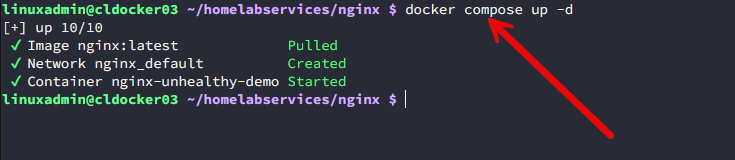
If the primary process inside the container is still alive, then, Docker considers the container to be running. This is true, regardless of whether the app inside is functioning correctly. Understanding that small detail is super important to understanding how this works.
So, as an example. If you have a web app that has a process still running, but the process for the app is deadlocked. It has lost its DB connection and stopped responding to HTTP requests.
Docker however, sees a running process. Your users see a broken application. So, the restart policy doesn’t come into play here when a user app is down when Docker sees a running process.
What HEALTHCHECK actually does
Docker’s HEALTHCHECK instruction is extremely useful, but it is another Docker mechanism that gets misunderstood quite often.

What does a health check look like? Usually you will see healthchecks that looks something like this:
HEALTHCHECK --interval=30s --timeout=5s --retries=3 \
CMD curl -f http://localhost:8080/health || exit 1
Or if it is setup in Docker Compose, it might look like:
healthcheck:
  test: ["CMD", "curl", "-f", "http://localhost:8080/health"]
  interval: 30s
  timeout: 5s
  retries: 3
When the command succeeds, Docker marks the container as healthy. But, if the command fails, Docker will mark the container as unhealthy. That’s it. Docker updates the health status, but it intentionally does not restart the container.
You can verify this yourself by running:
docker psYou may see something like this:
STATUS
Up 2 days (unhealthy)
Notice the contradiction in what it is saying and the fact that the container is still running, not restarted, etc. Docker considers that perfectly acceptable and for many, this might be a little eye-opening. Why is this the case?
Why Docker works this way
When I first saw this behavior, I assumed Docker was missing an obvious feature about Docker health checks or I didn’t have something configured right. The more I learned, the more I realized this was actually an intentional design behavior for Docker.
Docker separates container lifecycle management from application health. This is a small detail, but it is really important when we are talking about health checks, restarts, etc. An application can become temporarily unhealthy because:
- A database is restarting
- DNS briefly glitched
- Another service isn’t ready yet
- An external API is not available
- Storage is having issues
Automatically restarting every unhealthy container could actually make a bad situation worse in the long run. Imagine restarting your database every time another dependent service temporarily goes down. Docker, by design, leaves this up to the admin to decide whether or not to restart the container, etc.
Why this matters in the home lab
If your home lab is like mine, they tend to be much more dynamic than production environments with things changing constantly. I am constantly involved with the following tasks and workflows:
- Updating containers
- Restarting services
- Rebooting hosts
- Testing beta software
- Breaking things on purpose
What this means is that applications usually get into weird states sometimes where it may not cause the container process to exit in accord with the restart policy. I’ve also seen things like reverse proxies continue running while refusing new connections. Applications hang indefinitely while still consuming CPU. You can see web servers continue running but return nothing except HTTP 500 errors.
Docker sees all of these as running containers. Users simply see a service that no longer works. This is why health monitoring matters just as much as restart policies. So, you will want to design your health checks in a way that is meaningful.
Meaningful health checks
There is one thing to know with Docker. Health checks are not designed equally, and it is definitely something that most of us could probably give more attention to with determining health of our containers. If a health check is weak, then your monitoring of your container is going to be weak.
As an example, a simple TCP port check might not catch a whole lot of failures. So, having a health check that checks the actual application endpoint is more important. In other words, you can setup health checks that checks things that makes more sense than a simple port check. Those might look like:
- Checking an app to make sure it is responding
- Your app dependencies are available
- Critical services that are depended on are up and available
- The application isn’t returning error codes
Let’s look at an example of a simple port based health check. This might look like the following. But as you can see, once it satisfies that the port is reachable, the healthcheck is going to show to be “good”.
services:
  traefik:
    image: traefik:v3
    healthcheck:
      test: ["CMD", "nc", "-z", "localhost", "443"]
      interval: 30s
      timeout: 5s
      retries: 3
Much more robust Docker health checks that is still very simple in practice is one that checks from an application perspective. This health check is actually checking for keywords on the returned CURL command:
services:
  beszel:
    image: henrygd/beszel
    healthcheck:
      test:
        [
          "CMD-SHELL",
          "curl -fs http://localhost:8090 | grep -q 'Beszel Dashboard'"
        ]
      interval: 30s
      timeout: 10s
      retries: 3
The docker-autoheal tool
You can find great community projects out there that can help with some of the shortcomings of the built-in Docker functionality. There is a project called docker-autoheal that is a great way to continuously watch container health. This little tool is impressive in its own right and has several very cool features to note.
The docker-autoheal tool is a Docker container that you run on your Docker host that “watches” your containers and it can “auto-heal” them if it sees them go unhealthy. So, if a container health check starts failing, it will perform the restart operations needed.
Also, it relies on Docker’s existing HEALTHCHECK function, so nothing reinvented on that front. It just adds the behavior that I think all of us assumed happens by default with Docker. I’ve tested this approach in my own lab, and it’s one of those utilities that quietly does its job in the background very well.
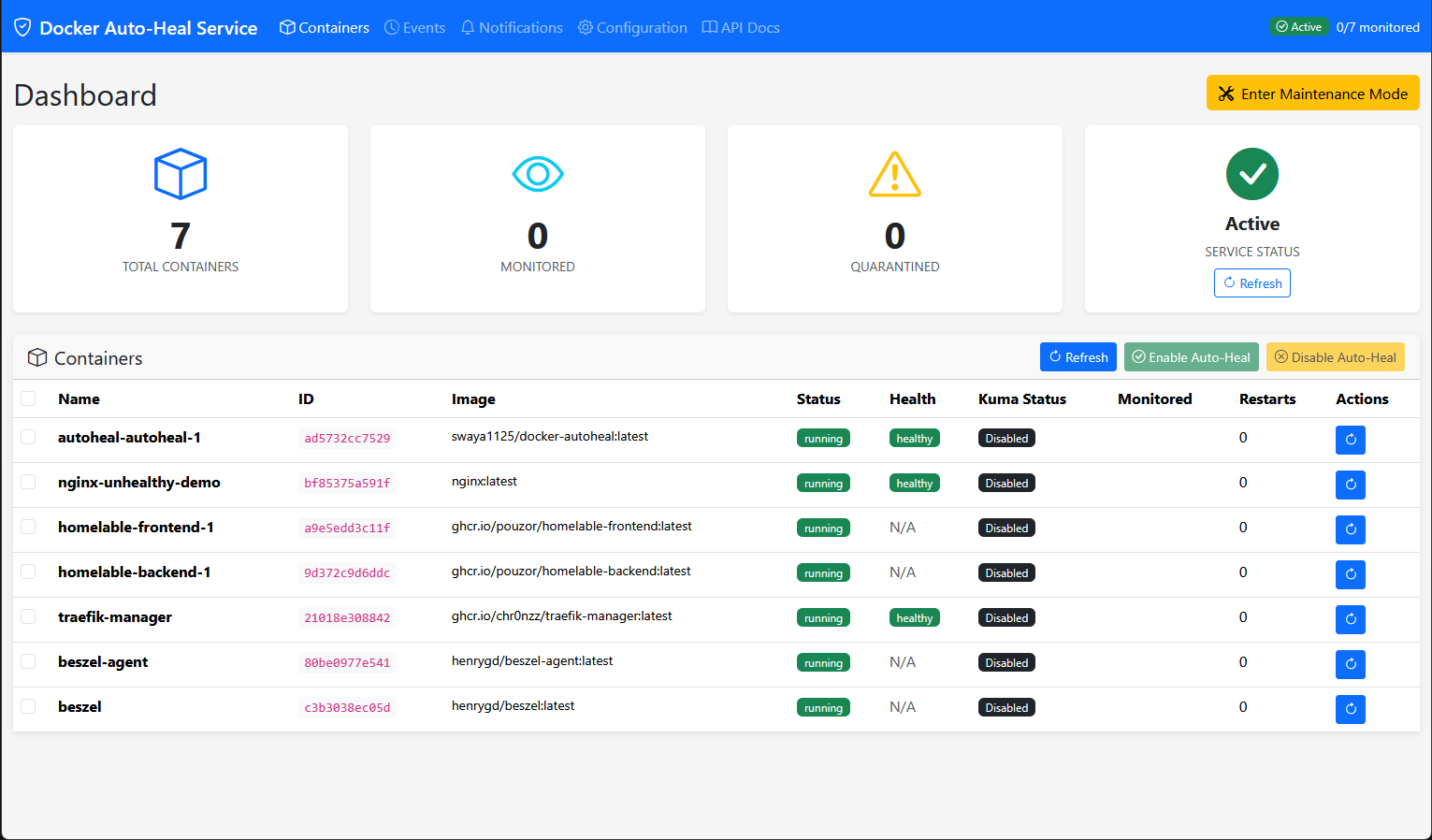
One of the impressive things about this autoheal container is it has a really nice web frontend built into it that gives you easy management of the solution. You can see all of your containers and the state of your container health.
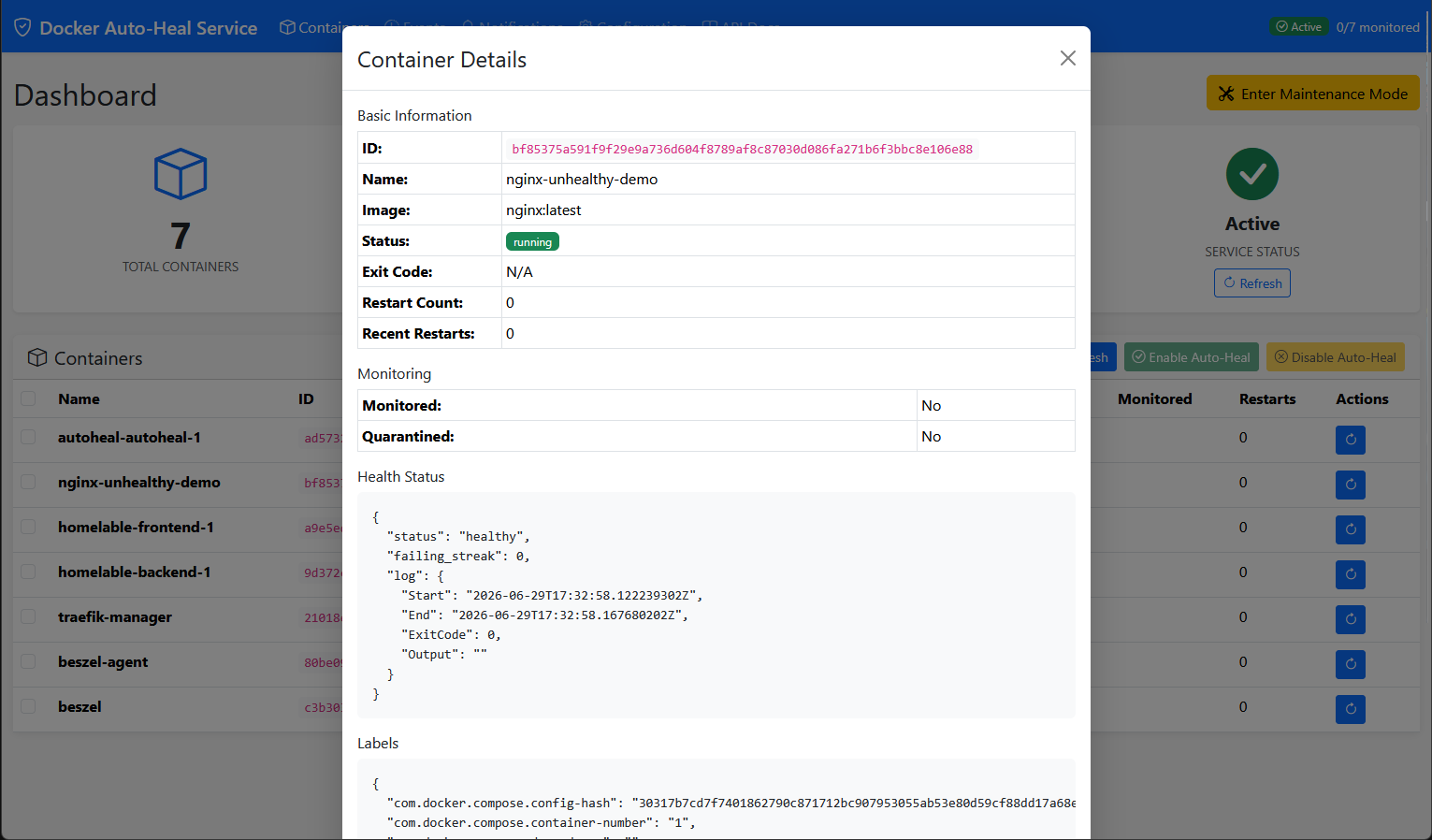
You can click and view the details of the docker containers you have running on your docker host in the docker auto-heal dashboard.
You can even set a maintenance mode in the docker auto-heal dashboard that pauses the auto-heal operations in case you are doing maintenance on your host, etc.
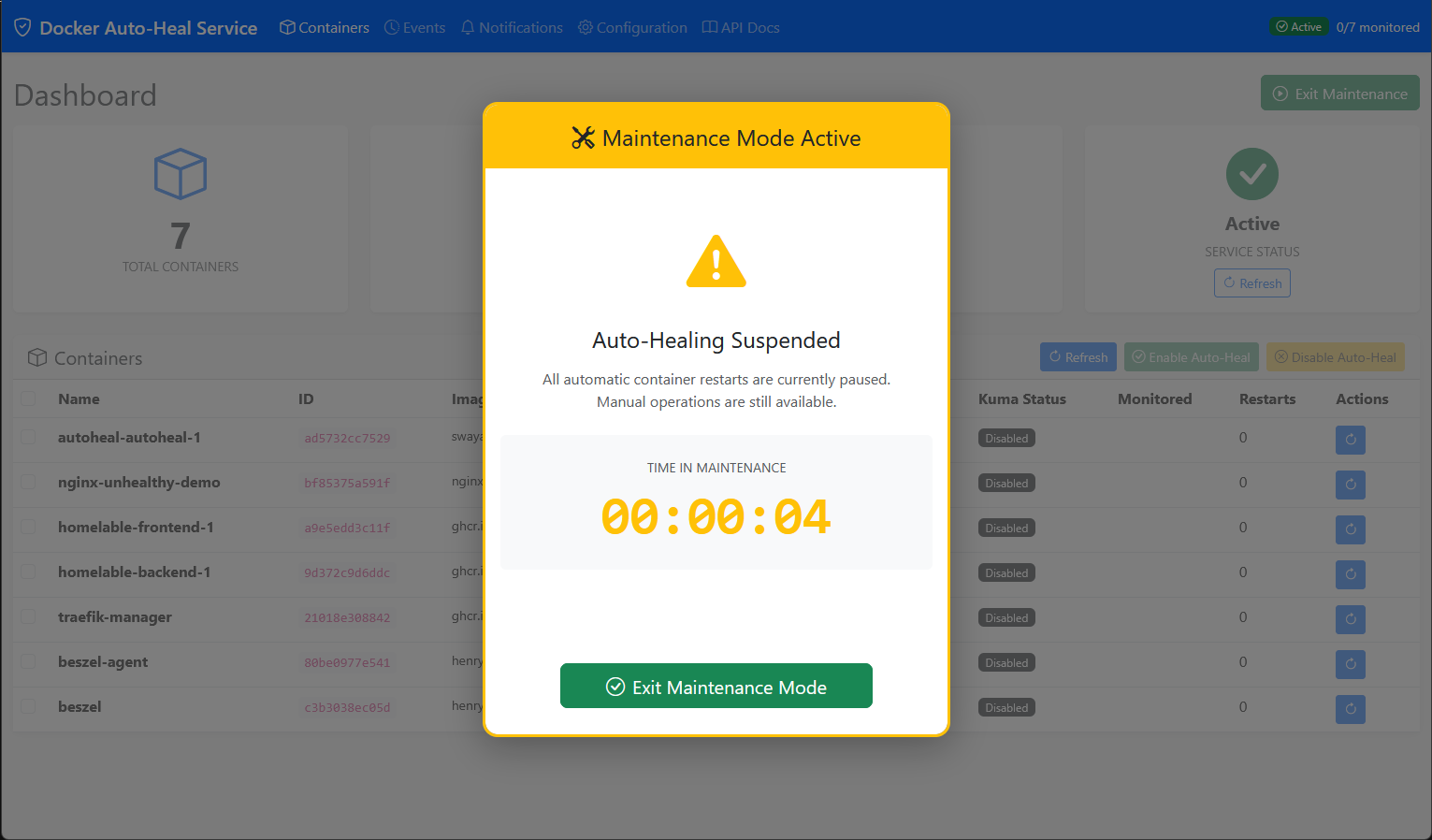
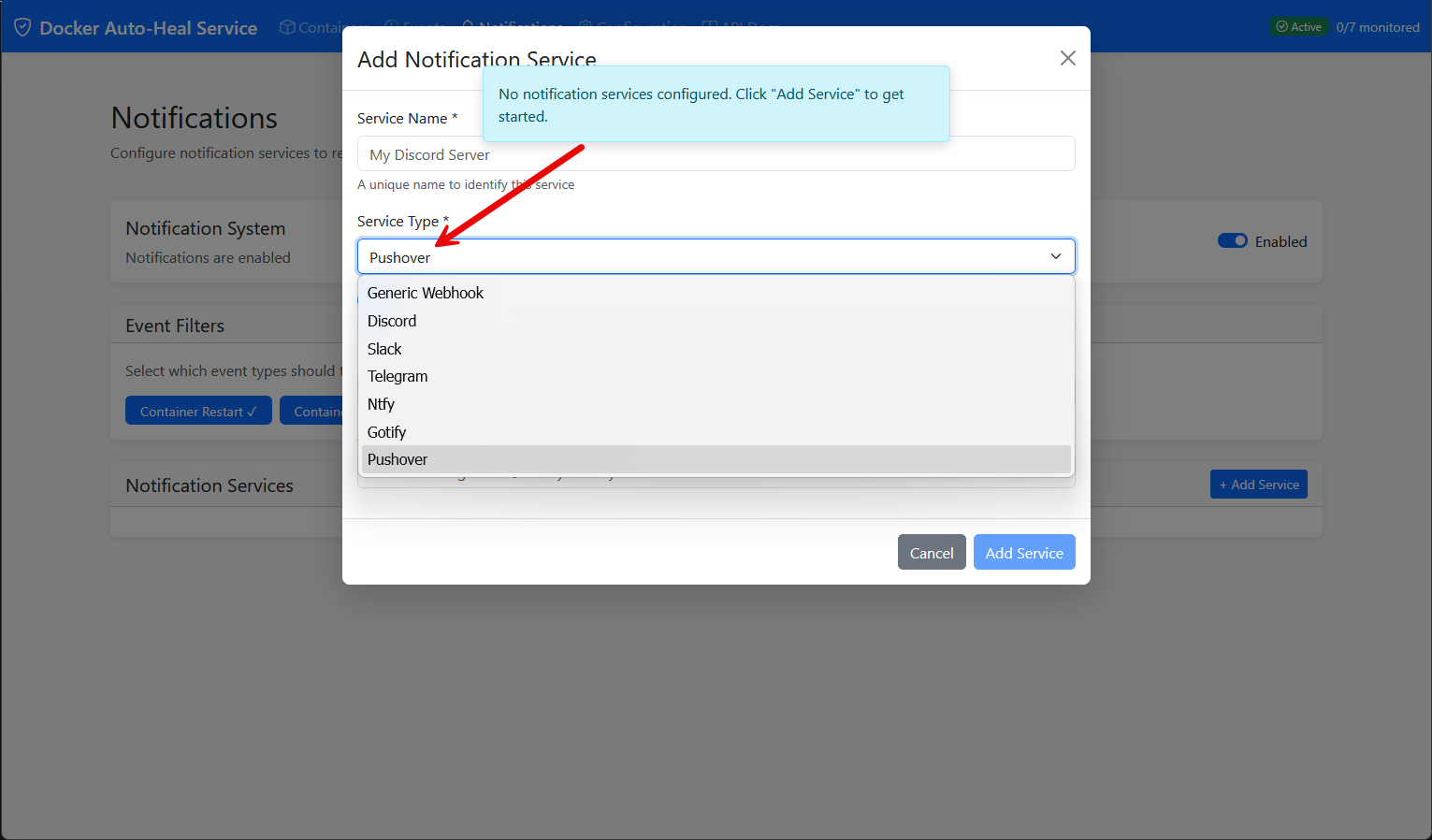
One of the really cool things as well is that it has built-in notifications that can easily be enabled. It also has modern notification services already integrated in the solution out of the box. So, if your auto-heal container fires a restart on an unhealthy container, you will get notified.
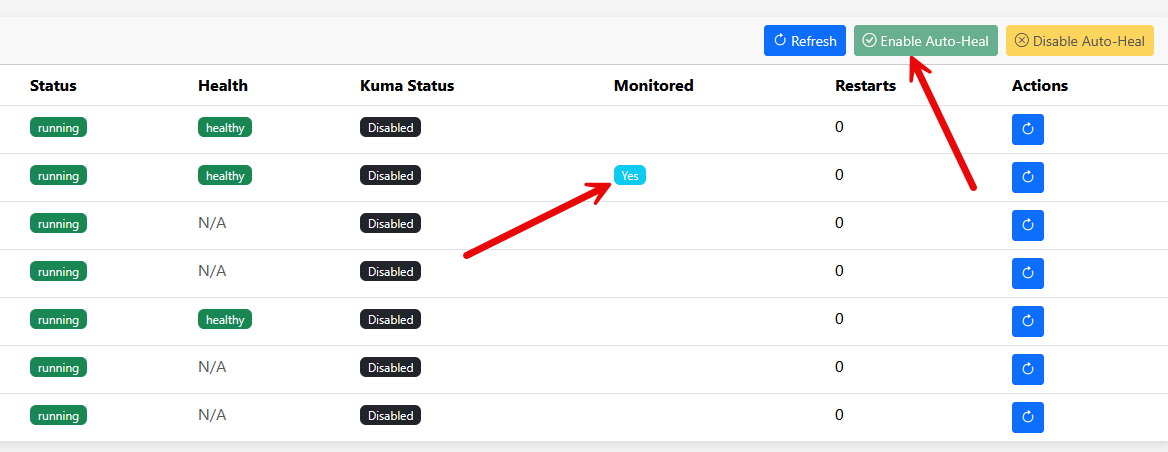
Too, it lets you enable auto heal on containers in a granular way. You just select the container in the dashboard and click the Enable Auto-Heal button. Then you will see the Monitored column change to Yes for that specific container.
Other ways to recover unhealthy containers
There are several solutions to self-healing when it relates to containers. Of course, one of the big features of Kubernetes is the ability to self-heal pods with liveness probes to see when these not healthy. But there is always complexity related to Kubernetes that we don’t see with Docker that can definitely offset the benefits if you don’t truly need any other capabilities that Kubernetes offers.
Also, if you’re using Podman, Quadlets integrate naturally with systemd, giving you additional recovery options while treating containers much more like native Linux services. Each platform tackles the problem a little bit differently. But it is great to see that we can keep things simple using something like a docker auto-heal container or something like Podman.
My recommendations just as suggestions
After running Docker consistently for quite a while now, here are my recommendations:
| Layer | What I do | Why it matters |
|---|---|---|
| Restart policy | Configure a restart policy (unless-stopped or always) | Automatically recovers containers that exit unexpectedly |
| Docker health checks | Add good HEALTHCHECK directives whenever the application supports them | Detects when an application is running but no longer functioning correctly |
| Automatic recovery | Deploy docker-autoheal for services where uptime is important | This covers the gap by going ahead and restarting containers that Docker marks as unhealthy |
| External monitoring | Monitor services with Uptime Kuma and other monitoring tools | Verifies automated recovery worked and alerts me when manual troubleshooting is still needed |
Wrapping up
As we have shown here, there is more than meets the eye with Docker health checks and the behavior that we might “think” happens and the reality of what Docker does instead. There are definitely misconceptions when it comes to health checks and restart policies. But I really like the idea of running the docker auto-heal tool as it adds really the behavior that I think we assume happens by default. It also has lots of other really cool features like notifications, a dashboard, and other things. How about you? How are you handling health checks and restarts of unhealthy containers?
More in this topic


Google is updating how articles are shown. Don’t miss our leading home lab and tech content, written by humans, by setting Virtualization Howto as a preferred source.
About The Author

Just do this and it will restart: (exit 1 is the secret 🙂
healthcheck:
test: [“CMD-SHELL”, “curl -fsS http://yourservice/health >/dev/null || exit 1″]
interval: 30s
timeout: 10s
retries: 3
start_period: 60s
restart: unless-stopped
MikeK
Thank you so much for the comment. Great note here. This is a good health check to note. However, I still believe exit 1 only marks the container as unhealthy? Have you seen otherwise? Docker restart policies like the “unless-stopped” restarts containers from my experience when the main process exits, but not when the health check fails. You would still need something watching the health status, like a Docker Auto-Heal. Let me know what you have seen though as I learn as much from the community!
Brandon
I have a combo of keep it simple and make it complex. I have a bash script that runs every couple minutes, checks for unhealthy containers and restarts them. Not great for all services. Then zabbix also monitors proxmox nodes and VMs and restarts any containers if they’ve been unhealthy for X minutes.
Johng,
Very nice, do you have a link to your bash script repo publicly by chance? That would be a great resource for the community.
Brandon
Very good
Thank you jdodd!
Brandon