



There is just something so cool about containerized technologies and there are a lot of great options for running them out there, including Docker (as we all know). But another option is Podman. I have looked at Podman more times than I can count. Every time I revisited it, I came away with the same impression. I liked the architecture, loved the security aspects, and definitely see why many like it. However, when compared with the day-to-day experience of managing Docker with Docker Compose, I always found myself going back to Docker. However, that changed recently when I started spending much needed time learning about Quadlets and new functionality coming down the pipes. Let’s see how these fit in the modern home lab.
What are Quadlets?
At a high level, Quadlets are a similar construct that allow you to have a declarative way to define Podman containers using systemd. So, instead of you creating containers with Podman run commands, you create configuration files that describe the container(s) you want to run.
Systemd then actions what you describe in the Quadlet by creating, starting, stopping, restarting, and managing the containers that are defined. So, that should feel pretty familiar if you have used Docker Compose. So, what would a basic Quadlet look like?
A basic Quadlet file might look something like this:
[Container]
Image=docker.io/nginx
ContainerName=nginx
PublishPort=80:80

[Install]
WantedBy=multi-user.target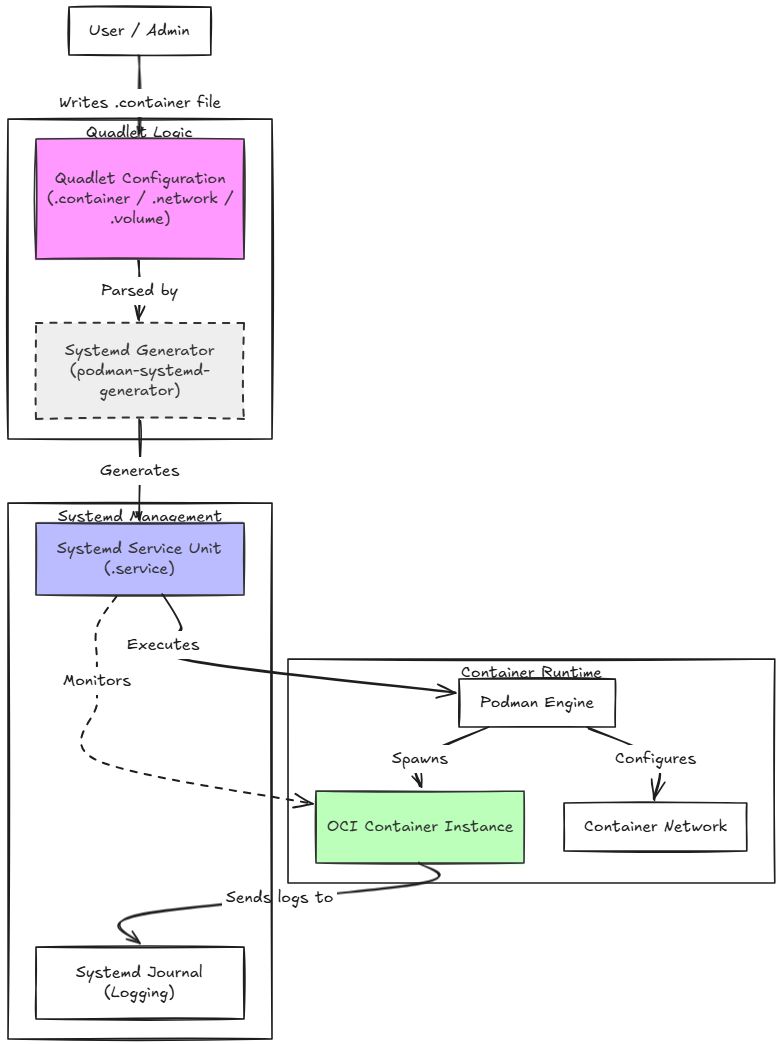
That file becomes the source of truth so to speak for the container being run. Systemd reads it, Podman creates the container, and the service behaves like any other native Linux service. This is one of the things that really struck me when I first started looking at them.
Systemd is a very cool part of the architecture of Podman
I think one of the most underrated features of Quadlets is how naturally they integrate with Linux systemd. Most Linux admins probably already use systemd to manage critical services. It is familiar because it is used daily for managing things like:
- Networking
- DNS
- Logging
- Time synchronization
- Monitoring agents
- Infrastructure services
Podman Quadlets allow containers to become part of your systemd managed infrastructure services too. With Quadlets, containers no longer feel like something “separate” from the system that you have to manage. Podman Quadlets make them into first-class Linux services.
Then, when you think about it, you can use familiar commands like the following for a Technitium container as an example:
systemctl start technitium.service
systemctl stop technitium.service
systemctl restart technitium.service
systemctl status technitium.service
When you think about it you get the benefits systemd has built in. When you look at it, systemd has the following features that you can take advantage of:
- Automatic startup
- Dependency management
- Restart policies
- Service monitoring
- Logging integration
So you get all the operations advantages that have been there for decades with systemd.
Quadlets explanation for Docker Compose Users
Let’s break the similarities and differences down in a way that can help ones coming from docker compose make the transition and understand the equivalents.
With Docker Compose, you have one file that describes your entire stack. So in other words you have all containers, networks, and volumes living in your docker-compose.yml file. Then you manage the whole thing with the docker compose up or down commands.
Podman’s Quadlet functionality flips this around in a way. Instead of one file managing a stack, you write individual systemd unit files for each piece of infrastructure. Then, the built-in systemd command is the thing that manages it all. So, you don’t have a “compose up” command. Instead you just use systemd to bring everything up
Let’s look at the table below as I think it will help to understand the comparison between the two:
| Questions to compare | Docker Compose answer | Quadlet answer |
|---|---|---|
| How do I define a container? | A service block in docker-compose.yml | A .container file |
| How do I define a network? | A network block in docker-compose.yml | A .network file |
| How do I define a volume? | A volume block in docker-compose.yml | A .volume file |
| How do I start everything? | docker compose up -d | systemctl start … |
| How do I wire them together? | They’re in the same file | Systemd Requires= / After= |
So, long story short, the Quadlet is just a way to write your Podman container definitions in the format that is needed for systemd to understand and manage it. Podman actually ships with a generator that is located here:
/usr/lib/systemd/system-generators/podman-system-generatorThis generator tool reads your container, network, volume, and .pod files and translates them into the systemd service format.
Where files live at
Just as quick notes here. For a rootless/user setup (most common for home lab):
~/.config/containers/systemd/For a non-root user, you can make the directory and create a quadlet here:
mkdir -p ~/.config/containers/systemd/
nano ~/.config/containers/systemd/nginx.container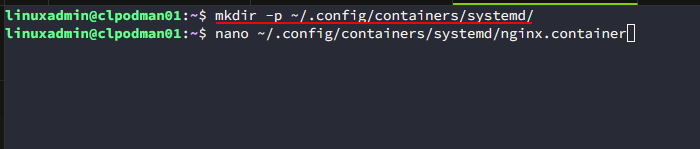
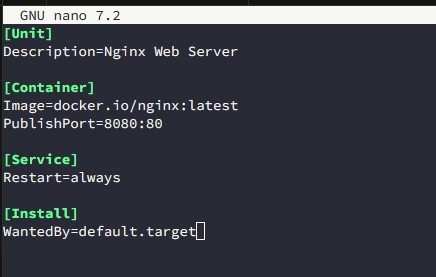
Below is the contents of a test Quadlet that I created as a rootless container for Nginx.
For a root/system setup, Podman automatically creates the directory here:
/etc/containers/systemd/Put all your files for a stack in the same directory.
Starting your quadlets
Now that we have everything in place, we can use the following commands:
systemctl --user daemon-reload
systemctl --user status nginx.service
systemctl --user start nginx.service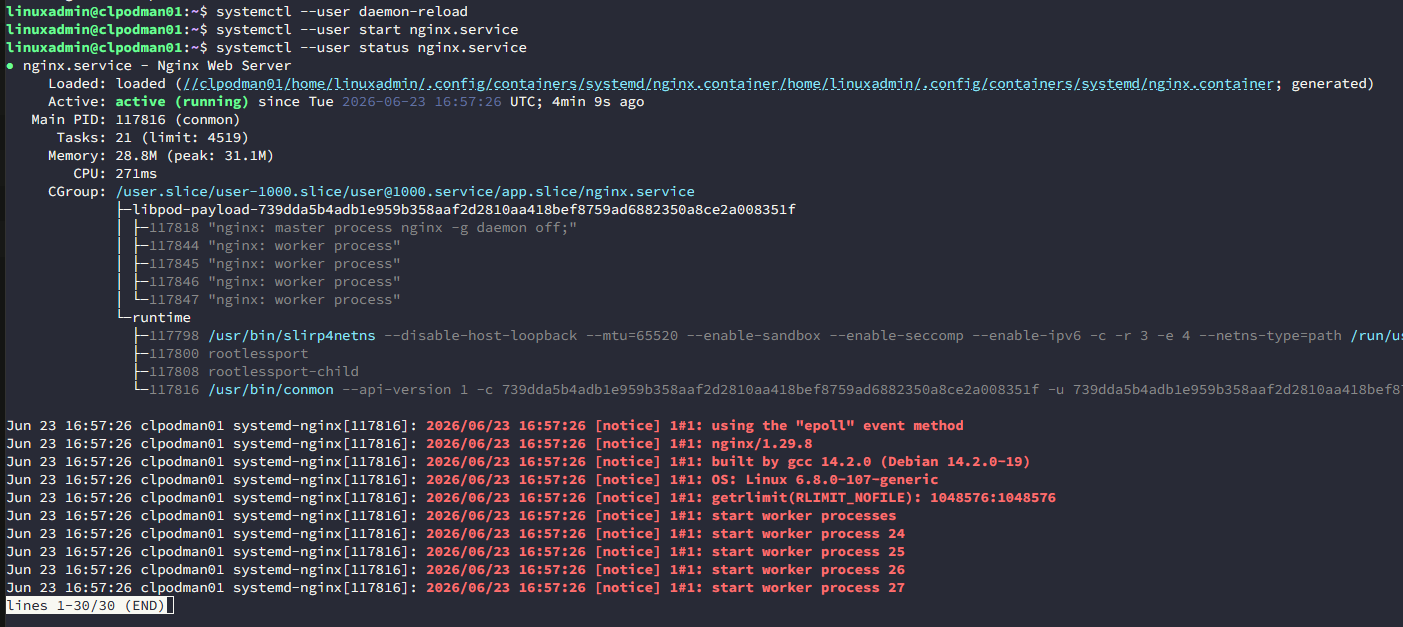
New Podman versions in 5.x support .quadlets file
As a note, before showing the process below, I want to mention, there is a new .quadlets file install in Podman version 5.x and soon to be released 6.x that allows you to install multiple system services with a single quadlets file.
You can read about this here: podman-quadlet-install. However, in my testing, even with Ubuntu 26.04 with version 5.7 installed, the multi-quadlet functionality appears to still not be there. Keep this in mind as I think this will make things click even more for most.
Multiple containers, networks and volumes
What about something like the below where you have multiple containers, networks, and volumes in play? Can Podman Quadlets install multiple services like this? Yes it can. Keep the above section in mind as well as this is changing even more. But we can still install multiple containers with Podman quadlets in the process we will see. Below is an example Docker compose for comparison:
services:
  nginx:
    image: nginx:latest
    ports:
      - "8080:80"
    depends_on:
      - postgres
      - redis

  postgres:
    image: postgres:15
    environment:
      POSTGRES_PASSWORD: secret
    volumes:
      - pgdata:/var/lib/postgresql/data

  redis:
    image: redis:alpine

networks:
  default:

volumes:
  pgdata:
We can do this with Quadlets as well. First just a note on organizing your quadlets. You can create subdirectories in the location we defined earlier. So your app might look something like this from a directory standpoint. Nginx.container is a single container quadlet. But, then we want to have a “myapp” configuration that has multiple containers, networks, volumes, etc.
~/.config/containers/systemd/
├── nginx.container          # standalone containers at the root
└── myapp/                   # stack-specific folder
    ├── myapp.network
    ├── myapp.volume
    ├── nginx.container
    ├── postgres.container
    └── redis.container
Define the network
You can define your network in a .network file located in the same rootless location.
~/.config/containers/systemd/mystack.networkThe contents would look like this:
[Network]
Driver=bridge
Label=app=mystack
This is equivalent to the networks: block in Compose. Containers on this network can reach each other by the name of their .container file (without the extension). So for instance, nginx can connect to postgres at the hostname postgres.
Define the volume
~/.config/containers/systemd/pgdata.volumeThe contents of the pgdata.volume file might look like this:
[Volume]
Label=app=mystack
This is equivalent to the named pgdata: volume in Compose. Quadlet will create and manage this volume automatically.
Define your containers
~/.config/containers/systemd/postgres.containerPostgres.container might have the following:
[Unit]
Description=PostgreSQL Database
After=mystack-network.service pgdata-volume.service
Requires=mystack-network.service pgdata-volume.service

[Container]
Image=docker.io/library/postgres:15
Network=mystack.network
Volume=pgdata.volume:/var/lib/postgresql/data
Environment=POSTGRES_PASSWORD=secret

[Service]
Restart=always

[Install]
WantedBy=default.target
Then, your redis container config would be provisioned with the file:
~/.config/containers/systemd/redis.containerIt might contain the following:
[Unit]
Description=Redis Cache
After=mystack-network.service
Requires=mystack-network.service

[Container]
Image=redis:alpine
Network=mystack.network

[Service]
Restart=always

[Install]
WantedBy=default.target
Finally, the nginx.container file:
~/.config/containers/systemd/nginx.containerIt might have the following:
[Unit]
Description=Nginx Web Server
After=mystack-network.service postgres.service redis.service
Requires=mystack-network.service postgres.service redis.service

[Container]
Image=docker.io/library/nginx:latest
Network=mystack.network
PublishPort=8080:80

[Service]
Restart=always

[Install]
WantedBy=default.target
The After= and Requires= in [Unit] is how you express depends_on from Compose. After= controls ordering, Requires= means “if that unit stops, stop me too”.
Notice the naming convention for generated services:
mystack.network>mystack-network.servicepgdata.volume>pgdata-volume.servicepostgres.container>postgres.service
Bringing it up
Once your files are in place:
# Tell systemd to pick up the new unit files
systemctl --user daemon-reload

# Verify systemd can see the generated units
systemctl --user status postgres.service
systemctl --user status redis.service
systemctl --user status nginx.service

# Start the network and volume first
systemctl --user start mystack-network.service
systemctl --user start pgdata-volume.service

# Then start everything else (Requires= handles the rest)
systemctl --user start nginx.service

# Verify everything is running
podman ps
podman network ls
This is the closest equivalent to docker compose up -d.

Daily commands to keep in mind
To pivot over to the commands you need to use that would be equivalents to docker-compose, take note of the following:
# Compose equivalent of: docker compose logs -f nginx
journalctl --user -u nginx.service -f

# Compose equivalent of: docker compose restart postgres
systemctl --user restart postgres.service

# Compose equivalent of: docker compose down
systemctl --user stop nginx.service postgres.service redis.service

# Compose equivalent of: docker compose up -d
systemctl --user start mystack-network.service
systemctl --user start pgdata-volume.service
systemctl --user start nginx.service

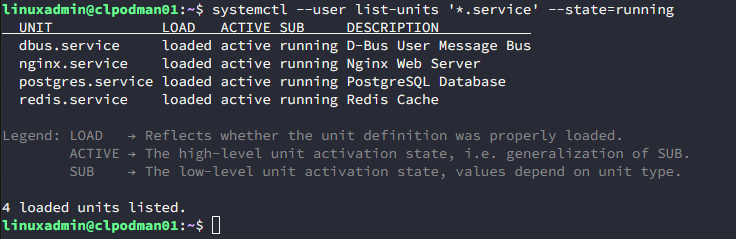
# Check what's running
systemctl --user list-units '*.service' --state=running

# Check status of a specific service
systemctl --user status postgres.service

# View logs for a failed service
journalctl --user -xeu postgres.service | tail -50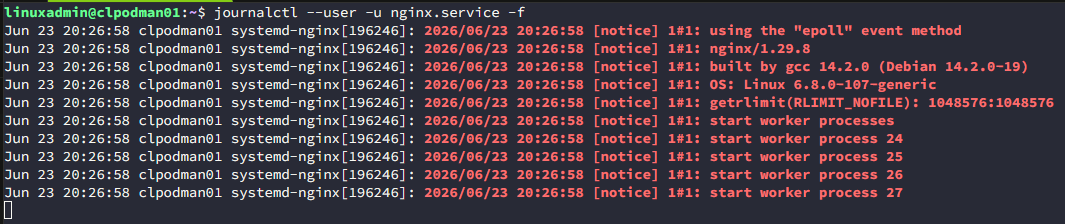
See what’s running with Podman Quadlets:
Why I think more home labbers will adopt Podman
The container landscape continues to evolve and change and I think that is the beauty of home lab is they serve as that playground where we can explore and learn without being restrained in production environments. Where we may never have the opportunity to try out Podman in production, our home labs can definitely give us that playground.
Podman has steadily gained momentum because it addresses a lot of concerns that ones have over using Docker and that organizations care about:
- Daemonless architecture
- Rootless containers
- Strong systemd integration
- Enterprise adoption
- Security-focused design
Most of us have years of muscle memory with Docker and Docker Compose in particular, but I think Quadlets help to start bridging that gap.
Newer versions of Podman with the multi-quadlets support capability will bring things even closer to what we have today with Docker Compose, so the distance is closing between Podman and Docker Compose.
Wrapping up
Podman Quadlets are a great capability of the growing Podman ecosystem. Let me know your thoughts on this functionality. Is this something that you are now using in your own home lab? What are your impressions with it? Are you thinking of making the switch from Docker with Docker Compose over to Podman and Quadlets? Have you already had a successful migration from Docker Compose over to Podman Quadlets? Let me know in the comments.
More in this topic


Google is updating how articles are shown. Don’t miss our leading home lab and tech content, written by humans, by setting Virtualization Howto as a preferred source.
About The Author

I like quadlets because of their integration with systemd. When I started with containers I followed the advice of docker+portainer. But then when I restarted my system I had to run all my stacks manually. I was looking for someway to start containers in the startup from the options that I saw, quadlets clicked as more advantageous to me. And I have never looked back.
Amin,
Very nice notes here. I really like hearing ones who are using various technologies and what led them to the tech stacks they have chosen. it makes total sense on the reasons here you started using Podman and quadlets. I really love how the Podman functionality integrates so closely with Linux system capabilities. Great to hear you have taken advantage of this in your lab environment. Thanks again Amin.
Brandon