


Docker is an amazing tool that can be used both in production and in our home labs. I am a huge proponent of containerizing what makes sense. In the day and age where we are currently with ridiculous pricing of RAM and other hardware components, we are all trying to look at ways we can conserve on the resource front. Containers are one of the best ways to do this. Most home labbers I have seen are keen to learn containers especially with things like Docker, Podman, and LXC. The problem is that when you start out running Docker and your home lab grows, you may have made some networking decisions early on that aren’t the best. Here are the Docker networking mistakes that I still see in home labs today and how I avoid them.
Publishing every container port
This is probably one of the first mistakes that newbies make when getting into running Docker with Docker Compose. The problem is that most of the examples that you see on blogs or across various repos show the example with every service port exposed directly to the host.
I also covered this recently with the post on reverse proxy mistakes: The Reverse Proxy Mistakes I Still See in Home Labs (And How I Avoid Them).
Below is an example of a snippet of Docker Compose code that probably falls into this category. For most, you don’t need to expose anything but the frontend docker image and not all of your backend container ports.
services:
  app:
    image: myapp
    ports:
      - "8080:8080"

  postgres:
    image: postgres
    ports:
      - "5432:5432"

  redis:
    image: redis
    ports:
      - "6379:6379"
With the above example, every one of the services is listening directly on your docker host now. Even if your firewall blocks outside access, you have essentially increased your attach surface and exposed sensitive services on your network when you likely didn’t have to.
You can check to see which port you have exposed with the “docker ps” command. If you want to filter for a specific container:
docker ps --filter "name=nginx"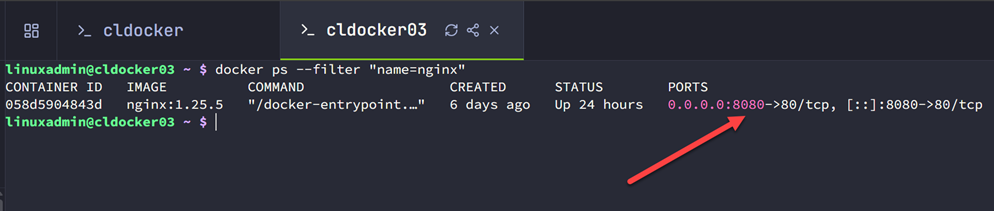
Nowadays for me, I expose a whole lot less ports than I used to. If a service needs to only be able to communicate with another container in the stack, I don’t publish the port at all. Docker’s internal networking already allows the containers on the same network to communicate using their service names.
For example, my application might connect to PostgreSQL simply by using:
postgres:5432This way, there is no host mapping that needs to take place. Keep in mind that the only containers that usually need published ports are services users actually connect to. This may be something like Traefik, a web application, or some other service that needs to have access from the host side.
Putting everything on one giant Docker network
This is another mistake that is super easy to make since it is usually what all of us do until we understand things better and know better. Instead of creating individual Docker networks for all applications, it is easy to just put EVERYTHING on the default Docker bridge perhaps or on your reverse proxy network which arguably is even worse since that is supposed to be for external traffic.
Now, when I create container stacks, I have dedicated Docker networks for each application and only attach the containers that need to be attached to the reverse proxy network. Then, this way, my frontend container connects to BOTH the reverse proxy network AND the dedicated network that may have the database container. This way, the frontend is the only container that can communicate with the backend container.
You can use this simple command to list out your networks:
docker networks ls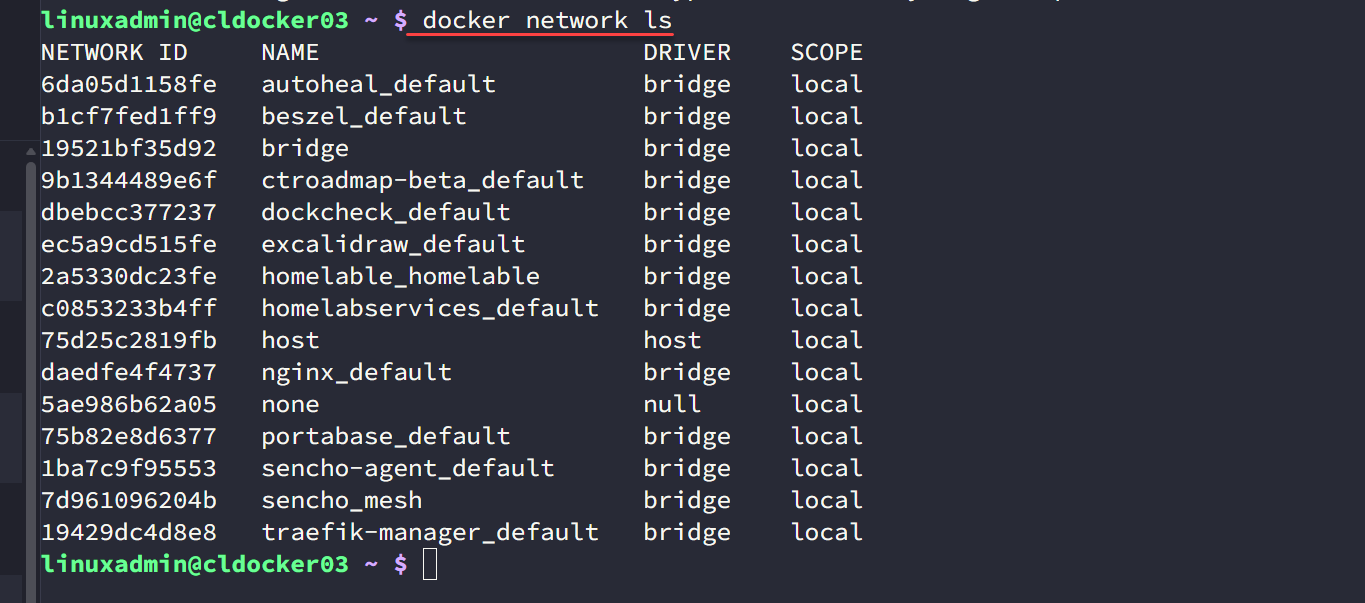
So, when you create your Docker networks, think in line with what your trust boundaries are and what communication requirements are needed for each of your apps.
For example:
- traefik-external
- grafana-network
- homeassistant-network
- nginx-network
Not every container needs access to every other container.
Exposing your databases when they don’t need to be
Another mistake that closely relates to the points we have already talked about is exposing your databases when they don’t need to be. When you follow basically any Docker tutorial you may see an example given of a database container getting spun up like MySQL. They will then show ports exposed like this:
ports:
  - "3306:3306"
But, instead of doing the above, I usually do nothing at all. Seriously, I don’t expose them. If my app and database are ;on the same Docker network, they can already communicate so there is no need to jump through hoops or add extra config most of the time.
The application on the inside connects to:
mariadb:3306instead of an IP address.
The only time I intentionally publish a database port is when I have a need to do some administrative work if you need to connect using a database IDE tool. But, the beauty is, you can add this temporarily and then remove it again once you are finished. This way, you aren’t leaving the database just exposed 24/7/365.
Using host networking because it seems like it would be better
There is definitely a place for running on host networking in Docker. Some of the apps you may want to run in your home lab may need it. For instance, some of the monitoring and networking tools that I run, work best with host networking and having visibility to what the host sees on the wire. An example of this is my Arpwatch container that I run to monitor devices coming onto my network.

But, I have definitely seen the opposite of this as well. I have seen home labbers move almost all of their containers to host networking simply because they didn’t want to have to worry about exposing the ports they needed to expose.
In doing this though, you have to realize that you a removing much of the isolation that is built into Docker’s networking. It also makes it where port conflicts are much more common and likely because containers are now competing with each other for the ports available on the host. Unless an app needs host networking, I stick with bridge networking.
By doing this, you get the benefits that we discussed earlier about things that get exposed and being able to keep a tighter reign on that. It allows you to control exactly what you want the container to be able to communicate with and what gets to communicate back to the container.
Not using external networks when they make sense
This is one of the biggest improvements that I personally made in my home lab network. When i started creating dedicated external networks and using them to connect up web applications to expose these where I wanted them.
A great example of an external network is creating a dedicated Traefik network. Instead of each Docker Compose project creating its own isolated network and then trying to work around that later, I have my Traefik network created and then I have my web apps connect to this network to be proxied by Traefik.
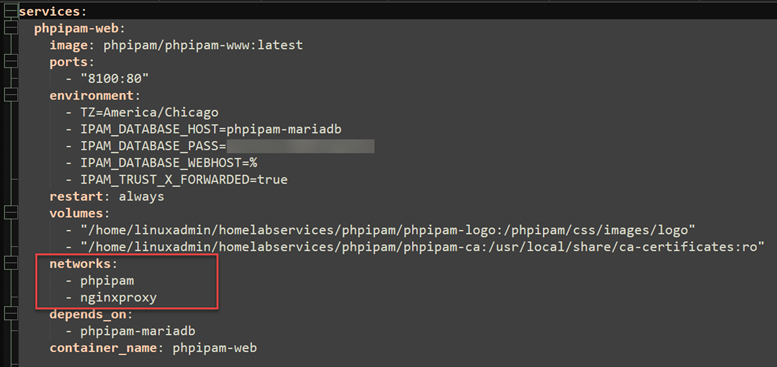
Now, not to be confusing, I still create dedicated app networks so that only the containers in that particular app can communicate, but the Traefik network is where I proxy my connections through to those other networks. This way, the only way into the app’s network is through that proxied Traefik connection.
For example:
networks:
  traefik:
    external: true

services:
  app:
    image: myapp
    networks:
      - default
      - traefik
This approach has several advantages that in the home lab we can benefit from:
- Traefik can immediately discover applications on that network
- Applications still keep their private default network for backend communication
- I don’t have to publish application ports just so the reverse proxy can reach them
This makes self-hosting and adding new services and apps much easier.
Hard coding service IPs instead of using Docker DNS
This is one that I have been guilty of in the past but mainly before I started to understand how Docker actually can do the heavy lifting for you. Have you ever hard coded IPs in your Docker compose? I have, and trust me, unless you are in for some kind of self loathing and trying to make life hard on yourself, don’t do it!
One of Docker’s best features is every container automatically gets DNS resolution. So, instead of writing configuration files like this:
172.16.9.7I simply use the service names in my compose:
postgres
redis
grafana
prometheus
Those names continue working even if containers restart and receive different IP addresses. I have seen on forums ones spend hours troubleshooting broken apps after recreating containers because they hardcoded an IP address into a config file.
Long story short. Don’t do it!
Manually assigning overlapping subnet ranges
One Docker networking mistake I learned the hard way was trying to manually assign subnet ranges to every Docker network. At first, it seemed like a good idea. I wanted every Docker Compose project to have its own subnet so I knew exactly where everything lived.
For example:
networks:
  default:
    ipam:
      config:
        - subnet: 172.20.10.0/24
That works until you forget what you’ve already assigned! Yikes! After enough Compose projects, I eventually overlapped a subnet without realizing it. Docker just created another network using the same address space, and suddenly containers on different hosts or different stacks started behaving in strange ways. Little did I know I had introduced a routing nightmare and one that is difficult to troubleshoot sometimes.
Docker normally does a very good job of automatically assigning non-overlapping subnets from its address pools. So, again, like a lot of these “nerd knobs” unless you have a good reason to set this config or change it, don’t do it.
One thing I’d add that is technically important is that Docker won’t always prevent this. People often think it might not succeed in creating overlapping networks, but, this can and does happen:
- Different Docker hosts (very common)
- Docker Desktop vs. Linux hosts
- Swarm nodes
- Networks recreated over time
- Conflicts with your LAN or VPN subnets (I’ve seen this one bite people more often than Docker-to-Docker overlaps)
Wrapping up
There are a lot of potential mistakes to make with Docker networking. I am a huge advocate to get in there and get your hands dirty in the home lab so to speak. You are GOING TO make mistakes and that is part of the learning experience. But, hopefully sharing some of the mistakes I made a long the way will help you avoid what I think are some of those that are the most common when it comes to Docker networking. None of them will keep you from running containers but they can cause you grief later on down the road. How about you? What mistakes have you made with your Docker networking?
More in this topic




Google is updating how articles are shown. Don’t miss our leading home lab and tech content, written by humans, by setting Virtualization Howto as a preferred source.
About The Author
