



When it comes to putting a new service into the home lab that is something I will feel like I can rely on and trust, it has to be able to pass a few sanity checks. Some of the biggest weaknesses I have found in my own home lab are only obvious when I intentionally try to break it. What do I mean? Well, do you know what happens to your app or service when you disconnect Internet access? What about if you think your app is redundant. What happens if you intentionally stop one of the app containers. Does the other one automatically pick up, even if the underlying server underneath it (Proxmox host) is healthy? These are the 7 home lab reliability tests I think are worth running against any home lab service that you actually depend on.
1. Pull the Internet and see what happens
This is a big one. It sounds simple that you apps should be able to keep running. I mean after all, you are “self-hosting” it and shouldn’t need to rely on the Internet. Right? Well in principle that is true. The infrastructure that physically runs the virtual machine, container, app, service, lives on your hardware. But, here is the kicker. Does the app or service “rely” on a resource on the Internet to do part of its job as an app or a service?
To know this isn’t the case, you can disconnect the Internet and make sure the app continues to respond and do what it is intended to do. What we are not saying here is “disconnecting the network Interface” to the VM or container. We are saying “leave it connected” to your physical network, but remove your WAN connection or effectively do this with a firewall rule.
This type of test can be eye-opening. It helps you to flesh out if something being self-hosted is still reliant on something on the Internet. DNS is one obvious place that this can show up. If my internal DNS server forwards everything upstream and can’t resolve the names of my internal infrastructure after losing the WAN, I have a problem.
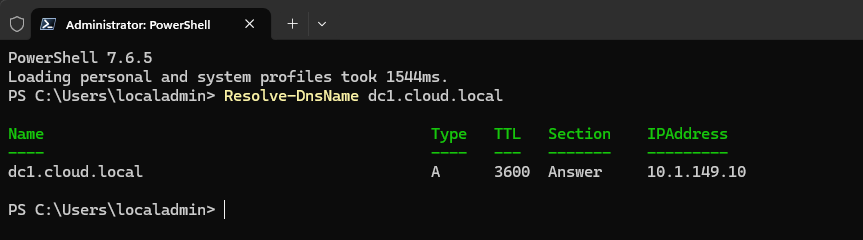
Often, this comes down to the design of our service or infrastructure. Our our DNS zones designed to live only in the cloud and then we just have a recursive forwarder to the Internet for all “even internal” name records? That isn’t designed too well if that is the case. You want to have an authoritative DNS zone on-premises for your internal resources that also exist on-premises and then have a split horizon zone that then forwards things that live outside of your home lab to the cloud.
This way, even when the Internet goes down, your name resolution still works for all the resources you need to get to internally on your LAN. But, this is just one example. I went much deeper into what broke when I performed this exact test in my own lab here: I Thought My Home Lab Was Self-Hosted Until I Pulled the Internet
2. Make sure it survives an underlying hypervisor host failure
What about a hypervisor host failure as part of your home lab reliability tests? This one is one of the areas that is super important especially after you start building out Proxmox VE Server clusters. It is easy to build out redundancy at the application alyer and then still creating a single point of failure underneath the application. What do we mean?
Well, imagine that you have two DNS servers that are built so you have redundancy there. But, what if they are both VMs running on the same Proxmox node? What if they are both containers running inside a Docker container host VM that is on the same Proxmox node? Now, I don’t really have any protection against a host failure. Only protection if one of the VM or container hosts fail.
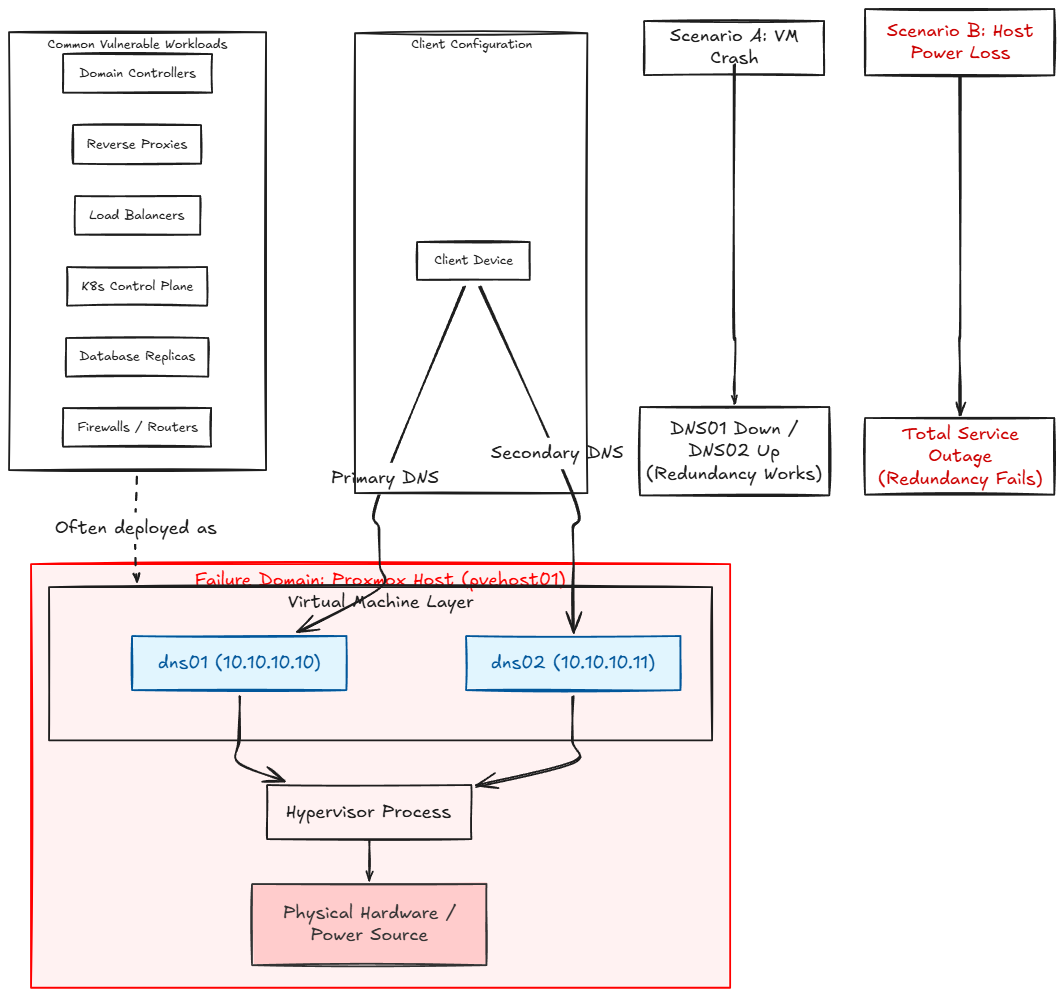
These are two different things and if we aren’t careful we can “design” ourselves into a corner if we don’t do our due diligence with making sure how our resources are running. This was a point that caught my attention when looking at my own Proxmox environment and realizing that workloads that were supposed to be protected were running on the same physical host.
There is a specific capability that is designed for just this use case and to keep this from happening, called Proxmox affinity and anti-affinity rules. They are VERY useful, especially for this exact use case. I wrote about the mistake that made me look much closer at failure domains here: I Was Running Redundant VMs on the Same Proxmox Host Without Realizing It
3. Kill the application and test if it is actually redundant at the app level
There is another area as part of our home lab reliability tests and this one exposes a weakness in a lot of the basic high availability configs that I have seen. Many home labbers know about Keepalived as a solution that allows you to have a virtual IP address shared between two virtual machines so that if one virtual machine goes down, a failover happens, and the other virtual machine will pick up the virtual IP address and continue answering to client traffic.
But this still exposes us to a weakness, especially if your application in the home lab is containerized which is how most of us are running things these days. So, for instance, imagine that you have a Keepalived instance running across two Docker container hosts. They have a virtual IP address that can move from the primary server to secondary server if the “host” fails.
That sounds like it is HA and it is at a certain level. But, what about if the Docker container host is running just fine and then the container behind the virtual IP all of the sudden crashes or dies? Or, you perform updates on the container image and it has to go down? In that case, the “server” that is watched to make sure it is alive, is ok and the interface is alive. Keepalived is alive and the VIP is alive. So, in this configuration, even though our application is dead, Keepalived hasn’t been told to specifically monitor that application, only the host behind the application.
But, the interesting bit is this. Keepalived actually “can” monitor at the application level for health checks, using something called track scripts. The track script can be used to perform application aware health checks on the application running on the host, like a container hosting a specific application. Then, if the track script notices a failure, it can trigger a failover at the Keepalived level. This isn’t possible without the track script.
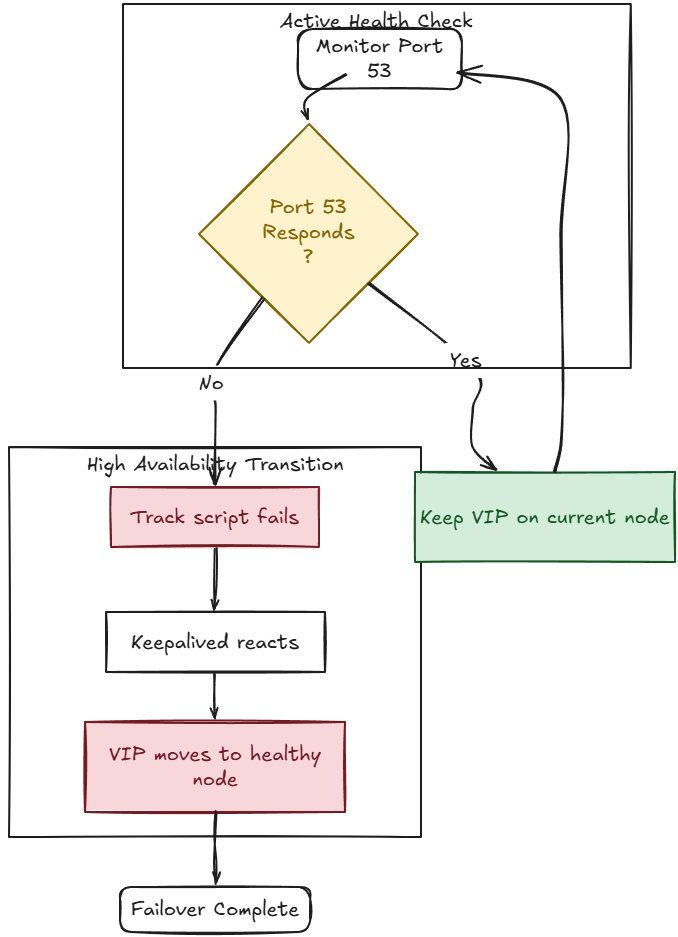
I covered this Keepalived functionality that I think changes the game of how I think about application high availability here: I Thought Keepalived Only Protected My Home Lab Servers. Then I Found Track Scripts
4. Can you properly see failure coming ahead of time?
What do we mean by this? None of us have a crystal ball that we can look into and see the date on the calendar when things will fail and then before then move everything off that particular hard drive, or host to make sure our apps don’t fail.
However, there are things that do provide some of this “predictive” information with home lab reliability tests that if we have the right monitors in place, we can see these ahead of time and know that a possible failure is imminent. What are some of the things that I look out for?
- A disk starts incrementing errors
- Storage latency starts increasing
- A ZFS pool gets close to really high utilization
- A Docker container starts restarting a few times a day
- A network interface starts showing errors or drops or increased latency
- NVMe temperatures start to climb to warning levels
- A certificate gets close to expiration
None of those necessarily means the service is down right now and things may still be working away just fine. But that is exactly why I care about these metrics. They don’t tell you “your service is dead” but they do tell you “something is going on or changing in a way that you probably should look at it”.
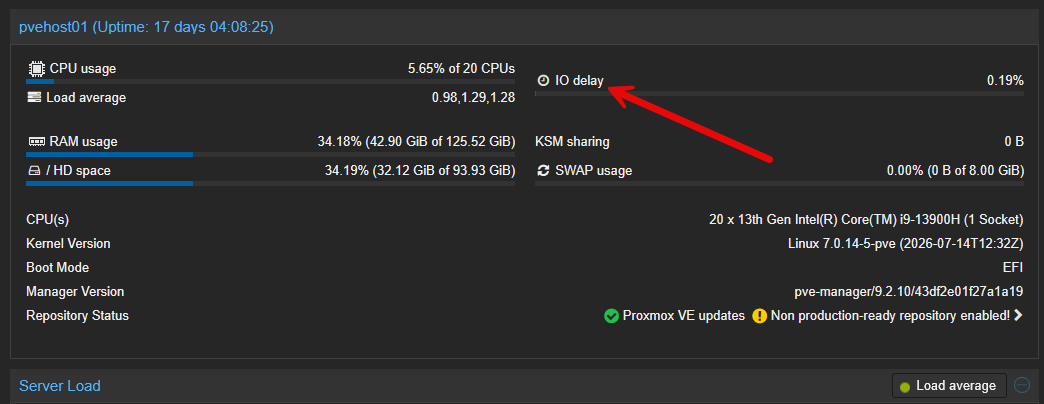
If you aren’t monitoring some of the statistics that related to the problem areas I have mentioned above, do yourself a favor and start monitoring those. Then when you have monitoring in place, simulate failure or warning conditions. You can sometimes do this by stopping and restarting services a few times, generating synthetic traffic, increasing disk load on purpose, etc.
Then, make sure you have effective, sane alerting that can catch anomalies that continue and not just the immediate, “my CPU spiked to 60%” which is usually pretty useless and leads to “alert fatigue”.
Check out the home lab metrics that I monitor closely in this post here: 9 Home Lab Metrics I Watch Before Something Goes Wrong
5. Make a configuration change and make sure you can find it and even roll it back
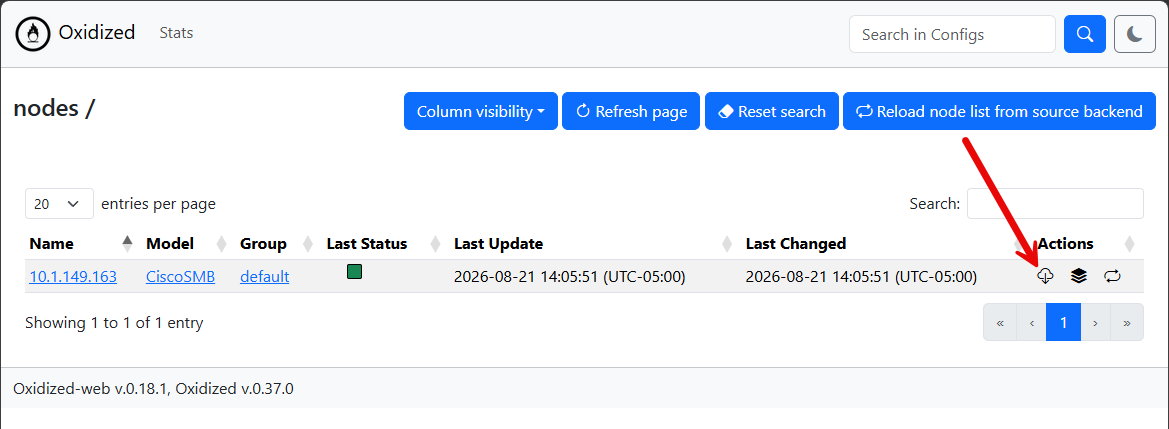
This one isn’t really a failure as such as first glance. But, I do actually think it needs to fall into the same category. Change something in your home lab, like a Docker Compose configuration. Then pretend that six months have passed. Can you find out exactly what has changed in the environment?
I have found this is super valuable with things like network equipment. You change a VLAN tag, or you modify an ACL, update a trunk, or something else and then you just move on. Then, three weeks later, you realize something is not acting right or “talking correctly” on the network.
Then, you find yourself asking, “what changed?” or “what did I do a few weeks back?”. You might vaguely remember that you did change something, but you can’t remember exactly what it was. Without a configuration history, that can be an absolute nightmare scenario and feel like a “needle in a haystack”.
Git version control can help with this, even in the realm of our network devices. How is that the case? Well check out my system I built specifically to catch and preserve my network configs in the home lab: I Built a Server That Catches Every Change on My Home Lab Network
6. Trace between every layer the application depends on
This is another one that can bite you and I have definitely dealt with this in the past. Most of us when we self-host modern applications, we usually don’t just browse directly to the server or the container that we are hosting.
Instead, the path to the application may look more like this flow:
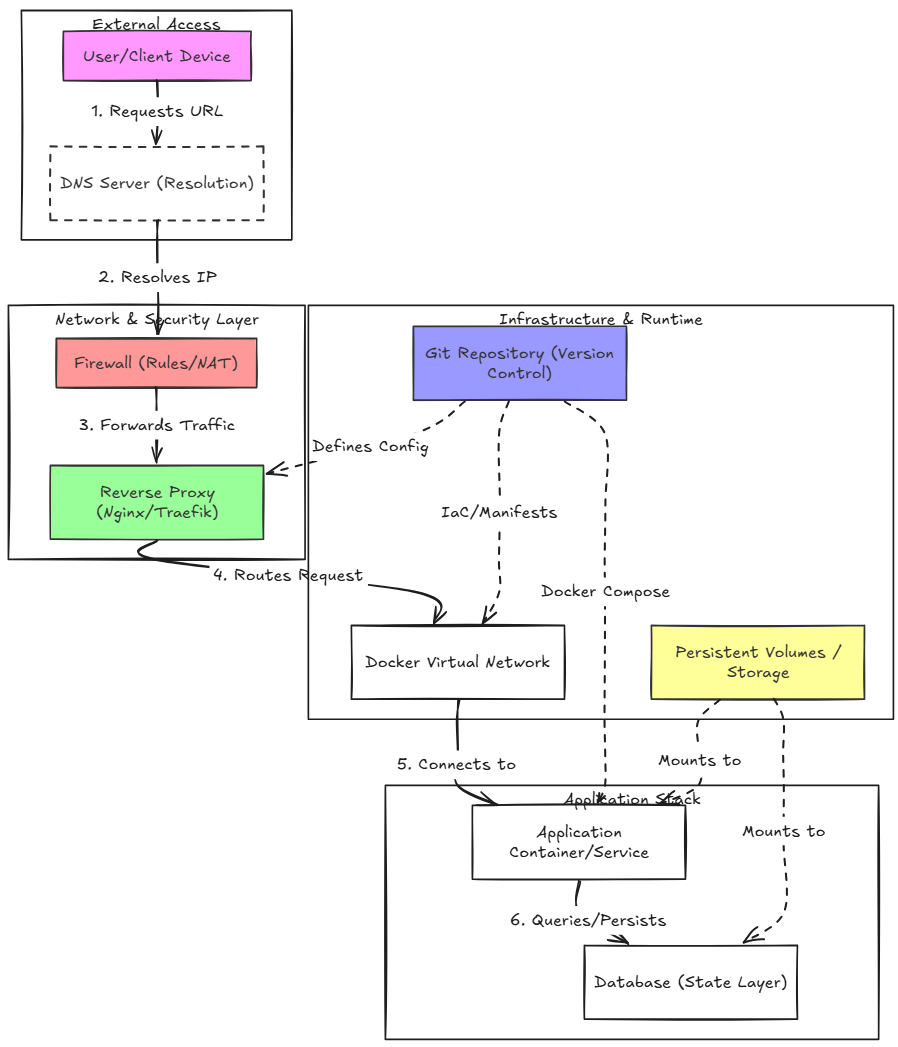
This means that the application may be perfectly healthy and you may still have issues that start happening getting to the service that it is hosting. When you introduce things like reverse proxies (Nginx Proxy Manager or Traefik), this is another layer that you have to work through when troubleshooting.
Can you work through this path with your application? Do you have an application map and dependencies of your application that you are self-hosting? So, have a documented application blueprint for your critical applications is super important, so that when you have an outage, you understand all the layers and hops as well as dependencies the application has.
Check out how I am documenting my entire home lab the right way here: How to Document Your Home Lab (The Right Way).
7. Pretend you have forgotten everything about your service
What if you have totally forgotten how your application or service is configured or ran? Well, the first thing that I would reach for is found in step #6 with proper documentation and understanding how the application works to begin with. But there is another component to this. What if you understand how the application works, but don’t quite understand how to recreate the config, especially if you have lost a node or container host?
This is where proper version control comes into play. I am training myself now to make sure that anything I have in my “production” home lab, I have inside a Git repository. This means Docker compose code, Kubernetes manifests, reverse proxy configurations, etc.
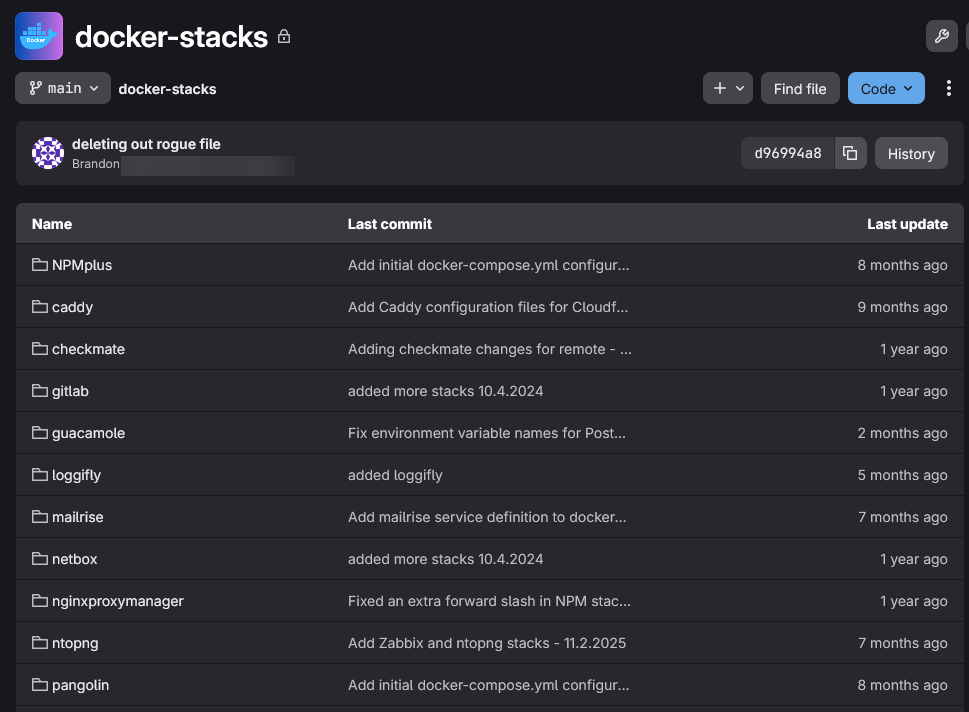
Treating all of your critical applications as code helps to prevent painting yourself into a corner of snowflake configurations that you have to recreate from memory which is a nightmare. Pretend you have amnesia and assume you have no idea how a specific container is configured, where the persistent volumes are mounted, what ports it exposes, etc. Have a location where all that config is stored and understand where to look in break glass moments.
I wrote up a post that shows how using Git in these certain areas changed my management of the home lab: These Git Repositories Changed How I Manage My Home Lab.
Wrapping up
We are not trying with these list of home lab reliability tests to say that we will prevent every failure. That is not the point. We are saying that we are “ready for the failure” with these 7 checks instead. Because, we have proven to ourselves the resiliency of our application and what happens when things do fail. What about you? What types of failure do you test for in your home lab? Let me know down in the comments!
More in this topic




Google is updating how articles are shown. Don’t miss our leading home lab and tech content, written by humans, by setting Virtualization Howto as a preferred source.
About The Author
