


There are SO many tools out there that allow you to keep your containers updated and I have used just about all of them, including Watchtower, Dockcheck, and others. Running containers isn’t hard in itself. It just starts getting more challenging when you get more and more of them. Then, comes the management overhead. I have Docker worklaods spread across multiple hosts. Currently, I am using Flatcar Linux as my container host operating system of choice and have used tools like Watchtower most of all for updates. Recently though, I started getting myself familiar with Komodo Docker container management and it has come a long way since I last used it. Let me show you how it now keeps me from babysitting Compose stacks across individual Docker hosts and how it can do the same for you.
Docker Compose isn’t the issue
I really like using Docker Compose as I think most who run home labs do. Compose files are one of the easiest ways to document how an application is supposed to run and you can use it as documentation in itself. Compose files can also be stored inside your Git repository.
A home lab app folder might be organized like the following:
/opt/docker/
└── appname/
    ├── compose.yaml
    ├── .env
    └── data/
If you want to manually update a Docker Compose application, you can follow the steps below with simple Docker Compose commands to pull the new image and then bring the stack up:
cd /opt/docker/appname
docker compose pull
docker compose up -d
You can check the status of the Docker Compose stack using:
docker compose psAnd check the logs too:
docker compose logsSo, there is nothing that difficult about this process. But, the problem is that it doesn’t scale very well. It requires you to manually go into each application directory and run the series of command needed.
What is Komodo?
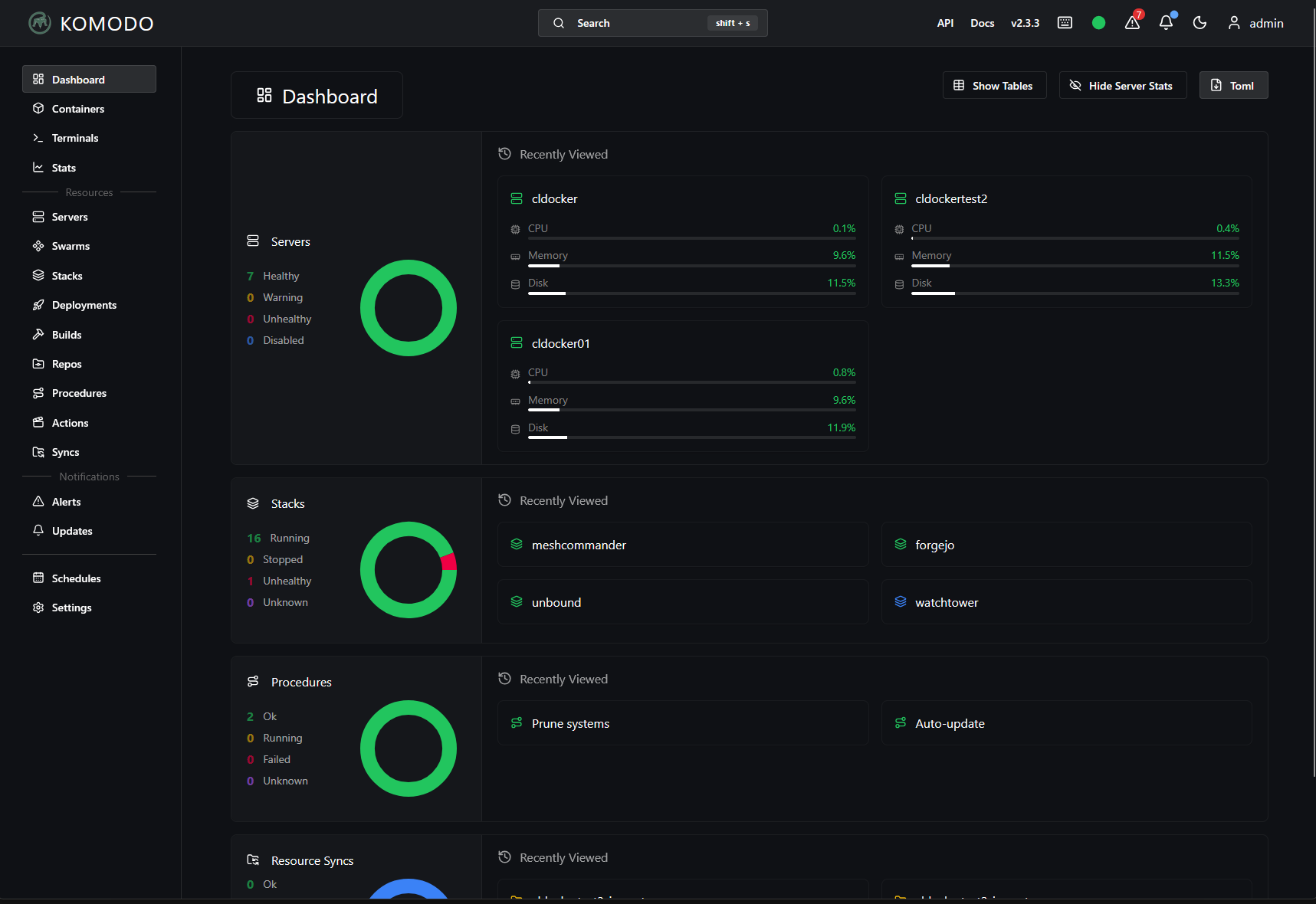
Komodo is an open source platform for managing your Docker servers, containers, Compose stacks, and deployments. The thing I like about it is that it is a centralized management tool for managing everything about your containers, not just keeping them updated. So, instead of SSH’ing into each of your Docker container hosts to check things out, you can login to Komodo and it gives you a place to manage your container tasks across your home lab.
The architecture is pretty simple. It has a simple Core server along with an “agent” that Komodo refers to as a “periphery” that allows you to manage the remote Docker host. Also, the thing that is amazing about Komodo is that it is totally free and doesn’t have certain features locked behind a paywall, etc. It is powerful, even compared to other pay for tools. It gives you basically a GitOps type platform for your containerized infrastructure, without needing Kubernetes.
Updates using Komodo
Komodo gets your attention in the fact that it isn’t just a simple Docker dashboard. There are a lot of tools out there that can do just that. But in addition to having dashboard-like features, it connects you to your remote Docker hosts and allows you to manage these host effectively. This includes keeping your remote containers updated.
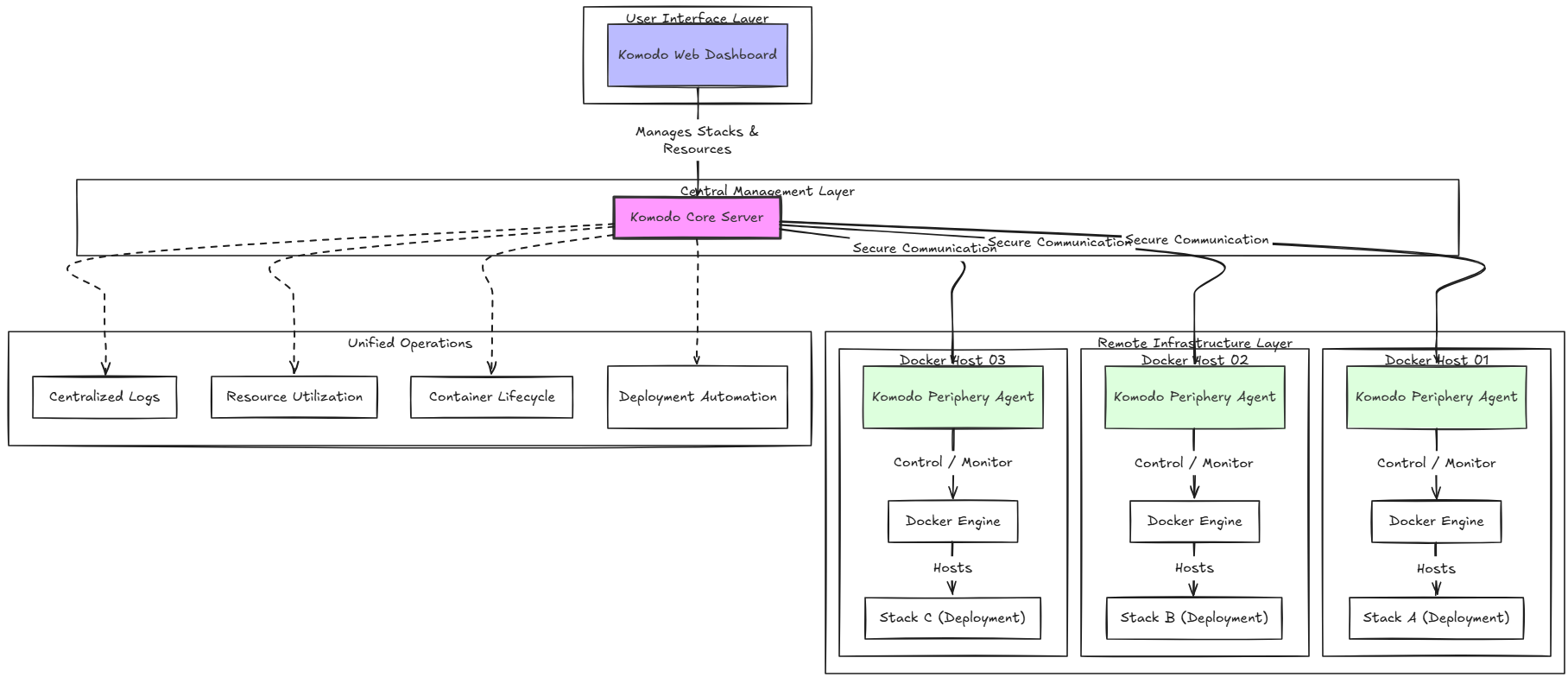
Komodo abstracts your Docker stacks from the host itself so you don’t have to remember things like, “What host is the Docker stack located on?” Instead, your “stack” becomes an object in itself that you manage. It knows which server the stack belongs to and it gives you that centralized visibility to your servers, containers, logs, performance metrics, and deployments.
Komodo uses your existing Compose files
One of the things I like about using Komodo Docker container management is that it is uses your existing Docker Compose files. So, you don’t have to reinvent the wheel or anything like that. I didn’t want to have to rebuild my entire Docker environment around some type of proprietary application just to keep containers updated.
I liked the fact that Komodo already had the concept of a Docker stack built into the solution. And the cool thing is that you can just easily point it to your Docker container stack files wherever those are on your Docker container host and it can “import” the stack that way.
Speaking of an import utility, there is another open source project that has been written specifically for Komodo, called the Komodo importer. You can find that project on the following GitHub page: FoxxMD/komodo-import: Import existing compose stacks into Komodo.
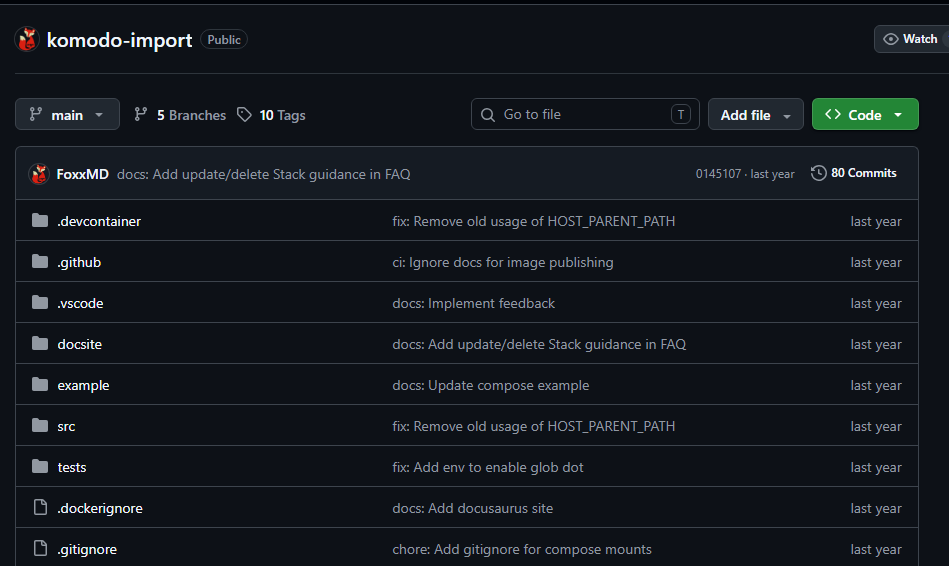
This was probably one of the biggest selling points for me as it worked natively with my existing docker container stacks.
It has strong Git integration
Komodo also has really strong Git integration where you can make use of your self-hosted or any other Git repo where you are storing your Docker compose files. So, the cool thing about this is that instead of your server holding the authoritative copy of compose code, you can make the repository in Git the source of truth for your self-hosted home lab application.
So your workflow looks like this:
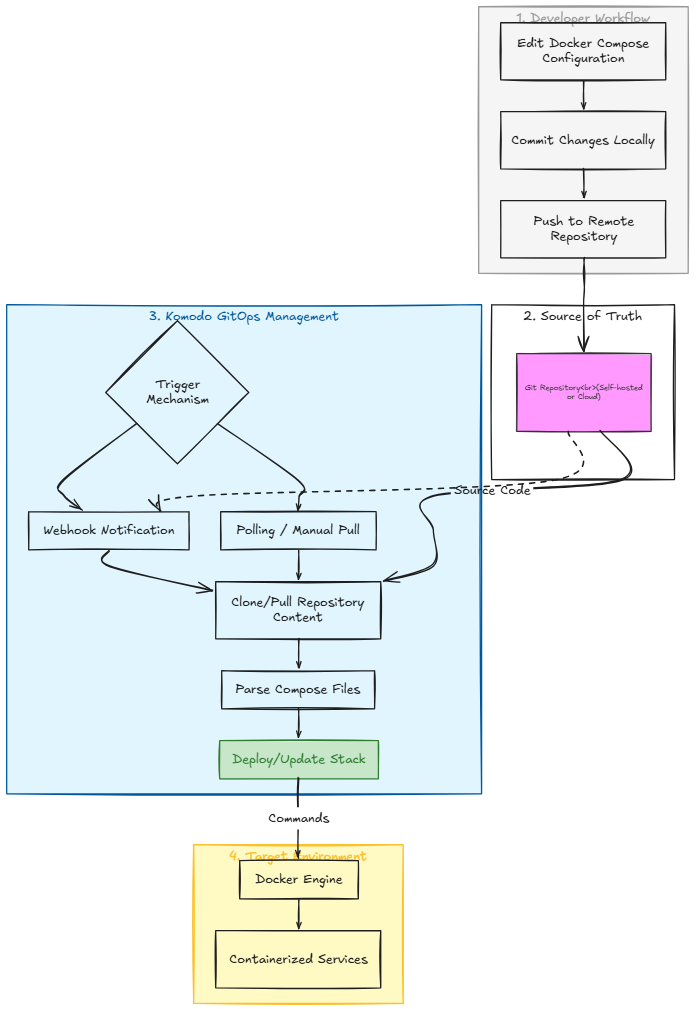
Komodo has a lot of actions already built in that can do things like:
- Clone a Git repo for a stack
- Determine when changes are made
- Can use a webhook that when you push a change, it auto redeploys the Stack
- It can then “auto deploy on push”
So the neat thing about this is that if you thought you had to go to something like Kubernetes to get a “GitOps type workflow,” then you don’t necessarily have to do that. Kubernetes is amazing in its capabilities. But why introduce the complexity if you don’t want or need other aspects of it and you are just looking for this level of automation?
Automated updates for your containers with Komodo
The thing I didn’t like about Watchtower and some of the other tools that I have used is that they weren’t centralized in their operation. You have to stand up an instance of that tool on each of your container hosts so that it can check for updates for the containers on that host and then update those when you schedule them to update.
One thing that might be initially confusing with Komodo is some of the settings you will find at the “Stack” level and then the Global Auto Update procedure under schedules. They actually work together but they are purposed for different jobs.
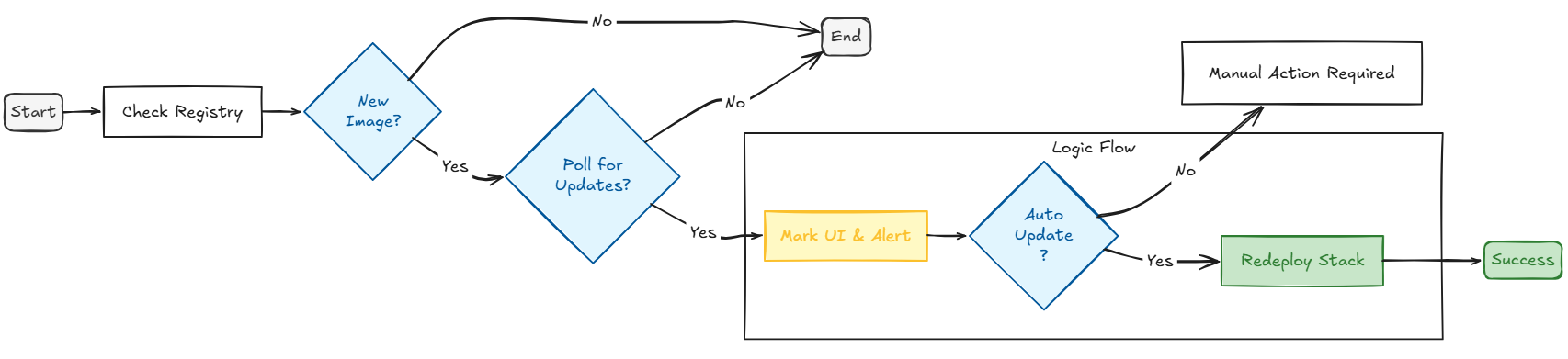
Inside each stack configuration, Komodo gives you two options along the lines of updates:
- Poll for Updates – This setting marks the stack s one that Komodo should check for newer Docker image digest. Enabling this along doesn’t mean it will automatically redeploy if updates are found
- Auto Updates – This configuration takes it a step further. If you enable it on a stack and Komodo discovers that an image has an update available, it can redeploy the stack
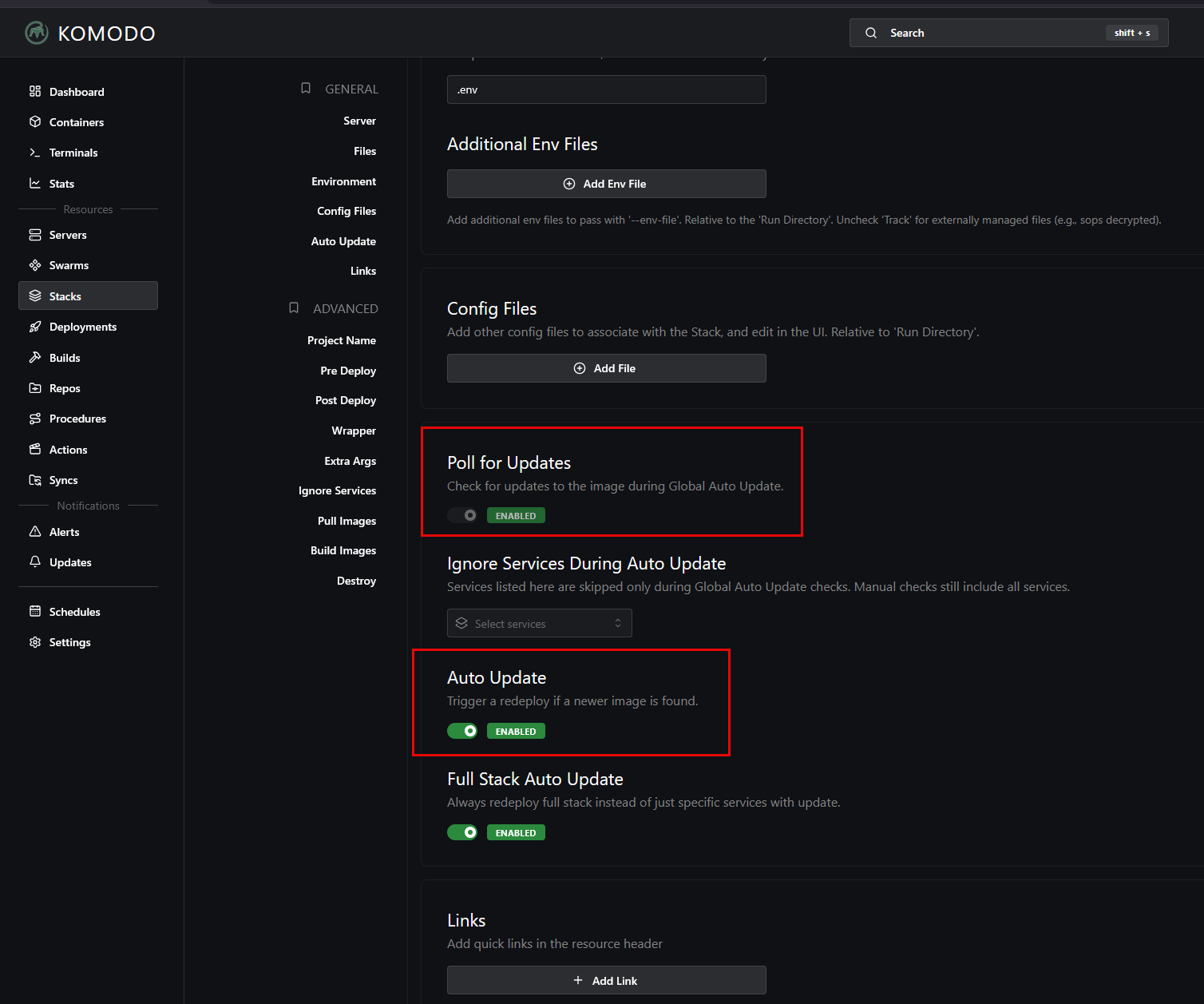
Global Auto Update
There is one final setting that is important and that is the Global Auto Update. This is an action you can customize to run when you want it to. But, by default when you turn it on, it is scheduled to run once per day at 03:00.
Then when this process runs, it looks for the stacks and Deployments that have the Poll for Updates or Auto Update enabled and checks the container registries they are configured with for newer image digests.
So to recap:
| Komodo setting | What it controls | Result |
|---|---|---|
| Global schedule | When Komodo checks for container image updates | Runs the update check on the schedule you set |
| Poll for Updates | Which stacks Komodo should check and get updates for | Shows that a newer image is there, but does not redeploy it |
| Auto Update | Which stacks Komodo is allowed to update automatically | Redeploys the stack when a new image is detected |
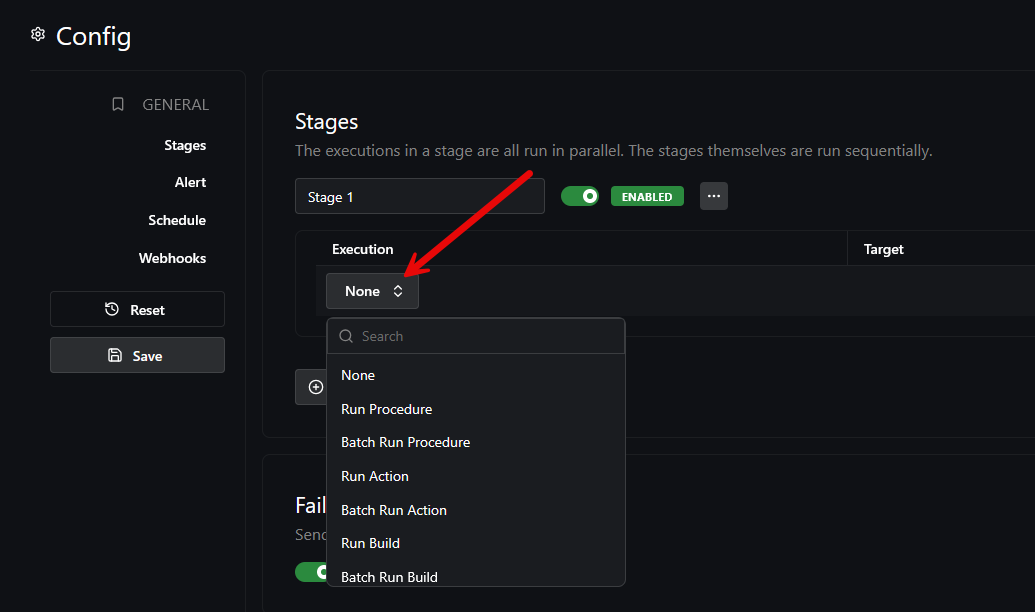
Procedures can work along with the auto updates
Komodo has something else called Procedures that combine multiple actions togerther into a type of workflow. It supports putting these together in various actions that allow you to run things in parallel or in certain stages. This allows you to have many types of workflows that aren’t just simple updating. You can do more interesting things like:
- Update an application
- Wait for it to deploy
- Restart another dependent service
- Run another action
If Komodo itself goes down?
This is where I really like the solution in a home lab. At the end of the day, your Docker Compose continues to live in the folder that it always lived in. You can still manually interact with your Docker Compose the same way you always have. Komodo isn’t changing your compose code in some way that essentially makes it unusable without Komodo.
So if you have Komodo down, it doesn’t mean that ever container stack that you are using it to manage is also down. Docker continues to run as it always has one.
Wrapping up
I have been taking my home lab into more and more of a GitOps type workflow that allows me to have things automated, repeatable, and stores my Docker Compose code in source. Now, with my docker hosts in the home lab and Komodo Docker container management, I have a centralized management tool for that purpose. It provides the orchestration and management automation that I need to do things like keeping my container images updated. But, as we have touched on here, it can do a lot more than that as well and even gets you into more of a GitOps style approach to managing your infrastructure in the home lab. What about you? Are you using Komodo currently? What features are you making use of in your environment?
More in this topic




Google is updating how articles are shown. Don’t miss our leading home lab and tech content, written by humans, by setting Virtualization Howto as a preferred source.
About The Author
