



I have used Keepalived in my home lab for quite some time and most of the time, I have thought of it in a very simple way as to what it does. I run two servers in Proxmox with Keepalived. One owns the virtual IP address (VIP), and if the primary server goes down, the other server takes over the virtual IP address. Pretty simple concept and this works. Recently, though I was working through some HA scenarios in my home lab and started looking closer at some of the Keepalived features that I could use. The cool thing is Keepalived doesn’t have to wait for an entire server to fail. It can also make decisions on failover based on application level checks in your environment Keepalived track scripts. This opens up a lot of cool possibilities. Let’s look at what these are and how they can be used.
What is Keepalived?
Just a brief note here in case you haven’t heard of it before. Keepalived is a Linux tool that has as its purpose high availability. It uses VRRP to switch a configured virtual IP address between your servers when a “failure” happens. VRRP is Virtual Router Redundancy Protocol. It lets multiple server hosts share a virtual IP address so another node can quickly take that IP over if the active node fails. Keepalived is a popular solution, especially in the home lab space that can give you automatic failover for your services like DNS, web servers, load balancers, etc.

Protecting a whole server has limitations
Now let’s look at the most common configuration for Keepalived and that is protecting a whole server. The first thing to realize is that protecting a whole server does have its limitations. Wait, why? Well, let’s take a step back and see how we would configure this in a tradition way, protecting an entire server. Think about the traditional, two-server setup where you have two Docker hosts running DNS services. Maybe it looks like this:
docker01
- Technitium DNS

docker02
- Technitium DNS
So with this configuration, I stand up Keepalived on each Docker host and a virtual IP address between them. Then, I hand the virtual IP address (VIP) out to the clients as the DNS IP address:
192.168.1.53Both of the Docker hosts are part of VRRP through Keepalived. Maybe you have the docker01 host configured with a higher priority and it is the host that owns 192.168.1.53.
If docker01 server crashes or it loses network connectivity, or Keepalived service itself stops running, docker02 will become the new MASTER and it will take ownership of the virtual IP.
Clients continue sending their DNS requests to the same IP address and no one knows any differently.
192.168.1.53But, let’s key in on the limitation here, especially with containers. What happens on docker01 if I do the following?
docker stop technitiumThe operating system is still healthy. It is still reachable on the network, the physical network interface is healthy and Keepalived is healthy and working. VRRP advertisements are still communicating between them. So, in this basic setup, Keepalived, has no reason to failover the VIP to the secondary node, even though our DNS is dead in the water.
That exposes a flaw in this configuration of Keepalived. The weakness is that we can build HA around the machine running services and not the actual services that you depend on in your home lab or for self-hosting. The service could fail and you would never have a failover event.
Then I discovered Keepalived tracking scripts
In case you haven’t heard of this feature or aspect of Keepalived, it has what is called a vrrp_script configuration component to the config file that allows it to periodically execute a script, and use the exit status on the script to make VRRP decisions. Then, with this additional layer of logic, it makes the decision if failover is needed or not.
You can pair the check you are making here with the VRRP instance that uses the track script. When looking at the Keepalived documentation, the scripts can run at a configured interval and Keepalived looks at the “exit status.” It also has other configurable metrics like interval, timeout, rise, fall, weight, and these allow you to tweak and tune the failover behavior.
Also, in addition to the track scripts, there are other things you can monitor. You can track:
- processes
- files
- interfaces
This is especially useful with containers
This opens up a completely different way of thinking about your failover strategy. So instead of thinking about failover in terms of is my “server” alive and well, you can think about it in terms of is my “application” alive and well.
So, then, if you want to check an application or service like DNS (example we keep going back to), you can do that. This is one of those things that if you have a home lab with containers, this is super beneficial.
When you think about what containers are good at, they separate the application from the host lifecycle. That is why we use them. When you run containers, stopping, updating, moving, recreating them is all part of the lifecycle management and is definitely one of their advantages.
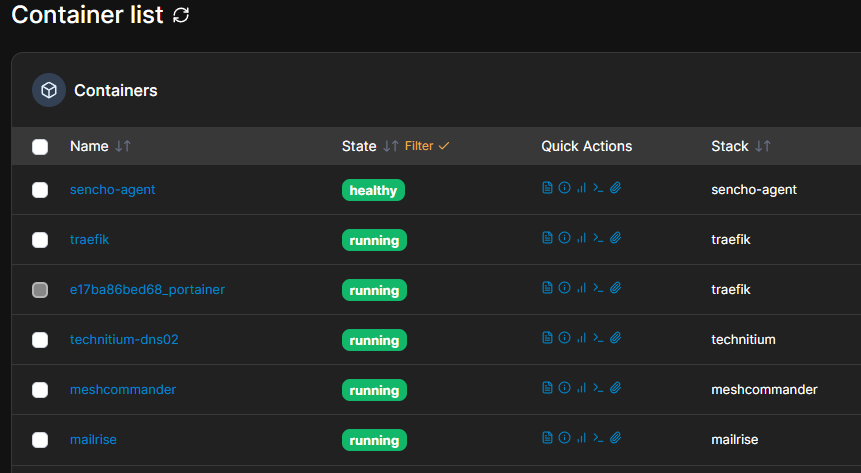
But thinking about this scenario with containers, they are decoupled from the host when we think about running services and wanting to have failover. If we setup Keepalived in the traditional way to just protect a server, then this means as we mentioned at the outset, it will never catch a single “container” failure, since the host itself is still up and running and heartbeating.
Docker host             HEALTHY
Network interface       HEALTHY
Docker daemon           HEALTHY
Keepalived              HEALTHY
Technitium container    STOPPED
DNS service             DOWN
But setting this up with an application check is MUCH more powerful if we are running containers. The flow becomes:
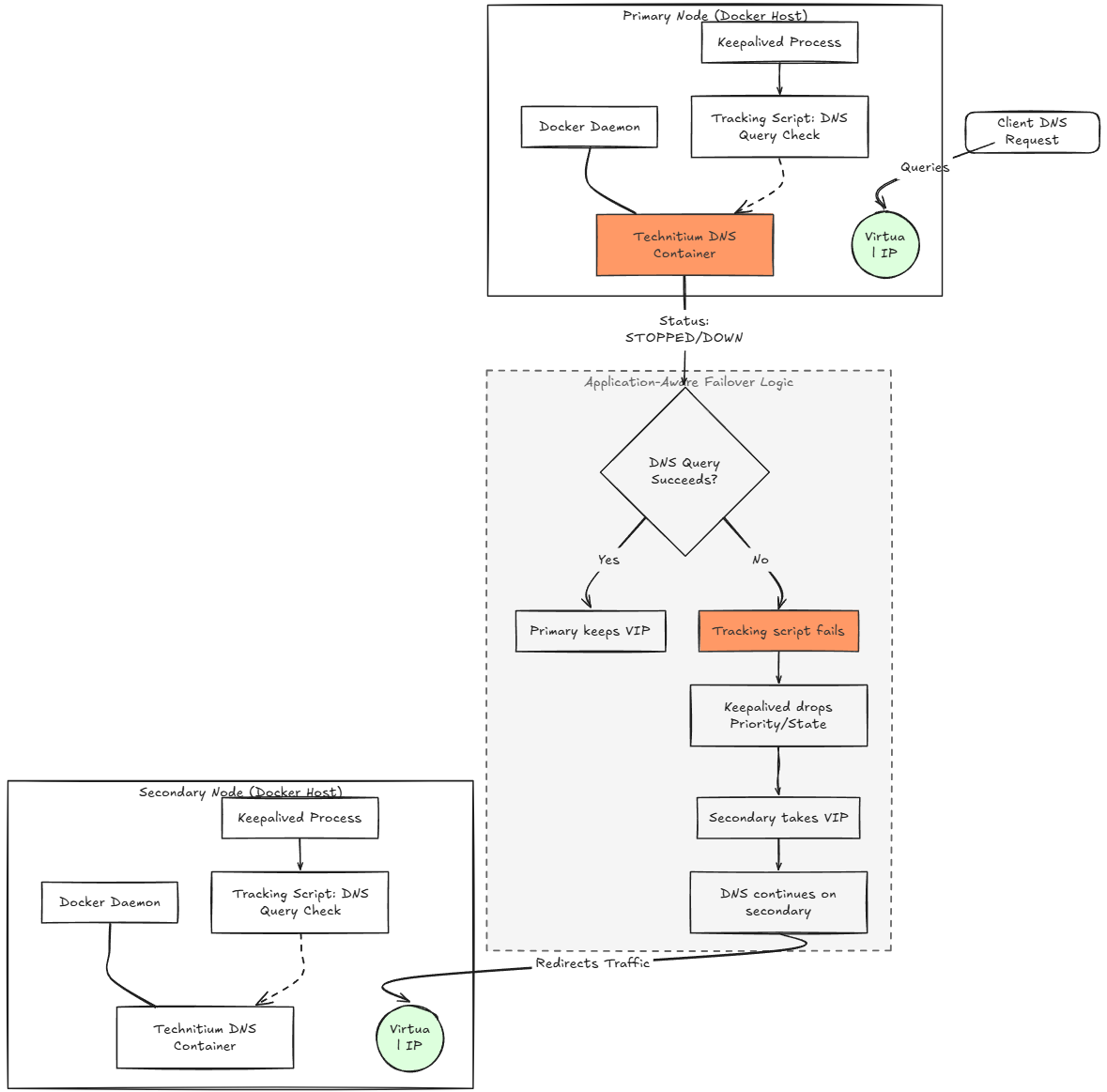
That is much closer to the HA behavior I actually want to be honest in a highly containerized home lab like I am running today. It means that if I intentionally take down a DNS container for maintenance, it will failover to my other DNS container running on the other server.
A simple application health check example
The really cool thing about the track scripts with Keepalived is that they don’t have to be anything very complicated. The simplest configuration that I can think of for a service like DNS is just using a simple port 53 check. If a DNS server container is stopped, port 53 should go down and no longer answer. That gives Keepalived something to trigger on.
One of the most basic scripts you could have for this would look something like this:
#!/bin/bash

nc -z -w 1 127.0.0.1 53
Make it executable:
chmod +x /usr/local/bin/check-dns-port.shThen, in your Keepalived VRRP configuration, you would have a configuration that would look similar to this:
keepalived.conf
A quick explanation of the below terms:
- interval – this is how often Keepalived runs the health check
- fall – How many consecutive failed checks are needed before it is considered “failed”
- rise: How many consecutive successful checks are needed before the script considers the check healthy again
vrrp_script chk_dns_port {
    script "/usr/local/bin/check-dns-port.sh"
    interval 2
    timeout 1
    fall 3
    rise 3
}
Reference the above in your existing vrrp_instance:
vrrp_instance VI_1 {
    state MASTER
    interface eth0
    virtual_router_id 51
    priority 200
    advert_int 1

    virtual_ipaddress {
        192.168.1.53/24
    }

    track_script {
        chk_dns_port
    }
}
In this example the nc command tries to connect to port 53 on the host. If something is listening there, the command will exit successfully. But, if the DNS container is stopped and port 53 isn’t available, the check will fail.
You can then use the exit status with the vrrp_script and track_script configuration. Now, your logic becomes with this:
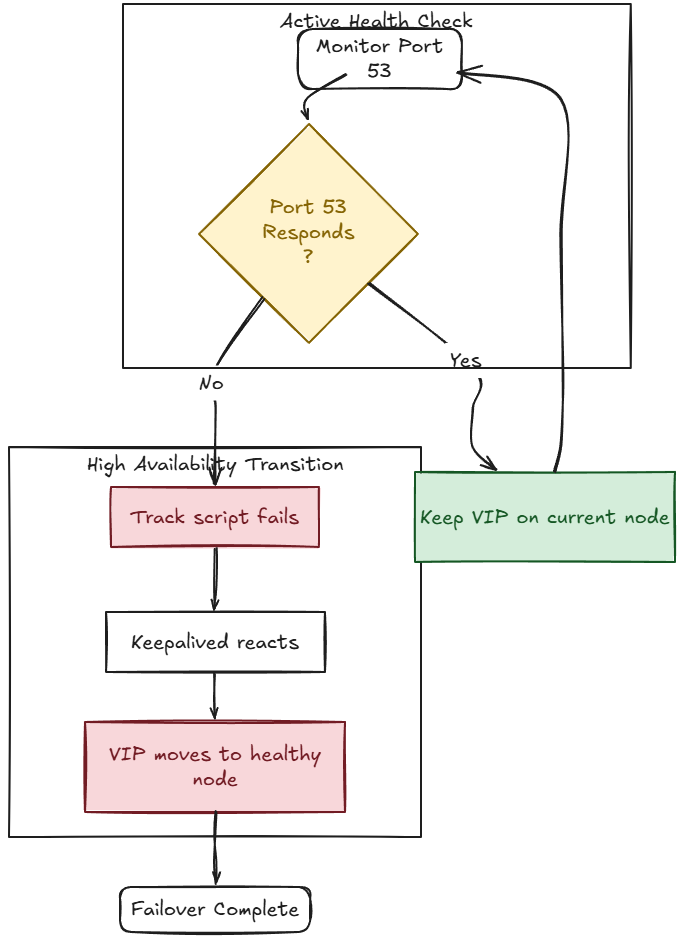
So already, as simple as this is, it gives us protection that means the host can still be reachable and not trigger a host level failure, but still trigger do to the fact the Technitium container is stopped and DNS is no longer reachable. Awesome!
Now you may have already been thinking about this, a port simply being open, doesn’t really test the application. It just tells us that at a network level, the DNS port is open. But if you wanted to take this a step further, you could actually perform a DNS lookup and do something like:
dig @127.0.0.1 home.lab +shortThe really nice point with this is that it doesn’t have to start off very complicated, but even in a simple form, it is really powerful and arguably more powerful than just a simple host check.
Basic host checks are still in place
One thing I want to call out here to make sure we haven’t muddied the waters is the fact that the “basic Keepalived functionality” of protecting against a host failure, is still in effect. So if your host goes down, and takes all of your containers down with it, the basic failover still works the way we expect it to work. But the track script is just another layer of protection on top of the basic host goes down failover protection that you get.
So in essence, we have have added an additional layer of protection to our HA strategy that allows us first to check the application layer for health and failover if something is wrong there. But, we also retain the server protection if an entire server goes down.
Failing back?
Keepalived let’s you decide if you want to fail back to the original owner of the VIP, or if you just want to leave services where they are currently until a maintenance window and you can decide if you want to go back to your original node.
The keyword in the configuration for “don’t fail it back” is the nopreempt keyword. This means it won’t failback if the primary comes back online, even if the weight says that it should be the owner.
vrrp_instance VI_1 {
    state BACKUP
    interface eth0
    virtual_router_id 51

    priority 200
    advert_int 1

    nopreempt

    virtual_ipaddress {
        192.168.1.53/24
    }

    track_script {
        chk_dns_port
    }
}
Wrapping up
This whole deep dive into Keepalived track scripts, has made me reinvigorated to reevaluate my home lab HA configurations. The track scripts opens up a whole new world of possibilities when it comes to designing application level high availability. Especially, if you are running a lot of containerized applications and you haven’t delved into Kubernetes quite yet, you can setup two Docker hosts with Keepalived and then setup the track scripts to monitor your critical applications like DNS so these are failed over and ran on your secondary host. What about you? Have you experimented with track scripts and designing HA this way?
More in this topic




Google is updating how articles are shown. Don’t miss our leading home lab and tech content, written by humans, by setting Virtualization Howto as a preferred source.
About The Author

I have Keepalived running as HA for my Pi-Hole servers. However didn’t know about the track scripts. Great find!
Good article, thank you, Brandon. Can we use VRRP with Kubernetes? I have a Technitium cluster on Docker and a K8s, but I don’t know how to set up Keepalived in Kubernetes.
Hello and thanks for the comment!
Kubernetes usually already has really good service level abstraction. What I am running for my cluster is MetalLB and it provides the floating IP address for my Traefik instance. Then Traefik handles the incoming connections for my services like DNS. So then I have the IP address of Traefik that floats between all of my worker nodes in the Talos Linux Kubernetes cluster. If a node goes down, then I have self-healing that happens with Kubernetes. So, I run one of my DNS nodes in Kubernetes and one on a standalone host. For my setup, I have the primary DNS address assigned as my Kubernetes Technitium instance. Then the second assigned on my Technitium instance running in Docker, with Technitium clustering. Let me know if this helps!
Brandon
Thanks for your fast response!) I’ve been thinking about using a floating IP between the Docker service and the Kubernetes service. For example:
192.168.1.53 – VIP (hosted on the Docker host)
192.168.1.54 – Docker host
192.168.100.51 – Kubernetes host
If we set up two IPs as DNS servers for clients (192.168.1.53 and 192.168.100.51) and the Docker host went down, DNS resolution would still work, but clients would end up waiting for timeouts — so DNS performance degrades even though resolution doesn’t fail completely.
I also read that you set up a Technitium cluster in Kubernetes + Docker, and I thought that might have resolved this issue.
No worries and these are really great observations here. I am going to revisit my setup now with this new discovery of track scripts and see how I can bolster my current configuration. I do believe there is probably a way to implement it so stay tuned as I am sure this will be another forthcoming home lab experiment 😁👍
Brandon
Yes, it will be interesting. I’ll be follow, thank you)