


When you run a home lab long enough, you eventually hit one of those troubleshooting sessions that turns into a full-on detective story. You start out convinced the issue is one thing, but then you discover there are three or four small configuration problems stacked on top of each other creating issues that point you in the wrong direction. That is exactly what happened to me recently with my Technitium DNS cluster. Let me give you some background on what happened and step you through my troubleshooting journey as I know I love to read these kinds of things when I want to learn what to avoid or things to implement.
The backstory
On paper, my setup seemed simple enough. I had a primary Technitium DNS server (dns01) running as a container on one Docker host and then my secondary Technitium instance was running on another Docker host. I had created the cluster and all has been well since the clustering feature was introduced in 2025.
Read my full post on initially setting up Technitium clustering here: Stop Using Pi-Hole Sync Tools and Use Technitium DNS Clustering Instead.
However, after I decided to go with Kubernetes in the home lab, I wanted to get my primary instance running as a Kubernetes app to take advantage of all the benefits of my Kubernetes cluster spread across Talos VMs running across my Proxmox cluster. I migrated my dns01 server over to Kubernetes and while I got everything running there, I didn’t realize that I introduced several issues at that time. Now, fast forward several months.
Kubernetes woes
As my primary instance appeared to be running ok inside Kubernetes, it looked like clustering appeared to work. I happened to notice though that when I looked at my secondary server just a few days ago, I saw that the connection to the primary node from the secondary showed as unreachable. Below is a screenshot I took of what I saw:
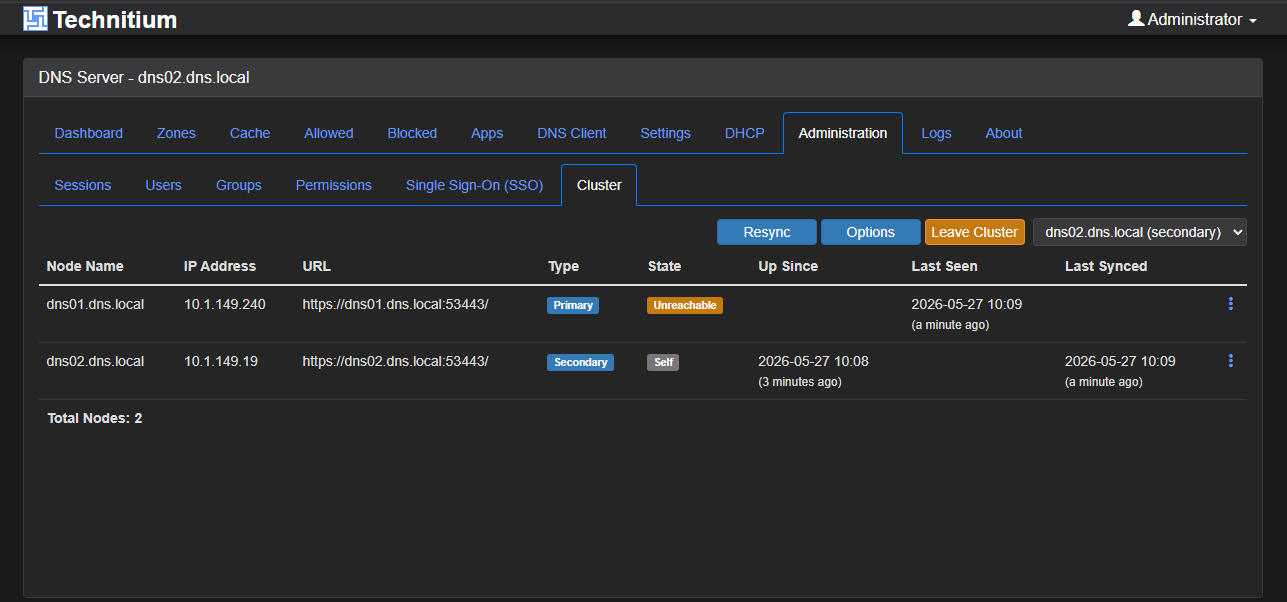
I went as far as removing the secondary node from the cluster and rejoining. The secondary would quickly show as connected. But, then after immediately refreshing the page, it would then go to “unreachable”. Zone transfers failed. DANE validation errors showed up. NOTIFY failed intermittently. Sometimes it looked fixed, but again, these turned out to be quick wins and then went to unreachable and failures.
My Technitium DNS architecture
Before diving into the mistakes, it helps to understand the architecture because several of the issues only appeared due to the way I deployed things.
My environment looked like this:
- dns01 running in Kubernetes
- dns02 running in Docker Compose
- Traefik handling ingress for management and cluster traffic
- MetalLB exposing a VIP for DNS services
- Internal DNS zone replication between Technitium nodes
This worked perfectly fine in Docker previously. The problems started after migrating the primary into Kubernetes. That detail matters because Kubernetes changes assumptions around networking, DNS, source IPs, and service routing and I have to admit that I didn’t fully think through all of the nuances properly beforehand.
Many settings that worked fine on a standalone VM suddenly became problematic once Kubernetes entered the picture.
The first mistake was using my real internal DNS namespace
I had some misunderstandings with Technitium when I first setup my cluster between the two nodes. I thought that I needed to put the domain name in the cluster configuration being my self-hosted domain so I would have name resolution of both nodes between each other and from other clients. But this was a mistake as I found out later.
When you go through the cluster configuration wizard, the Cluster Domain you see below needs to be a special domain that you don’t already host if you have this domain answered authoritatively on another server in your lab. This was my case. I already had a Windows Server DNS server that hosted “cloud.local”, but I initialized the cluster with this same domain name.
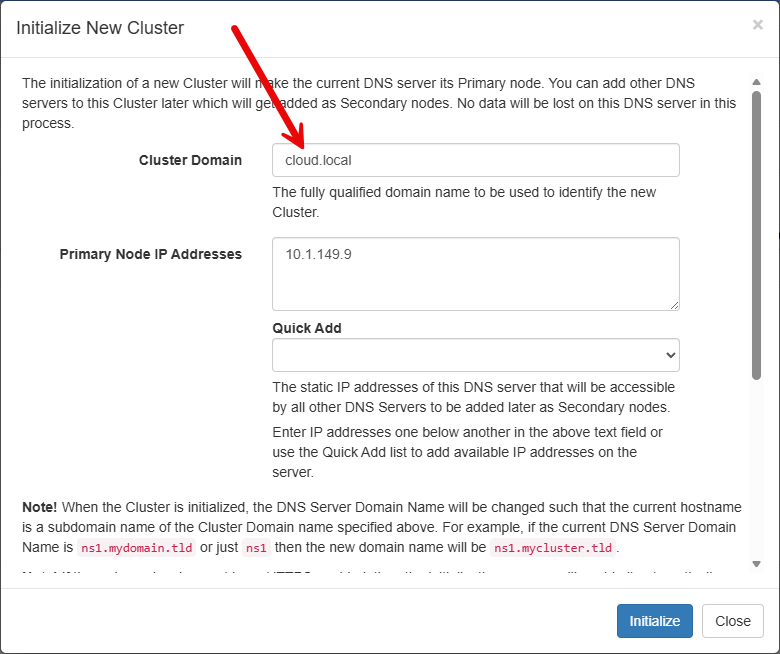
This was arguably the biggest design mistake that I made going in as this kept me from doing things on my Technitium DNS servers like establishing a conditional forwarder for cloud.local to my Windows DNS server. And, you can’t convert a primary cluster zone:
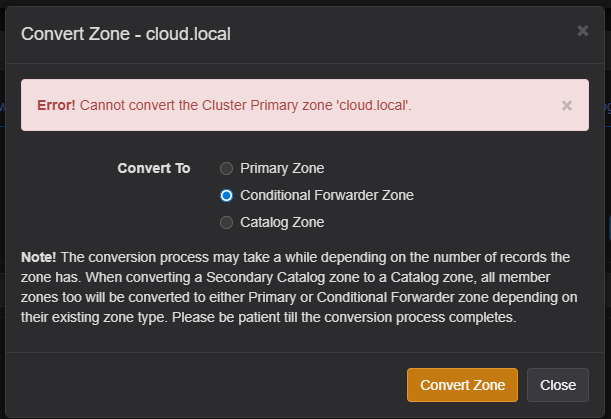
So, lesson learned. Instead of creating a good design, I accidentally created DNS overlap and prevented me from fully taking advantage of Technitium for resolution until I corrected the issue.
So, after understanding this more fully, I decided to delete the cluster which you can do under the Administration > Clustering menu on your primary node. This allowed me to start from scratch and do it right.
What did I use for this special domain? I just settled on dns.local as this is the domain they give you by default and that should have made me stop and think about it. (but it didn’t stop me from having another “duh” moment before I did as you will see in the next section).
My advice here is straightforward:
- Do not reuse an authoritative DNS namespace for Technitium clustering unless you are absolutely certain how delegation and forwarding will behave.
Keep clustering isolated.
My second mistake was trying cluster.local
Before I went back to “dns.local”, I thought I would be safe using “cluster.local”. But this turned out to be a mistake as well. I was solving my issue of overlap with the cloud.local domain, but I was introducing another issue since I was now hosting things in Kubernetes for my primary node.
If you work around Kubernetes long enough, you probably already know where this is going. The cluster.local domain name is special. It is Kubernetes’ default internal DNS suffix used for service discovery.
Things like this already exist internally:
service.namespace.svc.cluster.localWhen you start introducing your own infrastructure services under that same suffix, weird things can start to happen from the perspective of the Technitium node you are hosting there.
The lesson with this one is simple as well. Do not overload special-purpose namespaces. Just because a name exists does not mean it should become your application namespace. Choose something neutral and intentional.
For me, dns.local became the better answer. I know there are also some purists that would say that my cloud.local domain shouldn’t be used and you are probably right. These .local domains are actually earmarked for multicast traffic. But, so far, knock on wood, I haven’t had an issue in my lab due to using it.
The DNS_SERVER_DOMAIN setting caused more problems than I realized
The above sections describe issues that I had inadvertently introduced from the primary node that was running in Kubernetes. But my woes didn’t stop there. On my secondary node, I kind of shot myself in the foot as well.
On my Docker Compose host running dns02, I had the wrong DNS_SERVER_DOMAIN value configured.
At one point I had the below reference to cloud.local but I didn’t notice this in the docker compose after I had corrected the issue with the cluster zone.
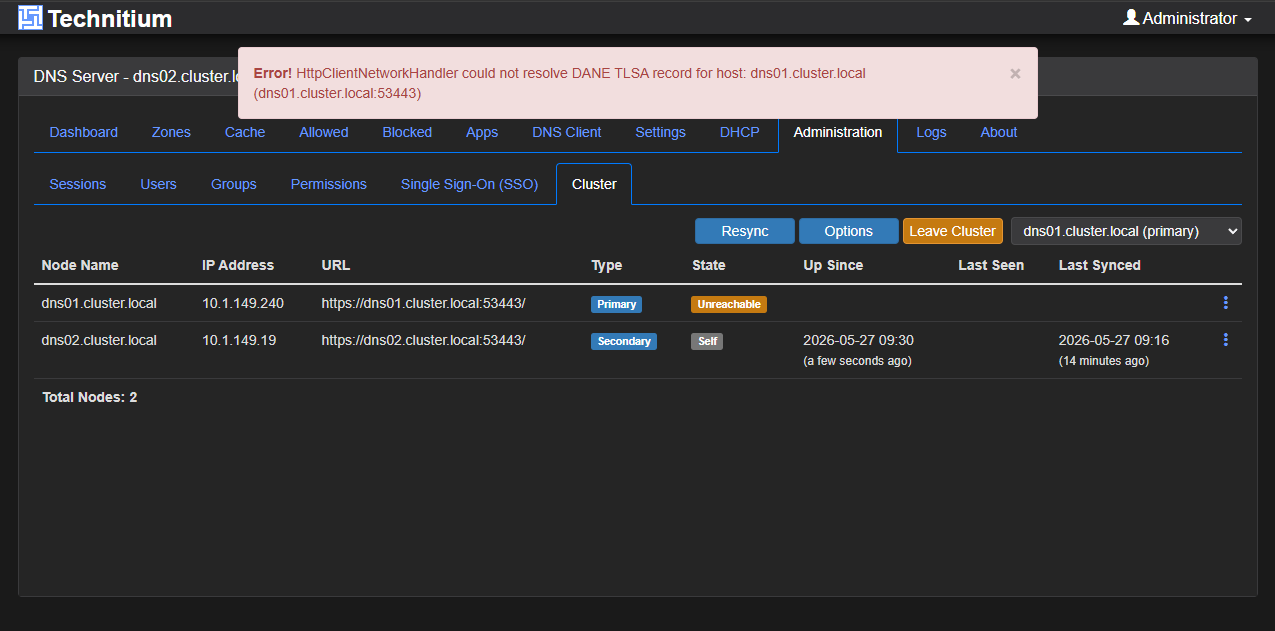
DNS_SERVER_DOMAIN=cloud.localAs it turns out, that mismatch caused me SO MUCH grief and I didn’t realize it. I couldn’t figure out why I was getting DANE errors with the records returned from the primary node. When clustering depends on consistent naming, DNS identities, and TLS validation, inconsistencies create these types of failures.
What made this issue deceptive was that the cluster would sometimes look healthy. When I would delete the cluster, recreate it, and then join the second node, it would say it could reach the primary and say Connected, until I refreshed the page.
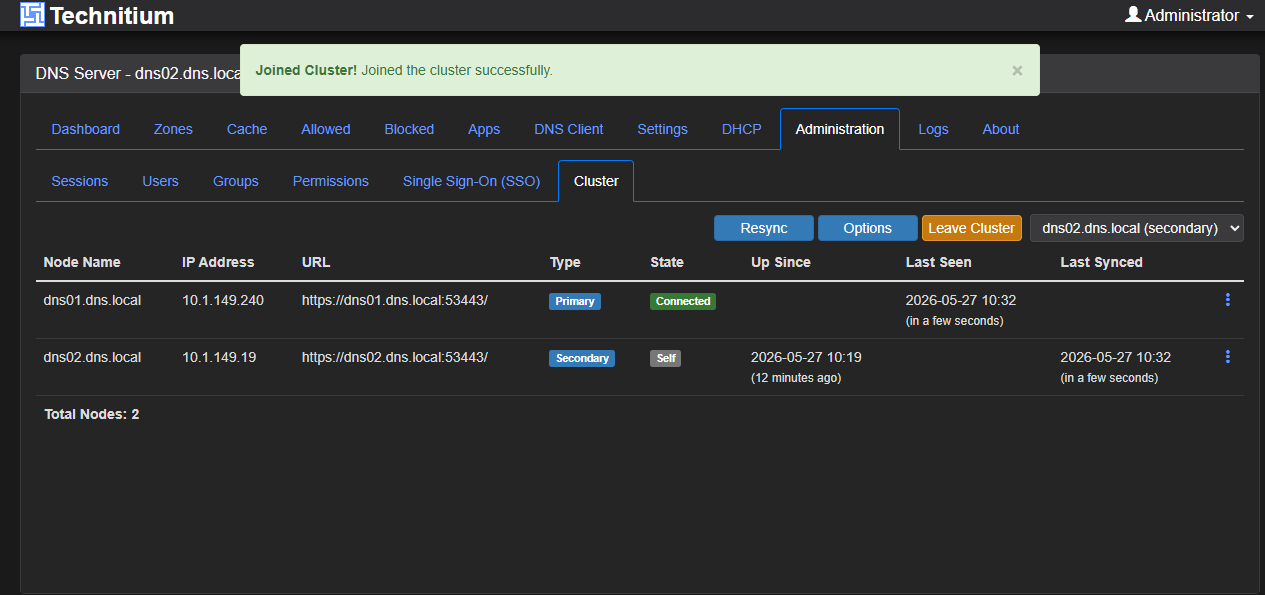
Then, when I refreshed the page, I would see Unreachable and then if I switched the dropdown to my primary, would get the Error below regarding DANE and TLSA:
After resolving the DNS_SERVER_DOMAIN in my Docker compose for the secondary node, this solved the issue with the secondary node being able to connect to the primary.
Name resolution for the special domain I chose
I felt also like I was in a chicken and egg scenario with the special domain I chose, “dns.local”, since I didn’t have that resolvable from anywhere in my lab network. What I wound up doing that I am not sure I technically had to do was add an extra_hosts configuration in my Docker compose to make sure I could resolve the primary node:
extra_hosts:
      - "dns01.dns.local:10.1.149.240"
The “240” address is my primary node address that is running in Kubernetes. So, on the secondary host that is running on a Docker host, I also used the DNS_SERVER_DOMAIN, and DNS_SERVER_FORWARDERS environment directives in my compose code:
environment:
      - DNS_SERVER_DOMAIN=dns.local
      - DNS_SERVER_FORWARDERS=10.1.149.240
These additions helped to prevent issues with the special domain name and hostname that was only known between the two Technitium hosts.
Kubernetes networking changed assumptions that I should have not had
At one point in my troubleshooting, I thought that Technitium needed to bind directly to my MetalLB VIP. Here was my thinking:
“If the service lives on 10.1.149.240, Technitium should listen on 10.1.149.240:53.” Logical, right? Wrong. This was me accidentally thinking like a VM administrator instead of a Kubernetes administrator.
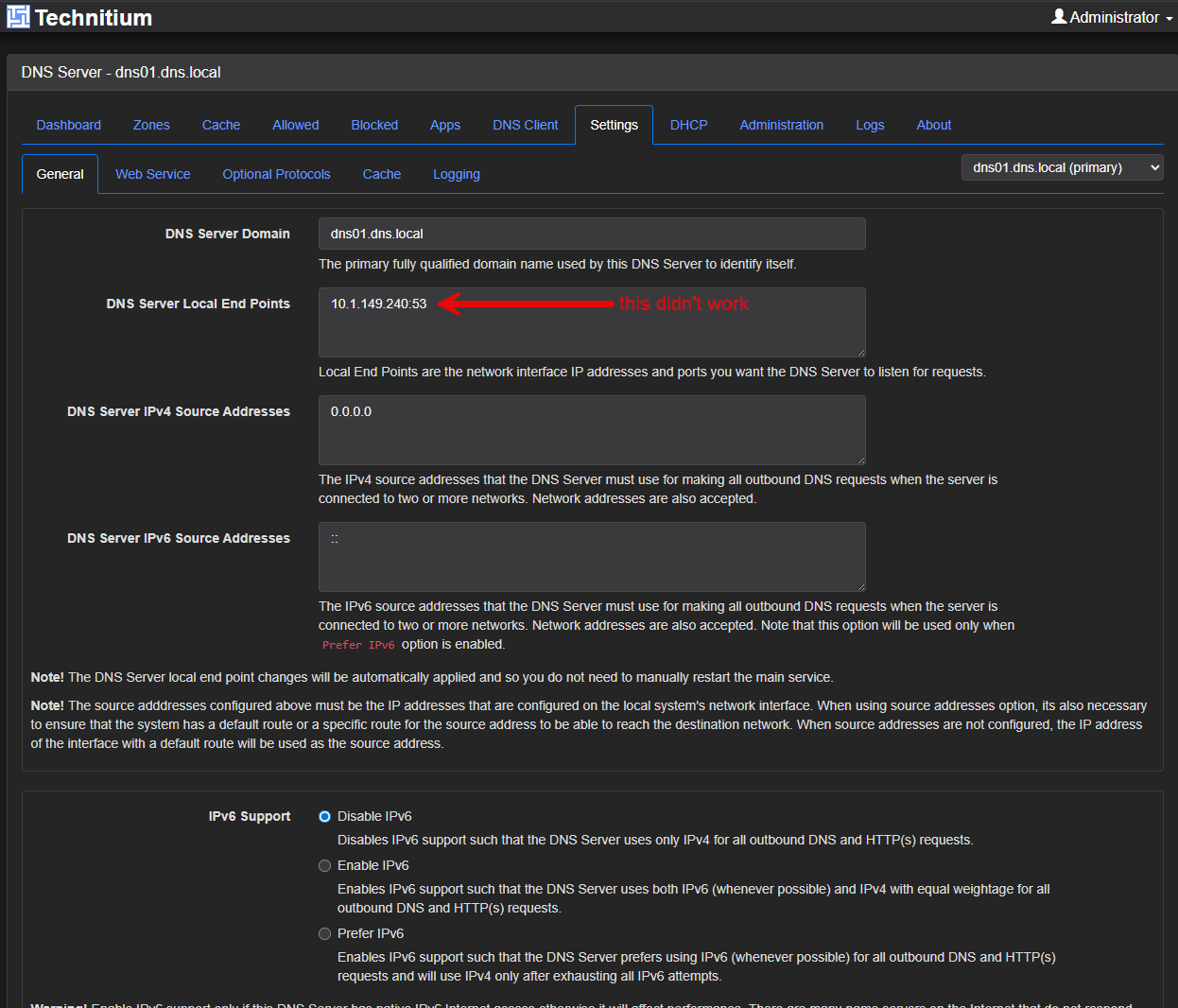
MetalLB owns the VIP. The pod does not. So, when traffic arrives at the VIP and Kubernetes forwards it to the pod. That means Technitium should simply listen on the all zeroes address in the Technitium config and not the VIP IP:
0.0.0.0:53So, again, lesson learned here on thinking about traffic flow in Kubernetes and how things ingress into the environment differently than Docker or a virtual machine.
TLS passthrough on 53443 matters
Another important lesson that I learned with moving Technitium to Kubernetes in my environment was that I was treating Technitium clustering like web traffic. That was a mistake in my thinking with Traefik configuration.
The management interface on HTTPS is not the same thing as cluster communication. Port 53443 needed special handling. Eventually, after lots of the other troubleshooting I have covered, I configured Traefik for TLS passthrough so Technitium itself handled encrypted cluster traffic.
This turned out to be important because DANE validation depends on node-to-node trust. If Traefik terminates TLS and re-encrypts traffic differently, you can end up debugging problems that are impossible to explain sometimes.
So, the lesson I learned here and the setting that came out of it was, do not assume your reverse proxy should treat cluster traffic like a normal web application. Understand what the service is doing underneath.
Here is an example of the code I used:
apiVersion: traefik.io/v1alpha1
kind: IngressRouteTCP
metadata:
  name: technitium-cluster
  namespace: technitium
spec:
  entryPoints:
    - dns-cluster
  routes:
    - match: HostSNI(`*`)
      services:
        - name: technitium
          port: 53443
  tls:
    passthrough: true
The final resolved issue that actually fixed clustering for me
After all the domain suffix issues, DANE errors, name resolution issues for the cluster domain, and TLS passthrough, I still had one lingering issue even after I had resolved the secondary node being able to connect to the primary.
I thought I only needed the IP address 10.1.149.19 in my list of allowed IPs for zone transfers since this was the IP address of my Docker host that was hosting the secondary Technitium node. But as it turns out, I realized something in looking at the logs. The IP address that was passing through was the Kubernetes pod address instead of the external address of the primary Kubernetes node for Technitium in the Zone transfer allowed IPs.
Here are three examples from my logs:
[2026-05-27 16:57:46 UTC] [10.244.1.0:21957] [TCP] DNS Server refused a zone transfer request since the request IP address is not allowed by the zone: cluster-catalog.dns.local

[2026-05-27 16:59:20 UTC] [10.244.1.0:20971] [TCP] DNS Server refused a zone transfer request since the request IP address is not allowed by the zone: dns.local

[2026-05-27 16:59:20 UTC] [10.244.1.0:20971] [TCP] DNS Server refused a zone transfer request since the request IP address is not allowed by the zone: cluster-catalog.dns.local
In Kubernetes, traffic was originating from internal pod networking. Specifically the IP range:
10.244.0.0/16Technitium was seeing requests from Kubernetes internal addresses, not the addresses I expected. So when zone transfers happened, they were being rejected. From my perspective, the cluster looked half-functional. The easy fix for a lab environment was to allow the Kubernetes pod CIDR for zone transfers.
Now a better fix would be to do some SNAT of sorts to get the right IPs aligned but for my purposes here this worked fine.
The settings I run now
After all of this, here is where I landed:
| Setting | What I run | Why |
|---|---|---|
| Cluster namespace | dns.local | Avoid namespace conflicts |
| DNS server domain | Consistent across nodes | Prevent identity mismatch |
| Local endpoint | 0.0.0.0:53 | Correct for Kubernetes networking |
| IPv6 | Disabled | Not used in my environment |
| TLS cluster traffic | Passthrough on 53443 | Allows proper cluster trust |
| Zone transfer allow list | 10.244.0.0/16 | Required for Kubernetes pod traffic |
| Internal naming | Consistent across all nodes | Prevents resolution confusion |
Wrapping up
Wow, what an adventure this turned out to be in troubleshooting, not only Technitium, but also Kubernetes in general. I have to say I learned a lot from this little issue in the home lab. Hopefully some of what I have shown here will help someone else who may want to run one or both nodes inside Kubernetes and some of the hurdles I had to overcome to make that possible. What about you? Are you currently running a Technitium cluster? Are you running Technitum in Kubernetes? Or, am I the only insane person doing this? Let me know in the comments.
More in this topic


Google is updating how articles are shown. Don’t miss our leading home lab and tech content, written by humans, by setting Virtualization Howto as a preferred source.
About The Author

Very nice article, great read. Screenshots clear explanation of what went wrong and how to solve it.
I run a single technitium instance myself, my main dns is Adguard secondary is technitium.
Why? Because when I needed to do some maintenance or hardware changes you name it my network would keep working.
My main docker host is a Ubuntu server install, technitium is running on my truenas machine. ( Was a bit of a pain also port 53 related).
Thanks for the read!
Michael,
Very nice! I love to hear what others are doing and how they handle things in their home labs, especially when doing maintenance, etc. Thank you for sharing your setup as well!
Brandon
When running technitium as a recursive DNS server in k8s, can you have 2 aRecords, one in the truenas node and one with the IP of a worker node in the k8s cluster – or externalIP related to the cluster?
How would you make the secondary technitium server running on k8s talk to the primary one running in truenas?
Neat, you solved my clustering issue 😃
I also switched from two Pi-hole instances to Technitium recently as the clustering feature was the main driver. My Pi-hole instances were not load balanced, and I had separate (but pretty basic ad blocking only) configs.
My setup looks similar to yours minus the Kubernetes (I am using Swarm, still). Even the dns server hostnames are the same 😂
My Pi-holes were dns01.example.com and dns03.example.com both in Compose
My two Technitium instances that replaced Pi-hole were using Docker Compose and not in the Swarm because I was still testing out the clustering and wanted to keep these separate for now.
Similar to your issue I added the second Technitium instance to the cluster and everything looked okay for a few minutes until I came back later and it was unreachable.
For better or worse my internal DNS zone is using an FQDN with public TLD.
Initially I had used dns01.example.com for my cluster domain when setting up the cluster. The documentation wasn’t exactly clear on what exactly should go there.
It was weird because my hostname was dns01.dns01.example.com and dns03.dns01.example.com for the two instances
I eventually destroyed and recreated the cluster but instead used example.com for the cluster domain and the hostnames now looked better they were dns03.example.com and dns01.example.com but alas the clustering would soon show unreachable
I tried both creating a zone, and using the catalog zone that the cluster creates and add entries there to point to the instances and that sort of worked briefly but because I have an upstream DNS server for example.com, it caused other weird issues in resolving other hosts in the lab.
The note about being a domain you don’t already host solved it for me.
Instead of using the hostname of the first Technitium instance I used dns.example.com for the cluster domain and then the Technitium instances were able to cluster and all was well. I also added the conditional forwarder zone for example.com.
The entries in the cluster became dns01.dns.example.com and dns03.dns.example.com.
aaron,
This is awesome. So glad this long winded article was able to help someone. I wasn’t sure if I was the only one that missed a couple of details there. And you are right. I think the documentation wasn’t really clear on a few of the details. Hopefully this will help others as well and glad you were able to get things up and running in your environment there as well 👍
Brandon