


If you have spent a lot of time over the years building redundancy into your home lab, you probably have looked at many of the same layers that I have. I run multiple DNS servers, I have a Proxmox cluster, replicated workloads, multiple nodes, and spare capacity so that losing a single server should not bring anything important down. At least, this is the theory. Not long ago though I was looking at workloads running across my Proxmox cluster and noticed something that stood out. Two VMs that were supposed to protect me from one another failing were running on the exact same host. While at the app level things looked good for redundancy, if I lost just the one Proxmox host, both would go down together. That sent me into an audit of my cluster to see where VMs were running and looking at their failure domains they possibly shared.
Home lab reality check: two VMs doesn’t automatically mean redundancy
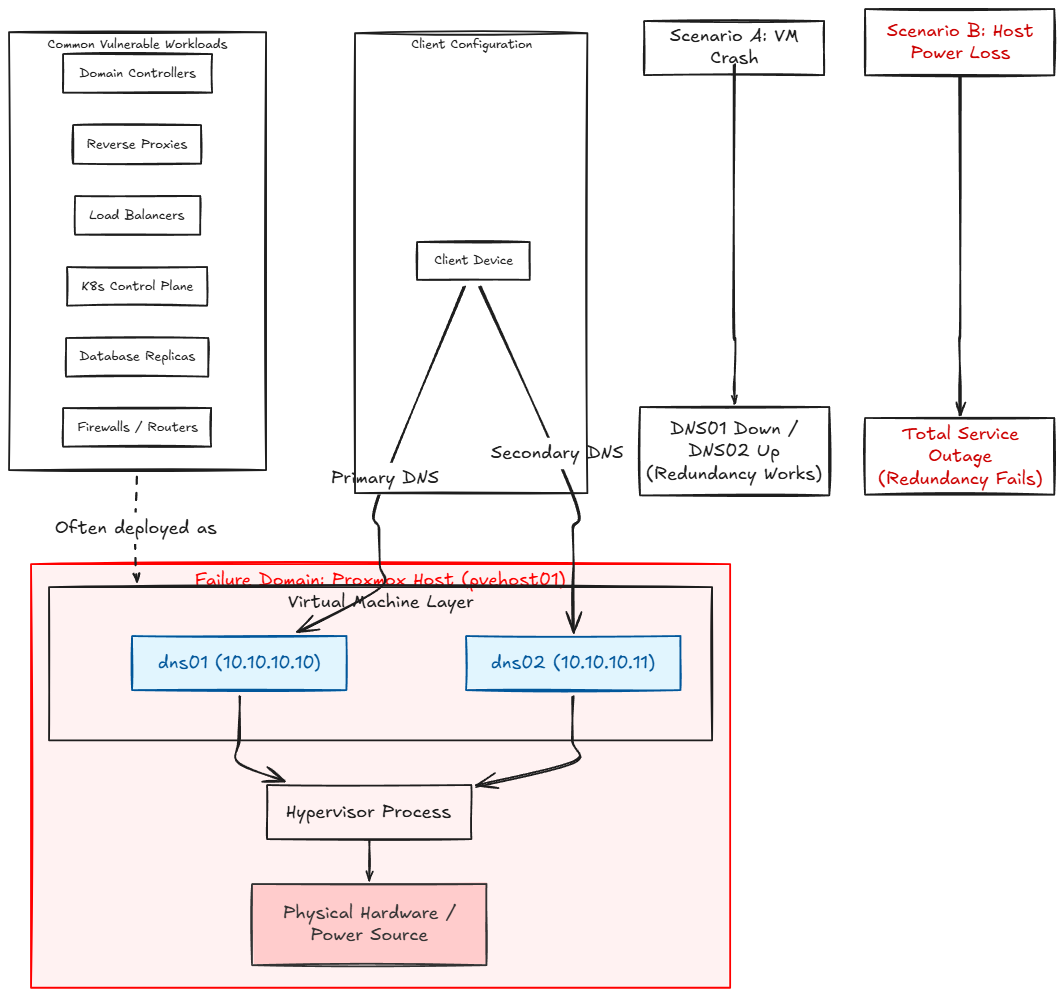
This is an important lesson to take away from something like this that if you have two copies of a service, that doesn’t automatically protect you from things going down. Take DNS for instance. Let’s say I have two DNS servers:
- dns01 – 10.10.10.10
- dns02 – 10.10.10.11
Clients are properly setup to use one as primary and the other as secondary for name resolution. But, imagine that both VMs are running on a single Proxmox host. If that is the case, if the dns01 VM crashes, I am fine. I still have dns02 running. But, if pvehost01 (the single Proxmox host), loses power, both DNS servers will go down simultaneously.
So the lesson is this. You may have two separate processes that are supposed to protect you from failure, but they may essentially share the same failure domain. What is this? A failure domain is a group of systems or components that can fail together because they share the same underlying dependency. This can be things like a server, switch, storage device, or power source.
This is not just a “DNS server problem.” This can happen with any critical workload in reality:
- Two domain controllers
- Two reverse proxies
- Two load balancers
- Two Kubernetes control plane VMs
- Multiple Docker hosts
- Redundant monitoring servers
- Database replicas
- Authentication servers
- Keepalived peers
- Home automation controllers
- Firewall or routers
Long story short, you can build an incredibly complex and resilient application architecture, only to default the purpose, by placing both halves on the same hypervisor. This mistake can exist one layer underneath everything we normally look at if we are not careful.
Read my other blog posts where we specifically talk about DNS high availability:
- DNS Failover for the Home Lab and Why You Need It
- Why I run multiple DNS servers in my home lab (and you should too)
- Stop Using Pi-Hole Sync Tools and Use Technitium DNS Clustering Instead
Virtualization can allow failure domains to sneak up on us
When it comes to really good virtualization platforms like Proxmox, they make it so easy to move workloads around that sometimes it is easy to lose track of where things actually live. I can migration one virtual machine between nodes, perform maintenance on servers, balance memory use and reorganize without the guest VM really knowing.
But, this can be an Achilles heel with virtualization. It can work against us when thinking about redundancy planning. So, think about another scenario that could potentially happen, even when we have this in mind at the outset.
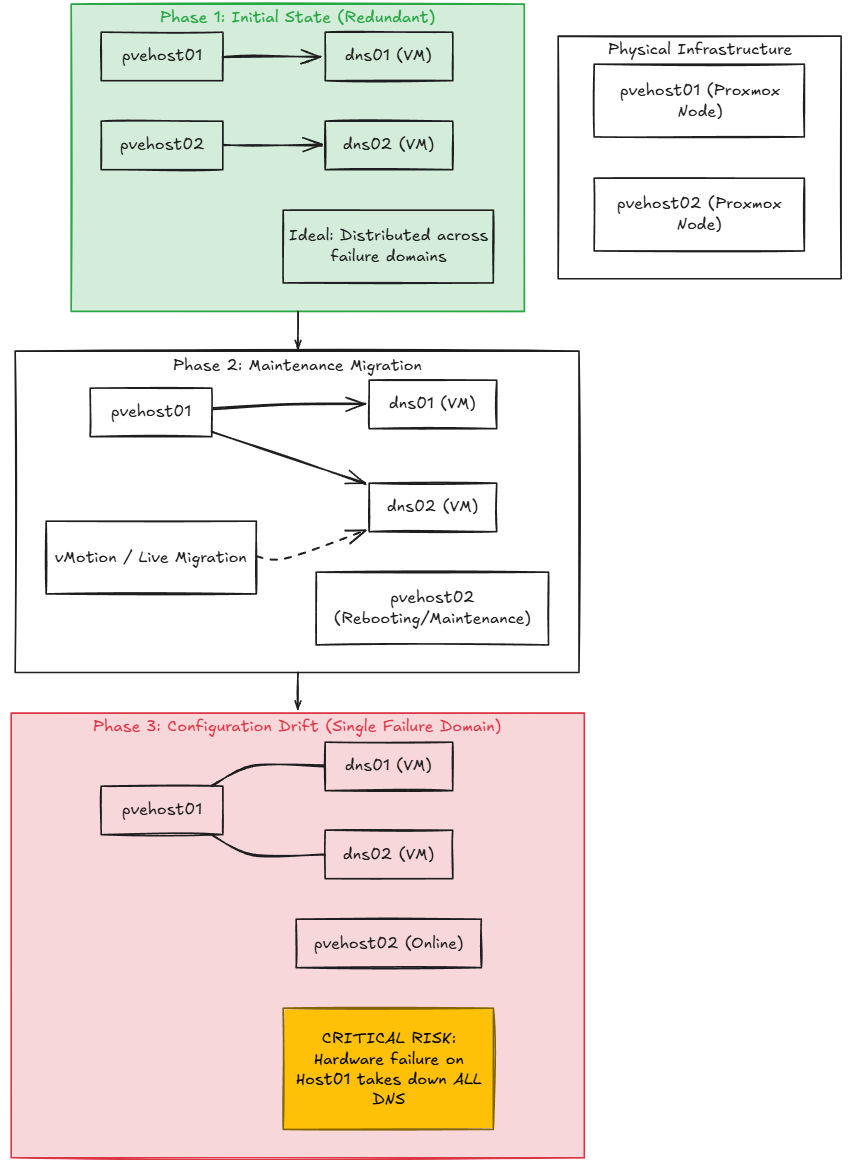
Let’s say that I originally build dns01 on pvehost01 and then I build dns02 on pvehost02. That is perfect. They are both on different Proxmox VE Server hosts. But a few days later, I need to reboot pvehost02 for maintenance. So, I migrate dns02 to pvehost01. I then perform the maintenance. Everything comes back up and is running.
Now, what is wrong with this picture? Well, nothing sends me an email saying, “your redundant DNS servers are no longer physically redundant”. Both servers are running, DNS is resolving, and there are no alarms going off. At a very basic level, this is configuration drift at the “placement” layer. In other words, our “desired state” has been drifted away from.
Now, without realizing it, we have two VMs on the same Proxmox node and have set ourselves up to have the same failure domain for both of our “redundant” VMs.
The first thing I check now is the Proxmox node side
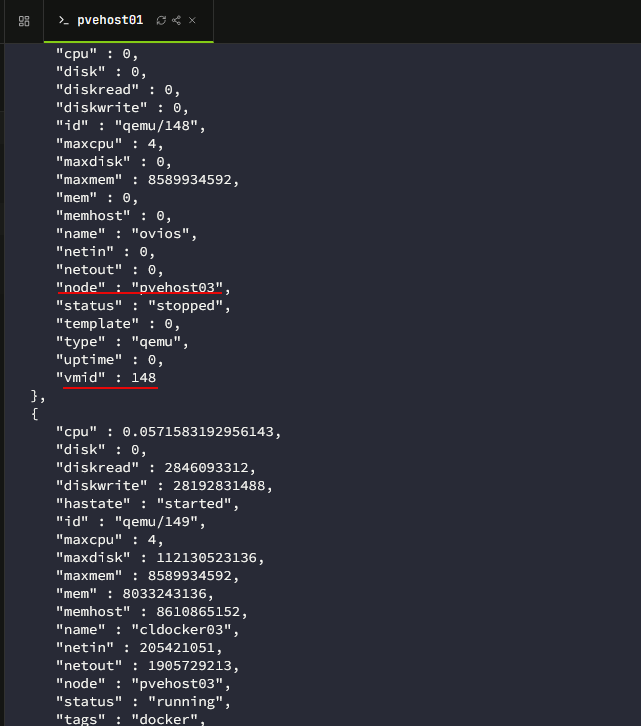
The easiest way to catch this is to audit where critical workloads are running in your Proxmox cluster. In the Datacenter view, you can look and see where your critical workloads are running. Proxmox makes this easy to see in the web UI in the Server View. You can search for your node and you will be able to see which host “owns” it.
So, a key point here is that you aren’t really looking to see if your VMs are “balanced” in that sense, in terms of resources. We are simply looking to make sure we don’t have two critical VMs that each host one side of a redundant application found on the same host.
You can also see this from the command line with this command:
pvesh get /cluster/resources --type vmOr if you just want the name of the VM and the host it is running on, you can use a bit of jq filtering:
pvesh get /cluster/resources --type vm --output-format json | jq -r '.[] | "\(.name)\t\(.node)"'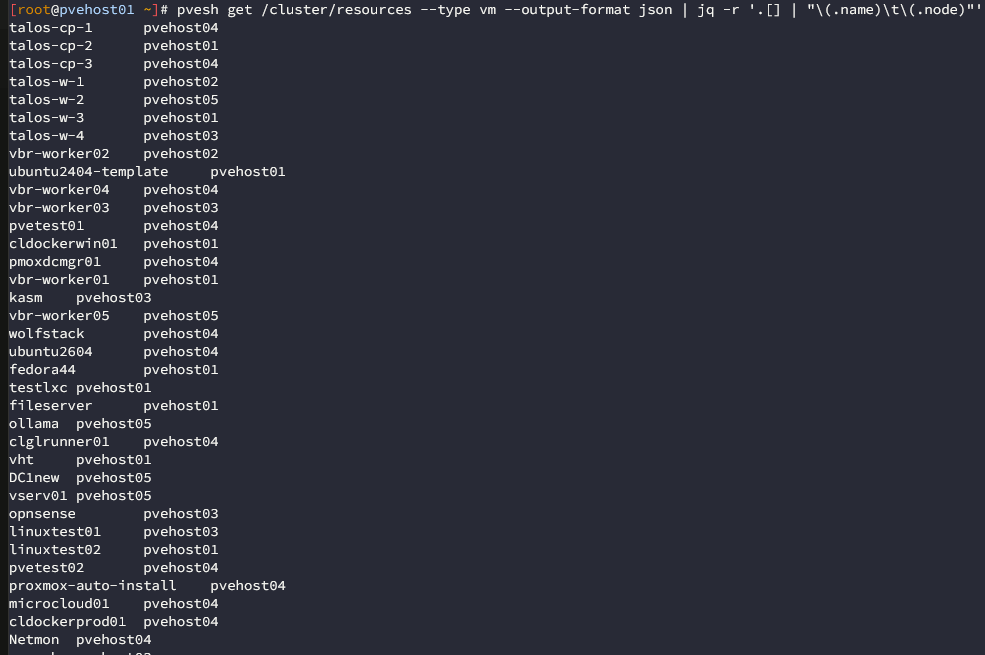
Or, for something easier to pipe into something programmatically, you can use JSON output:
pvesh get /cluster/resources --type vm --output-format json-prettyOnce I start looking at the cluster this way, I am no longer thinking about VM 100, VM 101, and VM 102 individually. You start to think of your applications and this I think is the most important mental note that you can make.
Proxmox HA does not automatically “know” about your app architecture
Keep this in mind about Proxmox HA. It is a great solution to allow relocating HA managed workloads when a node files. This is a useful feature. But it doesn’t inherently know that 2 VMs are supposed to protect one another.
So, from the hypervisor perspective, dns01 and dns02 are just simply two different virtual machines. It doesn’t automatically know that one is the primary and one is the secondary for your application. This is where something called placement policy comes into effect.
Proxmox node & resource affinity
In the latest releases of Proxmox VE Server, it provides HA rules that can define where HA resources run, must like we have in VMware vSphere environments. In Proxmox VE 9.x, you have node affinity and resource affinity. They each serve different purposes.
- Node affinity – where a VM or container should run
- Resource affinity – whether VMs or containers should run together or apart
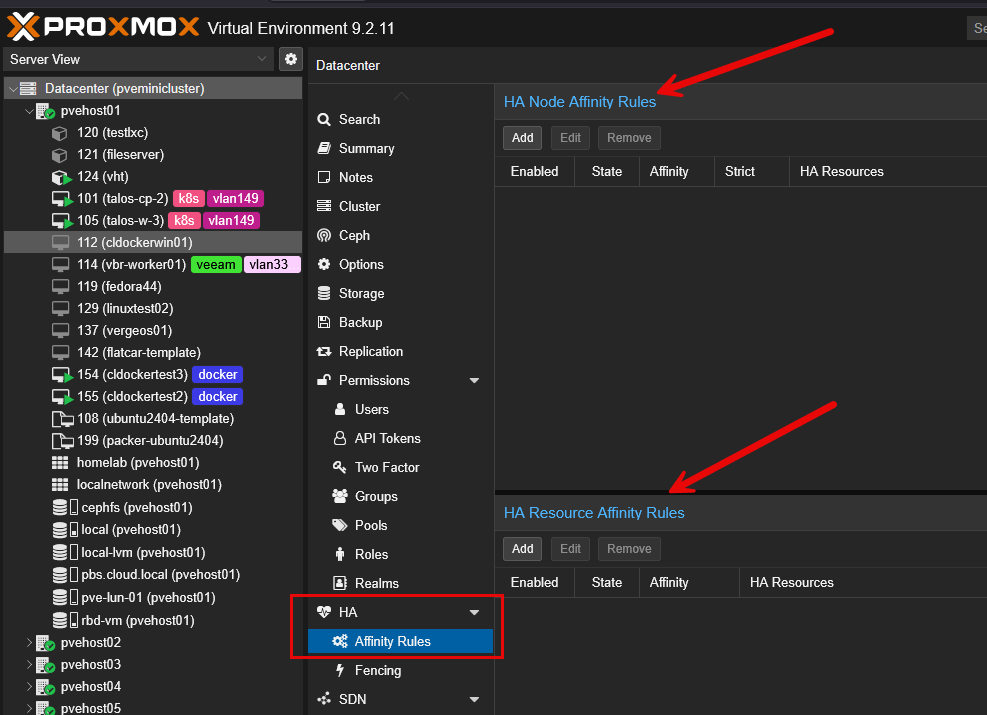
Node affinity
With the node affinity rules, these tie specific VMs to nodes. For instance, maybe only Proxmox node 3 has a GPU, and so I want to tie VM1, VM2, and VM3 to Proxmox node 3 since they need to have access to a GPU.
With the node affinity setting, you can make this either soft or strict. A soft rule in this configuration means that VMs “refer” certain nodes but can use another node if necessary. A strict rule as you would imagine means that the HA resources “cannot” run outside the specified nodes. You can also assign priorities to nodes to have a preferred failover order.
Resource affinity
With the resource affinity HA resources, it allows you to configure affinities between two or more HA resources. You may not care which “specific” nodes they are running on as long as they align with your resource affinity configuration. There are two modes to this.
- Positive resource affinity means certain resources should be kept together
- Negative resource affinity means that you keep certain resources separated or apart across your different cluster nodes
For redundant infrastructure architectures like we talking about here, the negative resource affinity is the one that applies to what we are talking about accomplishing with our app redundancy.
For example, if VM 152 and VM 102 are redundant DNS servers, a negative resource affinity rule can configure the rule so that these two VMs should not be on the same Proxmox host. Note under the Affinity configuration, this is where we say to either “keep together (positive)” or “keep separate (negative)”.
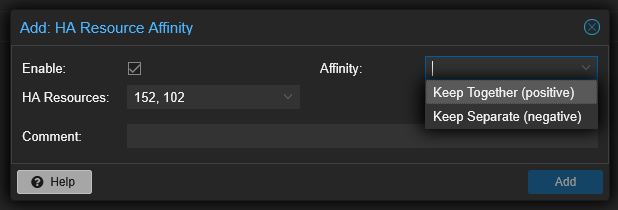
So, now, with negative affinity, I know longer have to rely on my memory to perform these simple but crude checks to make sure VMs are not running on hosts that are in the same failure domain. Instead, this is taken care of for me automatically with the resource affinity rules and “negative affinity”.
Don’t forget about storage redundancy
Even if you have the negative affinity rules configured as they need to be configured and you have your application configured so that resources are split between two VMs and application data is replicated between them, there is another aspect to this that you need to think through and that is storage redundancy.
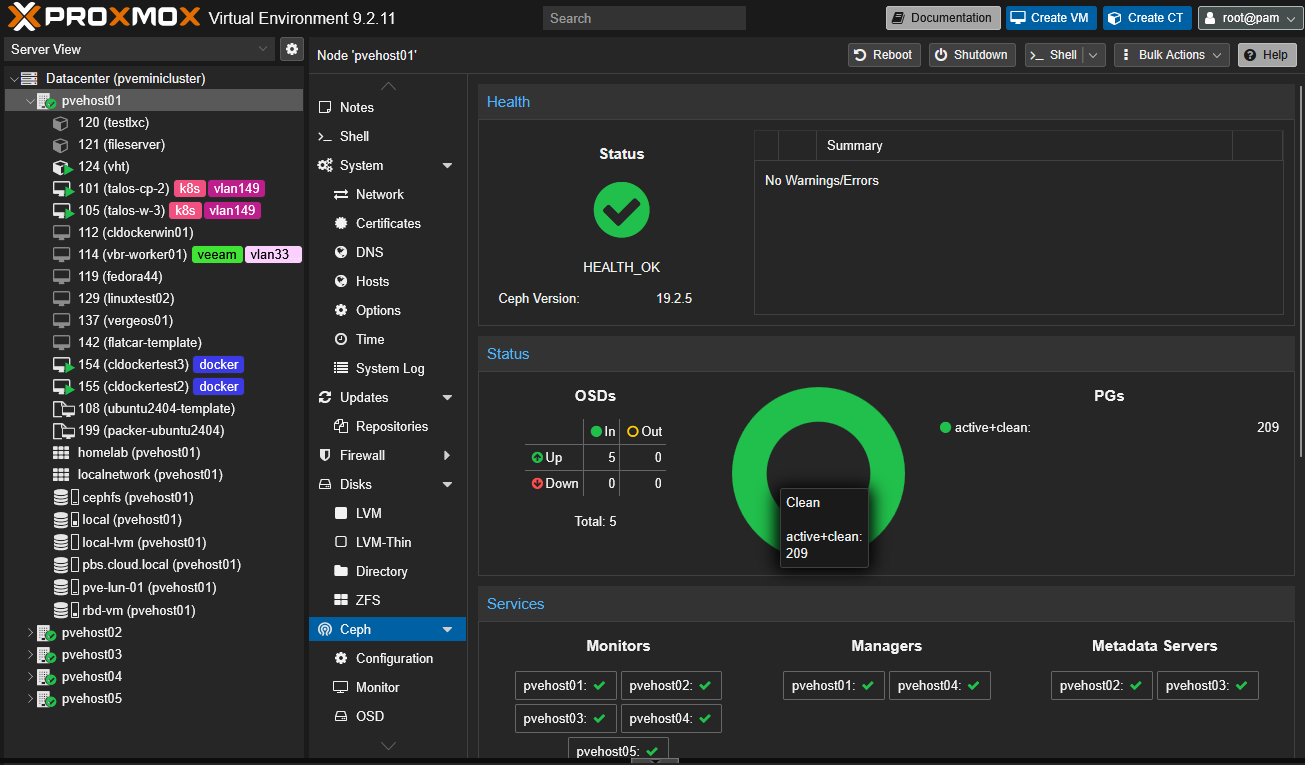
If you have everything configured correctly with your HA resource affinity rules, you still need to think about storage. What if both VMs that you want to keep separated reside on the same storage? If you have a storage issue, then both VMs are going to go down, even if they are owned by two different Proxmox hosts.
Containers can hide affinity as well
I love running containerized solutions in the home lab. But, keep in mind they can also help to hide where resources are running. You may have two separate containers running primary and secondary DNS server solutions. But what if both instances are running on the same Docker host?
Even when everything looks redundant and seems like it should be resilient, you may actually have resources that are running on the same resources. If that Docker VM crashes and it is running both contaiers, both DNS servers will go down.
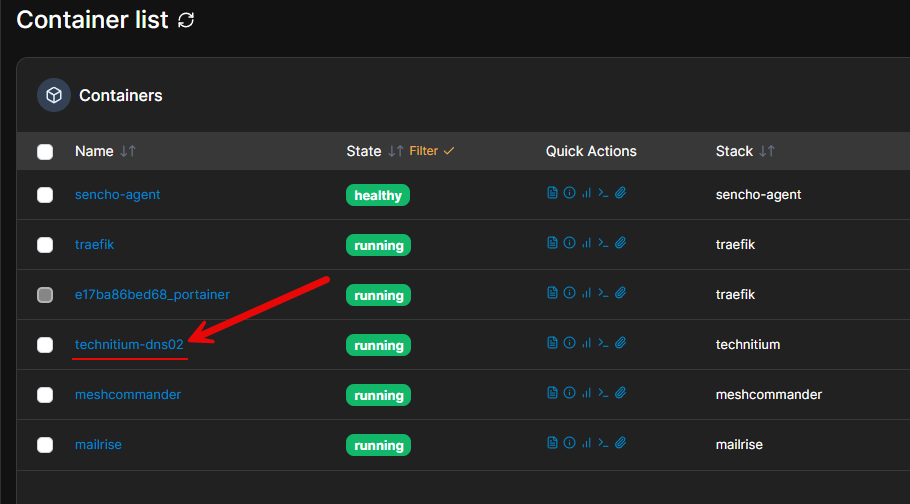
So, to fix this, you would need to have two Docker host VMs. One Docker host would run one DNS container, and the other Docker host would run the other DNS container. Then, you would of course need to create your negative affinity rule and apply it to both of your Docker hosts where you have each DNS container running.
Wrapping up
Hopefully, this discussion of how having redundant VMs running the same application for resiliency, shows that you can still have things running in the same failure domain. It is wise to setup the Proxmox VM affinity rules that allow you to provide separation for your critical VMs and Docker hosts that are running one of your multi-container configuration so that these don’t run on the same Proxmox host. If you want to learn more about Proxmox, join up with my Proxmox training content here: Proxmox Training — Premium library.
More in this topic




Google is updating how articles are shown. Don’t miss our leading home lab and tech content, written by humans, by setting Virtualization Howto as a preferred source.
About The Author
