


On the surface of things, I really like Proxmox networking. It is straightforward and based around Linux bridges which are powerful in their own right. You get the default Linux bridge out of the box called vmbr0. You attach a physical NIC and you can also enable VLAN awareness. After that, you are pretty much ready to connect your virtual machines. For the basics this works perfectly. However, the problems can start as you get into more advanced requirements with your home lab or production. Sometimes things can be broken but not really obvious at first. I have broken my lab more times that I care to admit while working through advanced configs. These are the key gotchas I ran into and what I learned from each one.
Bridge configuration is not always what you think it is
The Linux bridge as we mentioned is the foundation of Proxmox networking that is used for Docker container hosts, Kubernetes nodes, etc. It is also one of the easiest places to make subtle mistakes or get yourself into trouble later. It can be easy to assume that if the vmbr0 is attached to a physical NIC, then everything connected to vmbr0 is going to have automatic access to the network behind the NIC.
For the most part in simple cases, this holds true. But once you start introducing VLANs into the mix, this can cause issues when you don’t expect it. For example, if you are tagging VLANs at the VM level, the bridge itself needs to be VLAN aware. If it is not, tagged traffic will not pass through it correctly. This is the case, even though everything appears to be configured the right way.
Also, when you have multiple bridges connected to the same physical interface, you may think these operate in an independent way of each other. That is the case most of the time. However, I found out there are cases when this doesn’t behave like you would expect. You an end up with overlapping or conflicting configs.
For instance when I was playing around with and eventually switching over from VLAN-tagged Linux bridges to Proxmox SDN VLAN tagged vnets in a zone, I found out you can’t take a vnet with the same VLAN that you have configured on a Linux bridge, even if the bridge you choose to back the zone is not the same bridge you are replacing with the vnet.
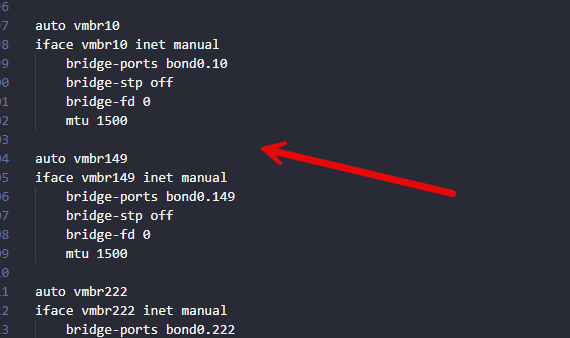
I had a vmbr149 Linux bridge that was tagged with VLAN 149. I tried to create a vnet that was also tagged with VLAN 149 but that was backed with vmbr0 which was basically a trunk bridge allowing all tagged frames. However, this couldn’t pass traffic until I got rid of the vmbr149 bridge.
I am thinking in the background, Proxmox realized it already had a bridge tagged with VLAN 149 and just used it to carry the traffic and this wound up double tagging my frames.
However, I have greatly simplified my design. I started consolidating everything down to a single VLAN aware bridge where possible and letting the tagging happen either at the VM or SDN vnet level. This removed a lot of confusion and clashing VLANs.
VLAN tagging confusion between vmbr0 and virtual machines
Taking this a step further. VLAN tagging can be done at multiple places in Proxmox. You can tag traffic on the bridge, on the virtual machine network interface or through Proxmox SDN. Mixing your approaches makes things messy.
It can be easy to “double tag” your VMs accidentally if you have a tag on the bridge itself and on the network interface attached to the VM. Another issue that can be easy to run into is forgetting where the tagging actually ahppens. If your physical network switch port is configured as a trunk, you usually want the Proxmox bridge to pass VLANs through without modifying the tag and let the VM define it.
Below is an example of double tagging frames at the VM interface level along with the Linux bridge level.
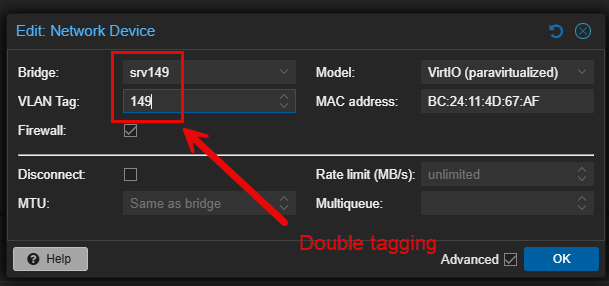
Usually I would say that most will want their switch ports to be in trunk mode and not access mode. This will allow you to pass multiple tagged VLANs. If you have the port in access mode, keep in mind that you won’t be able to pass anything other than untagged frames from your Proxmox host.
MTU mismatches will silently break things
One of the silent gotchas that can happen in the home lab is jumbo frames. I encountered some “shooting myself in the foot” moments when trying to get Ceph running alongside virtual machine traffic in the lab.
If your physical network is configured for jumbo frames and your Proxmox bridge is set to MTU 9000, it is easy to assume that everything will just work. However, VMs do not automatically inherit the MTU value in a way that you would expect.
Some guests will default to an MTU value of 1500. Others might pick up the higher MTU depending on drivers and configuration. This can lead to inconsistency and strange behavior. Even worse, this can lead to situations where you don’t really have obvious errors but you see intermittent connectivity. I saw this in my environment with large transfers (elephant flows) that would fail unexpectedly. Check out my post where I go more into detail on what I saw:
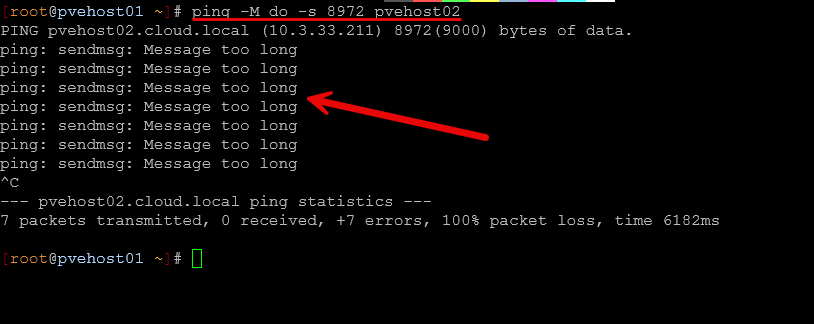
This can lead to times where strange behavior and traffic issues crop up or traffic even fails. The fix for this is to be very deliberate and explicit in how you set your MTU configuration. This means that you need to make sure you apply the value across all devices in the entire path, including physical switches, Proxmox bridges, and also inside guest operating systems. This is really the only way you now what value you will be able to pass consistently.
Usually jumbo frames really only benefit networks like storage networks which helps communication to be more efficient with lower CPU overhead.
Proxmox SDN introduces a new layer of abstraction
Proxmox SDN is a solution that I wrote about recently and how it is a great solution to use even in the home lab. Check out my post here:
However, it can obscure things from understanding what is going on under the hood. First, when I started using SDN, I thought it would be just like traditional brides with some added automation. Proxmox SDN is powerful, but it adds another layer that can obscure what is actually happening under the hood.
When I first started using SDN, I assumed it would behave exactly like traditional bridges with some added automation. That is not entirely true. SDN introduces zones, VNets, and controllers that change how traffic is handled.
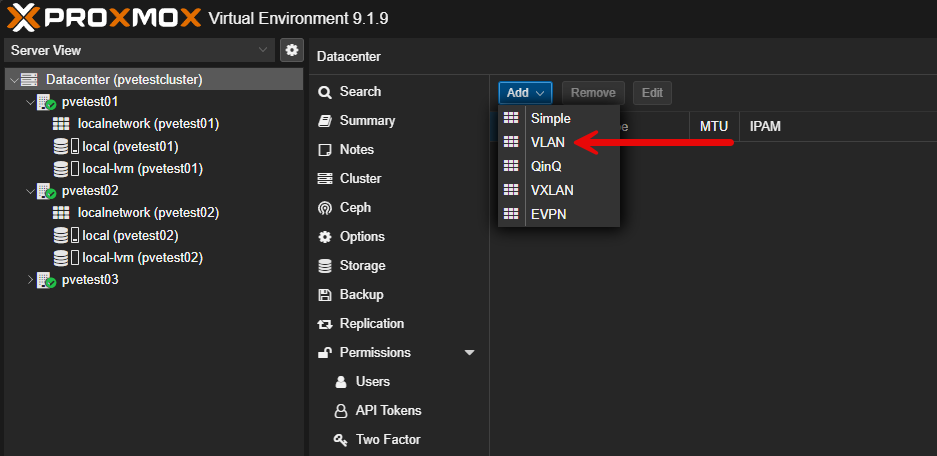
One issue I ran into was expecting SDN VNets to behave like existing bridges without fully understanding how they map to underlying interfaces. This led to situations where VMs were connected to VNets that looked correct but had no actual connectivity. Proxmox doesn’t tell you in the SDN configuration if you have bridge configuration underneath that will cause issues.
Another challenge is migration. Moving from a traditional bridge based setup to SDN is not something you want to do all at once. If you remove a bridge before making sure your SDN is fully configured and applied, you can easily cut off access to your VMs.
The approach that worked best for me was migrating one host at a time. What I did was evacuate a single host. Then I would delete the conflicting bridges underneath since I wanted to remove the unique bridges I had configured for each VLAN. Then, I would validate SDN functionality on that host and move a VM at a time over. I would have to switch it to the SDN vnet first on the host that wasn’t working (due to the underlying bridge). Then, quickly migrate the VM over to the new host with the working SDN vnet. This worked fine.
Once the migration finished (only took a few seconds with 10 gig live migration), the VM regained connectivity since the offending Linux bridge was gone from that host. I think SDN is definitely worth it, but it requires you to think about your networking at a deeper level.
Physical switch configuration matters more than you think
It is extremely easy to concentrate all on the Proxmox side of the configuration and then forget about the minor details with the physical switch config. Just remember, it plays a vital role in things working correctly.
Check out the 10 gig switch I used for my mini rack: I Bought a 10 Gig Switch to Fix My Proxmox Ceph Cluster and It Changed Everything
No matter how much you tweak on the Proxmox side, if the switch is misconfigured, nothing will help. They are complementary configurations that work together. If you expect VLAN trunking but the switch port is set to access mode, tagged traffic will never get through. Then on the flip side, if the switch is expecting tagged traffic for a particular VLAN and you are sending untagged frames, you will also have an issue.
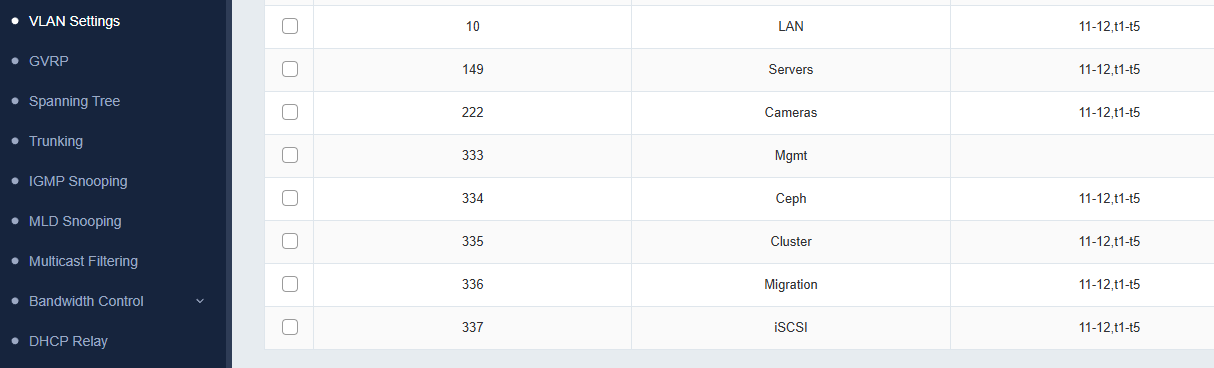
Keep in mind too that more advanced configurations can introduce additional complexity. If you are bonding interfaces together on the Proxmox side, the switch also needs to be configured with the same bond configuration and hashing algorithm. Mismatches on this side can lead to uneven traffic distribution or all out connectivity loss.
One lesson I have learned is to always validate the physical network first. Confirm VLANs, trunk settings, and link aggregation before diving into Proxmox troubleshooting.
Keep firewall rules in mind with traffic flow
Proxmox has built in firewall capabilities at the datacenter, node, and VM levels. This is a great feature, but it can also cause confusion if you aren’t thinking about it. I have run into situations where everything looks good from a networking perspective, but traffic was still blocked. The issue turned out to be a firewall rule applied at a higher level that I had forgotten about.
Because firewall rules can be applied in multiple places, it is important to understand the order of evaluation. A rule at the datacenter level can affect all nodes and VMs, even if individual VM rules look permissive. Also, if you have a physical or virtual firewall outside of Proxmox in the loop, always think about routed traffic and if firewall filtering might be in play when routing between VLANs.
When troubleshooting connectivity issues, you can temporarily disable the firewall just to rule this out quickly and easily.
Wrapping up
I think that Proxmox has some extremely powerful networking. Like any operating system or hypervisor, it has its own share of gotchas to be aware of. It allows you to build almost any design by default and also gives you plenty of ways to break things inadvertently. The gotchas i have covered here are all things I have learned through trial and error. Hopefully, sharing these with the community will save you some time and frustration in your own lab environment. How about you? What Proxmox networking gotchas have you run across in your lab? Let us know in the comments below.
More in this topic



Google is updating how articles are shown. Don’t miss our leading home lab and tech content, written by humans, by setting Virtualization Howto as a preferred source.
About The Author
