


AI is showing up literally everywhere and massively changing how things are carried out and being done. I am looking at ways that AI can benefit my home lab and hoping to share that with others if I find things that are truly beneficial. The curiosity over these tools led me down the rabbit hole of the Model Context Protocol, better known as MCP. If you have spent any time around AI lately, you have probably heard this term quite a bit. However, you may not have fully understood why it matters. An MCP server provides a cool abstraction layer between your AI agent and your API you want to speak with. Recently, I played around with a Proxmox MCP server that allows you to query your Proxmox environment in natural language to perform tasks.
What is MCP?
The acronym MCP stands for Model Context Protocol and is now an industry standard for the way that AI agents can communicate with external systems that have API endpoints that can be consumed. MCP servers are tools that allow agents to interact with the “live” data source to answer questions, run tools, and do various tasks.
MCP servers also give you the ability to have boundaries between what they can do and what they can’t do. Without MCP, you might ask an AI how to create a virtual machine in Proxmox and it might just tell you how to do it.
But, with an MCP server, AI can actually communicate with your Proxmox environment through the PAI, retrieve the information needed and perform the operations you need to have done. This is super powerful when you compare it with what AI could do only just a couple of years ago.
Here is a good Reddit thread on MCP Servers: What are MCP servers exactly, what market are they targeting, and who are they built for? : r/AskProgramming
Why this immediately interested me
If you follow my content posts, you will know that I enjoy finding ways to simplify infrastructure operations. Deploying things is only the beginning. Continuing to manage that infrastructure is where the real work starts. But making your infrastructure operations easier is definitely where I look for tools and solutions that make that happen.
The Proxmox MCP server feels like another step in that direction, especially in using AI for real-world use cases. So, think about it this way. Imagine asking your AI assistant questions like:
- Which virtual machines have been powered off for more than 30 days?
- Show me snapshots older than two weeks.
- Which node currently has the most available memory?
- Which VM is consuming the most storage?
- Clone my Ubuntu template and assign it the next available VM ID.
- Show me any failed backup jobs from last night.
Man that is real progress when we can get to that point of these types of natural language queries. So instead of having to remember commands and jump through multiple GUIs and dashboards, you can have this type of information basically instantaneously.
Why Proxmox is a great fit for MCP
One of the reasons that we can think about doing this with Proxmox is that it has a really good REST API interface. Even if you don’t realize that you have been using the API, you probably have. If you use tools like automation solutions, scripts, Terraform providers, Ansible playbooks, and third-party apps.
The way MCP servers work is they become just another regular consumer of the Proxmox API. But, the difference is that instead of writing code, you can interact with your Proxmox environment using natural language. This lowers the barrier for routine operational tasks. Infrastructure is much easier to explore and manage.
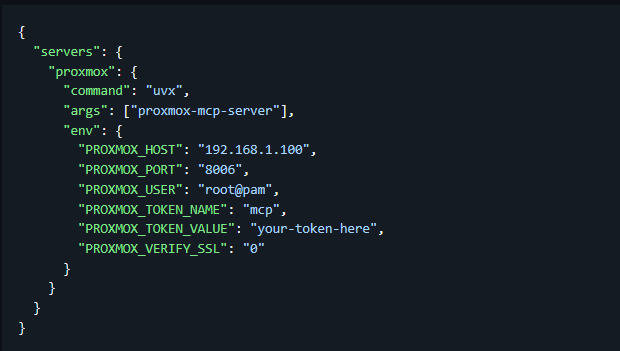
So any types of information that you want to query for like some of the examples we showed in the previous section, you can get this information VERY easily with minimal effort.
Installing the Proxmox MCP server in something like Cursor
First of all, the MCP server that I tested is Proxmox-MCP, which you can find on Github here: GethosTheWalrus/proxmox-mcp.
Cursor is arguably one of the easiest tools you can use to take advantage of MCP servers as I really like the Cursor settings page that makes the MCP integrations much easier than even just vanilla VS Code. With the approach of using uvx you can create a Python virtual environment or manually install the package with Python Pip.
I used the uvx approach which downloads and runs the MCP server directly from PyPI whenever Cursor starts it. That is the first step if you haven’t already installed it is install uv from Astral.
Install UVX
If you haven’t had to install UVX as of yet, you can do this with the following simple command in PowerShell:
powershell -ExecutionPolicy ByPass -c "irm https://astral.sh/uv/install.ps1 | iex"Loading the Proxmox MCP server
Once uv is there, you can verify everything is working by running:
uvx proxmox-mcp-serverThe first time this command runs, uvx will download the latest proxmox-mcp-server package into an isolated environment and launch it. There is nothing to install or maintain manually.
Cursor setup
In cursor, you just wire in the Proxmox MCP server configuration.
C:\Users\localadmin\.cursor\mcp.jsonMy configuration looks similar to the following. You will need to customize the MCP server settings with your real values here. Creating a custom API token and user for this purpose is a great way to lock things down and have least privilege access.
{
  "mcpServers": {
    "proxmox": {
      "command": "uvx",
      "args": [
        "proxmox-mcp-server"
      ],
      "env": {
        "PROXMOX_HOST": "your-proxmox-host",
        "PROXMOX_PORT": "8006",
        "PROXMOX_USER": "root@pam",
        "PROXMOX_TOKEN_NAME": "mcp",
        "PROXMOX_TOKEN_VALUE": "your-api-token",
        "PROXMOX_VERIFY_SSL": "0"
      }
    }
  }
}
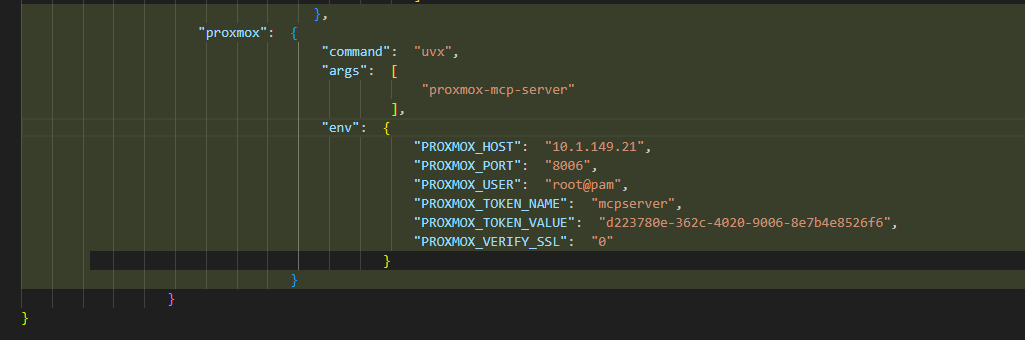
Below is an example of what my configuration looks like for a test Proxmox instance in the properties of the MCP server in Cursor:
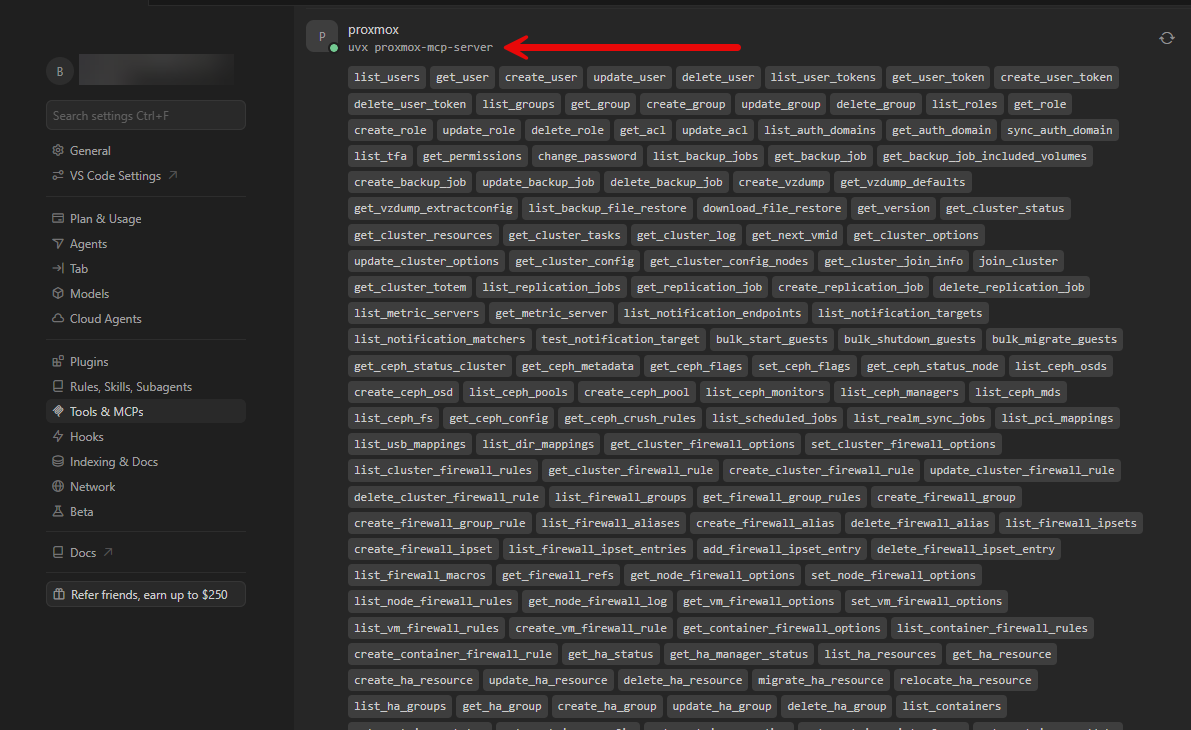
After turning the MCP server on, you see the green bubble and all the tools you have available.
Querying Proxmox with Proxmox MCP
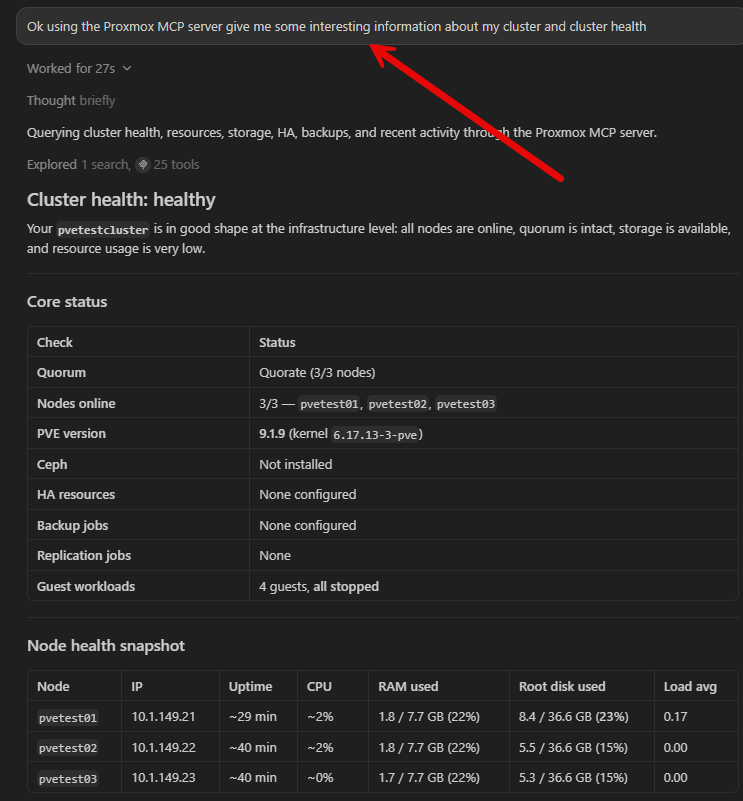
Now that we have the config in place and have everything that we need to make it work, we are at the fun part! Now we can start querying our Proxmox VE Server or Proxmox Cluster with the MCP server. I started out with a simple but fairly deep query of “Ok using the Proxmox MCP server give me some interesting information about my cluster and cluster health.”
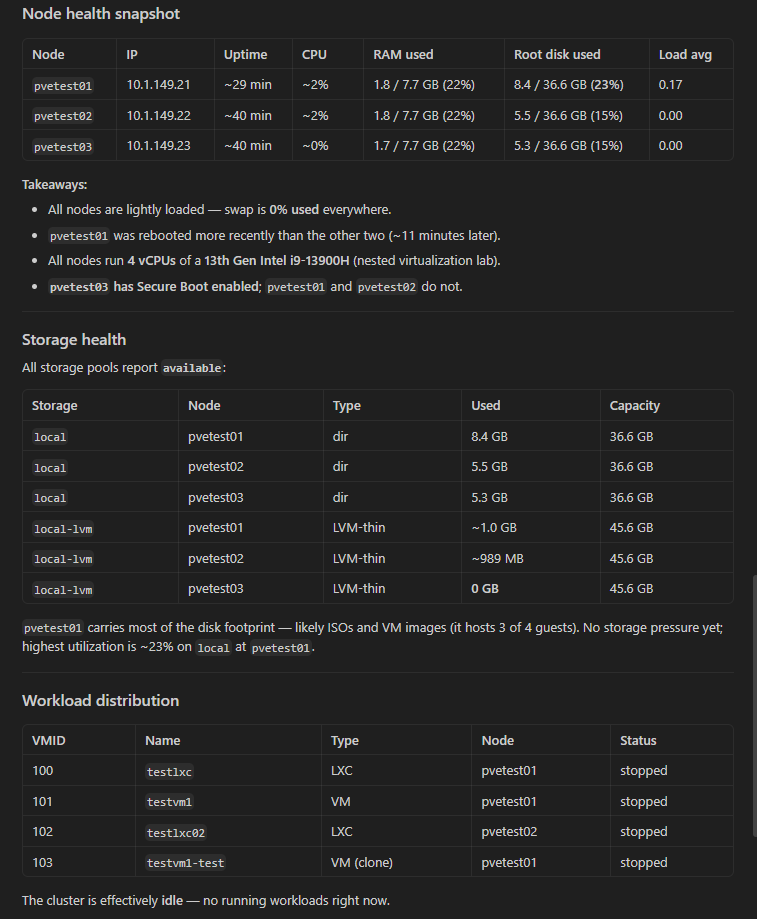
The same query continued the output with node health, storage health, and workload distribution.
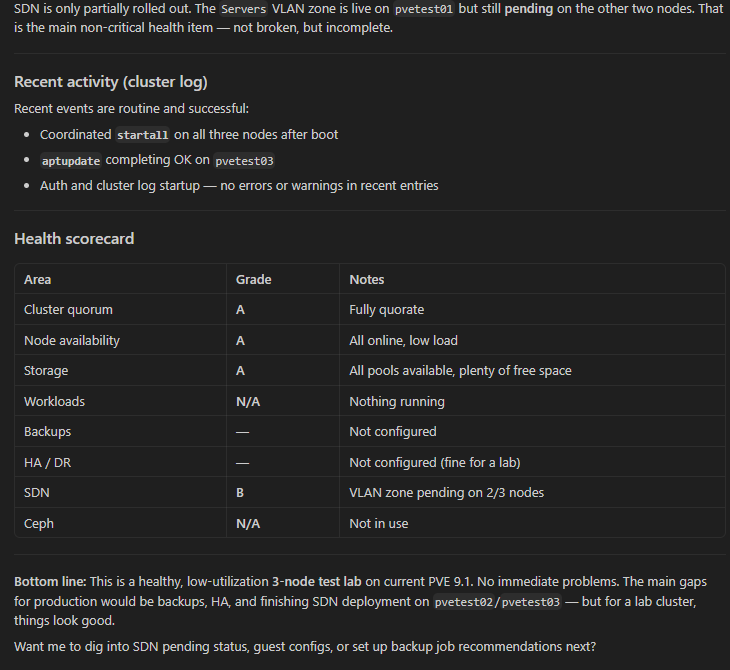
One of the very cool pieces of information that it gave me was the fact that SDN in this test cluster wasn’t fully rolled out. I had the SDN Servers Zone on one of the nodes but not the others.
Checking Proxmox nodes for updates
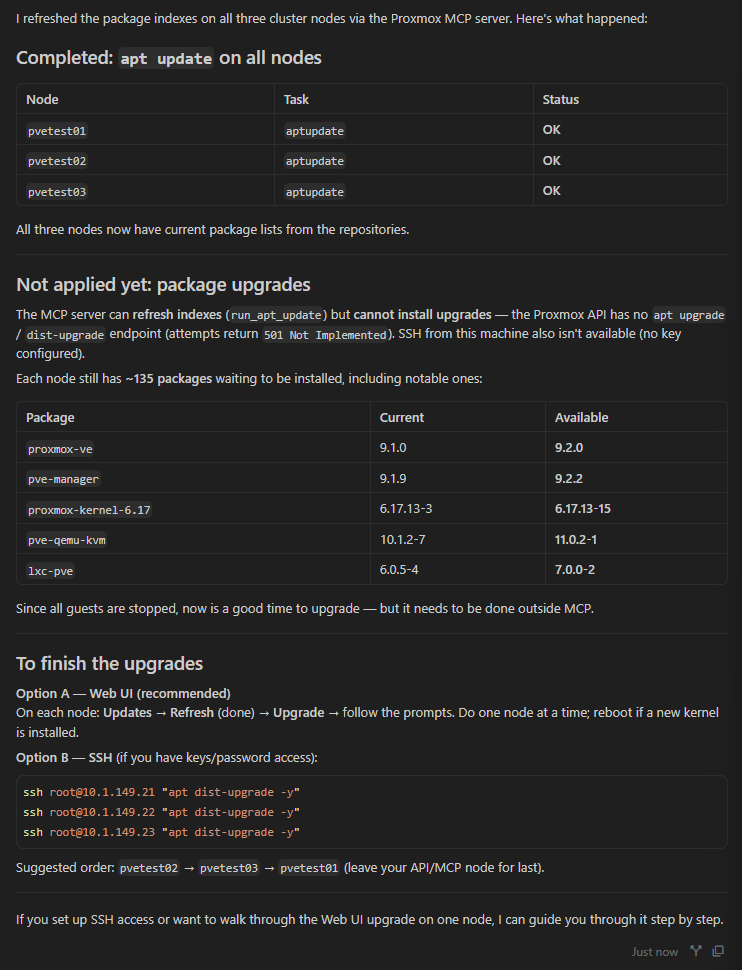
The tools are not only for getting information but you can also “do” things with them. For instance. I asked the MCP server “can you update the hosts in the cluster?” It queried the MCP toolset and did find the supporting apt update command listed, but it ran into an issue with the Proxmox API and limitations there it looks like.
Creating a new Proxmox LXC container using the Proxmox MCP server
One of the really cool things I wanted to try was telling the MCP server to download an LXC OS template of Ubuntu 26.04, spinning up the new container on a specific network, and then telling it what password to use. It carried this out without a hitch.
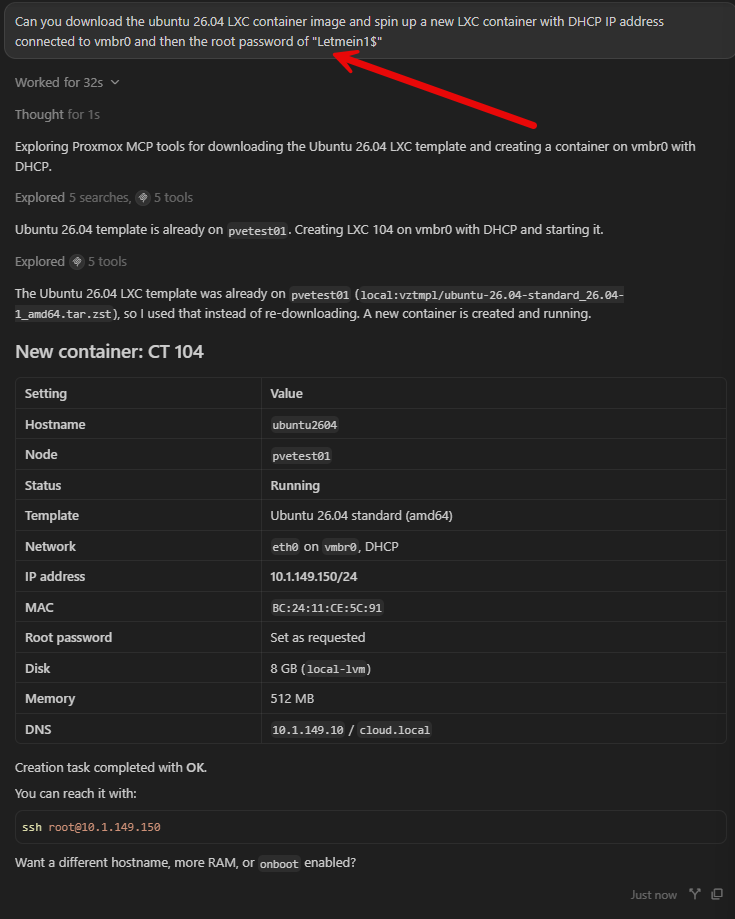
The new container was successfully spun up. In logging into the console, the password was correctly set, etc.
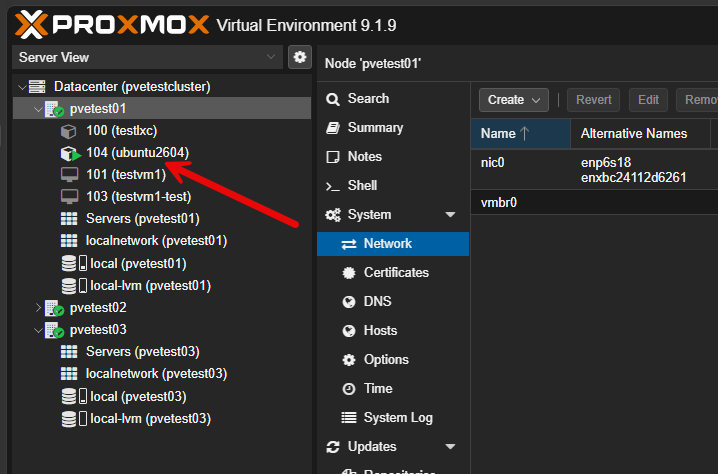
This is just scratching the surface of things you could do in your Proxmox VE cluster by connecting it to AI using this MCP server.
Where I think this becomes really useful
Operating my Proxmox home lab like this is definitely a lot of fun. But I don’t think this is just a novelty and something that is fun with no meaningful purpose. It totally ups our game when it comes to thinking about daily operations. There are so many repetitive tasks that can consume a ton of time throughout our day that we can use AI along with a special-purpose MCP server to find and review information.
Like the health check I ran above. Would I have thought to check and see if I had an SDN zone that was only created on one host but not all of them? I may have likely found this at some point, but it wouldn’t have been something that would have surfaced quickly.
So, making something like this part of your daily health checks on your clusters or PVE hosts is a great way to one-up your game when it comes to health checks and making sure your infrastructure is running smoothly.
Keep an eye and mindset on security
While MCP servers are extremely exciting and thinking about what AI can do for us in terms of repetitive tasks and the like, you still need to keep an eye on security. The MCP server is ultimately another interface into your infrastructure. So, it means that all the same security principles apply here.
Definitely use dedicated API tokens and give access based on least privilege access principles. Don’t give unnecessary admin privileges if these are needed. If you are using cloud-based models, you also want to understand exactly what information leaves the environment.
Many home labbers are already experimenting with running LLMs locally. This may make this an even more attractive option as it allows keeping AI tooling all locally to your home lab.
This feels like the beginning of something much bigger in the home lab
What excites me even more is that this extends far beyond Proxmox. As MCP server adoption continues to grow, I expect to see continued integrations with Docker, Kubernetes, Github, Terraform, backup solutions, networking appliances, monitoring systems, storage, and many others. We are only getting started in this space.
But, rather than replacing skilled humans, I think this is just going to change how we operate and we are instead going to need ones that understand all things MCP and AI in the operations in the enterprise and cloud native environments. We can gain those skills in our home labs.
Wrapping up
I am really excited about where all of this is going. We now have the ability to have AI assistants and agents help us do work that before we were only asking them to give us information on. I think as these tools continue to mature and grow, we will see even more capabilities emerge. But like everything else, we need time to gain trust in these new types of tools. A home lab is a great way to develop that trust and experiment with what it is good at doing and what we may not give to AI just yet. What about you? Have you used Proxmox MCP servers in your home lab? Let me know in the comments.
More in this topic


Google is updating how articles are shown. Don’t miss our leading home lab and tech content, written by humans, by setting Virtualization Howto as a preferred source.
About The Author

Awesome article Brandon. Going to get this into the lab today and see what happens.
Great article! I wonder if you tried to connect Hermes agent to Proxmox? I guess it will be much easier for a beginer…
John,
Thanks for the comment! Yes, I think this kind of agent access is easily accessible now with all the great MCP server options we are seeing out there now. It makes it easy.
Brandon
Awesome article as always, definitely gonna try this.
Lackland,
Thank you! Do give it a try, very cool to see how it can streamline troubleshooting, health checks, and administration with our Proxmox clusters.
Brandon
Great article!
Thank you!