



One of the interesting trends that is happening across all industries is the rise of AI and AI-integrated tooling. I think most of us have experimented with running local LLMs through projects like Ollama and OpenWebUI. But a lot of these feel more like a chatbot that things that are super helpful in the lab, even though they are powerful. However, I have recently spent some time testing OpenCode connected to Ollama with local coding models running directly from inside my home lab. After going through the setup and experimenting with them, this to me is where things get more exiting with AI coding agents. And the cool thing is, you don’t need cloud APIs, subscriptions, or any of your code leaving your network. Let’s walk through using OpenCode in your home lab and how to get this setup.
What is OpenCode?
You have probably started to hear about OpenCode a lot about it lately. It is similar to what tools like Cursor, Claude Code, or Codex terminal interfaces look like. But the important thing is that it is something you can self-host and run locally and tie into your existing AI self-hosted resources like Ollama. With AI coding agents, these can interact with your local filesystem and repos directly from the terminal.
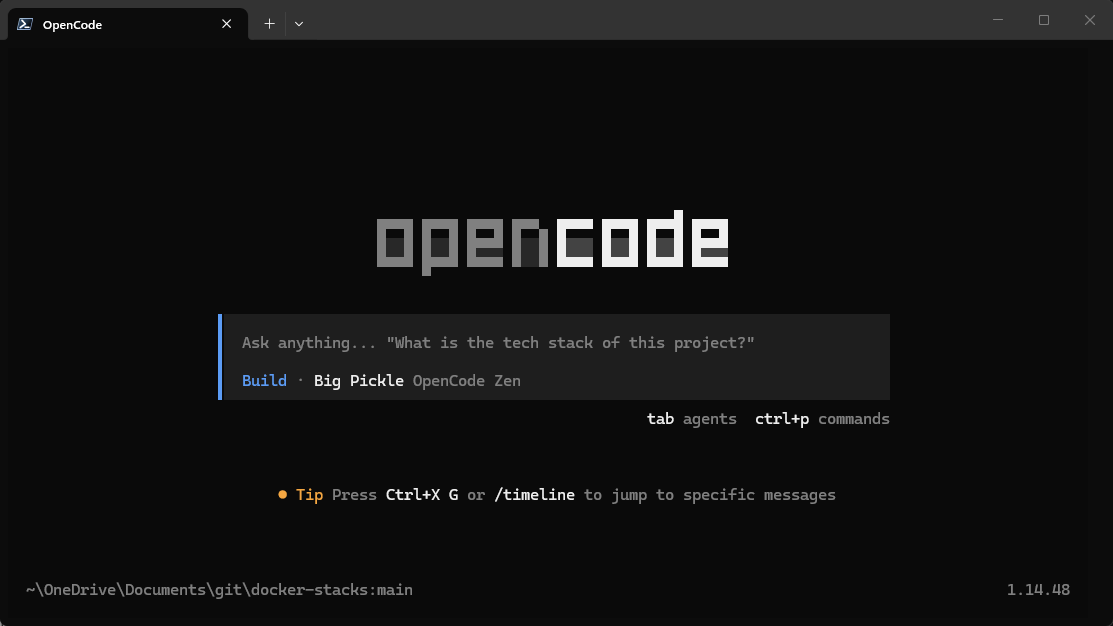
So, instead of running like a basic chatbot, OpenCode can do the following:
- Read files
- Go through project folders
- Analyze repos
- Suggest edits
- Search through code
- Help explain infrastructure
- Interact with tools
- Work with terminal tasks and workflows
This is what starts moving the experience from “chatbot” into “agent.” The really interesting part for home lab users is that OpenCode can connect to local models running through Ollama which I think is super cool and the most desirable if you want to experiment with self-hosting your own AI environment.
It means you can run your coding agent fully local without depending entirely on cloud providers. For me, this became interesting because I spend a huge amount of time working with things like Docker Compose, Kubernetes manifests, Bash scripts, Terraform, Ansible, Powershell, and the list goes on. These are just the types of things that an AI coding agent that you are hosting locally is really good at.
Why I wanted to try this locally
I have experimented with local LLMs before. Like many people, I initially tested Ollama together with OpenWebUI. While it was fun to ask questions and test prompts, I honestly did not find most local models particularly useful compared to cloud-hosted AI systems. You are locked into a really chatbot style workflow and I found the performance with pointing VS Code or another tool to use Ollama as a coding agent itself to be pretty terrible.
Coding especially felt weak pointed to Ollama directly. However, that is why OpenCode caught my attention. It combines the idea of local models, agentic tooling, filesystem access, repo awareness, and terminal workflows. So this feels much more practical from a coding and “usefulness” perspective than a self-hosted chat platform.
Also, if you value privacy and I know most of us do, when working with infrastructure code, internal configurations, or automation projects, there is definitely something to be said for keeping everything inside your own environment. For home lab users especially, this creates an interesting middle ground between experimentation and something that really is practical unlike what I have found before OpenCode.
If you want to know how to run your own Ollama instance locally along with OpenWebUI, check out my full tutorial here:
Installing OpenCode
Installing OpenCode is actually really easy. On Windows, I installed it with the command:
choco install opencode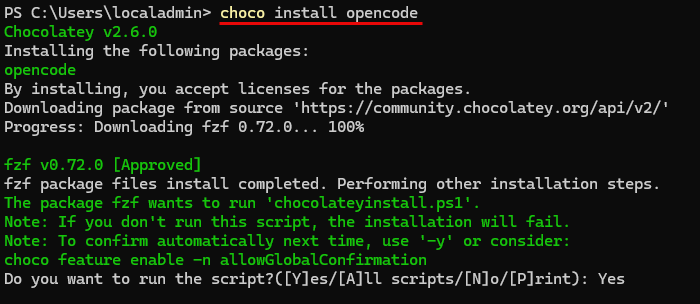
There are tons of other ways to install it depending on what operating system you are using. Note the following that are straight from the documentation:
# YOLO
curl -fsSL https://opencode.ai/install | bash

# Package managers
npm i -g opencode-ai@latest        # or bun/pnpm/yarn
scoop install opencode             # Windows
choco install opencode             # Windows
brew install anomalyco/tap/opencode # macOS and Linux (recommended, always up to date)
brew install opencode              # macOS and Linux (official brew formula, updated less)
sudo pacman -S opencode            # Arch Linux (Stable)
paru -S opencode-bin               # Arch Linux (Latest from AUR)
mise use -g opencode               # Any OS
nix run nixpkgs#opencode           # or github:anomalyco/opencode for latest dev branch
Connecting OpenCode to Ollama
This was the part that I wasn’t sure about until exploring the options and ways of connecting OpenCode to various providers. Ironically, there isn’t an option in the OpenCode text GUI for Ollama, only Ollama Cloud. You will only see the option for Ollama Local if you create the opencode.json file down below.
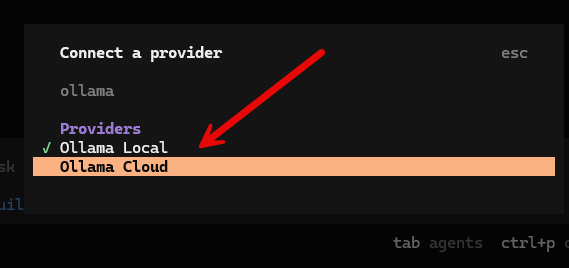
The solution to getting OpenCode pointed to your local Ollama instance is to create a local OpenCode configuration file, opencode.json as mentioned.
On Windows, I created this file here:
C:\Users\localadmin\.config\opencode\opencode.jsonIn Linux, it is located here:
~/.config/opencode/opencode.jsonInside the file, I configured OpenCode to use Ollama’s OpenAI-compatible API endpoint with the baseURL address. Also, you tell it which models to use. Here I started out with carstenuhlig/omnicoder-9b:latest which works well on my RTX 5080 with 16 GB of RAM.
{
  "$schema": "https://opencode.ai/config.json",
  "provider": {
    "ollama": {
      "npm": "@ai-sdk/openai-compatible",
      "name": "Ollama Local",
      "options": {
        "baseURL": "http://127.0.0.1:11434/v1"
      },
      "models": {
        "carstenuhlig/omnicoder-9b:latest": {
          "name": "Omnicoder 9b"
        }
      }
    }
  }
}
One important detail here is the /v1 endpoint. Without /v1, the connection generally won’t work correctly because OpenCode expects the OpenAI-compatible API interface from Ollama. After restarting OpenCode, the local models became available.
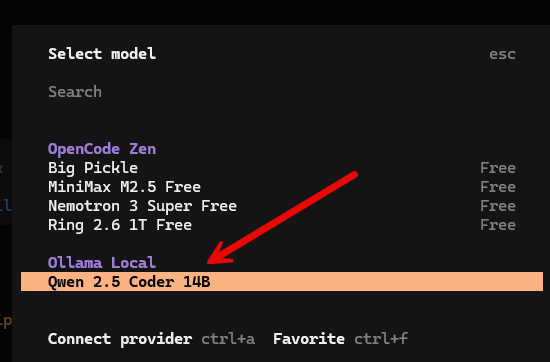
Choosing the right local model matters a lot
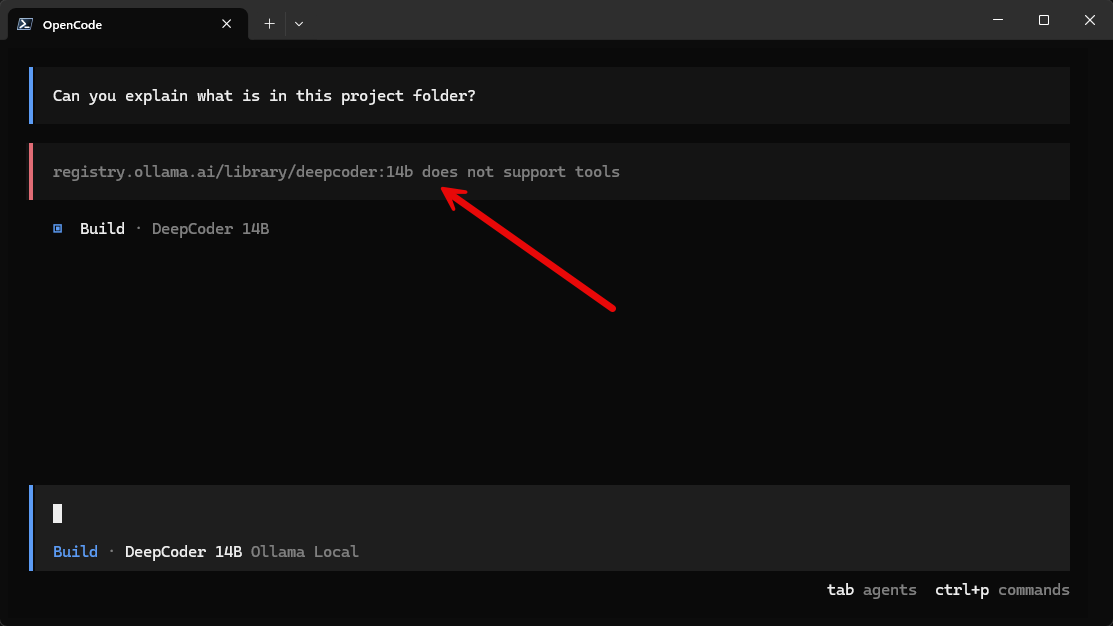
This was a learning experiment for me since I hadn’t experimented as much with coding agent configurations in a self-hosted way. Not all coding models are equal when it comes to AI coding agents. For instance, I had DeepCoder 14B downloaded, but saw this when trying to use it with the OpenCode platform below. It told me the model did not support tools which is must support for the AI agents that OpenCode uses.
Agentic coding systems depend heavily on tool usage. The model needs to support things like:
- File inspection
- Filesystem traversal
- Structured tool calls
- Repository search
- Terminal actions
- Context-aware operations
Without tool support, the experience isn’t very good and will descend into the experience of simply using a standard chatbot. The model can answer coding questions, but it cannot truly operate as an agent. That is where LLMs like Omnicoder 9b felt better.
I switched to carstenuhlig/omnicoder-9b:latest and the experience improved dramatically.
ollama pull carstenuhlig/omnicoder-9b:latestNow, OpenCode could properly read project folders, analyze repositories, explain files, traverse directories, and interact with local projects. This completely changes the experience.
Launching and using OpenCode for your projects
The way to launch Opencode so that it has understanding and context with your folder or project is that you change to your folder containing the files you want to work with and then you launch opencode from there.
For example:
cd C:\repos\terraform-proxmox
opencode
Once launched inside the project root, the agent can start understanding structure of the repository and files you want to work with. This is especially useful for infrastructure-as-code repositories where the context spans multiple files.
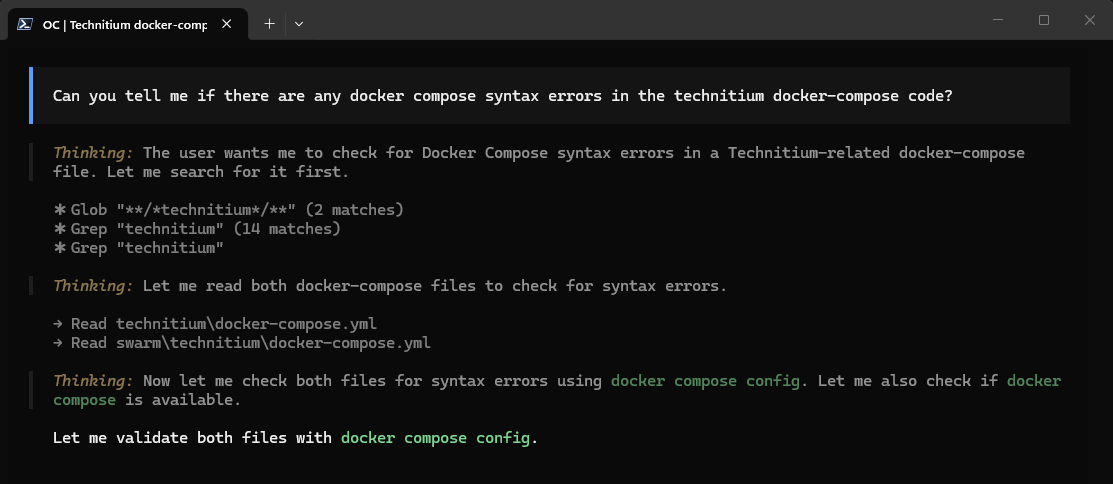
Below you can see a simple example of me asking OpenCode to look at the files in the current folder and telling me whether or not it has any syntax errors in the Docker compose code.
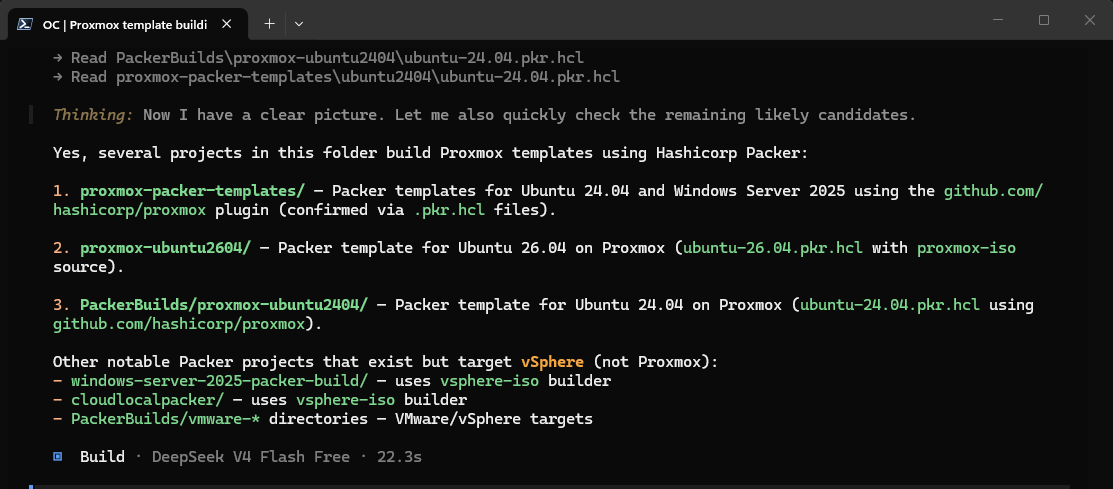
Another VERY powerful thing I think using OpenCode for is something simple like looking for particular files and project types. How many times have you been like me and couldn’t find a specific git repo and you couldn’t remember what you named the folder that housed the project you were looking for? I asked OpenCode agent below to find all the projects that related to Proxmox templates with Packer.
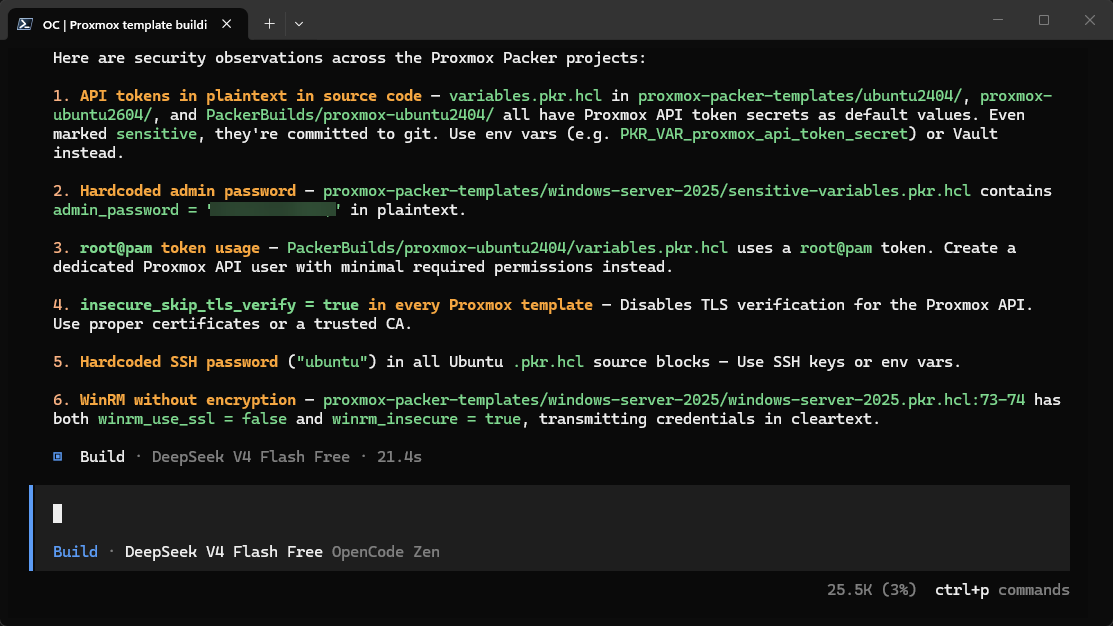
Another quick agent prompt. I asked OpenCode to give me security recommendations to tighten up security for the Packer projects and this is what it gave me. Also, as shown below, you can easily switch to publicly available cloud based models if you want as well. here using DeepSeek V4 Flash which is free:
These examples are just the tip of the iceberg and just show a tiny fraction of what can be done here. I am looking forward to exploring this more in my own home lab.
Hardware you will need and model size
One thing worth discussing when talking about OpenCode or any other self-hosted AI solution that you want to run in your home lab. You will need to have a decent video card. While you “can” run models entirely on a modern CPU, the performance is mediocre to poor at best in my honest opinion.
Smaller models like 7B variants will run on many systems, but once you move into stronger coding models like 14B or 32B variants, the hardware demands will increase and you want to have the right hardware for the job.
For my testing, the 7b and 14b models felt like the sweet spot between:
- Performance
- Quality
- Resource usage
- Responsiveness
The 32B models can absolutely perform better, but they also require a ALOT more RAM or GPU memory. For many home lab users, a 14B model is probably the best middle of the road starting point for consumer grade video cards.
I am using an RTX 5080 that I picked up Black Friday 2025. But, below a few NVIDIA cards that would do a great job with local AI coding agents across different budgets:
Current limitations to note
Even though I was pretty impressed with my little local AI coding agent setup with OpenCode, cloud models are still noticeably better. Large hosted models still will outperform your local models in many areas like deep reasoning, large repo awareness, multi-step planning, long context handling, debugging, etc.
So, like me, you will probably find they perform the best on focused projects instead of massive repos and large code bases. But, I think for most in the home lab, this is acceptable and definitely in the realm of what many are doing with infrastructure as code projects in their home labs.
But with those things said, I do think the gap is narrowing much faster between what we can do locally and what you get with a cloud-based model.
Why I think this is a shift in the way we operate home labs
These solutions like OpenCode are extremely important I think for home labs over the next couple of years. I think for a long time, we were super focused on things like virtualization, storage, networking, Kubernetes, self-hosting, etc.
And while those things are still important and we will continue to build around those, I think we are moving into an era where self-hosted AI that is actually worth self-hosting is possible and is part of the group of projects that are now worthwhile in a lab. People are starting to build local inference servers, GPU nodes, AI development environments, agentic workflows, and more interesting projects around AI.
Wrapping up
What about you? Have you tried out OpenCode as of yet? What kind of hardware are you using? What kinds of projects do you see this helping you with in your home lab? I am interested to see what others are doing in this space and how you are taking advantage of AI in your home lab workflows. Let me know in the comments.
More in this topic

Google is updating how articles are shown. Don’t miss our leading home lab and tech content, written by humans, by setting Virtualization Howto as a preferred source.
About The Author

Great article thanks for sharing. I’ve been trying to get tool calling work for a while. I spent way too long trying to get qwen coder 2.5 working with Ollama and OpenCode. So far I’ve only managed to get Gemma E4B working but I haven’t had time to do any actual coding with it yet. I’ll give Omni coder a try. How did you find this model?
PS – it looks like there’s a V2 now:
https://ollama.com/carstenuhlig/omnicoder-2-9b
Very nice! So glad you posted this, will give it a spin.
Brandon
Connel,
Great notes here. I think I had done the same as you it sounds like and tried different models. The Omnicoder model was one I found just searching around Ollama and looking at the various models. But it was a good find as it seems to work well.
Brandon