


If you are like me, AI agents are starting to get much more interesting to me than just running another chatbot in the home lab. We are well past that phase of generative AI and fully into the agentic phase. I have run local LLMs, experimented with different models and used AI for quite a bit of technical work. But an agent that can carry out tasks against my infrastructure is a different kind of animal in how I approach things. This is what got me interested in the Hermes agent. I hope to make this into a series of posts on stepping into getting a fully agentic workflow in the lab starting with the network configuration. I decided to build the security boundary around it from the ground up.
What agents can do for you in the home lab
AI agents are starting to get more interesting to me the more capable they become and the more cost effective various models have become, especially open weight models. Now, you can run something like a Hermes agent, and have this operate in your home lab, give it instructions over Telegram, and have it actually do time saving work in your lab for you.
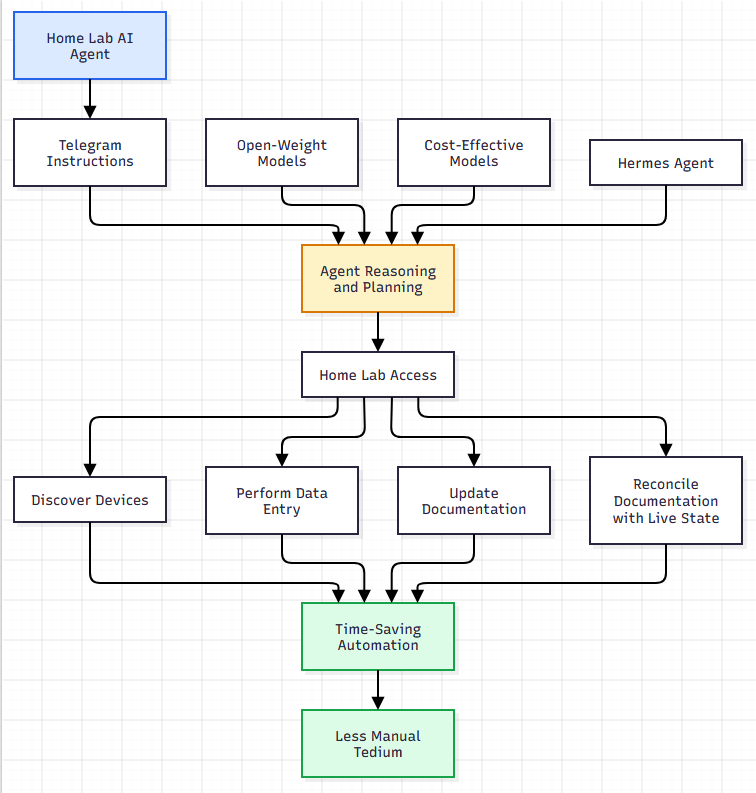
So, in other words, instead of you manually doing tedious tasks like discovering devices, data entry, updating documentation, and reconciling your documentation vs your live state, this is something an AI agent is almost purpose built for.
Why security and privacy comes into the question
However, there is almost a catch 22 to this discussion in “how much” leverage and freedom you give AI agents in your home lab. They need to be able to do what you “want” them to be able to do, but not be able to do what you “don’t ask them to do” or “don’t want them to do”.
Also, a lot of the models that are very cost effective aren’t necessarily from sources that ones trust with their data or with sensitive information in their home lab. While we don’t like to think there would be any nefarious activities going on with agents these days, I don’t like to take my chances.
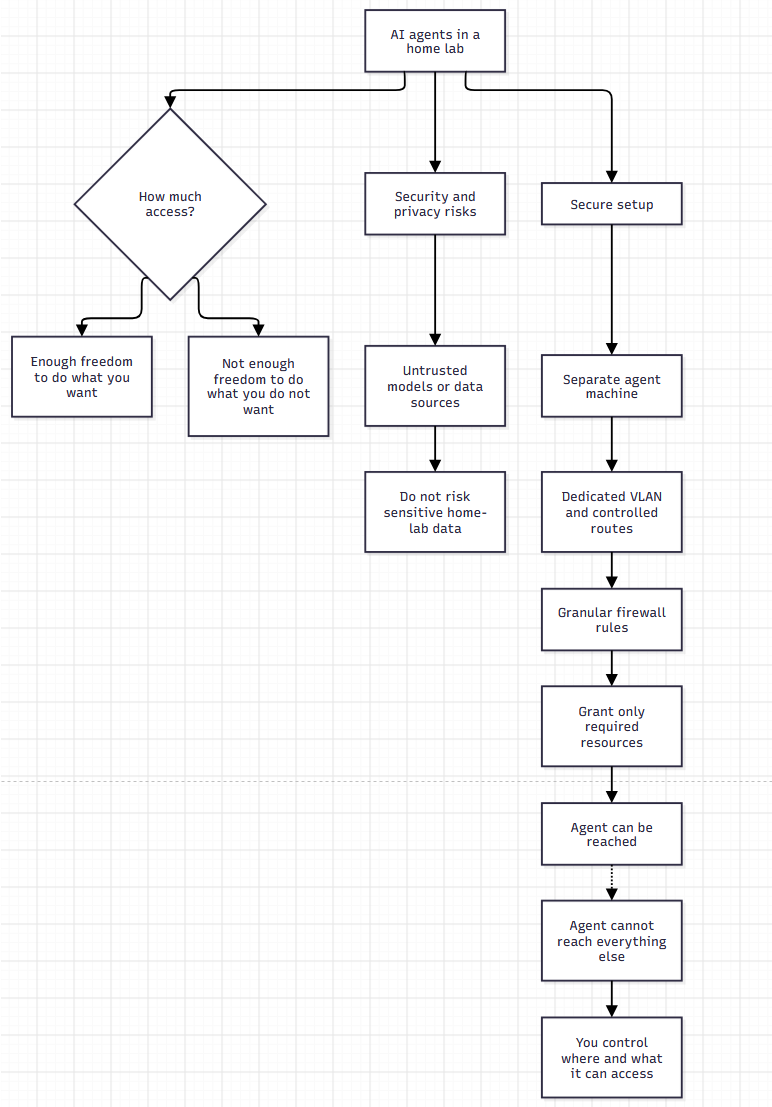
This is why to setup AI in your home lab the right way, you want to make sure YOU are the one that controls where and what it has access to. For me this means the following:
- Separating the agent machine and AI-related Docker/Podman containers from the rest of my network
- Creating a dedicated VLAN and route to get traffic in and out of the AI agent environment
- Only granting access to resources as I need them
- Even if I can get to the AI machine, it doesn’t mean “it” can get to me or anything else
- So, typically this assumes very granular firewall rules that you will want to configure
What is the Hermes agent?
The Hermes Agent is an open source AI agent from a company called Nous Research. It is designed to do more than just be a chat bot of sorts. It is purpose built to be able to execute commands, query APIs, have persistent memory, and it can run scheduled tasks as it is asked to.

Think also of Hermes agent as “not” the LLM because it isn’t the model itself, but rather the “worker. So, you can pair it with many different LLMs and have those run continuously on the server. Also, it integrates with existing messages systems so you don’t have to reinvent the wheel here. Telegram is its messaging platform of choice I would say that provides an easy way to communicate with the agent remotely. It is then empowered to become an AI operations assistant for your home lab.
My AI VLAN and network configuration
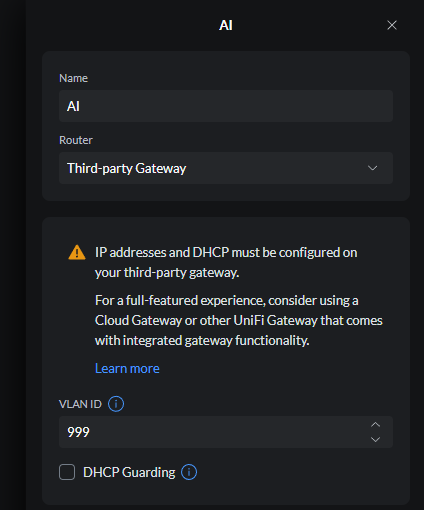
To begin with I started out building a dedicated VLAN for my AI lab. VLANs form the base of any network segmentation you want to do in the home lab or production environment. So, I created a new AI VLAN, which for me was VLAN 999.
I associated an intuitive subnet to go along with it:
- 10.9.99.0/24
Below, I created the new VLAN in the “networks” of my Unifi Network Application. I have a Unifi 48 port enterprise switch that gets this VLAN for tagging.
To go along with this, I created a new security zone in my Palo Alto PA-440 firewall that I have been using in the home lab for a few years now. I wanted to have a dedicated security zone to make arranging firewall rules easier and I wanted this to literally be separate from anything else I have established in the home lab.
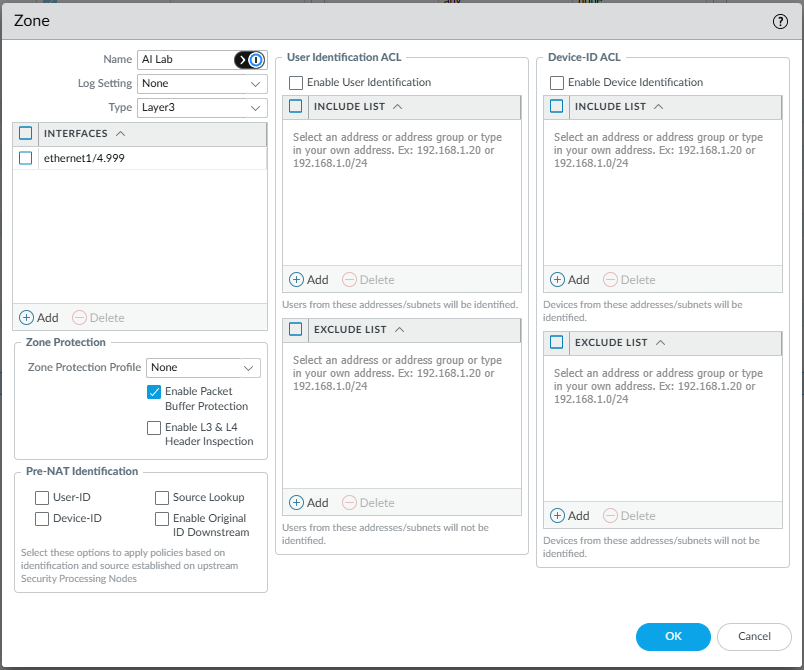
Then, on one of my existing “untrusted” interfaces where I already had a DMZ configured, I added a new layer 3 subinterface to the firewall for this new AI VLAN. I created an address object for the 10.9.99.1 GW that the Palo Alto would assume.
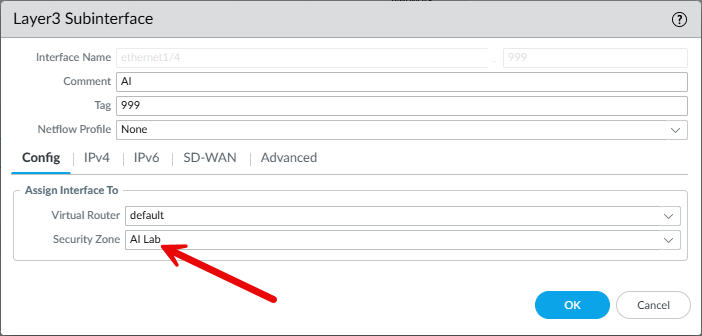
The Palo Alto firewall is the enforcement point
So keep in mind that this doesn’t have to be a Palo Alto firewall. That is just what I am running. Just about any modern firewall, including OPNsense can do what I am doing here with my Palo. Basically, we want to have our firewall rules setup in such a way that absolutely no traffic can get from the AI agent machine other than what we want to be able to flow.
In my configuration, the Palo Alto PA-440 handles the routing and firewall policy for this new network that I have configured specifically for AI agents. As you saw in the section above on creating the new VLAN 999, I added the new sub interface on the Palo and added this to its default router configuration so traffic can route between the different networks (when I want them to).
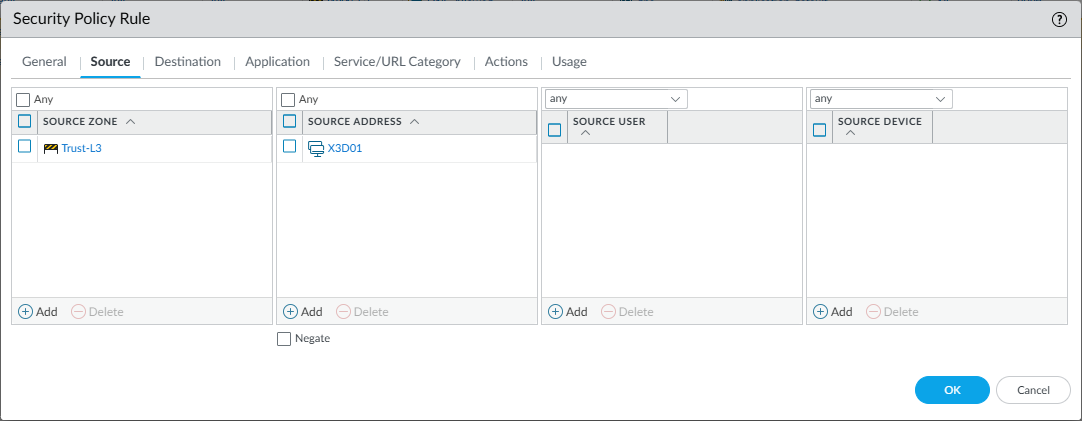
Also, I created an asymmetrical firewall rule that allows my management workstation to get to the AI Lab but it doesn’t allow the AI Lab to get to my management workstation or the rest of my home lab networks.
The source that I have is my Trusted L3 zone and the exact address object of my management workstation.
Then, for the destination, I have the destination as the AI Lab.
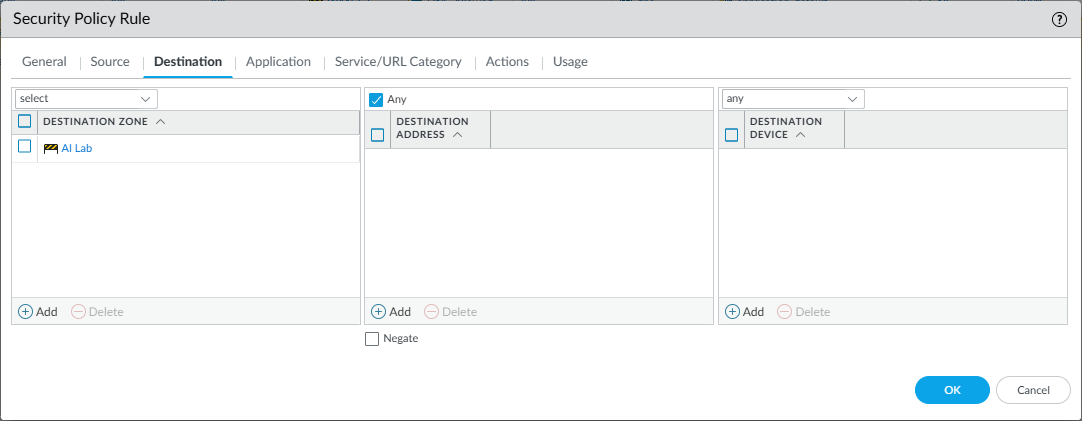
Keep in mind that for stateful firewalls like the Palo Alto PA-440, you don’t have to have a Hermes agent to Management reciprocal rule to allow the return traffic to work. It treats these as part of the originating session that comes from the management network so the return traffic is allowed.
Internet access is deliberately allowed
So, I didn’t completely isolate the Hermes agent from the Internet. This wouldn’t accomplish what I am trying to build. I don’t really have the GPU horsepower to have a satisfactory experience running LLMs locally. So, I need to be able to communicate with the Internet to reach cloud hosted LLMs. Also, I need general connectivity for things like updates, etc.
So I added the AI network to my normal Internet NAT policy on the PA-440.
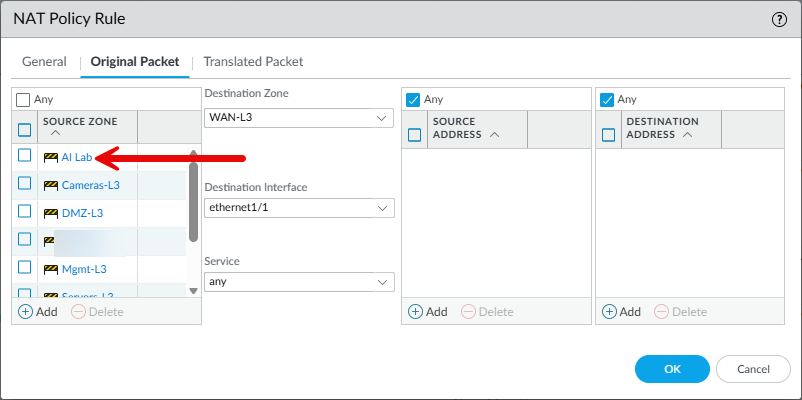
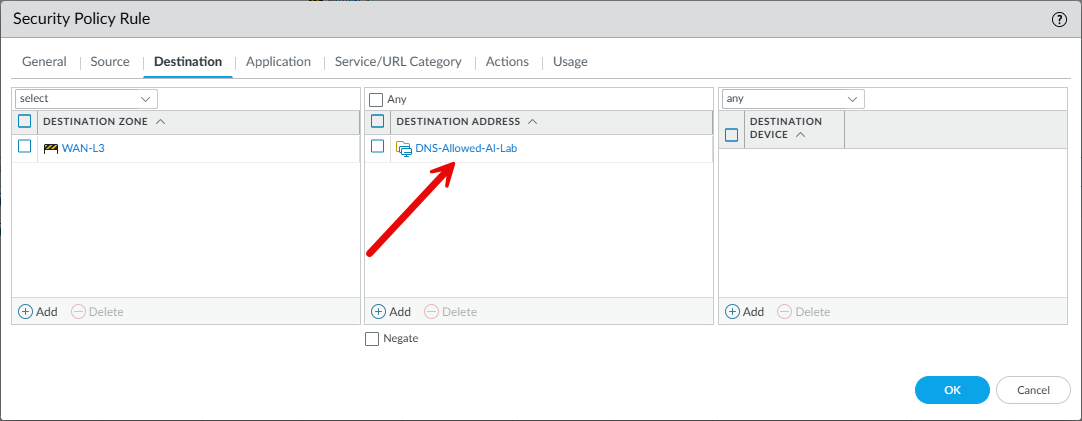
This allows hosts on 10.9.99.0/24 to establish outbound Internet connections. DNS was another part of this I had to consider. I didn’t want this machine to connect to my internal DNS servers in my home lab. So I wanted it to only connect to public providers. The DNS-Allowed-AI-Lab is an address group that contains the set of public resolvers I wanted to use.
Below is a high-level look at the architecture of the firewall and network segmentation for the AI lab:
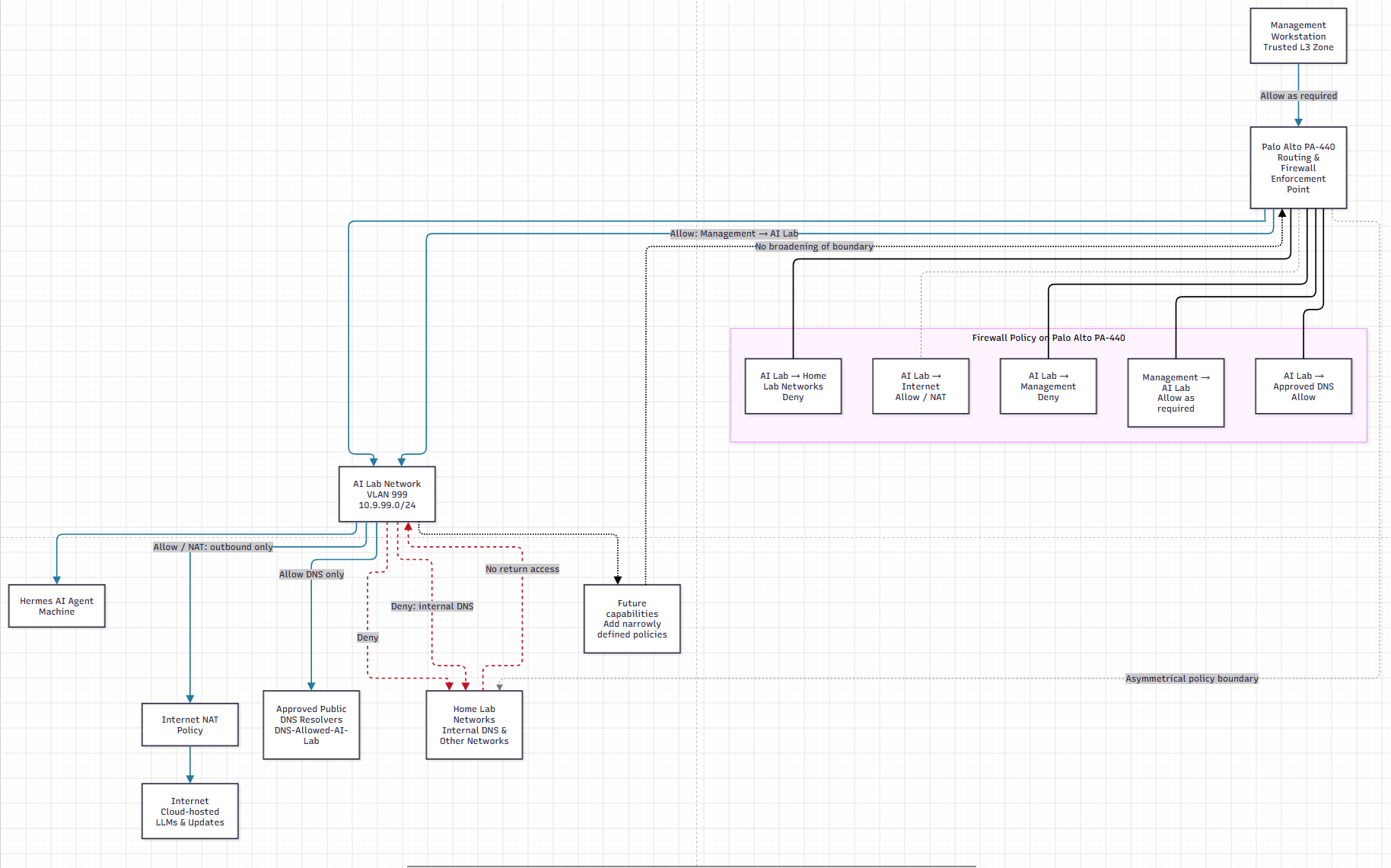
As Hermes gains capabilities, I’ll add very laser focused security policies that are needed.
Proxmox SDN made connecting the Hermes VM to the AI VLAN easy
One of the things that I really like about the Proxmox SDN functionality with VNETs is how easy it makes it to establish a VLAN on your Proxmox hosts in a cluster and then replicate that configuration across all your hosts in the cluster.
The traditional way to accomplish this is to configure the /etc/network/interfaces file manually and create manual bridges for each VLAN that you want to have your Proxmox host communicate on. SDN makes this SOOOOOOO much easier than having to sneakernet your configuration between all of your hosts.
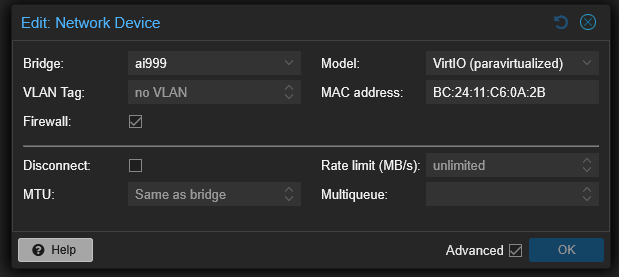
I created a new VNet called ai999 with an alias that helped to identify it as the AI Lab VLAN, the AI Lab VLAN 999 network. The VNet is associated with the VLAN 999 tag in the Proxmox SDN configuration.
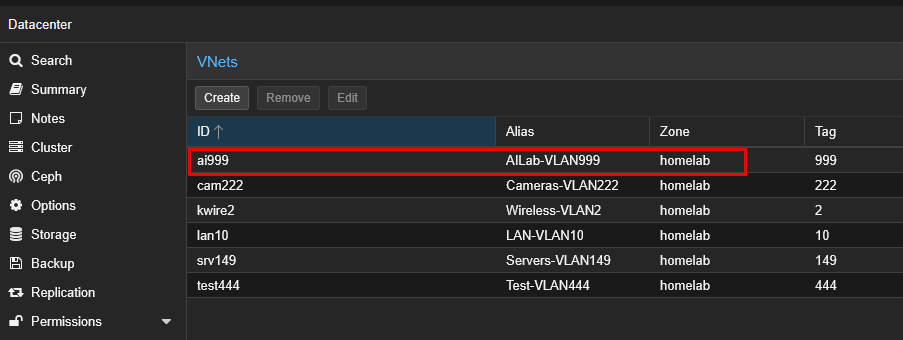
Then, I built up a new Ubuntu Server 26.04 LTS virtual machine and connected it to this new AI999 Proxmox SDN network:
Testing both directions was important to validate
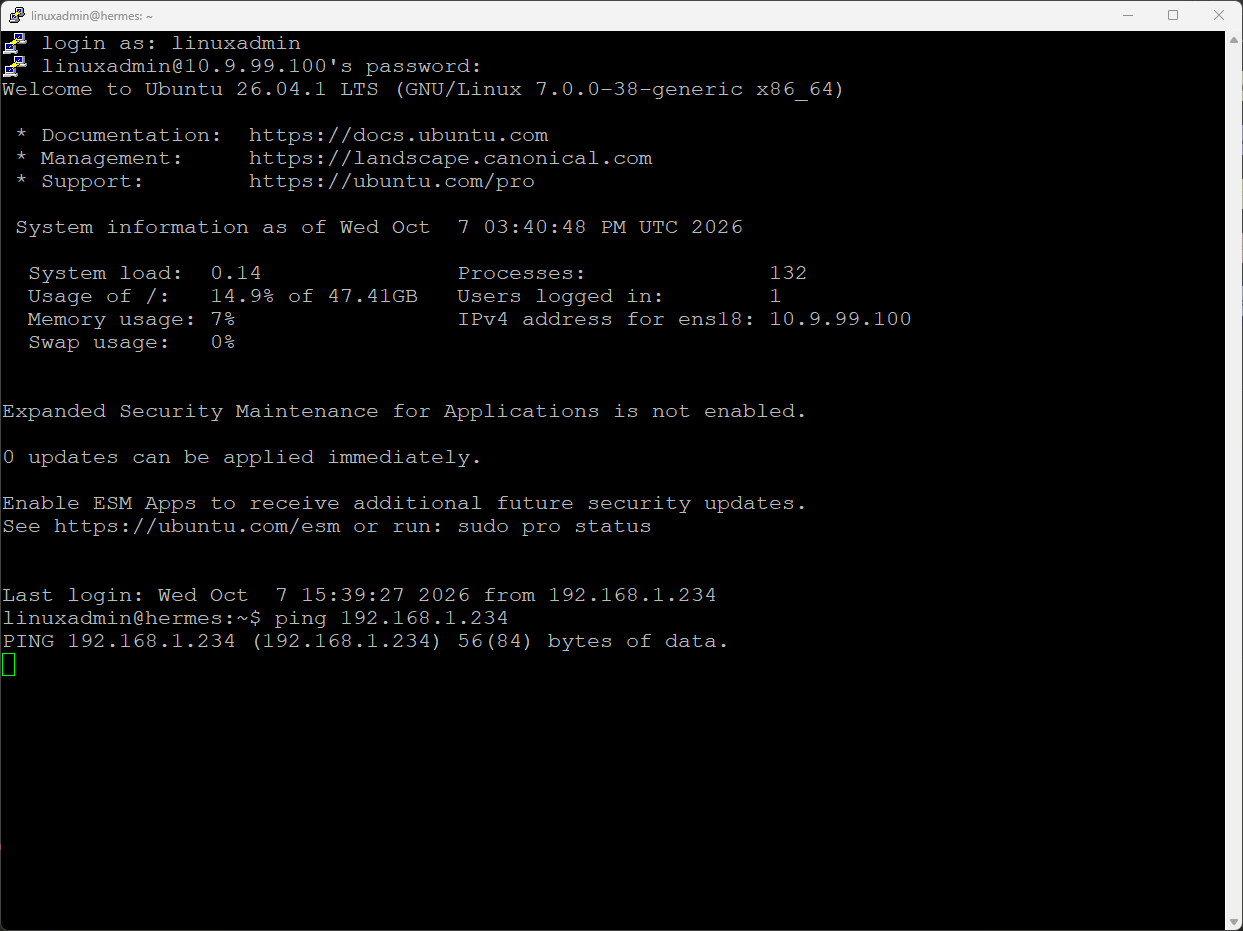
Simply creating firewall rules and leaving it at that, is about like creating a backup but never testing it to make sure it works. I like to test my firewall rules to make sure the filtering happens as I expect it to. From the Hermes agent VM, which I have addressed at 10.9.99.100, I attempted to ping my management workstation that was located on 192.168.1.234. I expected this to fail, which it did:
Then, from my management workstation, I attempted to ping the AI server which I expect to be successful, and it was:
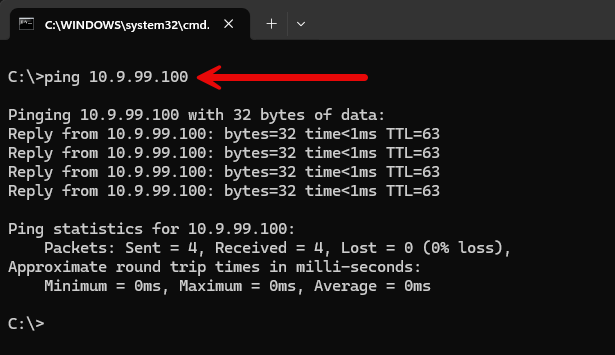
This simple ping test gave me the validation that I was looking for to make sure I had the isolation that I am wanting for this AI lab network. This also proved out several things at the same time. The new VLAN 999 was trunked properly across my switches, both my core and my top of rack for my Proxmox mini cluster. Also, my PA-440 was routing traffic for the new AI subnet out to the Internet as I was able to pull updates for Ubuntu, etc.
It also proved several pieces of the configuration simultaneously. VLAN 999 was traversing the switches correctly, the Proxmox SDN VNet was working, the PA-440 was routing the subnet, and my security policies were behaving as intended.
Why this security boundary is important
Would it have been easier and less trouble to just put the Hermes agent VM on my normal server VLAN? Absolutely it would have been. All of the network infrastructure was already in place for that VLAN and security zone. But, keep in mind the point of this was to create an isolated network where I have total control over the traffic in and out of the AI lab network.
Creating this up front is the right thing to do before the AI agent has access to the servers in my network. Security architecture like everything is WAY easier when it comes first and you get it in place before things “depend” on it.
Wrapping up
Is there anything special that I did since this was an AI agent that I didn’t do for any other network? Not really. But, with the caveat that I usually don’t restrict traffic down quite this tight right from the start. My DMZ would probably be the exception to that, but I haven’t really ran a proper DMZ in a while in the home lab since I don’t expose things to the Internet any longer. Stay tuned, as this is only the first part of my AI home lab journey to getting an AI agent as a first class citizen in my home lab that has permanent residency. What about you? Are you taking similar steps with your AI agent traffic? Let me know in the comments.
More in this topic

Google is updating how articles are shown. Don’t miss our leading home lab and tech content, written by humans, by setting Virtualization Howto as a preferred source.
About The Author
