


Man I am super excited about things tried in the home lab network this week. Lots of cool projects that took me into some uncharted territory for myself and trying out new projects that I haven’t had in the home lab as of yet. There is a really good variety of projects in the group this week. I looked at everything from AI agents to ZFS, to rootless Podman and home lab bastion hosts. Check out these 6 home lab projects to try this weekend.
1. AI agent network isolation
We have definitely entered into the era of agentic operations and I have been enjoying playing around with many of these new capabilities in my home lab. However, if you are building this out in your own home lab, I highly recommend that you create your network architecture as such where you can totally control the traffic that comes in and out of your AI lab.
This week, I looked at the process to create a dedicated VLAN for AI agents and getting these into a dedicated subnet which allows creating very granular firewall rules with my Palo Alto PA-440 firewall. It handles the routing and firewalling between the different subnets. I did this for my Hermes agent I spun up.
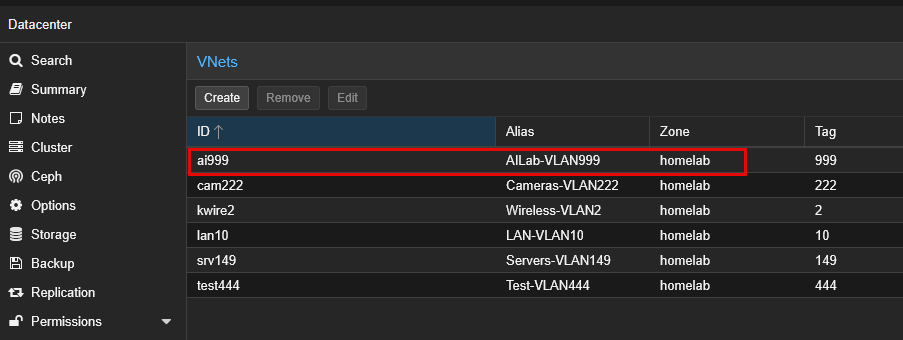
Using firewall rules I can control the direction of connections coming in and out and make these asymmetrical. In other words, I have my management workstation able to connect to the Hermes agent machine but not the other way around. The VLAN network provides the separation needed to make sure things stay where they are supposed to stay outside of processes that I direct intentionally.
This is the start of a few other ideas that I have in store for my agentic network. So, stay tuned on that front. You can read through my full walkthrough on this dedicated VLAN setup here: I Gave an AI Agent Its Own VLAN in My Home Lab. Here’s Why.
2. Make rootless Podman apps easy with Yantr
I have been getting more into Podman as I gain familiarity with it. There are definitely benefits to it, including its rootless architecture and also how well it is integrated with native systemd in Linux. Also, to be honest, Podman has gotten more of my attention as well lately as it is getting more into the territory of what we have with Docker Compose by means of the Podman Qaudlets. But, outside of the architecture, you don’t run Podman just to run Podman. You actually want to run apps with it.
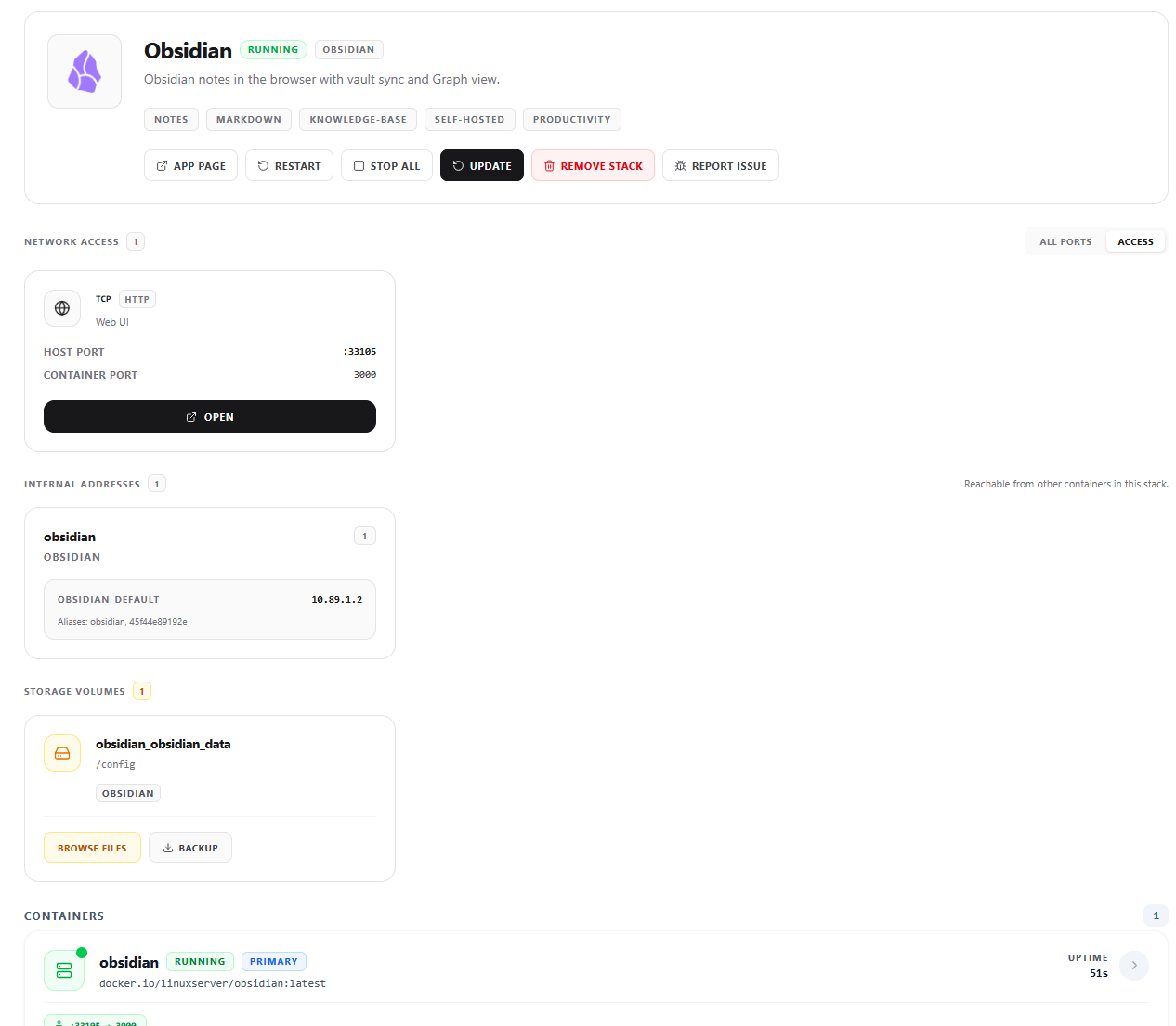
I spun up a tool called Yantr this week that is a self-hosted app catalog for rootless Podman. It provides a browser interface for you to be able to scroll through and pick applications in an ala carte fashion. They have done a really good job including many of the popular options for the home lab. These include things like Jellyfin, Nextcloud, Vaultwarden, and Open WebUI.
Yantr has a lot of interesting capabilities outside of just being a simple app catalog as well. One of the things that caught my attention is the fact that you can mark an application to be “temporary” and actually set the amount of time that it will “live” once you add it using the catalog. I can think of a lot of great use cases for me personally. I test and trial a lot of things in the lab. So, being able to mark things as temporary is awesome. I don’t have to remember to clean up, this is taken care of for me.
So, I think a great little project, especially if you have hesitated to play around with Podman, is get this in the home lab and let it hand hold getting real apps spun up in Podman. Read the full walkthrough: I Tried This Home Lab App Store and It Made Podman Much Easier.
3. Try out Warpgate for a home lab bastion host
There are a lot of great tools out there that allow remote access from a network perspective. However, there are still details to consider when thinking about secure access. As my home lab has grown over the years, the number of management connections grows too. There are many different types of connections to consider.
These include things like SSH sessions, web consoles, RDP sessions, VNC, etc. Warpgate was a project this week that caught my attention as it allows you to bring all of those different types of connections into a centralized gateway.
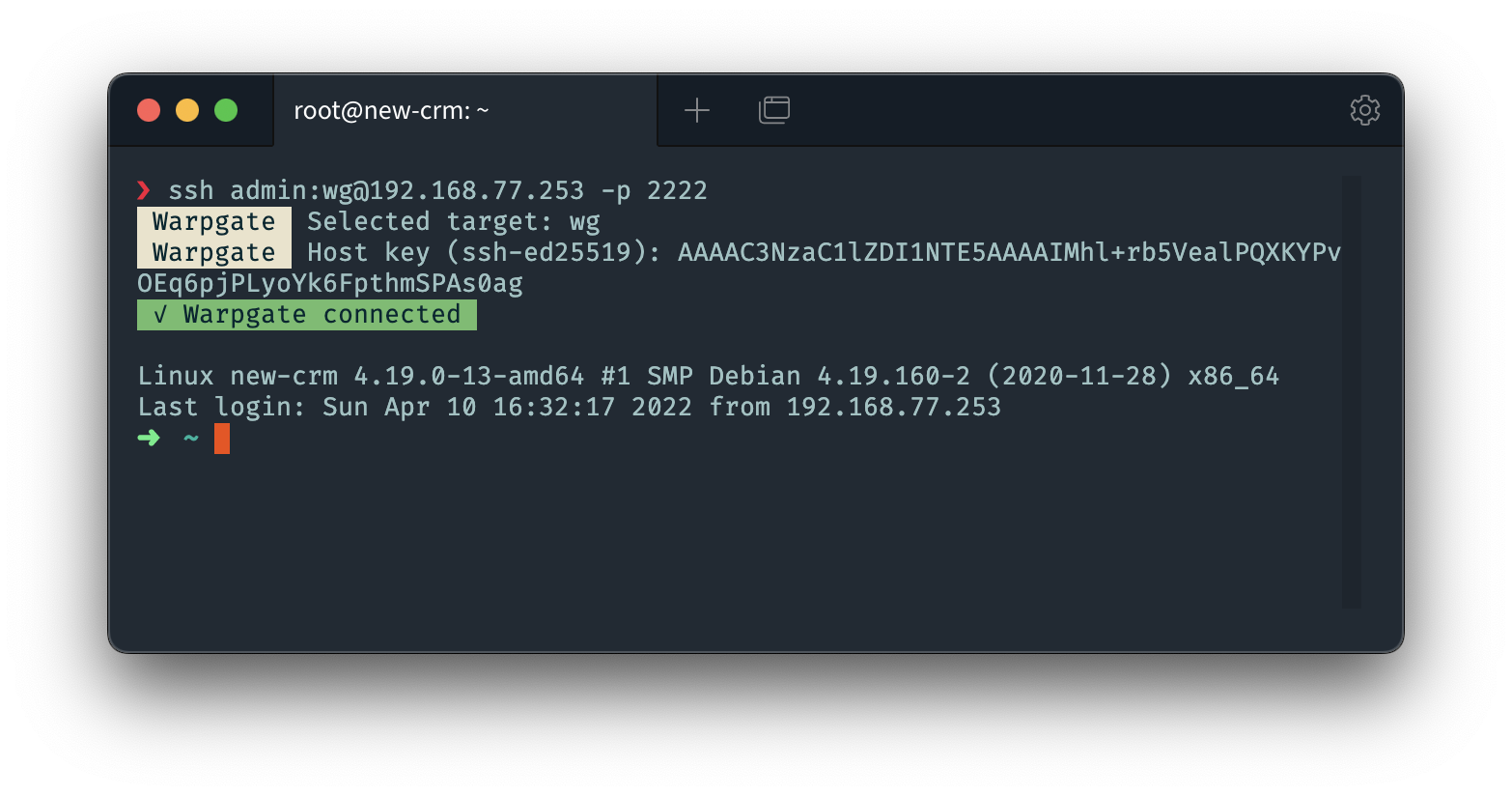
I like the security aspects of it that seem pretty robust in using it. It has multi-factor auth and audit logging. These are just defaults any more, but it makes it easy to get up and going. I also setup role based access that allow specifically which machines users can get to.
For a really cool weekened project, you can choose one Linux VM and configure exactly which account is allowed to connect. Then test a login that is permitted. Make sure you get the MFA prompts and make sure you only see the machines you have defined for access.
Read the full walkthrough: I Tried Warpgate to Secure Access to My Home Lab. Here’s What I Found.
4. Make your Proxmox file restores better and easier
This is a cool one that I tried out this week. There is a project out there that actually makes the file level restore (FLR) for Proxmox Backup Server (PBS) much easier and gives you a much more intuitive interface. With the pve-flr-portal project, I was able to easily spin up a companion type interface that specifically makes this a lot easier.
The project specifically adds a file browser and snapshot “timeline” feature to the interface that I think is handy. What I really like is that you don’t have to re-browse to the folder you are looking in as you jump around the different restore points. This isn’t a replacement for PBS, but just provides a better interface for this part of it. Also, the tool can’t recover files that aren’t in PBS as backups.
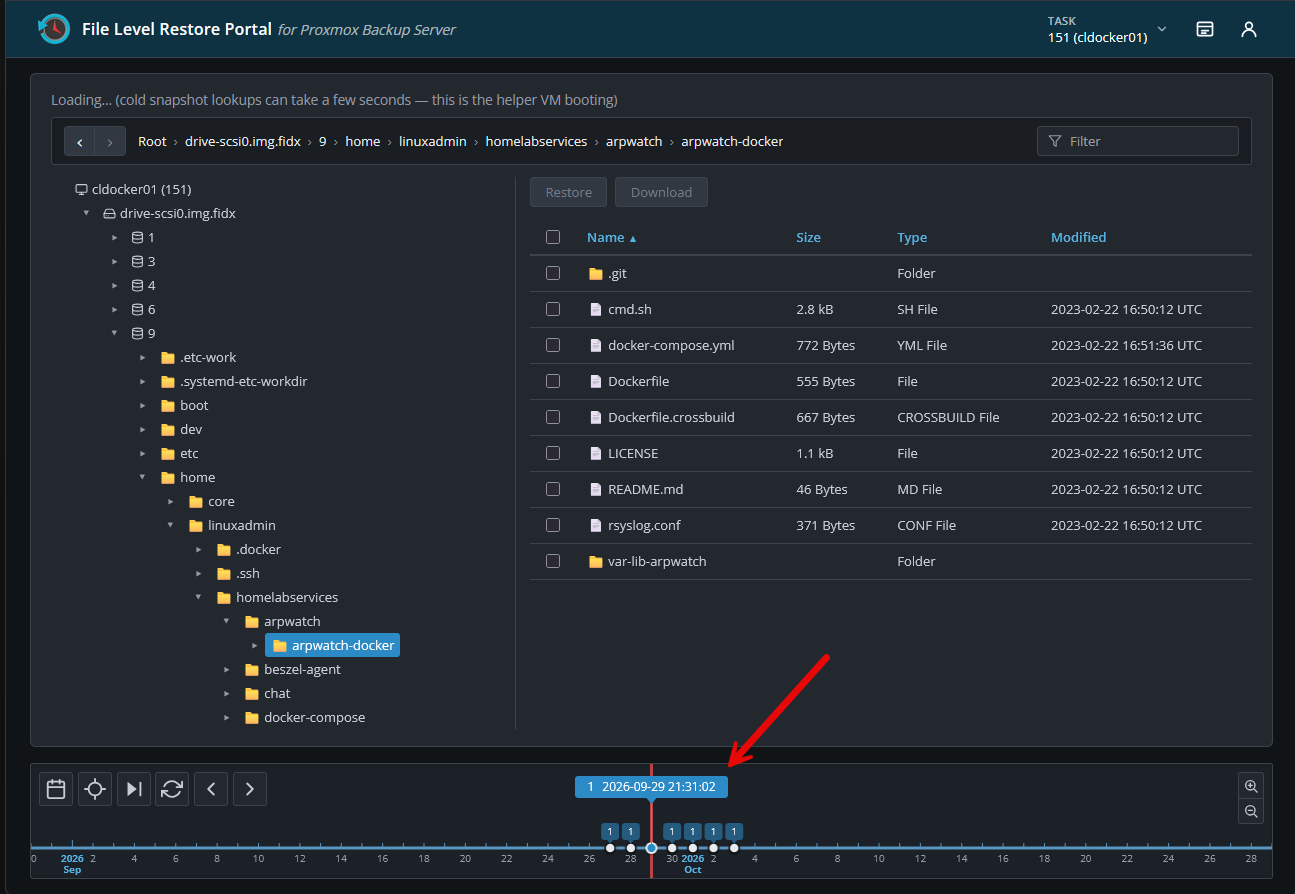
What I would recommend to test this out as a project is to stand this up using docker, then take a backup of your VM using PBS. Then change a file, take another backup. Then, use this tool to point to your restore points and navigate between them to see the changes and pick the earlier version of the file for restore.
Read my full project walkthrough here: This Proxmox Restore Portal Helps You Find the File You Actually Need.
5. Audit your Proxmox ZFS storage use
If you are running Proxmox ZFS storage, it is a great storage type in the home lab and has many really powerful features to take note of. However, it does have its quirks to be aware of. I considered 7 different ZFS storage topics to consider and take note of in your home lab.
Any of these 7 points are a good home lab projects to try this weekend. But, if you have time to focus on just one of them, i would take a look at how ZFS is using the storage pool space. If you aren’t careful like I wasn’t, your ZFS pool may be reserving all the space up front.
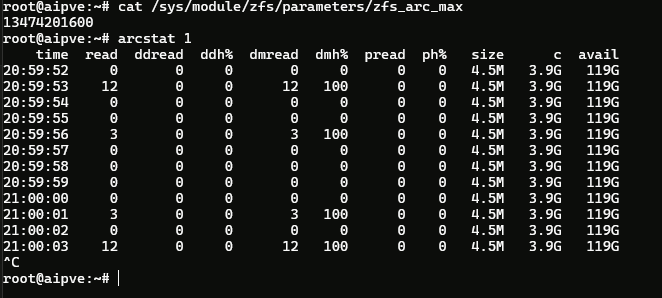
If it is doing that, it means that you may be using a lot more space than you would need to be otherwise. There are just a few commands that you can use to see what is going on with your ZFS storage and if you need to revisit the settings it has enabled.
For an initial look at my space I used the following command:
zfs list -t volume -o name,volsize,used,refer,refreservationMake this a home lab projects to try this weekend to check your VMs and their disks to see if ZFS is thin provisioning or reserving all the space up front. Also, review your ZFS snapshots, and see if your provisioning that you are using now matches with the capacity you have on hand in your home lab. Check out my full walkthrough of these 7 ZFS areas here: 7 ZFS Things I Wish I’d Known Before Using It on Proxmox.
6. Test WLS Containers instead of Docker Desktop
Really, the only serious option for running Linux containers on a Windows machine has been Docker Desktop. Most of us have used it and are comfortable with it. But it can definitely be a pain in some ways. I have wasted more time than I would admit to, troubleshooting Docker Desktop and quirky things with Windows.
However, if you have been following Microsoft’s announcements lately, they have just released as GA Microsoft’s WSL container engine. This means that you can now run OCI compliant containers on top of Windows without Docker Desktop. They have also introduced a new wslc command that gives you very familiar command syntax for those that are already familiar with working with Docker from the command line.
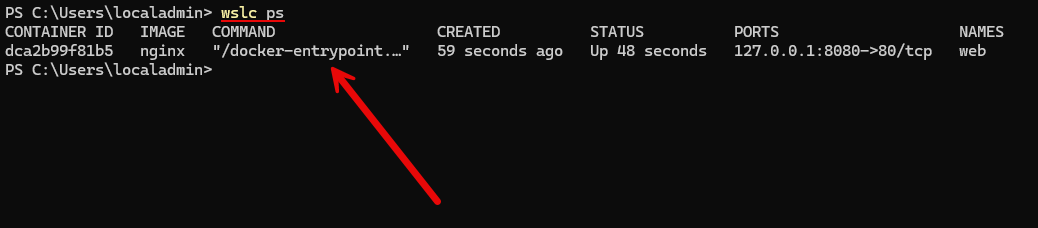
Surprisingly, this new WSL functionality is very fully featured, even in the first GA release. However, there is one big, gaping limitation right now. That is that it has no Docker Compose support. This will matter for many and their workflows I would imagine since most of us use Docker Compose for our container stacks to describe their configuration.
Even with that limitation currently, I would suggest this as a home lab projects to try this weekend to spin up a quick and easy application to test out the new WSL container functionality and see the new command in action. I think this is going to be super powerful as it matures and especially after it gets Docker compose support.
Read the full walkthrough of the new WSL containers feature here: Microsoft Just Gave WSL Its Own Container Engine. Do You Still Need Docker Desktop?.
Wrapping up
I think there are a lot of good projects in this list from this past week that covers a wide range of interests, technologies, and disciplines. If you only choose one of these projects, I think your lab will benefit from experimenting and getting your feet wet with the solutions presented here. Our home labs are about learning, and I have always felt like project-based learning is the superior approach to learning really any skill. IT and modern infrastructure skills are no different. How about you? What are your home lab project plans?
More in this topic


Google is updating how articles are shown. Don’t miss our leading home lab and tech content, written by humans, by setting Virtualization Howto as a preferred source.
About The Author
