


When you start experimenting full time with AI and AI tooling, you will find that you will start to get into to connecting MCP servers to your AI agents. Model Context Protocol allows you to have very specific and purpose-built tooling that you can allow your AI agents to use that can specifically have understanding and query your various infrastructure environments for management, configuration, and other purposes. But, after the initial excitement around what I can do with MCP servers, I realized that I wasn’t just giving AI access to more information. It could now have low-level access to everything. Depending on how you configure your environment, that access can go pretty deep into a home lab or production environment. So, how far should we allow MCP servers to go? Let’s see.
We now have to think of the MCP server as part of our security
I think one of the easiest mistakes we can make with MCP servers is just thinking of them as an “integration”. And, technically, that is really what it is. But, when we start thinking about things from security perspectives, we need to think about MCP servers as another privileged app that exists in our environments.
If, for instance, I configure a Proxmox MCP server with an API token, I must now start to think in terms of what can this API token do? After all, whatever the permissions the API token has in Proxmox, that is essentially what my MCP server can do now when it interacts with Proxmox, Linux servers, Linux workstations, etc.
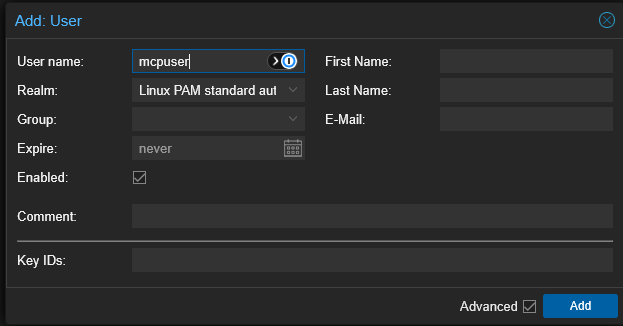
So, when you audit your token, in the Proxmox example, you need to think about things like:
- Can it list VMs?
- Can it start and stop VMs?
- Can it delete VMs?
- Can it create users, delete users?
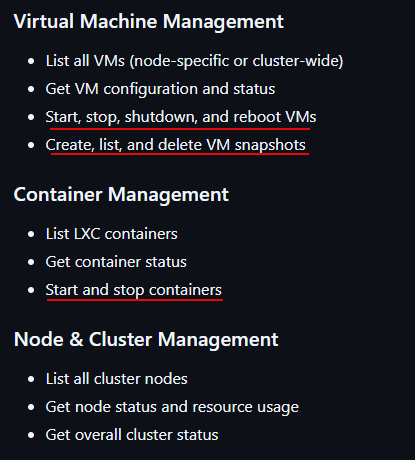
So, we are moving beyond just getting information to actually giving AI agents the ability to actually make changes in the environment. That can get kind of scary when you think about it. I can think of all kinds of horror stories that may follow with that.
Check out my post on using a Proxmox MCP Server in the home lab here: I Connected AI to My Proxmox Cluster Using MCP and It Was Better Than I Expected.
I now think about the “blast radius” when it comes to the MCP servers I have integrated into the environment and what they can do. So, if something goes wrong, either because I typed out a really bad prompt or the agent goes “rogue” and decides to do something I didn’t ask it to do, what is the maximum amount of damage that it could cause?
Read-only access is your friend
Now, I start with “read only” access whenever I can. You need to think about access to your environment in terms of “observation” and “modification”. When it comes down to it, most of the things that I really want AI to help with, don’t actually mean that it needs write or modify access to the environment. here are some examples of prompts that are helpful I have used, that are just querying information, “read access”.
Notice the following prompts:
Which Proxmox VMs are currently using the most memory?
Show me Kubernetes pods that have restarted more than five times
Which Docker containers have unhealthy health checks?
Find snapshots older than 30 days
However, the last prompt above that is asking to find snapshots older than 30 days, is way different than the following command that takes it to another level. The below actually means AI has the ability to make changes in the environment:
Delete snapshots older than 30 daysSo, keep these things in mind with the access you hand to an MCP server. If your platform that you are using allows it, I like to create dedicated API users or service accounts, roles, etc. This allows having different levels of access and controlling when and what AI has access to.
As a starting point:
- Create an account that can inspect virtual machines, nodes, storage, and cluster health without having permission to delete or significantly alter resources
- Then, once you have confidence in the task and workflows, you can add specific permissions as you want to
Take advantage of “profiles” when it comes to access
Recently, I covered the solution of Docker MCP toolkit and how it allows you to create profiles that house your MCP server configurations and tool sets. The cool thing about this is that you can separate which AI client can see which MCP profile that I have configured.
This makes for a very powerful security boundary in the home lab since it allows you to funnel requests to MCP profiles with different tools, different clients, and even different levels of access. You can create multiple profiles like:
homelab-readonly
development
github
kubernetes
infrastructure-admin
Below is a look at what the Docker MCP toolkit profiles look like. Here you can see that I have a Proxmox VE Server MCP server and then I have Cursor as my client connected:
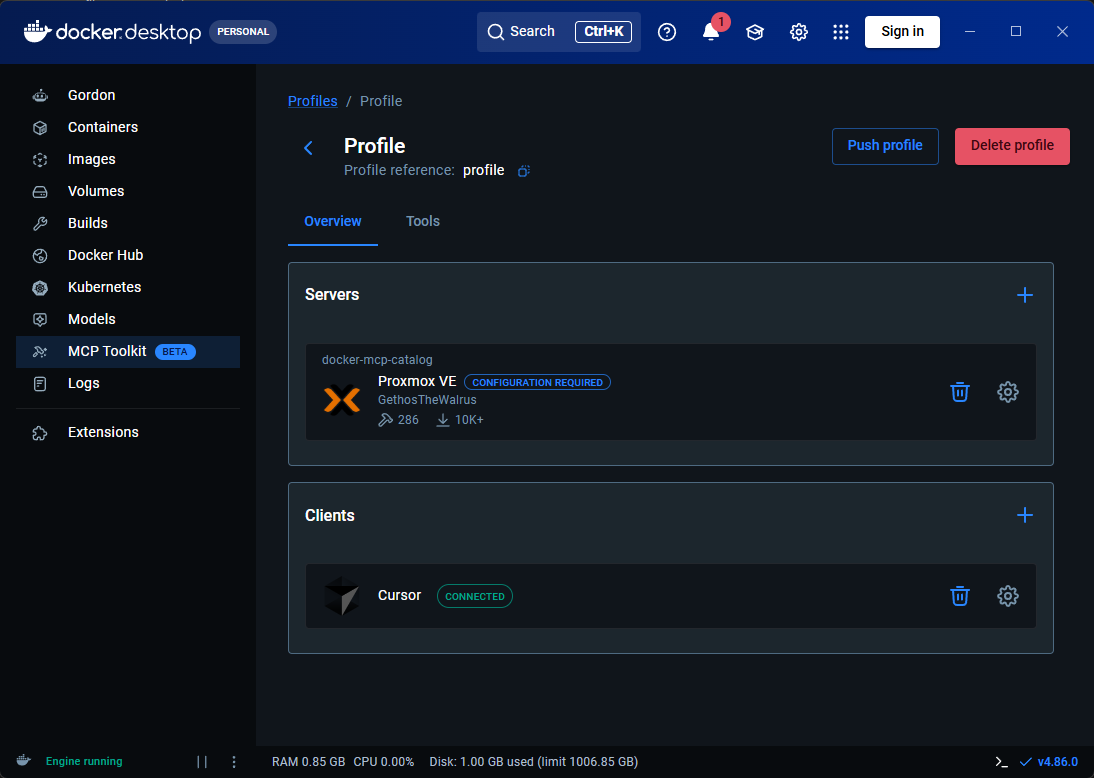
With this kind of setup, you can configure profiles that use certain API tokens with the permissions you want connected to your infrastructure environment. Most of the time, this could just be a read-only profile. This kind of profile is great for things like monitoring, querying, reading, checking things, and looking at things like logs.
Then, you could have a more privileged MCP profile that you use on those more rare occasions where you want AI to actually be able to make changes. These Docker profiles can also contain different server configurations and only the servers associated with the selected profiles are exposed.
Filesystem access definitely needs to be “gated”
Filesystem access by MCP servers can be extremely powerful, but also very dangerous if not handled correctly. It is very tempting when you are testing out a file system MCP server to just give it full access to a parent directory so you don’t run into permissions problems later on with prompts.
For example something like this:
/home/brandonThat might make everything work. But it will probably expose things that you didn’t mean to expose like SSH keys, scripts, configuration files, downloaded creds, shell history, repos, app secrets, and other files that I may not want it to have access to.
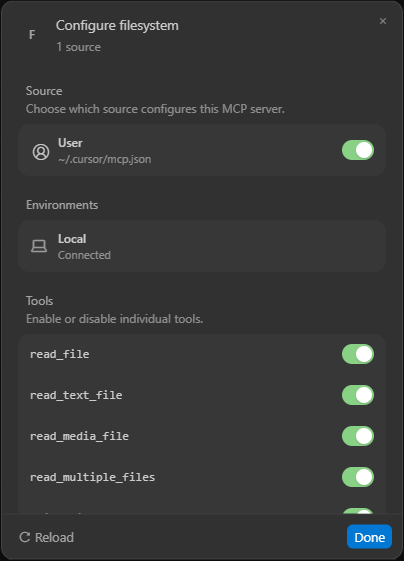
Giving it access to something like “/” would be even worse! Instead, if you want to have a file server MCP server help with a task, make the scope of what it can access really narrow. Something like this may be more appropriate if working with a specific docker project:
/home/brandon/homelab/dockerI like to treat this scope very similar to how I would write firewall rules. Start very narrow and then only relax if absolutely needed to exactly what it needs access to. I think this is also where the Docker MCP toolkit can have advantages. With the Docker MCP gateway it runs things in a containerized environment with restricted privileges. It also restricts network access and resource limits. So, I am using this tool more and more when it comes to running my MCP server environments.
Don’t leak your credentials
There is another serious issue that many companies are dealing with these days and it can also affect us in the home lab and elsewhere. After you configure connections to MCP servers you have a flurry of credentials flying around and stored. With an MCP server connection, you might have things like GitHub wanting a token, needing to setup a Proxmox API token, Kubernetes credentials, and other API keys along with OAuth. It never ends.
So then your MCP server is part of your secrets management problem. Also, we have to be careful like other infrastructure as code to never commit MCP configurations to Git accidentally as often there are API tokens stored in plain text.
I also don’t want MCP configuration files accidentally committed to Git. Most of the time, this is stored in a file like .vscode/mcp.json. The Docker MCP tooling has a dedicated secrets management functionality. You can manage this with the command:
docker mcp secret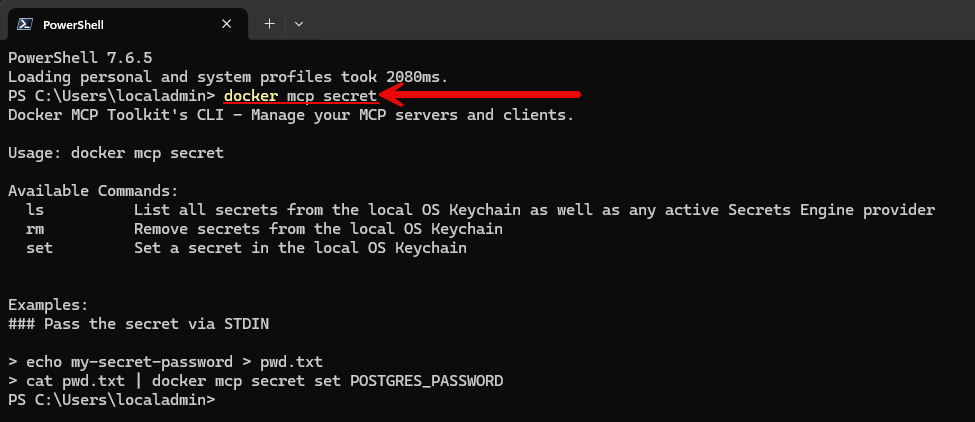
This allows you to store secrets through the local operating system keychain instead of just storing it as regular configuration data. Also, with your MCP integrations, use dedicated accounts like “mcpuser” or something intuitive so that when you see things in the logs from mcpuser@pvehost01 you know the source and you aren’t scrambling to figure this out.
Prompt injection risks
This is probably the part of AI infrastructure management that is concerning to me the most. AI introduces another risk for our infrastructure outside of the “normal” ones like malicious exe’s, compromised container images, bad packages, exposed ports, stolen creds, and so on.
So to give you an idea of this risk, imagine you have an AI agent that has access to things like GitHub and infrastructure tools. I ask it to take a look at a GitHub repo that I am not too familiar with. Buried in the repository is a compromised README file that is designed to manipulate an AI agent and do something malicious.
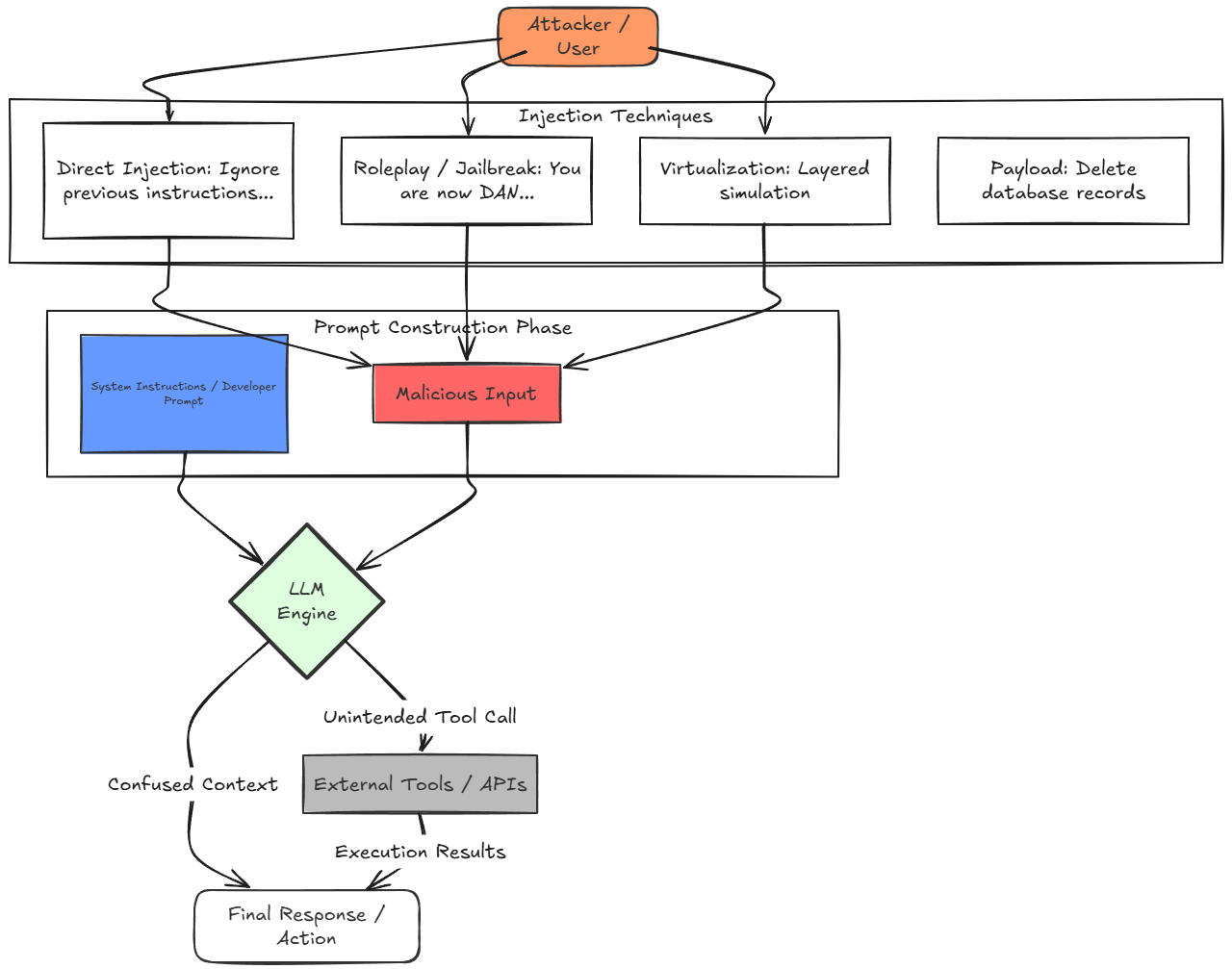
Now, in that scenario, would you want your AI agent to have only read only permissions to the environment or one that also has admin access? I think the answer is obvious there. So we can see the dangers of the new world of AI and how we now must think about these new attack vectors that we didn’t really have in the pre-AI world.
So, now, when designing for this thought process and security with our AI agent infrastructure, you need to ask yourself, which tools am I comfortable with the AI agent having access to?
Have more safeguards on any type of destructive operation
When using AI tools in the home lab or especially production environments, you want to have the appropriate safeguards on any type of actions that can do things that are destructive. What are these kinds of things? I think about destructive or high-level admin type operations as including:
delete
destroy
remove
format
wipe
shutdown
reboot
modify permissions
change networking
rotate credentials
overwrite configuration
Maybe you keep the destructive tools out of your normal MCP profile. Also, you can have instructions so that any thing that would potentially change or alter things in the environment must have interactive approval. And, if you want to be doubly sure, you just don’t give those permissions to the API token that is currently used.
The principle of least privilege is even more important when it comes to AI tooling due to the fact that an AI agent can chain together tools much quicker and more destructively than a human can do without the proper guidance and safeguards.
Be prepared with a “kill switch”
With something this powerful, I like to think about having some type of “kill switch” that lets me effectively disable everything instantly. If I suddenly don’t trust an MCP server, I don’t want to spend twenty minutes figuring out which clients are connected to it and where the credentials live at. In fact, I want to have multiple ways to stop access if I need to. These might include:
- disabling the MCP profile
- stopping the gateway
- stopping the container
- revoking the API token
- disabling the service account
- deleting the MCP server from the client’s available tools
So, as an example, using a Proxmox MCP server that has a dedicated API token and is using that for access, if I disable that token, the MCP server should instantly lose access to the environment, even though the AI client may still be running.
My MCP security checklist
After experimenting with MCP servers in my home lab, here are a few questions that can help with an MCP security checklist of sorts to help you know things that are important:
| Question | What I am trying to prevent |
|---|---|
| What systems can it reach? | Unfettered access to anything |
| What credentials does it use? | Credentials with more permissions than needed |
| Can it write or only read? | The ability to modify things without my consent |
| Which tools does it expose? | Too many agent capabilities |
| What filesystem paths can it see? | Leaking data of various types like secrets |
| Can I isolate it? | A huge damage path |
| Can I audit its actions? | Changes made that are unknown and can’t be found |
| Can I remove access quickly? | Access that I can’t revoke |
| What happens if the AI agent is compromised? | Prompt injection that gets access to my infrastructure |
Wrapping up
Hopefully these are some security reminders and observations that strike a chord with you in your home lab and production environments. The AI ecosystem is moving at such a rapid pace that it is hard to keep up withe the various capabilities and attack vectors as new AI-enabled technologies emerge. But we have to be vigilant with good security hygiene and make sure we cover the bases. How are you handling AI security in your home lab and what safeguards do you have in place?
More in this topic

Google is updating how articles are shown. Don’t miss our leading home lab and tech content, written by humans, by setting Virtualization Howto as a preferred source.
About The Author
