



For the last several months, AI has become a large part of just about every single project that I work on in the home lab, either directly or indirectly on Proxmox, Docker, or something else. Like many people I started using ChatGPT to write scripts, scan logs, troubleshoot Docker Compose, etc. Like most, this started saving me a lot of time with tedious work. But, now, we are in the world of agentic AI that can help us even more directly. Most of us in the home lab realm are using Cloudflare in some form or fashion. I connected Cloudflare’s official Model Context Protocol (MCP) server to my Cloudflare instance and it totally changed how I manage and troubleshoot this aspect of my home lab. Let me describe how.
What is the Cloudflare MCP server?
First of all what is the Cloudflare MCP server? To check out the official link, visit the GitHub repo here: cloudflare/mcp-server-cloudflare. Cloudflare’s official MCP server allows you to use AI clients like Cursor to communicate with Cloudflare APIs using the Model Context Protocol.
So, what this does for you is, instead of acting like a chatbot that only knows public documentation, Cursor becomes aware of your Cloudflare environment through authenticated API calls. Once you add it to Cursor or your other tool of choice, you will be asked to authenticate with Cloudflare in a browser.
The MCP server can then access the following types of valuable information for you:
- DNS records
- Cloudflare Tunnels
- Zero Trust configuration
- Cache rules
- Firewall events
- Managed WAF rules
- Security analytics
- SSL and TLS settings
- Workers
- Pages
- Zone configuration
- Load balancers
- Account analytics
One thing I appreciate is that this isn’t an all-or-nothing approach. The MCP server only has access to the APIs allowed by the API token you configure which can be read access or admin access. If you only want read-only troubleshooting, you can define this when you authorize the MCP server.
Installing the Cloudflare MCP server
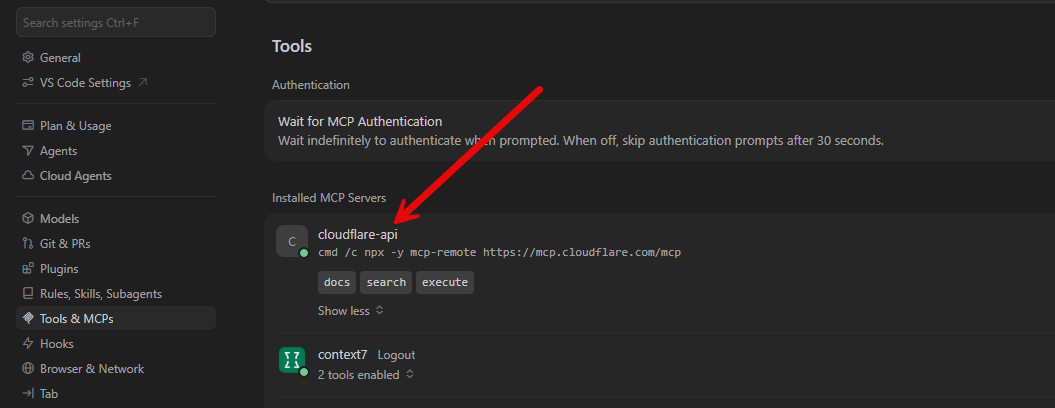
You will like that the process to install Cloudflare MCP server is very easy and straightforward, especially for authentication. You will add the following to your MCP.json file for your specific editor:
"cloudflare-api": {
      "command": "cmd",
      "args": [
        "/c",
        "npx",
        "-y",
        "mcp-remote",
        "https://mcp.cloudflare.com/mcp"
      ]
    }
Once you have your Cloudflare MCP server installed and enabled, after authenticating, you should see it activated like so:
A note about Cloudflare free and Cloudflare Pro
I want to make a note here as well about the different levels of subscriptions with Cloudflare. There are some things that the Cloudflare MCP server won’t be able to do on the Cloudflare free plan. But, I was still pleasantly surprised at just how much it COULD do, to be honest.
Even if you are using the Cloudflare free plans, you can still inspect general traffic analytics and get enough information to identify attack patterns, review requests to your domains, status codes, and even pinpoint abusive IP addresses.
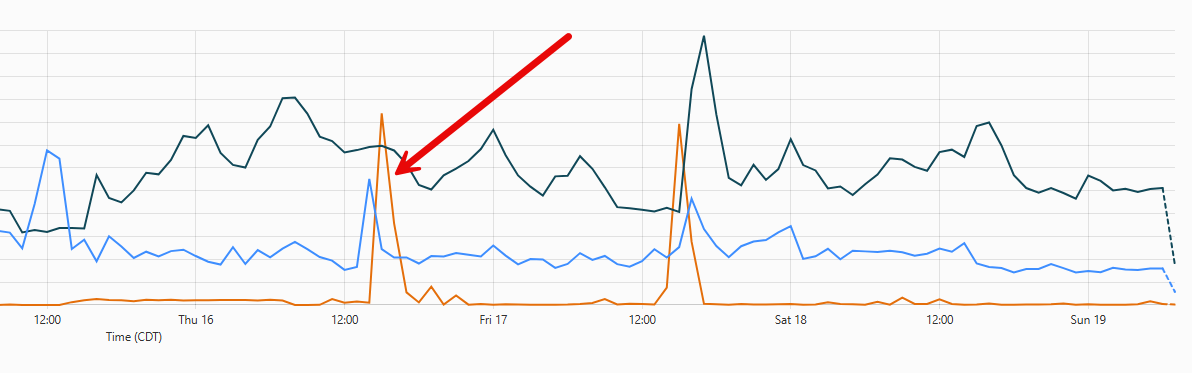
During one of my agent sessions, it successfully identified a flood that was happening on my domain and recommended a rate limiting rule that could be put in place. This rule was extremely effective and started capturing and rate limiting traffic.
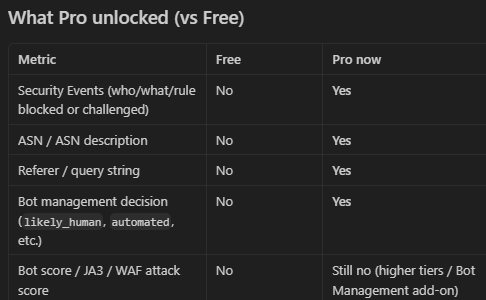
Here is a quick comparison of the feature differences that I found with connecting their MCP server to the Cloudflare API:
| Capability | Cloudflare Free | Cloudflare Pro |
|---|---|---|
| Review traffic trends | Yes | Yes |
| Analyze HTTP status codes | Yes | Yes |
| Review request paths | Yes | Yes |
| Inspect user agents | Yes | Yes |
| View visitor countries | Yes | Yes |
| Display cache status | Yes | Yes |
| Identify abusive IPs | Yes | Yes |
| Compare hourly traffic patterns | Yes | Yes |
| Find browser traffic from automated traffic | Basic | Enhanced |
| Find out whether or not issues originate from Cloudflare or the origin server | Yes | Yes, with additional context |
| Review Security Events | No | Yes |
| Inspect WAF actions and rule matches | No | Yes |
| Analyze firewall event history | No | Yes |
| View challenge activity | No | Yes |
| Connect security events with traffic analytics | Limited | Yes |
| Find out why requests were blocked or challenged | Limited | Yes |
But the key takeaway here I think for home lab deployments is that there is usually enough capabilities to do most things you want to do on the free Cloudflare plan.
Example of free plan limitations with prompts
The biggest limitation wasn’t the AI agent itself talking to the MCP server. The limitation was the data APIs that Cloudflare exposes in the free plan. So, what you will see, whenever you ask questions of your AI agent like in Cursor you may ask things like:
- Which WAF rule blocked these requests?
- Show me why Cloudflare challenged this visitor
You might see the agent won’t be able to answer because the underlying Security Analytics APIs were unavailable. Below is an example of a chat snippet with my agent where it ran into an issue with the free plan and being able to show security information due to the lack of security analytics.
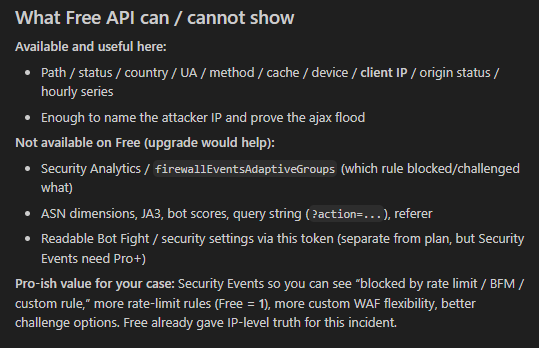
Cursor did do a good job actually explaining these limitations with the free APIs, instead of hallucinating answers, which I appreciated. It was pretty clear about which information wasn’t available through my current plan.
One of my troubleshooting sessions
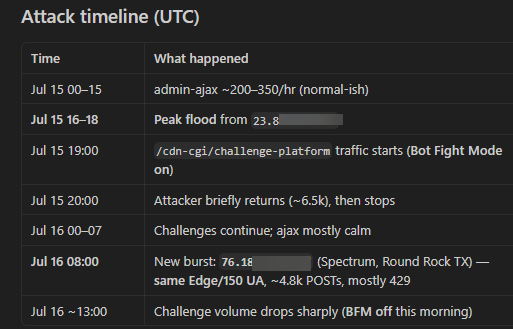
I had a real world troubleshooting session with the Cloudflare MCP server. I was seeing bursts of traffic to one of my domains and I was trying to figure out what was going on. Of course I could have stumbled through the Cloudflare analytics manually, but unless you are in there every day, and you just want to spend the time wading through the stats, it is very time consuming to piece information together.
But I was seeing the following things on my origin server:
- traffic spikes
- firewall events
- origin 504 responses
- cache behavior
Again, normally investigating these types of things would mean I needed to open dashboards in Cloudflare and looking through firewall pages, DNS settings, cache rules, and several other areas inside the Cloudflare dashboard.
Instead, with the Cloudflare MCP server, I stayed inside Cursor. I started prompting the Cloudflare MCP server for gathering and correlating the information. And it was amazing what it came up with very quickly.
Other things that AI helped me work through
One of the things that I have always liked about AI is the process of bouncing ideas off of it and seeing what sticks. Today’s modern AI agents has a lot of built-in skills that it already can make use of. With that in mind, you can think of it as a senior engineer or architect that you can ask questions.
Also, I wanted to explore doing things like turning on and reviewing for a home lab ingress. Things like asking AI via the Cloudflare MCP what happens if:
- I turn on HTTP/3
- How much of the traffic is bot traffic
- Are there URLs or ingresses that I need to implement rate limiting
- What about DNS configuration security?
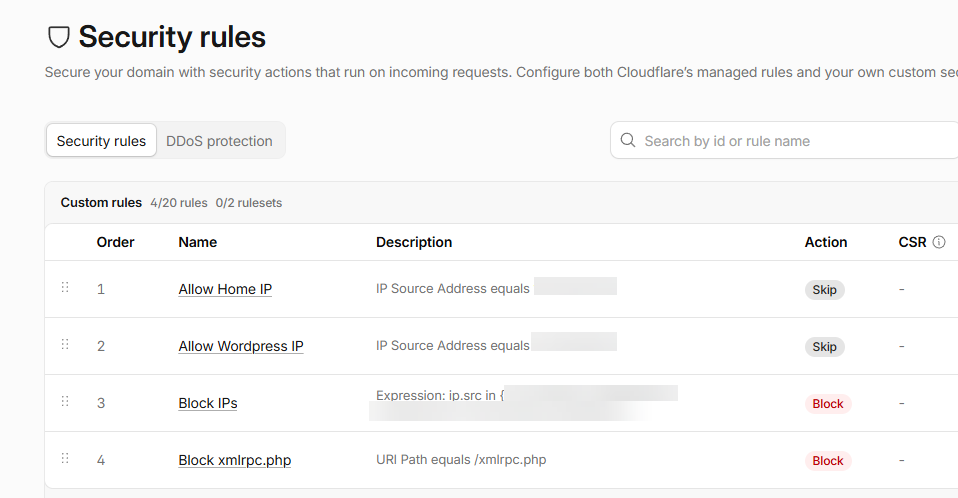
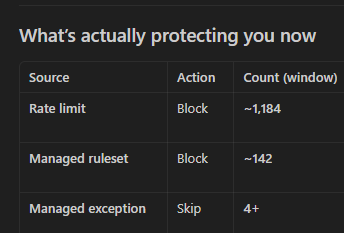
Did the session work and was it beneficial for security? Absolutely. After implementing the suggestions presented in Cursor from the session with AI using the Cloudflare MCP server, the rules implemented with the assistance of AI allowed Cloudflare to mitigate attacks.
The orange spikes are traffic that Cloudflare mitigated that matched the block or rate limit rules due to abuse, thanks to being pinpointed by AI.
Asking better questions
What became very apparent to me with the AI + Cloudflare MCP server was just how good a troubleshooting or security session could be if you are running Cloudflare in conjunction with your home lab. Instead of asking documentation questions, I started asking investigation questions.
Some of the first prompts looked like this:
- Review my Cloudflare analytics from the last several hours. Do you see anything unusual?
- Explain why I’m seeing these 504 responses
- Analyze my firewall events and tell me whether this looks like a targeted attack or routine internet background traffic
- Review my cache configuration and recommend improvements
- Compare my HTTP/2 and HTTP/3 traffic
- Review my DNS configuration for anything that looks incorrect
Notice how none of those prompts explain my environment. With the MCP server connection, Cursor already knew the environment and had access to Live metrics. That completely changes the interaction with AI and how we can manage our home labs.
The prompts I now use almost every day
Once I had the Cloudflare MCP server configured, I found myself asking much better questions than I ever could with a traditional AI chat. The difference now for me is that Cursor with the Cloudflare MCP server already understands my Cloudflare account. So, now, instead of spending five minutes explaining what I’m looking at, I can immediately ask it to investigate something.
Here are several prompts that I have started using with the Cloudflare MCP server:
Review recent traffic
Analyze traffic over the last 24 hours. What stands out as unusual compared to normal activity?This is a great starting point when something feels “off” but you aren’t sure where to begin. Or if you simply want a good overview of how things are operating at the moment.
Investigate security events
Review my recent firewall events and summarize what types of requests are being blocked.Instead of scrolling through hundreds or thousands of events, the Cloudflare MCP server with AI summarizes the activity and identifies patterns.
Analyze bot traffic
What percentage of my traffic appears to be automated, and are there any bots I should be paying attention to?This gives a much better understanding of how much of your traffic may be coming from automated bots or bot attacks.
Review DNS
Review my DNS configuration and identify anything that doesn't follow best practices.This is helpful after migrating services or adding new applications.
Wrapping up
The cool thing about using Cloudflare MCP server is that it allowed AI to act almost like an advisor instead of just a chat bot. Instead of you having to do all the work to help AI have context, the direct connection allows it to be an active participant and do the heavy lifting for you instead. It could review live analytics, inspect firewall activity, analyze DNS config, explain traffic patterns, etc. The time savings with this is HUGE! After managing and troubleshooting this way using Cloudflare MCP server for my public resources in the home lab, I honestly don’t want to go back.
More in this topic




Google is updating how articles are shown. Don’t miss our leading home lab and tech content, written by humans, by setting Virtualization Howto as a preferred source.
About The Author
