


I have been reflecting on how far things have come in my home lab and ironically, I feel like I am more organized now more than ever before, even though I have more complex services running. Even though I am running things like Kubernetes and multiple Docker hosts with lots of containers, I can find things easier now than ever before. I wanted to pass along how I organize my entire home lab so I can find things. Organization is key to everything I do any more. Let me show you what I do.
The problem
We have all been there before. You spin up a Docker container to test something. A week later you deploy another copy somewhere else. Six months later you vaguely remember creating a VM for that project, but you cannot remember which Proxmox node it lives on, what IP address it has, where its data is stored, or even why you built it in the first place.
The problem usually is not that the home lab has grown too large. The problem is that it has grown over time and sometimes quickly and things haven’t really been spun up according to any type of structure. That was exactly what happened in my lab. I reached the point where I had multiple Proxmox clusters, lots of Docker hosts, Kubernetes nodes, over a hundred containers, many storage systems, VLANs, VPNs, AI services, monitoring tools, etc. Nothing was really broken because of that, but I couldn’t really find anything that I was looking for quickly.
I organize by function instead of technology
One of the problems I had early was that I organized things by what technology they ran on, instead of what things did. I would group things based on the technology I was using.
For example, my organization structure was based around:
- Docker servers
- Kubernetes servers
- Ubuntu VMs
- Debian VMs
- Windows VMs
That seems like a logical and organized way to do it. That is, until your applications begin living across multiple servers and different tech stacks. Now instead, I organize around what the service actually does and this has been a whole lot easier and has made me think about the “roles” I have running, instead of the underlying technologies.
So, now, I think about these kinds of roles:
- Infrastructure
- Monitoring
- AI
- Networking
- Reverse proxies
- Storage
- Identity
- Development
- Automation
- Media
- Testing
Now when I need something, I already know roughly where I can find that service or app no matter what the technology is. So, I have had much better success with my organization structure this way.
Docker container code is stored in git and organized in folders
I have been able to make sure that over the past couple of years, I have created a folder structure for my Docker containers and Docker compose code so that I have everything arranged that I need underneath named folders with the Docker compose code underneath.
This makes it much easier to find code that I am looking for. If I want to deploy it somewhere else. I don’t have to look at the other Docker host. I just log into git and search for the app folder and I have the structure readily available.
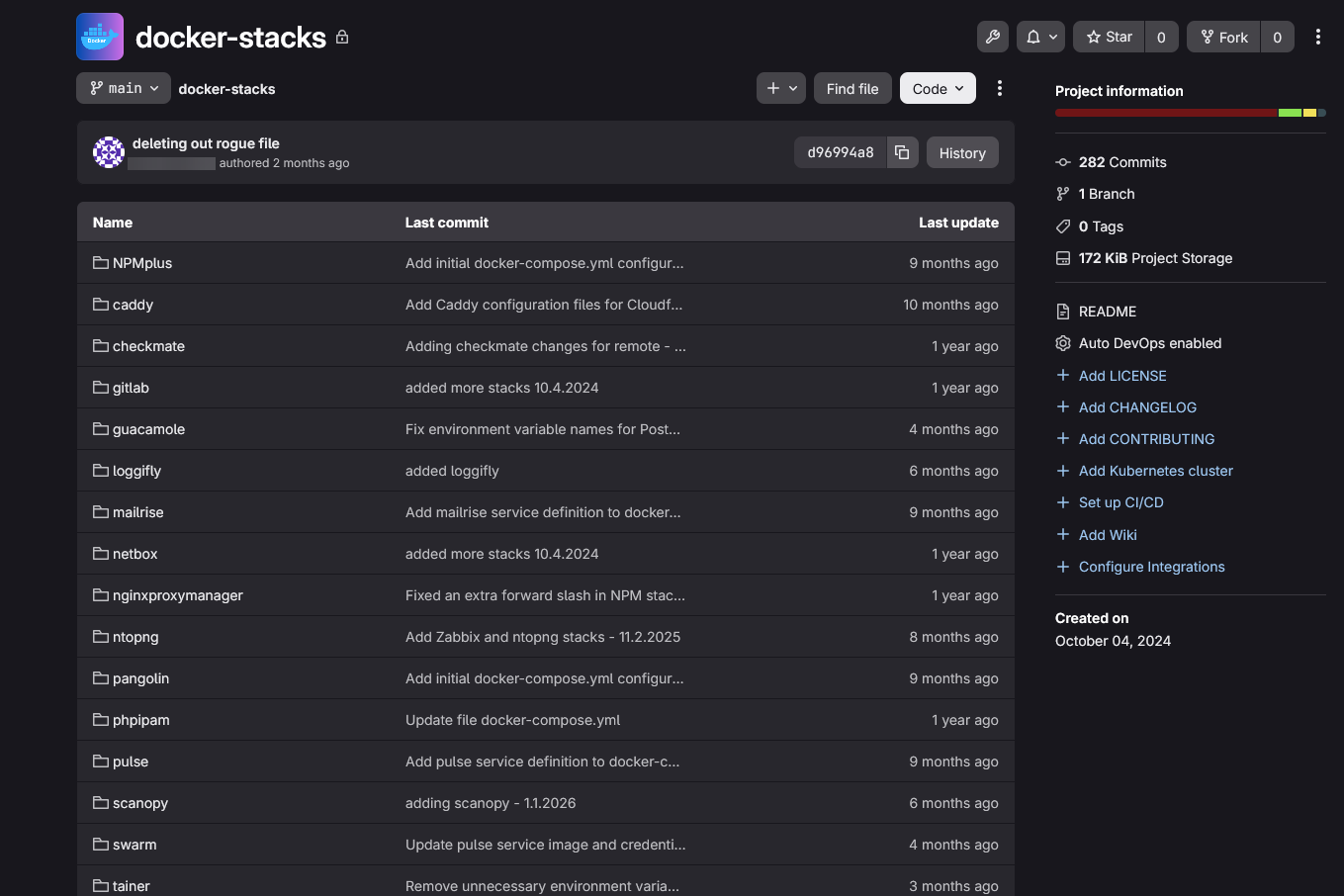
Have a home lab organization structure in your git repo for your Docker containers and compose code. If you do this you will definitely thank yourself later!
Every host has a predictable name
I love cool names, but frankly for me at the end of the day, I like boring names the best for my home lab that are intuitive and actually tell me what the host does and what might be stored on it. For instance, my machine names have something in the name for what it actually does in terms of its role.
Examples of this include
dockerhost01
pvehost01
podman01
dc1
dc2
kube01
kube02
kube03
Below, you can see my virtual machine inventory in Proxmox and some of the names that I have there.
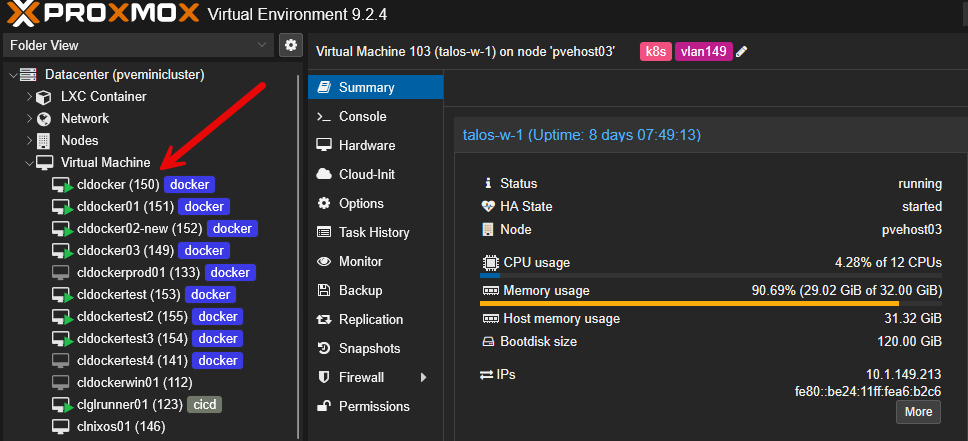
When I SSH into a machine, I immediately know what it does and even if it has been a while since I have worked with the specific machine or services, I can still find my way around due to this naming convention.
My folder structure mirrors my infrastructure
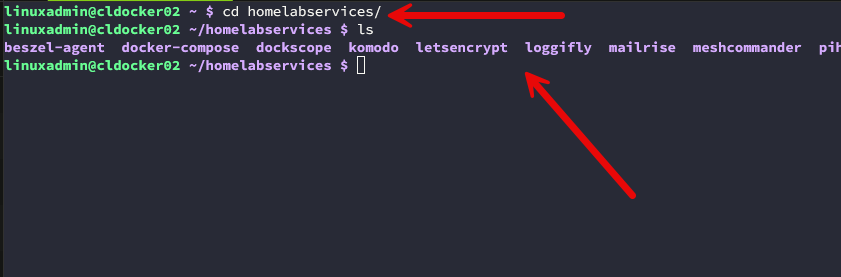
Also, in addition to having my git repo structured with my Docker compose folders in a hierarchy, I also create a “homelabservices” folder on a specific location on my docker hosts. This way, I know that all of my containers I run for home lab services are found in under that parent folder.
Then, underneath the homelabservices folder, I have the named folders for each specific app that I am running there. For example, it looks like the following:
~/homelabservices/
    traefik/
    dockcheck/
    dockscope/
    authentik/
    grafana/
    prometheus/
    homepage/
Below is a look at my homelabservices directory on one of my docker hosts for home lab organization.
Each application folder may contain the following as an example:
- docker-compose.yml
- .env
- README.md
- config/
- data/
- backups/
This way, if you need to migrate your servers or change out a Docker host, you know exactly which folders you need to copy over to get your data.
Centralized container dashboard that is searchable
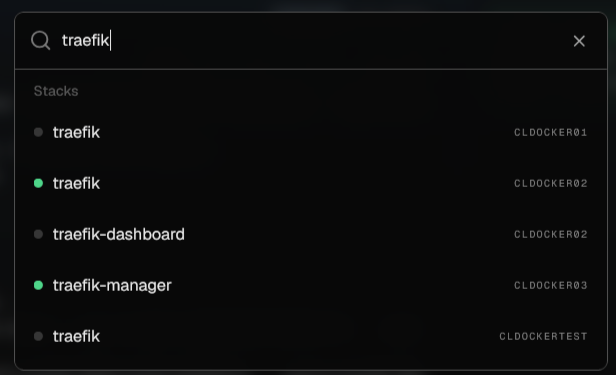
One of the drastic improvements that I think makes a huge difference with home lab organization is having a solution that you add your Docker container hosts to and then have the capability to be able to search across all your hosts for a single container. I had a homegrown solution that I used for quite some time, but now I have gone to an open source solution called Sencho that I wrote about recently.
With Sencho, I now have visibility to answer questions like, which hosts have Traefik running? Where is my reverse proxies running? Are the services running on the expected hosts? These sound like easy questions, but if you have multiple docker container hosts, this can be difficult to answer confidently if you don’t have a good tool.
Every service has one home
Also, another important thing I have learned is that I have one home for a particular service. It is very easy to have duplicate deployments of the same services. You might have multiple Portainer instances, multiple reverse proxies, multiple monitoring containers, etc.
I ran into this a lot more before I had a solution to search across all my containers to see where specific containers were running and which ones I had already spun up and where. Now, with Sencho servicing my environment as of recently, a simple search in the dashboard shows me if I have that service already running somewhere, or if I am just looking for the service.
IP addresses are part of my organization strategy
For my home lab environment, the IP addresses used for certain workloads are one of the ways that I organize things. Certain workloads for me go on certain VLANs and IP ranges. This has also really helped me to standardize my network layout and know where everything is found on the network.
I have VLANs created for specific purposes:
- Servers
- Management
- Migration
- Cluster
- Ceph
- LAN
- iSCSI
- Cameras
- Wireless
- etc
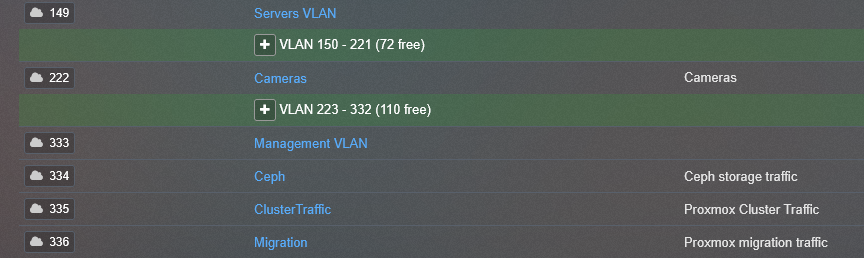
So, with this being said and determined ahead of time, I know where something lives, before I ping it. Also, it helps to easily narrow in on an app, device, service, etc if I don’t know exactly where it is.
DNS is the center of everything
I treat DNS as one of the most important services that I run in my home lab, period. Without DNS working right, everything else breaks. That is pretty much how most of the hyperscalers work these days as well. The days of hard coding IP addresses have long since been best practice. Do I sometimes hard code IPs in things? Yes I do, especially when testing or ruling things out.
In case you are wondering, I run a pair of Technitium DNS servers that are configured in a cluster. This means my configuration on the primary server synchronizes to the secondary. Check out my post on setting up a Technitium DNS cluster here: Stop Using Pi-Hole Sync Tools and Use Technitium DNS Clustering Instead.
But when I start to think about bringing things into my “production” home lab environment, I start thinking about proper DNS names, SSL certificates, etc. Instead of IP addresses, I want to be able to get to services via names like:
grafana.lab.local
auth.lab.local
ai.lab.local
proxmox.lab.local
So when it comes to organizing your home lab, having proper and memorable, human-friendly DNS names makes everything so much easier.
Labels and tags
One of the simple things that you can do for organization is to use labels and tags across multiple infrastructure components. These include using things like Docker labels and tagging in Proxmox. I especially use Proxmox tags to give myself visual cues on the roles I have configured for certain virtual machines.
So I have things like “docker” as a tag and assigned to certain VMs, VLAN IDs, and other tags in my inventory. Docker tags are very helpful in your docker compose as you can do things with docker labels like enable Traefik services for specific containers among other things.
You can also use the notes field in Proxmox to add helpful information for organizing things. For example, I can quickly identify:
- Production workloads
- AI services
- Test environments
- Internet-facing applications
- GPU workloads
- Backup targets
Searching becomes a whole lot easier once everything has useful metadata assigned.
I separate production from testing environments
One of the simple things that you can do in your home lab environment is to separate production from testing environments. So, if you have an environment, including VLANs, hosts, VMs, etc for production and the same thing for testing.
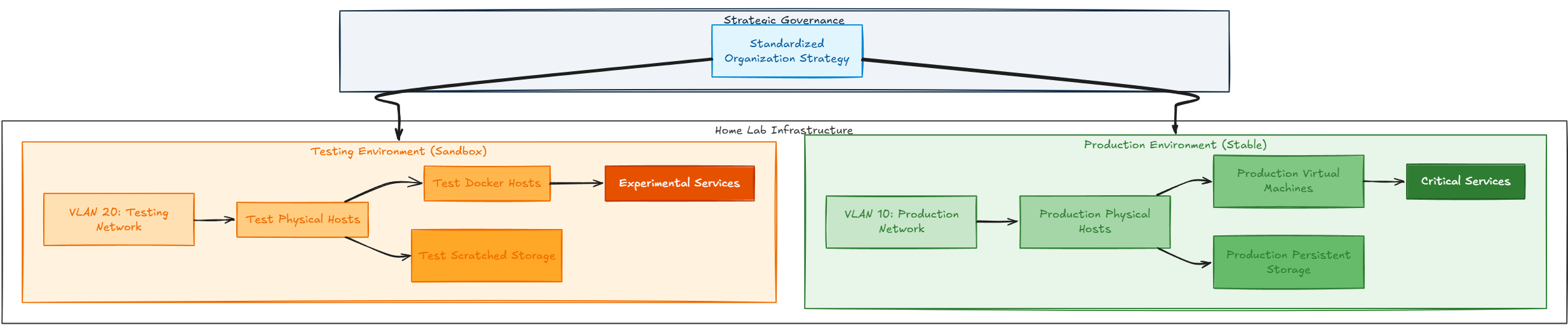
For testing environments, I have certain “test” docker hosts that I place a lot of my test services that I like to spin up and down there so that if any host or storage gets messy it is on this same host that I have configured for testing. I still follow all of the same organization recommendations that I have already talked about here on my testing environment just to keep my same strategies across the board.
Wrapping up
As home labs grow and expand in their purpose and configurations, confusion is usually just part of the growing pains. But there are definitely things you can do that can help your home lab organization efforts. The biggest improvements that I have made have not been new hardware or platforms. It was creating consistent organization across the board. What about you? What workflows and organization tips do you follow?
More in this topic




Google is updating how articles are shown. Don’t miss our leading home lab and tech content, written by humans, by setting Virtualization Howto as a preferred source.
About The Author
