


So at the first of the year when I built out my new Proxmox mini lab, I went all in on Ceph. Like most of us, I wanted to have distributed storage, high availability and the ability to easily scale out nodes when needed. It has been a phenomenal storage system. Over the past few months, I have tuned it, tested multiple things, and even benchmarked consumer vs enterprise grade drives and pushed 1 million IOPs for reads. So naturally this might sound like the end of the story. But recently, I added iSCSI storage into the mix using a StarWind plugin for Proxmox. Now I am running a Proxmox Ceph iSCSI home lab, side-by-side in the same cluster. Let’s look at why I decided to run both and how I am using each and lessons learned.
Ceph has been my go-to storage
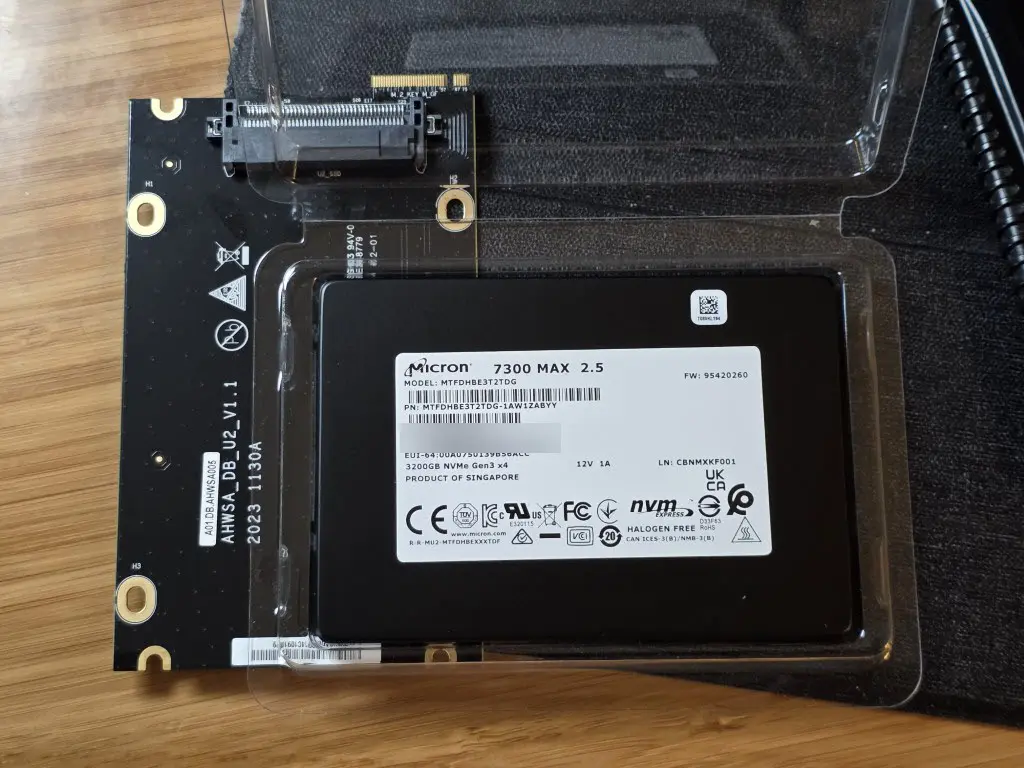
Ceph has definitely formed the backbone of my Proxmox cluster. My current setup has my 5 Proxmox nodes each participating with a single NVMe based OSD each connected over 10 gig networking. I wanted to go multiple OSDs for each host, but I splurged on Micron 7300 MAX enterprise drives that felt like they cost a fortune and I didn’t want to bring down the performance of these drives with another consumer grade drive sitting beside it in each host.
I created an RBD-backed VM disks that is replicated across multiple nodes. This allows me to have resilience if one node goes down, data is still available. This is huge when it comes to having a home lab that is resilient and great for learning with real workloads and cluster features.
Ceph performance in the home lab
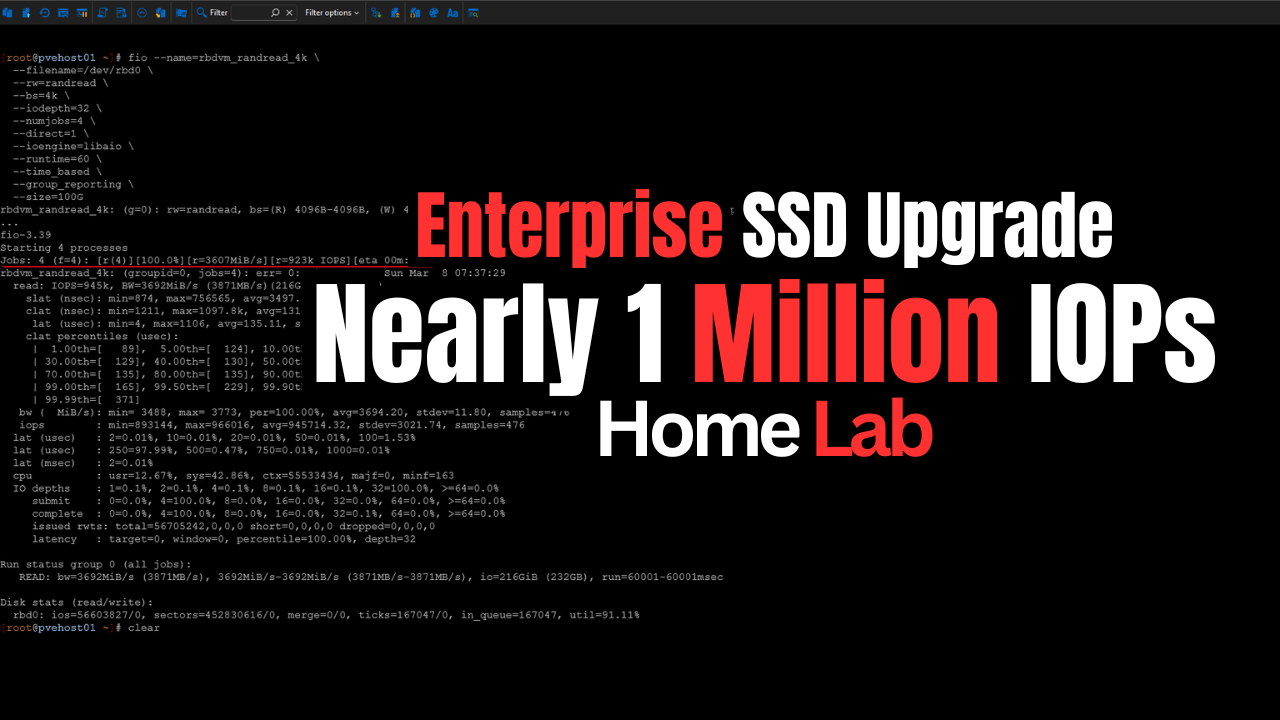
Performance has also been VERY good with Ceph when I went to enterprise drives. In my testing using the Micron enterprise drives, and turning FIO workloads, I was able to get around one million IOPs for reads and 60,000 IOPs for random writes. Also, this was not a synthetic one-off test on a quiet system. I did this benchmark with around 26 VMs running so it wasn’t a quiet system to say the least.
Read my post on this here: Consumer vs Enterprise SSDs in the Home Lab: I Benchmarked Both in Ceph.
Ceph also integrates extremely well with Proxmox. By running Ceph and having shared storage, you get features like live migration, snapshots, and backups that work seamlessly for all your VM disks that are on RBD storage.
So, Ceph has for a long time checked all the boxes and it still does for me for my general home lab workloads.
Why I started looking beyond Ceph
The distributed storage with Ceph has been great and I haven’t had any issues with it. But for me, a Proxmox Ceph iSCSI home lab means having another shared storage resource available in the cluster would open up some interesting use cases that I could take advantage of.
Since I wanted to learn even more about iSCSI with Proxmox and get a better feel for everyday operations, part of the reason to add iSCSI was the learning aspect. Having both Ceph and iSCSI in the cluster means I will be able to experience the management and operational aspects of both storage types, which are likely going to be the BIG ones when it comes to real enterprise environments that are wanting or are migrating from VMware over to Proxmox.
Reusing old hardware
Most environments will have a connected SAN to their VMware environment and will be looking at migrating these workloads and still being able to take advantage of the SAN they have invested in. I wanted to add iSCSI to see the best options and configuration parameters there.
Also, for me, one of the really cool things I was looking at doing is actually replicating my VMs that are running on top of Ceph over to iSCSI to have yet another way to protect my workloads running in Ceph in case something were to happen with my Ceph storage and I wanted to get everything up and running as quickly as possible.
Adding iSCSI storage to my Proxmox cluster
Do check out my full write up on this one. But when iSCSI came into the picture, I used the StarWind iSCSI target in my environment and integrated it with Proxmox. Read the post on that process here:
The process using the StarWind plugin for Proxmox was very straight forward and I was able to get the target presented to my hosts, discover the storage, and log into the iSCSI target in no time. Multi-pathing came with a bit of experimentation, especially since the Terramaster F8 SSD-Plus only has a single network adapter. But after playing around with it, I was able to SSH into the storage and add a second IP to the same network adapter.
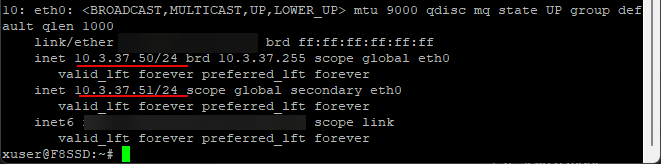
I know this isn’t true multipath-worthy since it is a single adapter. But, it gives me two different IP addresses to target on the storage side for multiple path configuration with Proxmox.
Once everything was connected, I verified the setup using tools like multipath to confirm that both paths were active and healthy. From there, adding the storage into Proxmox using the starlvm

This setup feels super easy and straightforward. Unlike Ceph, there is no cluster-wide rebalancing or distributed logic to this type of storage. It is just block storage presented to each host, with multipath handling path redundancy.
Networking for two storage types
Ideally, if I would have had enough 10 gig interfaces like you would have on a modern server grade machine, I would have split out traffic between physical interfaces for both storage types. However, I am running the Minisforum MS-01 mini PCs in my home lab cluster. I only have (2) 10 gig connections to work with. I have them in an LACP LAG configuration for 20 gigs of total throughput.
What I have done is created a new VLAN for the iSCSI traffic and added an IP interface on a new bridge backed by the bond for the iSCSI VLAN. This allows for separation between the traffic types and still makes use of the LACP bonded interface.
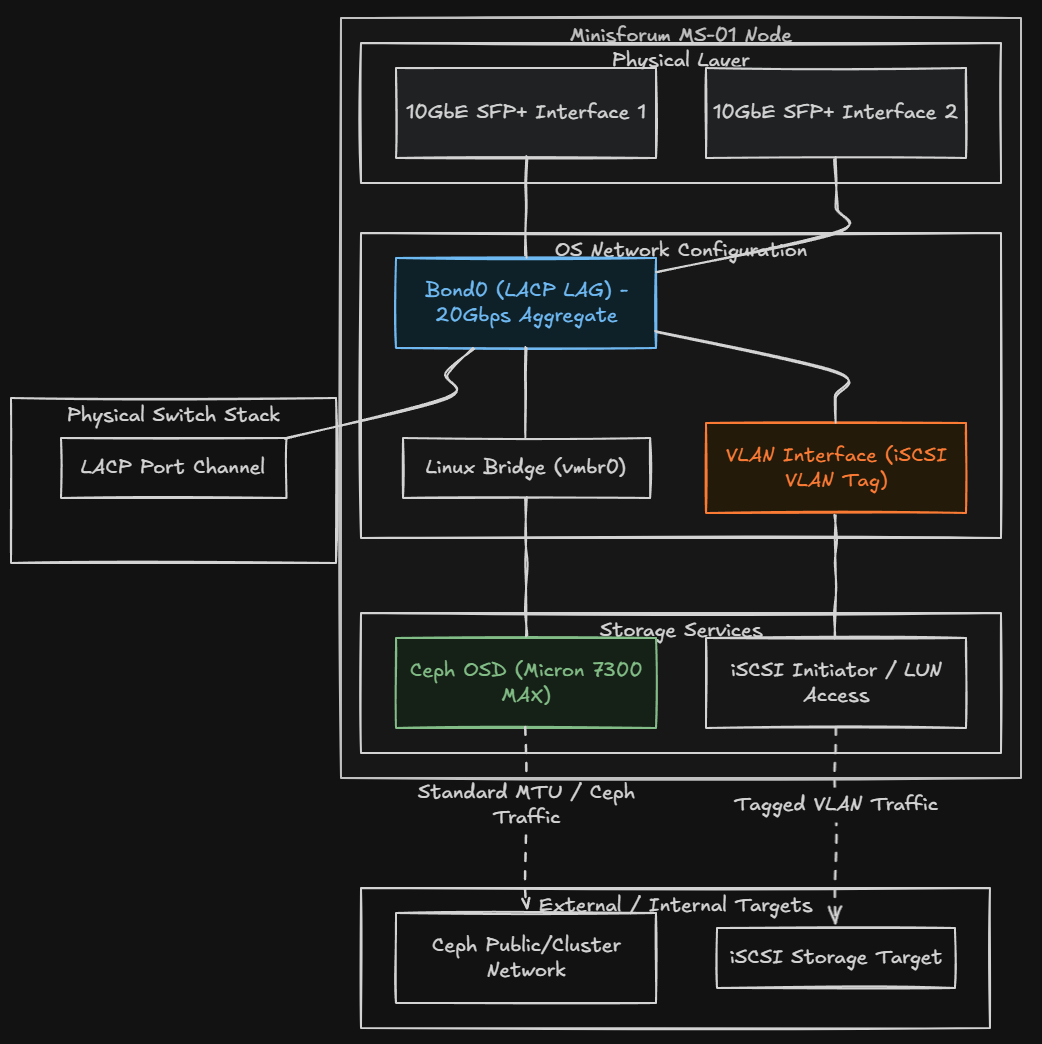
So far, I have not noticed any issues with performance with Ceph with the iSCSI storage LUN. OSD latencies are still “0” with the Micron 7300 MAX drives so everything still performing as expected with no issues.
How I am using Ceph and iSCSI together
I see value in running both storage types in a Proxmox Ceph iSCSI home lab environment. First for me is the fact of “getting the claws sharpened” for both types of storage. I have a really good feel for Ceph management and configuration at this point, but haven’t really put iSCSI storage through the paces as of yet in the home lab. I have played around with it, but nothing serious up until this point.
Keep in mind as well I just got most of my production workloads moved off of VMware in the home lab at the first of the year, so now I am really putting everything through the paces with Proxmox and my mission critical workloads.
Where I am using which one
In my environment, Ceph is still my primary storage for workloads that benefit from high availability and distributed performance. This includes most of my core VMs, anything that I want to be able to migrate freely between nodes, and workloads that generate a lot of I/O. I really like how Ceph is integrated seamlessly with proxmox. If a node goes down, I know the data is replicated and accessible on the other nodes in teh cluster.
The iSCSI LUN is safe as well and it is a tried and true storage protocol that is battle tested for decades now. And I am going to use the iSCSI LUN to bolster my data protection as well. How?
Even though the iSCSI LUN and the Ceph RBD storage is not ZFS, PegaProx has a pretty slick “snapshot” solution built in that allows you to snapshot based replication of your virtual machines to different storage.
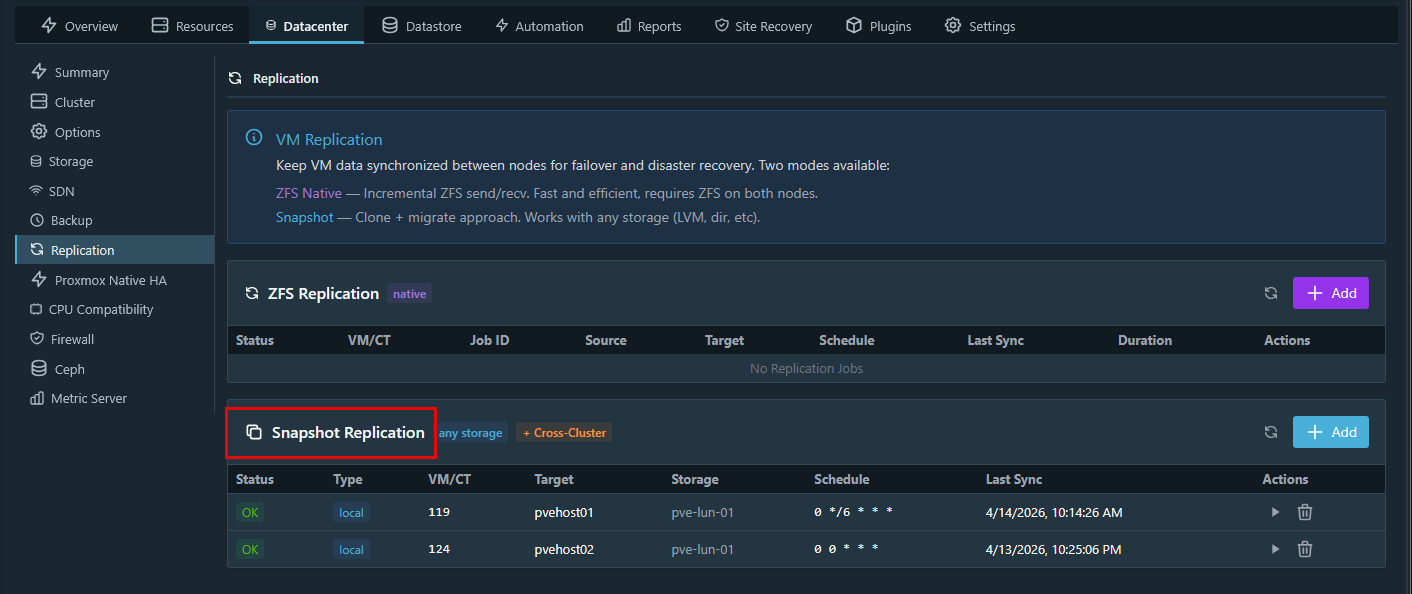
On the other hand, I am using iSCSI for other types of workloads. This includes things like backup storage, bulk data, templates, ISO images, and certain VMs that do not require distributed storage.
iSCSI is also great for scenarios where I want predictable performance with less overhead. Because the storage is centralized, there is no replication traffic between nodes. What you see is what you get in terms of performance characteristics. Also, you can get away more with using consumer grade NVMe or flash drives without the latency impacts that we see with Ceph.
Another advantage is flexibility. If I want to take that iSCSI-backed storage and use it outside of Proxmox, I can. It is not tied to the cluster in the same way Ceph is. This hybrid approach lets me place workloads where they make the most sense. This is better than trying to force everything into a single storage model.
Tradeoffs with a Proxmox Ceph iSCSI home lab
Keep in mind that no storage type is perfect and each of them have their tradeoffs to take note of.
| Storage type | Strengths | Tradeoffs |
|---|---|---|
| Ceph | High availability with replication | More complex architecture |
| Ceph | Distributed across cluster nodes | Requires ongoing monitoring |
| Ceph | High performance when tuned | Performance depends on disk and network |
| Ceph | Scales well with additional nodes | Best results require enterprise SSDs |
| iSCSI | Simple and predictable | Depends on external storage system |
| iSCSI | Easier to troubleshoot | No built-in redundancy |
| iSCSI | Works with existing NAS or SAN | Multipath adds complexity |
| iSCSI | No distributed overhead | Performance tied to backend and network |
| Networking (applies to both) | Enables high throughput | Misconfiguration hurts performance |
| Networking (applies to both) | Supports low latency | MTU mismatches cause issues |
| Networking (applies to both) | Critical for storage traffic | Inconsistent link speeds create bottlenecks |
Is hybrid storage with Ceph and iSCSI good for home lab?
Number one, I really like the learning aspect of having both. Two, there are practical advantages to having two separate storage technologies connected to the same cluster as it gives you options. Options are never a bad thing when it comes to recovering from a disaster or just simply having more locations to store your data.
Note the following points:
- Proxmox Ceph iSCSI home lab gives you flexibility
- If you already have a NAS or SAN that supports iSCSI, you can reuse it
- If you are learning, this setup gives you the chance to play with both distributed storage and traditional block storage
- If you have mixed workloads, use the best storage for the workload
Wrapping up
For a long time, I thought I would decide “between” Ceph and iSCSI traditional storage. But after running Ceph storage for quite some time now, adding iSCSI opened up more options. It gives you flexibility for storing home lab data. It has also allowed me to integrate my existing Terramaster F8 SSD Plus NAS. After thinking about what i wanted to do, I realized it didn’t have to be an either or type of decision. Running Ceph and iSCSI together has given me more control over how I run my home lab workloads. So, if you are building or evolving your home lab, it may be worth thinking about your storage in the same way. Not as a single choice, but using a combination of storage types together for more options. How about you? Are you using Ceph and iSCSI together? Let me know in the comments.
More in this topic

Google is updating how articles are shown. Don’t miss our leading home lab and tech content, written by humans, by setting Virtualization Howto as a preferred source.
About The Author
