


When it comes to Proxmox replication in the home lab or production for that matter, if you want to have replication you needed ZFS. That was just how the solution is engineered in the box. This is built into the platform and well documented that way. So, since I haven’t been running ZFS and have been using Ceph and now ISCSI with my clusters, I have just tried to design around that assumption. But recently, that assumption got flipped on its head and it has changed how I think about storage design in my Proxmox home lab.
Why ZFS replication feels like the only option
If you have spent any time with Proxmox, you know that replication is tightly tied to ZFS. The built in replication feature works by leveraging ZFS snapshots and send and receive operations. You can read this in the Proxmox Admin Guide for PVE 9.x here: Proxmox VE Administration Guide.
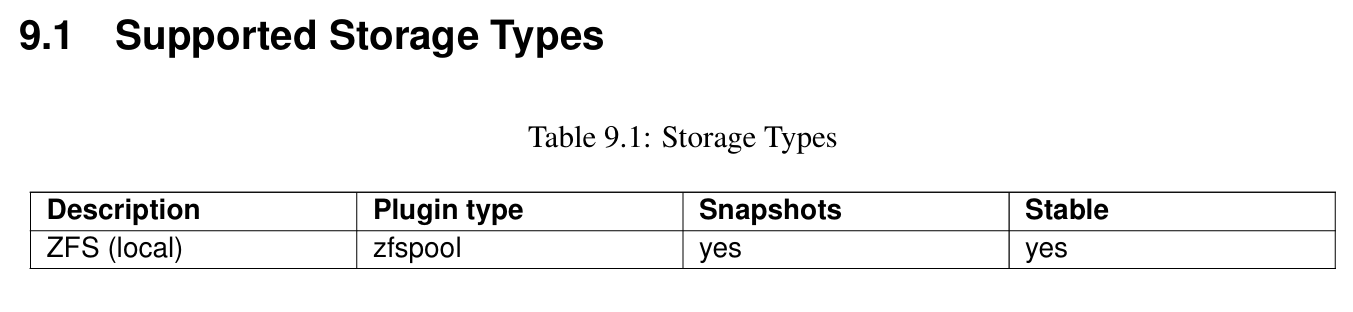
That gives you a lot of benefits when using ZFS and replication:
- Incremental replication
- Efficient snapshot transfers
- Built in scheduling
- Tight integration with the Proxmox UI
- Automatically changes direction if you migrate
- It’s well documented and works
But, the downside here is that if the storage is not ZFS, the replication feature simply does not apply. LVM, LVM thin, Ceph, iSCSI, etc do not get the same native replication capabilities. If you try to enable replication on a VM that sits on something outside of ZFS, you will see the following:
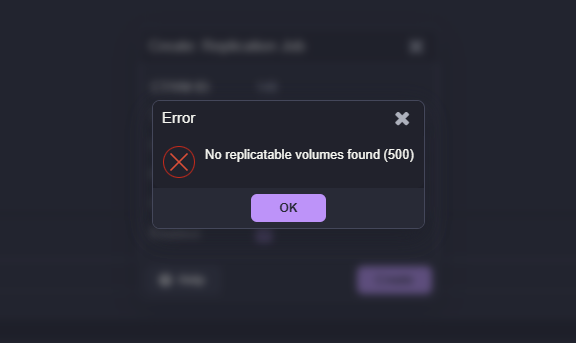
So naturally, most people conclude that if you want to make use of replication, you will need to configure and run ZFS storage. This is exactly where I was.
ZFS is great unless you want shared storage in a Proxmox cluster
Don’t get me wrong. ZFS is a great file system that works very well for local storage. However, once you shift into the mindset of a proper Proxmox cluster, this changes things. In a cluster, you want to have “shared storage” for all your nodes. This means that you want to have all of your cluster nodes be able to access the same storage at the same time and run different workloads from the same storage.
That is not possible with ZFS. So, you are stuck between capabilities depending on what type of storage you use natively in Proxmox.
- If you use ZFS, this storage can’t be used in a cluster
- But if you use ZFS you can use replication between ZFS storage
- If you use a shared storage technology (Ceph, iSCSI), you can share between nodes
- If you use a shared storage technology (Ceph, iSCSI), you can’t use native Proxmox replication
So it is a bit of a conundrum with the native functionality. Now, can you use something like Veeam to replicate your Proxmox virtual machines between two different environments? Yes, you absolutely can do that, and this is similar to how many who run VMware with Veeam are operating today.
Where the gap actually is in Proxmox
Proxmox itself is not lacking in replication capability. It is just that the “built-in” replication feature is tied specifically to ZFS. It seems like this would be an easy win for Proxmox development to add this native feature in there. But if you take a step back, replication with ZFS in Proxmox is really just:
- Copying VM disk state from one node to another
- Doing it in a consistent way
- Keeping those copies reasonably up to date
ZFS is the vehicle that solves that using snapshots and send streams. But when it comes down to it, this is not the only way to achieve the same outcome. The gap is not that Proxmox cannot replicate non ZFS storage. The gap is that it does not have a native, general-purpose replication engine for all storage types.
The tool to replicate non-ZFS VMs
The other day, I stumbled onto functionality using PegaProx that was very intriguing to me. And this came right after I had just added iSCSI to my Proxmox cluster that was already running Ceph. In case you haven’t heard about PegaProx, I think it is probably the best third-party UI out there right now for Proxmox and has many great features that will help fill the gap of look and feel for vSphere admins moving away from the vSphere Client.
Check out my posts on PegaProx so far here:
- Managing Multiple Proxmox Clusters Gets Messy When You Want Smarter Placement
- PegaProx Now Adds Built-In ESXi Migration and Proxmox Backup Monitoring
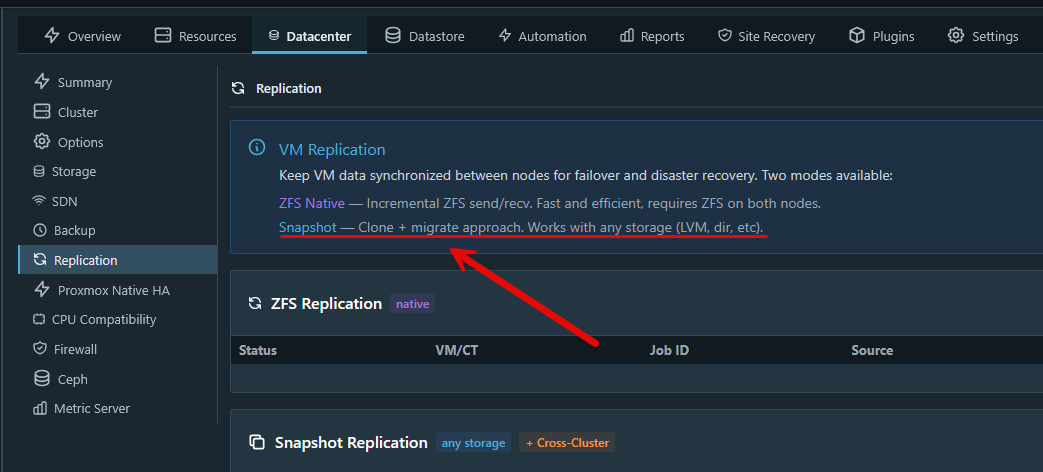
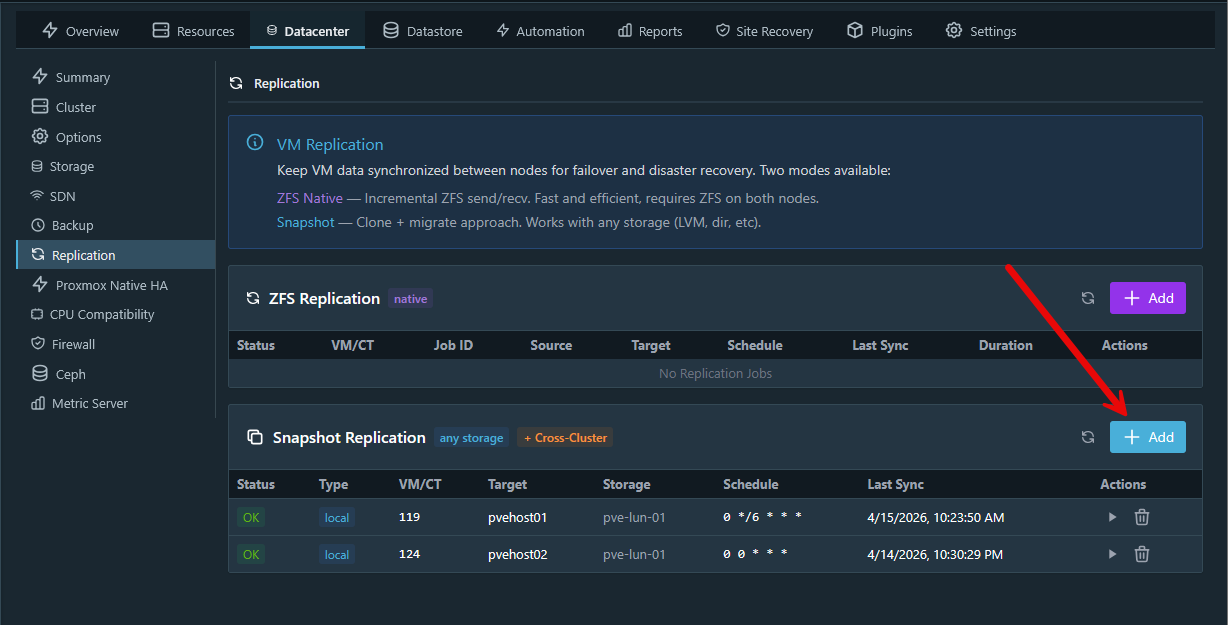
In PegaProx underneath the Datacenter options for your cluster, there is the Replication menu. In looking at the replication options there, PegaProx actually has an option to use what they just refer to as Snapshot replication. The description for this replication type is this:
- Clone + migrate approach. Works with any storagge (LVM, dir, etc)
Also, what is interesting in terms of efficiency, according to the official PegaProx documentation, it states:
- “Snapshot-based replication copies VM data between clusters. After initial full sync, transfers are incremental (delta only).“
How to replicate VMs that aren’t on ZFS
Now that we see the tool and functionality to do the snapshot replication, let’s see what this workflow looks like. Click the +Add button on the Snapshot Replication section.
This will launch a window that looks like the following. As you can see in the dialog box, it has you select:
- VM/CT
- Target Node
- Target Storage
- Schedule
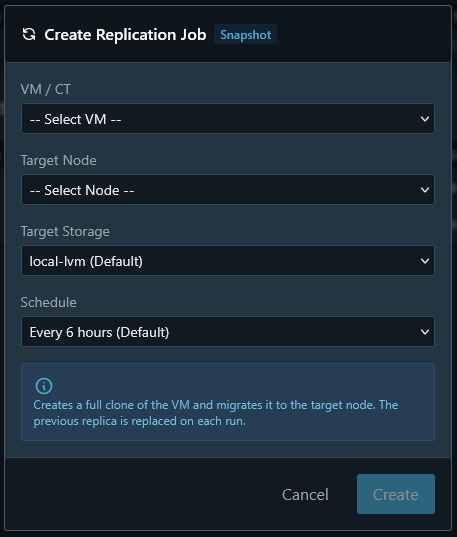
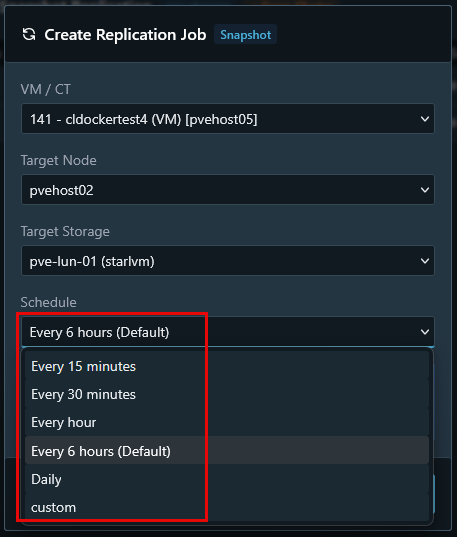
Note below, the target storage I have selected is an iSCSI LUN and not ZFS. The Scheduling options are also interesting. The default setting is every 6 hours. But as you can see you have the options:
- Every 15 minutes
- Every 30 minutes
- Every hour
- Every 6 hours (Default)
- Daily
- Custom
This sets up a CRON style schedule that will snapshot and replicate the VM at the specified interval.
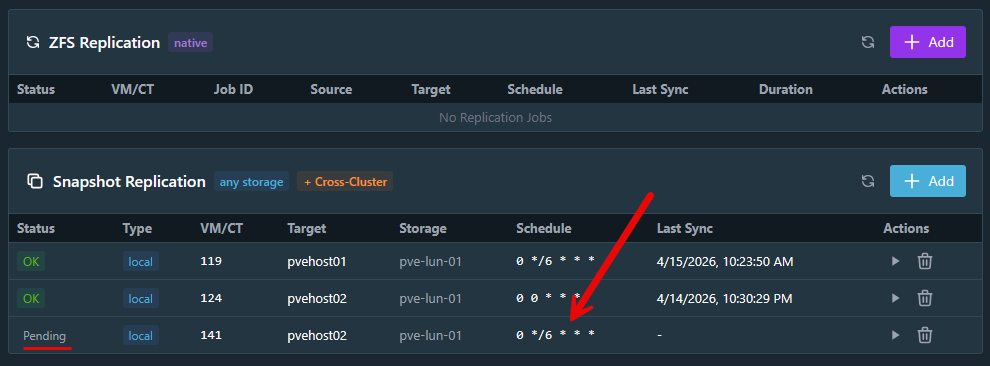
Since I completed the dialog box above and set the options then click Create, you will see the VM/CT listed as Pending. This just simply means the replication hasn’t made its initial seed of the virtual machine and it is waiting on the replication interval.
This will kick the task off. You can select the task in PegaProx and view the status of the job.
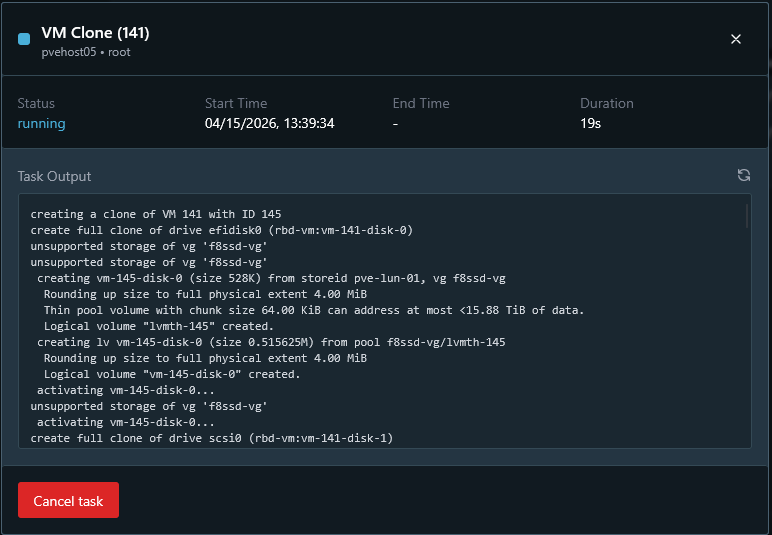
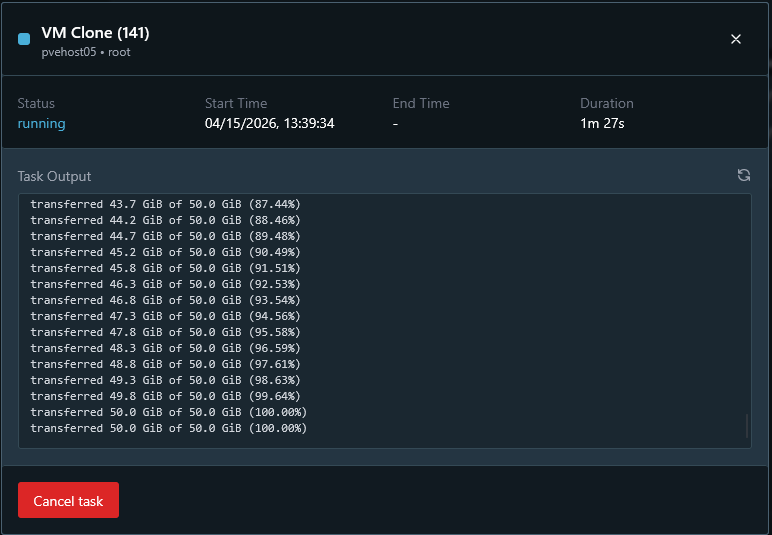
If you scroll down in the status window you can see the status of the clone copy in real time.
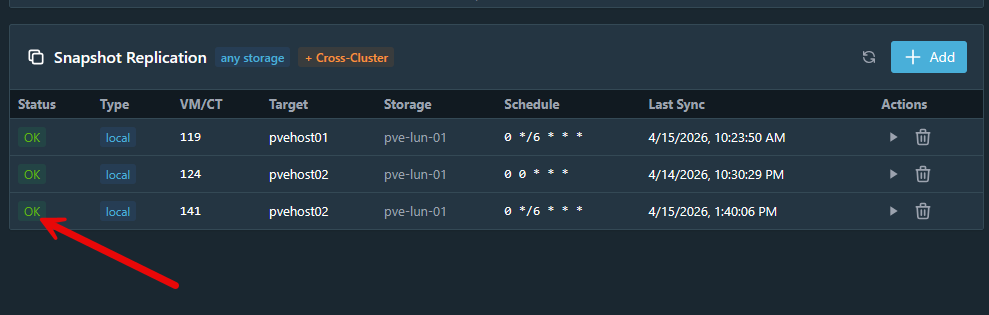
After the clone completes successfully, it will display OK on the status of the replica.
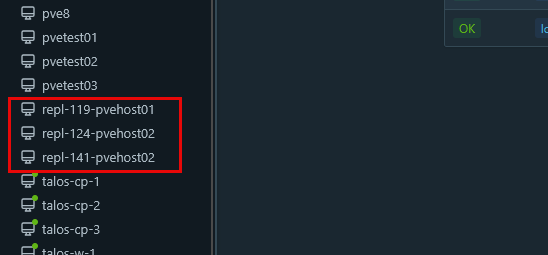
What are the resulting virtual machines called? These are prepended with “repl” and then the VMID and the host that you targeted for the replication.
How I think this changes our storage options in home lab
Have you ever just used a technology because you wanted a single feature? That may be the case when some use ZFS honestly. It is a great filesystem, but doesn’t make sense in all scenarios. So if you only used ZFS simply to get replication capabilities, this can help to change that. As we see above, instead of relying on ZFS snapshots, this approach focuses on VM level snapshots or disk state and then transferring that between nodes.
I think this is great since it shifts replication from being a “storage” feature to being a “platform” feature and this can really change things. You are no longer tied to ZFS for the replication feature and opens your storage options up a lot.
In my case, now the following was possible:
- Use iSCSI backed LVM or LVM thin storage
- Leverage external SAN features like thin provisioning and snapshots
- Keep centralized storage while still having replication
- Mix and match storage types depending on the workload
Is there still a case for ZFS replication?
Understand that ZFS is probably the most efficient and powerful replication since it operates at the filesystem level with incremental changes. So for pure performance and efficiency, ZFS is the best option IF you are not limited by its other limitations for shared storage, etc.
Keep in mind according to the official documentation from PegaProx is also is doing incremental transfers, but arguably still won’t be as efficient as ZFS as the storage layer.
Personally, I would recommend using ZFS replication when you are running local disks and you want to have simple, built-in replication without any setup to speak of. The main reason to steer the other direction is if you have need for running shared storage between multiple nodes.
I think ZFS is still one of the strongest features or Proxmox and if the tool fits, definitely use it. This is not about replacing it entirely but about having options and having another way to replicate your data if you can’t use ZFS.
Wrapping up
The Proxmox ecosystem is growing and expanding with great tools that offer a lot of really nice features. Tools like PegaProx, Pulse, and ProxMenux are tools that immediately come to my mind. They drastically increase the toolset of your Proxmox environment with very little if any overhead and they are all easy to deploy. So, if you have been holding back from using iSCSI or other non ZFS storage because you thought replication was off the table, this may be worth revisiting now. What about you? Are you currently using ZFS replication? Is this feature of PegaProx something that interests you? Do let me know in the comments.
More in this topic




Google is updating how articles are shown. Don’t miss our leading home lab and tech content, written by humans, by setting Virtualization Howto as a preferred source.
About The Author

You mentioned how proxmoxs native replication tool only supports zfs which is valid; however, you also suggested that you don’t get that replication when using ceph which is a moot point because you don’t need to manually configure replication when using ceph because ceph is replicated storage by default so anything on one node gets replicated to the others anyway.
Teagan,
Thanks for the comment and yes fair point here Ceph is replicated storage by design. However, keep in mind, the purpose of the replication mentioned in the article is to get the VMs outside the “fault domain” of your “site”. Of course for home lab a fault domain can literally be a single server. So you want to get your data out of that single fault domain to a different location to meet the 3-2-1 backup best practice. A lot of times replication as referred to here is known as “site-level” recovery. Big orgs do this by replicating warm copies of their VMs to a DR facility outside of the production cluster so that in a disaster they can failover, etc. All of this to say that even though Ceph is replicated, it is still replication inside the same storage technology which won’t help you in a disaster if you lose all of your hosts or quorum in Ceph. With the ZFS replication and the replication mentioned here with PegaProx we are able to get the data copied to a different location. This satisfies the “1” in the 3-2-1 as it allows us to have 1 copy stored offsite.
Brandon
“ceph is replicated storage by default”
This is true if and only if you set up ceph with the GUI that is provided/afforded to you, from Proxmox.
If you use the GUI to set up your Ceph, then yes, by default, you are running with a replicated CRUSH rule.
But if you install ceph-mgr-dashboard and enable it, and then create an erasure coded CRUSH rule, and then use that for your Ceph storage backend, then you won’t have the replication that said Ceph GUI will default to.
(And you might want to use EC rather than replication for storage efficiency purposes.)
Then if that’s the case, ceph not being replicated will be true.
There are multiple ways that someone can deploy Ceph, with a Proxmox cluster, _especially_ if you don’t depend on using the Proxmox GUI.
And like Brandon says, you can’t use Ceph replication to replicate to an offsite location.
The thought experiment that I’ve been thinking about recently is where I would use ZFS as the backend storage. It won’t/doesn’t have the same distributed nature as Ceph, but it would basically have multiple systems that are running ZFS (raidz2 for example). And then create iSCSI targets on the zvols, and the mount/use that over the network.
Different nodes will mount different iSCSI-over-zvol over the network. And then install Ceph on top of that.
This way, the Ceph “backend” is actually ZFS, running in the background, and you can enjoy the benefits of having said ZFS, running on the backend.
But then with the Ceph layer running on top of iSCSI over ZFS, you can also enjoy the benefits of Ceph as well.
And at least in theory, if you create a ZFS dataset, that will also create the dataset zvol, which you can then use more “traditional” ZFS send/receive for replication.
I haven’t actually tried to implement this yet (hence why it’s still just a thought experiment), but the theories of operations here indicate that it _should_ work, but I will need to test how well (or how poorly) it works (or doesn’t work).