



Most of you like me, have probably used VLANs in the home lab for many years now as this is a representation of what we do in production. We use VLANs to segment traffic between different subnets, including for servers, storage, and less trusted devices like IoT. VLANs are usually established at the switch layer. Then, once your router or firewall has an interface on each VLAN, it can route traffic at the network layer between them. So, with that, it is important for you to have the right firewall configuration in place to keep control over those paths. Let’s look at the firewall configuration for home lab VLAN isolation.
Firewall rules are needed
Wait, doesn’t a firewall just naturally block traffic between VLANs? No, they don’t. Most firewalls have been designed this way on purpose. Allowing traffic that isn’t defined to flow freely cuts down on troubleshooting. Then, depending on the use case, rules can be added to filter different types of network traffic between different segment.s
OPNsense describes this as inter-VLAN routing: traffic crossing VLAN boundaries is routed and controlled by firewall rules. You can read their official statement on that here: docs.opnsense.org
The question I want to answer is simple:
- Can a device on a less trusted VLAN reach something I intended to be more sensitive management traffic?
This I think is the most important question to ask when you start implementing VLANs. Many assume traffic is secured by default with VLANs. While they are a step in the right direction, they are only part of the solution.
Check out content I have on the VHT premium side for networking: Networking Training Course.
What a VLAN does by default and what it does not do
So you may be wondering. If a VLAN doesn’t filter traffic, what does it do? Well, suppose you have a management VLAN established for your Proxmox hosts, switches, and storage. You might also have a general server VLAN for your self-hosting. Then, you may have an IoT VLAN for less trusted devices.
These are really good boundaries that are definitely recommended. VLANs in general though control what is called a broadcast domain. There is a lot of great information on basic networking out there. But just put as short as I can, a broadcast domain is the group of devices that can receive a broadcast. This maybe traffic sent by one device, like an ARP request about who owns an IP address. So, each of your VLANs create a separate broadcast domain. This means a broadcast on one VLAN doesn’t go across to another VLAN.
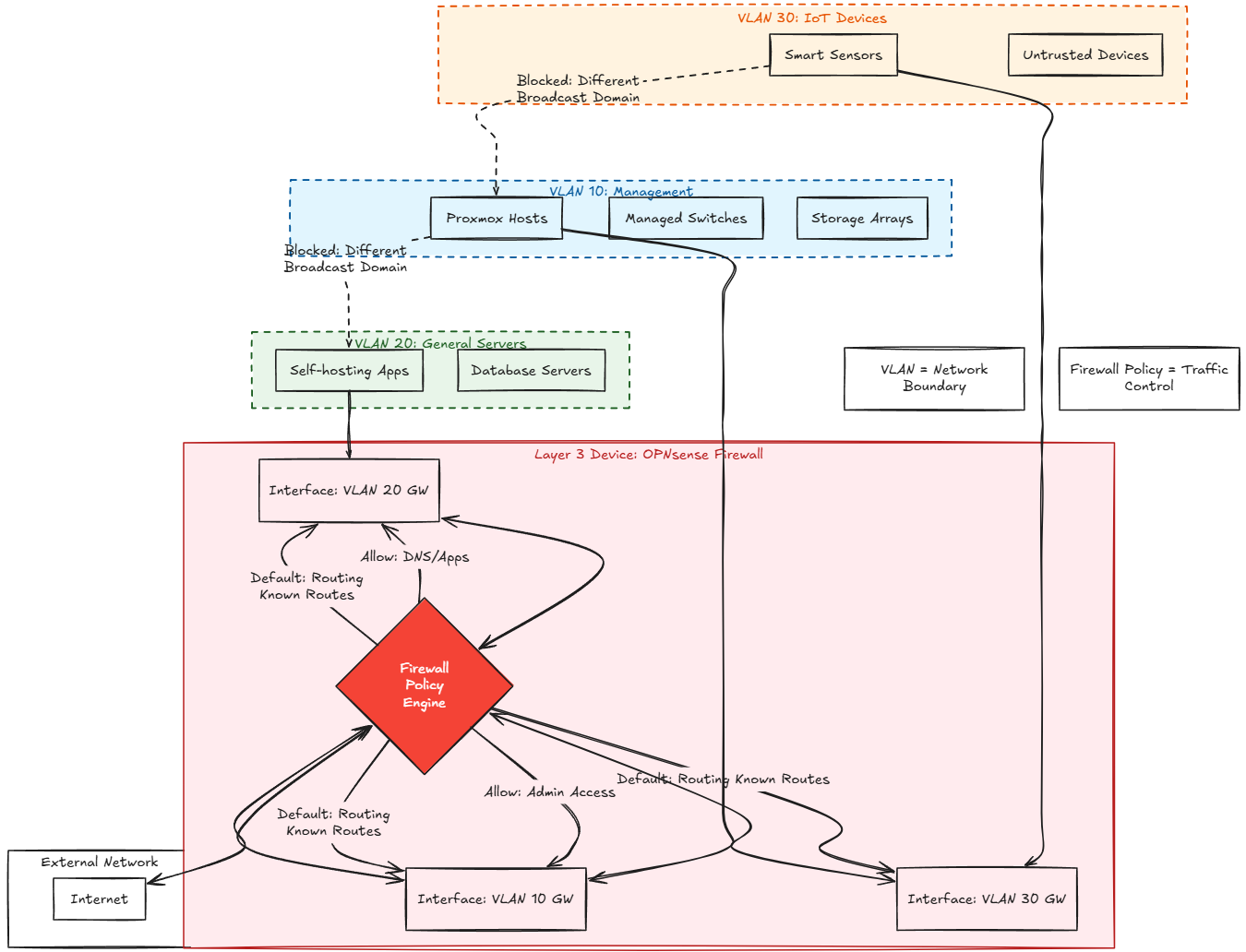
As soon as you put a routing device like a firewall in between VLANs, the firewall “knows” how to get traffic between the VLANs by default. Each of the VLANs is local to the firewall in a simple design. For instance, if you have a firewall rule that allows the IoT VLAN to reach any destination, that might be great for Internet traffic, but it would also allow those devices to access more than the Internet, including your management devices.
A good rule of thumb to keep in mind is that:
- the VLAN defines the network boundary
- the firewall rules define what crosses that boundary
You also need to know “where” the routing happens. If for instance, you have a firewall like OPNsense in play. But you also have inter-vlan routing configured on a layer 3 switch, traffic can potentially bypass the firewall and simply route via the gateway of the switch itself.
Start testing your access across your lab
The first thing that I would do is to pick what you consider to be your most “dangerous” traffic type. Maybe this is your IoT VLAN or some type of “guest” wireless access. From this network, see if you can get to maybe your most “secure” VLAN. This could be your management network or your servers VLAN. In this way, you start to test “real world” traffic types
Make yourself a little chart either printed out or handwritten where you note what the expected result should be. Then with testing either prove or disprove that traffic is governed the way that you want it to be.
So I will do something like this:
| Source | Destination | Service | Expected result |
|---|---|---|---|
| Test client on IoT VLAN | Approved DNS server | DNS | Allowed |
| Test client on IoT VLAN | Proxmox management IP | TCP 8006 | Blocked |
| Test client on IoT VLAN | Proxmox management IP | TCP 22 | Blocked |
Things like the DNS test are important. You don’t want to block literally everything most likely as you will want your IoT devices to be able to pull updates, etc. So, testing things like DNS matter as much as the blocked connections.
I like to also start with testing directly to IP addresses. This way you aren’t “bit” my name resolution taking you somewhere different due to a stale DNS record or lookup issue. I target the IP addresses so I know exactly the destination IP that I am looking to prove out on my traffic flows.
Port testing from a client on the restricted VLAN
One thing you can do from a Linux test client or Windows either one with nmap loaded is to test the management ports directly with the following:
nmap -Pn -p 22,8006 <proxmox ip>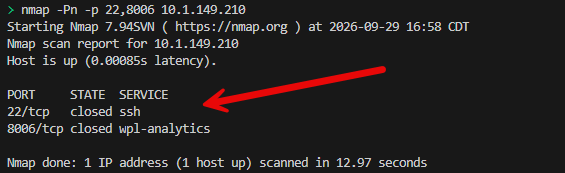
Note the options:
- -Pn
This tells nmap to proceed with the port test even if the host discovery probes do not get a response. So, even when ICMP is filtered, it will still check the ports you specify.
I also like to attempt the connection directly I am concerned about:
curl -k --connect-timeout 3 https://<proxmox ip>:8006/If I then get to the management web UI from the IoT VLAN, then I have found an issue that I need to correct. If the connection times out (which is what I want), this is the expected outcome. Even though it is the expected outcome, I like to verify the reason the traffic was filtered was due to a firewall rule and not something else that is sporadic.
I will spot check from the management VLAN where the traffic does work just to make sure the traffic flows in an expected and deliberate way. Don’t just test with ping. ICMP tests are useful for certain things, but again, ICMP can be filtered and you might still be able to get to TCP 8006 or SSH. Without testing this, you don’t know for sure with just a ping test.
Find the rule that blocks the traffic to know for sure
In OPNsense I like to make sure it is the firewall that is preventing access to a specific resource. If I can’t find a log entry where something is blocked, I want to know why and correct it if the firewall is not where the control is being introduced.
You can view the firewall logs under the Firewall > Logs > Live View menu.
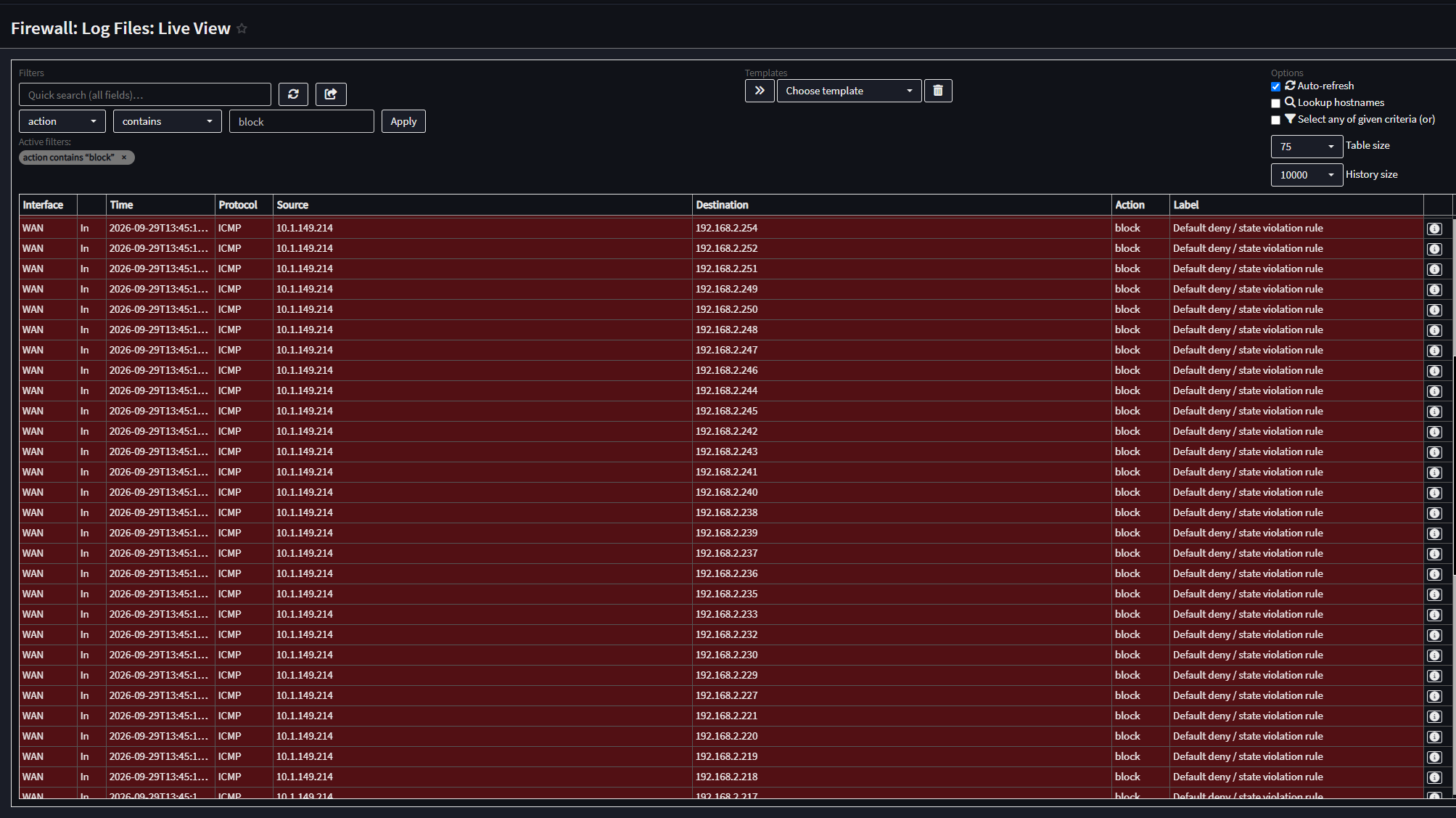
I have seen common issues with firewall rules and made these kinds of mistakes myself where you are attempting to allow “Internet access” but in the process you inadvertently allow “any” destination. This works for Internet traffic for sure since any destination would allow you to get to any address on the Internet. But, it could also allow traffic to get to another VLAN that is internal if the rule isn’t crafted right.
Also, keep things like these in mind with OPNsense:
- Interface groups, floating rules, and rule order
The processing order for rules can also include rules that aren’t necessarily visibile on one interface tab especially when you have groups in play or floating rules are used. Check out this OPNsense documentation for more details on that: docs.opnsense.org.
Here are a few tips on writing OPNsense firewall rules:
- Small labs you might write a policy as a few small rules like allow DNS, block access to protected networks, etc
- In larger labs, use aliases to help with a list of protected networks instead of editing every single rule when addresses change
- Use descriptive names like “IoT to approved DNS” instead of something like “VLAN rule”
Be sure to retest things after tightening a policy
If you found holes during the test, make small incremental changes to rules and retest. Repeat the test and then make sure the traffic is now blocked that was inadvertently allowed, or allowed when blocked. Of course the goal is ultimately you want to allow traffic that should be allowed and block the rest that needs to be blocked.
Keep a record of the results of your tests again in a little node or change log with the date.
| Source VLAN | Destination | Expected | Observed | Rule matched |
|---|---|---|---|---|
| IoT | DNS server | Allow | Allowed | Yes |
| IoT | Proxmox TCP 8006 | Block | Blocked | Yes |
| Admin | Proxmox TCP 8006 | Allow | Allowed | Yes |
Blocking traffic on the same VLAN is this possible?
So, everything that we have discussed so far, depends on the firewall or router being in the middle of the communications “between” VLANs for blocking or allowing traffic to work. If you have devices on the same VLAN is there a way to block traffic effectively since it doesn’t cross the boundary of a router/firewall?
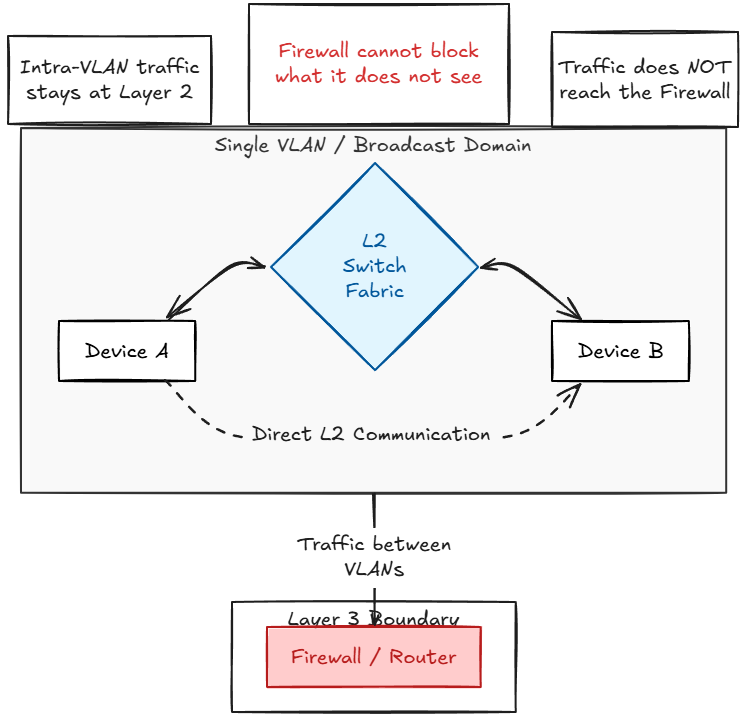
Yes, actually this is one of the best use cases I think for the Proxmox firewall at the VM level. This is a really underutilized feature in my opinion. Proxmox supports having firewall rules for individual guests and each virtual network device has its own firewall enable flag you can turn on.
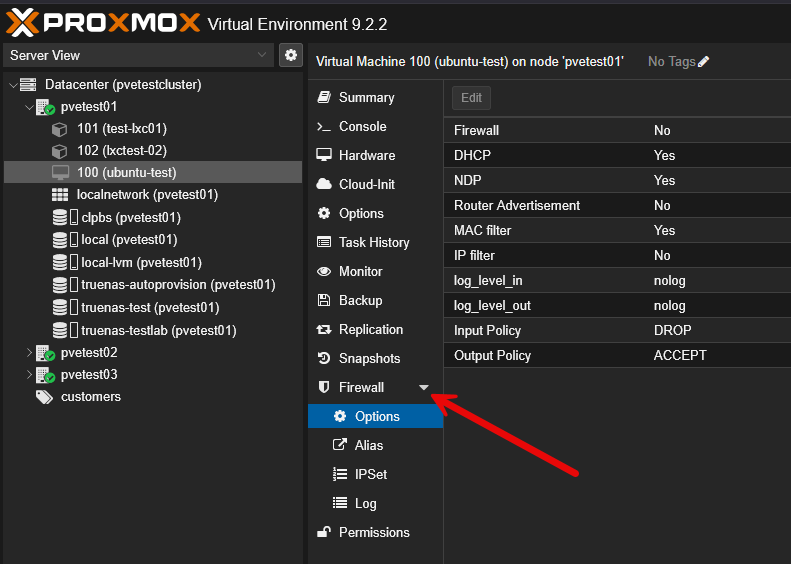
This would be a good use case for something like the following. If I had a database VM that I wanted to only be accessed from an application VM or LXC container, then I could make this happen with the VM/LXC specific firewall.
Just remember in Proxmox there are firewall settings at the datacenter level and at the VM/LXC level and then also you can set firewall settings in Linux or Windows guest operating systems. I like to recommend having a standard of where you are doing filtering at this level as you can get 3 different layers going on that aren’t really standardized and it makes troubleshooting connectivity a nightmare.
But, this is practical workload micro-segmentation whereas the OPNsense policy controls access between routed networks. Micro segmenting your traffic is a great way to have fine-tuned control over which traffic flows you allow, even inside a VLAN that wouldn’t be possible with just an OPNsense policy.
Wrapping up
VLANs are THE network construct that allows for proper segmentation. They are definitely needed and are the way that we can effectively separate traffic and apply firewall rules. Just because we have VLANs created, we can see that it doesn’t necessarily mean that traffic can’t connect from dangerous VLANs over to protected VLANs. We need the right firewall rules to filter that traffic. But, if it is intra-VLAN traffic so two machines on the same VLAN, this traffic can’t be controlled by traditional firewall policies between VLANs, since it doesn’t process that line of sight traffic. What about you? What are you doing for your firewall rules between VLANs? How are you testing to make sure your traffic is flowing the right way
More in this topic




Google is updating how articles are shown. Don’t miss our leading home lab and tech content, written by humans, by setting Virtualization Howto as a preferred source.
About The Author
