



If you haven’t heard about Pangolin, I wrote up a full walkthrough with the solution back in September of last year. You can read that post here: Why Pangolin is the one reverse proxy I’d pick if I was starting my home lab today. I think one of the big things that differentiates Pangolin from other solutions or self-hosted reverse proxies is the architecture. It can do the basics of SSL termination and forwarding a hostname to a container or VM, but it is also built around secure tunnels, multiple sites, identity, etc. You could technically cluster Pangolin before, but it wasn’t straightforward. But that has now changed with Pangolin 1.23. Now, HA clustering is now a self-service configuration. Let’s talk about this and how it could change self-hosted Pangolin for the home lab.
Pangolin 1.23 brings really good changes under the hood
Before, clustering wasn’t really available in a practical way. Now, Pangolin 1.23 changes that. The high availability clustering piece is now a self-service capability. Also, there has been many good architectural changes with the main Pangolin container.
Now DNS resolution and certificate management have been moved into the main Pangolin container. For those that are self-hosting and for home labs this is one of the biggest news items since I first tested and wrote about the platform. Now, I want to level set and say that it doesn’t necessarily make HA totally effortless. But, I do think that Pangolin has made clustering much more a possibility now.
Clustering before and after Pangolin version 1.23
Just to rewind and level set so we can describe what changed. How was clustering with Pangolin before version 1.23? Before, Pangolin clustering relied on external proprietary components. These included a custom DNS server and cert manager. According to Pangolin documentation, standing that up required a contract engagement in addition to you needing to be running the Enterprise Edition of Pangolin.
What changed after 1.23 with clustering
Now, with version 1.23, all of these functions are folded into Pangolin itself. Each instance of Pangolin can now handle DNS resolution and the cluster has a coordinated way that it can do things like issue, store, and distribute certificates. They also have published reference documentation so you can stand up a two-node deployment.
This is a bigger deal than it might seem and there are a LOT of moving parts and pieces to make this work. Clustered ingress controller have to have shared configs. They need to know which certificates are valid, which tunnels need to be reconnected if a node goes down and DNS needs to work in the clustered environment. So, that is actually a lot of complexity.
Now, Pangolin has published a cluster architecture that self-hosters can reproduce in their home labs and operate on their own infrastructure and you don’t need to engage with Pangolin support.
Pangolin 1.23 clustering architecture
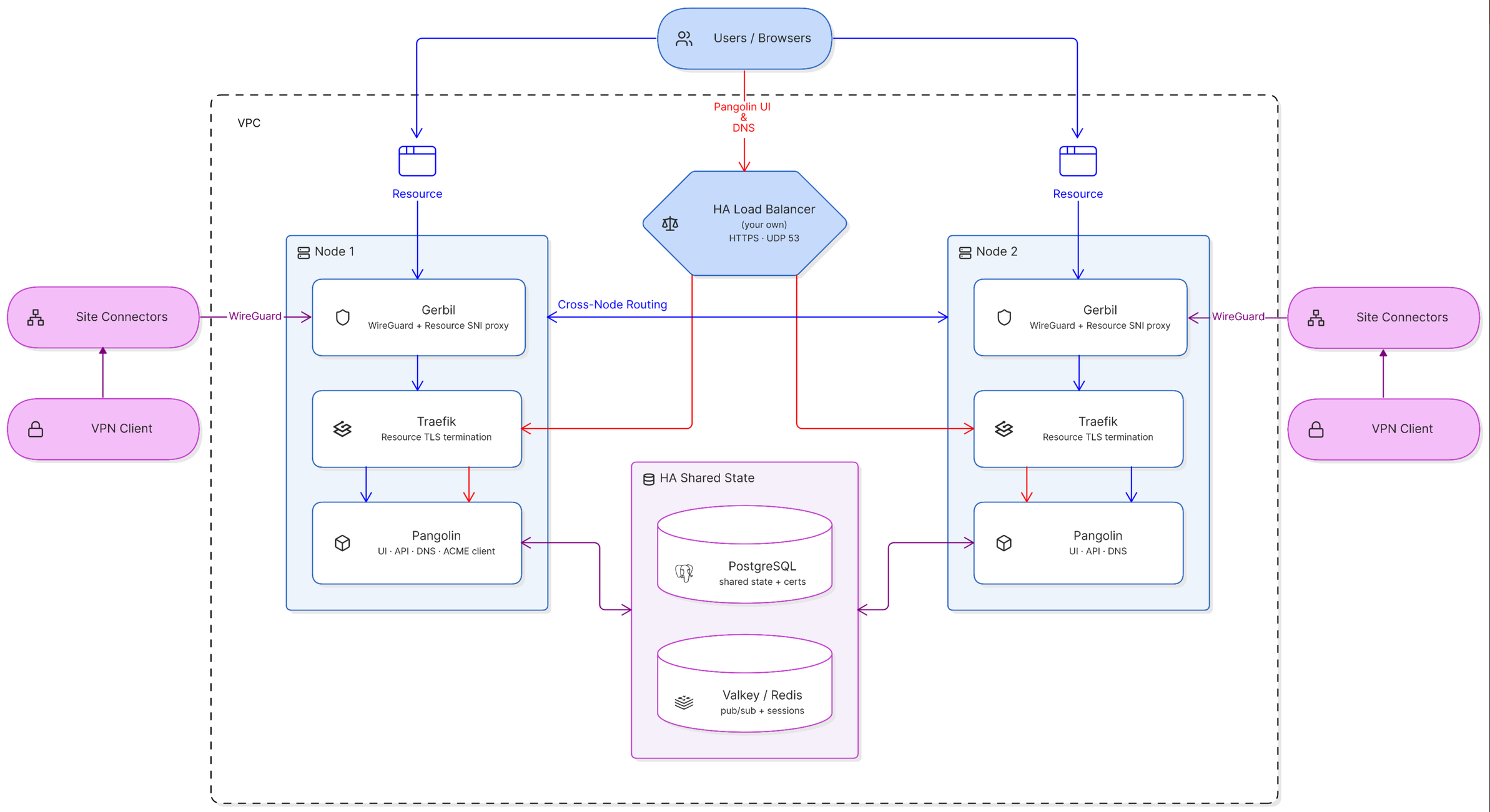
The new Pangolin clustering architecture is made up of the following components:
- Pangolin instances: These give you the web UI, API, auth, DNS, cert management, and they also coordinate clustering.
- PostgreSQL: This stores persistent data that includes things like users, sites, resources, policies, settings, TLS certs
- Valkey or Redis: This synchronizes real-time state between the various nodes and cluster caching
- Traefik: This is the reverse proxy that runs on each node to route HTTP and HTTPS traffic. It terminates SSL and proxies requests to backend containers/VMs
- Gerbil: This is the piece that manages the WireGuard tunnels and connects your Pangolin Sites. It forwards requests between nodes.
- Load balancer: This is what monitors your node’s health and sends UI, API, DNS, HTTP, and HTTPS traffic to instances that are healthy
The load balancer is still your responsibility
There is a detail here that you need to keep in mind with the new Pangolin clustering functionality. You still need to provide the external load balancer in front of the cluster. So, it needs to be able to monitor nodes and stop sending traffic to an unhealthy instance. This load balancer is placed in front of the Pangolin dashboard and API, HTTP/HTTPS, DNS traffic. There is a special API endpoint found at /ping that you can use to decide which nodes are up and healthy.
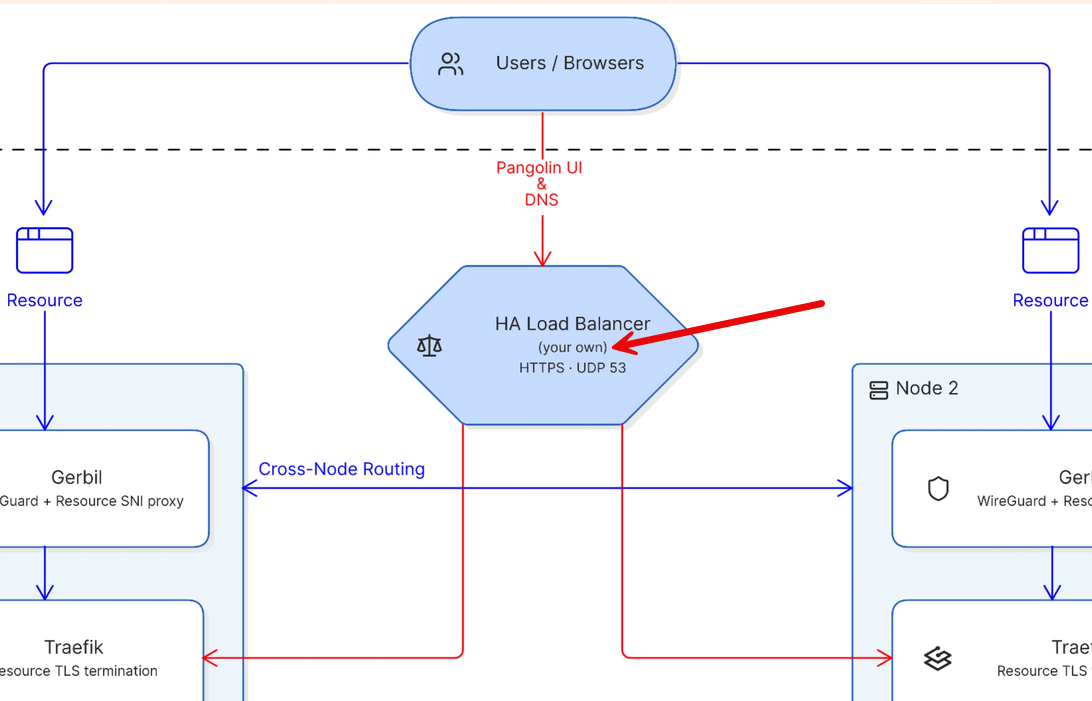
This begs the question that you may be wondering on the load balancer front. Does this mean if you don’t have high availability for your load balancer that you have moved the single point of failure? Yes it does.
But, you could still pretty easily run something like a pair of HAProxy devices for your load balancers or something else that you could use with a floating virtual IP address. But the good thing is that Pangolin is being transparent about the dependencies here and I appreciate they list that in the documentation.
What you need before building the cluster
You need to keep in mind a few things that you will need before building the cluster. What are those? To begin with, let’s start with the nodes that you will need. Keep in mind two is the minimum for clustering, but depending on your needs, you can add more than that.
- Node 1 – this runs Pangolin, Gerbil, and Traefik
- Node 2 – this runs Pangolin, Gerbil, and Traefik
- A database node – runs PostgreSQL and a Redis compatible server
Keep the following in mind on the networking side:
- public, static IP address, reachable from the internet
- Node 1 and Node 2 private IPs to reach each other over an internal network
- As discussed, you need your own HA load balancer in front of both nodes, this terminates SSL and access DNS traffic
In addition to this, you need a dashboard domain for your Pangolin web UI, DNS delegation, and then finally you need to open the ports required for connectivity and other operations. You will find the ports on the official documentation page for the requirements.
How I would approach a Pangolin cluster in the home lab
I think for most of us in the home lab, the first thing that we need to really think through before we start deploying things is the failure domains. After all, if the whole point of adding the complexity is to make sure that you have high availability for your Pangolin deployment, then you want to make sure not to shoot yourself in the foot by not thinking about where you are running things.
- Pangolin node 1 – running on pvehost01
- Pangolin node 2 – running on pvehost02
- PostgreSQL node – running on pvehost03
- negative resource affinity rule in Proxmox to keep Docker host VMs separated
- HA load balancer 1 running Keepalived – running on pvehost01
- HA load balancer 2 running Keepalived – running on pvehost02
- Virtual IP address moves based on primary HA load balancer node
You could think about using something like a managed cloud load balancer if you don’t want to self-host the load balancer portion.
For redundancy on the database side, you can add database replication. Also make sure for your database data, you have verified backups, and have a recovery that you have actually tested to know it is good. You can also build this in stages and I would recommend doing that to allow easy troubleshooting as you stand up the various layers:
| Stage | What to deploy | What to verify |
|---|---|---|
| 1. Shared services | PostgreSQL and Valkey | Make sure both planned Pangolin nodes can connect to the database and Valkey services. |
| 2. First Pangolin node | Pangolin, Gerbil, and Traefik on the first node | Make sure dashboard access, DNS delegation, certificate issuance, and access to a test resource. |
| 3. Second Pangolin node | Pangolin, Gerbil, and Traefik on the second node | Make sure the second node connects to the shared services and it can get the expected cluster state. |
| 4. Load balancing | Highly available load balancer in front of both nodes | Make sure of health checks, traffic distribution, cross-node synchronization, and failover between nodes. |
You need Enterprise Edition, but this still applies to home labs
The clustering feature is an Enterprise Edition feature. But, keep this in mind. Pangolin currently makes Enterprise Edition free for personal use and for orgs that have less than $100,000 in gross annual revenue which will definitely apply to most if not all home labs. So, even though an enterprise feature, you can still get your hands on it.
Wrapping up
I think this is really a great new feature for those that are already using Pangolin or who might be interested in trying it out. Clustering features make sure that you can add high availability to this aspect of your home lab for self-hosting your own SASE and tunneling solution. As we have discussed here, just keep in mind that you need to give attention to the fact that you need to provide your own load balancer to the solution. This also adds a single point of failure if you don’t also add HA to your load balancer. Also, be sure to think through your failure domains as this can defeat the entire purpose of application high availability if you have inadvertently introduced single points of failure underneath. Are you using Pangolin in your home lab today? What do you think about this new feature?
More in this topic




Google is updating how articles are shown. Don’t miss our leading home lab and tech content, written by humans, by setting Virtualization Howto as a preferred source.
About The Author
