



Well, if you have received a message in your Proxmox VE Server version 8 webUI telling you that Proxmox VE 8 is no longer supported, you are not the only one. But like all software, it has a development cycle that is scheduled out and it has reached its end of development and support. It may be difficult to leave Proxmox VE 8 behind as it has been a very solid release and I understand the reluctance there. However, we have now reached the point where I wouldn’t put off upgrading now. Proxmox officially list August 31, 2026 as the end data for Proxmox VE 8. I would use the end-of-life date as the prompt to audit your home lab, make sure your backups are good and then run the Proxmox upgrade checker. Once you have checked it then you can move to Proxmox VE 9 in a way where you have control and sanity checks.
Current support matrix
Here is what the warning nag about end of support looks like currently in Proxmox VE Server 8.x:
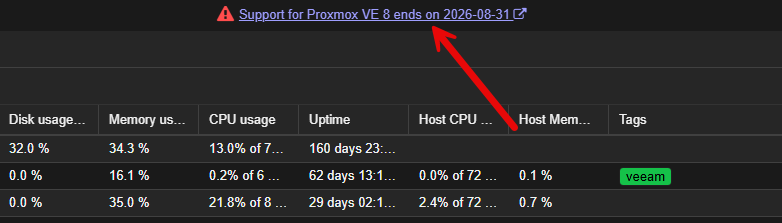
In case you are wondering, you can find the current support matrix for Proxmox versions here:
| Proxmox Version | Debian Version | First Released | Debian EOL | Proxmox EOL |
|---|---|---|---|---|
| Proxmox VE 9 | Debian 13 (Trixie) | 2025-08 | tba | tba |
| Proxmox VE 8 | Debian 12 (Bookworm) | 2023-06 | 2026-07 | 2026-08 |
| Proxmox VE 7 | Debian 11 (Bullseye) | 2021-07 | 2024-07 | 2024-07 |
| Proxmox VE 6 | Debian 10 (Buster) | 2019-07 | 2022-09 | 2022-09 |
| Proxmox VE 5 | Debian 9 (Stretch) | 2017-07 | 2020-07 | 2020-07 |
| Proxmox VE 4 | Debian 8 (Jessie) | 2015-10 | 2018-06 | 2018-06 |
| Proxmox VE 3 | Debian 7 (Wheezy) | 2013-05 | 2016-04 | 2017-02 |
| Proxmox VE 2 | Debian 6 (Squeeze) | 2012-04 | 2014-05 | 2014-05 |
| Proxmox VE 1 | Debian 5 (Lenny) | 2008-10 | 2012-03 | 2013-01 |
What does “end of life” really mean for Proxmox VE 8?
So August 31, 2026, will your Proxmox VE Server just shutdown and you will lose everything? You might chuckle at that, but this is something that is really misunderstood, especially in home lab circles. Your Proxmox VE 8 server doesn’t just shut down when the support window is gone. Your VMs still stay running and they will continue to boot along with your LXC Containers that you have running. The issue is support and ongoing maintenance.
Most of us don’t pay for support in the home lab anyway, so this aspect of the lifecycle isn’t as important as the part about “ongoing maintenance”. In general, Proxmox says that its releases are supported at least as long as the Debian release is and it recommends running the latest stable Proxmox VE release. Proxmox VE 8 is based on Debian 12 Bookworm in case you were wondering.
The part that matters is that they are not going to continue to patch Proxmox VE Server 8 components, etc. And, if you are like me, the hypervisor is not necessarily the area of my infrastructure that I want to roll the dice on when it comes to security and other fixes.
For me, everything relies on and touches the hypervisor. You have all the core components, including the Linux kernel, QEMU, LXC, ZFS, storage drivers, networking, the web UI, clustering, and Ceph for storage. The hypervisor is underneath everything else that I run in my home lab. So, I at least want to be on a “supported” release that is actively patched, etc.
First step, see what you are running exactly
Before doing anything else, I would confirm exactly where every Proxmox node currently stands.
You can quickly check from the shell with:
pveversion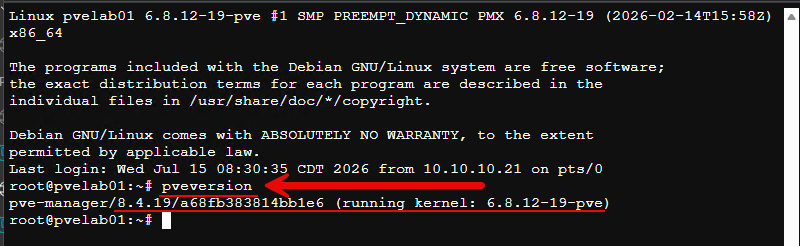
For more detail:
pveversion -v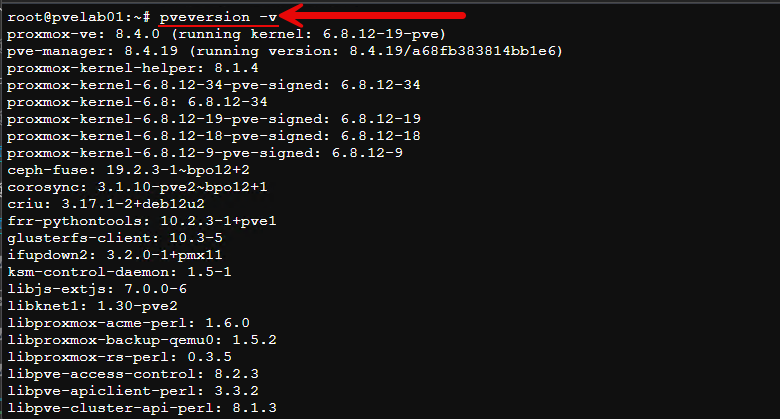
This second command gives you a better picture of the installed Proxmox packages running, instead of just giving you the main version. You can also see this in the web interface as well.
Upgrade guidance
Directly from Proxmox, they say in their official guide that a system should be running the latest Proxmox VE 8.4 packages. So their supported path is from an up-to-date Proxmox VE 8 installation to Proxmox VE 9. To do that in the home lab, there are a couple of simple steps. Make sure you are pointed to the no-subscription repos:
Navigate to “host” > Updates > Repositories and disable the “enterprise” repos and add in the “no-subscription” repos.
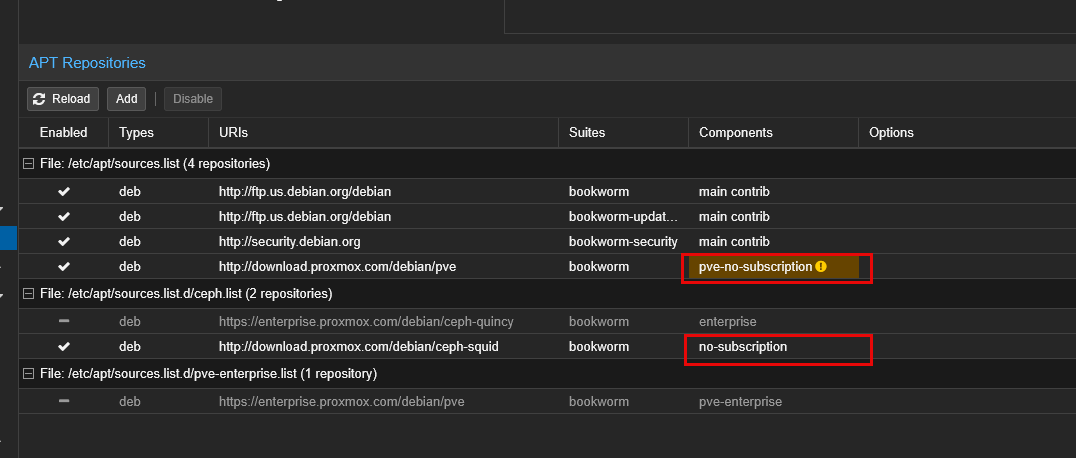
Then, run:
apt update && apt full-upgrade -y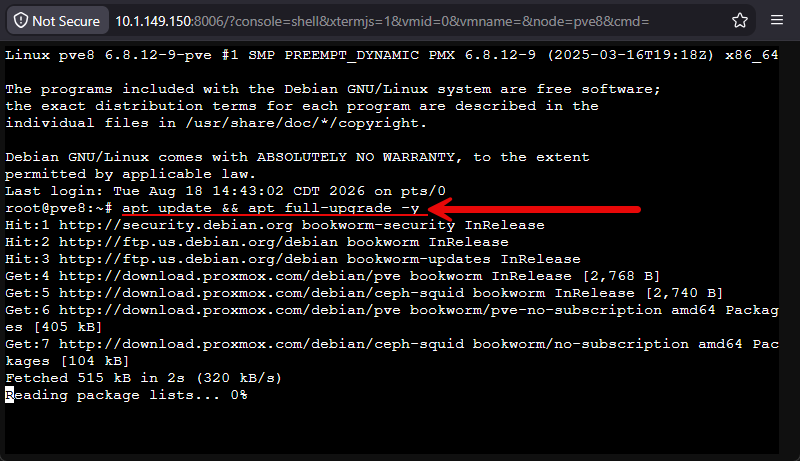
I would run the updates and then perform a reboot. Once everything comes back up ok, and is healthy, I would only then start thinking about your upgrade to PVE 9. Just so you know, when I ran all the current updates on a test Proxmox VE 8 server in the home lab, this is the version that I got upgraded to:
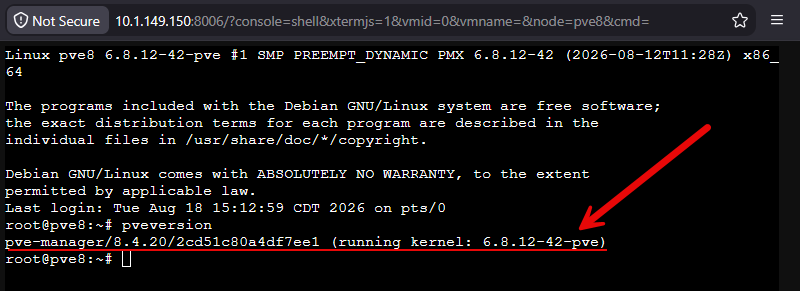
Run the Proxmox upgrade checker
Thankfully, Proxmox has given us an upgrade checker of sorts that provides all the tests needed to know if your Proxmox VE 8 Server will successfully make it up to Proxmox VE Server 9. To run the full battery of tests on your home lab PVE 8 server, run this command:
pve8to9 --full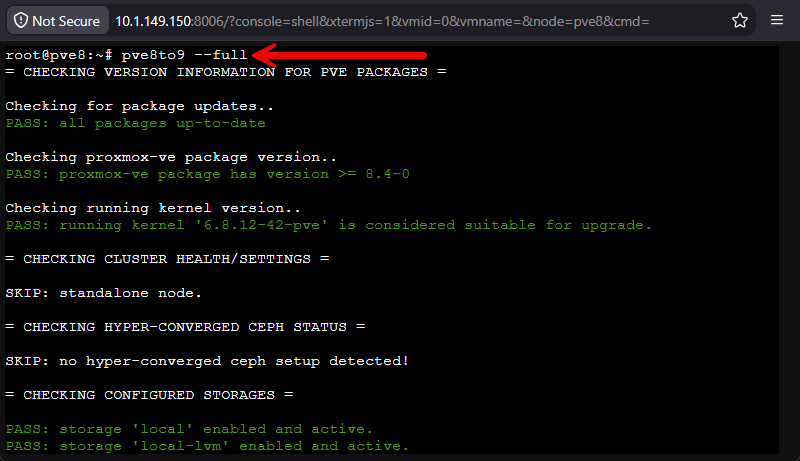
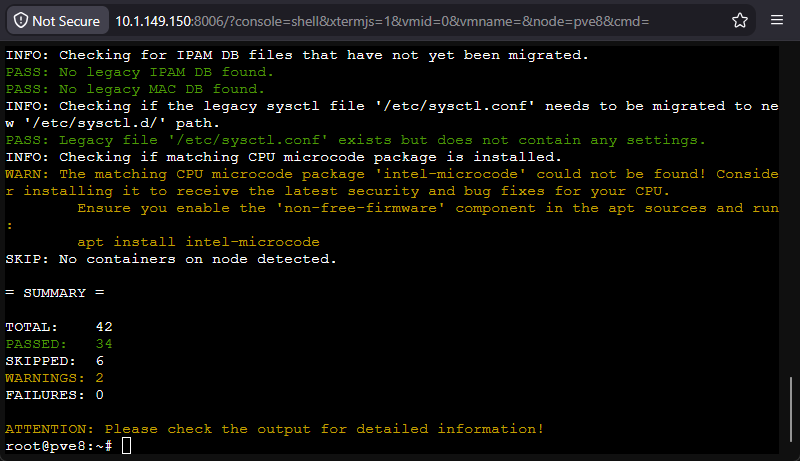
What you want to see is that you have no failures. Take note of the warnings, but generally speaking these are things that won’t necessarily cause the upgrade to fail, but are things to note and correct if you can beforehand.
Configuration backups of your Proxmox VE 8 host
There are also a couple of things that I would recommend doing if you have the chance to and that is getting an actual backup of your Proxmox VE Server 8 host itself. I don’t mean virtual machines at this point. Here, we are talking about getting a backup of the actual server itself.
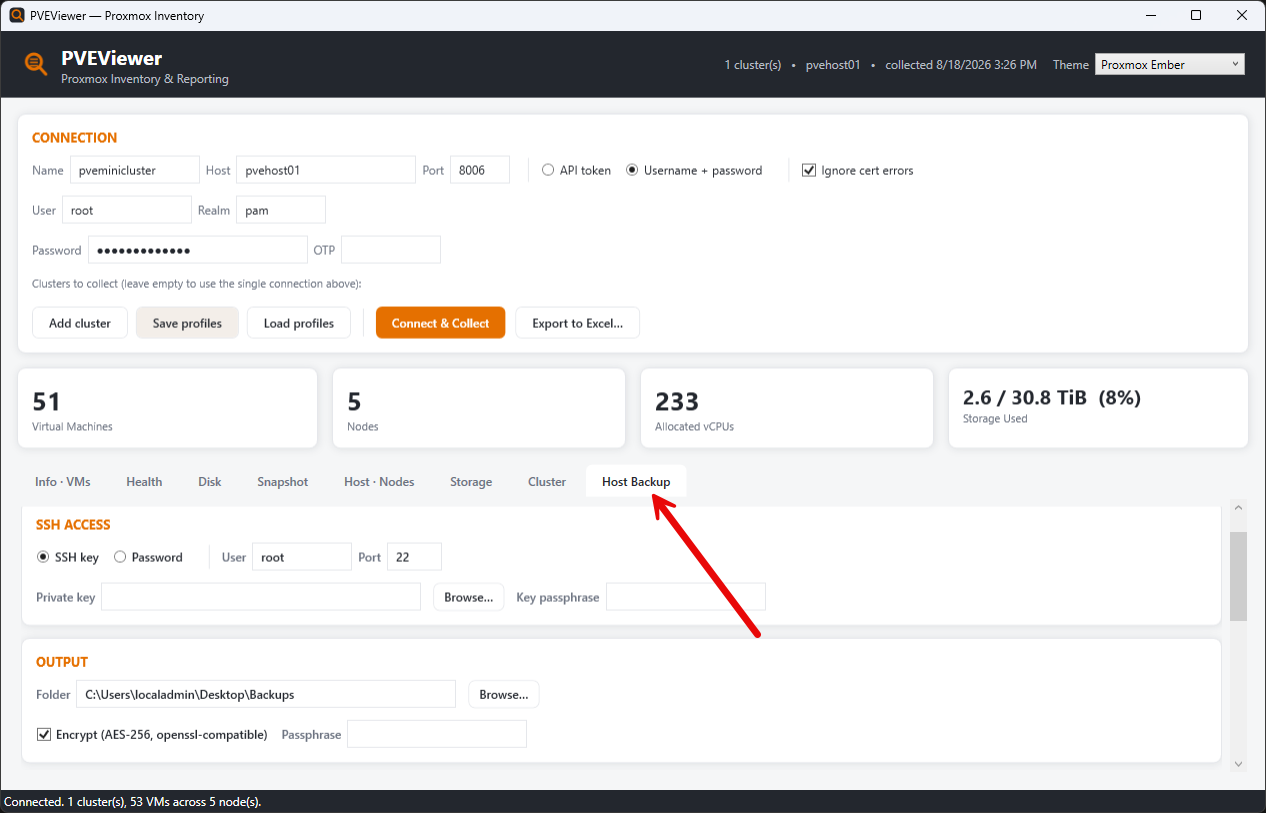
There are a couple of things to note on this front. You can actually install the Veeam Linux agent inside your Proxmox VE Server host and grab a full system backup that way. You can also pull a backup of the “configuration” as well for your host, including network configuration, host configuration, cluster configuration, virtual machine configuration, etc.
I like to use a tool called PVEViewer that I stumbled onto as of recently. You can check out my full blog post on the tool here: I Tried This New Proxmox Inventory and Auditing Tool and I Was Impressed.
Take care if you are using device passthrough and custom drivers
If you are doing a lot of passthrough of physical devices like GPUs, network adapters, or other types of devices, I would give these a little bit of extra attention. The reason for this is that Proxmox VE 9 is a whole new generation of Linux since it is running Debian 13 Trixie. Along with that, it has newer versions of core virtualization and storage components.
Newer kernels are a good thing and usually bring about even better hardware support and newer drivers. But they can also can cause issues if you are using otherwise unsupported modules or drivers. If you have something mainstream like an Intel NIC, I am not too concerned. But if I installed a driver that I found on GitHub 2 years ago and it has had no updates since then, this may be one that I would be a little concerned about.
Clusters and those with Ceph need more planning
It is one thing to upgrade a standalone Proxmox VE 8 Server to version 9. But it is something altogether different to upgrade a cluster to a whole new version. Clusters require more thought. The nice thing is that it gives you the ability to migrate workloads around to other hosts while you take a single host down at once.
You can Live Migrate or shut down workloads that you need to in order to upgrade the node and reboot it. You do this one at a time until you are able to make it through all the hosts and get them upgraded. Also, if one host bombs, it isn’t your entire cluster. So this is another nice thing about upgrading in a cluster.
Before you begin your cluster upgrade though, you want to make sure the cluster is healthy in general. You dont’ want to add to an issue that you may have going on by attempting an upgrade on top of an existing problem.
Check your cluster with:
pvecm statusA cluster with Ceph
If you are running a cluster that includes Ceph, this adds an additional wrinkle to the puzzle. Ceph is a super cool HCI storage solution that allows you to have shared logical storage between your cluster nodes without having a separate physical device attached for storage.
Before I begin any type of maintenance operation on your cluster with Ceph, make sure that Ceph is healthy using the command:
ceph -sAgain, like a cluster that isn’t healthy in general, if Ceph has some kind of issue, you don’t want to press your luck with it. Make sure it is absolutely healthy before you begin upgrading your cluster nodes. When I know that I am performing maintenance on Ceph as well on cluster nodes, I like to set a couple of flags for safety:
ceph osd set noout
ceph osd set norebalance
Both of these commands make sure that your Ceph cluster doesn’t try to move data around when you have a node down for expected maintenance.
The checks I would make after an upgrade
There are definitely a few checks that I would make after I run an upgrade from Proxmox VE Server 8 to 9. First of all, we can check the version of Proxmox using the command:
pveversion -vIf you have upgraded a cluster, validate the cluster health:
pvecm statusCheck your storage, whether this is ZFS or Ceph:
##ZFS
zpool status

##Ceph
ceph -s
Look for services that may have failed:
systemctl --failedLook through your journal log for anything that errored out or failed:
journalctl -p err -bThen start looking at workloads and running through a few things there. Note the following:
| Post-upgrade check | What I’m verifying |
|---|---|
| VMs | Virtual machines start and run |
| LXCs | Containers start with no errors |
| Networking | Bridges, interfaces, and networks work |
| VLANs | Tagged VLAN traffic passes |
| PCIe passthrough | GPUs, NICs, and other hardware still work |
| Proxmox Backup Server | Backup jobs complete successfully |
| Shared storage | NFS, iSCSI, Ceph, and other storage is still connected and accesible |
| Live migration | VMs can migrate between cluster nodes |
Wrapping up
Would I wait much longer? Well, to each his own. As we mentioned there isn’t some kind of “kill switch” that will activate at the end of August 2026. But, just know that if you are still on Proxmox VE Server 8 by the end of this month, you are running on an unsupported platform. All in all, the steps to get from PVE 8 to PVE 9 aren’t that difficult. I like the pve8to9 command line utility as well as it helps to flesh out any issues before you get into the middle of an upgrade. How about you? Are you still running Proxmox VE 8? Planning an upgrade soon? Let me know in the comments.
More in this topic

Google is updating how articles are shown. Don’t miss our leading home lab and tech content, written by humans, by setting Virtualization Howto as a preferred source.
About The Author

Great one. This kind of snuck up on me too. Luckily I got over to Proxmox VE Server 9 in the home lab a few months ago. Glad I did now. It is always hard to find the time to do the upgrades.