



Proxmox has the ability to run a two node configuration for a cluster. And for many home labbers this is a great setup since you don’t have to use as much power for 3 nodes. With today’s modern mini PCs they have a lot of horsepower with compute and memory to run quite a few VMs and LXCs or Docker containers. I totally get why many start with a couple of hosts. Systems like the MS-01, MS-03, and MS-A2 from Minisforum are great examples of mini PCs that are great for this purpose. But there is a situation that can develop with two node Proxmox clusters if these are not designed correclty. What is this?
The problem with two node that sneaks up on you
With a two-node cluster things can look like they are healthy while both hosts are online. You can manage the cluster and even migrate workloads. You can configure your high availability as well and do things like replicate ZFS storage between your nodes. But, then one host goes offline. Or maybe something happens with the Corosync network.
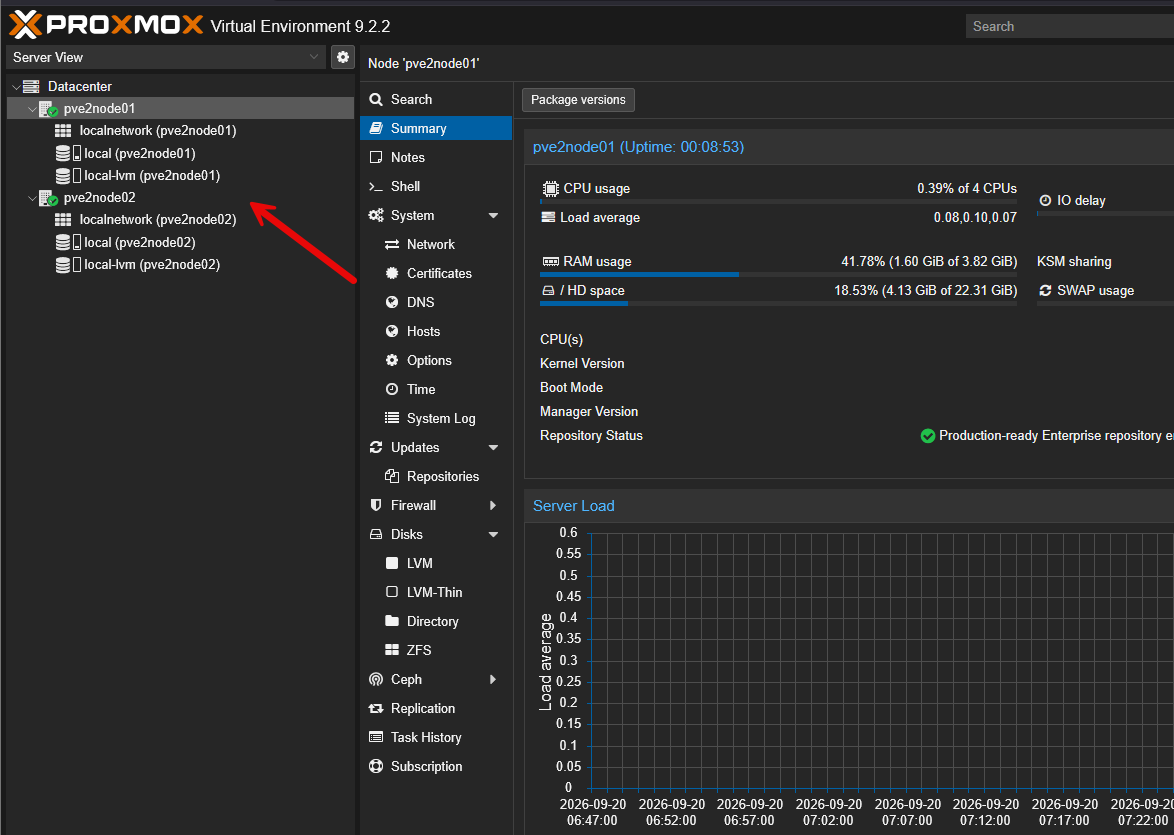
If not designed correctly, the node that is left won’t be able to operate normally. This is a situation that often will catch those that are new to Proxmox clustering by surprise. The server that is still up and running may be healthy and the storage it is attached to is healthy. VMs are there and present. But the cluster can’t determine what is happening with the other node.
Learn Proxmox Clustering in VHT Premium here: How to Create a Proxmox Cluster.
With that said, I would not build a serious two-node Proxmox cluster without that third vote. But doesn’t that defeat the purpose of a two node config? Well, not quite. Fortunately, there is what Proxmox calls a third vote in the Corosync QNetd that can be housed externally and acts as that QDevice to give the cluster the vote it needs.
Why does a two-node Proxmox cluster behave like this?
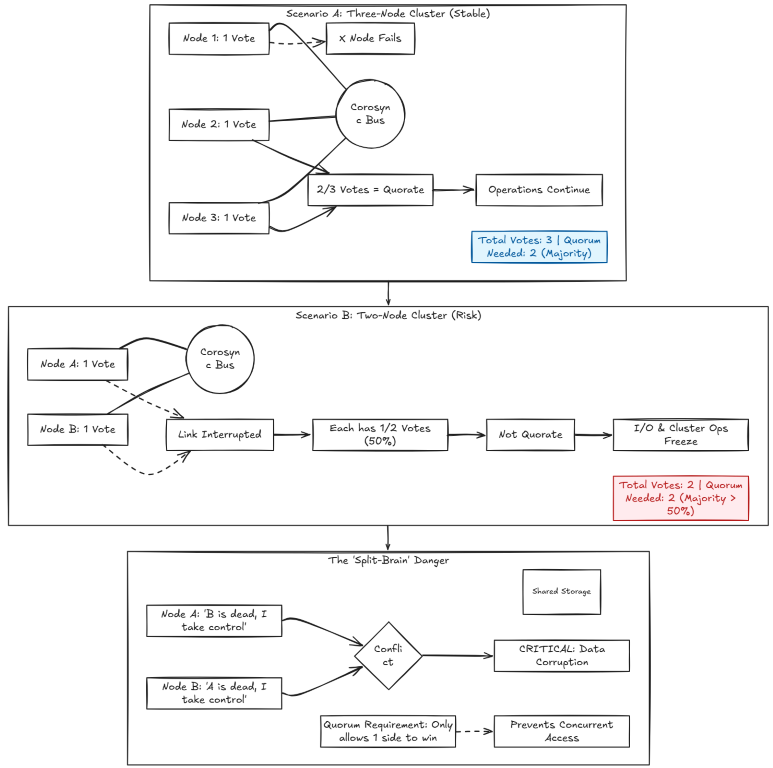
Proxmox uses something called Corosync to keep cluster membership and comms between nodes in sync. Each normal cluster node gets a vote. The cluster needs a majority of the votes to keep in a state of quorate (node majority).
With three nodes, the math on this is pretty easy. There are 3 votes that it expects to be there. So two votes form majority between the three. One of your servers can fail and the other two can still agree and have majority. This is important since it allows you to take down a node for maintenance or updates.
This is where two-node clusters are more complicated when it comes to quorum. They have an expected two votes to participate. So, then, if one host disappears, the last host has only one of the two votes that are needed. That is exactly 50% and not majority.
Even though technically, the last node would be able to run workloads, the problem this helps to prevent is called split-brain and this is very bad if for instance both nodes still have access to storage. If the connectivity between the nodes is the only thing that is cut off, they both could think the other node failed and start making cluster decisions, accessing data, etc. This is what the idea of quorum is meant to protect against.
Self-fencing and what it means in Proxmox
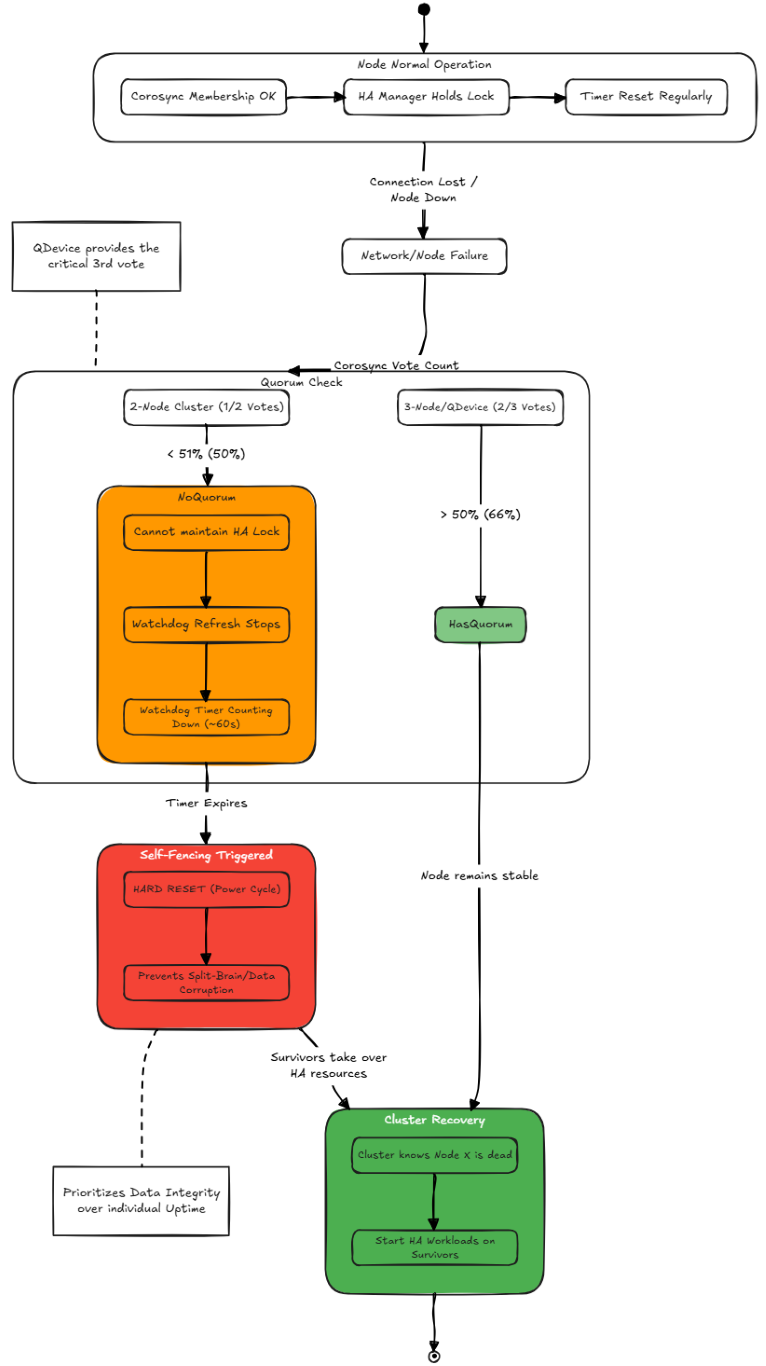
Proxmox has a self protection mechanism that it invokes called self-fencing. What does this do? Well, self-fencing means that a Proxmox host deliberately resets itself when it can’t prove that it is asafe to continue running HA resources. That may sound pretty extreme, but this is designed to prevent a split-brain situation.
Proxmox HA uses a watchdog timer on each node. The HA services regularly refresh that watchdog service to prevent it from expiring. When the node has quorum, it can access the HA manager’s protected state. It can remain as a member of the cluster and the watchdog keeps being refreshed.
But, if the node loses quorum and it can’t maintain the HA lock, it stops refreshing the watchdog. When the timeout expires, which is roughly a minute, the watchdog resets the entire Proxmox host.
Proxmox HA uses a watchdog timer on each participating node. The HA services must regularly refresh that watchdog to prevent it from expiring. As long as the node has quorum, can access the HA manager’s protected state, and remains a valid member of the cluster, the watchdog continues to be refreshed.
This sounds extreme since it isn’t a graceful Linux reboot of the host or of each VM and container that is running. It is basically like pushing the power button on a server. This behavior is part of the design of how Proxmox protects things. In a two node setup, a node may know that the other host is down, but it doesn’t know if it crashed or if the Corosync network connection has just went down. That may not sound drastic, but if the other host is up and running it could still try to run the same HA-managed VM, etc.
Before another cluster node can safely start that workload, the cluster needs confidence that the original copy is no longer running. Resetting the host is what helps to guarantee this doesn’t happen.
The sequence looks like this:
The third vote doesn’t have to be a physical Proxmox server
The cleanest and recommended solution for a resilient cluster is a three node setup with the third full Proxmox node. But this isn’t the only way that you can accomplish this. And in a home lab it would defeat the purpose of trying to have a low power, low node Proxmox cluster setup.
The Proxmox QDevice solves this problem without having another Proxmox host. The external service is called QNetd. It can run on a separate Linux system. It communicates with the QDevice clients that are installed on Proxmox nodes. Then, what Proxmox does is it incorporates the external vote of the QDevice into the quorum calaculation.
So, with this configured, the two-node cluster now has three votes:
- One vote from Proxmox node 1
- One vote from Proxmox node 2
- One vote provided through the QDevice
Now, if either one of the Proxmox hosts goes down, the host that is left over can communicate with the QDevice and keep two out of the three votes. This gives it the node majority.
Where I would run the QDevice in a home lab
The most important part of the QDevice is not the amount of hardware that it is assigned. The more important thing is “where” the QDevice runs. In fact, it doesn’t need much power at all (very little CPU, memory, or storage). You can use a small Raspberry PI or an external Debian server you have running, etc.
The important thing is you want it “outside” the failure domain of your two-node cluster. In other words, you don’t want it to be a VM running on the two node cluster itself. That would defeat the purpose. If one of the hosts goes down, it will take the QDevice with it.
My QDevice setup for me would look like the following:
- It would be powered on continuously
- It runs outside the two-node Proxmox cluster
- Both Proxmox nodes can reach it in a reliable way
- Its OS will get normal security updates
- It has a static IP address and reliable DNS record
Installing the external QNetd device
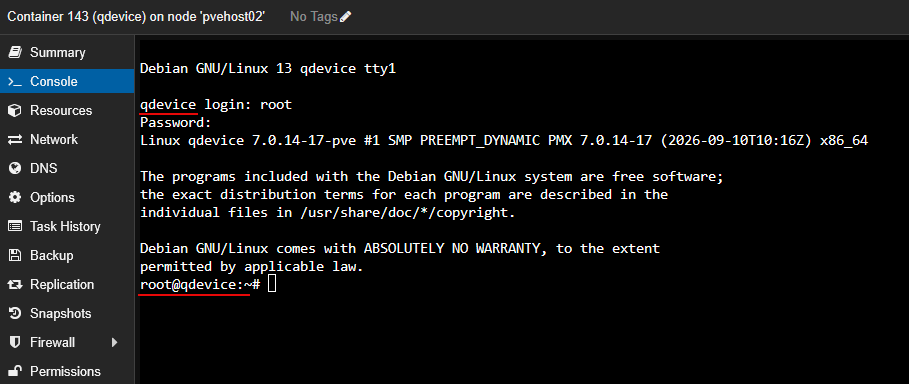
One of the lowest resource ways to run the QNetd device is to run it in a very low resource Debian VM or LXC container. Getting it installed is simple. Do the following:
apt update
apt install corosync-qnetd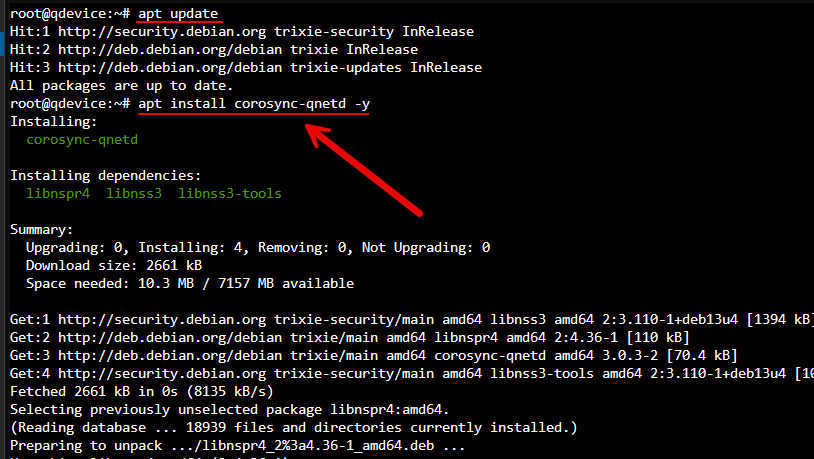
Then, just verify the service is running with the following:
systemctl status corosync-qnetd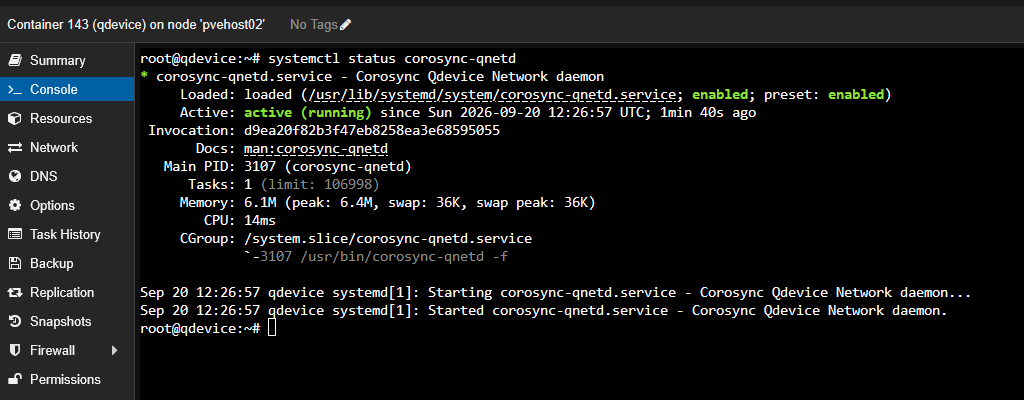
When you set this up in Proxmox, it will handle the certificate exchange and the remaining config that is left. The external QDevice host must be reachable from the cluster nodes. It also needs to be able to have SSH access for this to work during setup.
Make sure you have a static IP address or a DHCP reservation on the QDevice host. I prefer static as what happens if your DHCP server goes down in a failover? These are real things you have to think about when building for HA.
Then, just verify basic connectivity from both Proxmox hosts:
ping -c 4 <ip of qdevice machine>Installing QDevice support on your Proxmox nodes
Now that we have the external server running QNetd, we need to install support for the QDevice on our Proxmox nodes that are running the two-node configuration.
The external QDevice system runs:
corosync-qnetdSo, each Proxmox cluster node needs:
corosync-qdeviceOn both Proxmox nodes, run the following:
apt update
apt install corosync-qdevice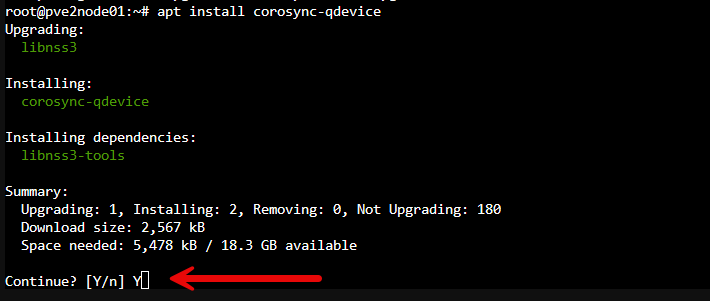
Before adding the QDevice, I would confirm that both cluster nodes are online and that the existing cluster is healthy:
pvecm status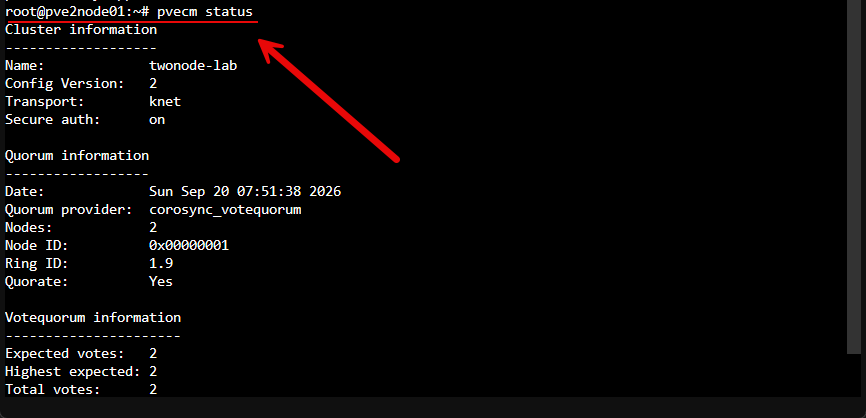
Running this command allows you to make sure everything is healthy to begin with. Look for node membership in the cluster, the cluster name, expected votes, current quorum status, network connectivity, etc.
Adding the third vote
Now, the last remaining step is to add the third vote to the cluster quorum. To do that, the basic command is the following:
pvecm qdevice setup <ip of qdevice>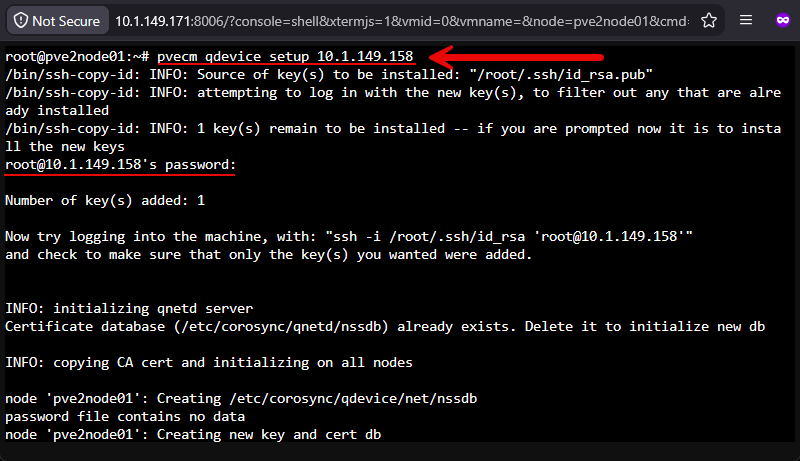
The setup process connects to your QDevice system (which you will need to have SSH access to), initializes the certificate infrastructure. It also copies over the certificates it needs for authentication, and updates the cluster configuration. Also, have the SSH root password ready for this process as it may prompt for it.
After it completes, I would immediately check cluster status:
pvecm status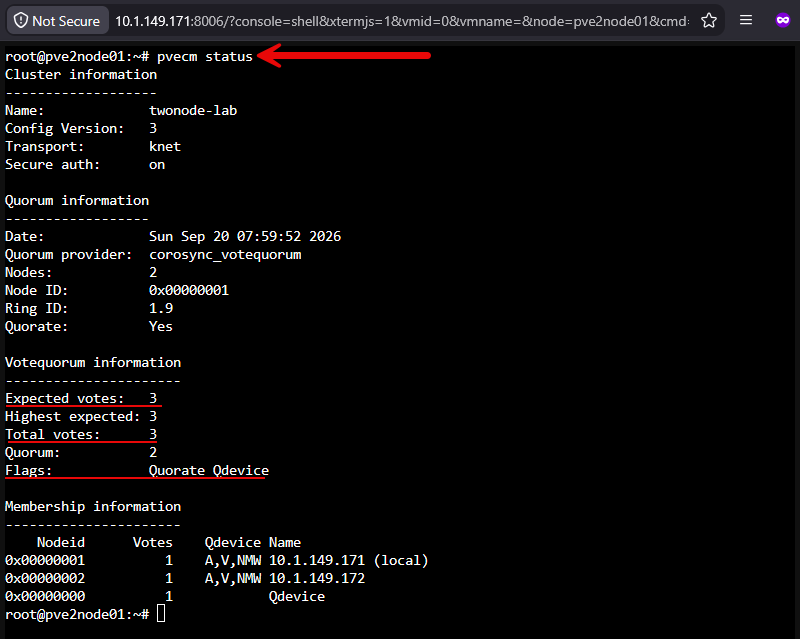
Now we see something totally different than when we ran pvecm status before when it was literally just the two physical Proxmox cluster nodes. Now we see the expected votes: 3 and we see the total votes: 3 listed.It also shows the membership information at the bottom of that output.
I can get additional details with:
corosync-qdevice-tool -s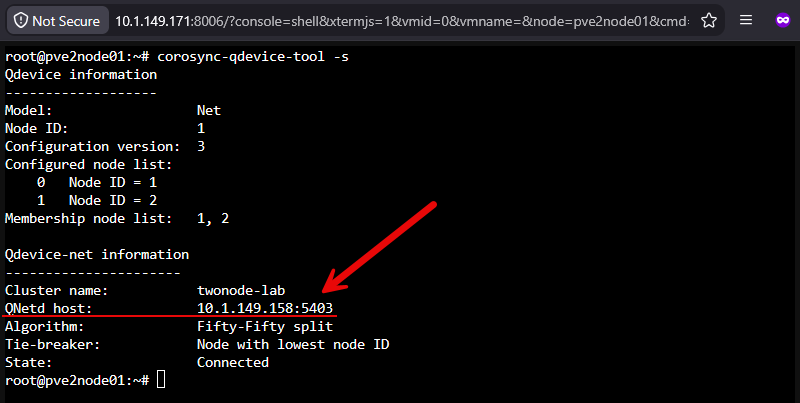
Be sure to test things out
So before I put production workloads on a two node Proxmox cluster with a QDevice, make sure you test the behavior by simulating failures. Take down your first node. Make sure on your remaining node that it has quorum.
Then do the opposite, take down the second node and make sure the cluster still has quorum. Then with the two physical nodes up and running, take down the QDevice. All of these tests are valid real world scenarios that you want to simulate as it will help to shed light on any issues you might encounter.
Changing the vote count as a hack
One workaround I see discussed on threads is manually changing the vote count. You can hack and add an extra vote count to one of the two Proxmox nodes. This will allow the host to keep quorum when the other node goes down. In a home lab, this is doable. and you can definitely do this kind of thing especially if you know you want to do maintenance on one of your nodes.
But, if you are planning on keeping the two-node configuration long term, it is best to set it up the right way with the QDevice as this way, it protects you in the event of a real failure where you have one of your servers go down unexpectedly.
Another workaround that some play around with is forcing the expected vote count after quorum is lost. Keep in mind that commands that change the expected votes for the cluster can be useful during recovery, but they should not become the everyday procedure for running your two node cluster.
Wrapping up
Hopefully, this walkthrough of adding that proper third vote in a Proxmox cluster helps any who may have been struggling with how this is configured in the past and how you can make sure that you can run a two node setup successfully in a home lab. Are you running a Proxmox two node setup in your home lab? I would be curious to know your long term experience running the QDevice and what if any edge cases with problems you have ran into?
More in this topic




Google is updating how articles are shown. Don’t miss our leading home lab and tech content, written by humans, by setting Virtualization Howto as a preferred source.
About The Author
