



It seems like Proxmox has been moving fast lately with lots of new functionality, improvements, bug fixes, etc. Each release seems to bring great new features along. Proxmox VE 9.2 is the next major upgrade release to drop. It doesn’t have anything revolutionary in this release or any flashy new redesigns, but it still packs lots of great features, especially in the area of operational capabilities. There are 7 new changes that I think matter with this release.
Dynamic load balancing finally makes clusters smarter
I have already highlighted this a bit in Proxmox VE 9.1.8 where this feature technically dropped, but it was in technical preview form there. Now, Proxmox VE 9.2 officially introduces the new dynamic load balancer. This new features provides the capability to keep your workloads from becoming uneven over time.
Given the passage of a bit of time, clusters often drift and one node ends up overloaded while the other node is much less utilized. Previously with Proxmox clusters, balancing your cluster required manual intervention and tasks to be performed. You would review the utilization and manually migrate workloads between hosts. Although many have known about and have been using the ProxLB project for some time (kudos to @gyptazy on that one).
Now Proxmox introduces dynamic load balancing to improve cluster resource utilization automatically. This is a great new step forward for official support of smarter workload placement. This is not VMware DRS in its entirety, but this honestly feels like a great step in that direction. I think this gets Proxmox admins what they have been needing for a while.
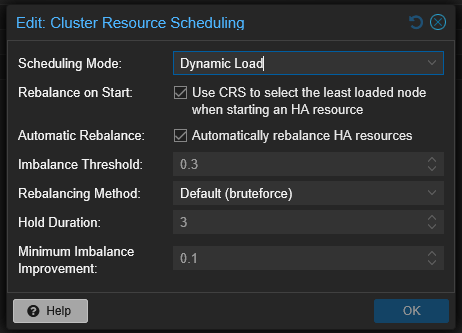
For home labs this might feel like something you wouldn’t take advantage of and you wouldn’t if you aren’t running a cluster. But I think this still matters in the context of home lab as well. Usually, even if you are running a single host today, you will probably delve into clustering at some point.
Dynamic balancing helps smooth out some of those natural imbalances without constant manual babysitting. For production environments, this reduces operational friction and improves cluster efficiency. I think this may quietly become one of the most appreciated improvements in Proxmox over time.
Read my post on this new capability here:
WireGuard inside SDN fabrics is quietly huge
This is another feature that many may not give much thought when they see it, but I think this is a really big one. Proxmox VE 9.2 expands the softtware-defined networking functionality by adding WireGuard as a fabric protocol option.
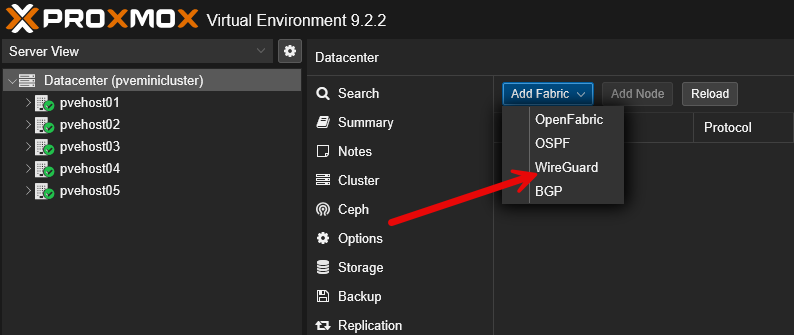
If you have experimented with disaster recovery labs, stretched networking, remote clusters, or even extending your home lab between locations, you will appreciate the capabilities this will bring to the table here.
WireGuard is literally the most popular VPN protocol out there. It combines a lot of great characteristics, including:
- Simplicity
- Strong encryption
- High performance
- Easier troubleshooting
- Lightweight configuration
Compared to older VPN technologies, WireGuard usually feels light and fast. So, now that Proxmox VE Server 9.2 has added this as a fabric protocol, this means you have the option for using it to connect your sites and workloads together.
Think about the following possibilities with SDN + WireGuard, etc:
- A secondary home lab location
- Hybrid cloud connectivity
- Disaster recovery testing
- Multi-site Kubernetes clusters
- Remote Proxmox nodes
Better BGP and EVPN filtering for advanced networking
Another great new feature in the realm of networking is the new “better BGP” and EVPN filtering for advanced networking capabilities. With Proxmox VE Server 9.2, we get fine-grained BGP and EVPN filtering with route maps and prefix lists.
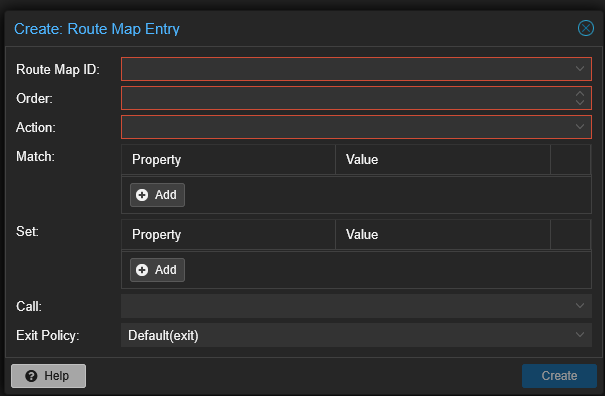
This sounds complicated and it is true, it can be. But the takeaway is pretty simple. Proxmox software defined networking continues to grow up and mature. For environments that are using SDN with BGP and EVPN, route filtering matters.
Without the ability to do route filtering, routes can get messy, and overly permissive which leads to things being hard to control. This matters quite a bit in larger environments where you have network segmentation and security requirements.
Now, for many home lab users, this is probably not going to be the feature you will immediately start using, day one. But, if you are learning enterprise networking concepts, labbing BGP, testing EVPN overlays, or something else like advanced Kubernetes networking, this will make Proxmox a lot more capable.
Managing custom CPU models in the GUI
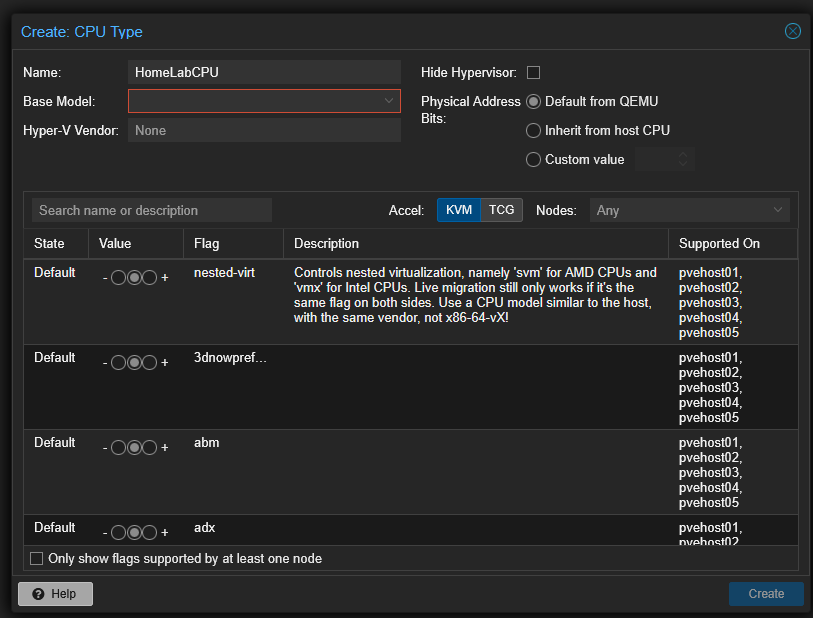
There is also a really interesting new feature that will save administrators time and effort. With Proxmox VE 9.2, it introduces management of custom CPU models directly from the GUI interface. If you have worked with migration compatibility problems, you probably already know why this is important. CPU compatibility can be frustrating in clusters, especially if these are heterogeneous.
I recently wrote a blog post covering how important this really is to make sure you have compatibility in migrating between different nodes in your Proxmox cluster.
Check out my post on that here: VM Migration in Proxmox Kept Breaking Until I Fixed This CPU Setting.
With this new functionality, we have a nice tool as part of the Datacenter GUI that allows you to create custom CPU models for your cluster VMs. Also, it gives you an easy way to see the CPU features that are available for all of your Proxmox VE cluster nodes
This is especially a really great tool for home lab environments where we may have very heterogeneous nodes making up our cluster. The custom CPU types allow you to pick and choose which CPU instruction sets are included in the custom CPU model.
HA arm and disarm
This is one that will be a welcomed addition to the operational control we now have over our Proxmox clusters. It has been the gripe of many Promox admins, including myself to have better and easier HA controls for your cluster. With Proxmox VE 9.2 there is a new HA arm/disarm function that allows you to easily turn off or pause your HA services across your cluster for maintenance operations.
If you have ever wanted an easy way to disable HA across your cluster, this new method is it. Now we have a simple button on the HA configuration in Datacenter that allows us to “Freeze” or “Ignore” HA across the cluster. This will be very helpful for maintenance operations.
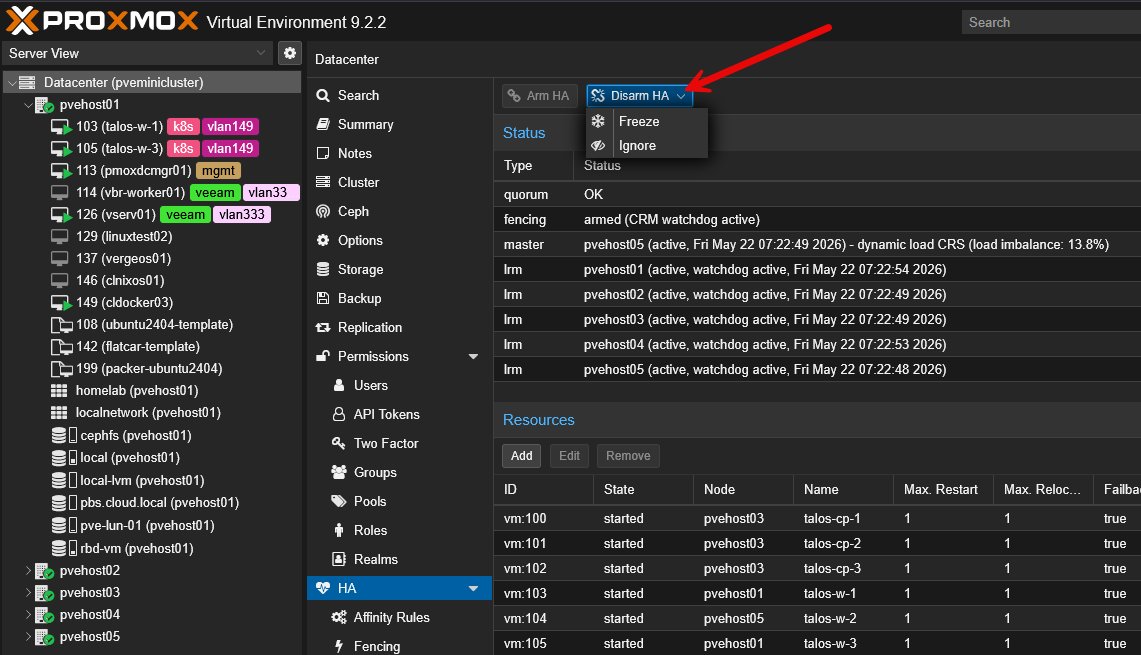
We have all been there with Proxmox where HA fights you when you are trying to power off or power down certain workloads. It will be great to have a quick and easy way to get this done across the cluster. HA arm/disarm gives administrators better control over how HA behaves during maintenance windows, testing, or troubleshooting.
This creates cleaner workflows for:
- Maintenance windows
- Planned downtime
- Troubleshooting
- Controlled failover testing
- Infrastructure upgrades
UEFI 2023 certificate enrollment tools
Thsi is another one that I have written about recently. Check out my post on this topic here: Don’t Ignore This Proxmox Warning Before June 2026. This is one that I kind of think is flying under the radar of most so trying to get the word out there. If you are using secure boot with your Proxmox VE Server host or your guest virtual machine operating systems, Proxmox has a great workflow built in that can help you transition from the Microsoft 2011 certs to the newer 2023 certs.
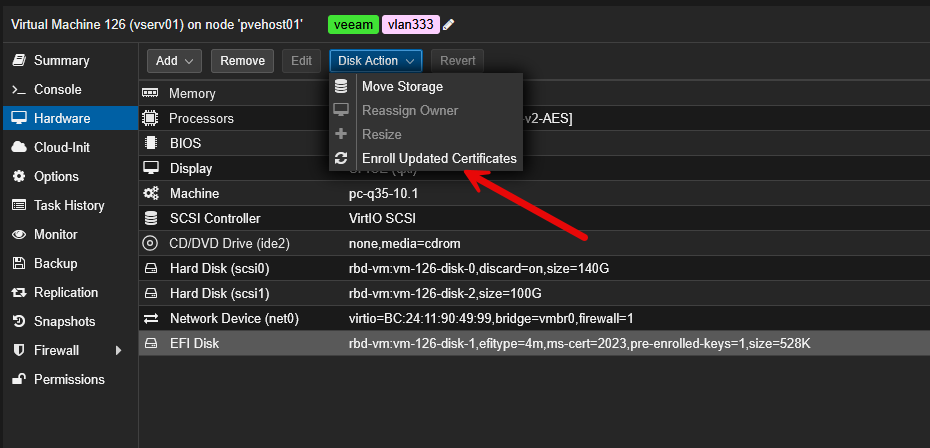
What I especially like here is that Proxmox exposes this functionality through the GUI. This removes the challenge of getting this done across your infrastructure estate, whether that is home lab or a production environment.
And, if you have seen the VMware process to enroll certificates, you will be glad you are running Proxmox. For administrators running Windows workloads or secure boot enabled environments, this is absolutely worth understanding.
Under-the-hood upgrades
There are a lot of under the hood upgrades that aren’t obvious with the upgrade, but they are definitely worth noting here. Proxmox VE 9.2 upgrades much of the software stack:
| Component | Version |
|---|---|
| Debian | 13.5 Trixie |
| Linux Kernel | 7.0 |
| QEMU | 11.0 |
| LXC | 7.0 |
| ZFS | 2.4 |
| Ceph Stable | Tentacle 20.2.1 |
| Alternate Ceph | Squid 19.2.3 |
These upgrades matter for a lot of different reasons:
- Kernel upgrades improve device compatibility and scheduling
- QEMU improvements uplift virtualization performance
- LXC improvements benefit container workloads
- ZFS updates improve storage capabilities
- Ceph Tentacle improves software-defined storage performance and reliability
For anyone running modern home lab hardware, especially mini PCs and newer chipsets, improvements like the upgraded kernel really matter in real-world use cases to support the hardware we are using there.
Upgrading considerations in lab and otherwise
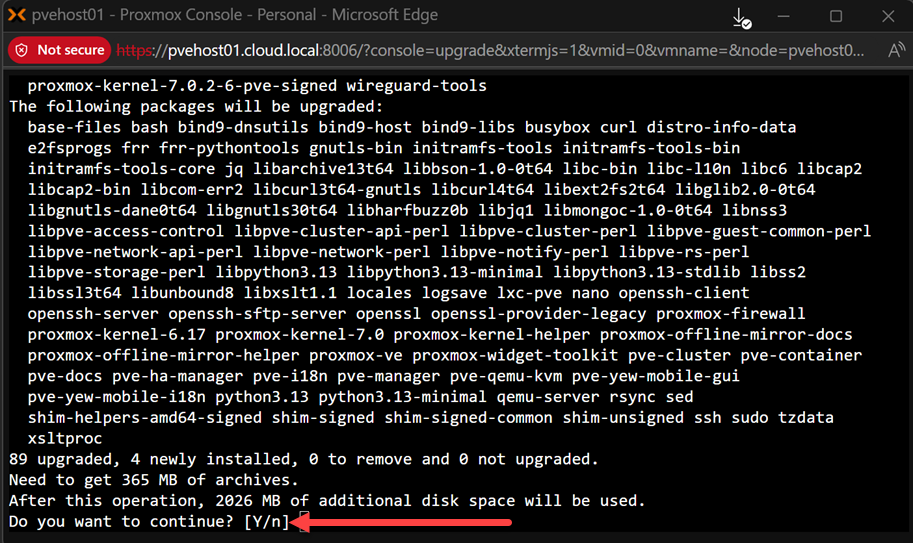
Like any upgrade, pay attention to the details and make sure you plan things accordingly. The good news is with Proxmox 9.2, the upgrade is straightforward. You can upgrade:
- Proxmox VE 8.x to 9.x
- Proxmox VE 9.1 to 9.2 with the GUI or apt commands
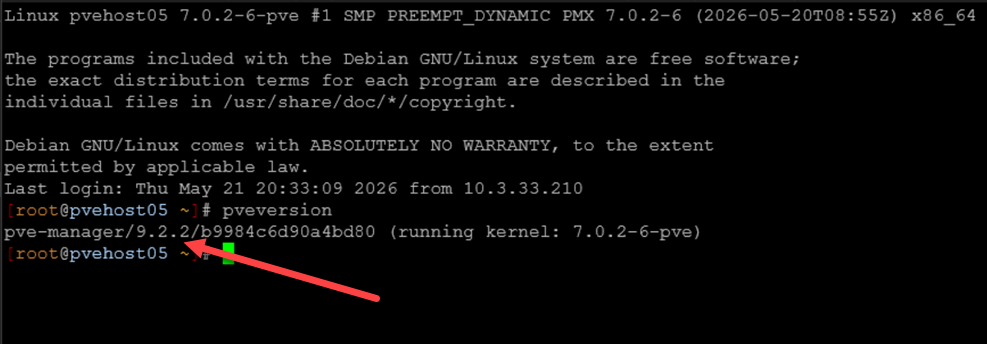
Below, is a quick look at the pveversion command after upgrading to 9.2.2.
However, Ceph environments need extra caution. If you are running Ceph Reef, the documented upgrade path matters:
- Reef to Squid while on Proxmox 8
- Upgrade Proxmox 8 to 9
- Upgrade Ceph Squid to Tentacle
Do not shortcut this process. Clustered storage needs patience as you upgrade them.
Video
Wrapping up
I am really looking forward to getting more time with Proxmox 9.2 in the home lab. So far since I have updated my 5 nodes in my home lab cluster, I haven’t seen any issues. I really like the fact that Proxmox is getting some major quality of life improvements compared to previous versions and this version is no exception to that. It has many new features that are great for home lab and certainly for enterprise environments. How about you? Will you be upgrading this weekend?
More in this topic

Google is updating how articles are shown. Don’t miss our leading home lab and tech content, written by humans, by setting Virtualization Howto as a preferred source.
About The Author

SO: If you don’t have a cluster, the upgrade is still nice – but not as vital.
Alan,
Thanks for the comment! Yeah definitely the new features outside of the underlying uplift on versions for everything (kernel, QEMU, etc), are heavy on cluster features. But definitely some really good updates across the board.
Brandon
Just came here to say, nice writeup! Sounds like a very exciting release.
Also definitely jealous of the UEFI 2023 certificate enrollment option, we sadly don’t use Proxmox at work and instead have multiple VMWare environments (+ physical workstations), and it’s been a massive PITA.
d3Xt3r,
I totally agree. I can’t believe how much more manual the process is with VMware. You would think they would lead the pack here with convenience and automation, but not the case. Are you guys having to go the route of mounting a VMDK and copying over the PK and KEK manually?
Brandon
Yes, but there’s a bit more to it than that. We need to enable UEFI authentication bypass first, then boot the VM to the EFI setup and enroll the certs, then disable the bypass. And of course, we still have to re-create all OVF/OVAs, as well as any recovery/boot media, SCCM PXE boot images…
And we still haven’t gotten around to doing the workstations, just found out that half the HP devices one of our customer owns doesn’t support the new certs (contrary to HP’s claims), which means they’ll have to either replace them all ASAP, or accept the risk of being vulnerable to bootkits like Black Lotus. 😐
Freezing HA in cluster is a thing I missed the most in my homelab. My cluster is connected to mikrotik switch and every time it gets updated I had to shutdown/restart my cluster. Finally I can upgrade my switch without downtime.
Jan,
I definitely think this will be a welcomed feature for many Proxmox home labbers and in the production environments. Definitely a great new capability.
Brandon
Loved the article, there is something to look at in depth, 10/10 – 5 stars
Proxmox s…u…c…k..x as an iscsi initiator. Works correctly and then all of a sudden no connections to the iscsi target. Removing the iscsi initiator in Proxmox and reinstalling it works but can no longer add the LVM again. ESXi8 and our Ubuntu 26.04 server use the same Iscsi Target without any issues whatsoever with their initiators. So Proxmox is absolutely not production ready.