


For those migrating to Proxmox from “another hypervisor”, there are always the discussions around what features may be missing or work different from what they are coming from. If you have been running or trying out a Proxmox cluster for any length of time, especially looking at HA features, you have probably run into some quirkiness. Things like a node goes down, your HA VMs restart on another node and things keep going, that works great. But, when the failed node comes back online nothing moves back. The cluster stays uneven. This has been a common frustration with Proxmox HA for quite some time. Proxmox 9.1.8 starts to change this. With this version it is releasing Proxmox HA rebalancing. Let’s see what this means and what benefits it will bring.
What is Proxmox automatic HA rebalancing?
Like what you might think, this means the cluster can now take steps to rebalance HA workloads across nodes based on policies that you define. Keep in mind, there are still things that we could say are missing to say this is a full DRS-style implementation like VMware. But, this is a great step forward that directly addresses a longstanding limitation of Proxmox HA.
Now we can choose to enable the following new options with HA cluster resource scheduling:
- Use dynamic HA scheduling
- Automatic Rebalance
How HA worked before this change
Before this update, Proxmox HA with cluster resource scheduler was more reactive. Its job was to keep workloads running when something failed or went down. The workflow of the previous HA looked something like this:
- A node fails and becomes unavailable or something bad happens
- The HA manager detects the failure
- the HA-managed virtual machines or containers restart on other nodes
- The cluster stabilizes and keeps on running
So far so good. But, for previous Proxmox configurations and clusters, the issue came after you returned the failed node back to operation. Proxmox wouldn’t necessarily rebalance workloads back to even out the workload on the nodes. Over time, this would lead to things being very unevenly balanced or distributed.
What did the options look like? I took these screenshots from a Proxmox VE Server 9.1.6 node:
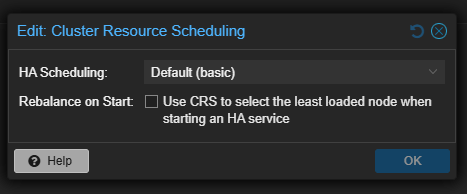
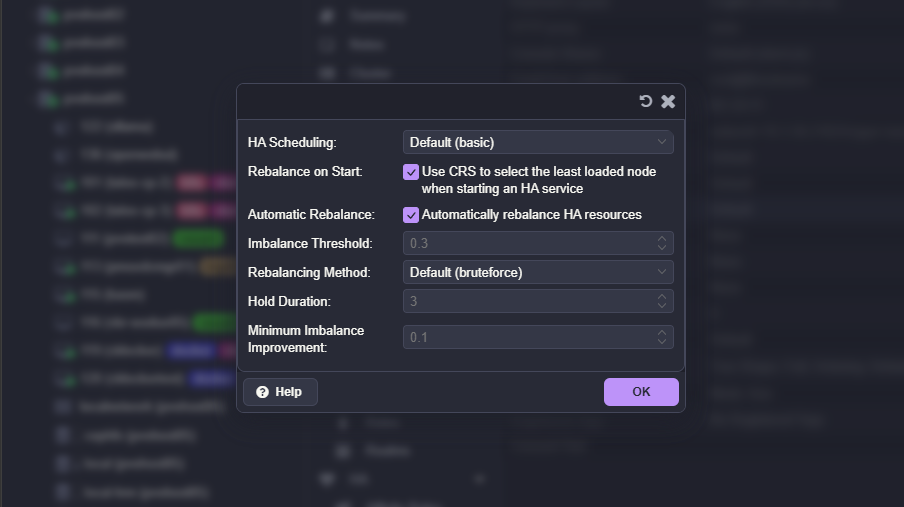
Previously when you looked at the HA scheduling options, you would see this:
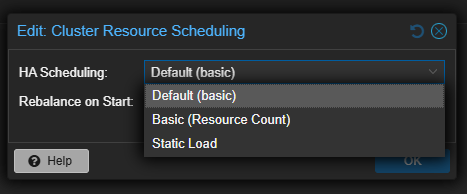
With these options, you will notice that everything is basically a static option or basic resource count. When a failed node returned to the cluster, Proxmox did not automatically rebalance workloads. Any virtual machines that had been restarted elsewhere stayed where they were. Over time, this could lead to very uneven resource distribution.
So, you could manually fix this or rely on other tools like ProxLB or PegaProx that has ProxLB built-in which both provide great options. Now, Proxmox has officially introduced a native way to have this functionality built-in.
What the new automatic HA rebalancing changes
With Proxmox 9.1.8, the HA manager becomes more proactive in its ability to watch the system. Instead of it only reacting to failures, it now evaluates placements of the workloads and rebalances when conditions allow it to. This includes rebalancing HA enabled VMs during normal operations.
This means the following things in your home lab or production:
- When a node rejoins the cluster, Proxmox can move HA workloads back to it
- When an unexpected HA restart happens, it will look at load in rescheduling
- When HA workloads are unevenly distributed, the cluster can correct that imbalance
In addition, Proxmox now supports load-aware scheduling for HA workloads. There is now a new mode in addition to the previous modes. What are the new options on the configuration?
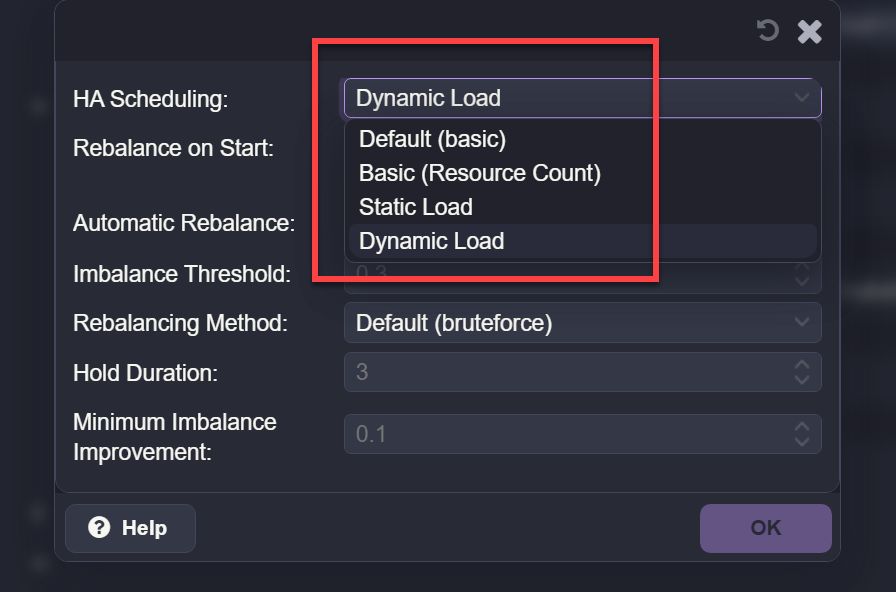
- Default (basic) – Uses standard HA placement logic with minimal intelligence. This mode gets workloads running without looking at load in any meaningful way
- Basic (resource count) – In this mode, it distributes workloads based on the number of HA resources per node. It tries to keep an even count of VMs or containers across nodes, but does not look at the actual CPU or memory usage
- Static load – It uses fixed weighting for nodes to influence placement decisions. Helps guide distribution but does not adapt dynamically to real-time resource usage.
- Dynamic load (new) – Evaluates node load when placing and rebalancing HA workloads. So in this mode, it takes into account resource usage and uses thresholds to know when migrations will improve the overall balance of the cluster
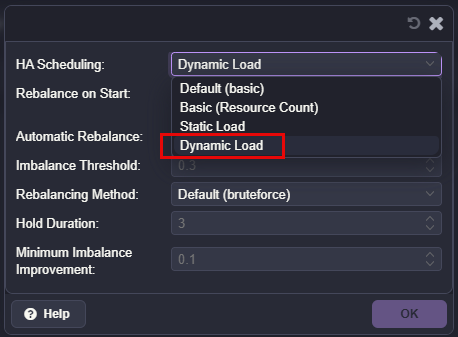
I think the new dynamic load is the most interesting option, because it lets Proxmox consider node load when placing and rebalancing HA workloads in the cluster. This is going to be an improvement over older behavior that was static where the placement is based on simple resource (VM and LXC) counts.
You have additional options to tune and give you more control over how the rebalancing operations happen. You have settings like imbalance threshold, minimum imbalance improvement, and hold duration. These are there to prevent migrations from happening if they are not necessary and it helps to reduce the churn inside the cluster.
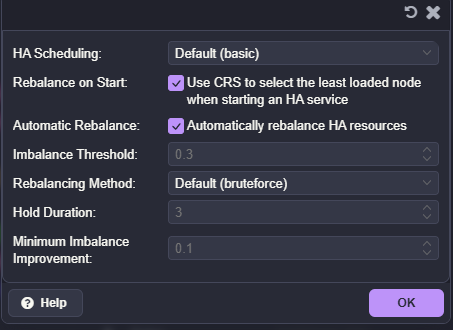
Keep in mind with this, it is limited to HA-managed workloads. But, I do think this is a step towards a lot more intelligent scheduling.
Is this a Distributed Resource Scheduler for Proxmox?
Not exactly yet. This new functionality is still tied to “HA” enabled workloads in Proxmox and it is policy-driven based on HA. Proxmox is not constantly monitoring CPU or memory usage and aggressively moving all workloads around with this. But instead, it will evaluate placement of VMs based on HA configuration and the new load-aware scheduling logic that it has built-in. So, alas, this is not a VMware DRS killer yet. But, this certainly gets it a lot closer.
Maintenance mode vs failure behavior
One interesting thing that you have probably observed is that Proxmox already had some intelligence about it when it relates to maintenance operations, even before this udpate.
When you place a node into maintenance mode, Proxmox will evacuate HA workloads in a controlled way. After it exits maintenance mode, it will migrate these back to the original node. For exiting maintenance operations this is a smart step that it will perform for you.
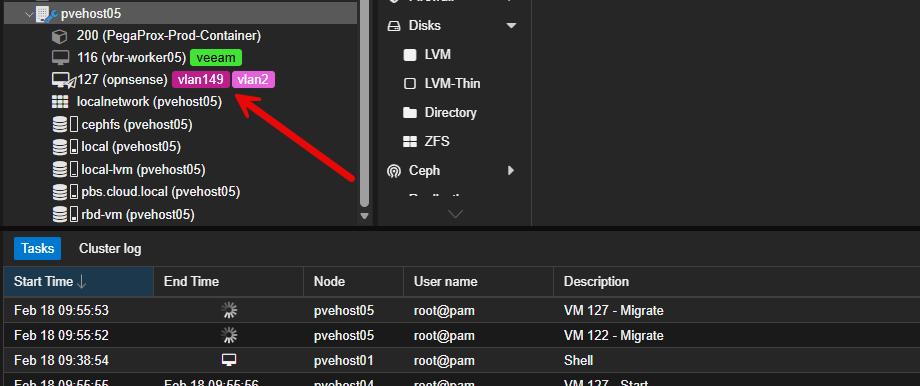
The difference again with the new modes comes in a failure scenario if a node goes offline suddenly. In this case, workloads would remain on the node where they were restarted. The new placement mechanism with 9.1.8 introduces that balance more intelligently and will migrate and balance workloads even during normal operations in a dynamic way.
What I observed in my lab
In my own testing, enabling Dynamic Load changed how Proxmox distributed workloads in a good way. Instead of it simply spreading virtual machines evenly across nodes, it looked to factor in node load when placing and rebalancing HA guests. I saw it do a better job of placement decisions.
I also noticed that Proxmox was not overly aggressive. It did not constantly move workloads around, and it respected thresholds that were set which I left the defaults with my testing. This looks to strike a really good balance between automation and keeping things predictable from what I can tell.
How to configure your cluster for the new feature
The first thing that you will want to do is check for updates in your Proxmox cluster and get your nodes updated. The new functionality is found in Proxmox 9.1.8.
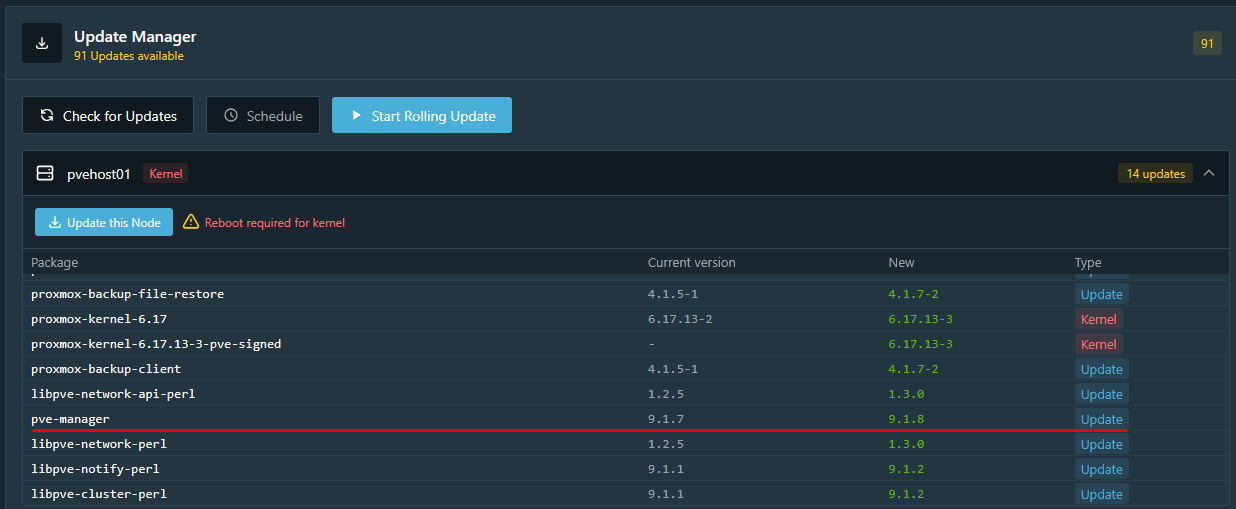
Keep in mind too, you need a functional Proxmox cluster to really take advantage of the resource distribution as you need shared storage and HA configured.
- You need a functional Proxmox cluster with HA enabled
- You need shared storage accessible by all nodes
- You need HA-managed workloads
- You should select an appropriate HA scheduling mode, such as Dynamic Load
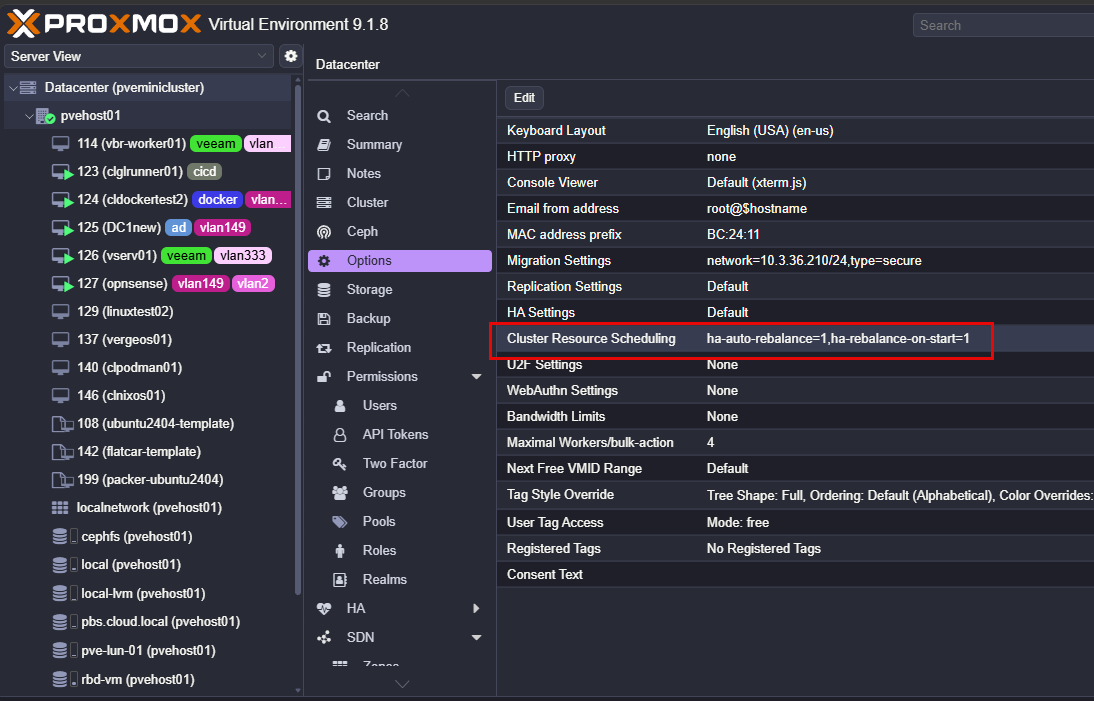
Navigate to the Datacenter > Options > Cluster Resource Scheduling menu.
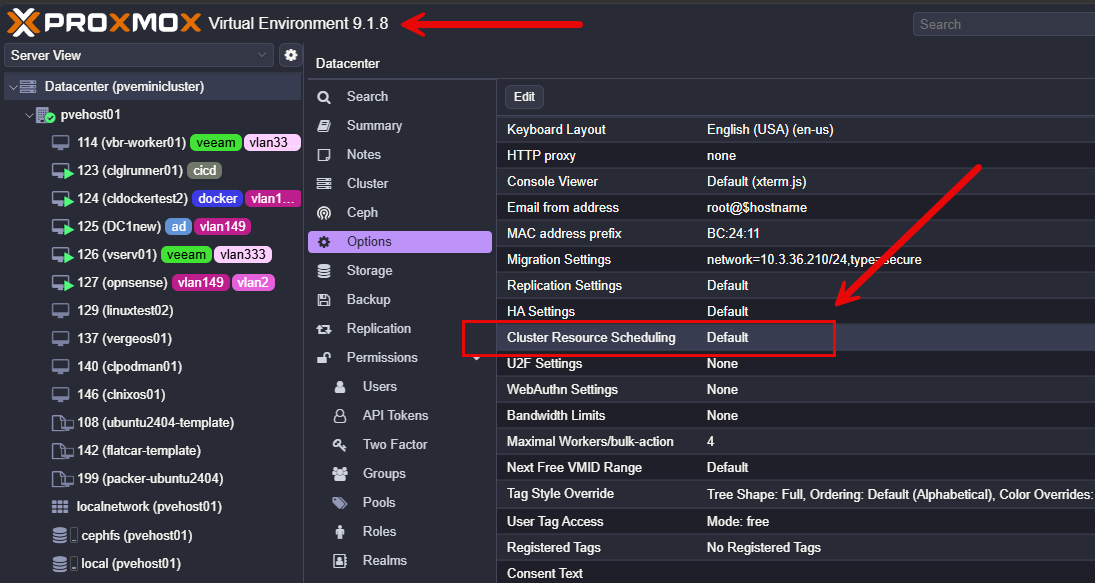
Here you can now select the Automatic Rebalance box to automatically rebalance HA resources and set thresholds for that.
Here we can see the new Dynamic Load option under the HA Scheduling option.
After setting the options in the Cluster Resource Scheduling in the Proxmox VE Datacenter options found in 9.1.8.
Why this is a big deal for home labs
Like production environments Proxmox HA rebalancing is a big deal for home labs as it will help to keep nodes from becoming overloaded with various HA events. I am looking forward to running this in “dynamic” mode while still taking advantage of the ProxLB project as part of PegaProx (the DRS type scheduler).
I think the new features along with the community projects out there bring Proxmox super close to the enterprise feature set that many are coming from when migrating over to Proxmox.
Wrapping up
The new round of updates, taking Proxmox to Proxmox VE 9.1.8 delivers on a really great improvement to Proxmox HA rebalancing. The new automatic HA rebalancing features helps to solve a gap that has been there for quite some time. If you are already using HA in your Proxmox cluster and you should be, this is a new feature you will want to try out. Proxmox is getting smarter about how it handles workloads. Combining this with the ProxLB open-source project will give you a very VMware-like experience for HA and DRS. How about you? Are you excited to see this new feature drop as part of 9.1.8 HA functionality?
More in this topic




Google is updating how articles are shown. Don’t miss our leading home lab and tech content, written by humans, by setting Virtualization Howto as a preferred source.
About The Author

Love it, I think they will add many new features related to this in upcoming releases.
Ha-rebalance-on-start solves the issue of loads not migrating back to nodes when they come back online, not the new ha-auto-rebalance option. The auto rebalancing option is a welcome feature however!
bosswaffle,
Thank you for the notes here. Definitely good to see the features in this area of built in resource automation evolve in Proxmox. I think it will continue to get better and better.
Brandon
With the new Dynamic load option, how do I set a VM to stay on say Node3, when Node1 fails? I don’t necessarily want the VM’s to be moved back to Node1 when Node1 comes back online
Silver,
Good question. From what I can tell, there is not currently a per-VM option that says “fail over to Node3, but do not automatically move back when Node1 returns.”
Dynamic Load is designed to rebalance HA-managed VMs across the cluster. So if moving that VM back to Node1 improves the balance and meets the configured settings, Proxmox may migrate it automatically.
Brandon