



Notifications
Clear all
Kubernetes and Containers
1
Posts
1
Users
0
Reactions
2,689
Views

Jan 26, 2025 12:46 pm
Here are my cheat notes on how to install Kube VIP in Microk8s kubernetes cluster. First, edit the csr.conf.template file found here:
sudo vi /var/snap/microk8s/current/certs/csr.conf.template
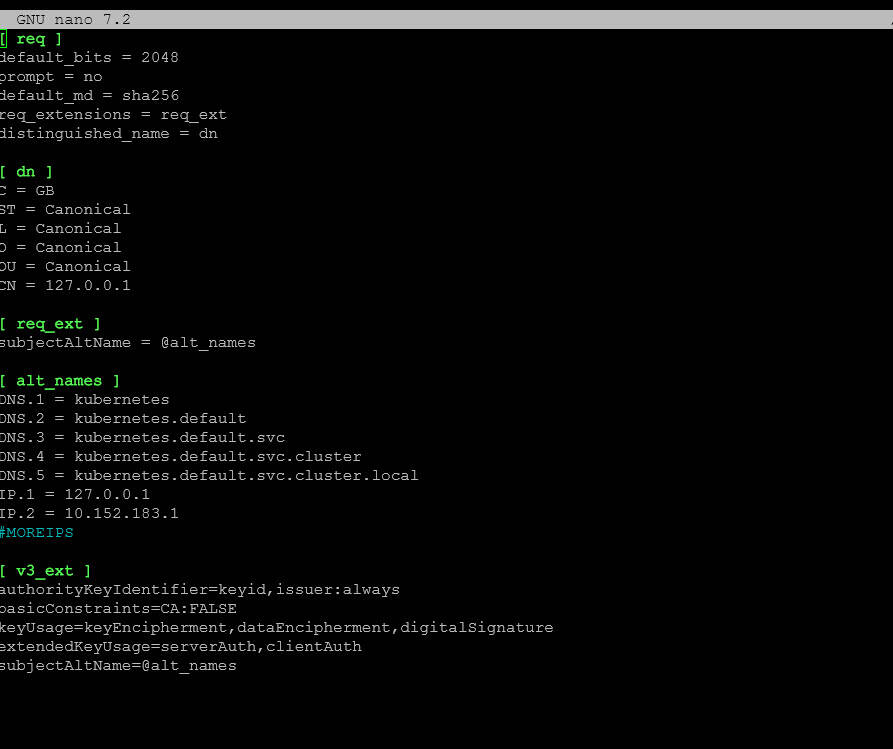
Add the IP address as IP.99="a.b.c.d" to the file. Then refresh your microk8s certificates:
sudo microk8s refresh-certs -e ca.crt
Create a values.yaml file. You can find an example here:
https://github.com/kube-vip/helm-charts/blob/main/charts/kube-vip/values.yaml
It will look something like this below. Replace the config: address with your address that will be the VIP and change any other settings here you would like, but most can use defaults.
# Default values for kube-vip.
# This is a YAML-formatted file.
# Declare variables to be passed into your templates.
image:
  repository: ghcr.io/kube-vip/kube-vip
  pullPolicy: IfNotPresent
  # Overrides the image tag whose default is the chart appVersion.
  # tag: "v0.7.0"

config:
  address: ""

# Check  https://kube-vip.io/docs/installation/flags/
env:
  vip_interface: ""
  vip_arp: "true"
  lb_enable: "true"
  lb_port: "6443"
  vip_cidr: "32"
  cp_enable: "false"
  svc_enable: "true"
  svc_election: "false"
  vip_leaderelection: "false"

extraArgs: {}
  # Specify additional arguments to kube-vip
  # For example, to change the Prometheus HTTP server port, use the following:
  # prometheusHTTPServer: "0.0.0.0:2112"

envValueFrom: {}
  # Specify environment variables using valueFrom references (EnvVarSource)
  # For example we can use the IP address of the pod itself as a unique value for the routerID
  # bgp_routerid:
  #  fieldRef:
  #    fieldPath: status.podIP

envFrom: []
  # Specify an externally created Secret(s) or ConfigMap(s) to inject environment variables
  # For example an externally provisioned secret could contain the password for your upstream BGP router, such as
  #
  # apiVersion: v1
  # data:
  #   bgp_peers: "<address:AS:password:multihop>"
  # kind: Secret
  #   name: kube-vip
  #   namespace: kube-system
  # type: Opaque
  #
  # - secretKeyRef:
  #    name: kube-vip

extraLabels: {}
  # Specify extra labels to be added to DaemonSet (and therefore to Pods)

imagePullSecrets: []
nameOverride: ""
fullnameOverride: ""
# Custom namespace to override the namespace for the deployed resources.
namespaceOverride: ""

serviceAccount:
  # Specifies whether a service account should be created
  create: true
  # Annotations to add to the service account
  annotations: {}
  # The name of the service account to use.
  # If not set and create is true, a name is generated using the fullname template
  name: ""

podAnnotations: {}

podSecurityContext: {}
# fsGroup: 2000

securityContext:
  capabilities:
    add:
      - NET_ADMIN
      - NET_RAW
    drop:
      - ALL

resources: {}
  # We usually recommend not to specify default resources and to leave this as a conscious
  # choice for the user. This also increases chances charts run on environments with little
  # resources, such as Minikube. If you do want to specify resources, uncomment the following
  # lines, adjust them as necessary, and remove the curly braces after 'resources:'.
  # limits:
  #   cpu: 100m
  #   memory: 128Mi
  # requests:
  #   cpu: 100m
  #   memory: 128Mi

volumes: []
  # Specify additional volumes
  #   - hostPath:
  #       path: /etc/rancher/k3s/k3s.yaml
  #       type: File
  #     name: kubeconfig

volumeMounts: []
  # Specify additional volume mounts
  # - mountPath: /etc/kubernetes/admin.conf
  #   name: kubeconfig

hostAliases: []
  # Specify additional host aliases
  # - hostnames:
  #     - kubernetes
  #   ip: 127.0.0.1

nodeSelector: {}

tolerations:
  - effect: NoSchedule
    key: node-role.kubernetes.io/control-plane
    operator: Exists
affinity: {}
  # nodeAffinity:
  #   requiredDuringSchedulingIgnoredDuringExecution:
  #     nodeSelectorTerms:
  #     - matchExpressions:
  #       - key: node-role.kubernetes.io/master
  #         operator: Exists
  #     - matchExpressions:
  #       - key: node-role.kubernetes.io/control-plane
  #         operator: Exists

podMonitor:
  enabled: false
  labels: {}
  annotations: {}

priorityClassName: ""
Finally, we need to add the helm repo for kube-vip, update, and then install:
microk8s helm3 repo add kube-vip  https://kube-vip.io/helm-charts
microk8s helm3 repo update
microk8s helm3 install kube-vip kube-vip/kube-vip --namespace kube-system -f values.yaml
Hopefully, this will help anyone trying to get this up and running.