


If there is one thing I think that has changed over the years with self-hosting and learning, it is what a home lab actually looks like. When most of us got started, the goal was to get our hands on as much enterprise hardware as we could. We would get racks, with used servers, load them up, often with spinning disks and then build what looked like miniature data centers at home. There was a lot of value to that approach. But, if I were helping someone build a home lab today, or if I were rebuilding my entire environment from scratch, my recommendations would look at lot different. Modern home labs don’t have huge racks with gear. Over the years I have tested countless platforms. This home lab blueprint represents where I have landed after a lot of experimentation and thinking through what I would run. Take a look at my home lab blueprint in 2026 and what is included (download at the bottom of the post).
Start with efficient hardware
This is where the huge difference in what we are doing in 2026 and what we have done in the past becomes extremely obvious. No longer are we filling enterprise “big iron” racks with 2nd hand servers. We are leaning heavily into mini pcs across the board.
Most home labbers no longer need enterprise servers to experiment effectively with enterprise solutions and infrastructure. That used to be the case, but no longer. Modern mini PCs are extremely powerful and have loads of CPU horsepower and decent RAM capabilities. Before the RAM’ageddon that has happened with the AI data center boom, you could easily stuff 128 GB of DDR5 RAM into new mini PCs.
But generally, the capabilities that we see are mini PCs that are capable of 64, 96, or 128 GB of RAM. These also provide multiple M.2 slots for running modern NVMe storage.
My ideal starting point would be two or three modern mini PCs with:
- At least 64 GB of RAM
- Dual NVMe drives
- 2.5 GbE networking, or 10 GbE
- Modern multi-core processors
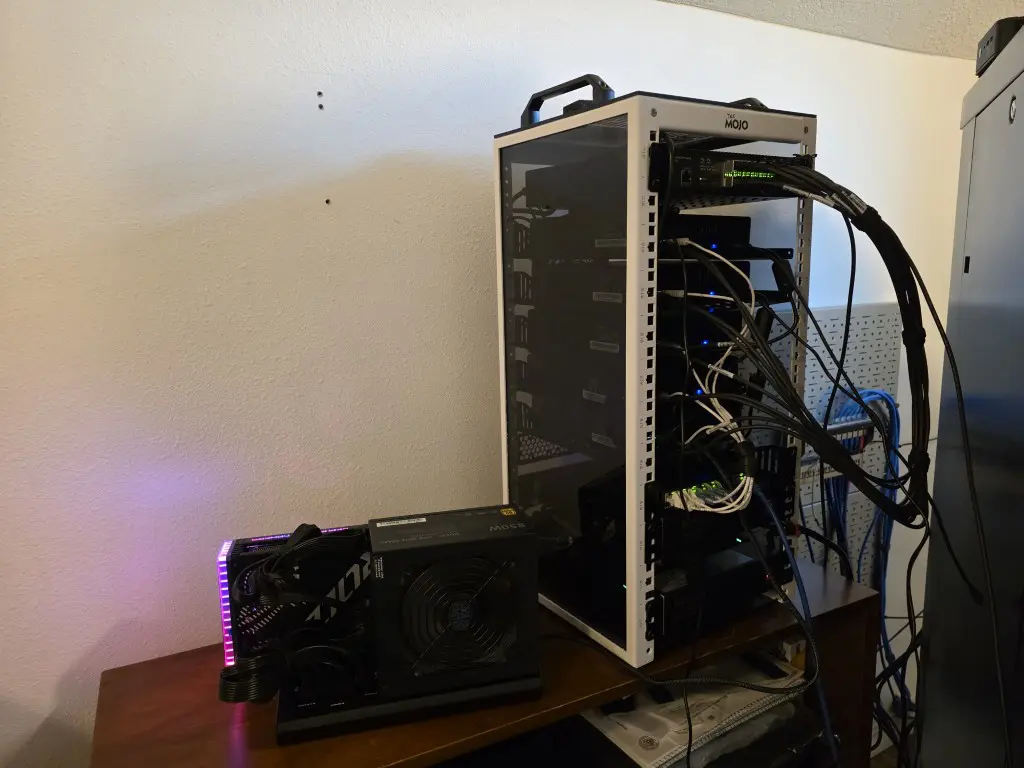
I am also running a 10 inch mini rack these days now as well. These fit the form factor of modern mini pcs extremely well. My 10 inch rack is working great for my (5) Minisforum MS-01s that form my Proxmox VE Server cluster.
The amount of virtualization performance available from these systems is pretty remarkable. They are also quiet, energy efficient, and capable of running dozens of containers and virtual machines without breaking a sweat. This is everything you need to form the core of your modern home lab.
One of the biggest lessons I have learned is that power efficiency matters far more than most people first realize. Hardware that costs less to operate is hardware that stays powered on longer and gets used more often.
Also, less power draw by definition means less heat that is being dissipated into your room where the equipement is housed. Mini PCs put out noticeably less heat and so you won’t have to worry as much about additional cooling in t
Build around Proxmox VE
I would tell anyone today, don’t get stuck in a proprietary nightmare with your tech stack any longer. There are just too many great open source solutions out there and you don’t have to depend on getting free or trial licenses from a program or some other means. The VMUG program for VMware was great while it lasted, but Broadcom has killed this for the home lab and enterprises are getting away from VMware as quickly as they can.
So I would advise learning open-source and cloud technologies. If you have followed my blog here for some time, this recommendation won’t come as a surprise. Since the first of this year, I have been running my production home lab off Proxmox and actually think I have the best tech stack that I have ever had for running workloads.
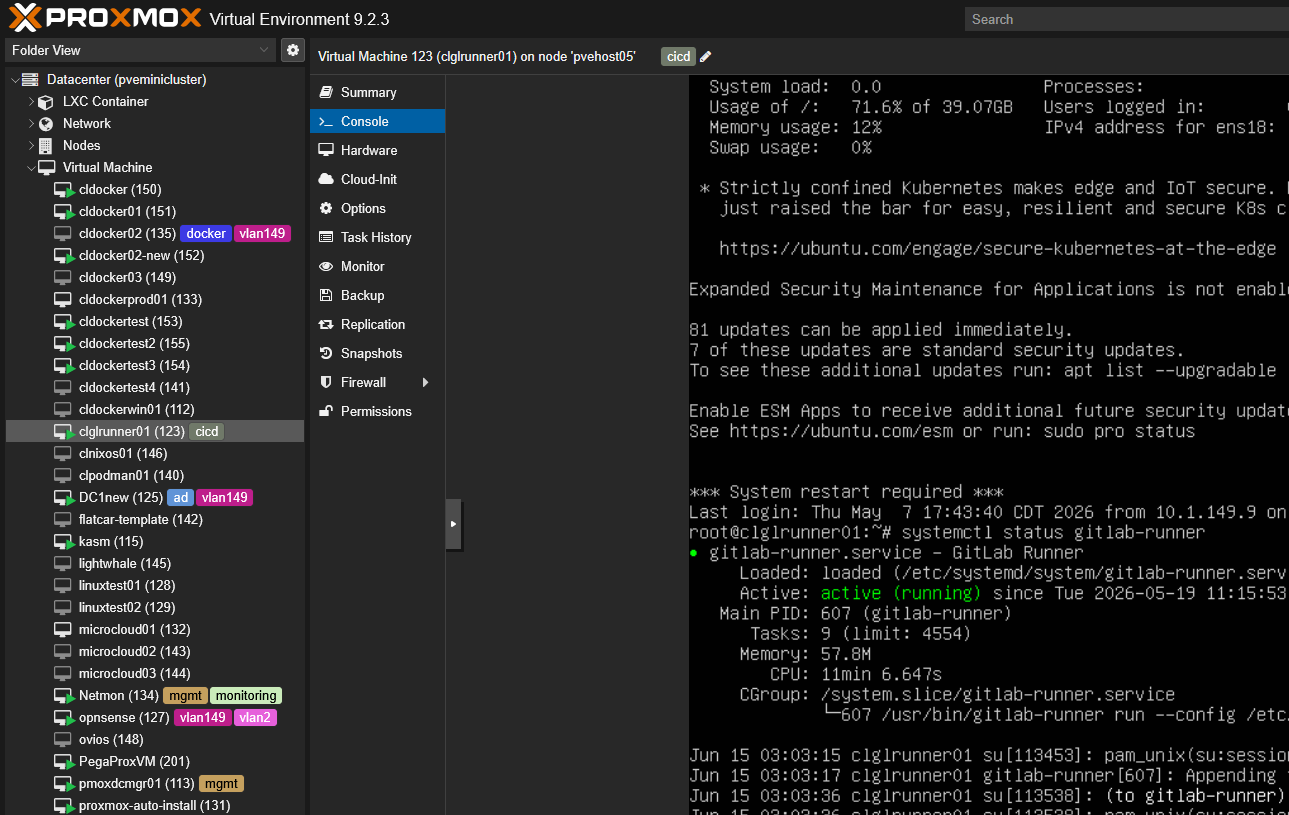
Proxmox has evolved into one of the most capable virtualization platforms available today. What I appreciate most is its flexibility. A beginner can deploy a single host and start learning virtualization within minutes. An advanced user can build clusters, high-availability environments, software-defined networking configurations, Ceph storage clusters, and automated infrastructure deployments.
In my own environment, Proxmox has become the platform where almost everything begins. This includes virtual machines, Linux containers, Kubernetes clusters, automation, backup infrastructure, and AI workloads all run on top of Proxmox.
For a modern home lab, I think it strikes the perfect balance between simplicity and capability.
Use ZFS before adding storage complexity
Storage is an area that is always a pivot point when starting out or even down the road. There is a tendency to jump right into clustered storage, SAN/NAS, or even distributed storage like HCI. There is nothing wrong with that if you are ready.
But tier 1 on the modern home lab blueprint for me is simple ZFS storage. ZFS gives you a lot of value because it includes concepts that are relevant across many other technologies and you gain the value of what each can do when you use it.
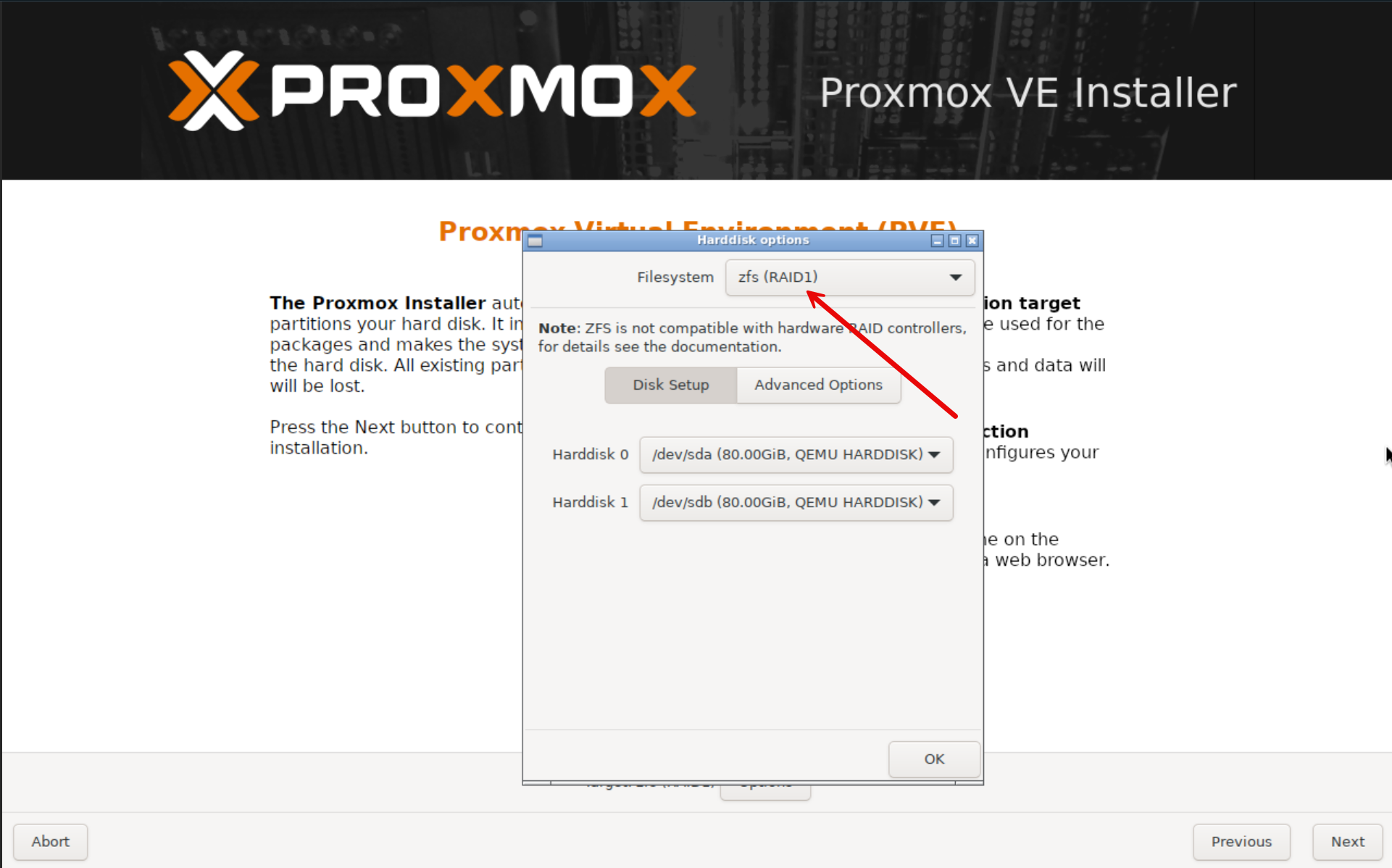
You can even install Proxmox on a ZFS boot volume:
Those benefits include:
- Snapshots
- Compression
- Replication
- Data integrity protection
- Flexible storage management
For most home labs, local NVMe storage combined with ZFS gives you performance that is more than adequate for your virtualization, containers, development environments, and self-hosted services. The best storage architecture is often the simplest one that meets your requirements.
Design the network before deploying workloads
This is another area that is absolutely critical to get right and that is the network. One of the mistakes that I have definitely made more than I would like to admit is focusing on getting workloads running before focusing on the networking that is underneath.
But, this is really the opposite of what we really need to do. Before you deploy any workloads, build the network and make sure your architecture there is solid. This means thinking through how you are implementing VLANs, creating segmentation, and making sure you design things like DNS properly.
Below, is a basic beginner home lab network with VLANs. Check out recommended designs here: Best Home Lab Networking Architecture.
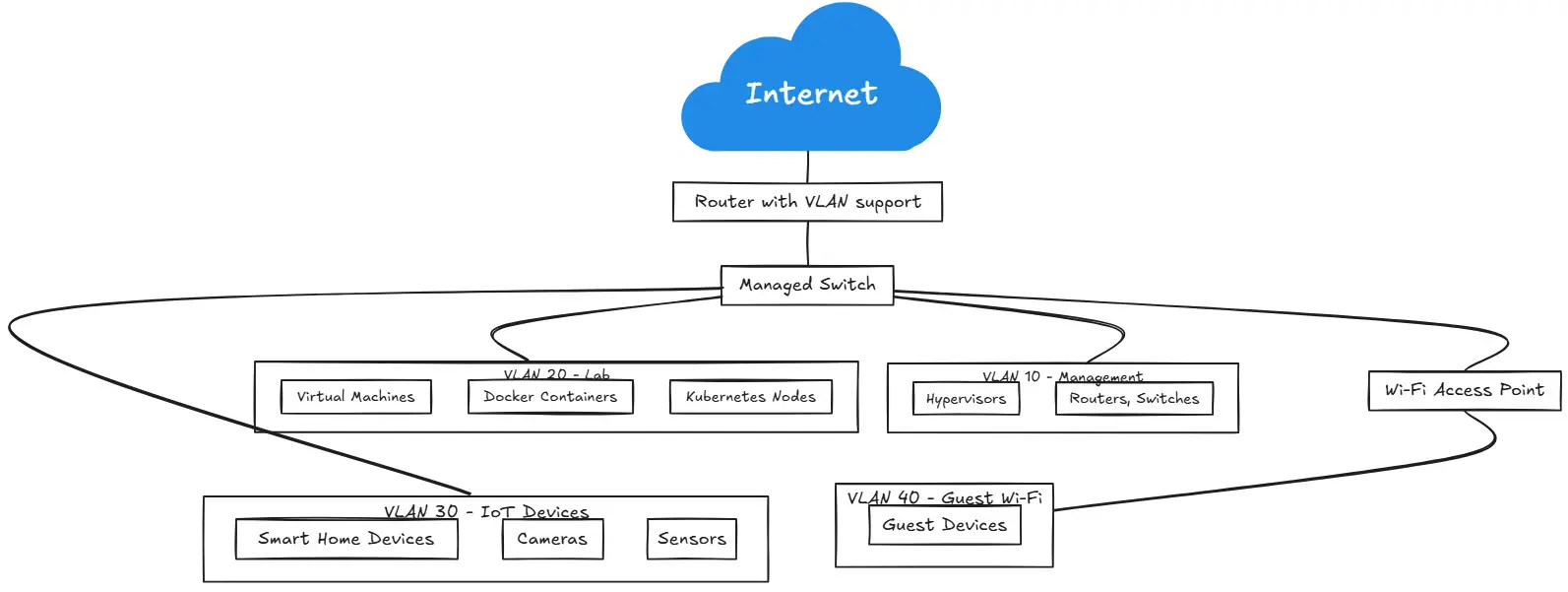
Also, remote access is important as well. In your home lab blueprint, for networking, I would include the following:
- At least (1) managed switch
- VLAN segmentation planning
- VPN access
- Internal DNS
- Reverse proxy services
The networking layer is super important not just when you start, but as your lab environment grows or you use different services across the lab infrastructure. Keep in mind that with a well-designed network, when you add new services, things will be straightforward. This extra time up front, will pay for itself for years to come.
Make DNS a first-class service
It is always DNS, DNS, DNS. Don’t we hear that so often? And, you know as much as I would like to say it, it is usually true. If there is an issue getting to a service or some other issue, more times than not, it involves name resolution in some form or fashion.
Everything relies on DNS. When it fails, you will notice it quickly and won’t be able to get to anything. For that reason, DNS would be one of the first services I deploy and one of the first that I would say needs resiliency.
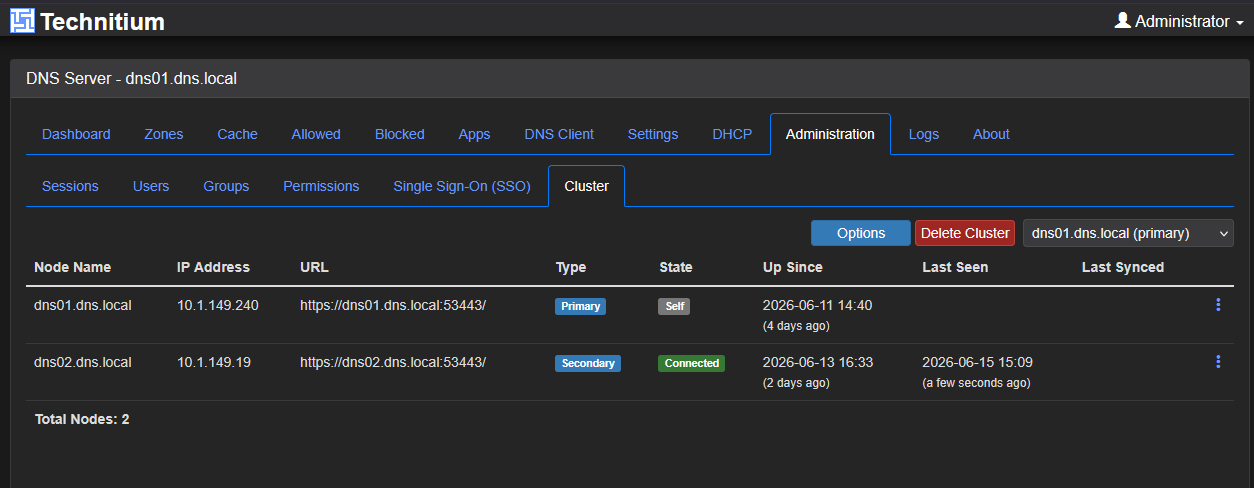
Over the past year, I have spent a lot of time working with Technitium DNS and Unbound. It has become one of my favorite infrastructure services since it now offers native clustering as part of the solution. It means that you no longer have to rely on community projects to synchronize configurations between your DNS servers.
Also, Technitium DNS combines features that traditionally required multiple solutions, including:
- Recursive DNS
- Authoritative DNS
- DNS filtering
- API integration
- Clustering capabilities
- Modern management interfaces
Check out a couple of my deep dives on Technitium here:
- Stop Using Pi-Hole Sync Tools and Use Technitium DNS Clustering Instead
- I thought my Technitium DNS cluster was fixed. These settings were the real problem
I recommend viewing DNS as critical infrastructure rather than just another application. Treating it that way has definitely improved the reliability of my own environment.
Start with Docker and grow into Kubernetes
This is another huge topic to definitely think about as you get into a home lab. Learn containerized technologies. I repeat, learn containerized technologies. Your future self will thank your current self for doing that.
But, there gets to be this discussion whether you should learn Docker or Kubernetes or which one you should run in a home lab. I think both. The reason for that is, like in the real world, in your home lab, there isn’t really a “one size fits all” approach to running containers. Sometimes, you don’t want or need the complexity that Kubernetes brings for certain services. But for others you might.
So, I have a decision tree that I go by when deciding what runs where and I blogged about this recently in a post that I wrote here: Why I Run Some Things in Docker, Some in VMs, and Some in Kubernetes.
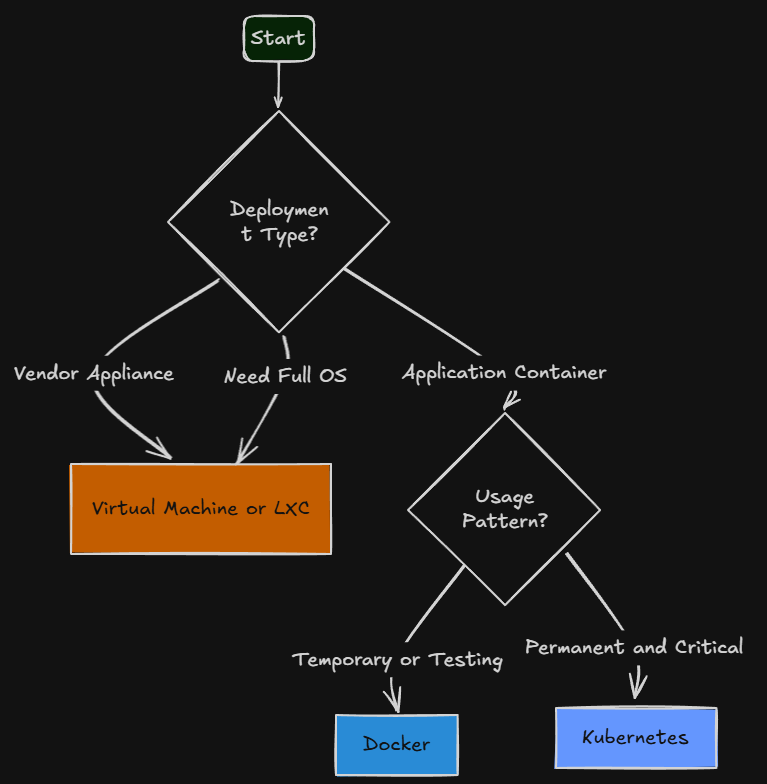
On the question of whether or not you should learn Docker or Kubernetes first, my answer is this: Start with Docker.
Docker gives you immediate value while it teaches you foundational concepts that make Kubernetes much easier to understand later.
With Docker and Docker Compose, you can quickly deploy things like:
- Monitoring platforms
- Automation tools
- Self-hosted applications
- Development environments
- Networking services
Once those concepts become comfortable, Kubernetes becomes a natural next step. But, you can also move to Swarm before Kubernetes. I think Swarm is a really nice middle ground that gives you some of the features that Kubernetes provides, without nearly as much of the complexity.
That is largely the path I followed myself. I started with standalone Docker hosts (still have a few), went to Docker Swarm for my production services, and then this year, I went all in on Kubernetes running in Talos Linux.
Today I run Kubernetes extensively, but I believe my Kubernetes journey was much smoother because I spent years working with containers first.
The progression I would recommend is simple:
- Docker > Docker Compose > Git > Automation > Docker Swarm > Kubernetes
That sequence builds skills naturally without overwhelming newer home labbers.
Put your configurations in Git
This is another foundational key concept in the modern home lab blueprint – Git. This is one of the biggest changes I would make today if I were starting over and telling my past self what to learn. Put as much as possible into Git. Years ago, most of my configs I would say lived directly on servers. That approach works, until something breaks. Or, you may forget what changes. Also, when rebuilding a new system or current system, you scratch your head trying to remember what the config was.
Today, I view infrastructure as code as much as possible. Examples of this for me include:
- Docker Compose files
- Kubernetes manifests
- DNS configurations
- Reverse proxy configurations
- Automation scripts
- Documentation
Below is my GitLab server that I run self-hosted:
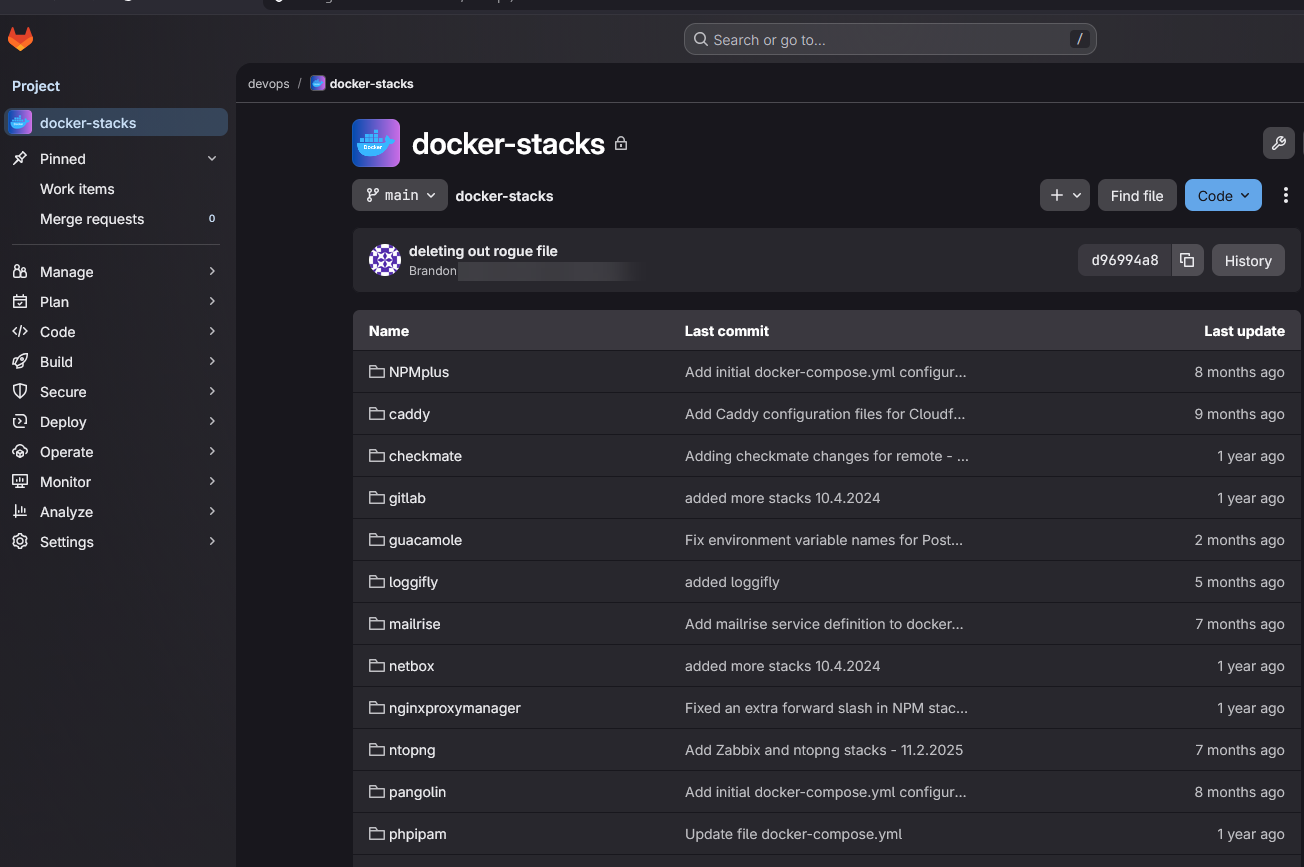
Version control gives you confidence in your configurations. It also allows for experimentation and helps you simplify recovery. Automation is also made so much easier and faster with it. One of the most valuable habits a home labber can develop is documenting and versioning infrastructure from the very beginning.
Automate repetitive tasks
Repetitive tasks are the tasks that should be automated. For years I delayed automating things because if felt like it was more time to dedicate to it than it is worth to justify it. But, that I think is a major mistake. Yes, time is involved. But on the other side of that time commitment is a much more modern and robust way of doing things. It is all about consistency.
Even if you only manage like 5 services all the way up to 500 services, the process is the same. Tasks and automation I would include in this endeavor would be:
- Configuration management
- Backups
- Monitoring
- Certificate renewals
- Notifications
- Infrastructure validation
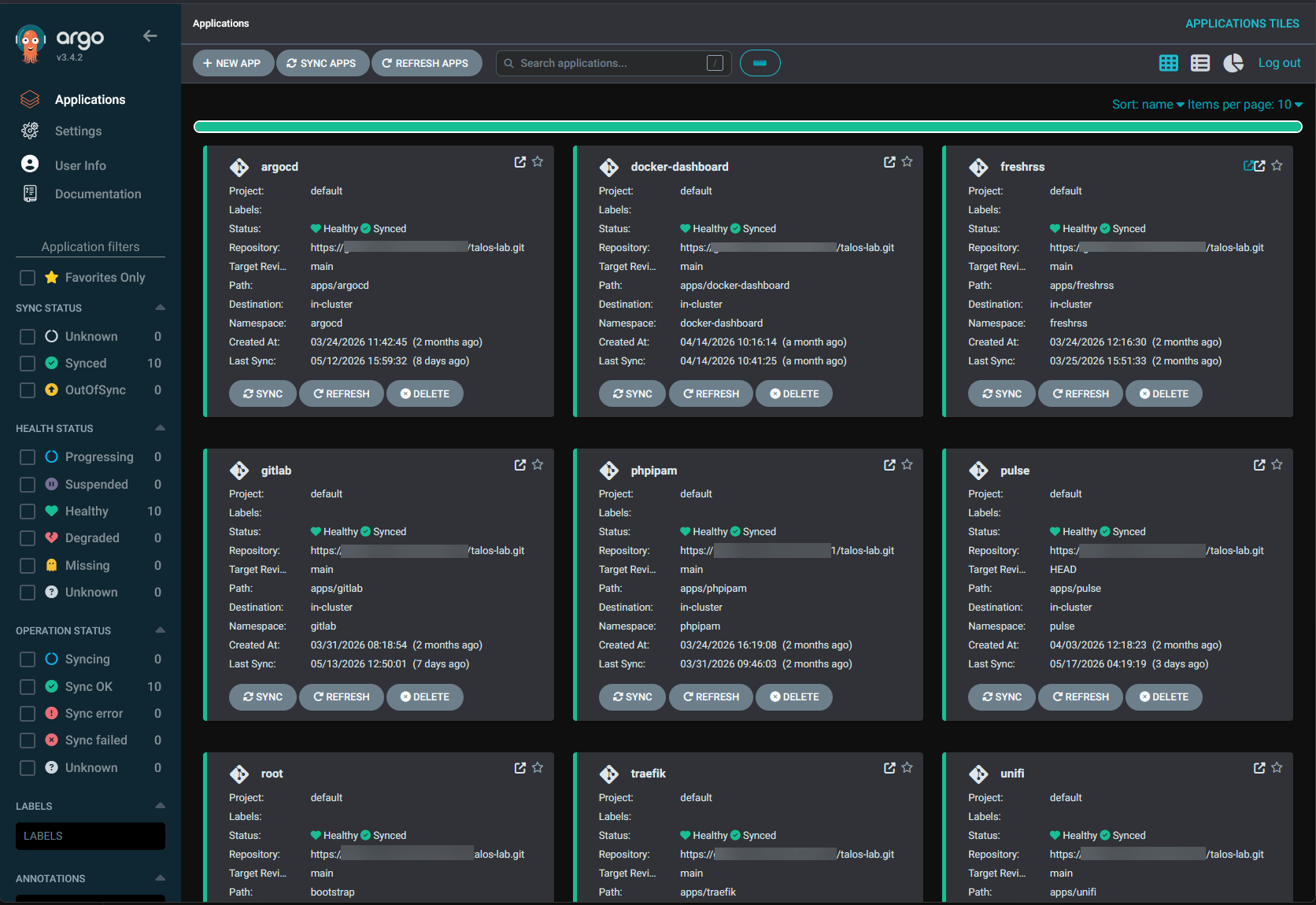
GitLab CI/CD, GitHub Actions, ArgoCD, and similar tools have become much easier to use than many people realize. Modern home labs provide an excellent environment for learning these technologies.
Check out my recent post on ArgoCD: I Stopped Deploying Containers Manually. This Changed My Home Lab.
Build meaningful monitoring
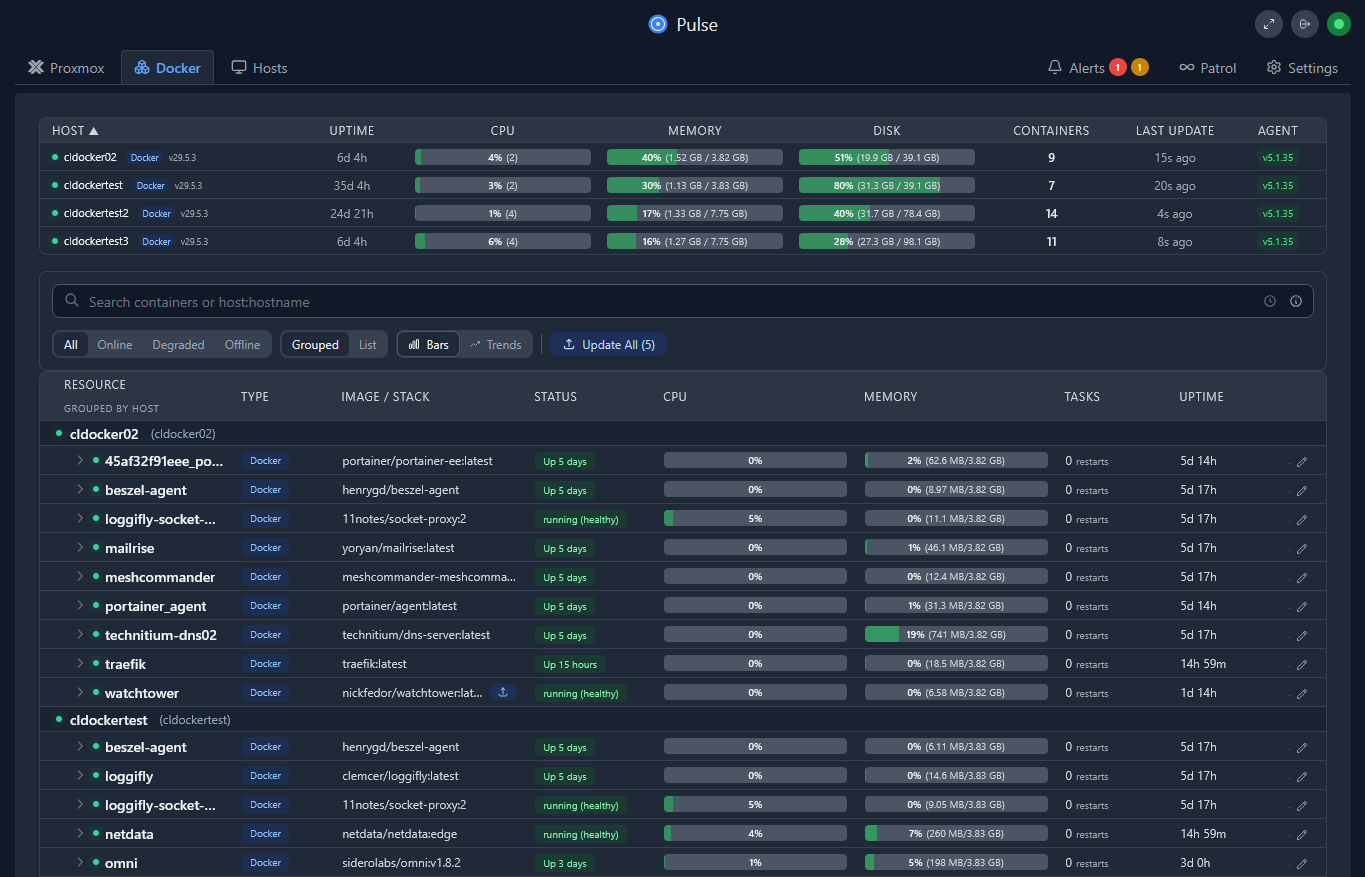
Monitoring has evolved significantly in my own environment. Years ago, I would say that I focused heavily on dashboards. Today, I care much more about alerts and don’t care as much for dashboard. A dashboard can be a thing of beauty, but it doesn’t really help me, if I don’t care to look at it.
An alert that is proactive and notifies me with something breaks is a LOT more useful in my opinion. For monitoring, I would build around:
- Uptime Kuma
- Pulse
- Netdata
More importantly, I would focus on monitoring the things that actually matter. Some examples of these for me are the following:
- Host availability
- Backup success/failure
- DNS health
- Certificate expiration
- Storage capacity
- Internet connectivity
These are the alerts that prevent surprises and allow me to be proactive about what is going on in the environment.
Add AI capabilities in an intentional way
No modern home lab blueprint would be complete without discussing AI in 2026. The barrier to entry has fallen dramatically. Today, it is entirely possible to run useful local language models on reasonably affordable hardware.
For most home labbers, I would recommend starting out exploring:
- Ollama
- Open WebUI
- OpenCode
- GPU acceleration with Proxmox VMs or LXCs
Read my post here on how to do GPU acceleration with VMs and LXCs: How to Enable GPU Passthrough to LXC Containers in Proxmox.
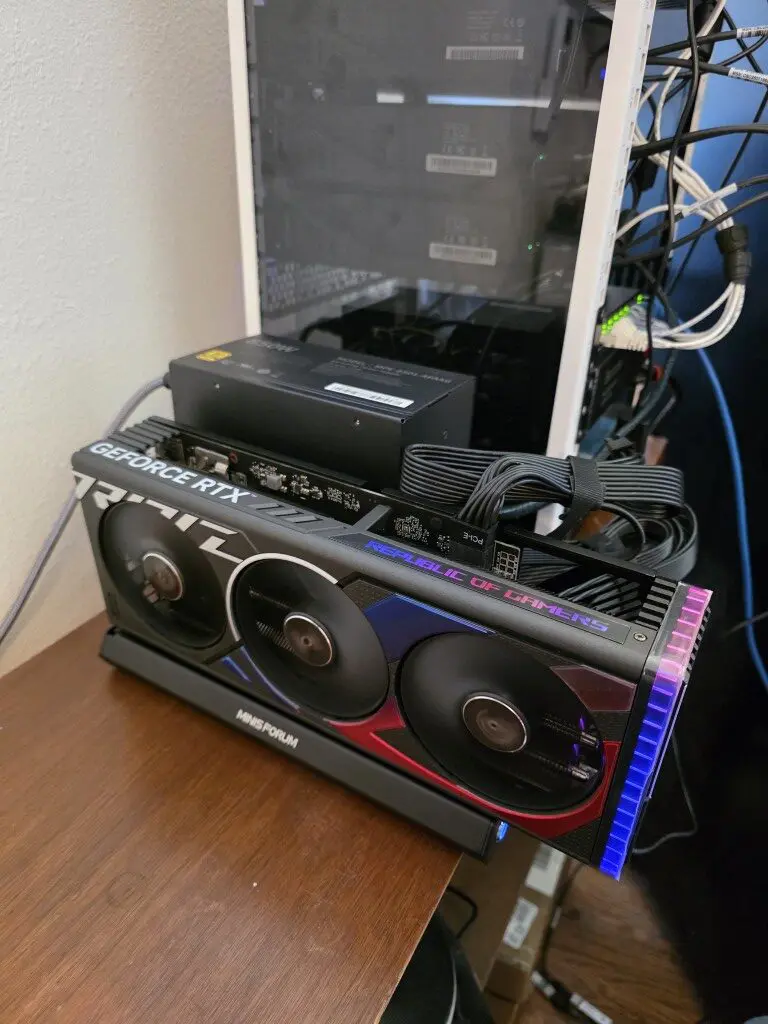
What excites me most is not necessarily replacing cloud AI services but it is the learning of the technologies that are used, like GPU passthrough and working with this type of acceleration. The home lab remains one of the best places to experiment with AI infrastructure without significant spending on cloud services, etc. I expect AI workloads to become one of the most common resources we all run over the coming years and AI will be doing amazing things for us, even in managing home lab services.
Prioritize and get backups going from day one
I know when I started out many moons ago, I thought for me that backups weren’t the most critical thing that I needed. Then I remember the first disaster that I had in the home lab on my “single” node where I had a storage failure and I lost hundreds of hours worth of configs and work. I realized very quickly the importance of having things backed up, even in a home lab learning environment.
As my personal story illustrates, backups are often treated as an afterthought by most home labbers. However, I think it should be foundational infrastructure. With Proxmox VE Server we have the very capable Proxmox Backup Server that makes enterprise backups a thing of beauty for absolutely FREE. Now we even have S3 offsite storage capabilities with Proxmox Backup Server 4.x.
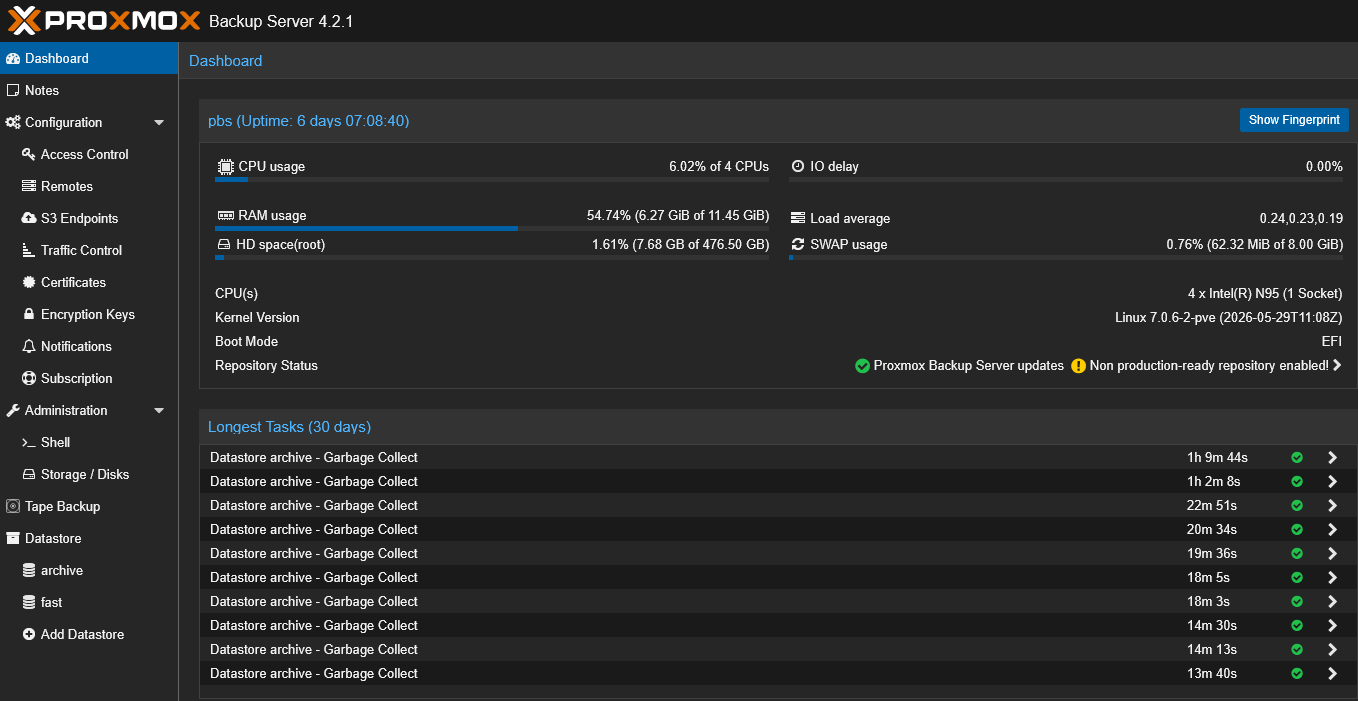
PBS is still an impressive solution that is available for home lab environments. I would keep backups for the following:
- Virtual Machines (PBS)
- Configuration backups (Git)
- Git repositories (I mirror my on-premises GitLab to cloud GitLab)
- Database backups (part of VM backups)
- Container volume backups (part of VM backups)
- Kubernetes backups (I use Kasten K10)
The goal is simple. Every important service you run should have a documented recovery process. Backups are not truly backups until recovery has been tested. That lesson has saved me countless hours over the years.
Download the blueprint download here
I have put this together as a blueprint along with links to resources: Download here.
Wrapping up
If I had to hand someone a blueprint for building a home lab in 2026, this would be it. It has taken me a few years to get to where I currently am in the home lab with understanding of why things need to be done a certain way. But I hope this can help to shortcut this process for the community. Start with efficient hardware. Build on Proxmox. Use ZFS. Design the network properly. Treat DNS as critical infrastructure. Learn Docker before Kubernetes. Put everything in Git. Automate aggressively. Monitor what matters. Explore AI. Back everything up. What about you? What is your blueprint this year?
More in this topic



Google is updating how articles are shown. Don’t miss our leading home lab and tech content, written by humans, by setting Virtualization Howto as a preferred source.
About The Author

I’ve been advising people to switch to mini PCs since 2022. I still get keyboard warriors trying to defend standing up a giant server rack in home labs, in spite of the fact that they’re a magnitude worse for space, heat output and electricity usage even compared to the most cost inefficient mini PCs. They’re a bunch of posers (usually fans of a certain Youtube influencer) who only care about the aesthetic.
You see, your advice is completely wrong for an entire section of home lab enthusiasts. There’s basically three types of home labs. There’s the posers who only care about aesthetics, the ones who want to make a business out of it and the ones who do it purely as a hobby.
Your advice only works for the second group.
As someone who spent more than enough time working on server racks for various businesses, I don’t find the rack aesthetic particularly impressive. I’m also not particularly looking to make a business out of my home lab. So, high availability and redundancy have no real meaning to me.
I have a single file server. It’s a mini PC running Open Media Vault with two 8 bay USB 3.2 enclosures and the bulk of my money invested into spinning metal. I have them setup in mergerfs with no redundancy at all because I never, ever have enough space and all of my critical data is backed up elsewhere. My only real regret is that I didn’t setup some form of bitrot protection. This has proven to be a bigger nuisance than I expected.
Beyond that, I just kept buying cheap mini PCs whenever I hit capacity.
Also, I feel like most people aren’t looking to waste a ton of money on RAM these days. 16 GB and even 8 GB would be fine for most mini PCs. You might have one or two with a higher capacity, if you actually need it. If you’re planning to self host AI, you’re looking to burn a whole bunch of money and there’s no helping you on it.
Proxmox and Kubernetes is complete overkill for most people just looking to get into the hobby and not turn it into a business. Aside from my file server, all of my servers are running Mint DE (I like fully functional file management, it’s stable and Cinnamon most closely resembles Windows 7) with Docker, NoMachine and Webmin. For now, I mostly manage things through Webmin and Portainer but I plan to switch to Komodo, Forgejo and Ansible for a more infrastructure as code approach. Similarly, I find ZFS to be overkill for most people but that’s more of a personal choice. OMV with mergerfs and snapraid feels like the better choice for a beginner. That said, I do agree that people should know what they want in file storage before committing.
I’m not trying to dunk on your article. I actually feel like it’s particularly good advice for those who want to take a more business approach to their home lab but, for those of us doing it more as a hobby, it’s largely overkill.
Zel,
Thanks for the comment and feedback. Points taken. The beauty I think in home labs is there is really no one size fits all approach and as you mention just a single mini PC can be extremely valuable when it comes to learning. The post and blueprint I have presented here I think is the best of all worlds tech stack that I think you can use as a core to learn most technologies in use within the enterprise today. But, at the end of the day, it is the combination of hardware and software that works for each use case.
Brandon