


The Cisco SG300-20 Switch is a great home lab switch that features most of the capabilities that ones see and use in the enterprise environment and for a cheap price. I wanted to write up a quick blog post on how to setup multiple VLANs on this switch as well as how I am using it in a small VMware lab environment. The really nice thing about the Cisco SG300-20 switdch is that it is easily configured via the web admin interface and it is fully managed.
Take a look at my post here on how to run basic setup on the Cisco SG300-20 switch for use in a VMware lab. We didn’t cover setting up VLANs in that particular post, so let’s take a look at that today.
Creating the VLAN
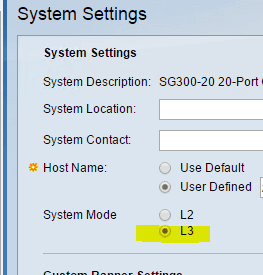
If you are wanting to create VLANs and do some cool inter-vlan routing the switch needs to be in layer 3 (L3) mode. This is found under System Settings in the menu. Note that once you change switch modes, your password that you set will be wiped out and returned to factory default.
Click on the VLAN settings menu.
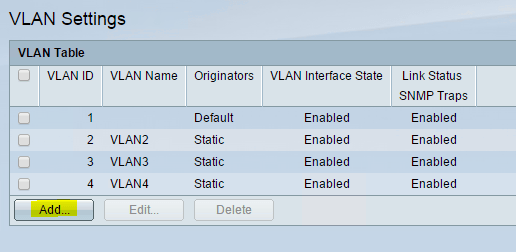
Click to Add a VLAN with the VLAN ID and name. Note below you can also add a range of VLANs by specifying the range in the VLAN ID field.
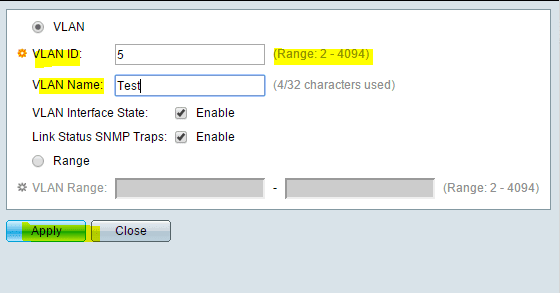
You can choose to save your configuration now or later if you see the blinking “save” notification.
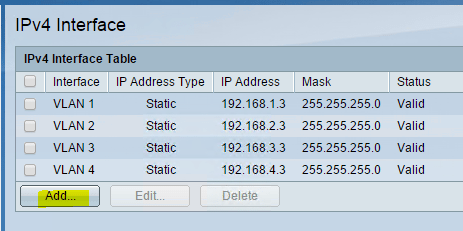
To assign an IP address to the VLAN interface itself, click the IPv4 Interface option in the menu
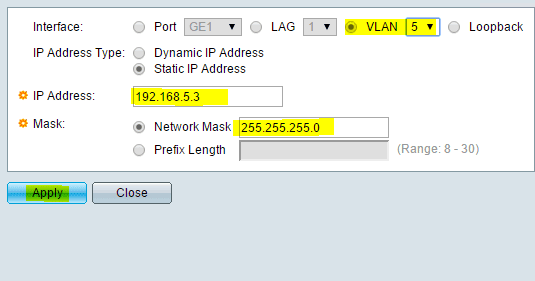
Select the specific VLAN as the interface to assign an address to, enter your IP address and subnet mask and click apply.
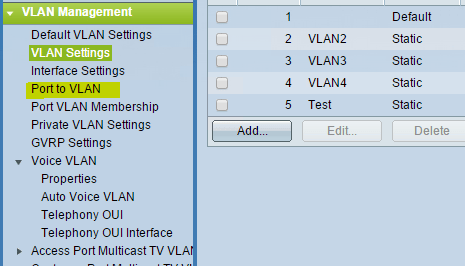
Click on the Port to VLAN option in the menu to assign ports with the web GUI.
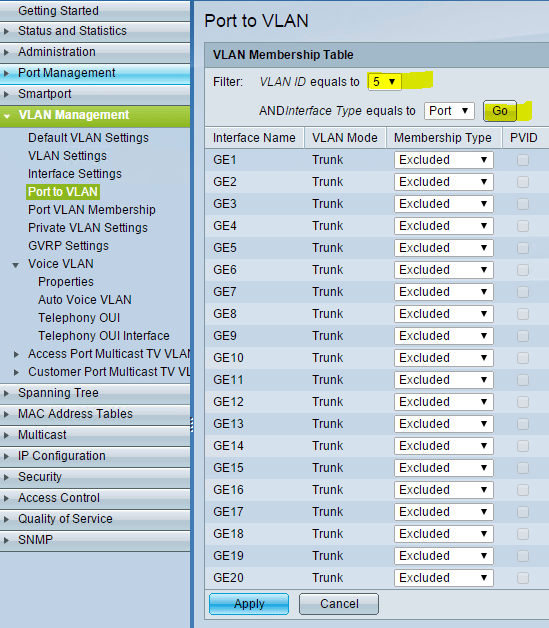
If you are planning on tagging several or all your ports with a particular VLAN, by far the quickest way is by using the command line to add a range of ports.
- Enter global config mode (config t)
- interface range gi1-20 (if selecting all ports)
- switchport trunk allowed vlan add 5 (this will add VLAN 5 to ports 1-20)
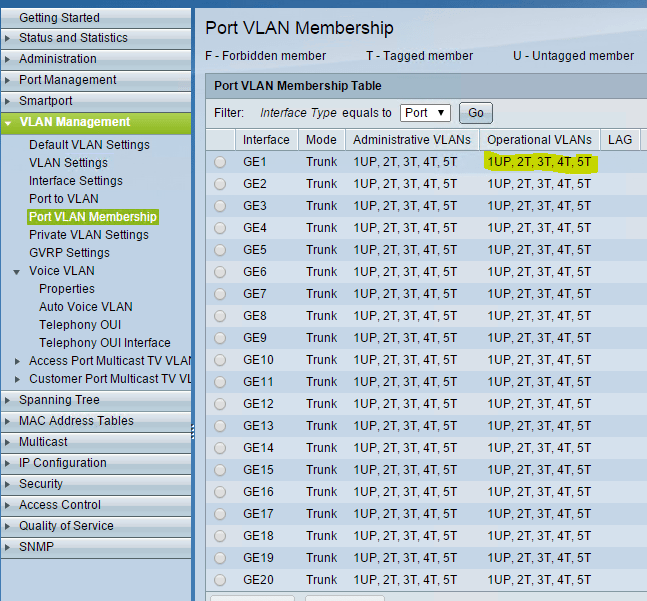
To confirm your VLANs created you can enter the command:
- show vlan
Or from the GUI, select the Port to VLAN option in the menu:
Final Thoughts
There you have it! You have created your first VLAN(s) on your Cisco SG300-20 switch. I will be posting soon on how to use your router (in my case Sophos UTM) to route traffic between the VLANs that are created on the switch.
More in this topic

Discuss this in the Community

Google is updating how articles are shown. Don’t miss our leading home lab and tech content, written by humans, by setting Virtualization Howto as a preferred source.
About The Author

Hello,
Hope you are doing well mate. Thanks for the awesome article I need your advise on setting up sophos utm to act as a firewall as well as to port forward port 25 to my exchange server 2013.
Here is how i have setup my lab Justin.
I have a home router with subnet 192.168.1.X this is my primary internet connection. To isolate my lab i have purchased another router and connected my home wireless router LAN port to the lab router WAN port. I have my home network IP as my WAN IP (192.168.1.200) and created 172.16.1.X as my lab LAN IP. I have connected my lab router to cisco SG300 and created some VLANS for management, servers etc. I have configured my exchange on the server VLAN and want to forward port 25.
Can you please guide me how can i achieve this please? where should i install the sophos utm and which nics it should be connected yo?
Hope to hear from you soon.
Many thanks,
Pavan
Reply
Pavan,
Is there a reason you want to use two routers in setting up your lab? Unless there is a reason to use multiple routers here – such as using the same IP address block on both sides for instance, I would use one router for your ISP connection. Also, two routers would necessitate the need to have two sets of port forwards for port 25. Your ISP router would have to port forward to the (WAN – internal IP) of your other lab router, then the lab router would have to port forward to the internal IP of your Exchange server on its side of things.
If you have an SG300 you can do everything you are trying to accomplish with VLANs and inter vlan routing. I have a couple other posts which will help you – http://www.virtualizationhowto.com/2015/07/home-lab-create-dmz-vlan/ and then also http://www.virtualizationhowto.com/2015/08/configure-inter-vlan-routing-multiple-switches/
In general terms though, I would setup Sophos UTM just inside your ISP router so you have gateway protection for your network. Setup two VLANs – one for management (192.168.1.x) and one for LAB (172.16.1.x). Turn on routing on the SG300 and let it route traffic between the networks and out to the Internet. The next hop route from your SG300 will be your Sophos UTM. The gateway for your clients in the respective VLANs will be the IP address you assign to each VLAN interface on the SG300. You can then use ACLs on the SG300 to block traffic between VLANs, etc.
With Sophos you will only need two NICs unless you need more. But at its most basic, one NIC will connect to your ISP router (WAN) and the other NIC will connect to a port on your SG300 (LAN). You will then create routes in Sophos to route back to the appropriate VLAN on the switch. Anyways, check out the links I pasted in.
Hope this helps get you in the right direction! Let me know if you need anything else.
Hey Brandon – I am very interested in understanding “how to use your router (in my case Sophos UTM) to route traffic between the VLANs that are created on the switch.” I am a little bit stuck at the moment with my setup and would love any advice suggestions you can provide. My most recent issues stem from the addition of a new Cisco router to support the need for some new IP cameras.
My current setup:
SG300-10P (I have it set as L3 and although this is the newest device and will really only support the IP cameras, I’m thinking that I will consider this my main switch since it is L3).
SG200-26 I’ve been using this switch for a while now but not (anywhere close) to the capacity it was designed, I never bothered to setup VLANs and etc b/c the need really was not there until now.
Sophos UTM 9.x (running as a VM on ESXI 6) I love the UTM but definitely adds complexity at times, I currently use the UTM as my DHCP server and then have another machine as AD/DNS. I also have a Sophos Wireless Access Point AP55C that is in this mix too.
The rest of my environment is either VM’s or Physical PC’s. I use a couple of Distributed Switches in ESXI 6 for VM connectivity. Any information you could share on how you have setup VLAN’s with Sophos, ESXI, and etc would be great.
R Gryphon,
Thank you for your comment! It will help me to point you in the right direction if I know more what you are trying to accomplish. You mentioned the addition of a router for ip cameras – can you explain this a bit further? Are we talking about the SG300-10P as a “router”? I am guessing you have the 10P for the PoE functionality for your cameras?
With the combination of switches and UTM you have several ways that you can setup VLAN routing, however, I just want to understand more thoroughly your topology before making any recommendations. How many VLANs are you looking to create? How many users?
Are you using all of the ports on the 10P for cameras? It would be the ideal choice for L3 in your environment however, I am not sure if you have any port count left after the cameras? You would need port count for upstream/downstream devices and VLAN trunking/tagging. If you have no ports left for the 10P to essentially be your core, then I would go the route of having the UTM do your routing for your VLANs.
Option 1 – Since Sophos is VLAN aware, you can do VGT which means the VM itself tags the VLAN traffic. Using this means, you create a subinterface so to speak in Sophos on your internal adapter if you are using a WAN and LAN. Then you would just tag the physical uplink port of the network card(s) servicing your distributed switch on your physical switch. Make sense?
Option 2 – Create multiple interfaces in Sophos and assign your IPs to the interfaces. Create different port groups for each VLAN and set the VLAN tag for the port group to be what you want. Attach the interfaces in Sophos to the appropriate port group network. Tag the physical switchport with all the VLANs that need to come across from Sophos.
Option 3 – Create multiple VDS’s and assign a physical interface to each one. Either set the vlan tag on the vswitch or tag the VLAN in sophos. Assign the interfaces in Sophos to the appropriate VDS. Then just make sure you tag the appropriate physical switchports with the right VLANs.
The above are just a few of the ways I can think of you could setup your virtual networks.
In Sophos you can setup DHCP for each interface, so you could have Sophos service each VLAN range with a different DHCP scope for your clients.
Hopefully the above may help you in the right direction, but again the above is based on not knowing a whole lot about your environment so I may be missing something.
Brandon
Hi Brandon.
Thank you for this knowledgeable blog.
I am very new to networking, I would really appreciate your help if you could make me understand and how to configure Cisco SG300 and Cyberoam 25iNG connected in a lab environment as below.
VLAN 10 – 192.168.10.1/24 (Server VLAN)
VLAN 15 – 192.168.15.115 – 192.168.15.1 FREE FREE/24 (DMZ VLAN)
VLAN 20 – 192.168.20.1/24 (Workstation VLAN)
VLAN 25 – 192.168.25.1/24 (Printer VLAN)
VLAN 30 – 192.168.30.1/24 (WiFi VLAN)
VLAN 99 – 10.10.99.1/24 (Management VLAN)
How should I configure this? Please help….
Rohan,
To start with you will need to enable routing on your SG300-28P switch so it can handle the inter vlan routing between the VLANs. Each VLAN on the SG300-28P will need to have an IP address assigned to the VLAN itself. From the addresses you have listed on the VLANs it looks like you have already done this possibly.
For clients, you would use the VLAN address as the default gateway. So your devices on the Server VLAN would have 192.168.10.1 as their default gateway, DMZ VLAN would have 192.168.15.1 as the gateway, etc.
You would then need on the cyberoam to create static routes for all of your networks 192.168.10.0/24, 192.168.15.0/24, 192.168.20.0/24, 192.168.25.0/24, 192.168.30.0/24 to point to 10.10.99.2 as the next hop. On the SG300-28P the default gateway needs to be set to 10.10.99.1. This can be done on the SG300 with the “ip default-gateway 10.10.99.1” command in global configuration mode.
It looks like you have VLAN 15 nad VLAN 30 setup on Port C and D respectively. I would probably just tag traffic via an Access port on the switch as you have shown in your diagram on the switch site, so port(s) Ge12, Ge24, and Ge26 whould be access ports. The ports on the Cyberoam would just be left untagged and you would simply use the addresses assigned to those interfaces on the Cyberoam as your gateway for those networks.
Hope this helps!
Hi Brandon,
This is a great blog. I am currently looking for a specific solution and I am a bit stuck. As I don’t have a switch in fron of me at the moment I am going to ask you the question. I will be using a SG300-24 switch with multiple VLAN’s. I’ll have a VLAN 1 for Management with VLAN ID 100, A VLAN with ID 200, a VLAN with ID 300 and a VLAN with ID 400. The reason for this is the different types of protocols we are using in the music industry.
I want to setup 1 port on the switch where I can connect my macbook and be able to communicate with all the VLAN’s. I have created all the VLAN’s in my network setup on my Mac but I need to know how to configure the port in the switch. Would this be a trunk port with all the VLAN’s tagged?
Thank you for your time if you can try to help me.
Erlwin,
Sure thing. What you are trying to accomplish is fairly easy. You would need a trunk port in this case with all the VLANs tagged as you mentioned. Also, your macbook would need an IP address from each VLAN subnet to communicate at layer 3 once you have all the VLANs setup on your macbook as it sounds like you have already done. Hope this helps!
Hi Brandon,
Thank you for your reply. I have indeed setup all the VLAN’s on my Macbook with their own IP’s in the range of each VLAN.
Would this setup also work when the switch is in layer 2 and I use the management VLAN on the switch to connect to or do I have to be in layer 3?
Erlwin,
The switch doesn’t have to be in layer 3 (routing turned on) for VLANs to work. If you are using a downstream router to route your traffic, then you don’t have to turn on routing on the switch. If you wish to use your switch to route traffic between your VLANs then you will need to turn on routing to do inter VLAN routing. With that point noted, you can have it in layer 2 and have your VLANs tagged accordingly and be able to have network connectivity from your macbook to other devices on the other VLANs as long as your macbook has the VLANs tagged and has appropriate IP addresses assigned and the switch can be in either layer 2 or layer 3. Does that make sense?
Hi brendon,
I am using asa 5510 but i wanna use only one port from asa, g0/2 which is configured for 192.168.0.2/24.
Can i use this port as vlan 10,20,30 in sg300 24 port.
er.hardy mann,
Sure you would just need to create subinterfaces to the g0/2 port on the ASA tagged with the appropriate VLAN for each subinterface and then have those VLANs tagged on the sg300 port 24 in a trunk port.
Hi brendon can u come at skype my id is hmann_15, coz m not able connect asa with sg300 l3
Hi Brandon,
I know this is an old post, but this is exactly what I’m going to attempt to undertake within the next couple of days on my Cisco SG300-28.
My overall aim is to setup multiple VLANs to separate VMware traffic (i.e. Management, Storage, HA/VMotion/DRS, VMnet).
In order to do this, would I also need an additional router, as my only current router is an ISP Cable Modem/Router which isn’t that configurable? I’ve read that it’s possible to take an old router and effectively use that as a bridge between the Layer 3 Switch (Cisco) and the ISP Modem/Router by using DD-WRT? Would this suffice, or would the easiest method be to purchase a 2nd-hand Cisco (e.g. rv325 or a 1921) router and configure it that way?
Many thanks,
Nick
Nick,
No problem. To answer your question about needing a configurable WAN router, that depends on your VMnet traffic mainly. Do you have VMs that you need to have on separate VLANs that need to be able to route traffic to the Internet? Typcially, with VMware traffic you mention, such as storage, vmotion, etc, these don’t need to be routed anywhere and can exist on VLANs that don’t need to talk to any other subnets. Also in many smaller environments it is typical to see VMware management traffic simply exist on VLAN 1 or default VLAN without anything special configured.
If though for instance, you had a few VMs on the VM host that need to be separated from VLAN 1 traffic such as DMZ servers, you might need another VLAN to separate these VMs from the rest. If they need to route traffic to the Internet which in that case most likely they would, you would need to be able to have an ISP router where you could add routes back to the SG300-28 if you had routing turned on the SG300-28 as is mentioned in this post.
Let’s say you had the following:
VLAN 1 – 192.168.1.0/24 – Management network, etc. SG300-28 switch is assigned the IP 192.168.1.1. Our WAN/ISP router is assigned IP address 192.168.1.254.
VLAN 10 – 192.168.10.0/24 – DMZ
VLAN 50 – 192.168.50.0/24 – iSCSI
VLAN 60 – 192.168.60.0/24 – vMotion
The subnet we care to route traffic to the Internet above is VLAN10/192.168.10.0/24 subnet. So on the SG300-28 our default route will point to the WAN/ISP router, so ip default-gateway 192.168.1.254.
On the WAN/ISP router, we would need to create a route back to the DMZ subnet so that return traffic would route back to the DMZ VLAN/subnet. So we would create a route like so:
ip route 192.168.10.0 255.255.255.0 192.168.1.1 (Note here we use the IP of the SG300-28). The WAN/ISP router would send the DMZ return traffic back to the 192.168.1.1 interface on the SG300-28 and then the SG300-28 would route the traffic back to the 192.168.10.0/24 DMZ subnet.
However, if none of the above is true about the VMs, you wouldn’t have to have a new router sitting at the WAN as the VLAN 1 subnet traffic would route normally through your WAN/ISP router and the vMotion, iSCSI, etc, traffic is simply contained in the VLANs on the SG300-28.
Make sense? Hope this helps.
Brandon
Hi Brandon,
Yes, thank you, that makes perfect sense.
It’s purely for a lab environment, so no requirements for a DMZ.
I was thinking (as I also have an unmanaged Netgear Gigabit switch (JG5524) that is currently connected to the ISP modem (i.e. anything connected to that receives a DHCP address via the ISP)), to use that as the Management LAN? Then, use the Cisco SG300-28 for the other LANs (separated in VLANs) – i.e. Storage/ISCSI, vMotion/HA/DRS and vmnic. In that scenario, in theory, I possibly wouldn’t need to add static routes?
Essentially, just playing around with a “live-like” (or close to) environment in my lab for testing/learning purposes.
Anyway, it’s all fun – at some point within the next couple of years, I will probably look at getting 10 Gigabit switches/NICs, so it’ll only be a “temporary” lab anyway!
Cheers,
Nick
Nick,
Yes exactly. I don’t see in that scenario that you would need additional static routes.
Brandon