



Needless to say like EVERYTHING else out there, home labbing has a lot of advice that you can follow across various message boards, videos, and blogs like this one 🙂 There are certain advice that gets repeated so often that it starts sounding like a universal truth that you MUST follow if you self-host. Much of the advice out there isn’t wrong necessarily. But if you follow all of it, you will introduce complexity, hardware, and spend money that you probably didn’t need to spend. I have tried to follow most of the advice out there over a period of many years and I can tell you there is certain popular advice that I no longer follow.
1. Everything should run on Kubernetes
Kubernetes has been the “hot” technology for more than a decade now with every organization out there at least considering it as the platform to run some part of their infrastructure. You can’t have a conversation these days about container orchestration without Kubernetes coming up.
Kubernetes is an amazing technology that solves specific problems that when you try to solve those same problems using other tools and technologies, you usually wind up with something as complex as Kubernetes or even more so.
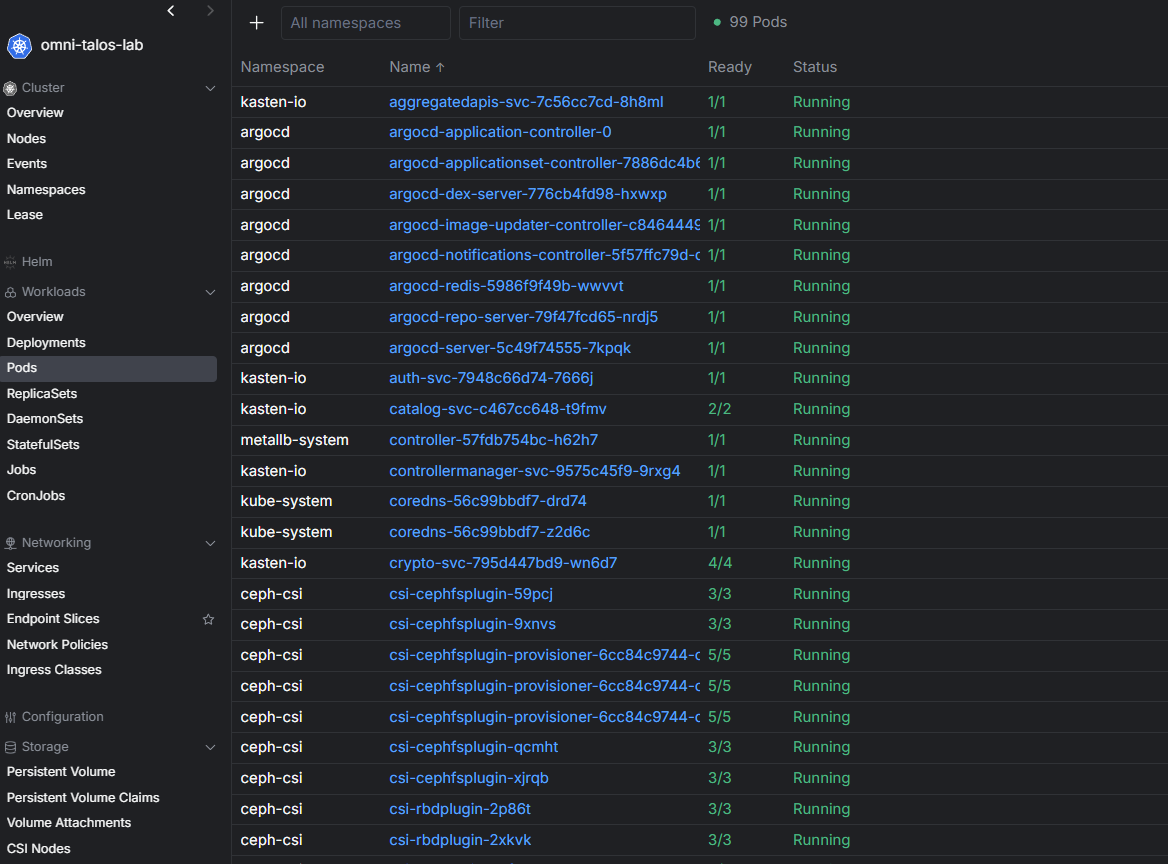
But though, does that mean that you need to run ALL containerized workloads in Kubernetes? My take on this popular advice that some might give is, no you don’t. I love Kubernetes and run several of my self-hosted containerized solutions in K8s, but not everything. I have a specific methodology for running my workloads and how I choose to run certain things in this post here: Why I Run Some Things in Docker, Some in VMs, and Some in Kubernetes.
Below is a chart of how I decide between different platforms, like virtual machines, docker, and Kubernetes:
| Question | If yes | Platform | Example workloads |
|---|---|---|---|
| Vendor appliance? | Vendor provides an OVA, ISO, or expects a server OS | Virtual Machine or LXC | Backup software, monitoring appliances, network tools |
| Full operating system needed? | Needs Windows, system services, or OS-level control | Virtual Machine | Active Directory, DNS, Linux infrastructure servers |
| Application container? | Lightweight app or service | Docker or Kubernetes | Dashboards, RSS, monitoring, reverse proxies |
| Is it temporary or testing? | Quick deployment or experiment | Docker | Lab apps, testing, proof of concept services |
| Is it permanent or critical? | Long-term service or reliability matters | Kubernetes | APIs, cloud-native apps, GitOps workloads |
| Would orchestration help? | Needs self-healing, scaling, automation | Kubernetes | Modern apps, HA services |
| Am I overengineering this? | Complexity feels unnecessary | Reconsider | Anything that feels too complicated |
2. You need high availability for everything
This is another area where I would challenge advice you see out there. High availability is another great idea in enterprise environments that is implemented in different ways, depending on what you are referring to, what vendor technology you are running, or if you are talking hardware or software.
In a perfect world, you want to NEVER have a single point of failure (a single router, single switch, single hypervisor host, single network path, etc). This list goes on and on. I think for most home labs, including mine, it is good to have HA on certain things, but not all as it is just cost prohibitive at a certain point to implement HA.
So, I think you pick and choose where HA makes sense. Like does my DNS infrastructure need redundancy? Absolutely. Does my hypervisor management platform benefit from resilience? Certainly. Does my “freshRSS” application need automatic failover at 2 AM? Probably not.
One of the biggest mindset shifts I have experienced is realizing that good backups often provide far more value than unnecessary high availability. For a lot of workloads, having the ability to restore everything matters more than having very complicated failovers.
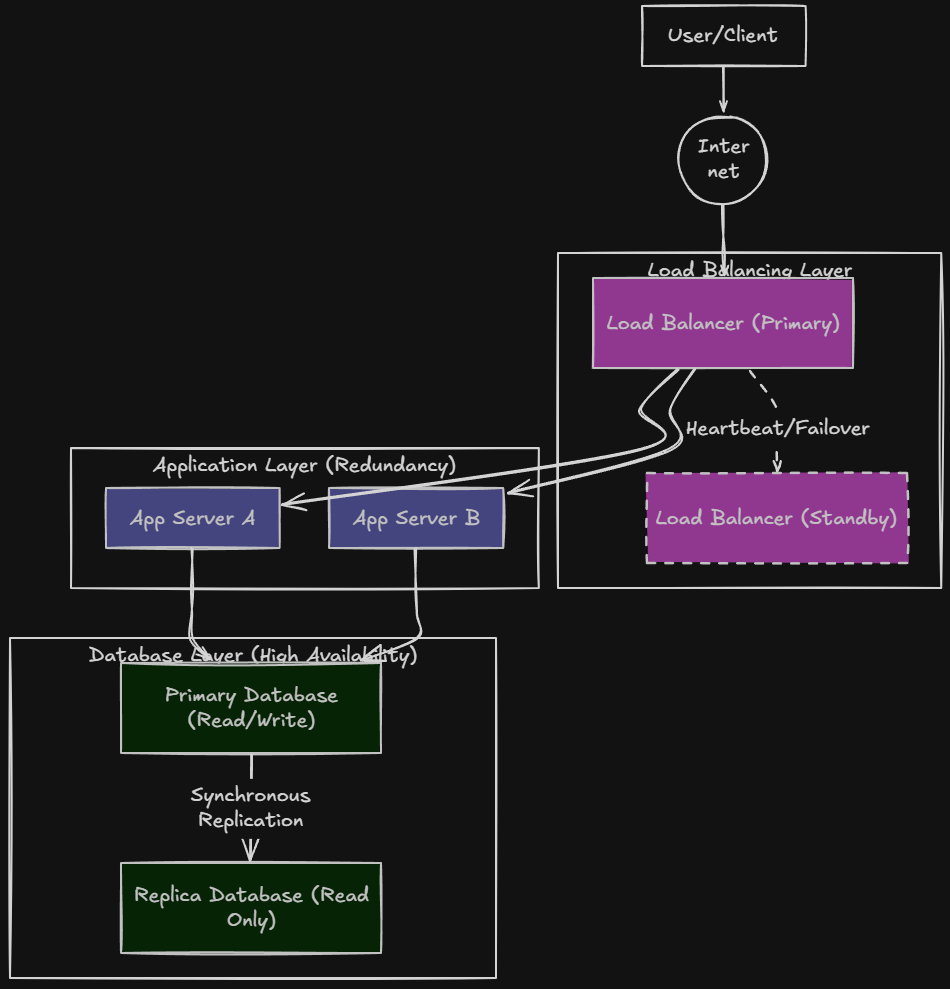
What is High Availability (HA)?
High Availability (HA) is the ability of a system, service, or an app to stay available and continue operating even when hardware, software, or network failures happen.
3. Enterprise hardware is always better
This is another piece of advice that I think has been out there quite a while. Most home lab communities pointed to running retired enterprise servers in a home lab. There is a lot of good reasons for that. Enterprise servers are powerful, relatively affordable for the hardware you get on the secondary market like EBay and they have features like out of band management that you just don’t get with most other types of consumer-grade hardware.
I started my own home lab journey using plenty of enterprise hardware. It taught me a tremendous amount about virtualization, storage, networking, and infrastructure management. But honestly, hardware has changed dramatically.

Modern consumer CPUs deliver pretty incredible performance. Mini PCs have become highly capable as well and honestly, compact systems can now provide resources that once required large rack-mounted servers.
Over the past few years, I have found myself moving toward more efficient hardware platforms. The performance-per-watt advantages are significant when you look at using mini PCs over enterprise servers. Noise levels can’t even be compared. Heat output is WAY lower with mini PCs compared to enterprise servers.
However, I no longer believe that enterprise hardware is automatically the best answer for every home lab. In many cases, modern consumer hardware provides a better overall experience for the money, efficiency, noise, and power consumption.
Check out my comparison post of looking at enterprise servers vs. mini PCs after the RAM prices went insane: Has RAM Pricing Just Made Used Enterprise Servers the Better Home Lab Deal?
4. More monitoring is always better
Let’s be honest, you can monitor an environment so much that you can actually kill the performance of your home lab by just the monitoring traffic and load. However, there is a much better approach I think to monitoring by choosing to monitor the components of your lab that are most impactful.
If you are running Proxmox VE server or a PVE Cluster, you probably want to monitor your PVE nodes and make sure they are healthy. Also, monitoring the VMs running on the platform that may be serving as Docker container hosts is also important. This way you know if you have any hot spots in the environment related to these aspects, then you will be able to spot them.
However, you can have so many monitoring tools running that it is hard to know where to look and in which one to get the metrics you are looking for. I am currently using the following:
- Pulse for monitoring Proxmox and VMs running
- Netdata for external monitoring outside of the environment
- ProxMenux for hardware and other monitoring
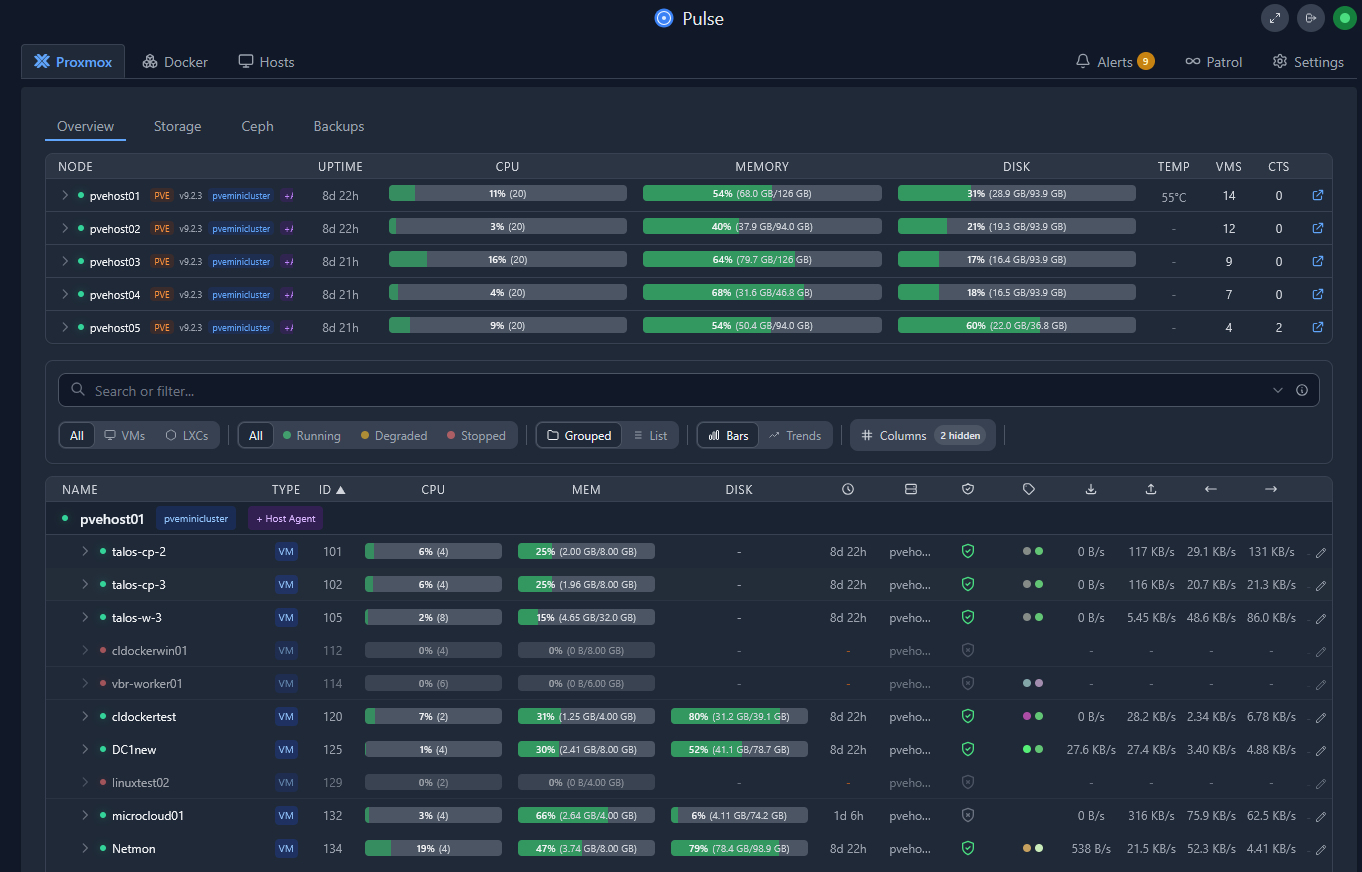
Today, in general, I focus on monitoring things that require action. Storage failures, backup failures, critical service outages, or anything that is “down” is what I care about in the home lab. A notification about a temporary CPU spike on a test VM usually is not something that I care about in the home lab.
The most effective monitoring strategy is not necessarily the one with the most data. It is the one that helps you identify and solve real problems.
5. Self-host everything
This is another one that might be controversial to self-hosting purists. I don’t necessarily agree with the idea of self-hosting “everything” in a home lab. Yes, a lot of the reasons we self-host is so that we are not locked into various “cloud” environments and share our data with others. But, I have certain types of data for me that are important enough that I don’t necessarily want to be responsible for the lifecycle of that data.
Password manager self-hosting is a service that I no longer self-host. I get it. Many self-hosters and home labbers out there don’t want to share their sensitive information with a cloud provider of SaaS solution when it comes to their passwords. I totally understand that. However, for me, the risk of possibly losing a self-hosted password management solution due to a catastrophe that I haven’t accounted for in the home lab is just too great.
Self-hosted email is another service that I just don’t take on as a responsibility to manage and host in my environment. Email has become a bear to self-host and the requirements are getting more and more strict when it comes to what you have to have in place before you can successfully relay email, due to all the SPAM floating around out there.
I instead use cloud hosted email providers and with my home lab notifications, I DO self-host push notifications along with bouncing things off Pushover which I have a subscription for.
I dedicated a whole blog post to my reasons of which services and apps that I no longer self-host where I give more details there on why I chose the way I did on specific services. Read that here: Things I Stopped Self-Hosting (And Why Cloud or Managed Won).
6. You should always buy more hardware
I know I can definitely relate to this one. The urge and advice from most is that you need to upgrade your hardware. Although I have to say I think most are holding on this advice anyway due to the price of things like RAM and storage that used to be cheap but now is outrageous.
Sometimes upgrades are justified if you actually have a performance issue. I know I speak for many of us that we are “hardware geeks” at heart and love to get our hands on new shiny things. But I will say that in all of the home lab iterations that I have ran in the past, I have never ran out of CPU resources even through the older CPU generations I have run in a lab. RAM is always the resource that seems to be in need. But not always. Storage for me is #2 on that list.
Over the years, I have discovered that many infrastructure challenges are not hardware problems and if you are having performance issues, a lot of times this is due to poor design. The key here is before upgrading hardware, check the basics.
Make sure you haven’t went too far with overprovisioning or overloading a specific node. Spread the work across multiple lesser powered nodes instead of scaling “up” an existing node. Also, performance issues may be related to storage and not to CPU or lack of memory.
Check out my full detailed blog post of how much of a different enterprise storage made in my home lab when it came to running HCI storage: Consumer vs Enterprise SSDs in the Home Lab: I Benchmarked Both in Ceph – Virtualization Howto

7. You should deploy new technology immediately
I have definitely been bitten by this advice and mindset in the home lab. I mean, the exciting thing in a home lab is that we can basically do anything we want to do. But, if you are running what you would consider to be “production” apps that you want to basically be available all of the time, just upgrading to be on the bleeding edge latest can be risky.
I have upgraded hypervisors to the latest and greatest version the day they are released, only to find that my backups became broken as there was an API change that prevents the backup solution from successfully “talking” to the hypervisor.
Keep these kinds of compatibility concerns in mind when you want to jump quickly on a new version. I have fell victim to this too many times to count. What I now do instead is spin up bleeding edge new versions of things like hypervisors in a “nested virtualization” environment where I can then try out the newest releases without affecting my “production” environment.
But being an accidental beta tester on your critical home lab infrastructure is not necessarily a fun place to be!
Video
Wrapping up
I think the best advice that I follow now in the home lab is “simplicity with a purpose”. Keeping things simple and “intentional” is always the safe bet. Compartmentalize your lab so that you have your “production” segment, but then have another segment of your lab dedicated to trying the newest and latest in a safe environment. I used nested virtualization for this, but you can use a separate host as well and spin up test workloads on a different host if you want to keep things separate (which is a great idea). What about you? What advice do you “not” listen to when it comes to changes in your home lab?
More in this topic


Google is updating how articles are shown. Don’t miss our leading home lab and tech content, written by humans, by setting Virtualization Howto as a preferred source.
About The Author

Best article I’ve seen i the homelab community all year.
Nathan,
I really appreciate it!. Take care.
Brandon
Hi,
I’m from the FygoOS team.
We recently sent you an email and just wanted to follow up here in case it got buried.
FygoOS is a Debian-based NAS operating system for both x86 and ARM hardware. We’d be interested to hear your thoughts if you’d like to try it in your own setup.
Feel free to reach out if you’re interested.
https://fygonas.com/
Thanks!
I agree 100%
Many thanks Predrag👌
Ok but none of this is popular advice.
Ronny,
You would be surprised 😁
Brandon
Maybe it depends on the specific community? My go-to community is r/selfhosted on reddit, and I’m not seeing any of this advice there. On the contrary, I generally see people making the same points you’re making here.
I’m not too familiar with this site, but it annoys me how many sites in general spew out articles like “Everyone is doing X wrong” and then just listing some common knowledge and popular opinions within the field of X.
Hopefully, this is not how you operate.
Ronny,
Point taken and r/selfhosted is a great resource. I do see such a mass of things mentioned on resources like r/selfhosted that sometimes it is hard for beginners or those looking to branch out to know where best to put their time and resources. What the article is trying to convey is that it is easy to get caught up in the buzzwords and “hot” technologies when these are usually not what is best in the realm of home lab or self-hosting. It is great to delve off into various technologies and tech stacks and that is fine for learning. All of the articles I write by hand are coming from real experience in this realm. I have been doing this for a long time now and try to write on subjects that I have found helpful for myself before I share them with others. Hopefully that makes sense and strikes a chord there. Again, appreciate your feedback.
Brandon
Thanks yourself for elaborating. I genuinely appreciate writers such as yourself that help make this sphere more accessible to all.
After some conversation, I admit that I probably came to a hasty and broad conclusion based on past annoyances with other sites. For that, I apologize.
Ronny,
No worries, one of the places I learn most is on comments to blogs I have written. Different perspectives are very valuable to me in learning what is important to others and helpful in the community. Please continue to provide your feedback as it is appreciated.
Kind regards,
Brandon
I dont see this advice anywhere in the homelab community? The reddit communities push the same points you do? So im not really sure where the disconnect is coming from?
Also, I feel like there is a disconnection going on here. I feel what youre stating is more in line for people simply selfhosting. A homelab tends to have higher complexity depending on what one is learning, technologies such as Kubernetes. A home lab is a place to learn. Where as the selfhosting challenge stops after does it have a docker compose available.
David,
I probably should clarify that I’m speaking from my own experience consuming home lab content over the years, not necessarily saying there’s a universal consensus that everyone is pushing.
On the second point, I actually agree that there is overlap but also a distinction between self-hosting and home labs. A lot of self-hosting discussions focus on running services reliably, while many home lab environments are intentionally more complex because the goal is learning thinkgs like Kubernetes, Ceph, SDN, automation, clustering, and other enterprise concepts which as you know if you follow my content, I write a lot about.
My point wasn’t that complexity is bad or that home labs should be simplified down to a few Docker containers. I’ve spent plenty of time building Kubernetes clusters, storage clusters, and other complex environments myself. The point was that I’ve found myself becoming more intentional about where complexity adds learning value versus where complexity simply adds to my maintenance burden. For me, that’s been an important point as my lab has evolved.
Brandon
I’d really agree with #7 in terms of distro upgrades. I host quite some stuff on ubuntu server and.. Don’t ever upgrade your sever with -d flag. It’s often not stable-enough yet. There is a reason why ubuntu only lets you update your LTS when the XX.04.1version releases.
Also, for kubernetes.. I just don’t. Everything runs fine with docker compose and I love it. When I’ll need high availability, I’ll just plunk it into a swarm. There actually so many caveats that cause single point of failure that’s it’s not always worth it.
For example: Immich. In terms of storage we have:
The DB – it’s a postures. So likely could be replicated. Or we could dump it everyone in a while and load last dump in case smth goes wrong. — technically possible, best with 3 instances.
And the library – it tends to grow big. Do to eliminate single point of fail, we would have to synchronize giga or tera bytes worth of data between hosts.
Or store library on a separate nas? That’s single point too.
So.. I’ll agree high availability is not always worth it. It’s fine for small, but important services – take nginx reverse proxy, pihole, maybe beszel; but much trickier for the bigger ones like jellyfin or immich
drono,
Great insights here with very popular self-hosted services. There are always tradeoffs as you mention, but definitely spot on with your observations that most things just don’t need high availability to the level that requires kubernetes. Swarm I think is such a great middle ground and honestly underrated. I wish there was more momentum behind it these days. Seems like most of the dev time and new solutions are focused on K8s. But still a solution that is well-suited for home lab workloads.
Brandon