



Every now and then, I run across a home lab project that has features that I wish were built into the default Proxmox interface. And, you can tell these tools are built by ones who don’t just live in a clean demo lab world where the architecture is perfect but they have actually worked with the default features and know where these are lacking. I stumbled onto a project called PVE-Electrified that isn’t a replacement for the Proxmox UI, but it is aimed at home lab users, developers, and those who want to tinker. Let me show you this cool little interface and the features it adds that I wish were the defaults.
What is PVE-Electrified?
PVE-Electrified is a modification of the Proxmox VE web interface. So, this isn’t an official UI that is supported as an add-on (so we can get that out of the way). So, probably this is not something you are going to load on your production PVE servers.
The project has as its use case, home lab environments. It also adds a plugin system that allows extending the solution with even more functionality. It also uplifts the architecture of the interface with a more modern tech stack that includes React, TypeScript, Vite, and Node.js.
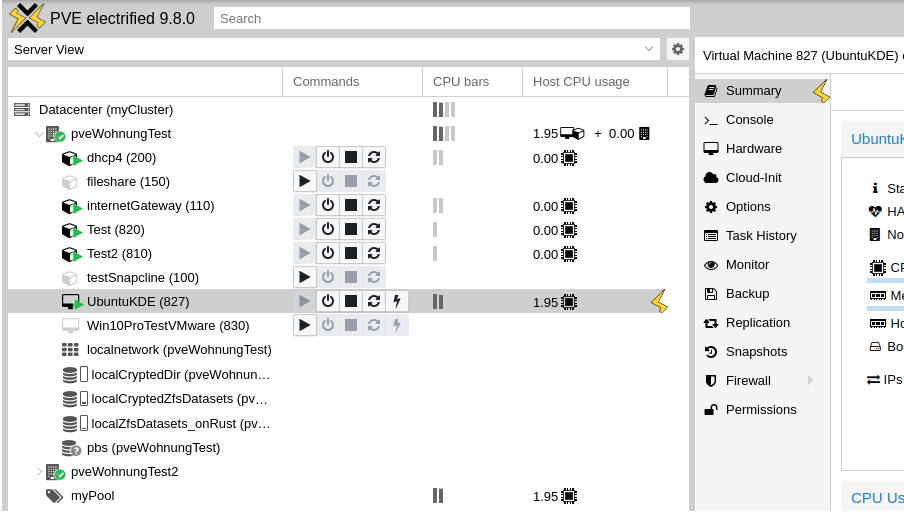
This may seem like a small detail, but it is actually more important than it may sound. One reason we do not see a huge ecosystem of Proxmox UI mods is that modifying the Proxmox interface has historically not been easy. Once you install Proxmox and start managing it, the existing UI is very utilitarian and functional, but it was not exactly designed around community plugin development in the way many modern web applications are.
PVE-Electrified is trying to change that. From a user standpoint, though, the most interesting part is not the framework underneath. It is the practical stuff it adds to the Proxmox experience. What does it add to your Proxmox VE Server experience? It adds things like:
- CPU usage bars directly in the tree view
- Power management buttons closer to where you are already working
- Faster power-state feedback
- Instant guest cloning using ZFS copy-on-write
- Snapshot cloning
- Better handling around conflicting hardware resources like USB devices and GPUs
- A plugin system that could make Proxmox much more expandable over time
So, with this feature list it got my attention as something I wanted to try because it targets real home lab pain points.
Installing PVE-Electrified
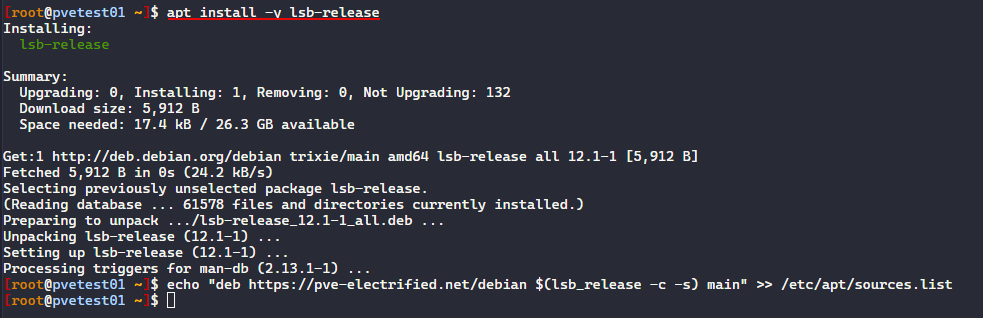
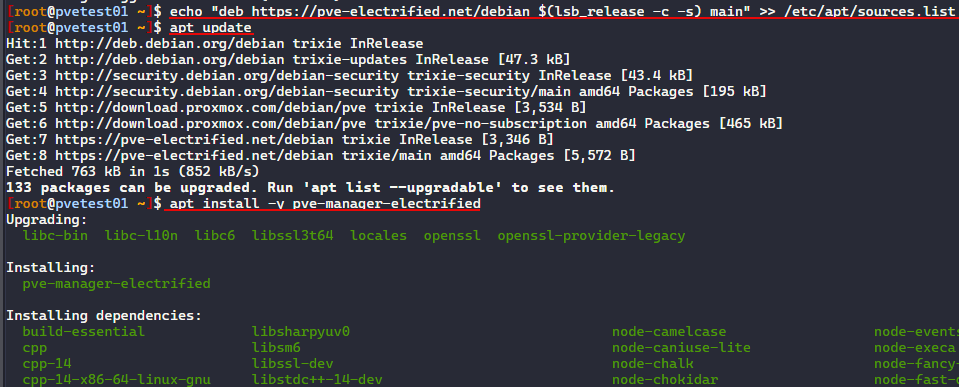
The process to get this up and running is fairly simple. On your Proxmox host, you will need to run the following commands:
wget https://pve-electrified.net/pubkey.asc -O /etc/apt/trusted.gpg.d/pve-electrified.asc && \
apt install -y lsb-release && \
echo "deb https://pve-electrified.net/debian $(lsb_release -c -s) main" >> /etc/apt/sources.list
apt update
apt install -y pve-manager-electrified
Running the lsb-release command.
Echoing in the repo into the repo list and then installing it.
Simple CPU bars are simple but useful
One of the first features that stands out is CPU usage bars in the Proxmox tree view. This is a simple little addition in the UI that I think is pretty cool that you can just visually see if you have any “hot” spots either from a host or virtual machine perspective.
Having a real-time CPU graph directly in the tree makes the interface a bit more glanceable I think to just quickly see things. When you are managing a lot of VMs, containers, or cluster nodes, this is pretty important and a quality of life feature that seems to make a lot of sense once you see it.
This way also, you don’t have to click on a VM and then see on the Summary screen what resources are being used. Below, you can see that it gives you an overall view of the cluster hosts and the individual VMs from a CPU perspective.
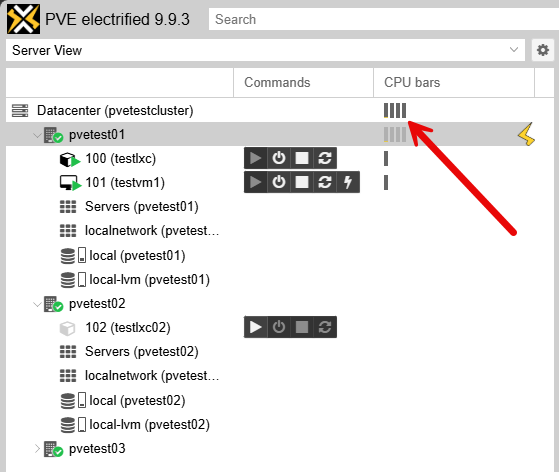
This is one of those quality-of-life features that feels obvious once you see it. You can already get performance metrics in Proxmox, of course. But again, it is not as quick to get things surfaced in there since you have to visit the Summary screen to see them.
Power management in the tree is another workflow improvement
PVE-Electrified also adds power management buttons directly in the tree and they also give immediate feedback on the state of the virtual machine. Again, this is not a massive architectural feature. It is a workflow improvement. But these small improvements are such big wins in workflow improvements
Just being able to quickly click to start, stop, reset VMs and LXCs is huge.
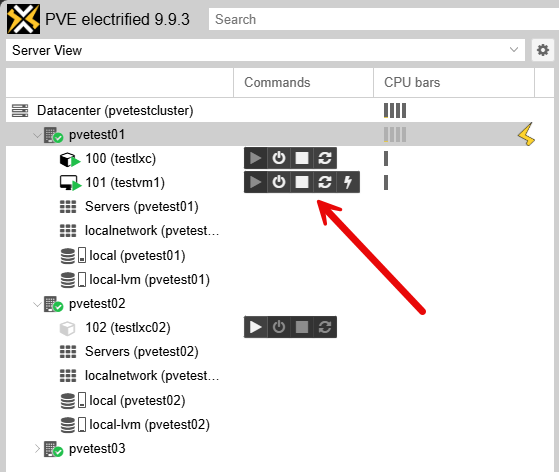
So, like me, if you are constantly starting and stopping VMs or LXCs, testing containers, suspending workloads, or cycling lab machines, this is a great little feature having power controls closer to the object you are managing and not having to click a different tab for those in the UI.
Instant cloning is a really great feature with PVE-Electrified
One of the biggest features for me looking at this from a home lab point of view is instant cloning of guests using ZFS copy-on-write. ZFS is hugely popular in home lab circles with Proxmox. This is where PVE-Electrified moves from “nice UI improvement” to “this could really change how I use a lab.”
Below, you will see that PVE Electrified as determined I don’t have ZFS. So the button just says Clone.
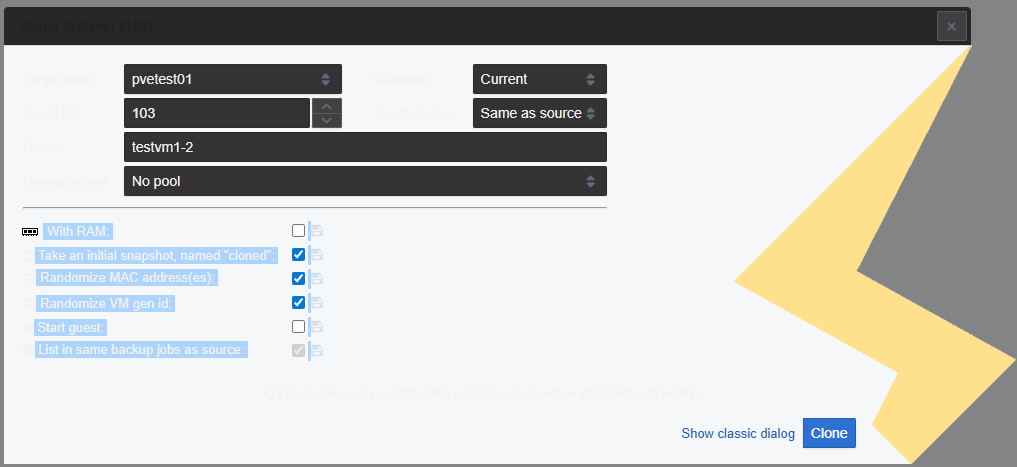
However, if you have ZFS as your backing datastore, you can use the fast clone feature:
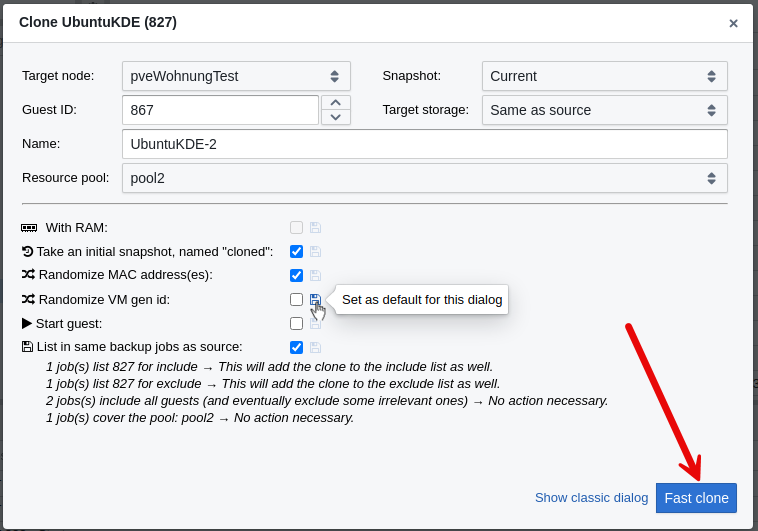
ZFS already gives you a powerful storage foundation. Snapshots, replication, compression, checksumming, and copy-on-write behavior are a huge part of ZFS-backed datastores. This also why ZFS Proxmox hosts are so popular in home labs. PVE-Electrified leans into that by using ZFS copy-on-write to make guest clones happen almost instantly without consuming the same amount of disk space as a traditional full clone.
If I have a clean Ubuntu Server VM that I use as a base for testing. Then, I can create a clone quickly and use it for a temporary project. If I am testing something else like Ansible automation, Terraform provisioning, Kubernetes bootstrap scripts, Docker Swarm, or a new monitoring agent, then I do this much faster. If I break the clone, no big deal. Delete it and start it again.
This is also useful for content creation as well. When I am writing about a tool or recording a walkthrough, I often need a clean environment. Fast clones make that process easier because I can reset to known states without rebuilding everything from scratch.
It also helps with experimentation. Many home lab users may not test certain things because the setup takes too long. The faster it is to clone and reset a guest, the more likely you are to actually experiment. That is one of the best things a home lab tool can do if it lowers the amount of difficulty or challenge with experimentation.
Clone from a snapshot with PVE Electrified
There is another VERY cool feature that I definitely wish was in the normal Proxmox web UI and that is a slick feature that lets you clone a VM from an existing snapshot. So, with PVE Electrified UI, you can create a snapshot, and then when you click the snapshot, you have a new option, Clone to new guest.
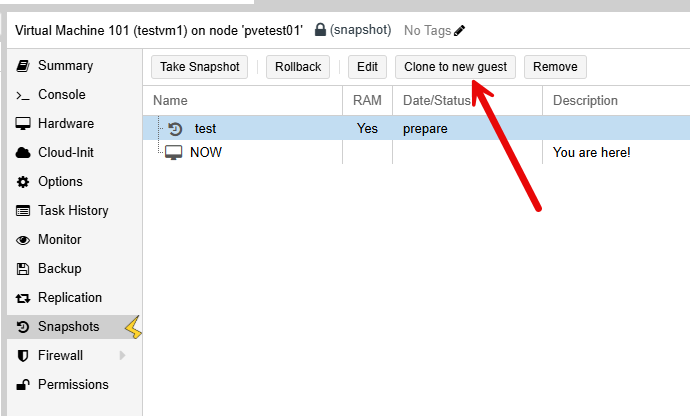
The ability to clone from snapshots is another feature that immediately makes sense to me and is one that I have actually thought about having in the past. Snapshots are already one of the most valuable features in a lab environment. Before installing a major update, changing a network configuration, modifying a Kubernetes control plane, testing a storage change, or installing a questionable package, I usually want a snapshot as a quick and easy rollback.
Below is a look at a new VM after cloning from a snapshot as the source with PVE-Electrified.
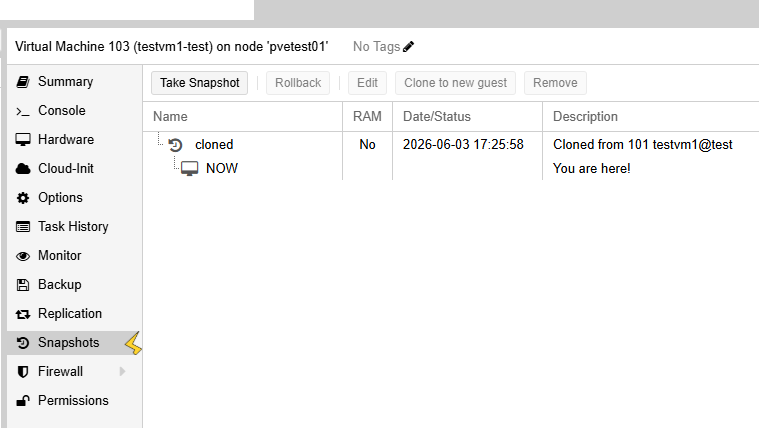
But cloning from a snapshot gives you a different kind of flexibility than just a normal snapshot. Instead of rolling a virtual machine back, you can actually fork to a new VM from an older state or point in time. This would be extremely useful when troubleshooting or for various projects.
Just as a quick example, imagine a situation where a VM was working two days ago and is now broken. Instead of guessing what changed you can clone from an earlier snapshot and compare between the two states without having to flip back and forth on the same VM.
For Devs this is even more powerful I think. You could keep a known baseline and create several branches from that point and test different paths without having to touch the original VM.
Hardware conflict detection for GPU passthrough in your lab
Another feature that really fits the home lab audience is the functionality for conflicting hardware resources when starting a guest. This is a feature that is relevant for GPU passthrough, USB passthrough, and other exclusive hardware assignments.
PVE-Electrified gives you a hardware conflict warnings that give you practical guardrails. For instance, Maybe one VM owns the GPU. Maybe another VM is still holding onto a USB controller. Maybe you forgot that a test machine is using the device you want to attach somewhere else.
It has a plugin system
It will be interesting to see if this solution catches on. The developer has built-in a plugin architecture that allows you to install plugins into your PVE-Electrified installation. This would allow anyone using the framework to extend the PVE-Electrified UI even further with additional functionality.
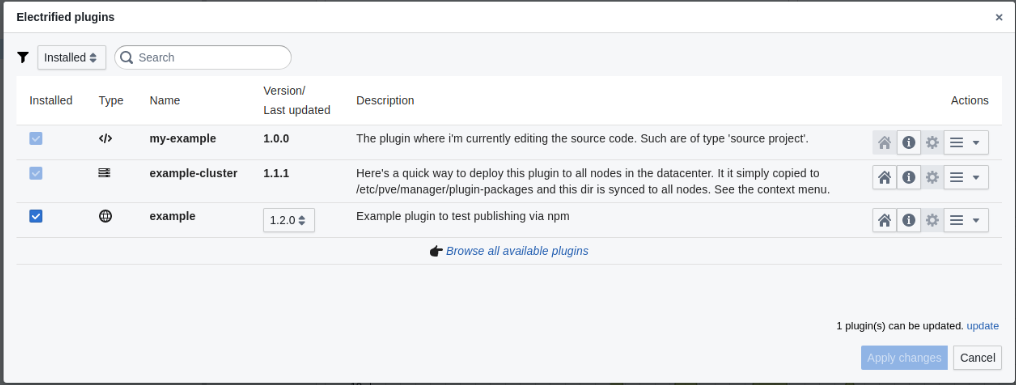
I could think of a lot of great plugins for things like GPU passthrough checks, ZFS tuning, disk wear monitoring, backup validation, dynamic DNS helpers, container dashboards, cluster health shortcuts, and many others that could be added. This is just a start.
Downsides
There are some potential downsides of the PVE-Electrified solution that I can see in working with it in a test environment. Note the following:
| Downside | Impact |
|---|---|
| Additional things running on your PVE host | Installs Node.js and other supporting packages beyond a standard Proxmox installation |
| Dark mode issues | The interface currently appears to work only in light mode than dark mode (CPU bars aren’t visible in dark mode) |
| Not officially supported | Community project with no official Proxmox support |
| Upgrade compatibility | Future Proxmox updates could require waiting for PVE-Electrified updates |
| Home lab focused | Better suited for testing and home labs than production environments |
Wrapping up
All in all the PVE-Electrified solution is a fairly cool tool for the home lab that I think adds a lot of really neat features, especially if you are running ZFS-backed storage in your lab environment. The instant clones and the clone from snapshot functionality are really great features that I think have a strong argument for lab environments where a LOT of experimentation happens. Also, having the additional workflow improvements that PVE-Electrified brings is a welcomed improvement as well.
More in this topic



Google is updating how articles are shown. Don’t miss our leading home lab and tech content, written by humans, by setting Virtualization Howto as a preferred source.
About The Author

seems like mine is not showing “commands/VM power buttons” on the left panel. Only CPU and Memory bars
btw, my blog; zaidan.web.id . Sometimes i write about Proxmox too
Zaiden, thank you for the comments here! Great to have a fellow blogger stop in and say hi and also comment on the solution. I found a few odd things as well with the width of the panels. Can you expand over the “first pane” and see if the power controls are hiding there?
Brandon
here is the capture
The plugin system looks interesting, but to gain any meaningful traction, it would probably need first-party support, IMO
Hammy,
Definitely agree there. That is one of the hardest things I think is to get the initial momentum behind a project for things to really take off. It is really an interesting solution though and highly extensible the way it has been built.
Brandon
Electrified author here, … (a bit tired after long coding nights) thx for the comments and praises;)
@zaidan: Yes, i’ve hidden the the command buttons by default now in the latest version. There is a small button when you hover the column header so you can show/hide columns.
I will have to show that on a screenshot on the website.
@Brandon: Ups, how does the theming look on your screenshots – like a mix of dark and bright theme? But not like on my dev machine… I actually put much effort into it that it also looks fine in dark mode (besides i’m a bright mode user). Which browser version are you using? Can you clear the browser cache may be?
BoGeee,
Thanks so much for the comment and great project! I believe in my initial testing I was using Firefox as I use a mix of browsers across the board. I “believe” I saw the same in Edge as well though. But let me do some checks across browsers and incognito just to make sure.
Brandon
Clone from snapshot is the best