


The article I wrote on Termius seemed to strike a chord with many who use various tools across the home lab. There were many comments for Termius, but also comments that were negative towards Termius and vendor lock in that some have experienced with it. However, one tool that was continually mentioned by commentors was a tool called Termix. In doing some looking on Termix, it is billed as a free and open source replacement for Termius. So, I decided to give it a try. After spending time with it in my home lab, I have to admit something I did not expect to say: I liked it way more than I thought I would. It is a “real deal” solution for SSH connections. Let’s see why.
Commercial vs open-source
One of the things I really like about blogging and working with the community is the tips and solutions that you get mentioned when you create content. I swear I wouldn’t hear about half of the solutions that I hear without the community. And, I had enough people say: “You should really look at Termix if you want something self-hosted” that I decided to take it for a spin.
The biggest reason I wanted to try Termix is that I wanted to see if a free and open-source solution could stack up against a commercial product. Not just Termius, but other commercial products that I have used and compared it to. What exactly makes this different? It sounds easy to dismiss, but the description: “Self-hosted SSH client” should tell you something.
You can read my full overview of Termius as a solution here: I Tried Termius for My Home Lab and Replaced My SSH Client.
What is Termius?
Traditionally, when I have thought about SSH tools, I have thought about full desktop applications. You install an app or software on your laptop, desktop, tablet, phone, etc. You create the connections you want, organize hosts, save creds, snippets, or folders, and then connect.
Termix flips this model around. Instead of being software installed on your device, it feels more like a service that you run as part of your environment. You can run it as a Docker container or even in your Kubernetes cluster which is what I am now doing, so I have proper SSL termination, etc.
It runs as a web app that I can connect to and the beauty of this is that you don’t have to install a “fat client” app on your end user device. If your device can browse out to the web, it should be able to connect to and run Termix. I think the moment that I realized what this was doing and would allow me to do, it immediately was more interesting to me.
Because, if you self-host important apps already, why not self-host the system that manages how I remotely access infrastructure?
Installing Termix in Docker
One of the things that I really like about Termix is the fact that it is self-hosted and it is easy to install in Docker whether this is a docker host running inside your Proxmox environment, or somewhere else. Take a look at the example Docker code below that I used to stand up Termix in my home lab environment:
services:
  termix:
    image: ghcr.io/lukegus/termix:latest
    container_name: termix
    restart: unless-stopped
    ports:
      - "8080:8080"
    volumes:
      - /home/linuxadmin/homelabservices/termix/:/app/data
    environment:
      PORT: "8080"
    depends_on:
      - guacd
    networks:
      - termix-net

  guacd:
    image: guacamole/guacd:1.6.0
    container_name: guacd
    restart: unless-stopped
    ports:
      - "4822:4822"
    networks:
      - termix-net

networks:
  termix-net:
    driver: bridge
After you get the Docker Compose code in a “docker-compose.yml” file you then just enter the normal command to bring things up:
docker compose up -d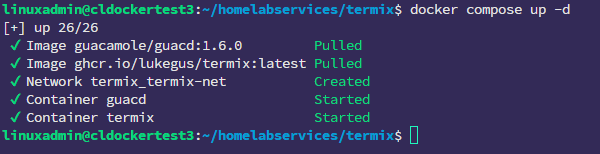
After you bring up the Termix docker compose stack, browse out to port 8080 on your Docker host to pull up the Termix interface. When you browse there, you will be asked to create your first admin account. That screen look like the following:
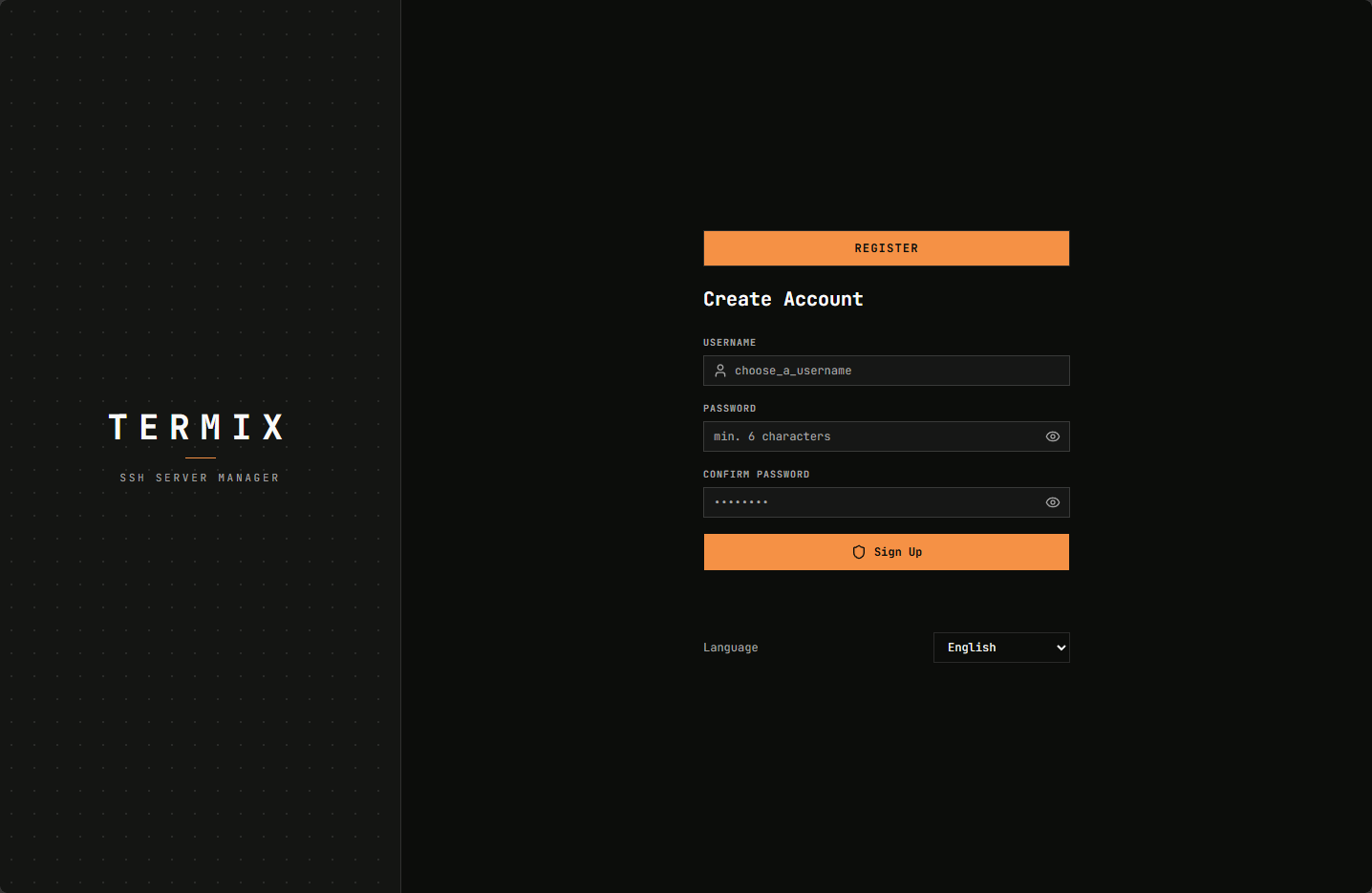
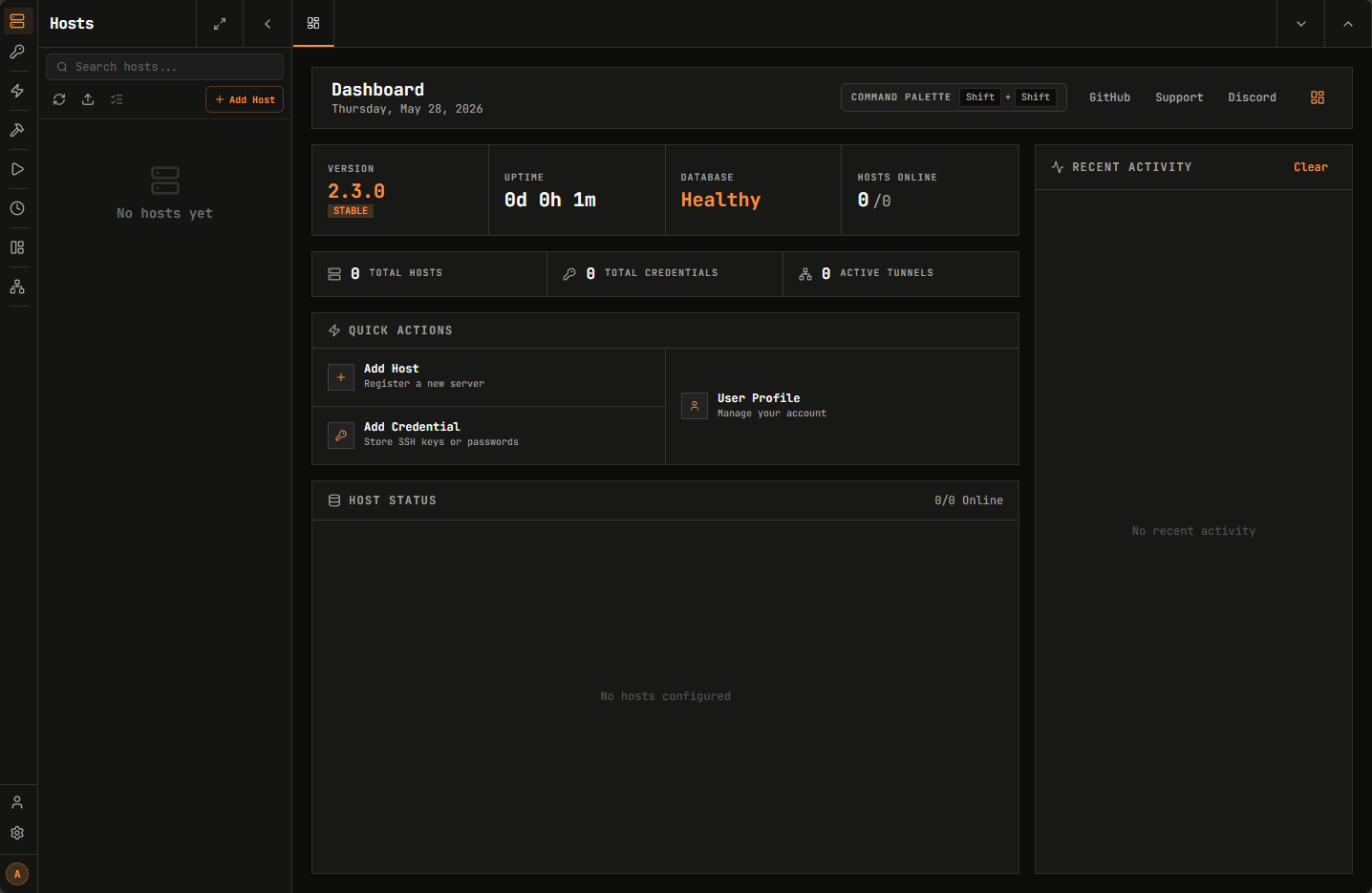
After getting the first admin account created, below is the Termix default dashboard. The interface already is very slick and modern looking and I like the left-hand menu that pops out from the side.
First impressions of Termix
I expected rough edges. That is probably the honest way to say it. A lot of self-hosted tools solve problems really well but do not necessarily feel polished. Sometimes the UI feels unfinished or things might feel awkward with the workflows, etc.
Sometimes you find yourself mentally excusing weird behavior because the software is open source or self-hosted. Termix surprised me here. The interface is quirky in a few places, but overall, it is clean and gets the job done. As I mentioned, I like the layout of the navigation tree and the organization of things was intuitive as well.
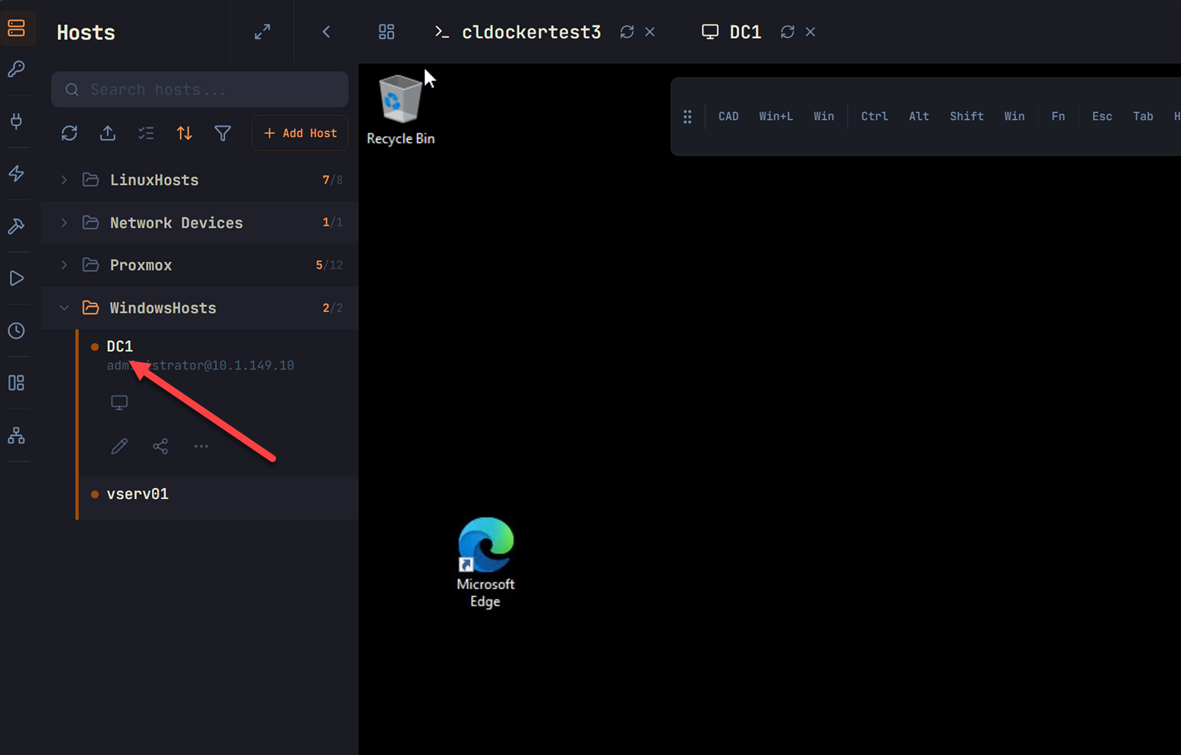
My only gripe is the toggling on of how you want to connect to a host was a bit non-intuitive to me at first to figure out, instead of SSH being toggled, toggle that off, and then toggle on RDP for a Windows host. Other than that, everything else seemed to be what I would expect.
It supports RDP and VNC!
Unlike Termius, Termix has RDP support via the underlying guacd server that it runs. It allows you to cover not only Linux with SSH functionality, but also VNC and of course VNC for Windows as well if you run that. But this is huge when you compare it to Termius and other “SSH only” connection managers as I think most of us operate across a wide range of devices that may be Linux, but could also have some Windows mixed in there. This is a great feature of Termix:
Snippets add value to your workflow pretty quickly
One aspect of Termius that I appreciated after using it was the snippets feature. I didn’t know what I was missing here until I saw the concept in action. All of the other tools that I have used simply were straight SSH clients but no real way to record and replay common commands that I use. When I saw that in Termius, I was like that is definitely a time saver.
Like most, I use a second-brain app to take notes and record commands and other things that I want to remember. But that requires opening my second brain app, searching for the note, copying the command, and then pasting it in my terminal. But with Snippets, you get to record common commands that you want to use and then they are just a click away, right inside your terminal app. This is WAY better.
Below, you can see snippets that I have pulled up. You can organize these in folders and customize the look of the folders as well with colors, etc. From there, you can run the snippet, copy it, edit it, delete it, or even share it. Pretty cool.
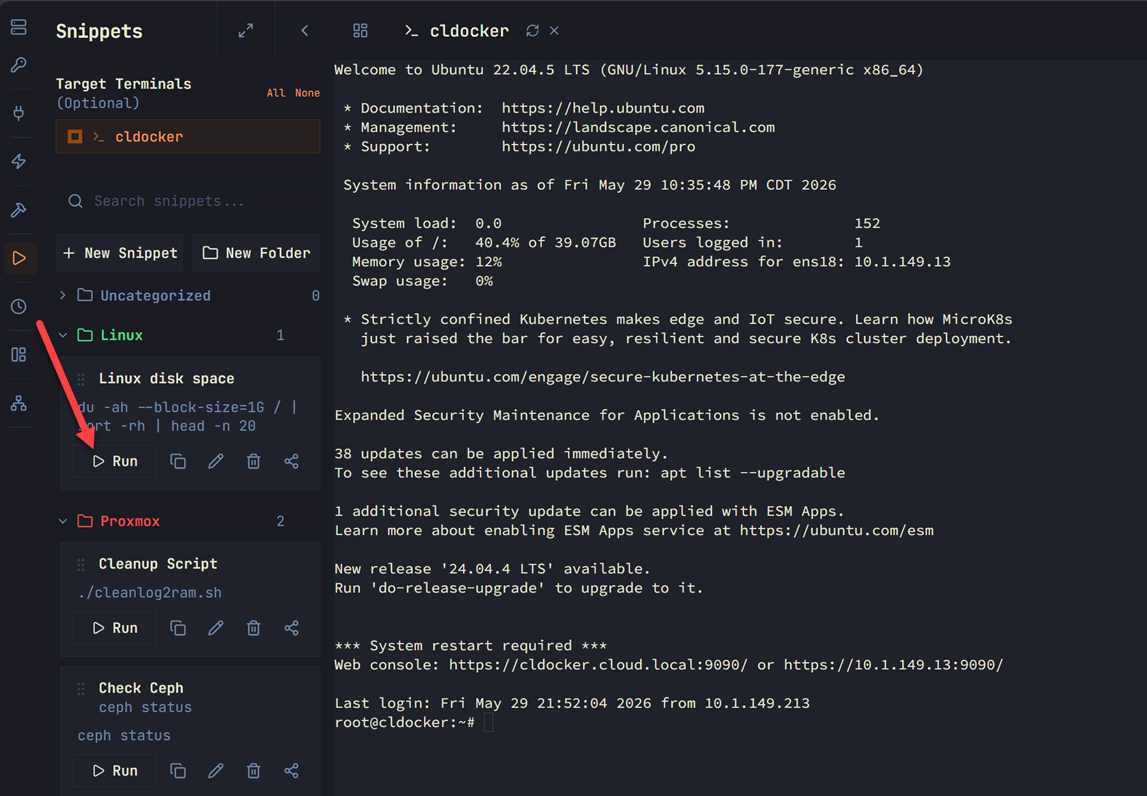
Also handy, you can search your snippets as you can imagine once you get a lot of them, finding what you want might become more challenging. So, with the search function, you can search for the snippet name or command you are looking for.
History feature is powerful
I thought this feature of Termius was powerful too, but Termix also has the ability to record command history that is searchable and allows you to have a more actionable value to your history than just simply the history command from a terminal prompt.
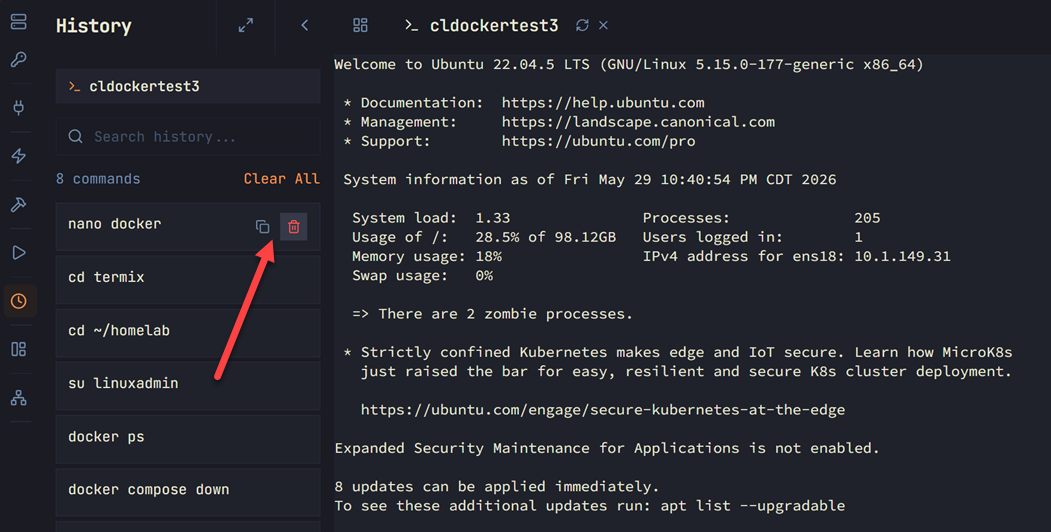
Below, you can see the history tab that I have pulled up when I clicked on a docker host session that I have running. You an see that you can copy the command from history here or delete it. The history menu is searchable like Termius which makes this really powerful again like snippets. I think Termius may have a little bit of an edge here on their history feature. From Termius you can rerun the command without having to copy, and one thing I liked better on Termius is they have the ability to easily add a command from history to your snippets.
Customization options
One of the things that Termius has a HUGE amount of is customization options. How does Termix compare? It doesn’t have as many “themes” or presets as Termix, but I do like the mix of themes that it does have as you can see below.
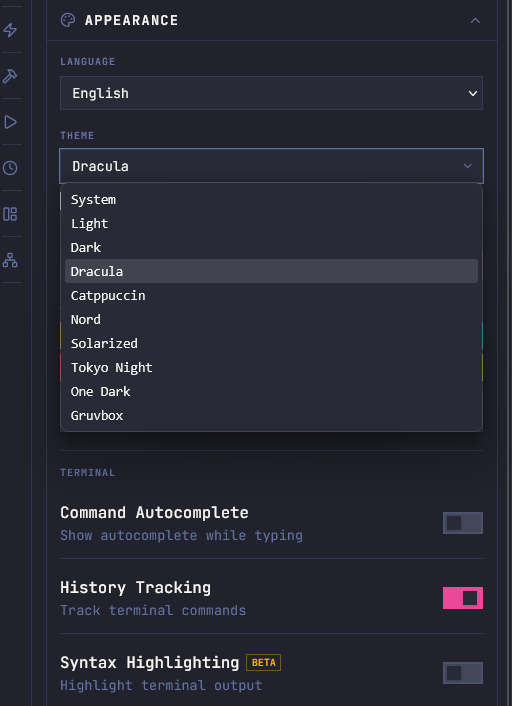
One thing I will mention that I don’t currently like with Termix is there are basically two places you can customize the look and feel of the solution. What you see above is found in the “user profile” settings under Appearance. This customizes the look of the interface.
To customize the look of the terminal, this is found under the properties of each connection. There isn’t a “global” area to do this. So I have to set the theme and font for each connection. While this granularity is nice, it would be great to have this in a global location as well so you don’t have to individually set 50 different connections if you want them all to be the same.
Import and Export
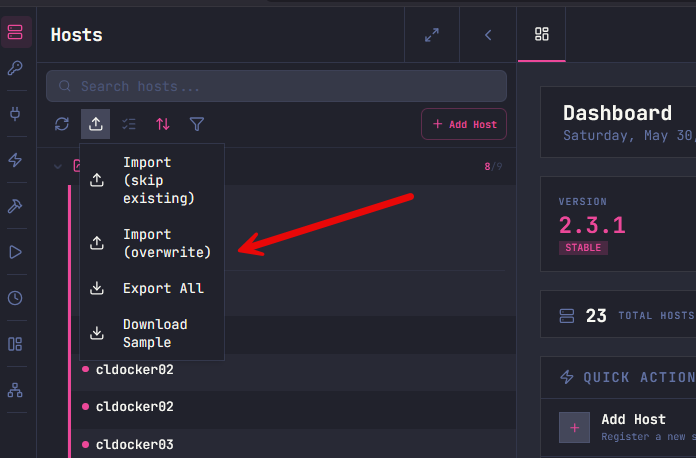
One of the good features I think of Termix is that it also allows you to have an easy way to import and export your entries. So, definitely not locked into the solution since it gives you an easy way “out” if you choose to get your connection information out of the solution. This is a great feature since the feeling of vendor lock in is real with these connection apps. You get very invested and spend a LOT of time entering connection information.
Below, you can see that Termix allows you to both import and export.
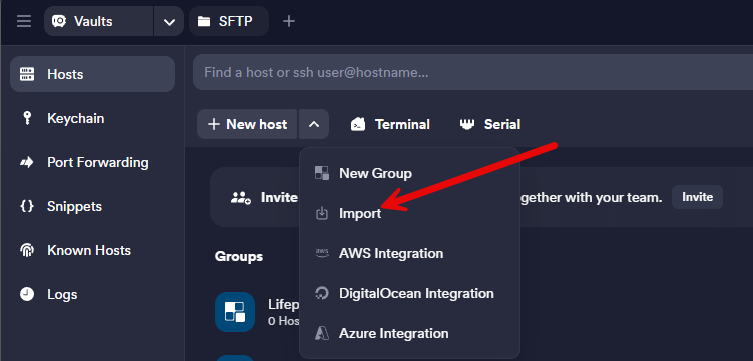
Termius experts please correct me here if there is an option somewhere else in the UI, I just didn’t find it. Under the host settings the only option you have here is to Import.
Termius vs Termix
Below are the areas of comparison that I felt most relevant between the two and my thoughts on when you should consider one over the other or help make the decision on which on you use.
| Area | Termius | Termix |
|---|---|---|
| Overall feel | Polished SSH experience | Surprisingly polished for open source |
| Hosting model | Cloud-connected required | Fully self-hostable in Docker or Kubernetes, etc |
| SSH management | Excellent | Excellent |
| Snippets | Yes | Yes |
| Command history | Yes | Yes |
| RDP support | No native RDP support that I have found | Yes, built directly in the solution via guacd |
| Data ownership | Tied to the Termius cloud | You control the platform, storage, and access |
| Exporting entries | I have not found a clean export workflow for hosts/connections | Allows exporting entries, which immediately stood out to me |
| Best fit | Users who want polish, simplicity, and convenience | Home labbers and infrastructure people who value ownership and self-hosting |
| How I view it | Premium SSH experience | Self-hosted terminal platform that flips the model on its head |
Wrapping up
This one surprised me a bit how good it already is and it is still early in its development with releases happening very aggressively. I thought I would stand it up and give it a nod that I had tried it and then move on. That didn’t happen. Instead it has been a solution that I keep logging back into and am thinking about how I pivot over some of my workflows instead to using Termix, if not using it exclusively for remote connectivity. I also like the feel of Termix in that it is “infrastructure” itself that I can self host and it is just part of my critical apps that I have running, instead of a “fat client” app that I have to have loaded everywhere I want to connect from. How about you? Have you tried out Termix? I am curious on how many are using this as a platform for their self-hosted remote connections for SSH and RDP. Let me know in the comments.
More in this topic



Google is updating how articles are shown. Don’t miss our leading home lab and tech content, written by humans, by setting Virtualization Howto as a preferred source.
About The Author

The reining king of homelab media.
Check out Skiff
https://github.com/Priyanshu-1622/skiff
The link to this article from your email is missing a ‘w’ in the ”https://www.”
Thank you Peter!
Brandon
I currently use Remmina on my Linux Mint PC as a single point of SSH access to self hosted CTs, VMs and Nodes – so Termix would be a replacement for this, and more widely accessible as well i.e. remote via phone and VPN when out?
Re the Snippets: I have been adding the standard ‘sudo apt update && sudo apt upgrade’ yada yada, to all my Vaultwarden entries for CTs etc passwords, so I can jump in and do what’s needed when I log in to the CT etc. If I understand correctly, the Snippet would hold the ‘apt’ string for the SSH entry in each case?
Peter,
That is it exactly. Just imagine having the snippet sitting there in your SSH session in Termix. Then you just click your snippets. When you click “run” it automatically runs the command by pasting and entering it in your terminal. Pretty cool. That way you don’t have to copy and paste from other tools or notes you might have.
Brandon
Having briefly messed with Termius and been an Apache Guacamole user to connect to my systems, termix may end up being my go-to. Good find and good article.