



I have been moving heavily into immutable server operating systems especially for hosting my containerized home lab resources. Flatcar has been my OS of choice lately for container hosts. But another interesting option is NixOS. It isn’t really immutable in a strict sense like Flatcar, but it is declarative, atomic, and rollback capable. So you can do some really interesting things with it, especially as infrastructure as code and storing your configurations. Like most people, though, my first NixOS installations were far from perfect. I made a lot of things harder than they needed to be because I was trying to use NixOS like every other Linux distribution. Over time I started adopting a handful of tweaks that made the experience much better. Read on!
Treat configuration.nix like source code
This is what I think is one of the biggest things you can do when you start using NixOS. Realize that your configuration.nix is essentially declarative infrastructure as code that you can store in your self-hosted or cloud Git repo. Early in my NixOS journey, I would edit files directly on the server, apply the changes, and then move on.
This works and you can do this, but if you want to remember what you changed two weeks later, it gets to be more difficult. Now, I keep my NixOS config in my self-hosted git repo that I run at home with Gitlab..
When you do this, you get the following benefits with your NixOS installation:
- Complete change history
- Easy rollback to previous configurations
- The ability to experiment in a safer way
- Documentation of why something changed
When I deploy a new NixOS server, I can just clone my repository, make a few machine-specific changes that I need, rebuild the config, and I’m finished. This alone makes NixOS feel a lot more powerful than managing just traditional servers manually.
Split large configurations into modules
This is one of the hacks that I have learned since beginning with Nix. Most, including myself when starting, like to put everything inside one giant configuration.nix file. This starts out manageable. But months later, you may have hundreds of lines of
One mistake I see many people make is putting everything inside one giant configuration.nix file. I will get into this below, but I have several different files for “server profiles”, for example:
- Docker
- SSH
- Networking
- Users
- Monitoring
- Development tools
- Virtualization settings
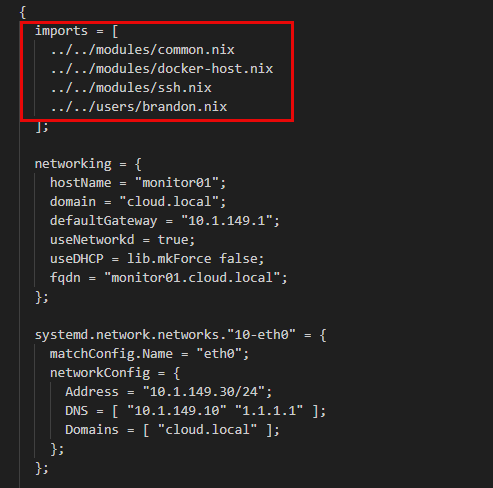
Then I simply import those modules into my primary configuration. This makes everything much cleaner to work with and easier to navigate. You can also reference these shared configs across several machines. My Docker hosts can share one module while virtualization hosts use another.
Enable flakes early
If I could go back and change one thing about my early NixOS journey, I would have enabled flakes much sooner.
When I first started using NixOS, I stuck with the traditional channel-based approach because it was simpler and it was what most older tutorials covered. There is nothing wrong with channels, but once I spent time understanding flakes, I realized they were a much better fit for how I already manage my home lab.
At a high level, what are flakes? They are a modern Nix feature that bundles your system configuration together with pinned versions of its dependencies. The result is a more reproducible and portable NixOS deployment that behaves consistently across multiple machines.
Instead of depending on whatever version of the package repository happens to be available when I rebuild a server, flakes use a lock file that records the exact versions of the inputs you use. That means you can rebuild the same server weeks or even months later and know I’m you are getting the same packages.
For me, that fits perfectly with keeping my infrastructure in Git. My repository now contains both the configuration and the exact package versions it depends on. When I intentionally want to update everything, I update the flake, review the changes, test the new configuration, and commit the updated lock file along with my config changes.
To enable NixOS flakes you need to add this line in your configuration.nix file:
nix.settings.experimental-features = [
  "nix-command"
  "flakes"
];

##Rebuild after adding

sudo nixos-rebuild switch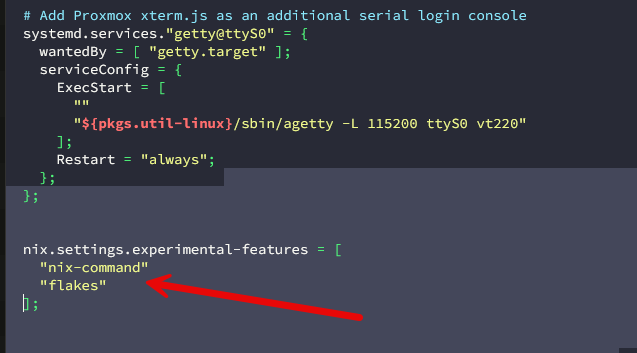
Use “generations” when needed
One of my favorite NixOS features is something I almost ignored at first and what I think is one of the most appealing aspects of the OS, and that is “generations”.
So, not like your traditional Linux distros like an Ubuntu Server, etc, you can take advantage of a new system generation while you keep the previous generations available. Every time you successfully run nixos-rebuild switch, NixOS automatically creates a new system generation
This will definitely change how you think about updates moving forward when using NixOS. Every nixos-switch-rebuild gives you another recovery point so if something goes wrong, you can roll back to that exact recovery point in time.
You can see the generations you have available on your NixOS system with:
sudo nixos-rebuild list-generations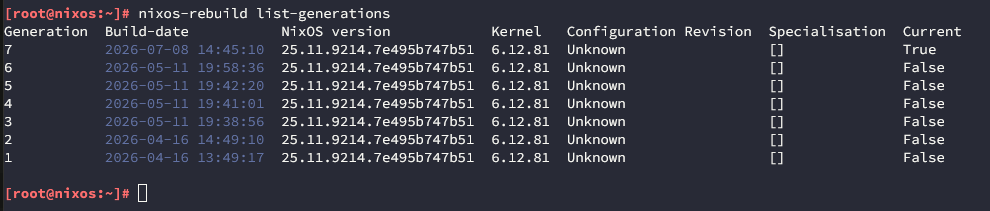
If you realize a recent configuration change or something else caused problems, you can roll back to the generation you had before with:
sudo nixos-rebuild switch --rollbackIf the system won’t boot at all, NixOS even lets you choose an older generation directly from the boot menu which is awesome. So you don’t have to boot off a disk or any kind of other “jumping through hoops” to rollback.
This really has given me confidence when making changes that are even major changes that you can get back to a working state pretty easily and quickly if you need to.
Build reusable server profiles
One tweak that has saved me from “reinventing the wheel” each time reusable server profiles. If you are wondering what this is, you can create NixOS modules for common server roles. So if you want to have modules for your different “server roles” in the home lab, you can definitely do that. You could have roles for Docker hosts, Kubernetes nodes, utility servers, DNS servers, etc.
Each module you create can contain packages, services, firewall rules, and settings that the role you create needs.
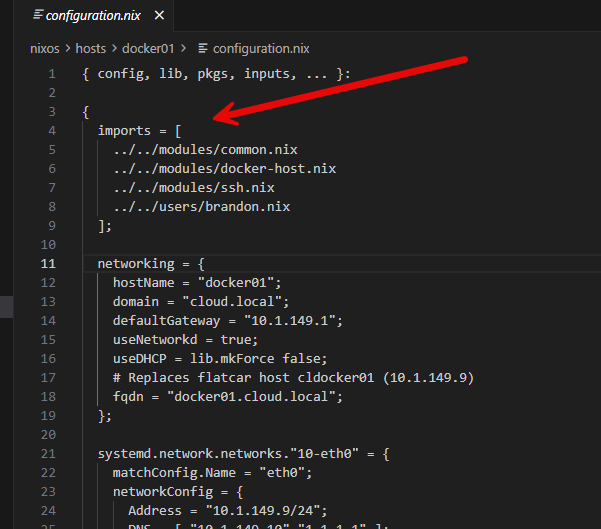
As an example of this, you might have a docker-host.nix module that enables things like Docker, installs common utilities, and configures the user permissions like you want. So, when I deploy another Docker host, I just import the module into my configuration.nix.
imports = [
  ./hardware-configuration.nix
  ./modules/docker-host.nix
];
So, in a practical sense, you would do this by cloning down your repo into /etc/nixos. So, instead of having the following:
/etc/nixos
├── configuration.nix
└── hardware-configuration.nix
You would have this instead:
/etc/nixos
├── flake.nix
├── flake.lock
├── hosts/
│   ├── docker01
│   │   ├── configuration.nix
│   │   └── hardware-configuration.nix
│   ├── docker02
│   └── monitor01
├── modules/
│   ├── common.nix
│   ├── docker-host.nix
│   └── ssh.nix
└── users/
    └── brandon.nix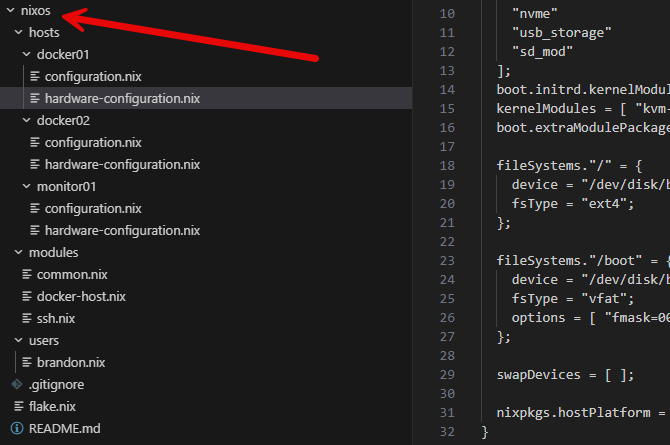
Then, the cool thing that you can do is something like the following:
cd /etc/nixos
sudo nixos-rebuild switch --flake .#docker01
For example, in this flake.nix, you will see two configs in there, when you run sudo nixos-rebuild switch –flake .#docker01 you are telling it to open the flake.nix and build the configuration that is named “docker01”. So even though these aren’t server “hostnames” per se, most people align those with the name of the configuration in the flake.nix file.
{
  outputs = { self, nixpkgs, ... }: {
    nixosConfigurations = {

      docker01 = nixpkgs.lib.nixosSystem {
        system = "x86_64-linux";
        modules = [
          ./hosts/docker01/configuration.nix
        ];
      };

      dns01 = nixpkgs.lib.nixosSystem {
        system = "x86_64-linux";
        modules = [
          ./hosts/dns01/configuration.nix
        ];
      };

    };
  };
}
As you can see with the above, this type of “server profiles” approach is super powerful.
Keep your list of packages intentional
Arguably I think when you start using operating systems that you can put things into infrastructure as code, it teaches you to be much more intentional about what is installed. With traditional servers, these just accumulate packages over time. You may install a troubleshooting utility, or add a dependency.
Then later on, you don’t remember why a certain package is there. NixOS, makes me intentionally think about why I am declaring a package. This gets you into the mindset of much cleaner systems. When you review a config file for NixOS, any unnecessary packages will stand out to you. If you want to remove them, it is just another configuration change followed by a rebuid.
Learn rebuild commands and get these in “muscle memory”
There are a handful of commands that become second nature once you spend enough time with NixOS. Definitely understand when to use them to make daily admin work smoother. One of the commands to commit to memory is the rebuild command to switch over your config:
sudo nixos-rebuild switch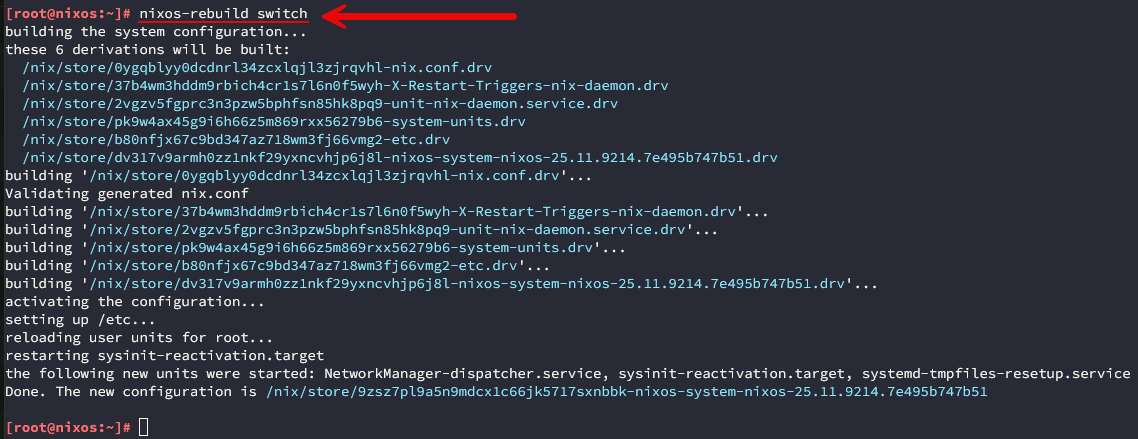
For testing purposes you can check your configuration changes before making them permanent, by using:
sudo nixos-rebuild testWhen experimenting with major configuration updates, testing first has saved me from headaches. Understanding the rebuild workflow helps improve confidence changing things and working with NixOS.
Keep your secrets out of configuration.nix
One lesson I learned fairly quickly is that declarative configuration doesn’t mean literally “everything” goes there. Case in point are sensitive values and information. These include the likes of:
- Passwords.
- API keys.
- Private certificates.
- SSH private keys.
These should be managed separately from your configuration.nix file. There are a lot of tools available out there for managing secrets within the Nix ecosystem. By not committing your secrets to your source repo, you can keep things safe and still have infrastructure that is reproduceable.
I like to use my CI/CD environment for a lot of things and it makes it much easier to deal with secrets being injected. But there are other ways to do this as well. Even if you have a private repo, you want to treat it like some day it could be a public repo. Having that mindset shifts how you think about storing your configurations.
Wrapping up
Hopefully, these NixOS tweaks and tips will help shortcut your journey using one of the coolest OS’s that is out there I think. Especially for home lab and self-hosting, NixOS makes a lot of sense. And if you are wanting to start your journey of thinking about declarative infrastructure, NixOS is one of those projects that helps you to learn about that at the same time you learn about working with NixOS itself. How about you? Are you currently using NixOS in your home lab? What are you using it for? Docker hosts, Kubernetes, utility servers, or something else? Let me know in the comments.
More in this topic




Google is updating how articles are shown. Don’t miss our leading home lab and tech content, written by humans, by setting Virtualization Howto as a preferred source.
About The Author

Have you ever fixed or recovered corrupted raid storage for lxc? My lxc root storage was configured to the raid 10 with 13tb usable drives. 3 days ago, there was blackout then the lxc can’t be started. Keeps saying to mount the root storage. The raid controller has dead battery so had to enable the cache or something I forgot. The blackout could’ve wiped something. So I tried to use xfs_repair and with the help of AI, it suggested to run xfs_repair -L something which then messed everything up even further. Now the raid is corrupted and cannot find the .img lxc.