When it comes to home lab networks, introducing VLANs is absolutely one of those critical moves that will take your home lab to the next level and it is a crucial foundation to basic security principles. Most start out with a flat network and that is ok. However, once you start clustering your Proxmox VE servers, and adding things like Ceph HCI storage or traditional storage like iSCSI, and then start experimenting with things like Docker and Kubernetes, network segmentation I arguably think is no longer optional. It becomes necessary. However, there are definitely VLAN mistakes to avoid when you introduce them. Here are five VLAN mistakes I see often, and many of these I have fell victim to myself. Check these out so you don’t repeat them.
1. Accidental double tagging VLAN ports
Running VLANs is all about tagging. VLANs are actually an encapsulation header wrapped around the frame that contains the VLAN identifier. So, this is where the tagged and untagged terminology comes from.
One of the mistakes that most newbies or beginners make is not fully understanding tagging from the perspective of their network traffic and where tagging is happening. For instance, they may have untagged traffic on the switch port set to VLAN 10. But they think they need to also set the tag coming from the client or the hypervisor VM, like a Proxmox VM network interface, also to VLAN 10.
Below is a mistake that is easy to make. Can you spot it? The network bridge is tagged for VLAN 149, but we are also setting a VLAN tag to 149 for the virtual machine network interface.
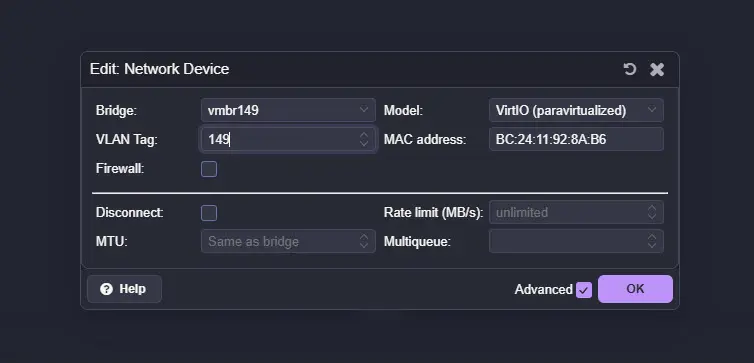
While the thought process is close, what can happen is the packet effectively gets double tagged, or at least processed in a way that behaves like double tagging, since you are adding a VLAN ID at the VM level and then also assigning that same VLAN at the switch level.
Because what you are telling the switch when you “untag” traffic is this: any untagged frames arriving on this port will be internally assigned to VLAN 10.
Here is the important detail. An access port does not expect tagged traffic. It expects plain Ethernet frames. When a tagged frame arrives on a port configured as an access port, several things can happen depending on the switch:
- The frame may be dropped
- The switch may strip the VLAN tag and reassign it based on the port’s VLAN
- The switch may treat it inconsistently depending on firmware behavior
In other words, the switch is not “seeing” your VLAN 10 tag from the VM and politely stepping aside. It is following the rules configured on that port. If the port is configured as access VLAN 10, it assumes all traffic should be untagged and belong to VLAN 10. A tagged frame arriving there is unexpected.
Now think about a trunk port scenario. If your hypervisor is tagging VLAN 10 and your switch port is configured as a trunk that allows VLAN 10, that is correct. But if that trunk port also has VLAN 10 configured as the native VLAN, untagged traffic is also treated as VLAN 10. This introduces VLAN ambiguity. Depending on how traffic enters and exits the port, tags can be stripped or added automatically.
This is where behavior that resembles double tagging starts to occur. Not because the switch is blind to the tag, but because:
- The hypervisor is tagging
- The switch is also applying VLAN logic
- The native VLAN may be stripping tags on egress
- The ingress rules may reassign VLAN IDs based on port configuration
2. Running jumbo frames through a router
Jumbo frames are one of the first “advanced” tweaks many home labbers experiment with. Set MTU to 9000 on your storage network, flip this feature on inside your switch, and enjoy lower CPU overhead and better throughput. In theory. After all nothing is ever this easy.
The problem starts when jumbo frames are not contained within a single layer 2 domain. What do we mean?
Well, jumbo frames should stay inside a dedicated VLAN that is not routed. The moment you route jumbo frame traffic through a firewall or layer 3 device that does not support the larger MTU, you introduce fragmentation or silent packet drops.
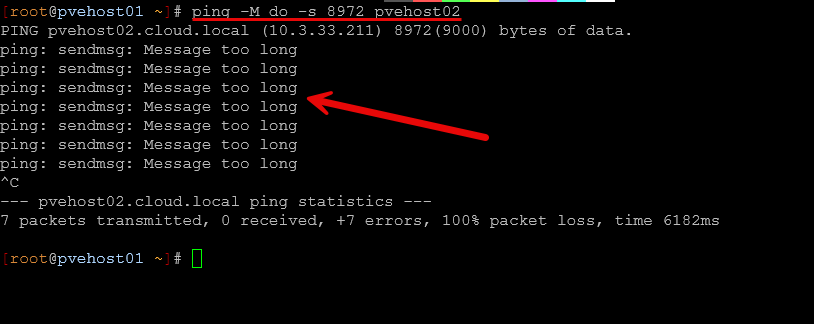
The problem is, most don’t set out to route jumbo frames through a router. But if you are like me, you have make some easy mistakes in not really thinking through traffic flow and how things will communicate.
For instance, if you flag on jumbo frames on a network where you have a backup server connected and you think to yourself that you want it to be able to benefit from jumbo frames. This is great if the backup server is communicating with endpoints on the “same network”. However, the problem with jumbo frames is there is no “discovery” mechanism that knows that another endpoint can’t speak jumbo frames. Instead, the source server communicates with jumbo frames because that is what it is configured for, and the destination server if it can’t speak jumbo frames will have fragmented traffic from the backup server.
I ran into this issue as I didn’t think about the fact that I have other clients the backup server needs to backup that are on a different network/VLAN. So to communicate, this becomes a layer 3 communication that is routed.
If you are using jumbo frames for storage traffic, make sure:
- The VLAN is not being routed
- Every device in the path supports the MTU
- You are not accidentally allowing that traffic to cross into your management or internet VLAN
Jumbo frames are all or nothing. Either the entire path supports it, or you should not enable it. Be sure to check out my post on jumbo frames and how “this broke” my Proxmox cluster:
3. Mixing traffic types on the same VLAN
This is one of the most common mistakes in the home lab. At first, everything lives on one flat network. So, in this configuration, things are technically mixing traffic types on the same VLAN. But this will typically work fine when you have a single host and just a few things on your network. But, as you add nodes and shared storage, you suddenly will have:
- Storage replication traffic
- Cluster heartbeat traffic
- VM management traffic
- Admin access
- Monitoring
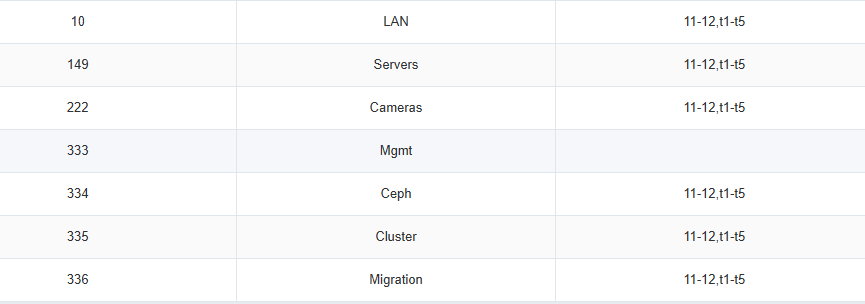
When all of that shares the same VLAN, performance can become a crap shoot. Storage traffic, especially something like Ceph or iSCSI, is chatty. It generates a LOT of east/west traffic between nodes. When that traffic shares the same VLAN as management or cluster communication, bursts can cause latency spikes.
In my own lab, separating storage traffic into its own dedicated VLAN made behavior far more predictable. Management stays isolated. Cluster communication has its own space. Storage has its own lane as well.
You do not need dozens of VLANs, but you absolutely should not mix heavy storage traffic with light management traffic and other general purpose client traffic.
4. Leaving VLAN 1 in active use
Most switches ship with VLAN 1 as their default. Out of the box, management lives on VLAN 1. Untagged traffic belongs to VLAN 1. Trunk ports implicitly allow VLAN 1. And in small home labs, everything just stays there. It works and that is the problem we want to highlight.
Because VLAN 1 “just works,” many home labbers never intentionally move away from it. They build new VLANs for storage or lab environments but leave VLAN 1 active everywhere as the default backbone of the network. What is the problem with doing this?
The issue is not that VLAN 1 is technically broken. When it is active across all trunks and access ports:
- It becomes the native VLAN
- It is allowed on every trunk
- It carries management traffic by default
- It quietly becomes a catch all for misconfigured ports

This can create ambiguous tagging. What do we mean? Well, if a device comes online untagged and you forgot to configure the port correctly, it will land on VLAN 1. And, if a trunk is misconfigured and strips tags, traffic will default back to VLAN 1. Also, when a device resets to factory defaults, it almost always communicates on VLAN 1. In other words, VLAN 1 becomes the safety net for mistakes.
In a segmented home lab, you want the opposite behavior. You want mistakes to fail loudly, not silently land in a default network that just works. So, how should you design your VLAN tagging strategy without VLAN 1?
- Move switch management to a dedicated management VLAN
- Avoid using VLAN 1 for user, VM, or storage traffic
- Remove VLAN 1 from trunk allowed lists where this is possible to do
- Be explicit about which VLAN is native, or eliminate native VLAN usage entirely
When VLAN 1 is no longer the default, your segmentation has to become intentional. Ports must be configured correctly or traffic simply will not pass. That makes troubleshooting clearer and in the long run your network will be easier to manage and understand.
5. Creating too many VLANs without a plan
As you can tell, VLANs are a powerful part of creating modern and secure networks. But don’t fall victim to the mindset that simply “more is better”. This is not always the case. VLANs are great when they are needed. But if you just create a VLAN to create a VLAN, this will lead to management nightmares, unnecessary routing of traffic, and more difficulty trying to keep everything documented when it is simply not needed.
This creates VLAN sprawl and leads to:
- Confusion about where/which network services live
- Firewall rules that become impossible to understand
- Broken routing because someone forgot to allow a new VLAN
Your segmentation in the home lab should solve problems and enforce best practices and not create unnecessary complexity. In general, there are a few reasonable VLANs that you can create to segment most home labs. Just a few ideas of VLANs you can create include the following:
Recommended VLAN Layout for a Practical Home Lab
| VLAN Name | Purpose | Typical Traffic Type | Should Be Routed? | Jumbo Frames? | Notes |
|---|---|---|---|---|---|
| Management VLAN | Hypervisor management, switch management, admin access | SSH, web UI, API access, monitoring | Yes | No | Keep isolated from storage traffic. Restrict access with firewall rules. |
| Storage VLAN | East west storage replication and shared storage | Ceph, iSCSI, NFS storage traffic | No | Yes (optional) | Dedicated layer 2 network if possible. Keep unrouted for performance and keeping things simple. |
| Cluster / Migration VLAN | Hypervisor cluster communication and VM migration | Corosync, HA heartbeat, live migration traffic | No (usually) | Optional | Isolate from management to prevent storage bursts from impacting quorum. |
| VM Production VLAN | Production workloads and internal services | Application traffic, service to service communication | Yes | No | Treat this like a real server network. Apply firewall and segmentation policies. |
| Lab / Testing VLAN | Experimental workloads, new deployments, sandbox services | Test VMs, temporary services, experiments | Optional | No | Useful for isolating testing services from production. |
A good rule of thumb is to ask yourself a few questions before designing out your VLANs or creating a new VLAN. Ask questions similar to the following:
- What problem does this solve?
- Is there a performance or security need?
- Am I documenting its purpose?
Wrapping up
VLANs are a super important part of any home lab network, just like they are in production enterprise environments. However, they are also one of the easiest areas of networking to misconfigure in a few ways that we have discussed. Network design should be intentional. You don’t want your segmentation to become complex or just copying someone else’s design just because it looks like it works in their environment. Look at your traffic types and base your segmentation for your environment in particular. When VLANs are designed correctly, your network will feel intentional and that is a good thing. It will also create segments that will perform well and have enforce the right security boundaries. How about you? What other VLAN mistakes have you seen made or have you made yourself to avoid?

Google is updating how articles are shown. Don’t miss our leading home lab and tech content, written by humans, by setting Virtualization Howto as a preferred source.
About The Author