If you have ever setup a production virtualization environment, including, VMware, Hyper-V, Proxmox, and others, when it comes to networking and storage efficiency, jumbo frames always come into the conversation. On paper jumbo frames are the MTU value that supports high throughput storage traffic with the least penalty on processing power. With my new Proxmox mini rack running Ceph erasure coding, jumbo frames seemed to be a given. Also, with VM migrations, and other large traffic loads, they make sense. However, after I enabled jumbo frames in my cluster, things started breaking in ways that were subtle, frustrating, and at times completely misleading. If you are running Proxmox, read on as this is what you need to know before you enable jumbo frames.
Why I enabled jumbo frames
When thinking about how to best design my recent mini cluster build with Proxmox, 10 gig networking was a given. I decided to retrofit the Proxmox cluster with (5) Minisforum MS-01s for compute, mainly because these little mini PCs have a wealth of networking packed into a small package. They have (2) 2.5 GbE connections and (2) 10 gig SFP+ connections.
In my opinion, 10 gig networking is where virtualization environments really start to perform and shine in the way that you expect. Anything under this, and you are going to see things that are sluggish from time to time and maybe even terrible performance (in the case of 1 GbE for HCI).
For my configuration, jumbo frames seemed like a “shoe in” for the config that I was running:
- Five Minisforum MS-01 nodes
- Dual 10Gb SFP+ per node
- LACP configured
- Dedicated VLANs for Ceph public, cluster, and migrations
- NVMe OSDs pushing real throughput
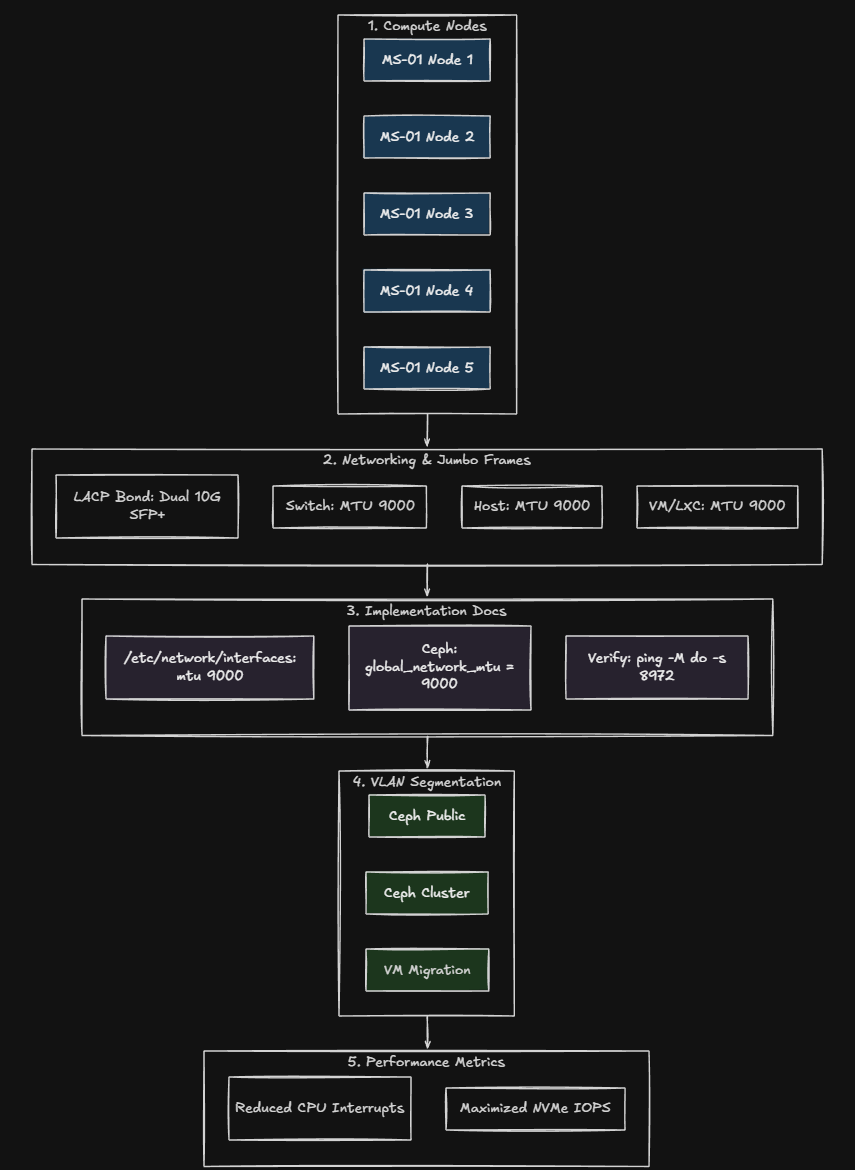
In case you are wondering why jumbo frames are desired, they are supposed to reduce CPU overhead and increase efficiency for large payload transfers that are common with storage traffic and other types of traffic like VM migration networks. Ceph traffic definitely qualifies under this description. The Ceph OSDs have data that is constantly moving and replicating around or blocks being written or read.
Reducing packet processing overhead is a win when you are talking about performance. When it comes to jumbo frames and my Proxmox environment I had all of the following requirements met:
- The switch supported MTU 9000
- The NICs supported MTU 9000
- Debian Linux underneath Proxmox supports MTU 9000
- Proxmox bridges support jumbo frames
So, I had everything configured for jumbo frames, or so I thought.
What happened?
The first signs were not dramatic or no complete “outages” per se, but I had some really weird issues that started to crop up. No red lights, no Ceph health errors, but the first thing that went for me was my Docker Swarm cluster that was running Microceph started having storage issues. Swarm nodes couldn’t connect to each other or could sporadically.
My Swarm cluster basically bit the dust with services going offline and back online, then back off again. I thought it was related to a specific node, but looking back I think it had to do with which specific host this node was on.
Another anomaly cropped up had to do with one of the other Swarm hosts I had that Veeam could no longer connect to. Why? I wondered:
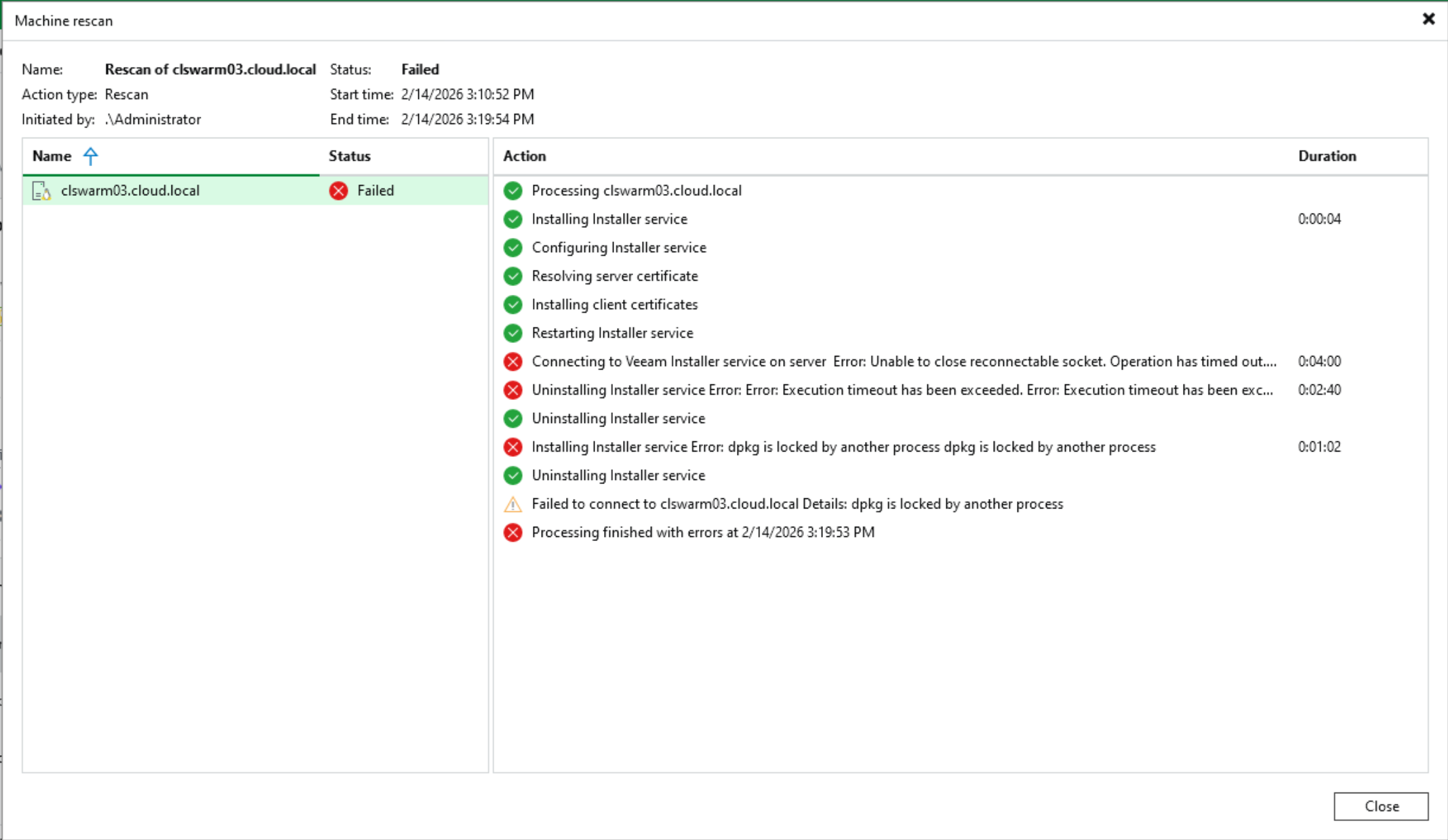
Outside of the errors mentioned above, I started noticing:
- VM migrations occasionally hanging
- Ceph latency spikes that did not make sense
- SMB transfers stalling mid-transfer
- Random timeouts between nodes
- Inconsistent iperf results
The worst kind of problem is the one where things mostly work. Proxmox showed green. Ceph showed active and clean. The cluster had quorum. But performance was inconsistent and unpredictable. When I ran certain tests, I could push high throughput. Other times, the same test would stall or drop. However, this is the behavior that tipped me off that something wasn’t right or consistent with jumbo frames.
The real problem with jumbo frames
Jumbo frames are not an on or off setting. They are an end-to-end commitment. The problem often comes in as it did with my configuration when you inadvertently either don’t enable it, or you do enable it on bridges in Proxmox that you didn’t mean to enable it.
What do I mean by that? Well, typically, you only want to enable Jumbo frames on “service type” network traffic, not clients or servers you are running within Proxmox. This can cause issues as there is no TCP/IP mechanism that “discovers” what MTU that a client is running on one side and then only communicates with the agreed upon MTU or so that I know of. This means, if a VM running in Proxmox is powered up on a Linux bridge that supports jumbo frames, the virtual NICs by default with Proxmox virtual machines are set to inherit the MTU value of the parent bridge device. So, your VM will inherit this setting as well.
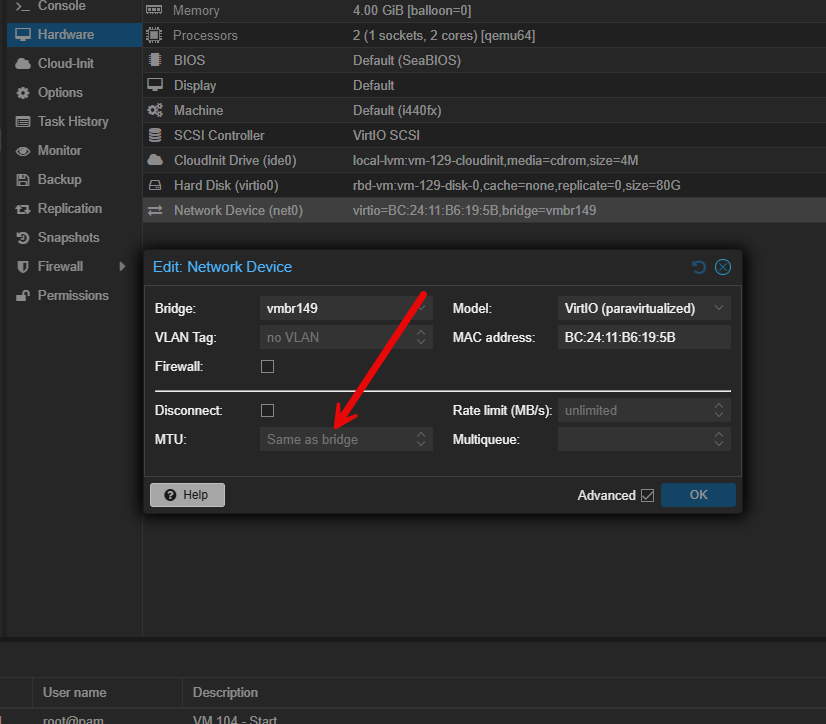
So where this can cause you grief is if you have servers on different networks for instance that need to be routed to communicate. In my case, my Veeam server is on a management VLAN, and servers are on a different VLAN. Even though both bridges in Proxmox were set to jumbo frames, the router/firewall in between was not. So both servers on each side though they were perfectly fine communicating with jumbo frames, but the router was not. Leading to fragmentation, retransmits, etc.
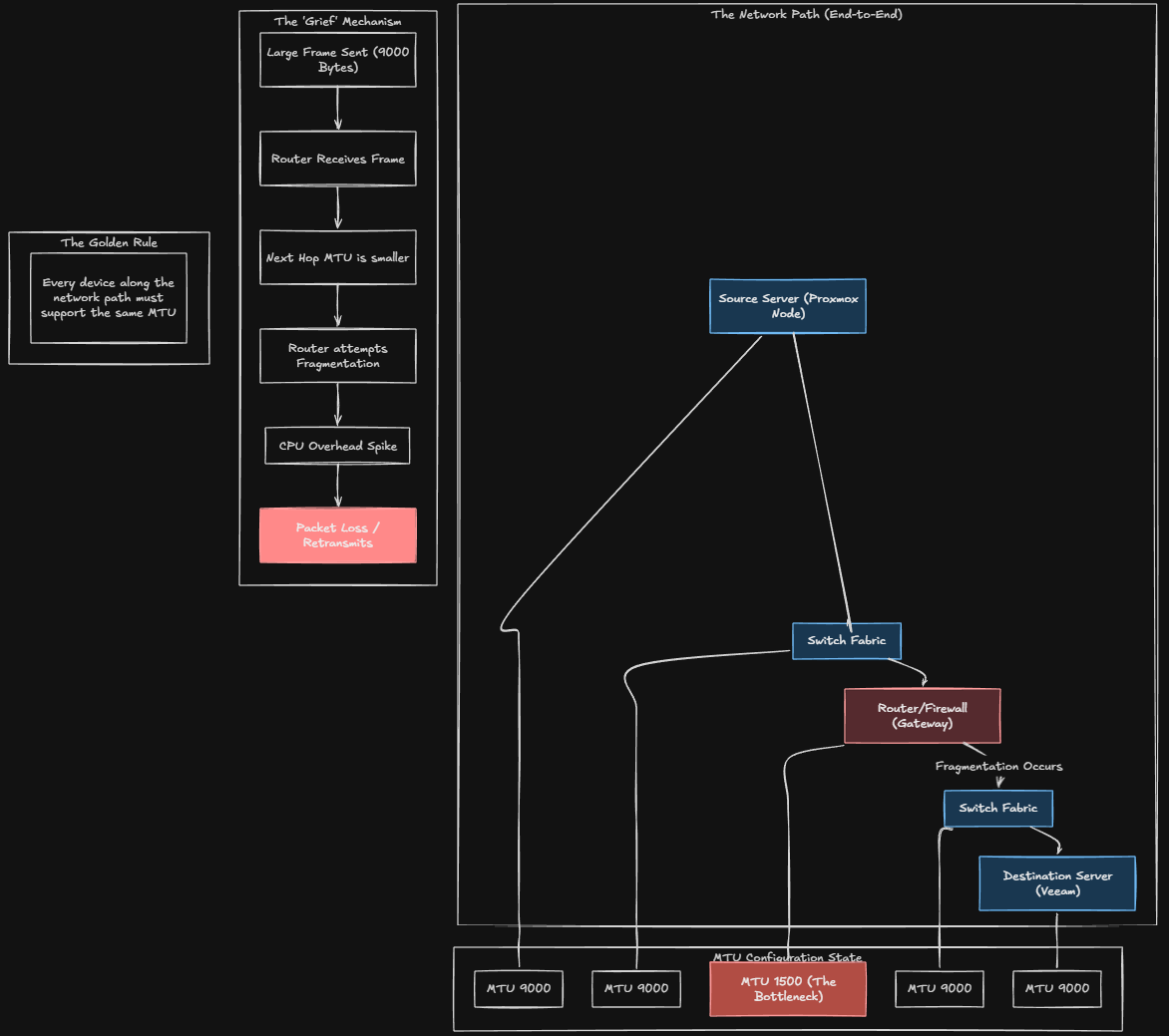
To reiterate, every device along the network path must support the same MTU.
That means:
- Proxmox bridge interfaces
- Bonded interfaces
- VLAN subinterfaces
- Physical NICs
- Switch ports
- LACP bonds on the switch
- Any intermediate switches
- Any firewalls in the path
If you miss one you create fragmentation or silent packet drops. I didn’t intentionally set jumbo frames on my server VLANs, but in the haste of getting things configured, I inadvertently did. Double and triple check your jumbo frames configuration.
Don’t enable jumbo frames on virtual machine networks
I think there is a misconception among those getting started when they hear about jumbo frames, they might think, well I can enable that on my clients and servers and this will make everything faster! Wrong.
There is usually not a need to use jumbo frames on virtual machine networks and those bridges backing them. If you do, as I have shown above, you will get VERY sporadic connectivity and all kinds of problems if you have it enabled, even inadvertently.
You may have a special case to do this for a single VM or two depending on their role, but you can create a network just for this purpose. In general, when you enable it for virtual machines, most modern operating systems will inherit the bridge setting for jumbo frames and will use that setting. Then you are in a world of hurt trying to figure out why things won’t communicate or they sporadically communicate.
So really and truly, jumbo frames are usually only needed or beneficial in your “special service” networks like storage networks, migration networks and other traffic types with large flows.
Beware of mixed MTU sizes between same bridge names and different Proxmox hosts
Also, you have to be aware of the fact that even on the same named bridge between different Proxmox hosts, you could have mismatches in the MTU settings on those bridges. Each host can have unique configurations.
This can show up in weird ways and you will see errors related to mismatched MTU sizes between different hosts in normal everyday operations. While I was in the process of changing the MTU sizes for VM bridges, I saw one of these errors, when I had reverted a host to 1500 MTU size and a VM that I tried to migrate to it still had a 9000 MTU size.
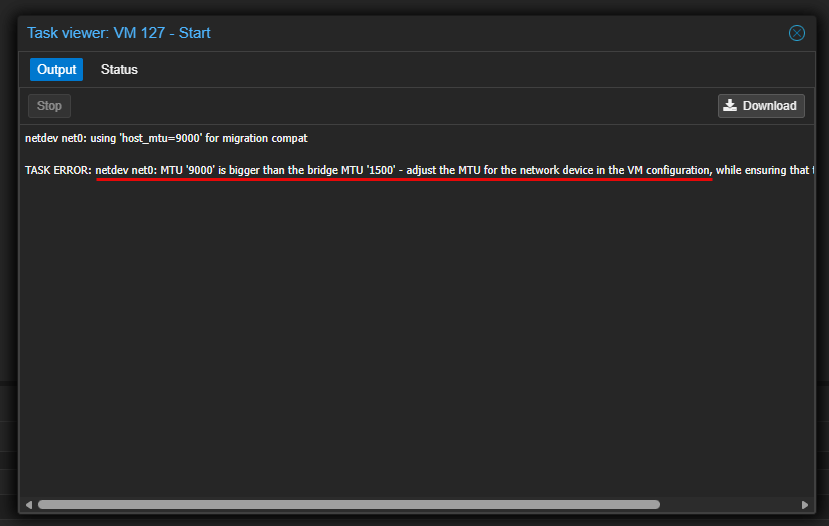
As you can see this can cause all kinds of issues when you have MTU variances not only between different devices, but also between the Proxmox hosts within the same cluster.
LACP can make this even more confusing
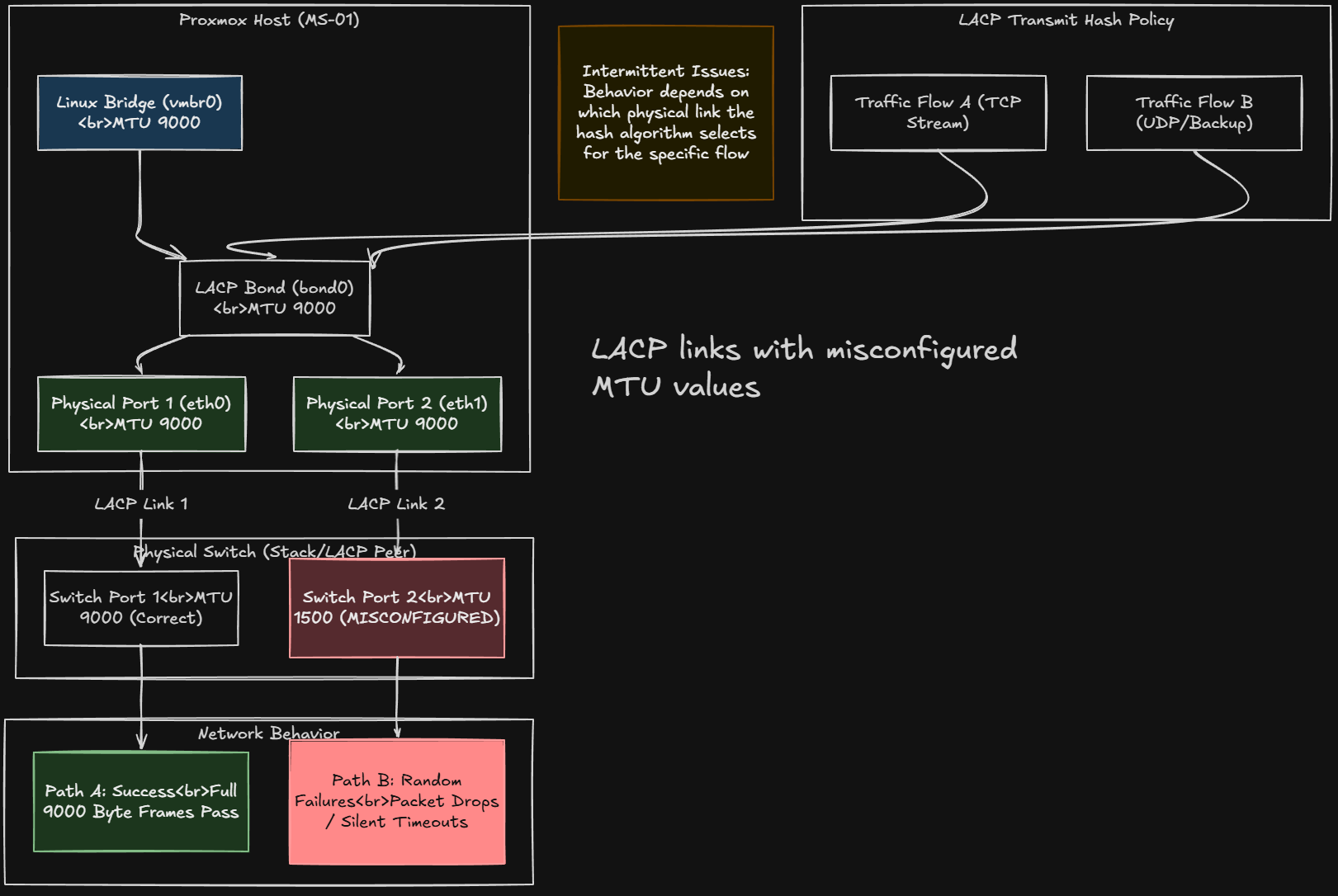
When you are running dual 10Gb bonded interfaces, traffic is hashed across links. If one physical port on the switch had correct MTU and another did not, traffic flows may be successful on one path and then fail on another.
That can explain random behavior with jumbo frames. Make sure you have your physical links set to 9000 along with the bridge itself and the bond. Strange problems will definitely rear their head when flows land on one link that is on a clean 9000 path vs another traffic flow that lands on a 1500 MTU bottleneck and mismatch.
Basic test to make sure you have have jumbo frames enabled
One of the most basic tests that is helpful to test whether or not you have jumbo frames enabled is running the ping command with the following command parameters setting the MTU size.
From one node to another, run the following on your Proxmox hosts or from within a Linux VM on the segment you are testing.
ping -M do -s 8972 <target-ip>If MTU 9000 is truly working end-to-end, that ping should be successful. Below is me pinging from my pvehost01 to a Ceph IP interface on pvehost02:
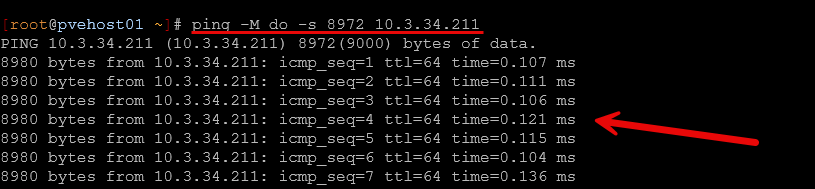
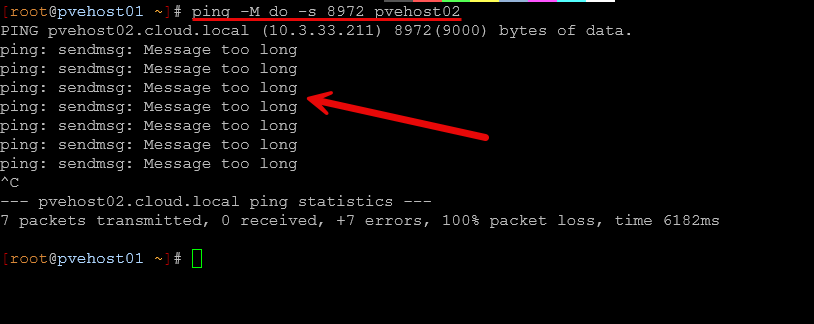
You may want to see jumbo frame pings fail on management interfaces or VLANs where VMs are connected to your Linux bridges. Below is me pinging to the management VLAN interface between Proxmox hosts and the untagged VLAN interface where I have a handful of VMs connected.
Example interface configuration on one of my Proxmox hosts
Here is an example of my working config after I lined out where jumbo frames needed to be. Note where I have jumbo frames configured:
- Physical interfaces
- Bon0 interface
- Ceph interface
- Migration interface
Below is my file from my pvehost01 found at /etc/network/interfaces.
auto lo
iface lo inet loopback

iface enp2s0f0np0 inet manual
        mtu 9000

iface enp2s0f1np1 inet manual
        mtu 9000

iface wlo1 inet manual

auto bond0
iface bond0 inet manual
        bond-slaves enp2s0f0np0 enp2s0f1np1
        bond-miimon 100
        bond-mode 802.3ad
        bond-xmit-hash-policy layer2+3
        mtu 9000

auto vmbr0
iface vmbr0 inet static
        address 10.3.33.210/24
        gateway 10.3.33.1
        bridge-ports bond0
        bridge-stp off
        bridge-fd 0
        bridge-vlan-aware yes
        bridge-vids 2-4094
        mtu 1500

# VLAN 2 - Dedicated VM bridge (no VM tagging needed)
auto bond0.2
iface bond0.2 inet manual
        vlan-raw-device bond0
        mtu 1500

auto vmbr2
iface vmbr2 inet manual
        bridge-ports bond0.2
        bridge-stp off
        bridge-fd 0
        mtu 1500

# VLAN 10 - Dedicated VM bridge (no VM tagging needed)
auto bond0.10
iface bond0.10 inet manual
        vlan-raw-device bond0
        mtu 1500

auto vmbr10
iface vmbr10 inet manual
        bridge-ports bond0.10
        bridge-stp off
        bridge-fd 0
        mtu 1500

# VLAN 149 - Dedicated VM bridge (no VM tagging needed)
auto bond0.149
iface bond0.149 inet manual
        vlan-raw-device bond0
        mtu 1500

auto vmbr149
iface vmbr149 inet manual
        bridge-ports bond0.149
        bridge-stp off
        bridge-fd 0
        mtu 1500

# VLAN 222 - Dedicated VM bridge (no VM tagging needed)
auto bond0.222
iface bond0.222 inet manual
        vlan-raw-device bond0
        mtu 1500

auto vmbr222
iface vmbr222 inet manual
        bridge-ports bond0.222
        bridge-stp off
        bridge-fd 0
        mtu 1500

# Ceph
auto bond0.334
iface bond0.334 inet static
        address 10.3.34.210/24
        vlan-raw-device bond0
        mtu 9000

# Cluster
auto bond0.335
iface bond0.335 inet static
        address 10.3.35.210/24
        vlan-raw-device bond0
        mtu 1500

# Migration
auto bond0.336
iface bond0.336 inet static
        address 10.3.36.210/24
        vlan-raw-device bond0
        mtu 9000

source /etc/network/interfaces.d/*
Summary of important points to remember with jumbo frames
Take note of these important points that can help when you introduce jumbo frames into your Proxmox cluster.
| Recommendation | Why It Matters |
|---|---|
| Validate MTU end-to-end using ping -M do -s 8972 before trusting configuration | Interface settings don’t really mean jumbo frames is enabled. Only testing with actual jumbo frame packets with 9000 bytes does |
| Keep jumbo frames isolated to a dedicated storage or Ceph networks or only networks that benefit | Storage replication benefits most. Management and VM networks often causes issues and complexity due to routing, etc |
| Make sure MTU is consistent across physical NICs, bonds, bridges, VLANs, and switch ports | One mismatched interface creates fragmentation or silent packet drops |
| Check each LACP member port individually on the switch | A single port at 1500 inside a bond can create intermittent and hard-to-diagnose behavior |
| Be cautious with firewall-enabled bridges and VLAN-tagged interfaces | These can introduce additional interfaces that may not inherit the MTU setting you expect |
| Do measure your performance before and after enabling jumbo frames | Improvements with jumbo frames are not guaranteed. In some home lab setups, the difference may be minimal |
| Don’t change the MTU value during major network redesigns | When you combine MTU changes with LACP, VLAN restructuring, or Ceph reconfiguration, it can make troubleshooting much harder if things don’t work after the changes are made |
| Document and version control network configuration files | Future tweaks can quietly reintroduce MTU inconsistencies without you realizing it |
Wrapping up
A jumbo frames Proxmox configuration has a lot of advantages for your cluster when you are running hyperconverged storage like Ceph. Even with traditional storage using iSCSI and NFS, there are advantages. The larger packets are more efficient and they take less of a toll on your CPU than standard sized 1500 MTU packets. However, like a lot of other things, jumbo frames requires absolute perfection when it comes to consistency. If you miss one thing or design things poorly, you will cause more harm than good by turning them on. Also, a key point to remember is that it almost always the better decision to leave jumbo frames turned off on bridges where you connect virtual machines. How about you? Are you running jumbo frames in your home lab? What issues have you ran into?

Google is updating how articles are shown. Don’t miss our leading home lab and tech content, written by humans, by setting Virtualization Howto as a preferred source.
About The Author