


If you have been running Proxmox in your home lab for any amount of time, you already know the ecosystem has been growing fast and rightly so. There are more tools, scripts, and utilities popping up than ever before. Back in late 2025, I put together a list of the best Proxmox tools and scripts that I felt really are great tools for Proxmox. That list still holds up. Those tools are solid and proven. But over the past few weeks in May 2026, I wanted to take a fresh look at what is new or at least new to me and see what actually deserves a place in a working home lab. There may be some here that you want to try out as well.
What I look for in a Proxmox tool
First of all, what do I personally look for when trying out and evaluating Proxmox tools that can be used in the home lab environment? There are a lot of interesting projects out there, but interesting I have found is not always tools that I find are useful or those that I use long term.
For me, tools have to meet several criteria:
- First, it has to solve a real problem – If I can already accomplish the same thing easily in the Proxmox UI or with a simple command, the tool needs to clearly improve that workflow.
- Second, it has to be usable – A lot of tools look great in screenshots, but once you deploy them, you run into confusing configuration, unclear docs, or features that do not behave as expected
- Third, it has to fit into a real home lab – That means it cannot need to have a huge amount of overhead just to run, and it cannot introduce instability into the environment
So, just to level set, this is what I look for with tools in the home lab.
Tainer
Tainer is one that I stumbled onto recently and it is one that I think holds a lot of promise for the home lab and otherwise. It provides a cleaner, more user-friendly interface for managing Proxmox environments.
Many solutions that we are seeing in the community are aiming at improving the management experience and UI. The Proxmox UI isn’t terrible and definitely is more function vs form. But anything that makes the experience better and easier is something that is worth taking a look at.
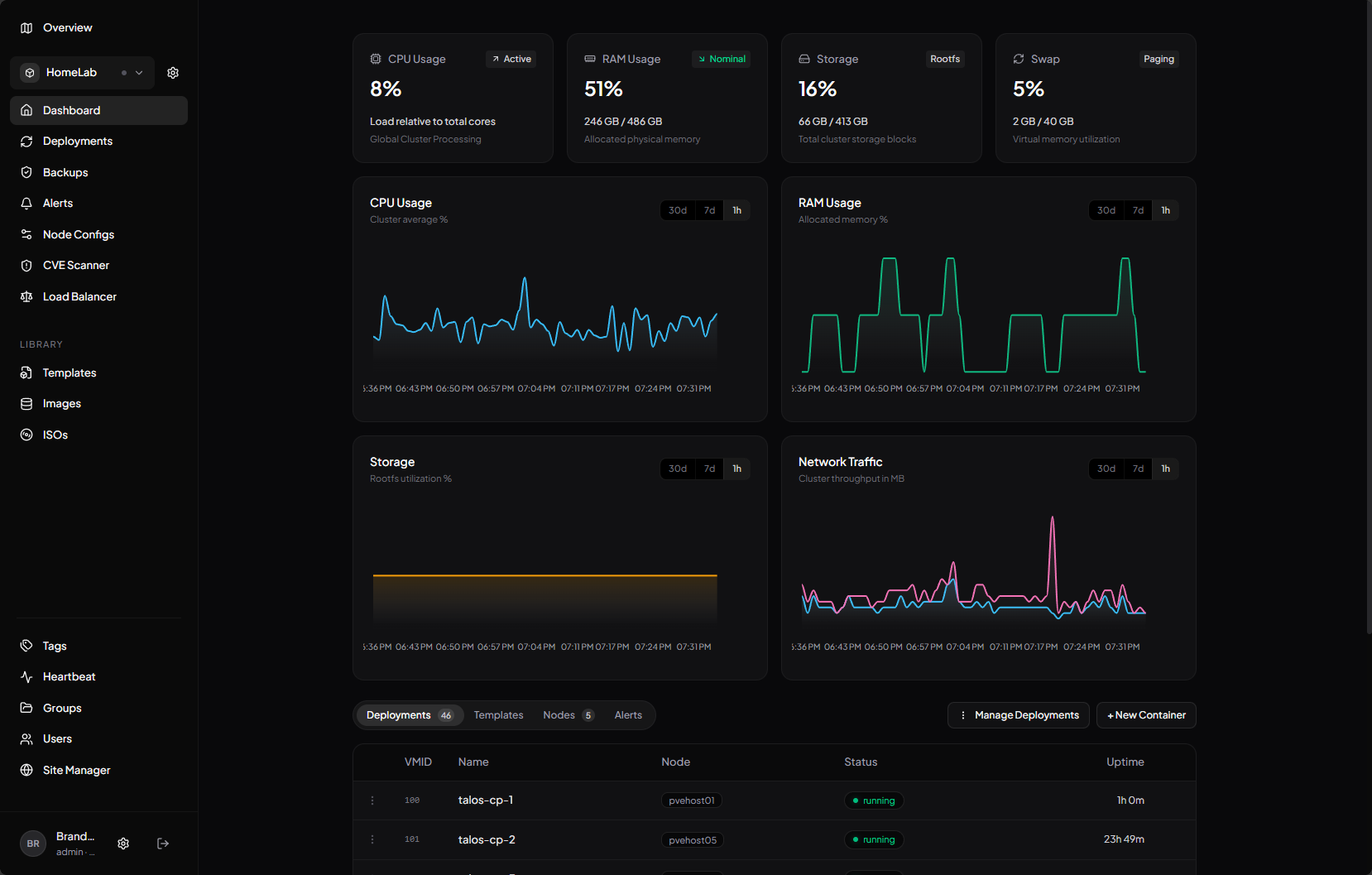
One thing that I think Tainer does a great job at is simplifying the experience, giving you a more SaaS like feel to managing your sites that are running Proxmox. I found in my testing that it presents the information really well and streamlines certain things. This is noticeable when you are trying to get a quick overview of your environment or perform management tasks.
It is still very new and a little rough around the edges in many ways, but does hold promise I think as one to keep an eye on as it matures. I definitely think this is one that I would look at running long term, especially if you are managing multiple clusters or you want to have a different lens on top of your environment outside of the detailed configuration you get with the native Proxmox UI.
Check out my blog post on Tainer as I recently tried this out in the lab: I Tried Tainer for Proxmox and It Feels Like Portainer for VMs.
PegaProx
PegaProx is one that I definitely see dominating the home lab space and even production environments for ones that are looking for a very vSphere Client like experience managing Proxmox. With PegaProx, you can manage multiple Proxmox clusters under the same UI without having to switch between the Proxmox UI of each cluster.
So, its strength is the aggregated view you get so you can see all resources across all clusters and start to think about resources in this unified way. PegaProx also does an amazing job of capturing the look and feel of the vSphere Client in the “corporate” view you can switch to. It is the closest thing to connecting to vCenter Server that I have tried out in the community so far.
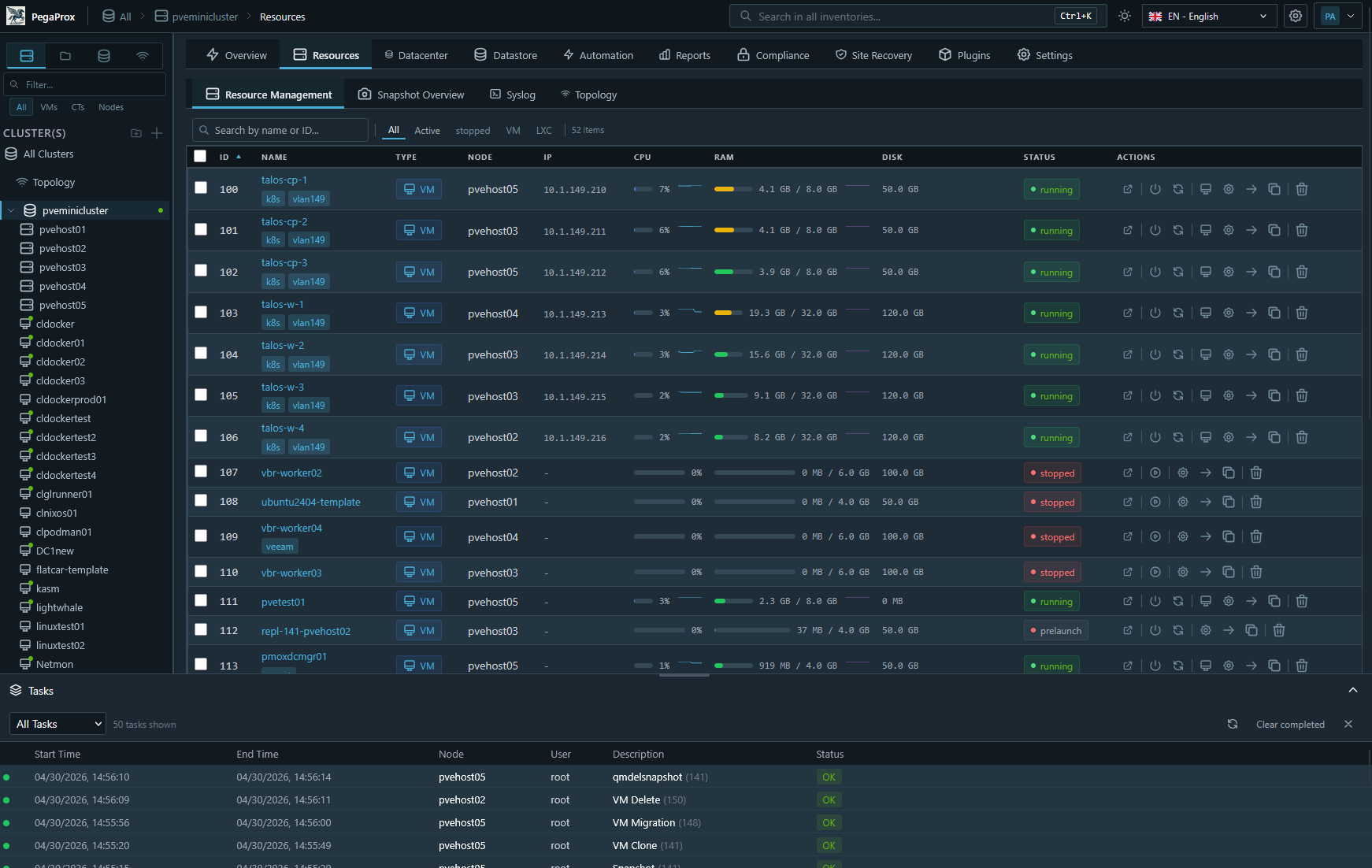
You also get a free “DRS” solution for Proxmox with ProxLB built into the tool and also a capability you can’t do with Proxmox on its own and that is snapshot-based replication. If you have ever wanted to have replication between Proxmox nodes and you weren’t running ZFS, this feature is for you.
For me, PegaProx makes the cut because it is a tool that solves a problem that Proxmox doesn’t fully address with native tools. It brings together manage in a seamless way that is easy to work with for multiple clusters and you actually get additional features you don’t get with Proxmox on its own.
It is also in my honest opinion THE UI to beat for Proxmox right now. Check out my blog post on this one: PegaProx Now Adds Built-In ESXi Migration and Proxmox Backup Monitoring.
CV4PVE-Report
If you have ever wanted to have something like RVTools that we have had for years in VMware environments, CV4PVE-Report is a tool that provides that functionality for you. I had originally commented on the fact that CV4PVE-Diag was that tool. The developer of the tools reached out to me and said he was about to release CV4PVE-Report that would be even better at this.
The CV4PVE-Report tool has as its focus generating structured reports of your environment. With it, you get details about virtual machines, storage configurations, networking, and other areas of your Proxmox configuration. The output comes in a format that is easy to review and share.
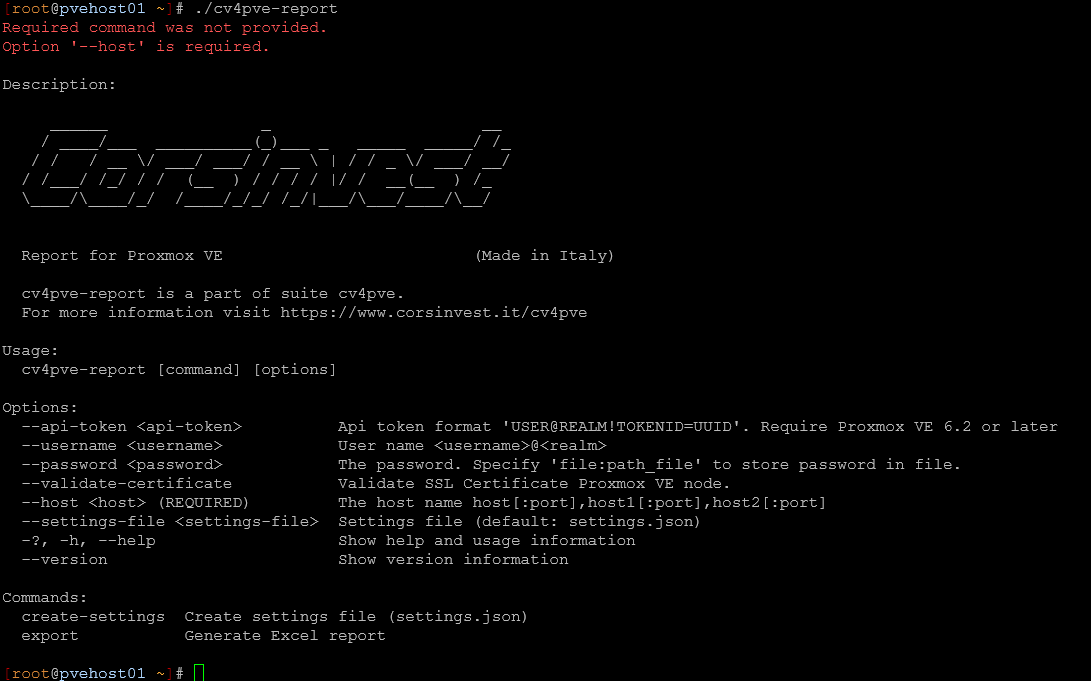
In my testing, this was one of the easiest tools to appreciate the value of. It doesn’t try to reinvent how you manage Proxmox. But, it gives you better visibility and a way to zero in on best practices in the environment.
Where might this be useful?
- Documentation – If you are documenting your environment, this saves a lot of time. Instead of manually collecting information, you can generate a report and have everything laid out in a consistent format
- Troubleshooting – If you are troubleshooting, having a snapshot of your environment can help you spot patterns or inconsistencies
- Planning – If you are planning changes, it is helpful to have a clear baseline
This one made my list as of May 2026 due to the fact it is easy to install and run and you get a LOT of useful information out of it. This is the kind of utility that you may not use every day, but when you need it, you are really glad you have it.
Check my post out on this tool here: Proxmox Finally Has a Real RVTools-Style Report (This Is What Was Missing).
CV4PVE-Diag
As mentioned above, the CV4PVE-Diag tool is made by the same developer/company that makes the CV4PVE-Report tool. The CV4PVE-Report tool focuses on visibility and documentation. The CV4PVE-Diag tool is more about troubleshooting and health checks.
I touted this tool back in March as the RVTools tool that makes a lot of sense for Proxmox admins. It is great as it is designed to analyze your Proxmox environment and highlight potential issues and areas that you may need to give attention. It is more of a CLI based tool that may not appeal to everyone but I think it fits extremely well into quick workflows from running a few commands.
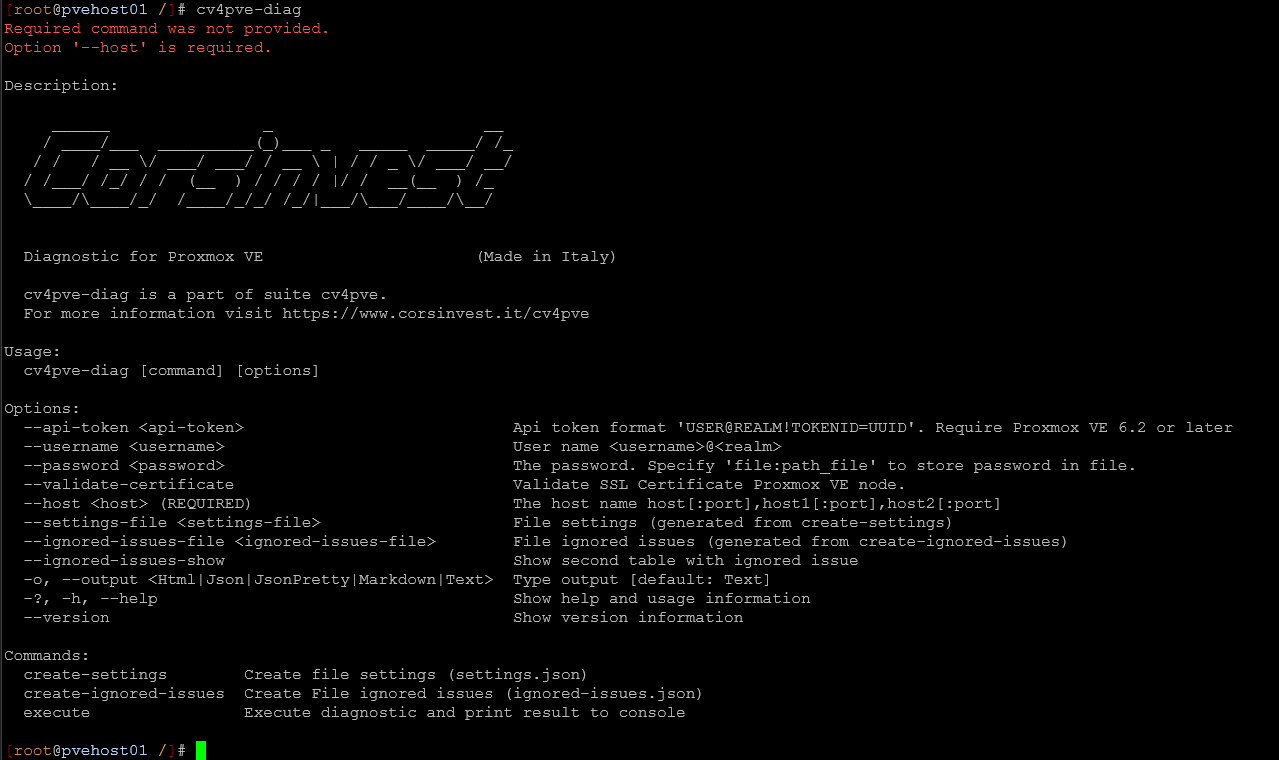
I think like RVTools did for VMware, this tool encourages you to have better housekeeping in your PVE environment. It nudges you to look at certain low-hanging fruit items that are worth reviewing. Again, I think the downside is there is no GUI with it, but this is just nitpicking as most PVE admins are comfortable in the command line any way.
This makes my list as of May 2026 in the home lab because I think it provides real value for those maintaining a Proxmox environment. It is lightweight, easy to run, and useful for periodic health checks.
Read my blog post on this tool here: Proxmox Finally Has a Real RVTools-Style Report (This Is What Was Missing).
A few others I tested but did not make the cut
I will be honest that several tools that I test just don’t make the cut for me to use long term. I love trying out new things. But if a tool falls into one of the following, it generally doesn’t stay around my lab:
- It isn’t free or open source
- It overlaps functionality that another tool is already doing
- It is too complex for what it does
- Too many dependencies
These are just a few of the things that usually make me decide against running a tool or solution long term unless it provides real value and removes blockers in my home lab environment.
Wrapping up
I think the Proxmox ecosystem is super interesting right now and continues to get more and more exciting as we see various projects take off. Proxmox itself is showing a lot of maturity and exciting to see all the features it is adding and growing at the same time. For me, running more tools isn’t necessarily a good thing unless they bring value to your home lab or production environment. What matters is finding ones that bring that value and improve your workflows with Proxmox or give you tools you may have been missing before. These four tools that I have tossed out there I think are definitely worth a look if you are looking for projects that are relatively new, interesting, and that actually do something that you can benefit from.
More in this topic




Google is updating how articles are shown. Don’t miss our leading home lab and tech content, written by humans, by setting Virtualization Howto as a preferred source.
About The Author

You might want to update this post, I just checked tainer’s webpage and it is not open source as of 6/28/2026.