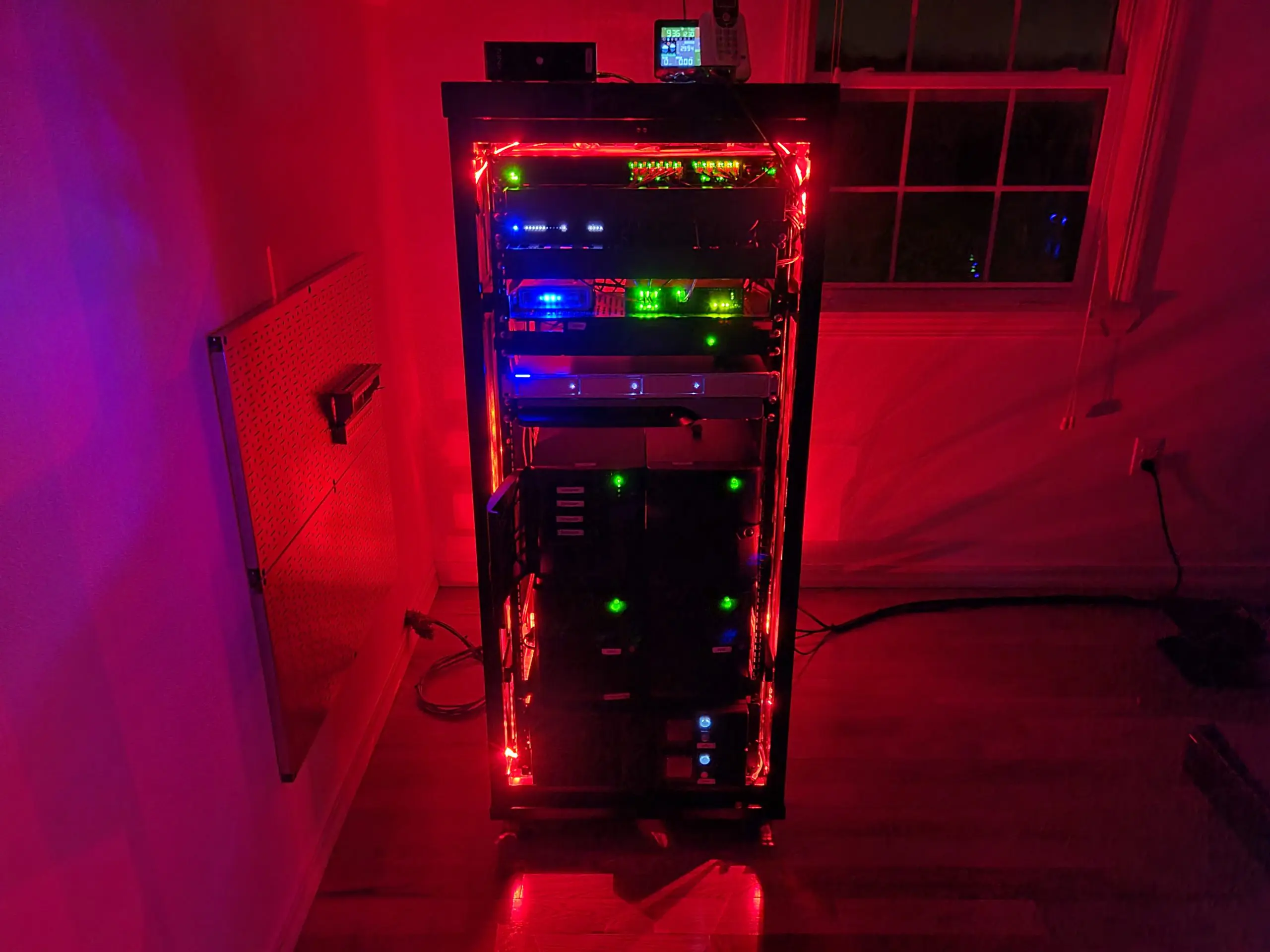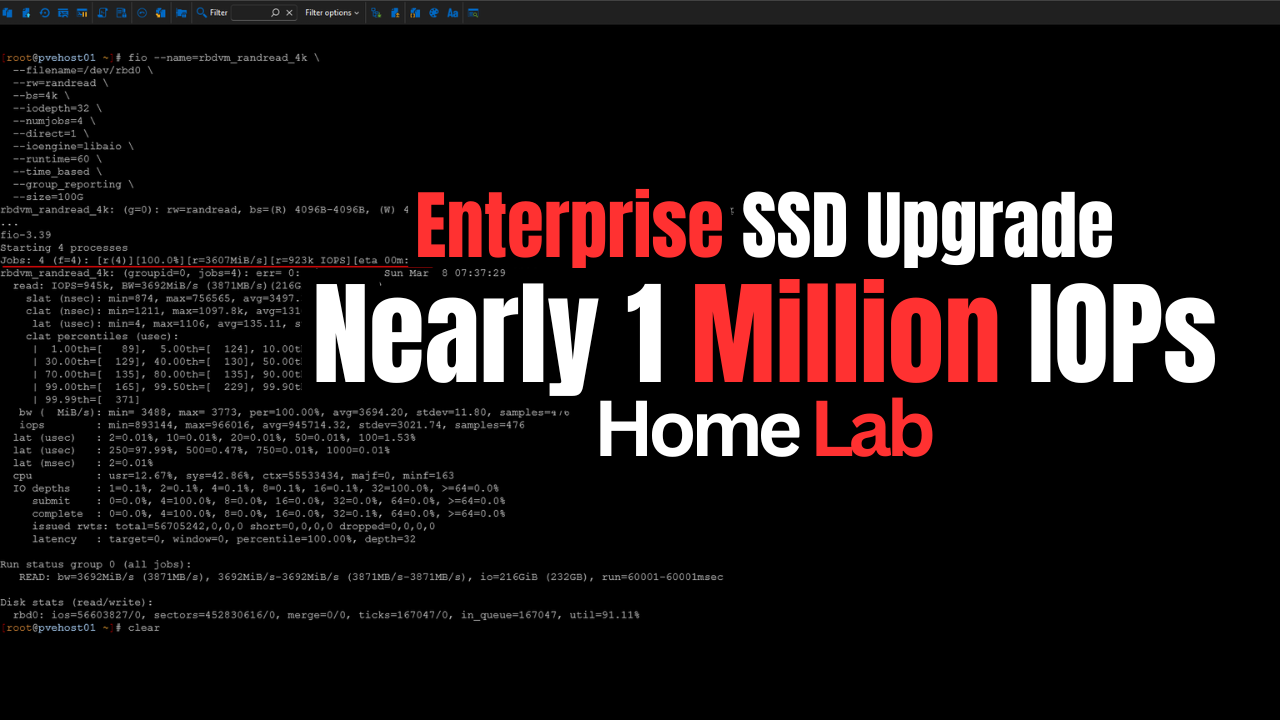
A lot of questions on types of hardware come up when ones are building a home lab server or home lab cluster that are definitely worth asking. Recently I had several comments on my Ceph mini rack build alluding to the fact that the consumer NVMe drives that I had used were aweful for Ceph. I hadn’t really experimented with true enterprise NVMe in a true test before in the home lab with distributed storage. But, the thought definitely intrigued me. Are enterprise SSDs really worth the cost compared to consumer drives? I knew the obvious answer that enterprise drives “should” definitely be better, but “how” much? Let’s compare consumer vs enterprise SSD home lab drives in Proxmox running Ceph storage in particular.
How are enterprise drives different?
Enterprise drives are designed for data centers and distributed storage systems in particular, like Ceph. With enterprise drives, you can buy drives based on the types of workloads that are running in your particular enterprise environment. You will generally see the following:
- Read intensive
- Mixed use
- Write intensive
With each of these use cases, you will have drives that are built more for a specific purpose based on the application that the server is running or the use case in particular. With enterprise drives, they are meant to be able to withstand prolong periods of intense writes with low latency, especially in the case of the “write intensive” enterprise category. These are especially meant for applications like Ceph or other distributed storage applications.
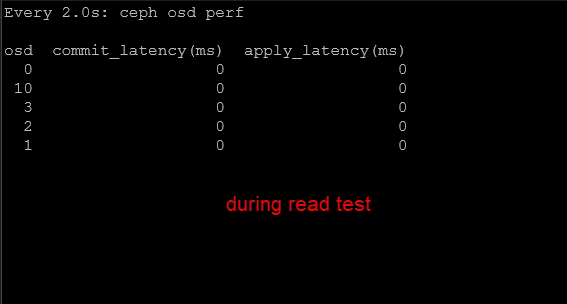
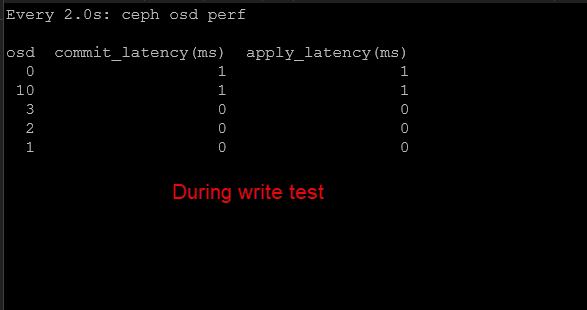
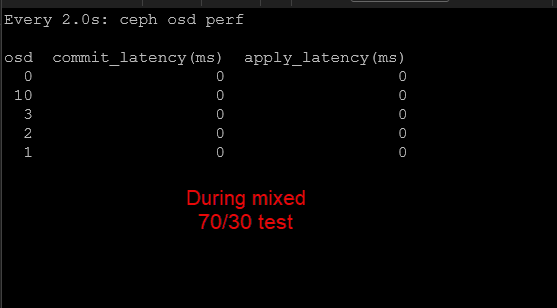
Below, as a quick foreshadowing of what the testing resulted in, the drives with more than 0 value are consumer drives. The ones with zeroes are enterprise drives. The ceph osd perf command measures drive latency. As you can see, the enterprise drives trounce consumer drives in terms of latency and this is important as we will see.
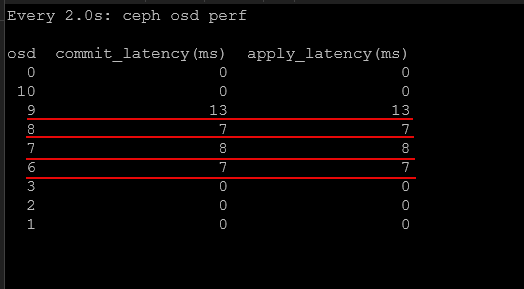
Why is this? Well, consumer drives are built primarily for desktops and laptops. They are built for bursts of high performance, but not prolonged periods of writes, etc without latency creeping up.
Can you use consumer drives in the home lab? Yes, actually you can and very successfully. I have almost exclusively over the years ran consumer-grade NVMe drives, and other consumer drives in the home lab. However, there is an area where you will expose the weaknesses of consumer drives more than just about any other. What is that? Distributed storage.
The reason for this is that distributed storage is more write intensive than just about any other workload that you can run.
Unique features of enterprise drives
Note the differences in enterprise drives that are worth noting:
- Power loss protection – One of the most important differences is power loss protection. Enterprise SSDs contain capacitors that allow the drive to flush its write cache to NAND if you have a power loss or failure. This makes sure that your data is safely written even if power is cut to your home lab server.
- TLC NAND – Most enterprise NVMe drives use native TLC NAND without relying on large dynamic SLC cache layers for sustained performance. Instead of depending on cache tricks to temporarily accelerate writes, they are engineered to handle continuous random writes at predictable latency. Consumer type drives rely heavily on something called SLC caching which can temporarily boost write performance. But when the cache is exhausted, performance drops like a rock. But again, the main use case for consumer drives is short sustained high-performance bursts. So this fits with what they are designed to do.
- Better latency consistency – Enterprise drives provide better latency consistency and much higher endurance ratings. Also important is the firmware they run is optimized for server workloads.
All of these characteristics are important for distributed storage systems where multiple nodes are constantly reading and writing data simultaneously.
Which enterprise drive did I use for my benchmarks in the Ceph cluster?
For the enterprise drive benchmarks, I used the Micron 7300 MAX 3.2 TB NVMe SSD. These drives are designed specifically for high endurance, write intensive workloads in enterprise environments. That makes them awesome for distributed storage platforms like Ceph. Ceph absolutely needs drives that can withstand sustained random writes, replication traffic, and have consistent latency.
Why did I choose a PCI 3 drive? You may notice if you Google Micron 7300 Max, these are PCI 3 drives. Why did I go this route in the MS-01’s PCI 4 U.2 slot? Well, in the previous benchmarks I ran, I was nowhere near saturating even PCI 3 speeds, let alone PCI 4 which is the spec of the consumer Samsung 980 Pros I was using. My real enemy for performance was latency looking at my previous benchmarks. So backing down to PCI 3 made it easier to find drives for this spec, and actually cheaper since PCI 4 enterprise drives are more expensive, and this wasn’t my bottleneck so I would have just been throwing money away to go up to PCI 4.
- Just as a note, I spent roughly $350-450 per drive on these and snagged all of them from Ebay. But you have to be careful, many sellers are trying to gouge on these drives for upwards of $750-850 a piece.
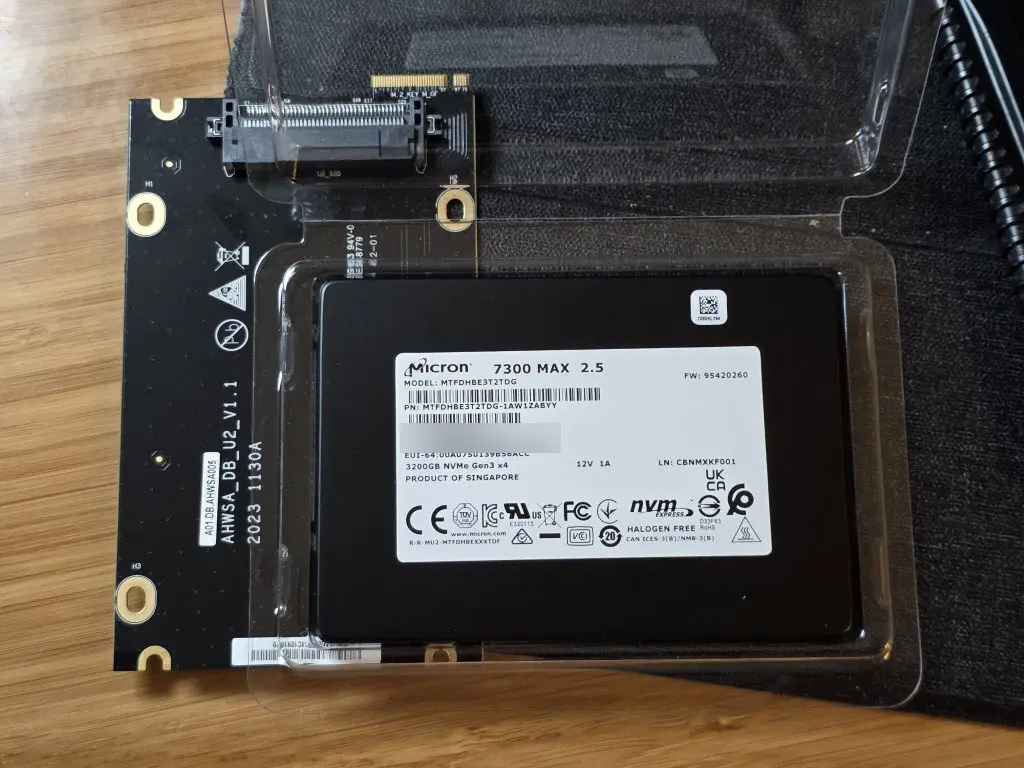
The Micron 7300 MAX is part of Micron’s 7300 series data center NVMe lineup. Within that family, the MAX model is the highest endurance option and is designed for workloads that generate heavy write activity over long periods of time. This is perfect for Ceph.
Every write operation in Ceph must be committed to multiple OSDs, which creates sustained write pressure and latency on the underlying drives. Consumer SSDs can struggle under these conditions because they often rely heavily on SLC caching that collapses once the cache fills as we mentioned earlier.
- Note in the pic below, I still show a Samsung 980 installed, but I was able to get these removed from the Ceph OSDs before running my benchmarks as I didn’t want the benchmarks to be skewed by any consumer-grade storage.
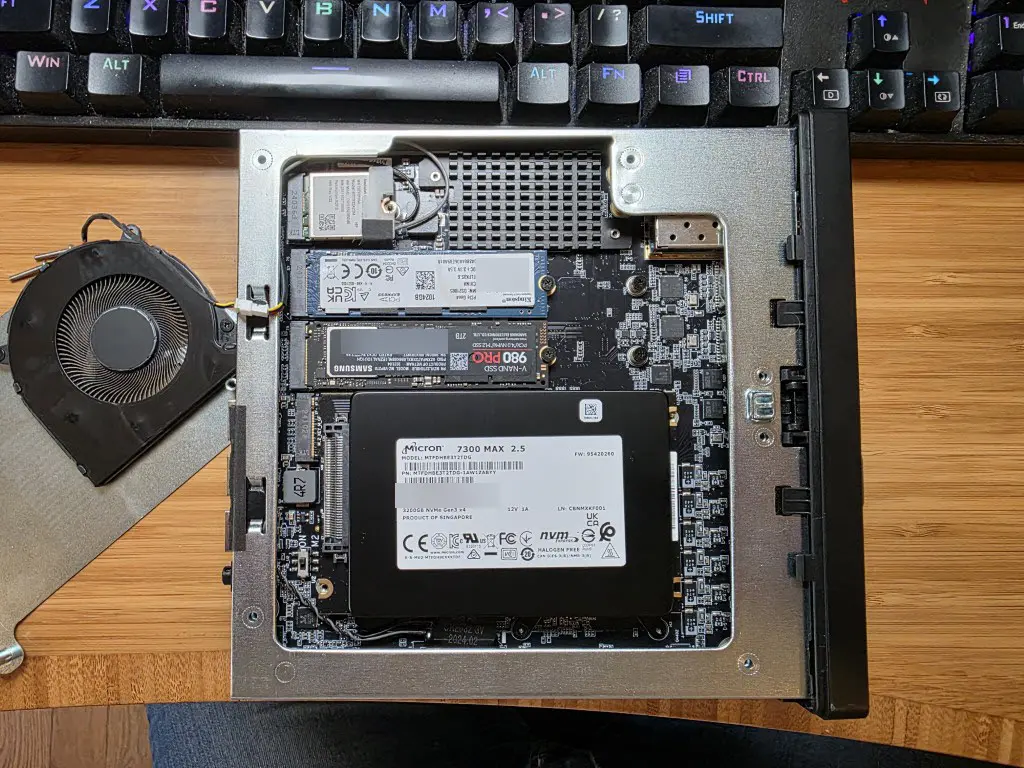
Micron 7300 MAX 3.2 TB Key specs
Here are some of the important specifications for the 3.2 TB model that I settled on for use with the “enterprise drives” test in the cluster.
| Specification | Micron 7300 MAX 3.2 TB |
|---|---|
| Interface | NVMe PCIe Gen3 x4 |
| Form Factor | U.2 2.5 inch |
| NAND Type | 96 layer 3D TLC NAND |
| Capacity | 3.2 TB |
| Sequential Read | Up to ~3.1 GB/sec |
| Sequential Write | Up to ~2.7 GB/sec |
| Random Read | Up to ~550K IOPS |
| Random Write | Up to ~200K IOPS |
| Endurance | ~60 PBW |
| Drive Writes Per Day | Up to 3 DWPD |
| Power Loss Protection | Yes |
The most important specification here for Ceph workloads is endurance. The 3 DWPD rating means the drive can sustain writing its entire capacity three times per day over the warranty period without exceeding its endurance limits.
For the 3.2 TB model, that translates to approximately 60 petabytes of total write endurance, which is unbelievably higher than most consumer SSDs.
Test environment and storage architecture
So, again a super brief overview. I have 5 Minisforum MS-01 mini PCs that are connected with 10 Gb networking. I have each node configured with LACP networking. Each node contributes storage to the Ceph cluster which is then pooled and presented back to Proxmox as shared storage.
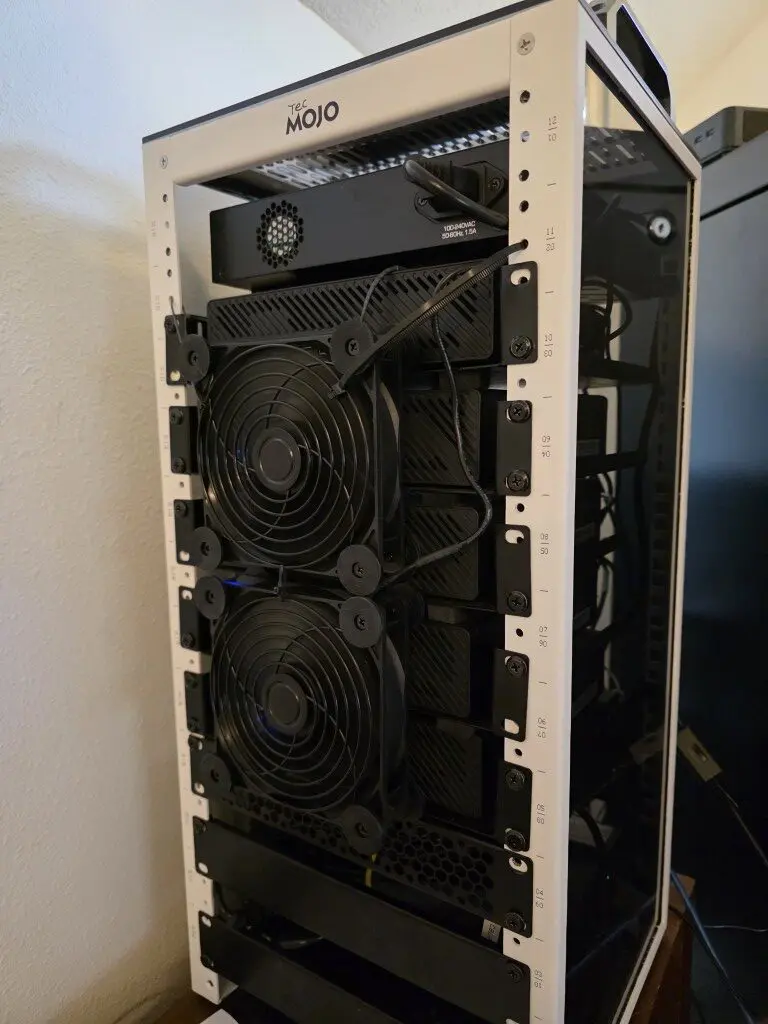
The rbd_vm pool is a replicated pool used for virtual machine disks. It has the following configuration in Ceph:
- Replication size: 2
- Minimum size: 1
The cephfs_ec_data pool uses erasure coding for CephFS data.
- Erasure coding profile: 3+2
This means virtual machine disks benefit from the performance characteristics of replication while CephFS benefits from the storage efficiency of erasure coding.
Level setting before benchmark results
I decided to run a real world experiment in my own Proxmox Ceph cluster. Before replacing my consumer SSDs with enterprise drives, I captured detailed benchmark data from the cluster while it was under normal load.
So just know this wasn’t some pristine environment with no existing load. I had roughly 23 VMs running at the time of both the consumer and enterprise benchmarks. I detailed the build out and benchmarking of performance (consumer-grade drives) in my last blog post that you can read here: I Built a 5-Node Proxmox and Ceph Home Lab with 17TB and Dual 10Gb LACP.
4K random read performance
Random reads are a critical workload for virtualization environments. Operating systems and applications constantly perform small read operations when loading files, libraries, and application data.
The first test I ran in FIO measured 4K random read performance using a queue depth of 32 with four jobs running in parallel.
fio --name=rbdvm_randread_4k \
  --filename=/dev/rbd0 \
  --rw=randread \
  --bs=4k \
  --iodepth=32 \
  --numjobs=4 \
  --direct=1 \
  --ioengine=libaio \
  --runtime=60 \
  --time_based \
  --group_reporting \
  --size=100G
The results:
| Metric | Consumer SSDs | Enterprise SSDs (all Micron 7300 MAX drives) |
|---|---|---|
| IOPS | ~185,000 | ~945,000 |
| Throughput | ~721 MiB/sec | ~3692 MiB/sec |
| Avg Latency | ~0.69 ms | ~0.135 ms |
| 99th Percentile | ~1.8 ms | ~0.165 ms |
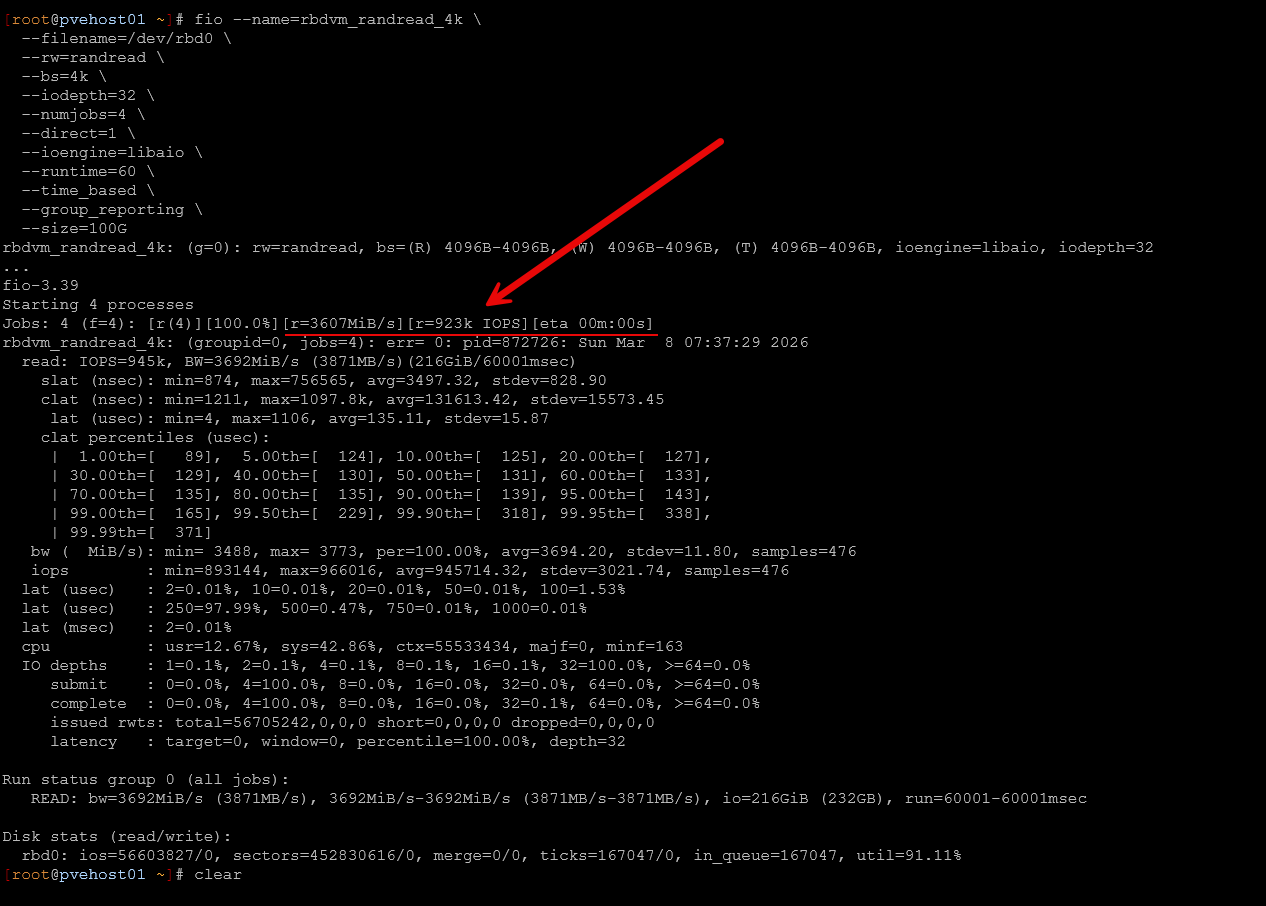
The 7300 MAX drives were absolutely beasts in terms of latency. Even pulling close to 1 million IOPs with the FIO Random Read test, I didn’t see any of the drives go about 0 on the latency scale. But I didn’t really expect much latency here, but still very impressive it stayed at 0.
The improvement here is massive! Read IOPS increased by more than five times while average latency dropped dramatically. Ninety nine percent of IO operations completed in under 165 microseconds with the enterprise drives.
That level of latency is approaching local NVMe performance, which is impressive considering these reads are coming from a distributed storage system spanning multiple nodes in my Proxmox Ceph cluster.
4K random write performance
Random writes are where distributed storage systems tend to struggle the most because each write must be replicated across multiple OSDs before it can be acknowledged. This test again used 4K blocks, queue depth 32, and four jobs.
fio --name=rbdvm_randwrite_4k \
  --filename=/dev/rbd0 \
  --rw=randwrite \
  --bs=4k \
  --iodepth=32 \
  --numjobs=4 \
  --direct=1 \
  --ioengine=libaio \
  --runtime=60 \
  --time_based \
  --group_reporting \
  --size=100G
The results:
| Metric | Consumer SSDs | Enterprise SSDs (all Micron 7300 MAX drives) |
|---|---|---|
| IOPS | ~7,700 | ~57,300 |
| Throughput | ~30 MiB/sec | ~224 MiB/sec |
| Avg Latency | ~16–18 ms | ~2.23 ms |
| 99th Percentile | ~30 ms | ~7.3 ms |
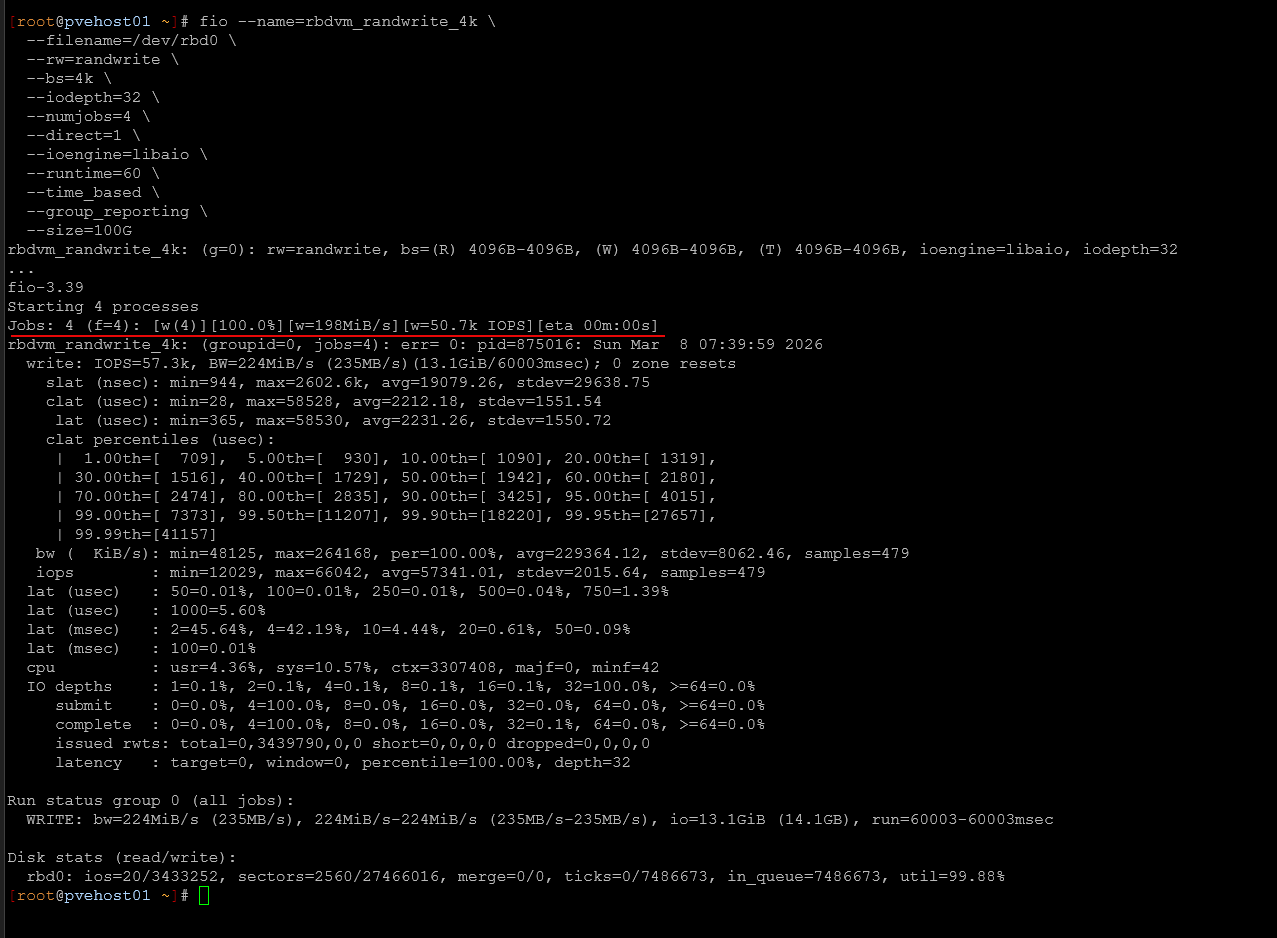
Again, look at the latency during the random write test which should be torture on drives and the 7300 MAX drives barely cracked a sweat.
The results here are even more mind blowing. Write IOPS increased more than seven times while average latency dropped from roughly seventeen milliseconds down to just over two milliseconds.
This type of improvement can have a major impact on virtualization workloads in the home lab where many systems are writing logs, updating files, and performing background operations simultaneously.
Mixed 70/30 read/write workload
Real world workloads are rarely pure reads or pure writes. Most virtualization environments generate a mix of both. To simulate this, I ran a mixed workload consisting of seventy percent reads and thirty percent writes.
fio --name=rbdvm_randrw_70r30w_4k \
  --filename=/dev/rbd0 \
  --rw=randrw \
  --rwmixread=70 \
  --bs=4k \
  --iodepth=32 \
  --numjobs=4 \
  --direct=1 \
  --ioengine=libaio \
  --runtime=90 \
  --time_based \
  --group_reporting \
  --size=100G
The results:
| Metric | Consumer SSDs | Enterprise SSDs (all Micron 7300 MAX drives) |
|---|---|---|
| Read IOPS | ~15.9K | ~57.4K |
| Write IOPS | ~6.8K | ~24.6K |
| Avg Read Latency | ~0.45 ms | ~1.33 ms |
| Avg Write Latency | ~17.7 ms | ~2.1 ms |
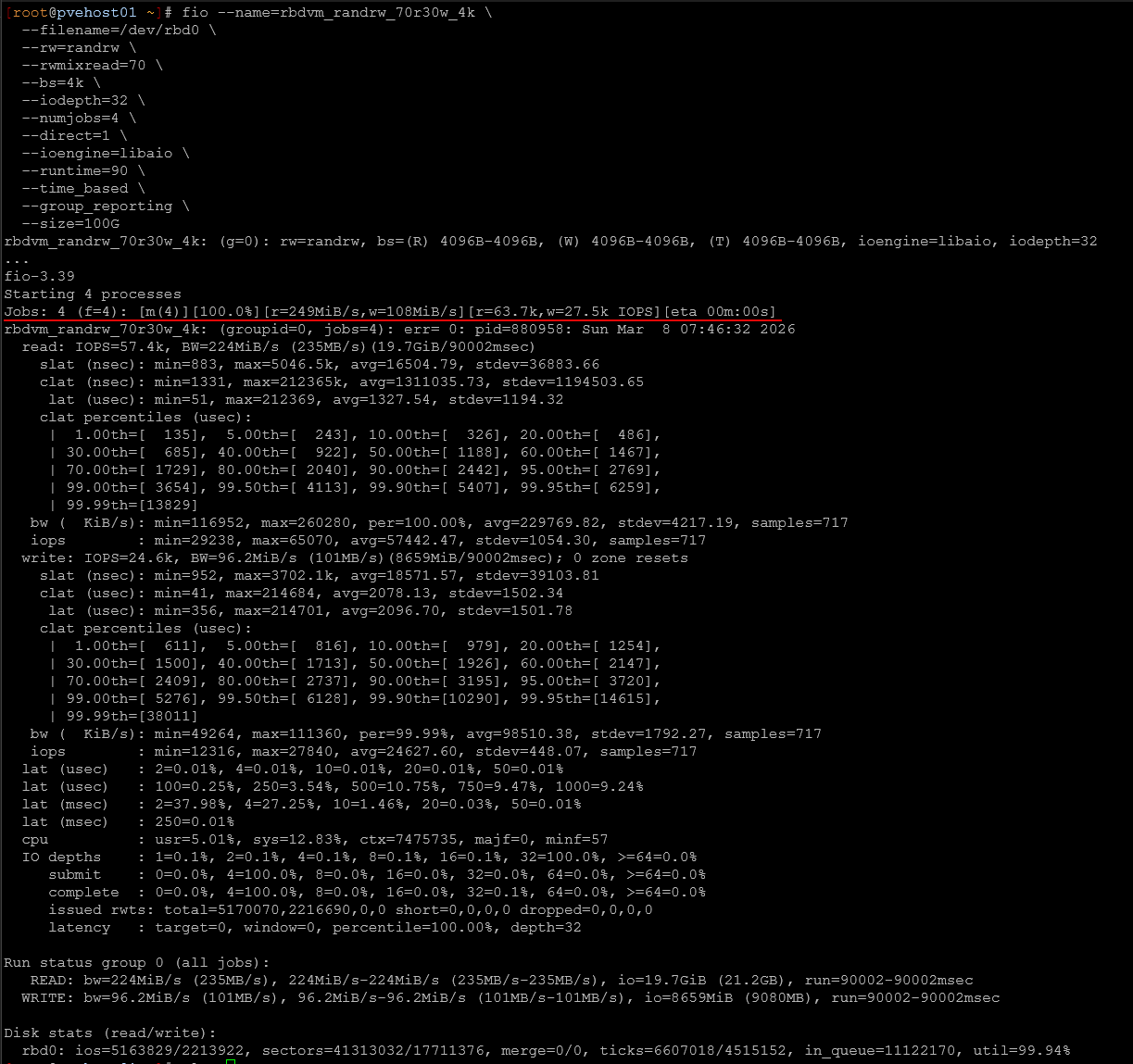
Again latency during the 70/30 test was impressive from these drives.
Overall throughput was awesome during the mixed workload test. Read IOPS increased 3.5x while write IOPS increased by a similar number. The most important change again appears in write latency, which dropped from roughly eighteen milliseconds down to just over two milliseconds.
The slightly higher read latency compared to the consumer baseline is expected because the system is now processing far more IO overall. So that is the explanation there. The cluster is doing significantly more work per second, and the drives are servicing a much larger number of requests simultaneously.
1M sequential write performance
Sequential workloads behave very differently than random IO. Instead of small scattered operations, large block sequential writes push sustained bandwidth through the storage system. These types of workloads often happen during activities like VM migrations, large file transfers, backups, and bulk data imports.
To test this scenario, I ran a 1 MB sequential write test using fio with a queue depth of 16.
fio --name=rbdvm_seqwrite_1m \
  --filename=/dev/rbd0 \
  --rw=write \
  --bs=1M \
  --iodepth=16 \
  --numjobs=1 \
  --direct=1 \
  --ioengine=libaio \
  --runtime=60 \
  --time_based \
  --group_reporting \
  --size=100G
The results:
| Metric | Consumer SSDs | Enterprise SSDs (all Micron 7300 MAX drives) |
|---|---|---|
| Throughput | ~542 MiB/sec | ~1539 MiB/sec |
| IOPS | ~542 | ~1538 |
| Avg Latency | ~18–20 ms estimated | ~10.3 ms |
Latency during the large sequential block writes:
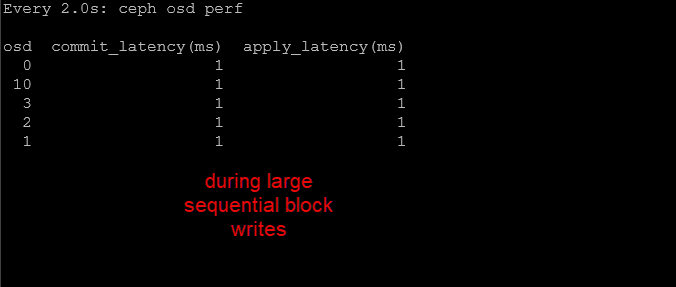
The improvement here is significant.
Raw Ceph object write performance
To isolate the Ceph object layer itself, I ran rados bench using 4 MB objects with sixteen concurrent operations.
rados bench -p rbd_vm 60 write --no-cleanup| Metric | Consumer SSDs | Enterprise SSDs (all Micron 7300 MAX drives) |
|---|---|---|
| Throughput | ~786 MB/sec | ~1850 MB/sec |
| Avg Latency | ~81 ms | ~34 ms |
| Peak Bandwidth | ~1.1 GB/sec | ~2.0 GB/sec |
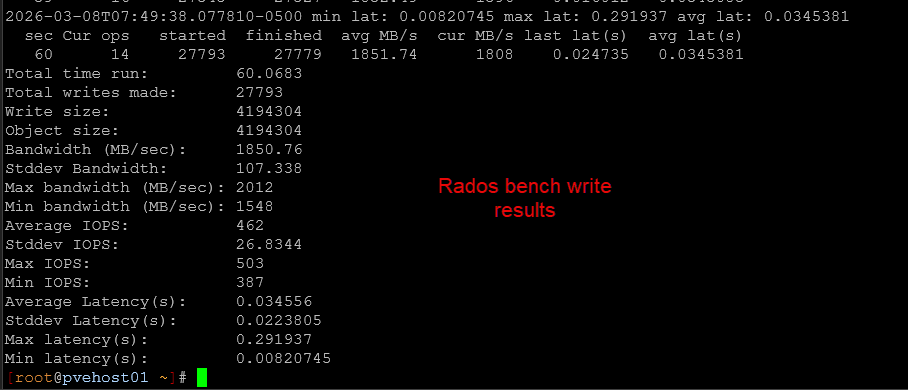
Very good latency numbers during the Rados bench write test.
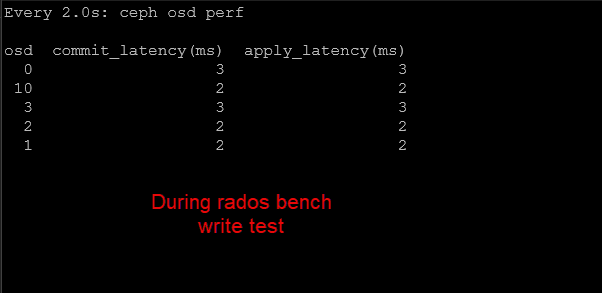
The improvement here is also substantial. Sustained object write throughput increased by 2x while average latency dropped significantly.
Large object writes involve multiple steps including network transfers, replication, and disk commits. Seeing sustained throughput close to two gigabytes per second shows that the cluster is now able to utilize the available network bandwidth much more effectively (dual LACP 10 gig connections).
Raw Ceph object read performance
Finally, I ran the rados sequential read test to evaluate large block read performance at the object layer.
rados bench -p rbd_vm 60 seqThe results:
| Metric | Consumer SSDs | Enterprise SSDs (all Micron 7300 MAX drives) |
|---|---|---|
| Throughput | ~1.23 GB/sec | ~1.51 GB/sec |
| Avg Latency | ~51 ms | ~41.9 ms |
The improvement here is more modest, but still meaningful.
Large object reads were already performing well with the consumer drives, which suggests the cluster was already scaling read traffic effectively across nodes and network paths.
Enterprise drives still improved throughput and reduced latency, but the gains were smaller because this workload was likely already approaching the limits of the broader system architecture.
Overall winner in consumer vs enterprise SSDs in the home lab
Looking at all tests together is pretty eye opening. When considering consumer vs enterprise ssds home lab drive choices in terms of performance, there is no comparison. Enterprise is without a doubt MUCH better.
| Test | Improvement |
|---|---|
| 4K Random Read | ~5x higher IOPS |
| 4K Random Write | ~7x higher IOPS |
| Mixed 70/30 | ~3.6x higher throughput |
| Object Write | ~2.3x higher throughput |
| Object Read | ~23 percent higher throughput |
The largest gains as we would expect are in random writes and mixed workloads where replication overhead of Ceph is highest. This is exactly where enterprise SSDs are designed to perform, and they did.
Wrapping up
So to answer the question with consumer vs enterprise SSDs in the home lab, are enterprise drives worth it from a performance standpoint? Can you tell a difference? The answer is a resounding YES. The performance is orders of magnitude better with the Micron 7300 MAX 3.2 TB drives vs a consumer-grade Samsung 980 Pro drive.
Even though on paper the Samsung 980 Pro has superior specs from a burst standpoint, it is just not designed to handle the type of workloads the Micron 7300 MAX drives are designed to handle and the latency patterns of the Samsung 980 Pro wasn’t even in the ballpark of the Micron 7300 MAX drives. Are they worth it? I honestly think yes, if you want the best storage subsystem that you can buy for your home lab, enterprise drives make a HUGE difference. You can find these drives, although somewhat scarce, for around $350-$450 a piece. Which honestly, this isn’t really much different from a price perspective from consumer NVMe drive prices these days. What about you? Have you performed a similar experiment? Let me know your thoughts of my benchmarking results.

Google is updating how articles are shown. Don’t miss our leading home lab and tech content, written by humans, by setting Virtualization Howto as a preferred source.
About The Author