


I have been writing a lot about DNS lately as I have been trying out a lot of different solutions. Recently, I took the new version of Technitium for a spin with native clustering in v14 and it is awesome! I am currently running this as a cluster for my “family” side of the home network for ad-blocking, etc. However, I also use other DNS servers, like Unbound. With Unbound, I manage an unbound.conf file that contains the configuration for the server. Up until now, I have just been remoting into my server and editing the file and respinning the container. However, I now manage my DNS server from Git and it changed everything. Let me show you how.
Why manage things from Git?
First of all, why would you do this? Doesn’t this introduce complexity or effort to get things done. Well, yes and no, but the advantages far outweigh the disadvantages of this approach in my honest opinion. I have been on a journey in my personal home lab of automating as much as I can automate and to implement version control on everything that makes sense to do so.
When you store things in Git, you get the advantage of having things stored safely in a way where your changes are “versioned”. This means you can roll back at any time to a previous version or even 10 versions back. This gives you a lot of control when it comes to reverting changes and disaster recovery. But it also makes things extremely repeatable and takes out all the processes in between. This also fits very much into the DevOps mentality managing infrastructure.
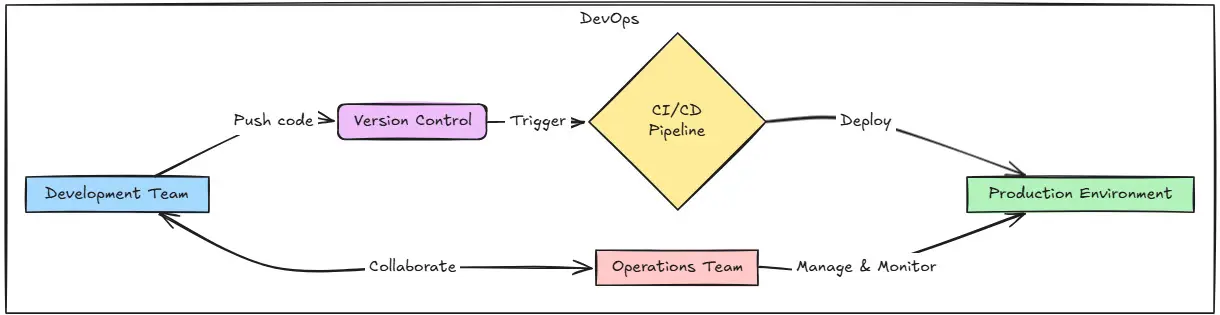
For instance, managing my DNS configuration file from Git means I no longer have to SSH into my Linux Docker Host and run all the commands and updates I need locally on the server. Now, I simply make the change to the file in my local copy of the repo and then push those changes via a commit to my GitLab server. Then GitLab does all the rest of the work. It copies the new file version down and respins the container, which is awesome!
Automated linting and config checking
Another VERY useful thing you can do when you manage configurations like this from Git is you can Lint your config files and check their config for things like syntax errors, or typos that break the solution. Case in point. When I was managing my DNS server config manually by directly editing the config file for unbound, several times I would leave out a quote at the end of a line or put an extra character in there or space that would break the config file.
Then, Unbound wouldn’t start. However, with Git and a CI/CD pipeline, I can check the config file with the built-in Unbound config checker and make sure the syntax is good before we put the file in place.
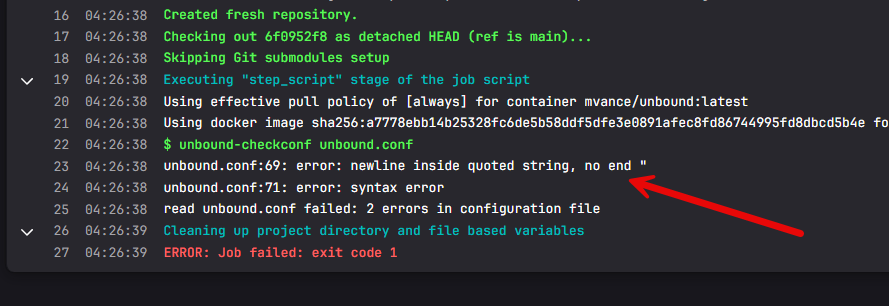
This is a major benefit to doing things this way, especially when it is related to a core service like DNS, you want to make sure you don’t introduce a breaking change and then everything is down. You will see this stage in my GitLab pipeline file below.
Why DNS configuration using Git is a good fit
We have already touched on this. Most home labs using Unbound configurations probably have the configurations managed in a very direct way. You SSH into the Docker host or Linux host if you are running Unbound on a bare metal Linux installation and you make a low-level change, adding or removing records. There are no guardrails that prevent bad edits from being deployed.
Also, there is no clean roll back, other than hoping you have a copy of the previous file or remember what you changed. This can make your lab extremely fragile when you edit things in this way, especially core services like DNS. I have made accidental mistakes when editing that have broken Unbound. Maybe not typing quotes around things that needed them or leaving one off. Then your container won’t start, or your Unbound service won’t start on your bare metal server.
You don’t want these kinds of manual edits to take down your lab and not have a good way to control your deployments, or even rollback when needed.
Why Unbound makes this possible
So, currently, I am running Unbound using a Docker container. I use Unbound as a the target of a conditional forwarder that I have setup on a Windows Active Directory DNS server. The conditional forwarder that I am targeting on the Unbound server is a split horizon zone that allows me to have a few of the public DNS records resolve with internal IP addresses for the home lab, but then have the others resolve using the public IPs.
The good thing about Unbound is that all of your configuration lives inside a single configuration file called unbound.conf.
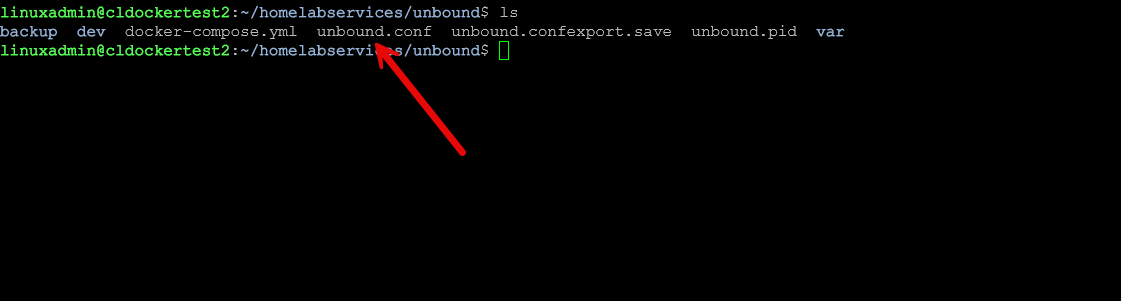
That detail matters because it means the behavior of my DNS server is entirely defined by the text within that file. If you want to know how the DNS zone works in my lab, you read the configuration file. Any infrastructure solutions that run from a set of configuration files that you can control are great candidates for Git versioning and management.
Treating Git as the source of truth
I have mentioned this already, but the moment you put your configuration files into a Git repository, your relationship with the config files on the servers themselves can change. The repository then can become the source of truth. This makes your running container even more disposable.
Let’s face it, even if you have backups of your config files in your backup solution, you still have to pull that backup file out of backups of your persistent data, rehydrate it to your server, and then spin up the container. This makes this much less painful than that. At this point, you don’t even really care about the persistent data, even though I definitely back mine up. Instead, this becomes just a secondary failsafe to immutable containers.
If I want to add a hostname, adjust a static mapping, or clean up old records, I do it locally. I review the diff. I think through the change. I commit it with a message that explains why it exists.
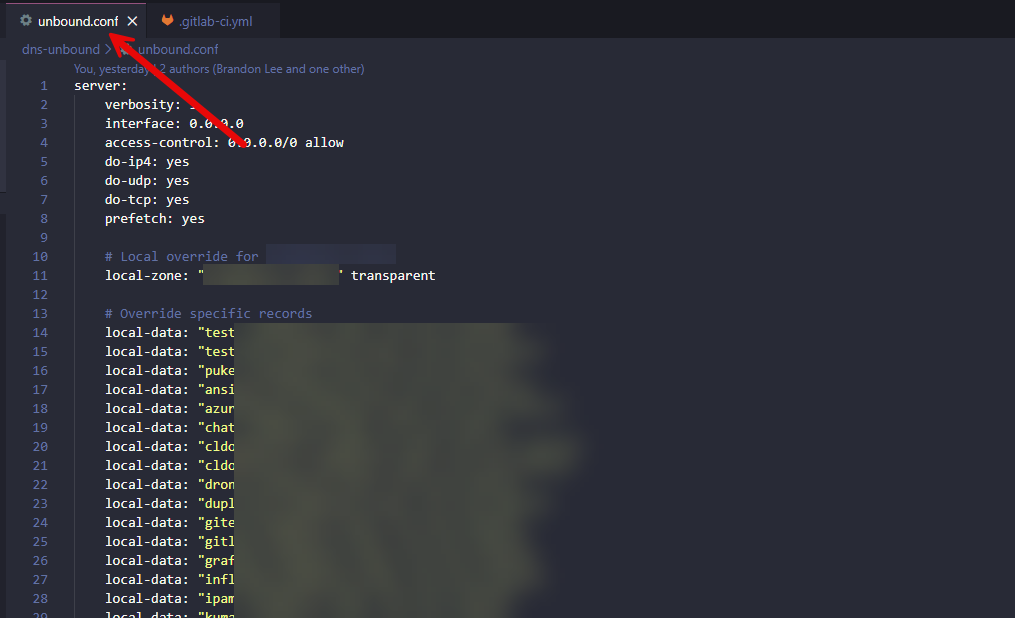
Nothing touches the running DNS service until I deliberately push the change. That single shift removed most of the anxiety I used to feel when working with DNS.
My GitLab pipeline file to automate this
Now, to the actual pipeline configuration file for those who want to do something similar. The pipeline below is setup with two stages in GitLab. The first stage is a validate stage. This is where we verify the unbound configuration file. This is the helpful part of a CI/CD pipeline that allows us to verify the configuration is actually good before we cutover to the modified file. If the config has a syntax error, etc, the pipeline will fail.
In this stage, we are running the command unbound-checkconf and feeding it the config file. This command is not something special we wrote here or a third-party tool. Rather it is part of a native unbound installation and is also in containerized versions like we are using here.
Finally, the second stage is the actual deploy stage. Here we are deploying the unbound.conf file after it passes the validate stage since we know the config is good from a check standpoint. Most of this stage is just normal pipeline stuff. You will see we have a couple of pipeline variables configured:
- SSH_PRIVATE_KEY
- DOCKER_HOST
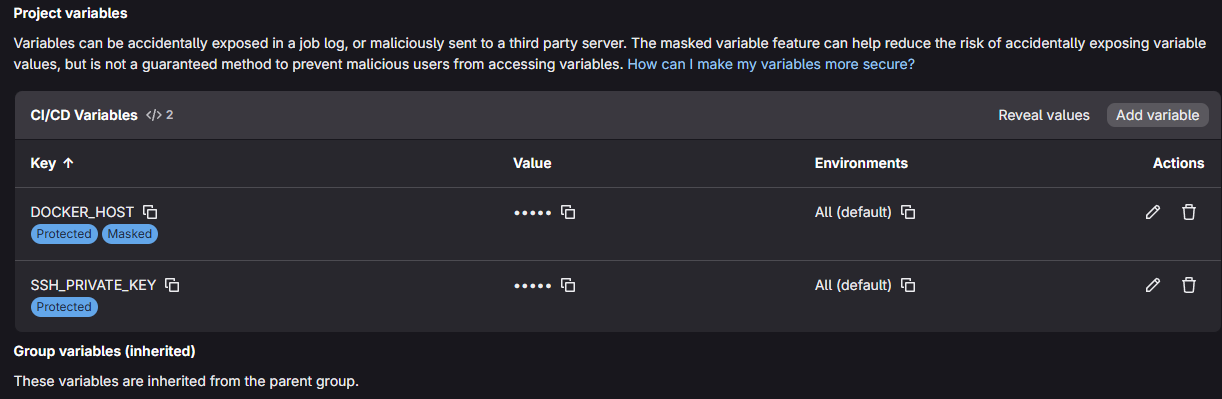
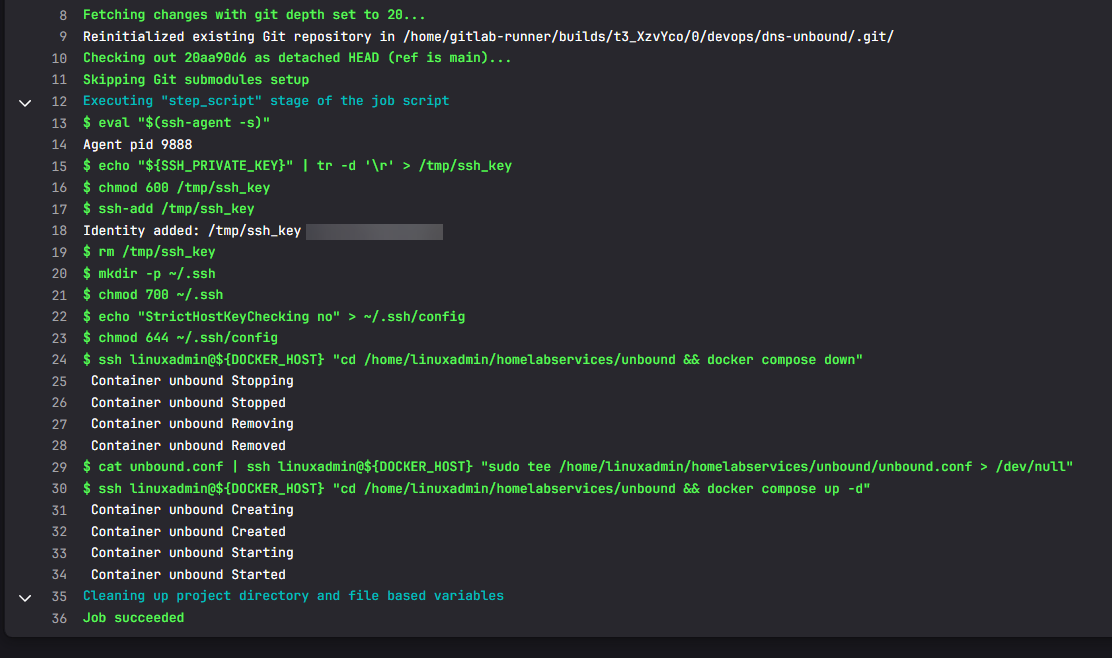
This allows us to have the private key stored as a pipeline variable and then the docker host is something we can also store as a variable. Then we just down the docker compose stack for unbound, copy the new file in place and bring the stack back up again.
stages:
  - validate
  - deploy

validate_unbound_config:
  stage: validate
  image: mvance/unbound:latest
  script:
    # Validate the unbound.conf syntax
    - unbound-checkconf unbound.conf
  only:
    - main
  tags:
    - docker

deploy_unbound_config:
  stage: deploy
  image: ubuntu
  before_script:
    - eval "$(ssh-agent -s)"
    - echo "${SSH_PRIVATE_KEY}" | tr -d '\r' > /tmp/ssh_key
    - chmod 600 /tmp/ssh_key
    - ssh-add /tmp/ssh_key
    - rm /tmp/ssh_key
    - mkdir -p ~/.ssh
    - chmod 700 ~/.ssh
    - echo "StrictHostKeyChecking no" > ~/.ssh/config
    - chmod 644 ~/.ssh/config
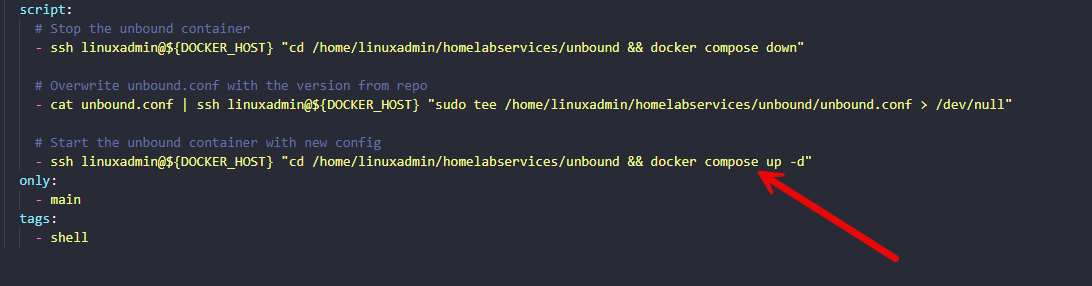
  script:
    # Stop the unbound container
    - ssh linuxadmin@${DOCKER_HOST} "cd /home/linuxadmin/homelabservices/unbound && docker compose down"

    # Overwrite unbound.conf with the version from repo
    - cat unbound.conf | ssh linuxadmin@${DOCKER_HOST} "sudo tee /home/linuxadmin/homelabservices/unbound/unbound.conf > /dev/null"

    # Start the unbound container with new config
    - ssh linuxadmin@${DOCKER_HOST} "cd /home/linuxadmin/homelabservices/unbound && docker compose up -d"
  only:
    - main
  tags:
    - shell
Restarting the container vs reloading config
As we see above, we are restarting the container on every deployment of the pipeline. Why do a restart instead of simply reloading the configuration file? Well, the restart only takes a few seconds and the DNS interruption is minimal, especially for a lab environment.
Also, this helps to guarantee the running service is using the configuration we have defined in Git. There is no ambiguity about whether a reload icked up every change. This also helps us with the idea of immutable infrastructure, even in our home lab. We are respinning each time there is a change and not simply updating anything.
How did this “change everything” you might ask?
Well, the biggest change here I think for me is a psychological one. A core critical service in my home lab stopped feeling like it was a bit fragile, especially when updates needed to be made. It helps me now to have a solution that allows making changes and even improvements to the config without worrying about breaking something late at night.
With the pipeline, I know it is going to be deployed exactly the same way each time. Also, with the stage to validate the config, I won’t be accidentally introducing an issue into the config which I have definitely done before without realizing it. Also, with Git processes and procedures, rolling back to a previous commit is trivial and easy.
My rollback is as simple as performing a git reset to the previous hash and restoring the previous working config which will be done automatically when the pipeline finishes running. This is a level of confidence and tooling that you just don’t really have when you are editing files directly on a server.
Real world benefits I didn’t really expect, but got anyway
One of the useful things that I didn’t set out to accomplish with this approach was documentation is automatically built into your Git repo. Your Git history becomes your documentation. You can look back at records and see what changes you have made over time, what records have been added, removed, etc.
Another major benefit is disaster recovery and mobility of your DNS app. If I need to rebuild the DNS host or move the container to another host, I don’t have to pull the config from a backup or look for things I need. I simply run my docker compose code I have stored in Git and also run my pipeline pointed to a different host.
It also enforced better discipline. I stopped making quick one off changes directly on the server. Everything flows through the same process now, which keeps the environment clean and predictable.
Helps you get into DevOps
If you have been wanting to learn DevOps and have as your goal to be a DevOps engineer, this mindset shift and taking on small projects like this in a home lab is one of the best things you can do to learn. I am very much a learner by doing and I think realistically, most of us are. I think actually having a project that solves a problem in the home lab is a great way to learn and have fun at the same time.
Wrapping up
Hopefully, this little project on how to start managing your DNS configuration in Git will help to open the door to incorporating Git into more normal management tasks like config file changes. In my opinion, this is the best approach that allows you to automate things, have tasks repeatable with accuracy, bolster your DR plan, and also avoid mistakes. How about you? Are you using DevOps CI/CD automation currently with tasks like this? What other project would you recommend? Let me know in the comments.

Google is updating how articles are shown. Don’t miss our leading home lab and tech content, written by humans, by setting Virtualization Howto as a preferred source.
About The Author

Welcome to the team! 😄
You might like DNSControl from the cool guys at StackExchange.
I’ve been using it for years now for absolutely every DNS configuration need I have.
F.D.Castel,
I will have to check this out for sure. Thanks for the tip!
Brandon
You should check octodns as a glue in between, to provision unbound from git.
Definitely will give this a look! Thanks Marcin.
Brandon
seems like a recipe for disaster to me, especially if you didnt like to ssh remotely before, now you are at the mercy of Git and its capacity to not get hacked/leak and your account user/pw from being known/stolen ..etc.
seems like you introduce a whole new world of possible issues that you weren’t exposed to before or at least on a smaller scale of danger.
or is it just me not understanding?
not against using git to capture changes and validation but to allow it to have its tentacles in your Lan is my eyes a bit scary. I know I know we arent talking about a company environment but if we are honest, wasn’t privacy the whole point to hosting custom dns solutions? companies have the resources to rebuild, getting screwed out of your life’s saving or endangering your family is something that in my eyes should be treated with much more care.
b101,
Thank you for the comment here and security is definitely an area of concern with any solution. In this case, you would secure your Git solution like any other critical solution with strong password and 2FA. Also, the great thing about this is that you can use a user making the connection to your docker host with only the right permissions needed to read the project and restart the container that you want to restart. So, in this case we have a very clean solution for connectivity and only this one box will be making SSH connections. You could even filter traffic for SSH down to your Gitlab, Gitea, or other instance. I also mirror my Gitlab instance locally with a cloud instance to have a backup of my critical projects just as a failsafe that I have my code and config file if anything destructive happens locally. With good security hygiene this solution can actually be very secure and actually minimize your attack surface. Hopefully this helps.
Thanks b101,
Brandon
Is it possible to use Git to configure technitium as well ?