


Scripting mundane setup tasks is essential in today’s world of server/workstation provisioning in the fast paced Virtualization environments we as system administrators manage. If you are like me, you may have googled “set audit policy powershell” to find a quick way to set your audit policy via powershell. If like me, you didn’t really find a good way to set your settings with powershell, you may want to look at the auditpol command line utility which you may already be using as it is. I have used it before in looking at audit policy settings, but not setting them
Let’s take a look at a quick post on how to set audit policy quickly and easily to match your company’s audit policy using this command line utility.
Set Audit Policy
Again, let’s say I want to set my audit policy to look like the following:
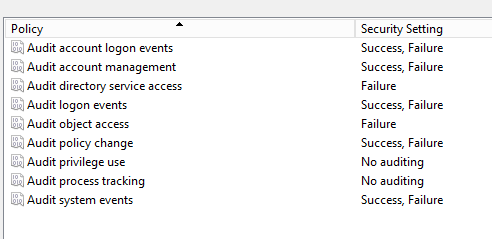
To see these settings via the command line with the auditpol utility you would enter the following command:
auditpol /get /Category:*
So how would I set the settings in the above screenshot using auditpol? The syntax is very similar with the set command. The only difference is that you specify the categories you want to set as well as whether you want to set the /failure to enable or /success to enable or both.
auditpol /set /category:"System","Account Management","Account Logon","Logon/Logoff","Policy Change" /failure:enable /success:enable

auditpol /set /category:"DS Access","Object Access" /failure:enable
As you can see above, you can lump the various categories together if they have the same auditing settings. So above, I have System, Account Management, Account Logon, Logon/Logoff, and Policy change all set to audit both failures and successes. The next line follows suite and enables only failure auditing for the specified settings.
Final Thoughts
The commands above can easily be added to another setup script you may be calling to automate system settings. The auditpol command is a useful utility and can be used to take a look at current settings as well as set flags that you want set for failure and success auditing.
More in this topic

Discuss this in the Community

Google is updating how articles are shown. Don’t miss our leading home lab and tech content, written by humans, by setting Virtualization Howto as a preferred source.
About The Author

LOL, this is exactly what I searched for. Thanks for this writeup, it is still helping someone 9 years later.
Rohit,
Thank you for the comment! I am so glad that you found it. Google has just about become worthless these days on surfacing what we need so glad you found it! Thanks again and please join the VHT community.
Brandon