




I recently installed Flatcar Linux in VMware vSphere and ran into a few gotchas that were different from my usual Proxmox workflow. Since most examples focus on Proxmox or cloud providers, I wanted to document the process that ultimately worked for me.
Download the VMware OVA
Download the VMware OVA from Flatcar:
https://www.flatcar.org/releases/ Choose the VMware/vSphere OVA image.
Create your Butane configuration
Create your normal Butane configuration file (example here):
variant: flatcar
version: 1.0.0

passwd:
  users:
    - name: linuxadmin
      groups:
        - sudo
Save it as:
flatcar.bu
Convert Butane to Ignition
Generate the Ignition JSON:
butane --pretty --strict flatcar.bu > flatcar.ign
Verify the file starts with JSON:
head flatcar.ignYou should see something similar to:
{
  "ignition": {
    "version": "3.3.0"
  }
}
Base64 encode the Ignition file
Encode the generated Ignition file:
base64 -w0 flatcar.ign > flatcar.ign.b64View the contents:
cat flatcar.ign.b64Copy the entire output.
Deploy the OVA
Deploy the Flatcar OVA in vSphere.
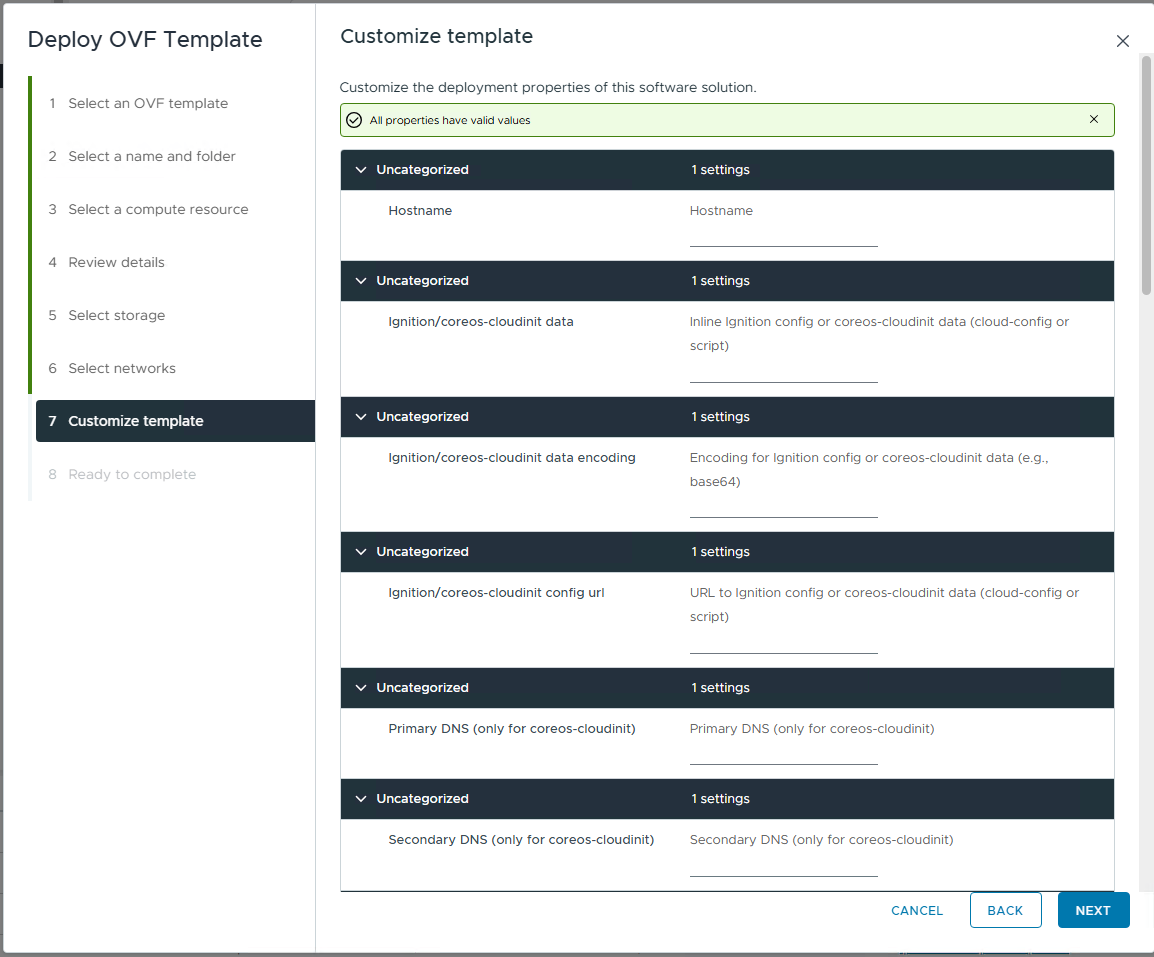
You can either populate the Ignition fields during deployment or add the values later as Advanced Parameters before the VM is ever powered on. But populating values manually during the OVA install is tedious and doesn't scale very well. You can leave the following screen blank during the deployment:
Configure Ignition using Advanced Parameters
This is the part that you want to pay attention to the details. You need to create the following two advanced configuration parameters:
guestinfo.ignition.config.data
guestinfo.ignition.config.data.encoding
With the VM powered off:
VM Settings > VM Options > Advanced Parameters
Add:
| Attribute | Value |
|---|---|
| guestinfo.ignition.config.data | Entire contents of flatcar.ign.b64 |
| guestinfo.ignition.config.data.encoding | base64 |
Both parameters are needed. If you forget to add the base64 advanced setting for the encoding value, you will see errors when it tries to load the config, like this:
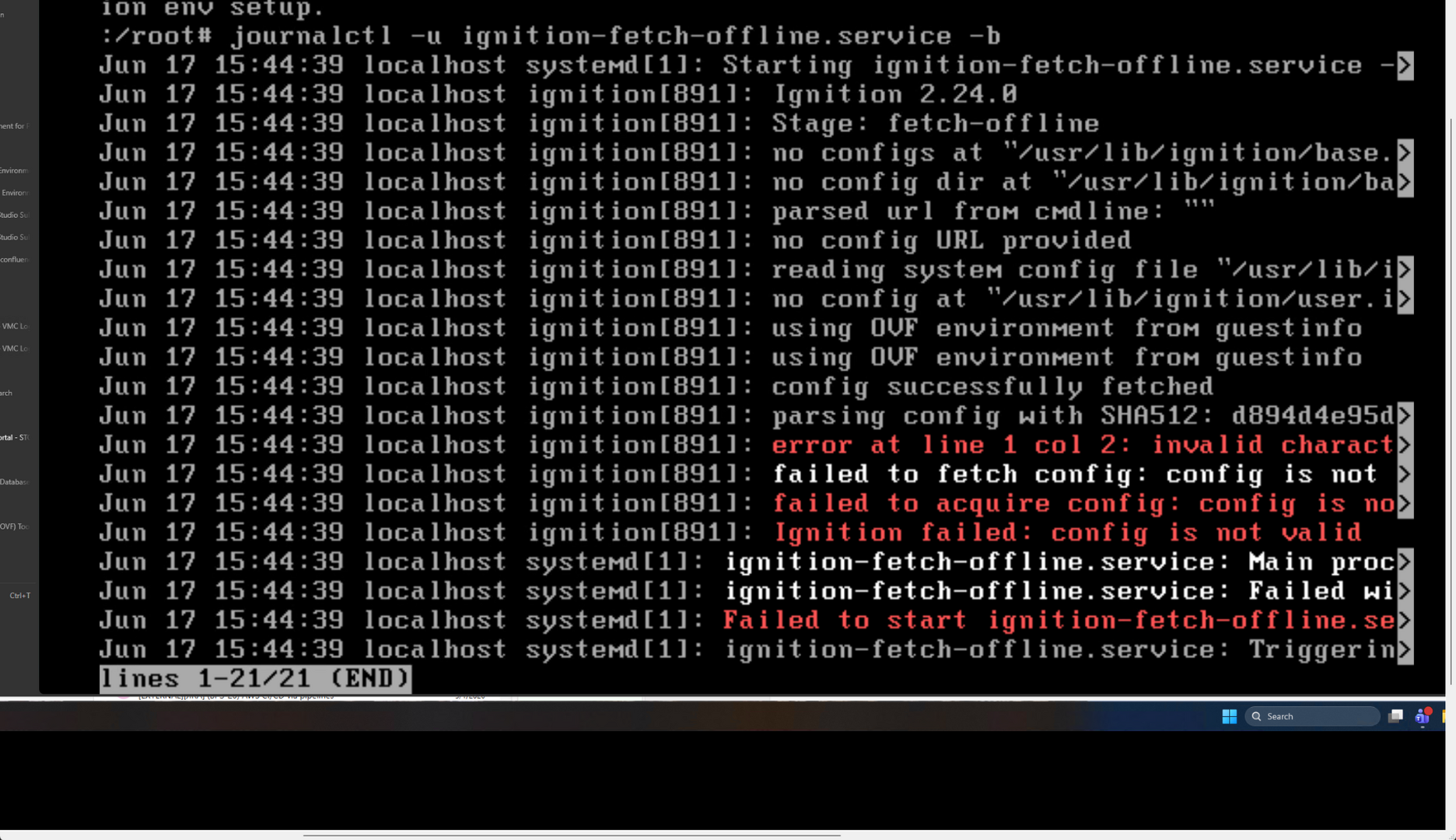
Without the encoding parameter, Flatcar will attempt to parse the base64 string as JSON and fail with errors similar to:
error at line 1 col 2: invalid character 'e'
VMware network interface naming
One difference I found out between Proxmox and VMware is interface naming.
In my environment VMware name the NIC as:
ens192Make sure of the the interface name before building static network configuration.
Example:
[Match]
Name=ens192

[Network]
Address=10.1.149.20/24
Gateway=10.1.149.1
DNS=10.1.149.10
Domains=cloud.local
Be careful with Ignition file downloads
My Ignition file contained:
contents:
  source:  https://extensions.flatcar.org/extensions/docker-compose.conf
and similar remote downloads.
These worked in my Proxmox deployment but failed during VMware deployment because Ignition attempted to fetch them before networking and DNS were fully available.
The symptom looked like:
lookup extensions.flatcar.org on [::1]:53
If you encounter this, deploy without the remote contents.source entries first and move those downloads to a systemd service that runs after:
network-online.targetVerify Ignition
After booting:
journalctl -u ignition-fetch-offline.service -b
or
journalctl -b | grep -i ignitionSuccessful processing should show:
using OVF environment from guestinfo
config successfully fetched
Hopefully, this forum post will help any who might be looking for information on how to deploy Flatcar in VMware vSphere. It is definitely doable but the process differs quite a bit from Proxmox.