I have been on a crusade in my home lab to see how far I can take my mini PC cluster. I have been having so much fun with my new Proxmox mini cluster running on 5 Minisforum MS-01s with Ceph distributed storage and enterprise drives backing Ceph. These have formed the basis of what I think is arguably my best performing home lab yet. Now, I have added an eGPU setup to my Proxmox VE mini cluster and I want to share my thoughts on adding an eGPU in the home lab, my hardware I’m using, and what kinds of workloads this enables in the home lab environment.
Why I wanted an GPU in my home lab
One of the things when went down from bigger chassis to mini PCs, I didn’t really have the size inside the MS-01s to install the video cards that I had on hand and ones that I wanted to use in the lab. And, I honestly missed not having a video card to play around with. Why?
There are several reasons why GPUs are becoming more important in home lab environments I think. The biggest driver right now is AI and machine learning, along with agentic coding. Many tools that we have available to us now are related to experimenting with GPU acceleration, running local LLMs, training models, or running inference workloads using things like Ollama and OpenWebUI.
Another common use case is media processing. Using tools like Plex, Jellyfin, and other encoding utilities can allow you to take advantage of the processing power that GPUs bring to the table for hardware accelerated transcoding. This offloads the processing of media encoding from the main CPU decreasing its load, while increasing the overall performance.
There are also many other use cases, including virtualization. GPUs can be passed through to your virtual machines or containers so you can have hardware acceleration for specialized workloads like running LLMs in virtual machines or building GPU enabled development environments.
So, now back to my original challenge, simply fitting a GPU into a mini PC environment. This is where external GPU docks (eGPU) comes into play.
The benefits of running an eGPU with mini PCs in Proxmox
There are a lot of benefits to running an eGPU with mini PCs if you are running these in a home lab. For one, if you have mini PCs that just won’t physically fit a full size GPU, which is most of them on the market today, an eGPU gives you a way to still be able to have GPU power attached to your mini PCs. This is great since you don’t have to be forced into buying a full size machine or server if you want to run GPUs or GPU-enabled workloads.
Second, the thing I really like about an eGPU setup is the fact that you don’t have to run the GPU all the time. If you install a GPU in a full size workstation or server, most of the time, you are just going to leave the GPU running in the machine 24x7x365 if that is how much you run the server in general.
With an eGPU setup, it gives you the flexibility to “turn off” the GPU when you don’t want to use it or don’t need it. This saves power and it gives you the control over when these resources will be utilized. In my testing with just an older GeForce RTX 4060 card that I have used for LLMs, etc, the card runs at around 30 watts just sitting idling. So, the 30 watts will add up if it isn’t being used at all and just sipping power.
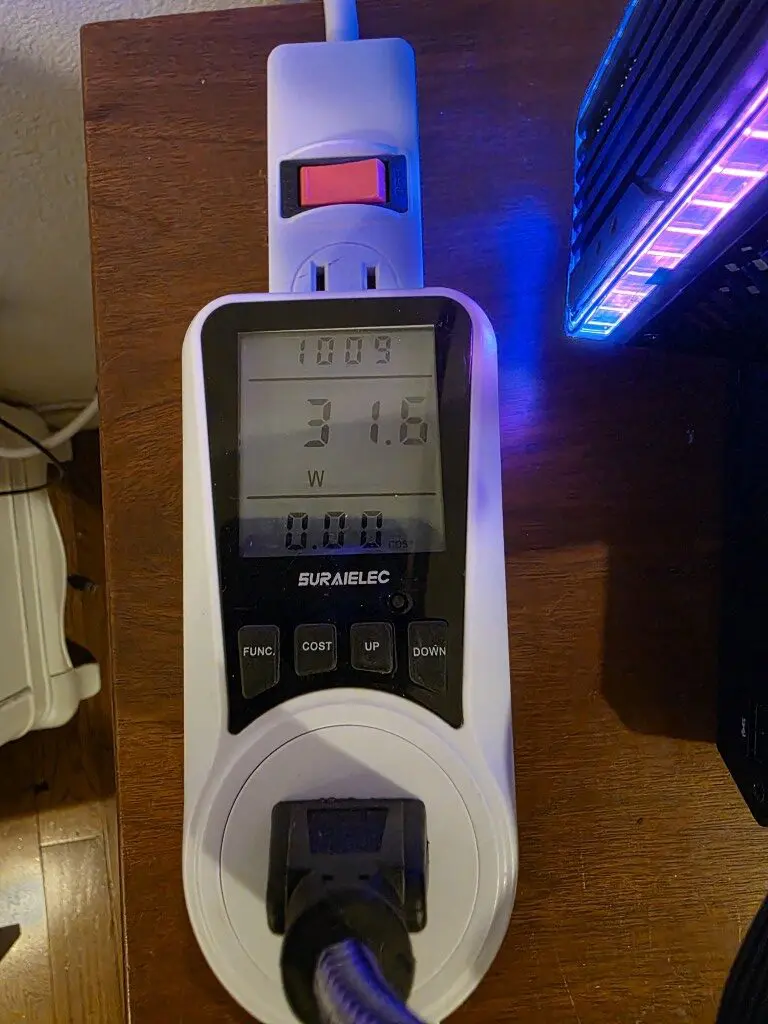
Lastly, when you can lower power draw numbers and not run equipment when you aren’t using it, you are by extension lowering heat in your home lab area. Heat can be brutal in the summer months. With an eGPU dock, you can eliminate this heat source when it is not in use.
The hardware I am using
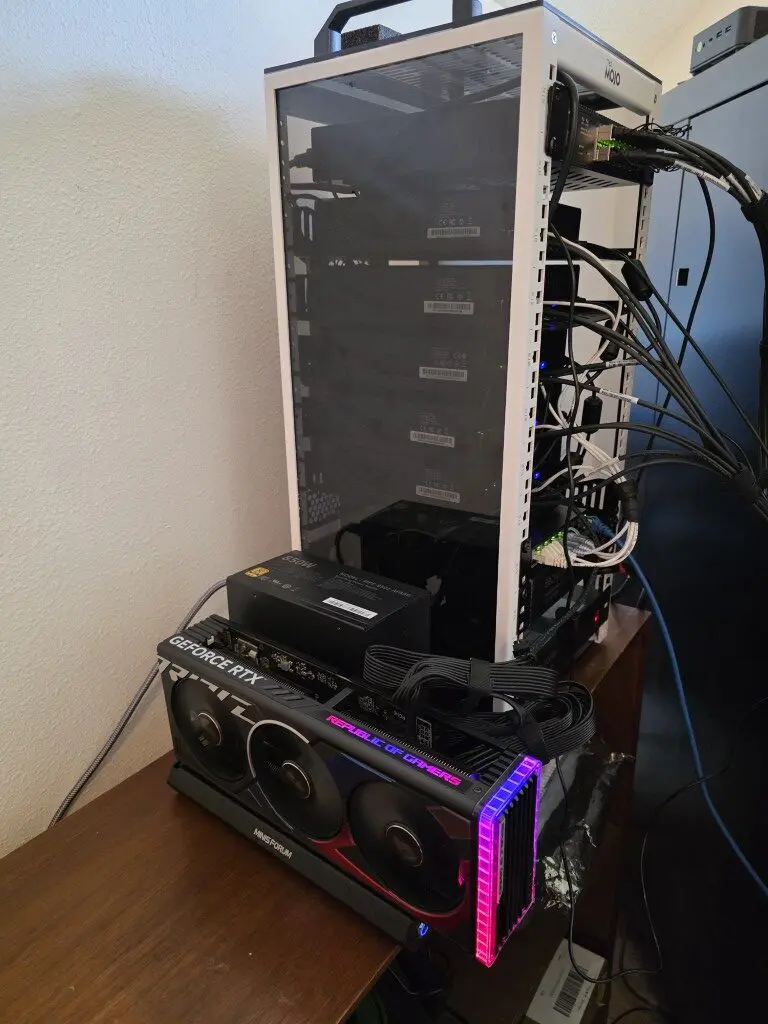
Ok, so now down to the specific hardware I am using in my Proxmox eGPU enabled mini cluster with Minisforum MS-01 machines. For my setup I used the following hardware.
- Minisforum MS-01 mini PC running Proxmox VE
- Minisforum DEG2 OCuLink eGPU dock
- OCuLink cable
- Desktop GPU
- ATX power supply (850 watt Corsair)
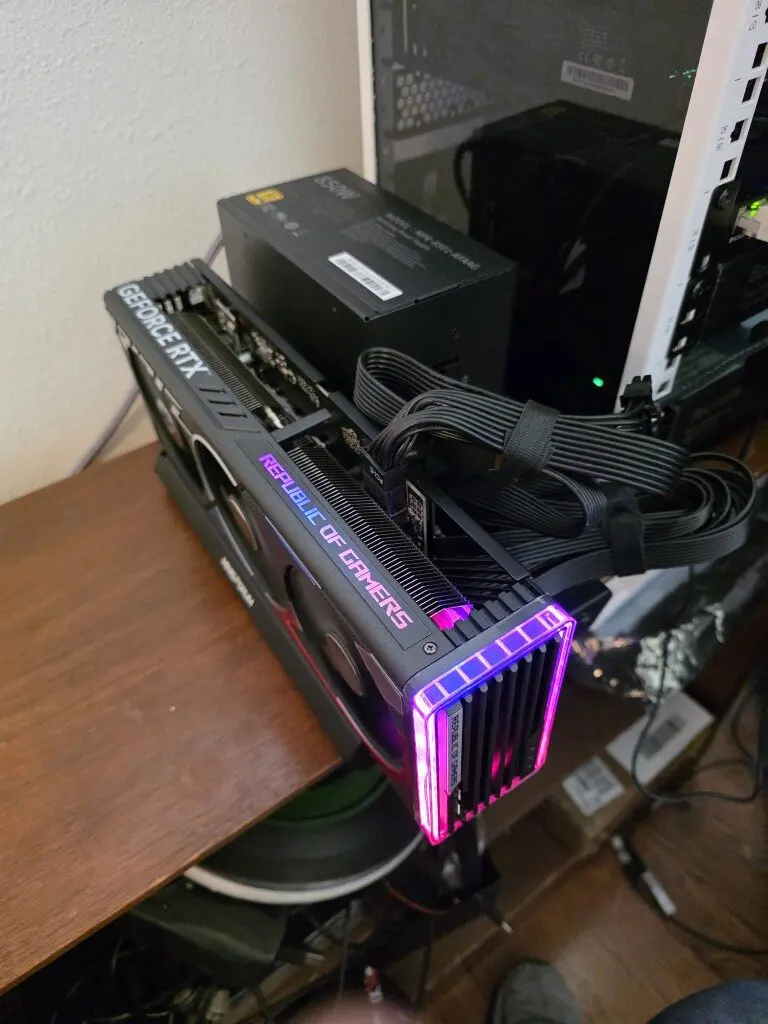
The Minisforum MS-01 is already a very capable system for home lab environments. It supports high core count CPUs, multiple NVMe drives, and high speed networking options including 10 GbE, and also, it has support for USB4 as well which you can use with eGPU docks.
There is no native support for OCuLink, but you can do like I did and add in an OCuLink PCI-e card in the expansion slot in the MS-01 and have this capability.
By connecting the MS-01 to the DEG2 dock over OCuLink, the system can effectively access a full desktop GPU as if it were installed internally. This allows the Proxmox host to detect the device and either use it locally or pass it through to a virtual machine or LXC container.
Understanding how OCuLink works
Just as a bit of background here. What is OCuLink and how does it work? OCuLink is a high speed interface that exposes PCIe lanes externally through a cable connection. Instead of tunneling PCIe through a protocol like Thunderbolt, OCuLink connects directly to the PCIe bus.
In many systems the OCuLink port provides a PCIe 4.0 x4 connection. This provides approximately 64 Gbps of bandwidth. For GPU workloads, this direct PCIe connection gives you two important advantages.
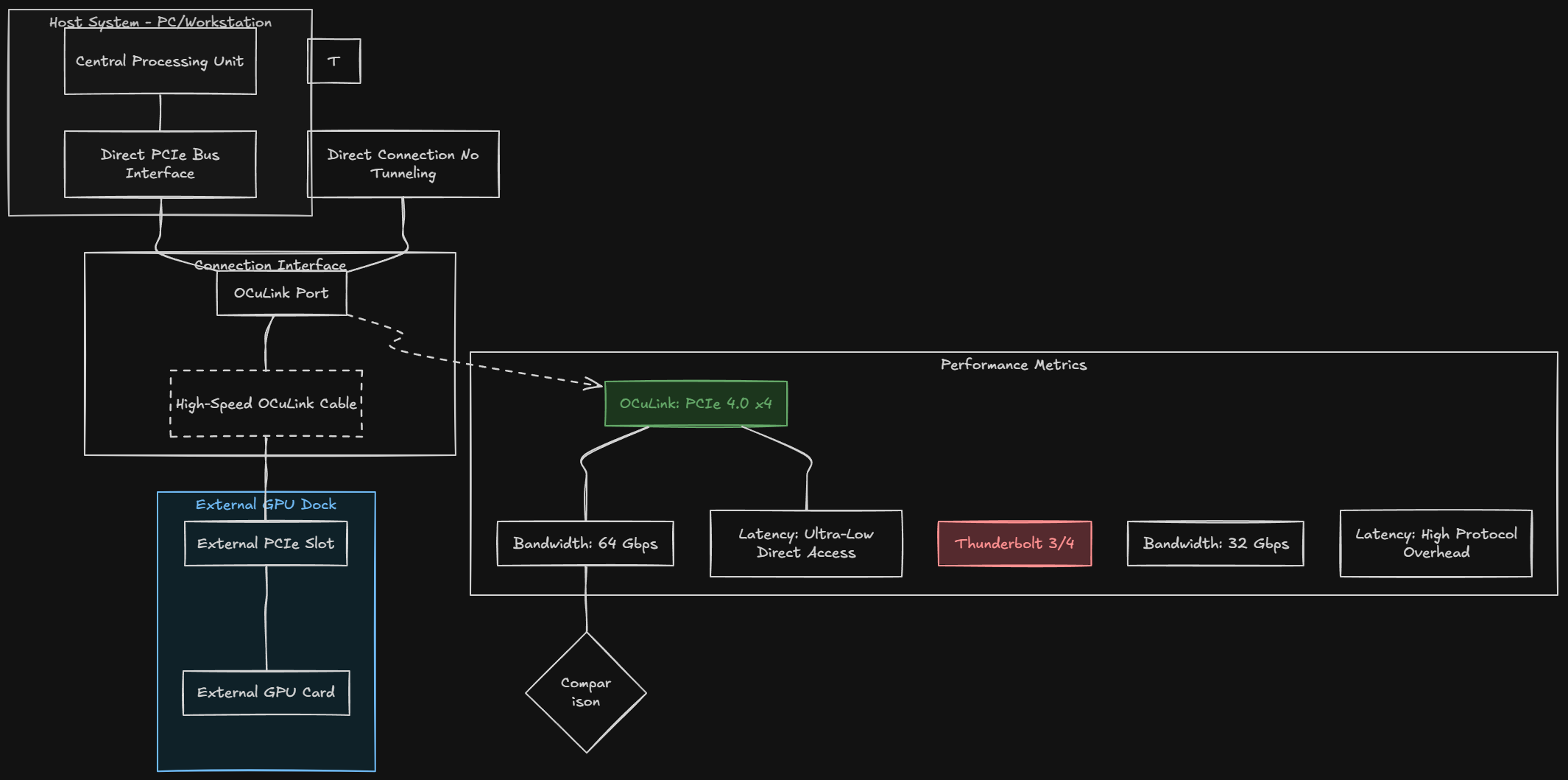
First, it provides lower latency compared to Thunderbolt based GPU enclosures. Thunderbolt involves additional protocol overhead which can reduce your performance. Second, it provides higher bandwidth than many traditional eGPU solutions. Thunderbolt 3 and Thunderbolt 4 will give you around 32 Gbps of bandwidth. For most workloads, OCuLink offers performance that is much closer to a directly installed PCIe GPU. This is one of the main reasons why OCuLink based GPU docks are becoming more popular in compact workstation and home lab environments.
The Minisforum DEG2 eGPU dock
Now, in addition to the OCuLink technology itself, you need to have a “dock” that supports installing your GPU and then hooking to your mini PC via OCuLink (if you want to use OCuLink like I did). The device that I settled on for this experiment is the Minisforum DEG2 OCuLink eGPU dock.
The Minisforum DEG2 acts like an external PCIe expansion device that is designed for GPUs and high performance devices. So, instead of it trying to be a fully enclosed GPU chassis, the DEG2 is designed more like a compact GPU test bench. It allows you to mount a desktop GPU externally and have roughly the same hardware presentation and experience as an internally installed GPU when you run Proxmox eGPU.
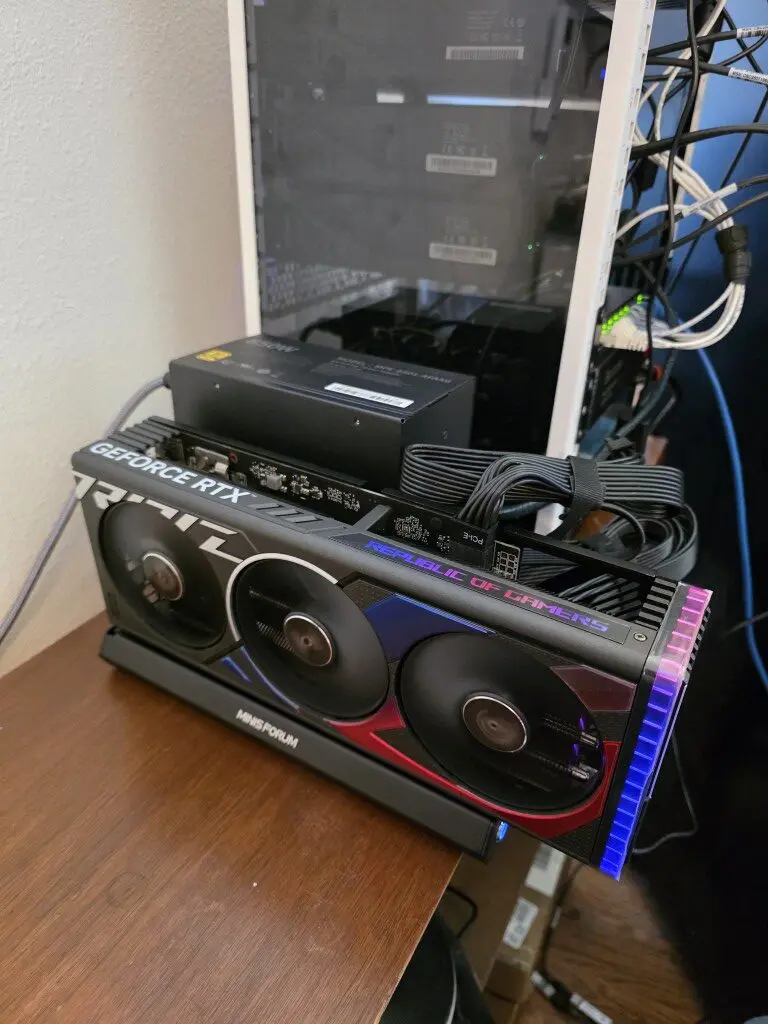
The dock gives you a standard PCIe x16 slot that can fit most modern desktop GPUs. Because the slot is exposed, installation is super easy and cooling is better than many enclosed eGPU boxes. Basically, you can have as much airflow as you need with it open and exposed.
Minisforum DEG2 specs
The DEG2 has several features that make it well suited for Proxmox eGPU home lab experimentation I think. Note the following:
| Feature | Minisforum DEG2 Specification |
|---|---|
| GPU Slot | 1 × PCIe x16 slot for full-size desktop GPUs |
| Host Interface | OCuLink (PCIe 4.0 x4) and Thunderbolt 5 |
| Maximum Bandwidth | Up to ~64 Gbps via OCuLink |
| GPU Compatibility | Supports most full-length, high-performance GPUs |
| Power Supply | Requires external ATX or SFX power supply |
| Storage Expansion | 1 × M.2 2280 NVMe slot with heatsink support |
| Networking | 1 × 2.5 Gigabit Ethernet port |
| USB Ports | USB 3.2 Gen2 connectivity |
| Included Accessories | OCuLink cable, Thunderbolt cable, GPU bracket, SSD heatsink |
| Dimensions | Approximately 270 × 175 × 41 mm |
This eGPU dock as you can see in the table provides a lot of functionality and features, including even an extra M.2 2280 NVMe slot and a 2.5 GbE network connection, very cool! For my current setup that I am hooking to my cluster, I am just taking advantage of the eGPU capabilities, but it is great to have these additional features if they might be needed in the future.
Setting up the eGPU dock
The process to setup the eGPU is super easy. You just unpackage the eGPU dock from the plastic wrap and then you get started installing your hardware (power supply and GPU). It’s that simple. There isn’t any complicated configuration phase, etc. The way the dock presents the hardware to your home lab server node or workstation mini PC is no different than having the hardware installed internally hooked to your motherboard.
The first thing that I did was install my PSU onto the dock. Two of the screws at the bottom align with your DEG2 and you just screw these into your PSU like you would do if you were installing the PSU into an ATX case.
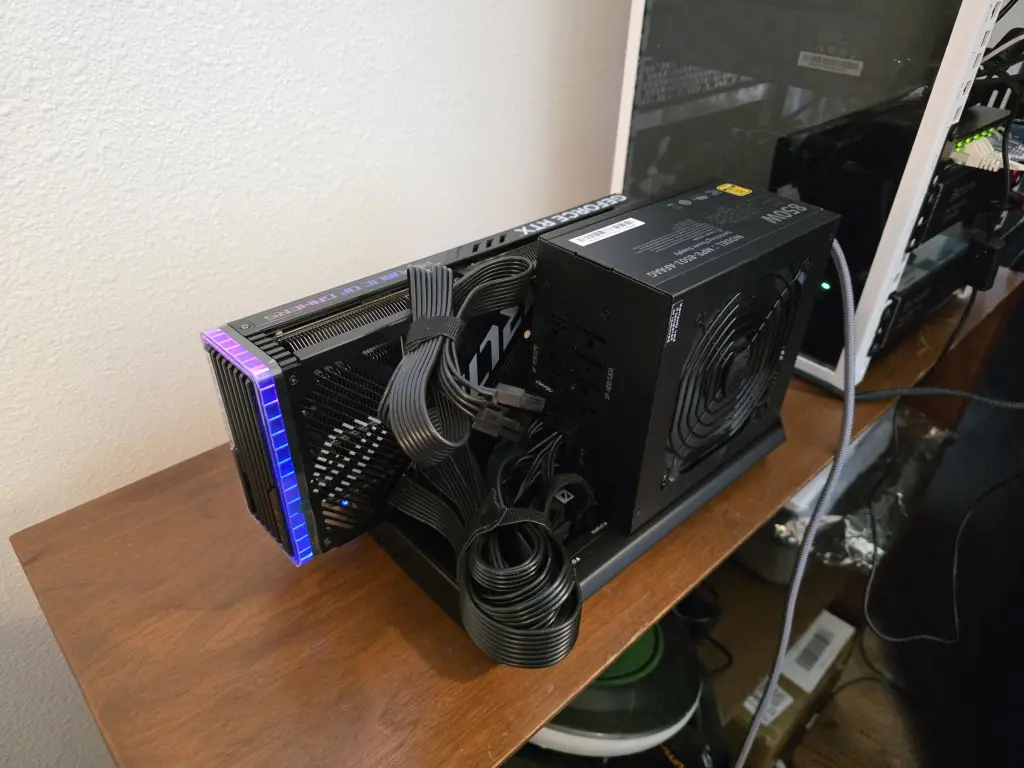
Then you want to do is install the GPU into the PCIe slot on the DEG2. This is similar to installing a GPU into a normal desktop motherboard. The DEG2 comes with a bracket and screws to secure the card to the dock.
Next, connect the GPU power connectors from the external power supply and connect the 24-pin power connector from the PSU to the dock. Once the GPU and power supply are installed, connect the OCuLink cable between the DEG2 dock and the MS-01 system. After powering on the dock and the mini PC, the system should detect the GPU automatically. If your mini PC was already on, you will need to reboot with the dock powered on for the mini PC to recognize the hardware.
Getting the GPU detected in Proxmox VE Server
After booting the system, the first thing I wanted to verify was whether the operating system could see the GPU. One of the easiest ways to check this is with the lspci command.
lspci | grep -i vgaYou can also list all PCIe devices.
lspciIn my case the GPU appeared immediately in the device list.
For NVIDIA GPUs, another useful command is the nvidia-smi command. To have this one, you will need to install either the official Debian repo driver, or download the latest driver for Linux 64-bit from NVIDIA.
nvidia-smi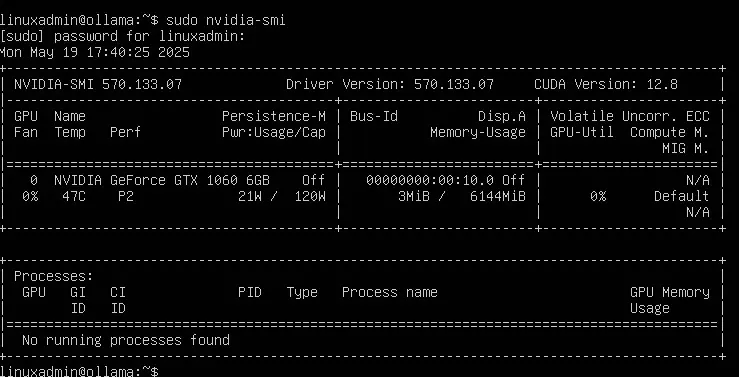
This tool shows GPU utilization, temperature, memory usage, and active workloads. If the GPU is detected correctly, you should see the device listed along with driver information.
Using the GPU with Proxmox VE Server and GPU passthrough
I have written extensively about setting up GPU passthrough in Proxmox VE Server, both for virtual machines and LXC containers. You can check out my tutorials on that front by reading both of those blog posts here:
- Run Ollama in Proxmox VMs and containers with GPU passthrough
- Running GPU-enabled containers in Proxmox
- How to Enable GPU Passthrough to LXC Containers in Proxmox
There is also a handy little utility that was written to make the process of setting up GPU passthrough much easier in Proxmox, called the PECU utility. I wrote a blog on this one as well that you can check out here:
What actually happens? Home Lab workloads that benefit from GPUs
Here are some home lab workloads that benefit from running GPUs connected to your Proxmox VE server or clusters:
- AI and machine learning – Running local AI models has become extremely popular in home labs. Tools like Ollama, CUDA based frameworks, and GPU accelerated containers can benefit significantly from GPU hardware.
- Video transcoding – Media servers like Plex and Jellyfin can offload transcoding tasks to the GPU. This improves streaming performance and reduces CPU load.
- Machine learning experiments – If you want to learn frameworks like TensorFlow or PyTorch, having access to a GPU makes training and inference much faster
- CUDA workloads – Many scientific and compute workloads support CUDA acceleration. This can be useful for experimentation and learning.
- GPU passthrough testing – Virtualization enthusiasts often want to test GPU passthrough configurations. An external dock like this makes it easy to add GPU hardware without rebuilding the host system.
Performance observations
Many may wonder what the performance is when running a Proxmox eGPU compared to a directly installed PCIe GPU connected to your mini PC. In the case of the OCuLink connection, the performance difference is much smaller than it would be with a lot of traditional eGPU solutions out there. The OCuLink connection provides PCIe 4.0 x4 connection, the bandwidth is a lot higher than Thunderbolt based eGPU enclosures.
For many Proxmox eGPU workloads, I think especially AI workloads, the performance difference is probably going to be minimal. In my testing, I didn’t really discern a difference between running it in the DEG2 eGPU dock and having the card installed internally in a PCI-e slot on the motherboard.
I think for most who want to add back functionality of GPU performance into a mini PC-based home lab, the eGPU dock based on OCuLink connections is an awesome solution.
Final thoughts
Does everyone need a Proxmox eGPU dock in their home lab? Probably not. However, if you are running a mini PC cluster or compact lab environment, a Proxmox eGPU dock gives you the ability to add GPU processing power into your mini PC lab when otherwise you would not be able to.
I think this flexibility is useful where you want to have total control over your space, power consumption, heat build up, and still have GPU processing. I love the fact that with eGPU, you dont’ have to power it on when you don’t want to use it. So, unlike having a GPU installed internally that is always drawing power and being “used” by the system, the eGPU gives that control to you to be able to decide when you want to add that processing power to your mini PC.
I also really like the Minisforum DEG2 eGPU dock that provides a lot of nice features in addition to a modern OCuLink solution with the ability to have an extra M.2 NVMe 2280 slot and also an extra 2.5 GbE network connection. How about you? Are you running eGPU in your home lab? What workloads are you running?

Google is updating how articles are shown. Don’t miss our leading home lab and tech content, written by humans, by setting Virtualization Howto as a preferred source.
About The Author