If you have been following my recent experiments in the home lab, I recently tested a very cool project for running Proxmox VE Server inside a Docker container. The developer has extended the project to include Proxmox Datacenter Manager, which I think may have an even stronger use case to run inside a Docker container. By containerizing Proxmox Datacenter Manager we can use it as a centralized control plane for a lab based entirely on containers. You could also potentially run PDM in the cloud as well in a Docker container, but more on that below. Let’s look at running Proxmox Datacenter Manager in a Docker container for home labs and testing out new Proxmox features.
Proxmox Datacenter Manager evolves Proxmox management
In case you haven’t kept up with the latest developments in the world of Proxmox, Proxmox Datacenter Manager is the evolution of Proxmox management that Proxmox recently released in GA as 1.0. It has many great features for managing multiple Proxmox hosts in a centralized way and having visibility across your environment. With PDM you can perform update operations centrally, migrate VMs, and perform all the normal basic VM operations.
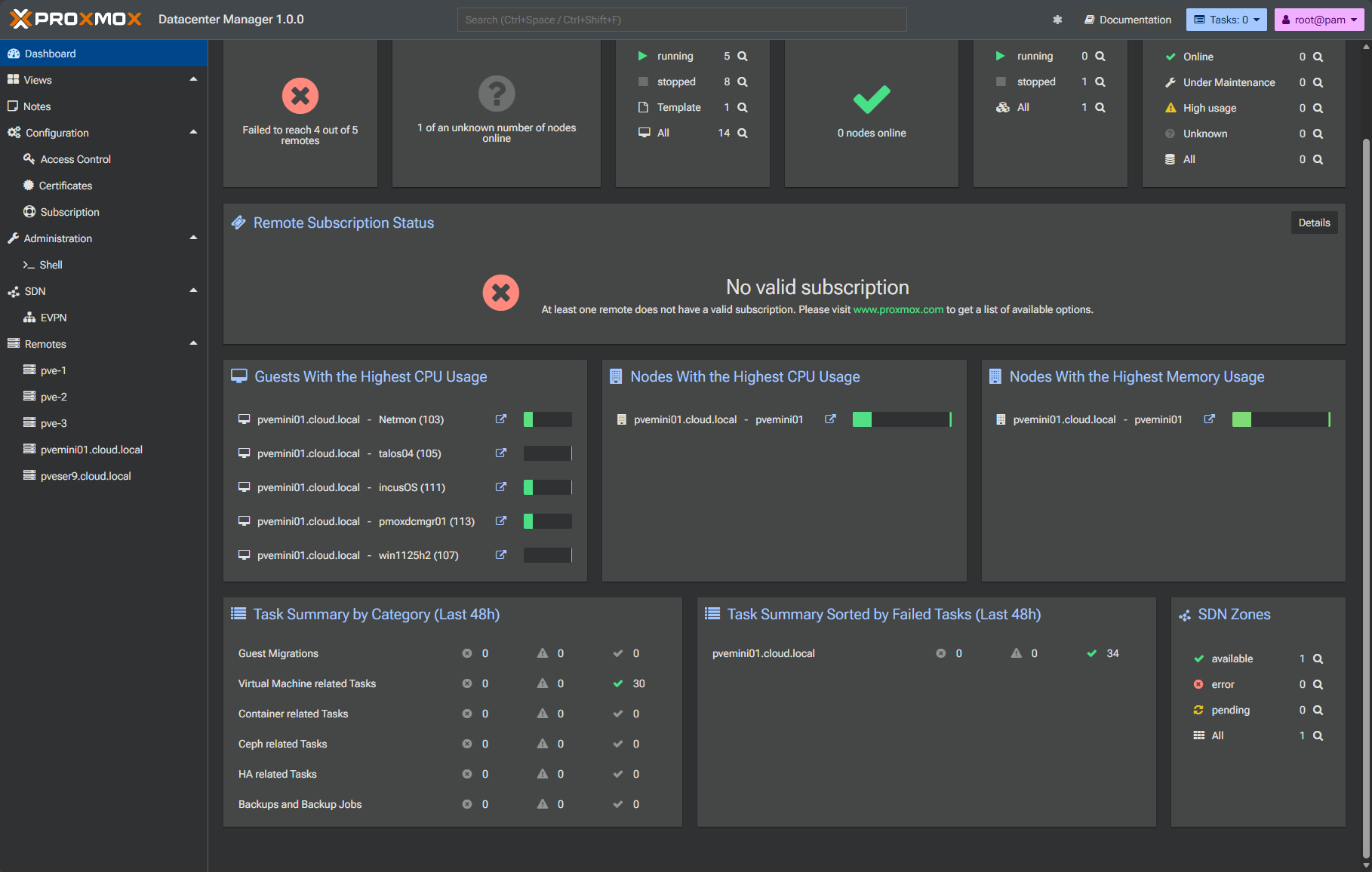
Especially when you start running multiple environments in the home lab, PDM becomes a really important component as part of this. You can centrally manage multiple clusters even from the PDM interface.
If you are running things on resource constrained hardware in the home lab, running PDM on a dedicated full VM or physical system can feel very heavy for a lab. With this cool new project, you can run PDM inside a Docker container instead. This actually opens up some interesting possibilities as well.
Why run Proxmox Datacenter Manager in Docker
As mentioned in the outset, the developer that release the pve-system-container has now renamed the project to containerized-proxmox and has added Proxmox Datacenter Manager as part of the available containers you can pull from the repo.
When I first looked at the project to run PVE inside Docker, I asked, why would you want to? Then I thought through it a bit and realized this can be a great learning tool for all of us in the home lab and using various types of hardware, in case we don’t have something dedicated to use.
Check out my dedicated blog post on running Proxmox in a Docker container here: Run Proxmox Inside Docker: A Weekend Home Lab Project to Learn Clustering and HA.

Like the project to run Proxmox VE inside Docker I think running Proxmox Datacenter Manager (PVM) inside Docker is also a great way to run it. And, for this type of project for a management solution like this, it makes a lot of sense.
Note the following advantages:
- You can stand up Proxmox Datacenter Manager (PDM) in just a couple of minutes instead of having to go through the entire install process for PDM
- Also, most of us are already using Docker in the home lab, so this fits into our existing tooling and workflows
- You can use this with the containerized version of PVE so that you can build, test, rebuild, tear down as one whole unit as an environment you are testing/learning with
- Finally, it allows you to explore PDM features and capabilities without breaking anything in your “production” environment
All in all, I think this is a great resource to use for learning, testing, labbing, and proof of concepting various ideas and testing.
High-level architecture
The architecture is fairly simple. If you have a Docker host, including a standalone single server, workstation, or even a Swarm Cluster, you can run the multiple PVE hosts in Docker containers along with the Proxmox Datacenter Manager container.
Keep in mind too, you don’t have to run the PVE hosts as containers if you just need or want to run the Proxmox Datacenter Manager (PDM) container. Running both is not a requirement.
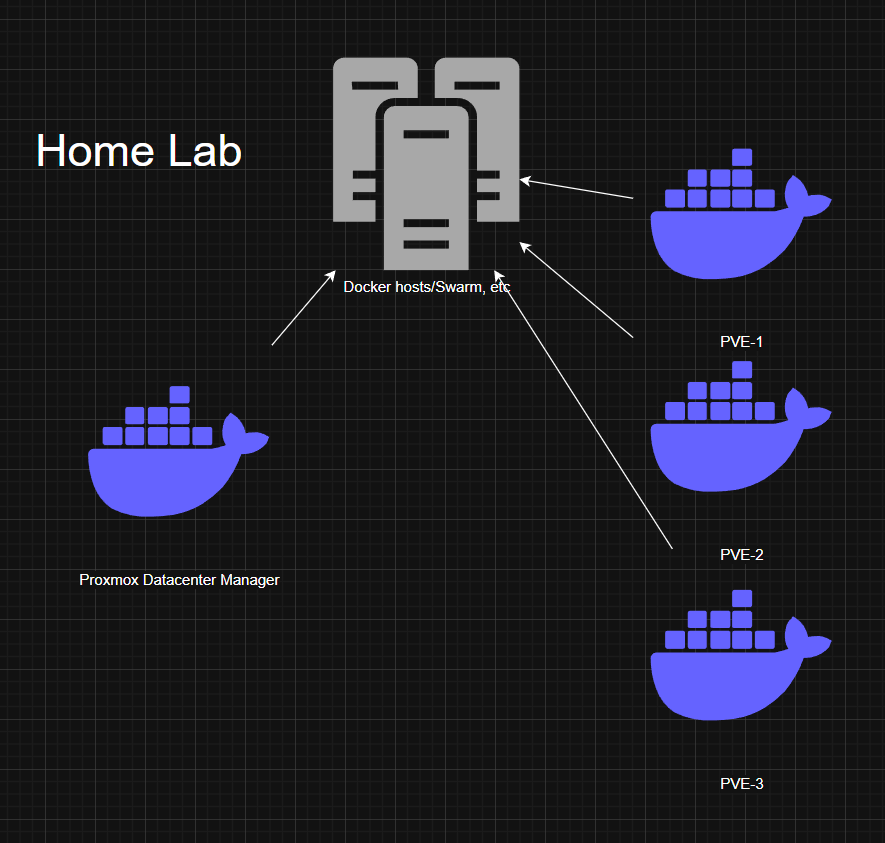
If you want to have a totally contained environment, you can run the Proxmox VE containers and from a management layer, connect them to Datacenter Manager. PDM connects to them over the network just like it would connect to real hosts or VMs.
The end result is a full Proxmox ecosystem running entirely inside Docker. Very cool for home lab testing and experimentation!
Installing Proxmox Datacenter Manager in Docker
Let’s look at the docker run command below along with Docker Compose to see how you can spin this up in both. First for Docker run command:
docker run -d --name pdm --hostname pdm \
   -p 8443:8443 -p 2222:22 \
   --restart unless-stopped \
   --cgroupns=host \
   -v /sys/fs/cgroup:/sys/fs/cgroup \
   --security-opt=seccomp=unconfined \
   --security-opt=apparmor=unconfined \
   --cap-add=ALL \
   ghcr.io/longqt-sea/proxmox-datacenter-manager
If you want to use Docker Compose instead, you can use the code below:
# Optional: Proxmox Datacenter Manager
  pdm:
    image: ghcr.io/longqt-sea/proxmox-datacenter-manager
    container_name: pdm
    hostname: pdm
    restart: unless-stopped
    cgroup: host
    security_opt:
      - seccomp=unconfined
      - apparmor=unconfined
    cap_add:
      - ALL
    volumes:
      - /sys/fs/cgroup:/sys/fs/cgroup
    networks:
      dual_stack:
        ipv4_address: 10.0.99.4
        ipv6_address: fd00::4

    # Port mapping only required for Docker Desktop or LAN access from other machines.
    # On Linux host, you can access this container directly via hostname or IP address,
    # e.g. https://pdm:8443 or https://[fd00::4]:8443
    ports:
      - "2222:22"
      - "8443:8443"
If you used the Docker Compose file approach, once you have your Docker compose file created, just bring it up with:
docker compose up -d
Changing the password for the Proxmox Datacenter Manager container
Now that we have the Proxmox Datacenter Manager container running, we need to change the password for the PDM container, using the command:
docker exec -it pdm passwdThen, we need to restart the container with:
docker restart pdm
Logging in for the first time
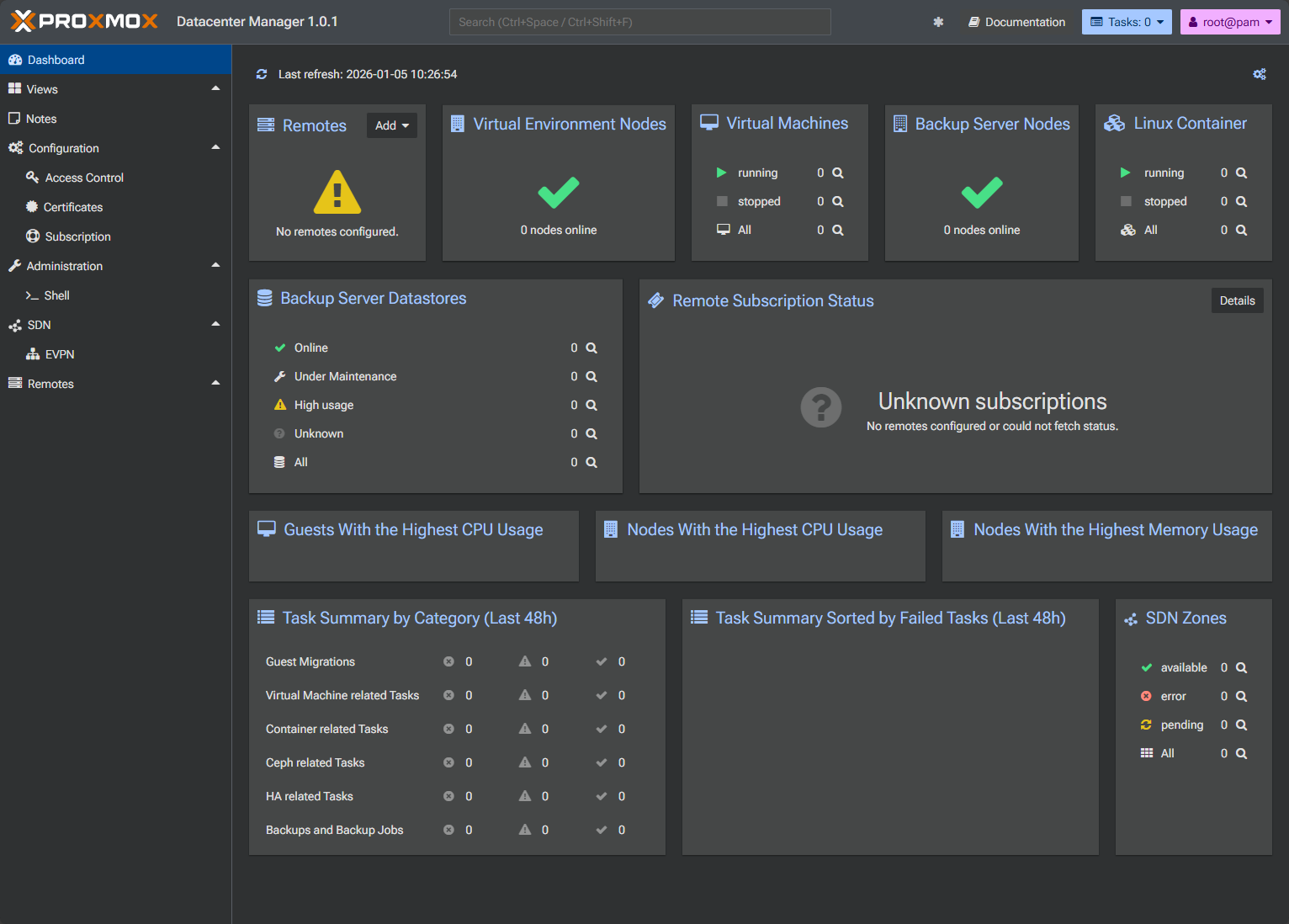
Now that we have the password changed and the container restarted after the password change, we should be able to login. Just browse out to port 8443 of your Docker container host. Login with the credentials you changed in the step above. And, now we have a containerized version of PDM running! Very cool.
Adding Proxmox VE Nodes to your containerized Proxmox Datacenter Manager
At this point, PDM is ready to connect to any of the PVE nodes you want to connect it to. This could be other PVE Docker containers that you have stood up for testing, or even your production PVE hosts themselves. You aren’t limited in what you can do here as long as PDM has connectivity to the Proxmox VE host’s APIs.
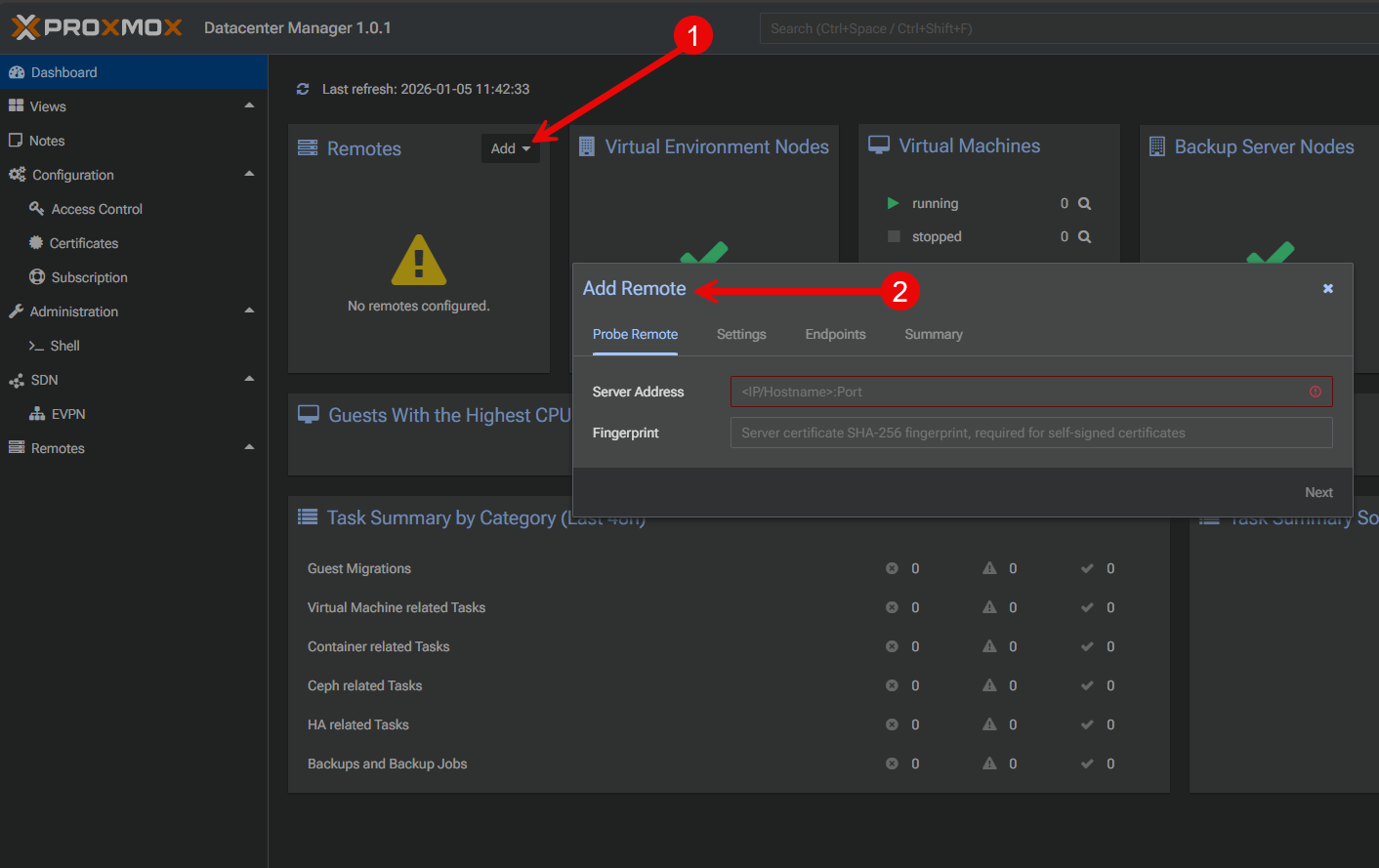
From the PDM interface, you can register each Proxmox VE node or cluster just as you would with a traditional deployment. The nodes will appear with their status reports and displaying resources, etc. This is great for exploring Proxmox Datacenter Manager functionality and testing in your environment.
Use Cases for running Proxmox Datacenter Manager in Docker
There are several real world scenarios that I think are worth check this project out.
- If you create content, this will allow you to create excellent live demo environments. You can record videos or take screenshots of Proxmox Datacenter Manager managing multiple clusters without the hassle of spinning up full VMs for PVE nodes or PDM
- If you are learning Proxmox, this setup lets you practice multi-cluster management
- For automation, containerized PDM makes it easy to test APIs. You can script against the management plane, reset everything, and repeat if you need to
- This would also be useful for testing upgrades. You can simulate version changes, check behavior, and get confidence under your belt before touching your real infrastructure
All of these are great use cases I think that make this a worthy project repo to bookmark.
| Use Case | Why It Works good in Docker | Benefit |
|---|---|---|
| Content creation and demos | Containerized PDM and PVE nodes spin up quickly and you don’t have to spin up full VMs any more | Create repeatable demo environments for videos, screenshots, and test environments in just a couple of minutes |
| Learning Proxmox | Multi-cluster environments are easy to simulate even with a single Docker host | Practice management concepts working with Proxmox clusters |
| API and automation testing | You can spin up or rebuild an entire environment in just a minute or so | This lets you test scripts, API calls, and automation workflows without risking your home lab infrastructure running your “production” environment |
| Upgrade and version testing | Create “throw away” environments to test everything first | Validate upgrade behavior and new features and feel good about the process before you roll this into your production environment |
| Training and experimentation | No permanent infrastructure commitment required | You can get a feel for Proxmox Datacenter Manager features without worrying about cleanup or long term infrastructure |
| Quick Proxmox “labs as code” | Configuration lives inside your Docker Compose files like any other stack | You can have a consistent reference environment that you can spin up/recreate at any time |
Wrapping up
I think this is a fantastic project that has been contributed to the community and allows us to have quick and easy Proxmox environments to test, break, spin up, tear down, document, and experiment with. Now that we can have a containerized Proxmox Datacenter Manager, you can spin up really a complete Proxmox environment with PVE nodes and PDM and use these for your testing and other purposes in the home lab. I think this will also be valuable when it comes to upgrade testing and other processes that you can quickly test the process here first, and then roll it into your production environment once you feel good about it. Have you tried the containerized version of Proxmox VE Server as of yet? What about Proxmox Datacenter Manager? Let me know in the comments if this is appealing to you as well!

Google is updating how articles are shown. Don’t miss our leading home lab and tech content, written by humans, by setting Virtualization Howto as a preferred source.
About The Author