Well, as we all know, the GA release of Proxmox Datacenter Manager dropped around the first of December last year. This has been a great addition to the Proxmox ecosystem. The great thing about Proxmox Datacenter Manager (PDM) is that it gives us the missing piece that we have been needing for quite some time. It gives us centralized management and many other great features and capabilities for Proxmox environments. After real day to day use for the past month or month and a half or so, I wanted to share the features that Datacenter Manager includes that are very good and how this changes the game.
The environment I ran it in
For me, I ran the Proxmox Datacenter Manager machine on a standalone mini PC connected to my Servers VLAN in the home lab. I wanted to have it separate from the other nodes that it was connected with. Specifically, I have PDM managing my new minilab cluster that is 5 mini PCs in my new mini rack that is comprising a large portion of my containerized home lab at this point.
This was not a quick test or a demo setup. Proxmox Datacenter Manager was connected to multiple active Proxmox nodes running in my home lab across several mini PCs. These nodes and one cluster had different roles and capabilities.
Some clusters were built around Ceph backed storage and Kubernetes workloads. Others focused on traditional virtualization with mixed virtual machine workloads. One cluster was intentionally messy housed a lot of my experiments across the board.
Datacenter Manager itself was deployed on a standalone mini PC running Proxmox. Also, I experimented with running it in Docker, although not supported this way, and it ran fantastically.
Centralized lifecycle management is one of the big wins I think
With Proxmox Datacenter Manager, one of the core features that I would like to call out is the visibility on updates you have available across your nodes and clusters. Before this was a real pain to see as you had to login to each web UI and see what updates you had available.
Take a look at how it allows you to view updates you have available across your Proxmox environment:
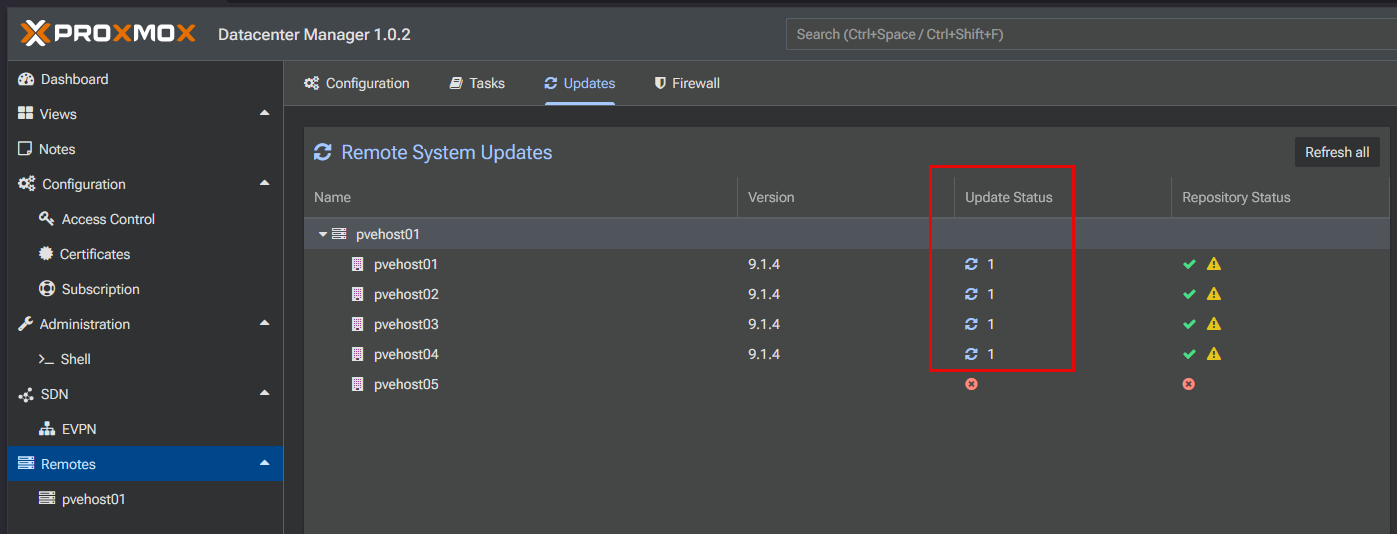
When you click on a specific node, you get visibility into which updates specifically are available and which packages will be updated.
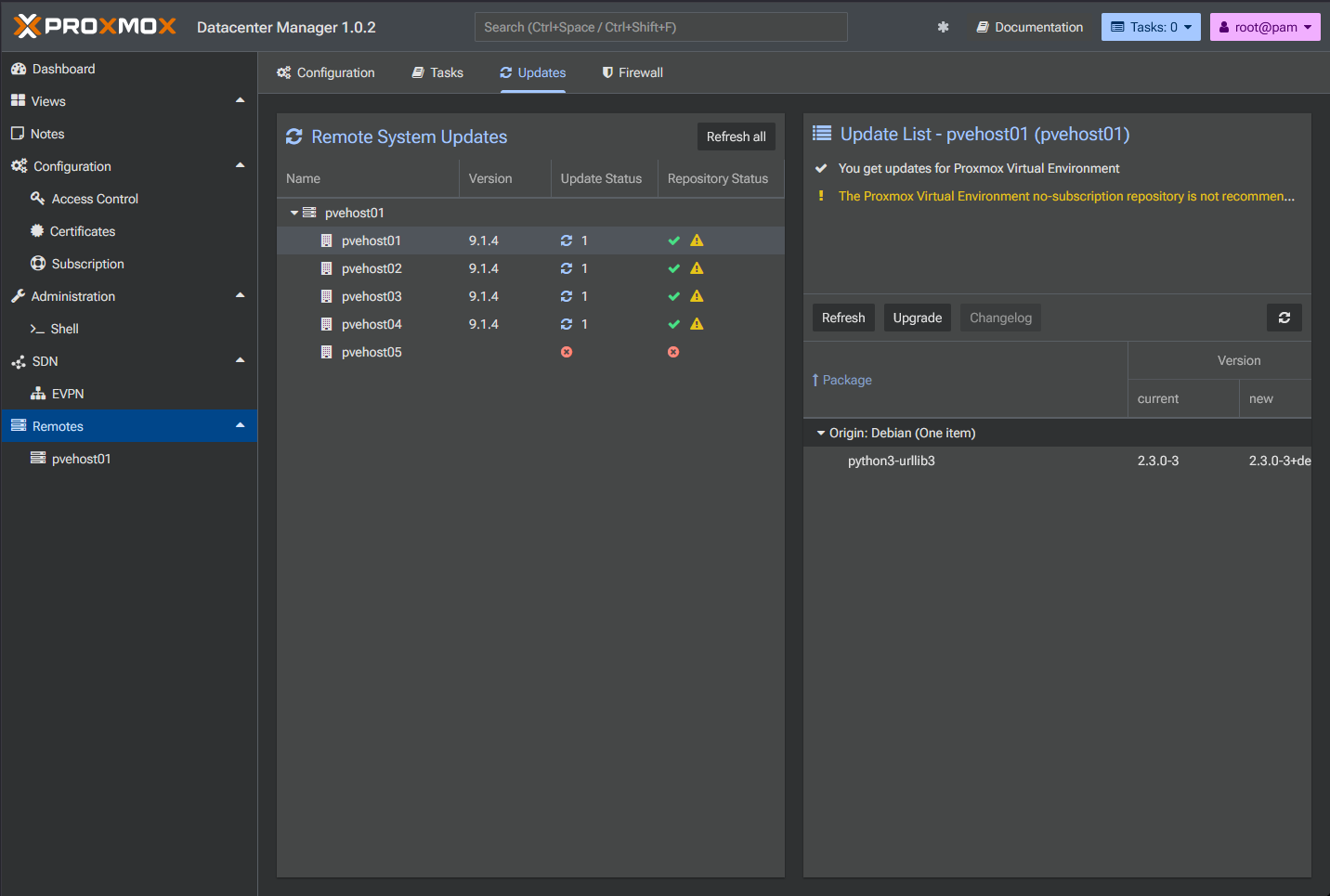
This is really looking like a feature that will continue to get even better such as being able to invoke maintenance mode on your cluster node perhaps with updates that require reboots, etc.
Proxmox cluster centric instead of node focused
For years now, Proxmox has been very node-focused with the web UI and no real single pane of glass management console to rule over your environment. With your traditional Proxmox environment, you drill down on a node. You click into a node, look at its resources and then you work your way up doing the same thing for the rest of your nodes.
This is how Datacenter Manager flips that around. You start with the cluster, then you drill down when you need to into the cluster. I think this is the more natural way to approach managing a virtualized environment and of course is more the way we have learned to manage in VMware vSphere and other hypervisor environments.
Check out why I don’t miss vCenter Server here: I Don’t Miss vCenter After Moving My Home Lab to Proxmox (Here’s Why).
I noticed that with this configuration in Proxmox Datacenter Manager, it starts to shift your mindset. I found that it encourages you to think about your environment overall. Things like capacity, health, and balance at the cluster level matters.
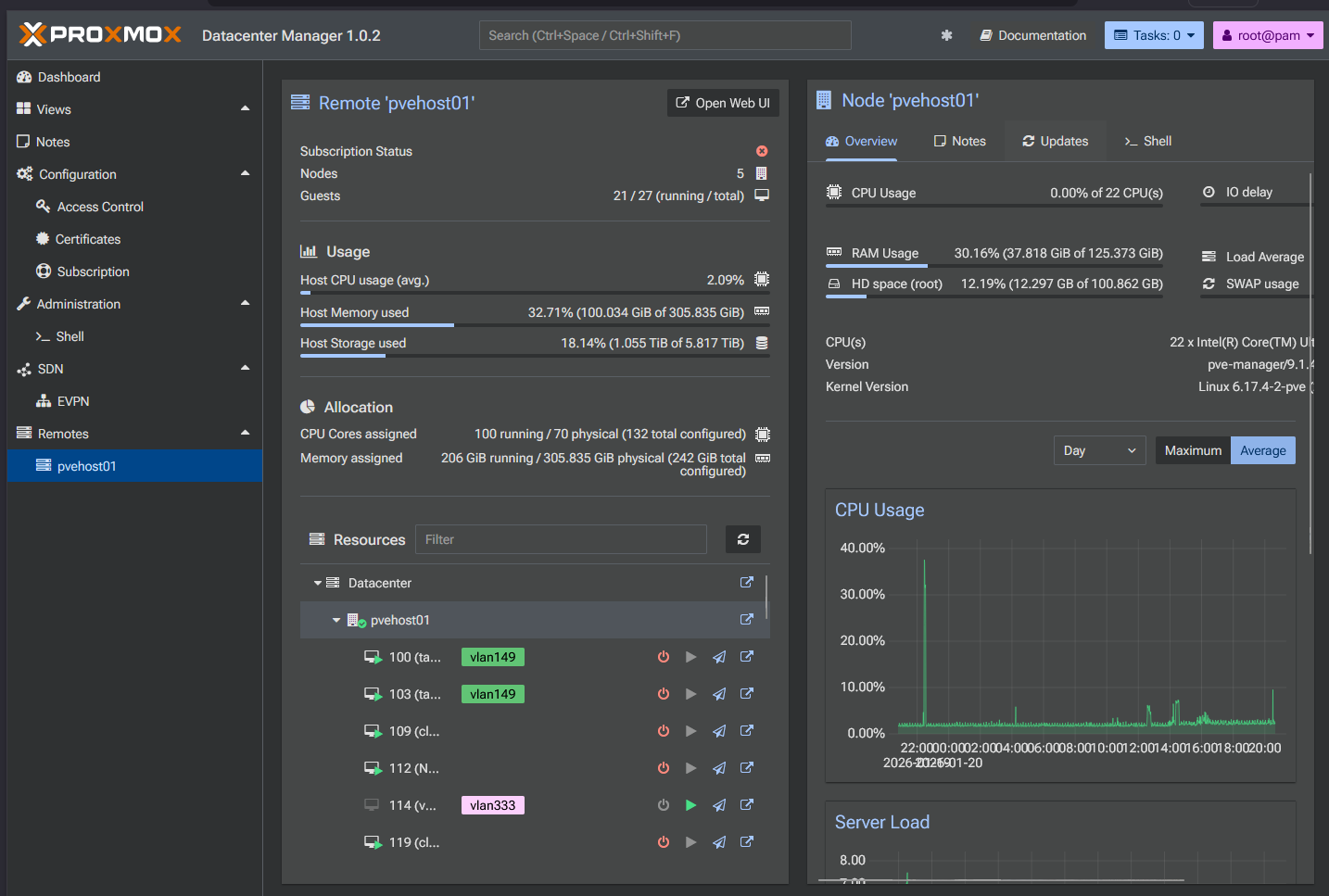
I like the fact that visibility in Datacenter Manager is not just informational. It helps you make good admin decisions about the environment. I now like to use it to look at the estate and see if a cluster is approach its limits in terms of:
- Storage
- Ability to host new workloads
- Nodes that are candidates for maintenance
- Hardware that may be underutilized
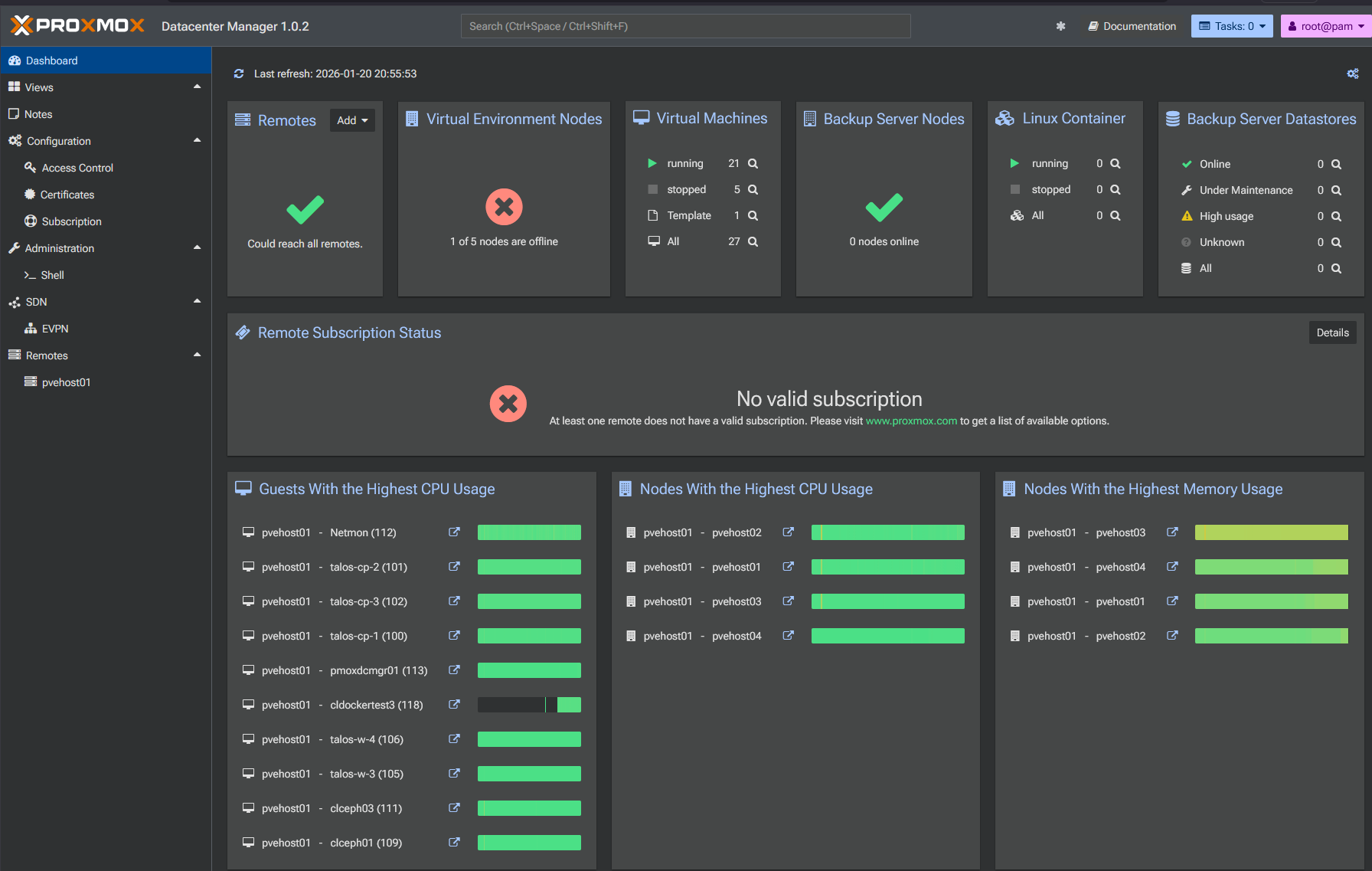
So, I think maybe we used to live moment to moment in the Proxmox web UI and this allows us to actually make planning decisions and answer those decisions. This is where Datacenter Manager answers those questions without having to keep up with things manually.
VM and container management
One of the areas where it shines is virtual machine and container management. We are still early on in the development of Proxmox Datacenter Manager so we only have basic features thus far. But when you look at what we already can do, it is promising. You can see your hosts, virtual machines, have basic power operations, etc.
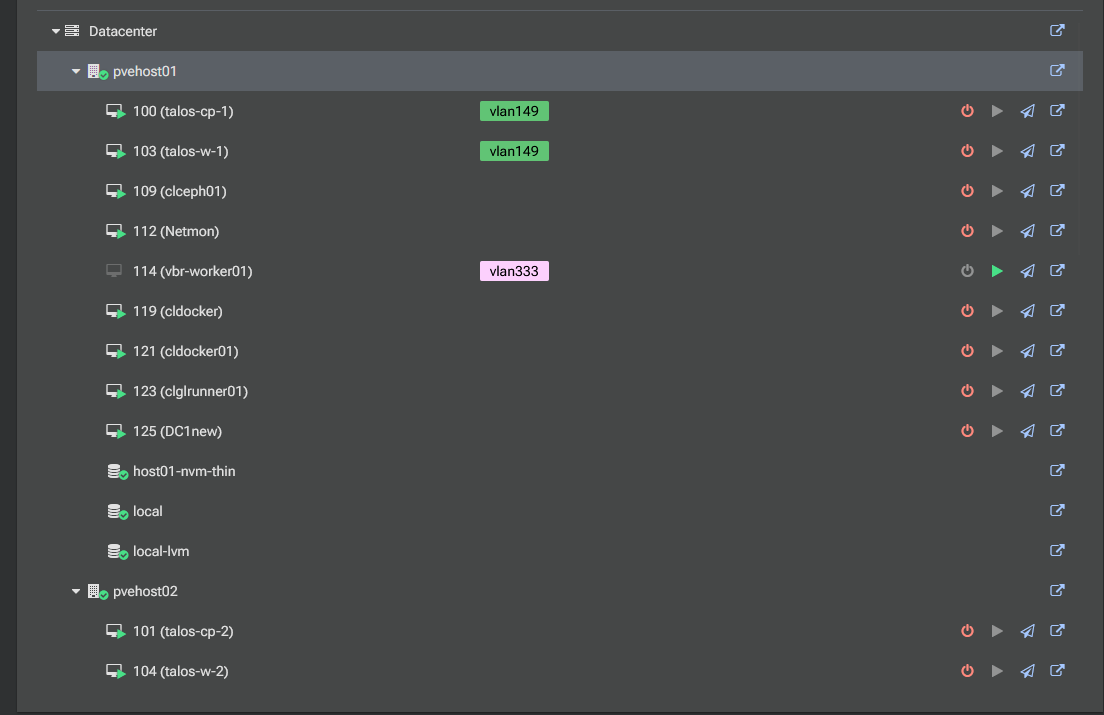
One of the other very cool things you can do is migrate your virtual machines between clusters and totally separate nodes or clusters which is great! Now we can move our workloads around as we need to between clusters, etc.
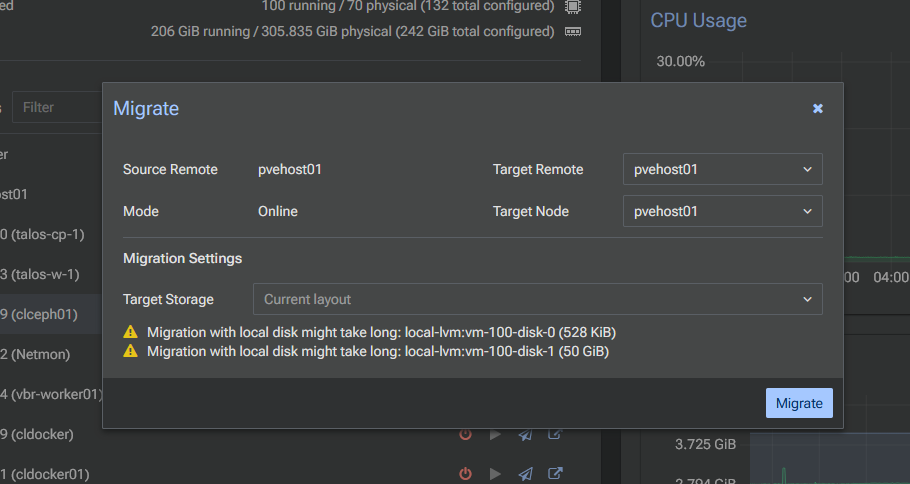
I would like to see a dedicated “Virtual Machines” view for the dashboard in Proxmox Datacenter Manager, but hopefully we will see these additional views and features added to the next release as it continues to evolve.
Reviewing logs and tasks across all your nodes
One of the other really nice benefits that you have with Proxmox Datacenter Manager is the ability to review and look at logs and tasks across all your nodes, not just for cluster nodes. With the Tasks view under the Remotes node in the dashboard, you can see various important pieces of information.
You can filter your tasks with various metrics and classifications, including:
- Filtering the logs using since aqnd until
- Using the task type filter
- Entering a user name for the task log to filter based on that
- Filtering the status levels including:
- All, OK, Errors, Warnings, and Unknown
- Choosing a specific remote
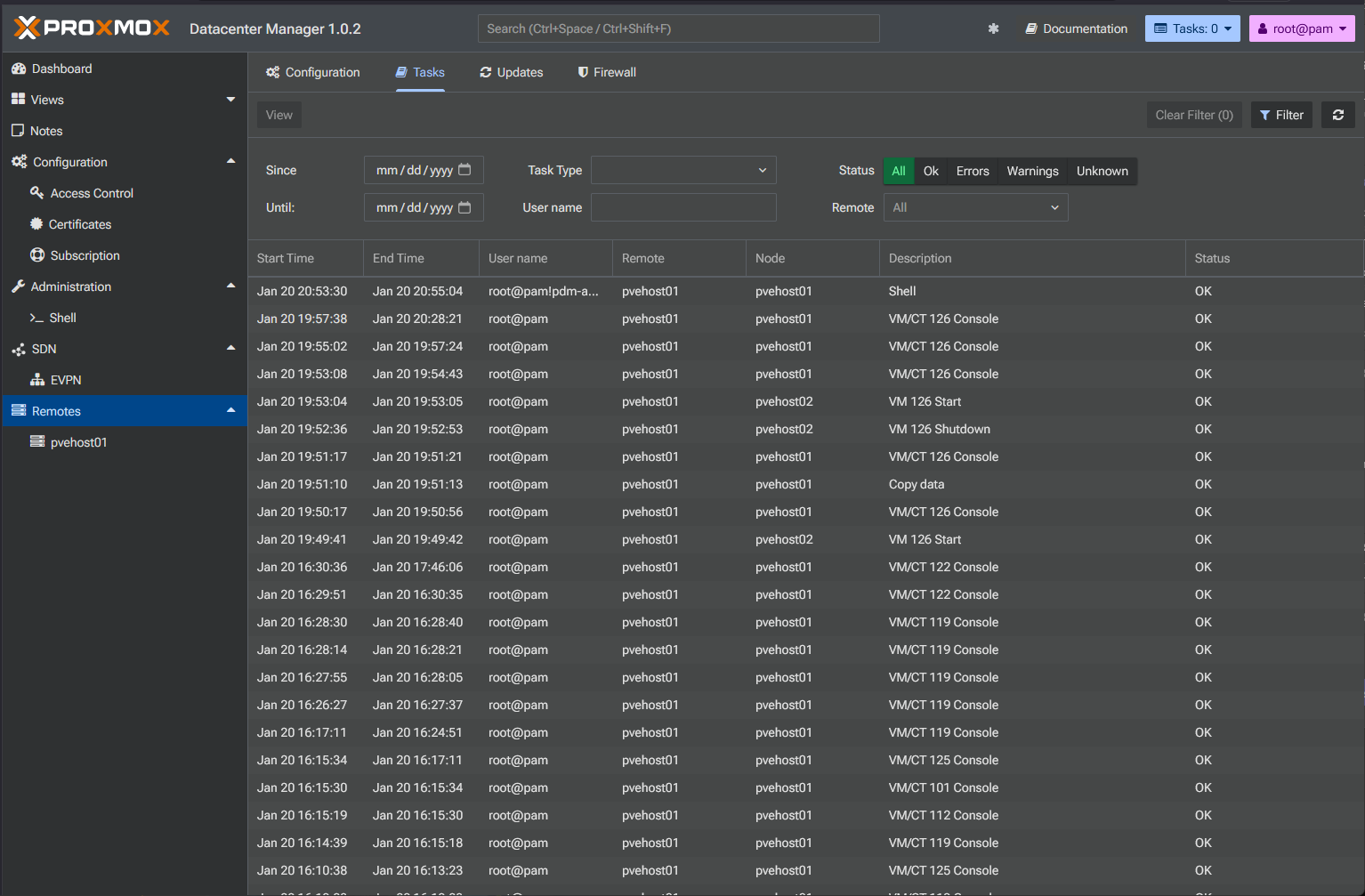
One thing you underestimate before running something like this is just how important consistency is. If you manage your clusters independently and have to manage and monitor logs and tasks across them separately, you miss things.
Also, variations between how different clusters are configured can creep in. Naming conventions drift. Resource usage may vary. Cleanup habits change. I found Datacenter Manager to be that layer that helps to unify your management habits. You see everything the same way and it helps with the consistency we all need.
You can run it in Docker if you want to
Although this isn’t a supported way to run Proxmox Datacenter Manager, there is a project available on GitHub that provides a Docker container image allowing you to run PDM in a container, which is great. It takes the headache out of downloading an ISO image and installing it in a full virtual machine.
This method fits really nicely with the lightweight feel of PDM and I think it would be great if Proxmox supported this installation method officially. Containers of course are super easy to spin up and lightweight and allow you to run PDM basically anywhere that supports Docker, even in the cloud! Pretty cool.
Check out this project here that I wrote about in a full blog post:

This also allows you to experiment very easily with Datacenter Manager since you can spin up full stacks and tear them down with PDM with a simple docker compose up -d command.
Limitations of what it can’t do are worth noting
While I love Datacenter Manager so far, there are definite limitations to the solution at this point. So, you need to understand what you can’t do as well as what you can do. In Datacenter Manager, you are not able to carry out detailed storage or network configuration. You will need to do this from the Proxmox node web UI still.
Also, advanced cluster specific settings and wizards that we have in the Proxmox web UI are not available in the Datacenter Manager interface just yet. This separation at this point is intentional while the core features and framework of the solution continues to evolve and mature.
I suspect in the next few releases, we will see more and more features and capabilities, including lower level cluster features will be included. This is going to become THE tool for Proxmox management.
Proxmox Datacenter Manager benefits the home lab
In my testing with Proxmox Datacenter Manager, I definitely think that it makes a lot of sense for the home lab, especially if you are running multi-node clusters of Proxmox or just multiple standalone Proxmox VE Server nodes.
Check out these scenarios:
| Home lab scenario | Proxmox Datacenter Manager a good fit? |
|---|---|
| Home labbers running multiple Proxmox clusters | Gives you a single centralized view for managing cluster health, your workloads, and resources without jumping between different UIs |
| Labs with infrastructure that is more permanent | It gives you lifecycle management capabilities by helping you plan capacity, track the growth of your lab, and maintain consistency over time |
| You care about consistency and efficiency | You can spot stale VMs much easier and see uneven resource usage across the environment, etc |
| You want to grow your lab gradually | It helps you with less management overhead when you add new nodes or clusters, this makes your growth feel consistent |
| Single node or small clusters | May have more limited value for this scenario if everything is just static and doesn’t change much. Native Proxmox web UI tools will probably be enough |
Wrapping up
After looking back over this past month or so after deploying Proxmox Datacenter Manager, I can say that it has definitely shifted my focus on Proxmox management to a more top-down approach of looking at the environment as a whole. It has really great features out of the box, even in this very early 1.x release that is now GA.
The controls we have so far are pretty basic, but we can see where this is headed and I like what I am seeing. The big features are update visibility across nodes, and the ability to move and migrate workloads even between clusters or cluster and single standalone Proxmox node. It does this really well. You have a more unified view of tasks and logs and an overall look at your capacity like we didn’t have before. What about you? Has Proxmox Datacenter Manager changed your management and admin workflow of Proxmox?

Google is updating how articles are shown. Don’t miss our leading home lab and tech content, written by humans, by setting Virtualization Howto as a preferred source.
About The Author