


I think we are seeing a paradigm shift in hardware landscape with the surging price of consumer RAM. This is not only going to affect the obvious, RAM upgrades, but RAM is also in just about everything else. Fast NVMe storage will likely dramatically rise as well and we are already seeing things trending that direction. With hardware prices rising rapidly and some of the new developments in the container space, 2026 will be a great time to start running containers if you haven’t been already.
Why containers?
If you have been running things in full virtual machines, there is nothing wrong with this approach. However, I have been preaching learning Docker and other containerized solutions for the past few years. I think that if you want to pick a skill that will take you to the next level as an infrastructure engineer, without a doubt containerized platforms are absolutely worth learning.

Cloud infrastructure is built on top of them, DevOps is centered around them, and they are just more efficient. Now, with the added reason of hardware inflation now that RAM is going sky high, having the most efficient way to run your infrastructure will pay off when the shortages come, and they are coming.
Also, now with Proxmox 9.1.1 OCI container images can be used natively on top of Proxmox, so we now have even better tools and more options to run containers in late 2025 going into 2026.
How the hardware landscape is changing the mindset
The current hardware situation is pushing container adoption like nothing else. Throughout 2025, the price of RAM has increased significantly. Micron just announced that Crucial will exit the consumer DRAM market, and they are the sole provider of many of the consumer kits that we all know and use, like the exciting 128 GB DDR5 SODIMM kits that were released this past year. However, we just as quickly bummed to learn that now our nice big RAM kits are not only insanely expensive but are going away. Just in that kit alone, the price has doubled in the past 6 months.
See my write up on how RAM pricing has made used enterprise servers a viable option again: Has RAM Pricing Just Made Used Enterprise Servers the Better Home Lab Deal?.

As we mentioned, NVMe prices are starting to creep up again, especially in the larger capacities. So, when you combine expensive RAM and higher SSD and NVME costs, it makes the thought of running fat, heavyweight virtual machines much less appealing. VMs take up a lot more memory and more disk space per instance and have more overhead than containers at basically every layer of the stack.
On the flip side, containers are extremely lightweight as they don’t require their own operating system for each app or solution you run. Instead they share the kernel of the underlying operating system of the container host. It means you can fit more services with much less memory and storage usage than what you could do running only virtual machines.
Containers help you stretch your RAM much further
Now, diving a bit deeper into the RAM aspect specifically, how do containers benefit us? Well, if you run Docker or Kubernetes containers offer a dramatic reduction in memory footprint compared to VMs. Just a simple VM running Ubuntu Server with a simple app might require 1-4 GB of RAM to run right. The same app running in a container can run on a few hundred megabytes or less RAM.

We know this that it is not “if” but “when RAM becomes more and more expensive or non-existent in 2026. So, with the RAM shortage well underway, the number of heavy virtual machines that you can afford to keep running is going to go down. Containers will give you the room to grow without needing to upgrade your hardware. You can have a much more application dense deployment of apps in a container heavy environment, compared to one that is only running virtual machines.
So, if you think about running your self-hosted applications inside VMs, like Gitea, Home Assistant, Bitwarden, FreshRSS, Dozzle or your monitoring stacks like Prometheus and Grafana, these would require their own setup and dedicated resources in a VM. But, if you run them in containers, it keeps the environment very lean and frees up memory for other things you want to run.
What tools do you need to run containers?
With recent developments in the container space I think we are in an even better position to start running containers instead of virtual machines. The tooling is better now than it has ever been.
Proxmox now supports full OCI container images natively and has those workflows built into Proxmox VE 9.1. Docker and Docker Compose are still extremely easy to use for small and medium deployments of containers. And, Kubernetes has become more doable through small distributions like MicroK8s, K3s, Talos, and other tools that can bootstrap your Kubernetes deployment.
Read my guide on Proxmox containers in 2025 and your options here now: Complete Guide to Proxmox Containers in 2025: Docker VMs, LXC, and New OCI Support.

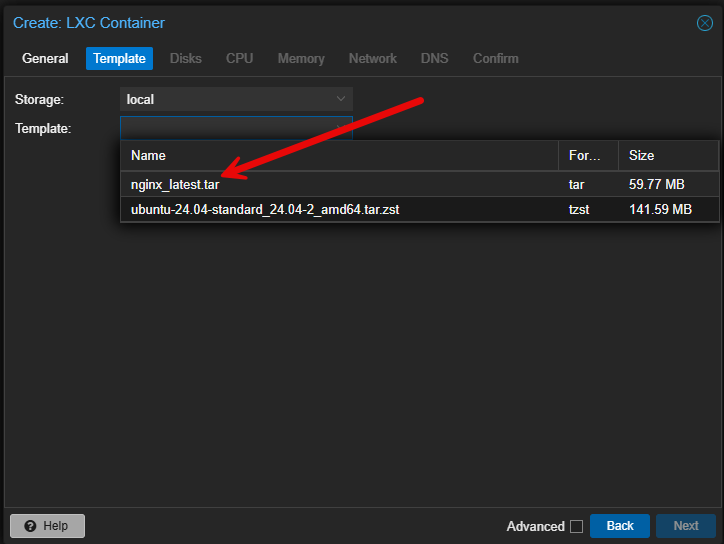
Below is a quick screen grab of creating a new LXC container from a downloaded OCI image.
If you are a home labber that avoided Kubernetes (I did this for a long time) because it felt too complicated, there are now great tools we can use, including AI, to help us get over some of the challenging spots or creating YAML configurations, etc.
Also, you don’t have to jump straight into Kubernetes. Outside of the new OCI containers in Proxmox VE Server 9.1, I recommend just starting simple, with a single Docker host, running something like Ubuntu Server 24.04. Then, start learning by transitioning an app you have in a VM to a container. You will be surprised at how much you will learn with this type of exercise.
Then if you want orchestration, you don’t have to jump to Kubernetes first. You can instead go to something like Docker Swarm first. This may be all you need or want. Check out my full detailed guide on how to create the ultimate Docker setup with Swarm, CephFS, and Portainer here:
They teach you DevOps processes
Once you start getting into containers, you will start seeing the tremendous benefits of DevOps processes using them. Since they are easy to spin up and spin down, you can start learning about Git workflows and having your Docker Compose updates respinning your containers when you check in new code. This is one of the coolest things to experience when you first see the possibilities when doing this.
You will start to see how you can adopt infrastructure as code approaches to your home lab and production environments, use GitOps, and then use automation pipelines to deploy your changes. Then your apps can become ephemeral and immutable so that you can just as easily spin up new versions of your containers than repair ones that are having issues.
I have several tutorials on CI/CD and GitOps processes that you can take an run with in your own home lab. Check these out:
The rise of low power home labs makes containers even more appealing
Mini PCs have been the favorite building block for home labs over the course of the past few years. Minisforum MS series, Beelink SER models, MiniX, and other NUC style mini PCs have definitely caught on. Mini PCs allow you to use very little energy but still deliver great performance for modern containerized workloads.

However, these have always been RAM bound. So again, to be as efficient as possible to run more apps and services on limited mini PC hardware (RAM mostly), containers fit this profile the best when compared with virtual machines. And, as we continue to see the RAM shortage and supply/demand play out, this will become more and more important.
Growing your home lab without actually upgrading hardware
I think one of the biggest advantages of containers is they allow you to reclaim hardware resources that you already have so you don’t have to upgrade your memory to have more RAM available to you. Pluse if you decide to scale out, instead of scaling up, you can potentially add more mini PCs to your lab and run dozens of home lab containers without any major upgrades needed outside of adding a couple of cheap mini PCs.
I think this is going to get even more important in 2026 as RAM prices are going to stay volatile and low cost hardware is going to be harder to come by. Even if you don’t scale out, simply migrating from virtual machines over to containers will make things more economical.
Steps to migrating to containers in 2026
If you want to be ready for a more container heavy environment, here are some practical steps to take:
- Start consolidating existing VMs into containerized applications where possible – I tell ones if they want to get into containers, take a service or app you have running in a VM currently and migrate that to a container. You will be surprised at just how much you will learn with that exercise.
- Move reverse proxy services like Nginx Proxy Manager or Traefik into containers – This will set you up to scale out your container infrastructure and have everything behind a single IP address and services running with proper SSL certs.
- Experiment with orchestration if you have more than one node – Start with a single Docker host, then move to Docker Swarm, and then up to Kubernetes.
- Use Portainer or Proxmox tools to simplify container lifecycle management – There are great tools out there including Portainer. There is also the open-source project Komodo that is phenomenal.
- Focus on lightweight Linux distributions and host operating systems – Make your container hosts as lightweight as possible.
- Begin codifying your home lab environment with Docker Compose files or Helm charts – Start learning Git and stand up your own self-hosted code repository.
These steps will help you get going in the right direction to containerize your home lab infrastructure.
Wrapping up
Home labs are entering a period of big changes. This is probably an understatement. RAM shortages and rising hardware costs due to AI data centers will affect all hardware purchases in the coming year and no doubt beyond, until the AI bubble bursts. I think that 2026, due to hardware shortages and new Proxmox functionality, it will be the year that containers come front and center for most home labbers. Containers offer a lower resource usage, better resiliency, faster deployment, and a really great ecosystem that fits so many fun and exiting ways to run self-hosted apps. What about you? Are you planning to migrate to containers in mass with your existing self-hosted services? Let me know in the comments.

Google is updating how articles are shown. Don’t miss our leading home lab and tech content, written by humans, by setting Virtualization Howto as a preferred source.
About The Author


Hola
Estoy empezando con home lab , en pc con 4 teras aprox , proxmox, tailscale y filebrowser, para backups dispositivos familiares y autoalojamiento de mis web landing pages cuando las tenga listas, me encanta todo esto pero me faltan ideas de para que mas lo pueda utilizar!!!
Horacio,
Thank you for the comment. Great question! Actually I use my environment for learning and experimentation more than anything. If you are in the IT field currently, one of the best investments you can make is to spin up a home lab to learn new skills and grow. Other than that, I run ad filtering services, self-host dashboards, VPN solutions for remote access, and many other critical services for my experimentation.
Brandon