


Wow if you have been watching the pricing on RAM in the past few months, we have seen prices skyrocket. This isn’t a good development for those of us running home labs and anyone looking to scale out their mini PC with more RAM or even build our own mini PC server, or custom built server. DDR5 prices have risen to the point where a high capacity kit for a mini PC can literally cost as much as a fully loaded enterprise server. Micron has also announced they are exiting the consumer memory space. Let’s look at these developments and see how this could tip the scales and make use take another look at mini pc vs enterprise server.
No more Crucial consumer grade memory and rising prices
There are really a couple of reasons that we are likely going to see RAM prices continue to skyrocket. Those are AI datacenters are swallowing up new RAM faster than these can be produced, and a major blow is that Micro just announced it will exit the consumer RAM space to concentrate on reason number 1, AI datacenters – double whammy ouch!
Below is an excerpt of the official statement. You can read the official statement from Micron here: Micron Announces Exit from Crucial Consumer Business | Micron Technology.
“The AI-driven growth in the data center has led to a surge in demand for memory and storage. Micron has made the difficult decision to exit the Crucial consumer business in order to improve supply and support for our larger, strategic customers in faster-growing segments,” said Sumit Sadana, EVP and Chief Business Officer at Micron Technology. “Thanks to a passionate community of consumers, the Crucial brand has become synonymous with technical leadership, quality and reliability of leading-edge memory and storage products. We would like to thank our millions of customers, hundreds of partners and all of the Micron team members who have supported the Crucial journey for the last 29 years.”
This is bad news since Crucial has been one of the most consistent sources of affordable and trusted RAM that we have been able to use in the home lab and for PC builds. With Micron stepping out of this space, it will likely be another impact to higher prices for consumers. Crucial, to my knowlege is also the only manufacturer that produces the 128 GB kit for DDR5 that we can use for mini PCs.
What is the current price trend? Take a look at the graph below from PcPartPicker showing the trend of a very popular kit amount for home labs, 64 GB DDR5 RAM over last 18 months:
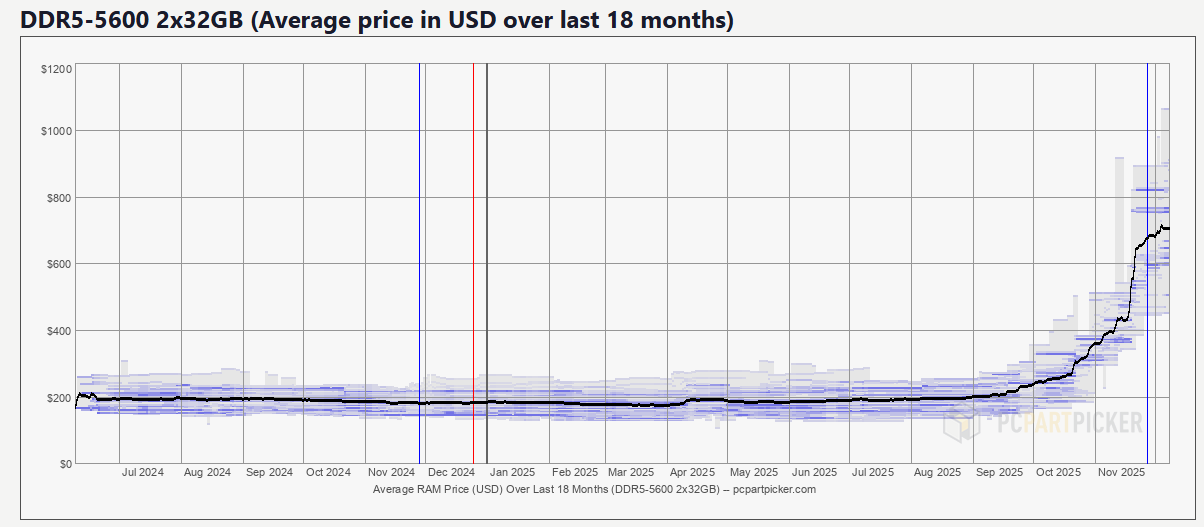
For home lab enthusiasts already feeling the strain of rising memory costs, this development raises more questions about whether consumer grade RAM will remain economical compared to enterprise surplus modules.
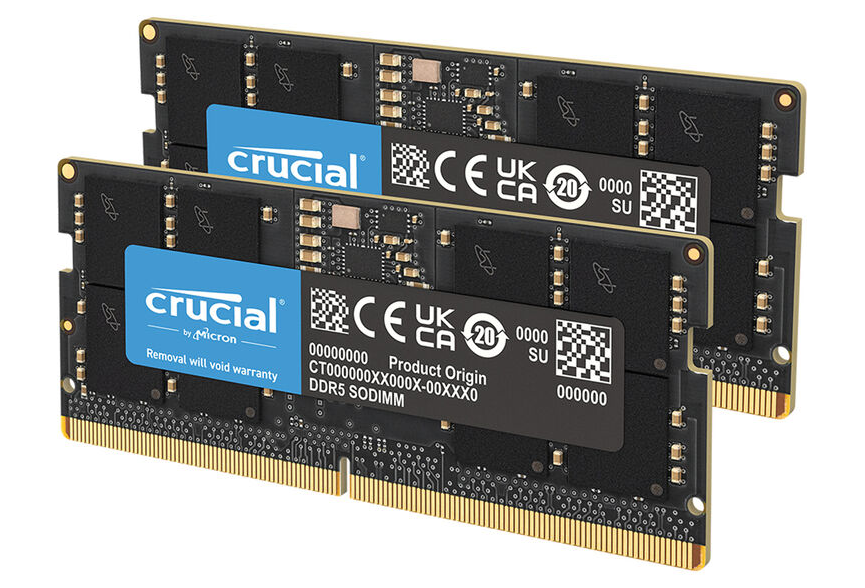
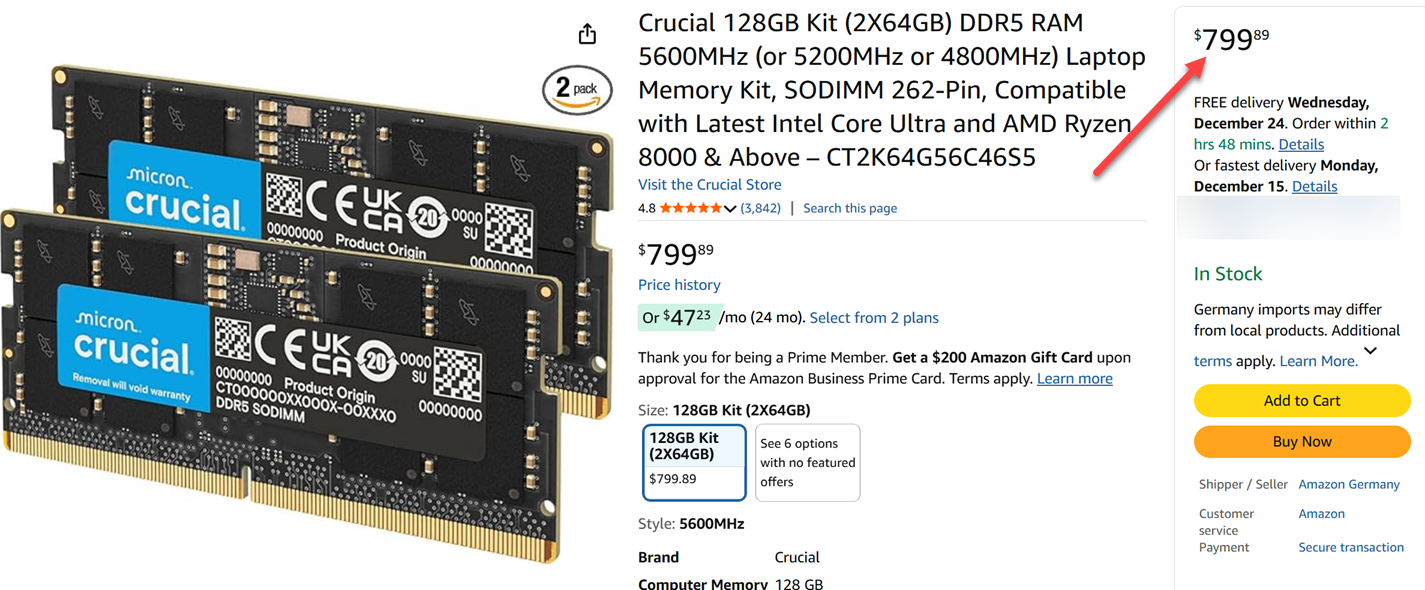
Below is the 128 GB RAM kit that we were all excited about from Crucial that dropped in 2025, giving us the ability to have mini PCs with 128 GB of RAM for the first time. I bought a single kit for around $400 earlier this year, and now it is over double that at around $800:
The impact of rising DDR5 pricing on mini PCs
So, let’s now analyze the impact on mini PCs. For the past few years, mini PCs have been smaller, quieter, and much more power efficient, rocking modern mobile CPUs. For home lab enthusiasts, myself included, it has been a great switch to be able to run efficient mini PCs for our self-hosted workloads running on Proxmox or VMware. Way less noise, way less power consumed, and less heat to worry about.
However, for most home labs, like production environments, we are not limited by CPU, it is RAM that typically always becomes the bottleneck. Workloads like virtual machines, Kubernetes clusters, AI models and container hosts all consume RAM long before they will saturate a processor. So, we see where things are going. With RAM prices skyrocketing, it may cause many of us to have to reevaluate what platform delivers the best deal and bang for the buck.
So far, used enterprise servers have not followed the same pricing trend, at least as of yet. Organizations when they refresh their enterprise server gear they usually offload these to secondhand orgs that resell used enterprise gear or they put them on eBay.
With enterprise server gear listings, this creates an inverse effect where used enterprise servers with large amounts of RAM are now possibly cheaper per gigabyte than consumer RAM, especially at high capacities, over 128 GB, making us look at mini pc vs enterprise server again for the home lab.
Enterprise servers have other benefits as well
Enterprise servers are designed in a way that gives them the ability to provide memory density long before the current RAM pricing surge. Even older generations support large capacities with multiple memory channels and plenty of DIMM slots that give you reliable ECC configurations. So if memory is king, and it often is for home lab and enterprise alike, it is hard to beat an enterprise server.
Also, enterprise servers give you expansion capabilities that mini PCs just cannot do. You get multiple PCIe slots that you can populate with extra networking, GPU acceleration, or storage controllers. Also, you get things like redundant power supplies and integrated remote management, like Dell iDRAC controllers. This expansion potential gives you a LOT of options for future upgrades.
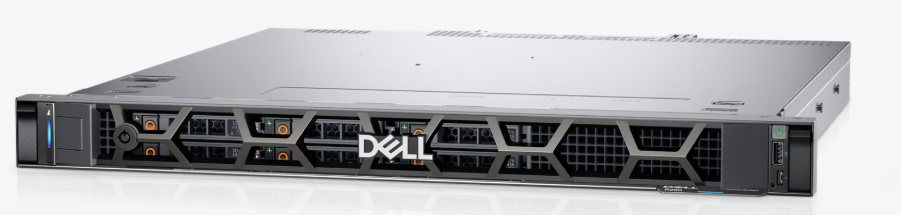
They are also purpose-built for virtualized workloads. Virtualization hosts that run dozens of VMs or container nodes benefit from the high thread counts these offer with dual processor systems. Even if the single core performance for some of these systems is lower than the newest mini PCs, the ability to have multiple cores across very wide enterprise grade, uniform Xeons, is a huge advantage. When memory capacity is the limiting factor, these advantages stack up quickly.
As an example, you can purchase a server with 128 GB of ECC RAM for ballpark of the same price as a 128 GB kit for a mini PC, and in some cases even less. Keep in mind this is an entire server and not just the memory. Keep in mind, this may still not automatically make servers the right answer for everyone, but it does reshape how people evaluate their options when they are looking at upgrades.
Below is an example of a current listing on EBay of an R740 with 2x Intel Gold processors and 128 GB of RAM.

Below is an current listing on Amazon for the Crucial 128 GB DDR5 RAM kit that we mentioned above. Keep in mind this is not ECC RAM, just general run of the mill DDR5 RAM.
Enterprise servers still have their limitations
Even if the value of memory weighs heavily in the favor of used or refurbished enterprise servers, there are still tradeoffs to be considered. What are those? Well, the big ones are:
- power
- noise
- heat
- physical footprint.
It is not uncommon for a rackmount server to idle at around 80 to 150 watts without doing a whole lot or really running anything at all. If it is under a lot of load such as a virtualization host, power consumption can go up drastically.
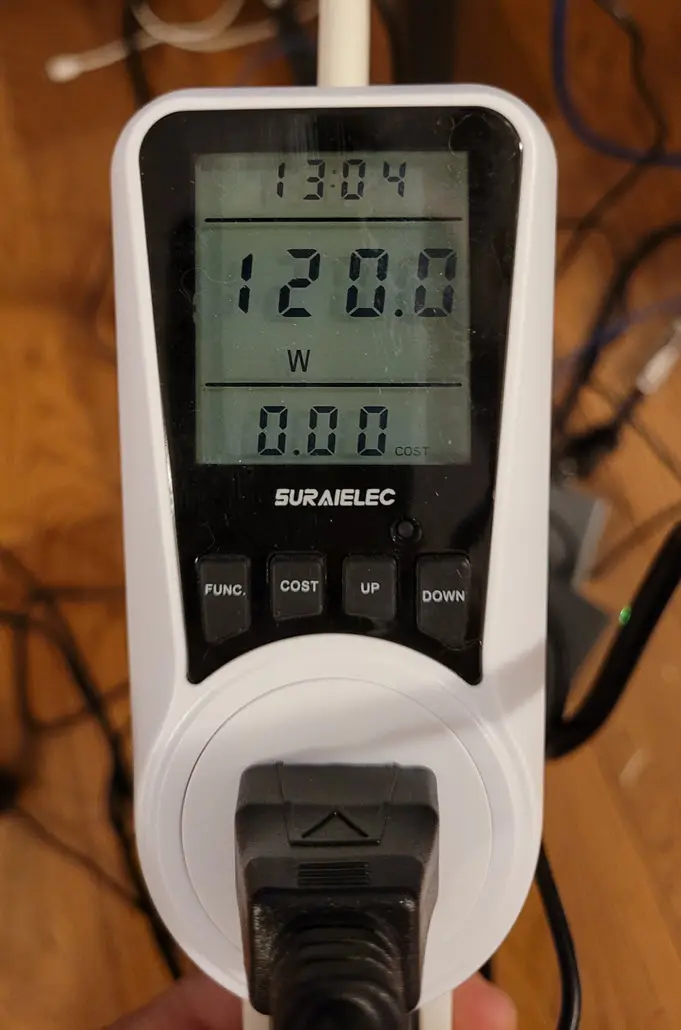
When you contrast that with mini PCs that some of which can idle at around 10 watts and draw only around 60-80 watts at 100% CPU, that is a drastic difference. This also directly impacts heat output. Obviously, a machine that only draws 10-30 watts at idle is going to be producing a whole lot less heat.
Also, enterprise servers are not quiet at all. They are not designed to be. They generally live in a datacenter where you can hardly hear someone talking to you if you are in a datacenter surrounded by servers. So, with that, that same noise level is going to be something that you would have to deal with if you purchase one for your home lab.
The physical footprint of an enterprise server is not even comparable to a mini PC. Enterprise servers are built for server racks. So they are not meant to have a small footprint. Plus to really have them configured as they are intended, you would need a server rack itself, which takes up even more space.
These tradeoffs mean that even though RAM pricing favors used enterprise servers, the practical considerations that you need to make, don’t disappear just because the RAM is a good value.
No “great” option any longer
If you would have asked me a year ago about the best option for home lab, I would have said hands down, the best option is to use mini PCs as they are cheap and with the 128 GB RAM kit from Crucial just had the best of everything. However, now we are seeing the culmination of the AI boom hitting us where it hurts now that big AI companies are building data centers and buying up all the world’s RAM.
So, in 2026, if you want to build a home lab on top of a mini PC, memory is definitely going to be one of the most expensive components that you can upgrade, with the Crucial 128 GB RAM kit costing you right now upwards of $800 just for RAM and really may not be available for much longer with Crucial pulling out of the consumer market! And, what’s more, Crucial is discontinuing manufacturing RAM on the consumer side. So, it is only going to get worse.
If you decide to check out a used enterprise server, right now, they are very appealing with options to purchase some with 128 to 256 GB of RAM on EBay for around the same cost as a RAM kit, which is crazy to think about. However, the practical downsides to a used enterprise server quickly come back in focus. Again, this are power draw, heat, noise, and space all being a consideration.
What this means for home lab directions in 2026
For home labs in the near future, you will have some decisions to make. I think we are not going to see any relief all the way through 2026 from the looks of it, maybe even longer. Some are saying this shortage is going to last well into or to the end of 2027, and those are just guesses. So, now might be the time to pull the trigger on a used enterprise server that has a healthy amount of memory if you have a space for this kind of server footprint and possibly have a server rack already.
Mini PCs are still going to be good options for home lab, but without paying an arm and a leg, we may have to just be content with less memory to work with. Definitely migrating over to containers will help to run the most efficient setup that is possible
Mini PC vs Enterprise Server pros and cons during RAM price hikes
Take a look at the considerations and comparison below for comparing mini pc vs a used enterprise server:
| Category | Mini PCs | Used Enterprise Servers |
|---|---|---|
| RAM Cost Impact | Very high impact. DDR5 kits are expensive and often cost as much as the system itself. Limited DIMM slots force large upfront costs. | Low impact. Server DDR4 and early DDR5 ECC modules are widely available and inexpensive on the secondary market (at least currently). Can scale memory gradually. |
| Maximum RAM Capacity | Limited. Most models cap out between 64 GB and 128 GB. | Very high. Common configurations exceed 256 GB, 384 GB, or more depending on generation. |
| Upgrade Flexibility | Low. Two memory slots limit incremental upgrades. | High. Many DIMM slots allow expansion over time based on pricing and availability. |
| Power Consumption | Very low power draw, usually 10 to 30 watts at idle. Ideal for 24 by 7 environments. | Higher power draw, often 80 to 150 watts at idle. Not cost efficient for continuous use for most home labs |
| Noise Levels | Near silent, suitable for living spaces and offices. | Moderate to loud depending on chassis. Rack servers can be very loud. |
| Physical Space Required | Minimal. Usually fits anywhere. | Requires more space, airflow, and usually a server rack |
| Performance | Very good single core performance and efficiency. Best for lighter workloads and controller nodes. | Strong multi core and parallel performance. Very good for virtualization, AI, and memory heavy workloads. |
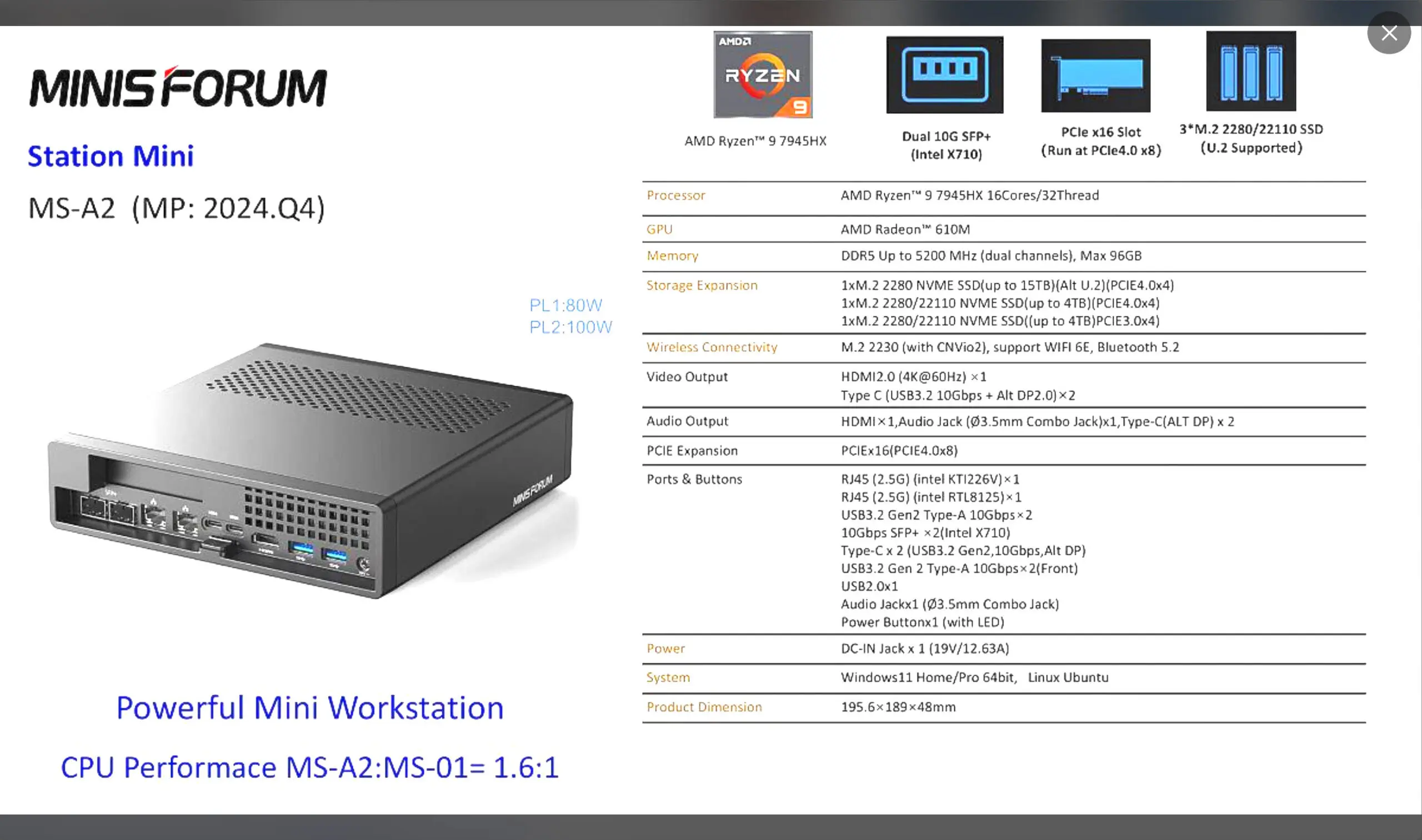
| Expandability | Very limited. Usually no PCIe slots and minimal internal expansion (except on Minisforum mini PCs like the MS-02, MS-A2, and MS-01 | High expandability. Multiple PCIe slots, drive bays, NIC upgrades, and GPU options to explore |
| Reliability Features | Good but consumer grade. Fewer enterprise focused safeguards. | Built for uptime with ECC memory, server grade cooling, and redundant power options. |
| Cost per GB of RAM | Very high during RAM price spikes. | Comparatively low, making large memory builds far more affordable with enterprise hardware |
| Best use cases during RAM price hikes | Low memory services, homelab control planes, low power tasks, edge workloads. | Virtualization hosts, Kubernetes clusters, AI workloads, development environments, any task that needs a large amount of RAM |
Wrapping up
Interesting times are ahead of us for 2026 and beyond. Memory is almost always the limiting factor in home labs and in production environments. Most modern CPUs don’t run maxed out in the least. But RAM does become limited very quickly. I think ironically just when we were all thinking mini PCs with 128 GB of memory were the answer to modern home labs, this gets much trickier in 2026 and beyond.
I am super curious on this. Are you planning to bite the bullet and purchase high priced RAM kits? Or, are you going to hold off? Are you considering mini PC vs enterprise server? Let me know in the comments what your plans are.

Google is updating how articles are shown. Don’t miss our leading home lab and tech content, written by humans, by setting Virtualization Howto as a preferred source.
About The Author

Great article Brandon. I am not sure how things are going to come out this next year. It feels like the consumer market is crumbling as of late due to AI data center push. I am probably just going to hold onto the hardware I have and see what happens.
Hi,
Sorry to say that, but 2026 will probably be worse! A company selling us Dell servers fo us at work told us the memory market is already full for 2026, All companies making RAM have a year fully booked.
We’ve ordered a server a couple of weeks ago, it has been postponed (which I never saw with Dell – usually 10 bunsiness days for delivery), due to “shortage”…
I work from home and have used a mixed approach for a few years. Mini-PCs for anything that I have to have on all the time. My enterprise servers only on when I need them for work. I can be running 30-40vms at a time on that, including DCs, Puppet, Linux and Windows, database servers, etc. I have it set up through my Home Assistant that as I am getting ready monday morning I just hit the power button and my R730 with 28 Cores and 256GB of ram kicks on, then set my DCs and other vms I need all the time set to autostart. Saves a ton on my power bill having it off on weekends, vacations, or any other time I just do not need it on. I still have tons of open slots and since its DDR4 its still very reasonable if I need to add more.
Dave,
Very practical approach! I was doing something similar with my Supermicros. I had a script that autopowered on the servers each moring and suspended the VMs in the evenings before powering off the server. Worked very well. That is one of the things I really miss not having an enterprise server in the mix now is the out of band management.
Two points…
1) This “AI boom” or rather “datacenter boom” IS going to crash. Several people have publicly said this simply can’t be sustained, due to various environmental reasons (power, space, time to build, ROI, etc.). And eventually the RAM producers will realize they are leaving money on the table by not producing enough RAM to support consumer and basic business office needs as well. So this current RAM price rise is unsustainable beyond, say, 2026-2027. So it might be reasonable to delay home lab expansion plans until things settle out.
2) An alternative approach is simply: use more mini-PCs rather than big RAM mini-PCs. This will very much complicate the home lab setup due to the need to support more machines, more updates, more cable mess, more configuration hassles, etc. – so you will be trading time and effort for lower costs. So whether that is profitable depends on the value of your time.
Everyone will have to make tradeoffs going forward. But everyone usually does in home lab builds anyway.
Steven,
These are great points you make here. There is definitely the option of scaling out. I guess it will depend on what users are willing to shell out for a mini PC for scaling out on memory. I wonder then too if we will be in the realm of the power use of a single enterprise server, but perhaps not. Lots to think about here as you have mentioned. I do think we will see this AI bubble burst in the future and hopefully there will be lots of cheap hardware for the taking at that time. I am thinking the smart move as you mentioned would be to reasonably delay home lab expansions until we see the direction things are going to head as we get into 2026. Thanks again for your insights here!
Brandon
Hi Richard,
I already saw the shortage in my company, one of our last Sell server order has been postponed due to shortage (just 1, “only 256GB of RAM)
And I need 10 more for an ESX cluster with 10TB RAM… The company selling us the servres told us already to order them as soon as possible to block the price.
But if you block the price and Dell can not provide the servers or should get the RAM for the double of the price, they can’t bill that to the end customer so it might be tricky for them as well.
Franck,
Crazy times! It really is starting to feel like pandemic era times again with supply and demand issues. I am betting we will only see things continue to get worse going into 2026. Man going to be interesting to see how this all plays out or what inventive solutions everyone comes up with.
Brandon
Hi Brandon,
I had the same reflexion about older server hardware for myself this last 2 weeks.
End of september, I consolidated a new (big) Docker server that I built this summer, so I can transfer workload from my ESXs to Docker containers and start lowering my power needs.
So I purchased a second 128GB memory kit (DDR5) to increase its memory to 256GB.
Overkill? Yes for the moment and I was VERY happy to see that I purchased it at the right time because I paid arround 300€ for it… yesterday it was at 1700 and today 2200 !!!
So I wanted to sell 2 old Dell servers but I think I will keep at least one “just in case”…
Franck,
Yeah thinking everyone should hold on to hardware they have currently. Will be crazy to see where all of this goes. I wasn’t as smart on the RAM side and only started to realize I needed to purchase some more after the increases started to happen, but just glad to get some extra before next year. I am willing to bet that prices will likely double again in a couple of months.
Brandon