

Vhtforums
AI Assistant
Ceph storage config...
 
Notifications
Clear all

Ceph storage configuration

9 Posts
2 Users
1 Reactions
4,814 Views
Posts: 4
Topic starter
Translate
English
Spanish
French
German
Italian
Portuguese
Russian
Chinese
Japanese
Korean
Arabic
Hindi
Dutch
Polish
Turkish
Vietnamese
Thai
Swedish
Danish
Finnish
Norwegian
Czech
Hungarian
Romanian
Greek
Hebrew
Indonesian
Malay
Ukrainian
Bulgarian
Croatian
Slovak
Slovenian
Serbian
Lithuanian
Latvian
Estonian
(@biodunelemide)
Active Member
Joined: 2 years ago
[#187]

I am trying to set up ceph storage on Proxmox. I don't have a paid subscription for my proxmox and get the following error "rados_connect failed - No such file or directory (500)" 
I have disabled the enterprise repository without any luck. 
please assist as I need as much help as I can get
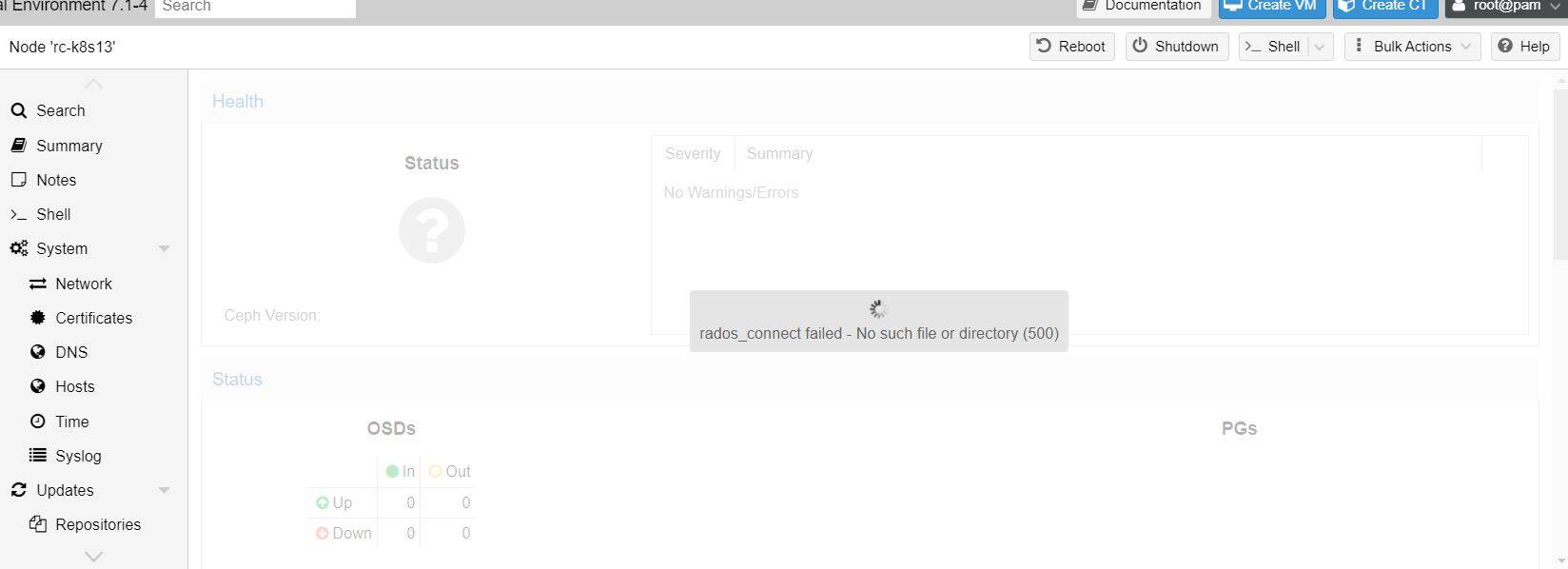
ceph error


8 Replies
Brandon Lee
Posts: 690
Admin
Translate
English
Spanish
French
German
Italian
Portuguese
Russian
Chinese
Japanese
Korean
Arabic
Hindi
Dutch
Polish
Turkish
Vietnamese
Thai
Swedish
Danish
Finnish
Norwegian
Czech
Hungarian
Romanian
Greek
Hebrew
Indonesian
Malay
Ukrainian
Bulgarian
Croatian
Slovak
Slovenian
Serbian
Lithuanian
Latvian
Estonian
(@brandon-lee)
Member
Joined: 16 years ago

@biodunelemide Welcome to the forums! Glad to have you here as part of the community. Can you give a few more details on your environment? How many servers do you have, OSDs added, etc? Also, I noticed you are still running Proxmox 7.x. Is this a new environment or existing environment where you have VMs already running?


Reply
7 Replies
(@biodunelemide)
Joined: 2 years ago

Active Member
Posts: 4
Translate
English
Spanish
French
German
Italian
Portuguese
Russian
Chinese
Japanese
Korean
Arabic
Hindi
Dutch
Polish
Turkish
Vietnamese
Thai
Swedish
Danish
Finnish
Norwegian
Czech
Hungarian
Romanian
Greek
Hebrew
Indonesian
Malay
Ukrainian
Bulgarian
Croatian
Slovak
Slovenian
Serbian
Lithuanian
Latvian
Estonian

@brandon-lee thanks for the speedy response. At the moment we have 16 hosts. which runs a combination of Windows VM, Linux, and K8s clusters. 
The hosts are all standalone ( no Clustering). We're buying new hardware to migrate to and we plan to run, Clustering, HA, and storage pooling after which we will migrate our production workload. 
We haven't been able to add OSD. We get the "rados_connect failed - No such file or directory (500)"  after installing Ceph. its an existing environment but for this configuration in preparation for the new servers, we are using hosts that don't have any workload on them. 
Lastly, we're running on version 7. Could this be the issue? 


Reply
Brandon Lee
Admin
(@brandon-lee)
Joined: 16 years ago

Member
Posts: 690
Brandon Lee
Translate
English
Spanish
French
German
Italian
Portuguese
Russian
Chinese
Japanese
Korean
Arabic
Hindi
Dutch
Polish
Turkish
Vietnamese
Thai
Swedish
Danish
Finnish
Norwegian
Czech
Hungarian
Romanian
Greek
Hebrew
Indonesian
Malay
Ukrainian
Bulgarian
Croatian
Slovak
Slovenian
Serbian
Lithuanian
Latvian
Estonian

@biodunelemide Great to know some background information there. Also, it is good this is a non production environment as that may help in troubleshooting. Take a look at my written walkthrough here. These are steps to get a basic configuration installed with Ceph. Curious if there are any missing steps maybe that are the culprit leading up to the 500 error: https://www.virtualizationhowto.com/2023/06/mastering-ceph-storage-configuration-in-proxmox-8-cluster/


Reply
Brandon Lee
Admin
(@brandon-lee)
Joined: 16 years ago

Member
Posts: 690
Brandon Lee
Translate
English
Spanish
French
German
Italian
Portuguese
Russian
Chinese
Japanese
Korean
Arabic
Hindi
Dutch
Polish
Turkish
Vietnamese
Thai
Swedish
Danish
Finnish
Norwegian
Czech
Hungarian
Romanian
Greek
Hebrew
Indonesian
Malay
Ukrainian
Bulgarian
Croatian
Slovak
Slovenian
Serbian
Lithuanian
Latvian
Estonian

@biodunelemide Let me know if you were able to take a look at your configuration. Do you receive any errors installing Ceph on your Proxmox nodes?


Reply
(@biodunelemide)
Joined: 2 years ago

Active Member
Posts: 4
Brandon Lee
Translate
English
Spanish
French
German
Italian
Portuguese
Russian
Chinese
Japanese
Korean
Arabic
Hindi
Dutch
Polish
Turkish
Vietnamese
Thai
Swedish
Danish
Finnish
Norwegian
Czech
Hungarian
Romanian
Greek
Hebrew
Indonesian
Malay
Ukrainian
Bulgarian
Croatian
Slovak
Slovenian
Serbian
Lithuanian
Latvian
Estonian

@brandon-lee yes i have looked at my configurations, and re-installed and I still get the same error. What do you advise I do?


Reply
Brandon Lee
Admin
(@brandon-lee)
Joined: 16 years ago

Member
Posts: 690
Brandon Lee
Brandon Lee
Translate
English
Spanish
French
German
Italian
Portuguese
Russian
Chinese
Japanese
Korean
Arabic
Hindi
Dutch
Polish
Turkish
Vietnamese
Thai
Swedish
Danish
Finnish
Norwegian
Czech
Hungarian
Romanian
Greek
Hebrew
Indonesian
Malay
Ukrainian
Bulgarian
Croatian
Slovak
Slovenian
Serbian
Lithuanian
Latvian
Estonian

@biodunelemide hey where in the process are you getting the error, just during the install, or at which step? This may help to pinpoint.


Reply
(@biodunelemide)
Joined: 2 years ago

Active Member
Posts: 4
Brandon Lee
Brandon Lee
Translate
English
Spanish
French
German
Italian
Portuguese
Russian
Chinese
Japanese
Korean
Arabic
Hindi
Dutch
Polish
Turkish
Vietnamese
Thai
Swedish
Danish
Finnish
Norwegian
Czech
Hungarian
Romanian
Greek
Hebrew
Indonesian
Malay
Ukrainian
Bulgarian
Croatian
Slovak
Slovenian
Serbian
Lithuanian
Latvian
Estonian

@brandon-lee so we get the install successful, allow for some time to allow the wizard to finish. It is at this point we get the error.


Reply
Brandon Lee
Admin
(@brandon-lee)
Joined: 16 years ago

Member
Posts: 690
Brandon Lee
Brandon Lee
Brandon Lee
Translate
English
Spanish
French
German
Italian
Portuguese
Russian
Chinese
Japanese
Korean
Arabic
Hindi
Dutch
Polish
Turkish
Vietnamese
Thai
Swedish
Danish
Finnish
Norwegian
Czech
Hungarian
Romanian
Greek
Hebrew
Indonesian
Malay
Ukrainian
Bulgarian
Croatian
Slovak
Slovenian
Serbian
Lithuanian
Latvian
Estonian

@biodunelemide just to make sure I understand where the error happens. So you get the first screen where you type the "Y" to install and then it comes back that the installation was successful. Do you get all the way through the wizard, so you get through the "installation" tab, "configuration" tab, and then on to the Success tab. Then, you try to navigate to the Ceph menu and it is there it gives the error?

Also, what networks are you configuring on the configuration tab, for public and ceph?


Reply
