

Vhtforums
AI Assistant
2.5 gigabit in Prox...
 
Notifications
Clear all

2.5 gigabit in Proxmox with a USB-C adapter

8 Posts
3 Users
4 Reactions
8,238 Views
Posts: 60
Topic starter
Translate
English
Spanish
French
German
Italian
Portuguese
Russian
Chinese
Japanese
Korean
Arabic
Hindi
Dutch
Polish
Turkish
Vietnamese
Thai
Swedish
Danish
Finnish
Norwegian
Czech
Hungarian
Romanian
Greek
Hebrew
Indonesian
Malay
Ukrainian
Bulgarian
Croatian
Slovak
Slovenian
Serbian
Lithuanian
Latvian
Estonian
(@malcolm-r)
Trusted Member
Joined: 2 years ago
[#165]

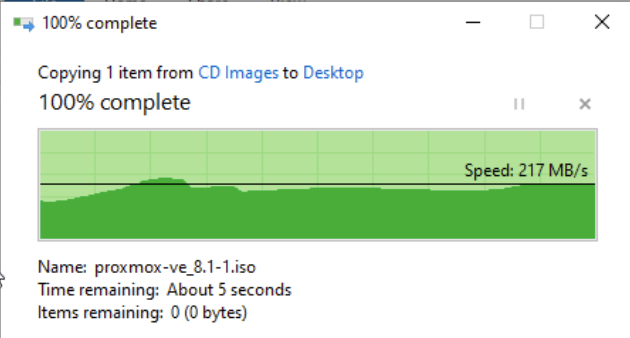
The little mini-pc I'm using to test Proxmox unfortunately only has a single 1gb ethernet port. Since most of my network is 10 gig, I decided to see if I could at least get 2.5 gig working, since this box doesn't have thunderbolt and those adapters are super pricey anyways.

I picked up this Anker adapter from Amazon: Anker USB C to 2.5 Gbps Ethernet Adapter

All I had to do was plug it in and create a bridge with it within Proxmox. I assigned an adapter to my Windows host (using the VirtIO Paravirtualized driver) and installed the driver from the Qemu guest agent ISO: https://pve.proxmox.com/wiki/Qemu-guest-agent

And that was that. I now have 2.5 gig ethernet for Proxmox!
image

7 Replies
Brandon Lee
Posts: 678
Admin
Translate
English
Spanish
French
German
Italian
Portuguese
Russian
Chinese
Japanese
Korean
Arabic
Hindi
Dutch
Polish
Turkish
Vietnamese
Thai
Swedish
Danish
Finnish
Norwegian
Czech
Hungarian
Romanian
Greek
Hebrew
Indonesian
Malay
Ukrainian
Bulgarian
Croatian
Slovak
Slovenian
Serbian
Lithuanian
Latvian
Estonian
(@brandon-lee)
Member
Joined: 16 years ago

@malcolm-r Thank you for testing the USB-C to ethernet adapter. This will be a great resource for those looking to add 2.5 GbE to their mini PCs. I am assuming this is a realtek chipset like my 1 gig adapter, so should work (ironically) with VMware as well.


Reply
Posts: 60
Topic starter
Translate
English
Spanish
French
German
Italian
Portuguese
Russian
Chinese
Japanese
Korean
Arabic
Hindi
Dutch
Polish
Turkish
Vietnamese
Thai
Swedish
Danish
Finnish
Norwegian
Czech
Hungarian
Romanian
Greek
Hebrew
Indonesian
Malay
Ukrainian
Bulgarian
Croatian
Slovak
Slovenian
Serbian
Lithuanian
Latvian
Estonian
(@malcolm-r)
Trusted Member
Joined: 2 years ago

yeah looks like it: ID 0bda:8156 Realtek Semiconductor Corp. USB 10/100/1G/2.5G LAN


Reply
2 Replies
Brandon Lee
Admin
(@brandon-lee)
Joined: 16 years ago

Member
Posts: 678
Translate
English
Spanish
French
German
Italian
Portuguese
Russian
Chinese
Japanese
Korean
Arabic
Hindi
Dutch
Polish
Turkish
Vietnamese
Thai
Swedish
Danish
Finnish
Norwegian
Czech
Hungarian
Romanian
Greek
Hebrew
Indonesian
Malay
Ukrainian
Bulgarian
Croatian
Slovak
Slovenian
Serbian
Lithuanian
Latvian
Estonian

@malcolm-r are you starting to run more workloads in Proxmox for testing? Curious how you are liking it?


Reply
(@malcolm-r)
Joined: 2 years ago

Trusted Member
Posts: 60
Translate
English
Spanish
French
German
Italian
Portuguese
Russian
Chinese
Japanese
Korean
Arabic
Hindi
Dutch
Polish
Turkish
Vietnamese
Thai
Swedish
Danish
Finnish
Norwegian
Czech
Hungarian
Romanian
Greek
Hebrew
Indonesian
Malay
Ukrainian
Bulgarian
Croatian
Slovak
Slovenian
Serbian
Lithuanian
Latvian
Estonian

@brandon-lee not a ton, yet. with 2 big esxi hosts i just don't have a big use case right now. i am, however, about to spin up an Ubuntu VM to transfer my torrent client to. i'm seeing some performance issues running it in docker, so i'll try a VM next and see if that helps.


Reply
Louie1961
Posts: 8
Translate
English
Spanish
French
German
Italian
Portuguese
Russian
Chinese
Japanese
Korean
Arabic
Hindi
Dutch
Polish
Turkish
Vietnamese
Thai
Swedish
Danish
Finnish
Norwegian
Czech
Hungarian
Romanian
Greek
Hebrew
Indonesian
Malay
Ukrainian
Bulgarian
Croatian
Slovak
Slovenian
Serbian
Lithuanian
Latvian
Estonian
(@louie1961)
Active Member
Joined: 2 years ago

I did the same thing with an HP z640 and my Synology DS220+ It was definitely more complicated on DSM7


Reply
1 Reply
Brandon Lee
Admin
(@brandon-lee)
Joined: 16 years ago

Member
Posts: 678
Translate
English
Spanish
French
German
Italian
Portuguese
Russian
Chinese
Japanese
Korean
Arabic
Hindi
Dutch
Polish
Turkish
Vietnamese
Thai
Swedish
Danish
Finnish
Norwegian
Czech
Hungarian
Romanian
Greek
Hebrew
Indonesian
Malay
Ukrainian
Bulgarian
Croatian
Slovak
Slovenian
Serbian
Lithuanian
Latvian
Estonian

@louie1961 I would be interested to know how you do this on a Synology device. Was it a chore on the driver side?


Reply
Louie1961
Posts: 8
Translate
English
Spanish
French
German
Italian
Portuguese
Russian
Chinese
Japanese
Korean
Arabic
Hindi
Dutch
Polish
Turkish
Vietnamese
Thai
Swedish
Danish
Finnish
Norwegian
Czech
Hungarian
Romanian
Greek
Hebrew
Indonesian
Malay
Ukrainian
Bulgarian
Croatian
Slovak
Slovenian
Serbian
Lithuanian
Latvian
Estonian
(@louie1961)
Active Member
Joined: 2 years ago

I followed this guide from the folks over at NAScompares . I am using this NIC, mainly because it was cheap on Amazon. https://www.servethehome.com/ult-wiiq-usb-3-to-2-5gbe-network-adapter-review/


Reply
