




I had recently updated to WSL version 3.x to get the latest native containers functionality. With that, just a couple of days later, I ran into an interesting WSL issue. Launching Ubuntu with wsl failed with this error:
Failed to attach disk 'C:\Users\localadmin\AppData\Local\Packages\CanonicalGroupLimited.Ubuntu24.04LTS_79rhkp1fndgsc\LocalState\ext4.vhdx' to WSL2: The path cannot be traversed because it contains an untrusted mount point.

Error code: Wsl/Service/CreateInstance/MountDisk/0x800701c0
At first glance, I wondered whether WSL couldn’t find my virtual disk as I have had that issue before with various upgrades or other issues happening. However, the VHDX was still there. The problem was the path that was being used to reach the VHDX disk.
My system was running WSL 3.0.1.0 with Ubuntu 24.04 LTS.
Why the problem?
Ubuntu’s LocalState directory on my C: drive was actually a link pointing to a storage location on D:. I checked it with PowerShell:
$statePath = Join-Path $env:LOCALAPPDATA 'Packages\CanonicalGroupLimited.Ubuntu24.04LTS_79rhkp1fndgsc\LocalState'

Test-Path -LiteralPath "$statePath\ext4.vhdx"

Get-Item -Force -LiteralPath $statePath |
    Format-List FullName, Attributes, LinkType, Target
The disk check returned True, and the folder showed:
Attributes : Directory, ReparsePoint
LinkType   : Junction
Target     : D:\WpSystem\<user-SID>\AppData\Local\Packages\CanonicalGroupLimited.Ubuntu24.04LTS_79rhkp1fndgsc\LocalState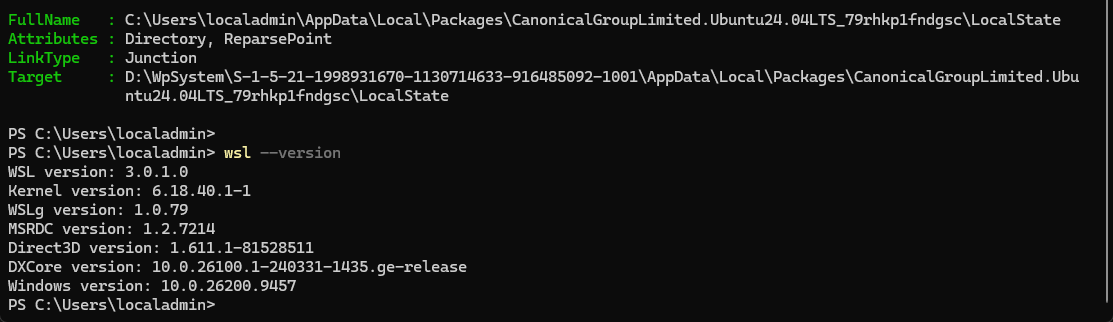
WSL was refusing to traverse that junction. This matches a reported WSL 3.0.1 issue involving distributions moved through Windows Settings.
The fix that worked for me
I changed Ubuntu’s registered BasePath to point directly to the real directory on D:, this allowed it to get around the problem
The script below checks that the VHDX exists at the destination, finds the matching distribution registration, and backs up its registry settings before making the change.
Run it in Windows PowerShell under the same Windows account that owns the Ubuntu installation. Adjust the $statePath variable if your distribution uses a different package folder.
wsl --shutdown

$statePath = Join-Path $env:LOCALAPPDATA 'Packages\CanonicalGroupLimited.Ubuntu24.04LTS_79rhkp1fndgsc\LocalState'
$targetPath = [string](Get-Item -Force -LiteralPath $statePath).Target

if (-not $targetPath) {
    throw "LocalState has no junction target. Nothing changed."
}

if (-not (Test-Path -LiteralPath "$targetPath\ext4.vhdx" -PathType Leaf)) {
    throw "VHDX not found at junction destination. Nothing changed."
}

$distroKeys = @(
    Get-ChildItem 'HKCU:\Software\Microsoft\Windows\CurrentVersion\Lxss' |
        Where-Object {
            $registeredPath = (Get-ItemProperty $_.PSPath).BasePath
            ($registeredPath -replace '^\\\\\?\\', '').TrimEnd('\') -eq $statePath.TrimEnd('\')
        }
)

if ($distroKeys.Count -ne 1) {
    throw "Expected one matching distribution; found $($distroKeys.Count). Nothing changed."
}

$distroKey = $distroKeys[0]
$distroSettings = Get-ItemProperty $distroKey.PSPath

$backupFile = Join-Path $env:USERPROFILE "wsl-ubuntu-registry-backup-$(Get-Date -Format 'yyyyMMdd-HHmmss').reg"

reg.exe export "HKCU\Software\Microsoft\Windows\CurrentVersion\Lxss\$($distroKey.PSChildName)" "$backupFile" /y

if ($LASTEXITCODE -ne 0) {
    throw "Registry backup failed. Nothing changed."
}

Write-Host "Distribution: $($distroSettings.DistributionName)"
Write-Host "Original path: $($distroSettings.BasePath)"
Write-Host "Direct path:   $targetPath"
Write-Host "Backup:        $backupFile"

Set-ItemProperty -LiteralPath $distroKey.PSPath -Name BasePath -Value $targetPath

wsl -d $distroSettings.DistributionName
This fix worked for me. Has anyone else hit this after updating to WSL 3.0.1, with the distro stored on another drive?