



If you are deciding to run a production-grade Kubernetes cluster, Talos Linux Kubernetes makes a lot of sense, since it focuses on being immutable and security-focused. However, it forces you to be more deliberate when you design everything, including storage. Talos makes it more challenging to just shoe horn in any kind of storage since it removes SSH, package managers, and mutable operating system state. In my recent minilab project, I had to choose a persistent storage technology for Talos Kubernetes. I landed on Ceph. Let me walk through why Ceph won in this choice and the challenges with running it with Talos.
My minilab at the start of 2026
In case you missed my post on this, I have decided to jump head first into a minirack that will run a minilab for modern containerized services. Check out my post here for the full details:
It sports Proxmox and Talos Linux Kubernetes and allowed me to make use of an assortment of mini PCs that I have laying around.
Why storage choices matter even more with Talos
With Talos, it changes how Kubernetes nodes are managed and how you manage them. You cannot log into a host operating system and start tweaking things. You can’t install random packages to work around issues. Every interaction happens through the Talos API or Kubernetes shell itself.
So, long story short, this has a direct impact on the storage design you choose. As we know, local only storage for a Kubernetes node means that you can’t move workloads tied to persistent data to another node as the data will not be there. You need a way to replicate the data or share it between your Kubernetes nodes. Talos doesn’t necessarily make storage harder, but it definitely removes shortcuts or hacks that we might make in a lazy way using other Kubernetes distributions. But overall, this is a good thing.
Evaluating Storage Options for a Talos Kubernetes Cluster
Before settling on Ceph, I considered several storage technologies. What were those? Well, note the following:
- Local persistent volumes – these are the simplest option and make work well for just learning Kubernetes in general, but they break down when a node reboots or workloads need to be rescheduled.
- NFS – it is easy to deploy and a good option but it doesn’t perform the best out of other choices from my testing with the hardware choices I have available in my home lab.
- iSCSI – this is a great option and well known for most of us, so was definitely on the table for me
- Longhorn – I have used Longhorn especially in my Rancher cluster I ran way back in the day and it was a good option that was also distributed storage which was the direction I was leaning.
- Ceph – This was a strong contender for me since I had experience with it in my Docker Swarm cluster and it has performed flawlessly there so I had a good amount of confidence in it as a solution
Distributed storage systems are where Talos really shines. These systems assume immutable nodes, and have dynamic scheduling, and integrate cleanly with CSI drivers. Ceph stood out for me since it ticked all the boxes I was looking for and is a distributed storage technology. I didn’t really want to depend on an outside storage hardware device. Too, I already had experience with Ceph via Microceph running in Ubuntu and also have run it with Proxmox as well.
I like also that Ceph supports multiple storage types. You can layer on CephFS to have a shared file system while RBD gives you block storage for databases and performance-sensitive workloads. So you can get the best of both worlds using both in tandem. Ceph also integrates with Kubernetes using CSI drivers where storage is provisioned dynamically. PersistentVolumeClaims become the interface that applications use. Ceph handles placement and replication behind the scenes. Also, Ceph is widely used in production clusters. So, learning it in a home lab translates to gaining experience with a real-world production technology.
My Ceph architecture in the minilab
So unlike my Docker Swarm hosts, I couldn’t run Ceph directly on the Talos nodes since they are immutable. So, what I decided to do was have a separate cluster of three Ubuntu Server 24.04 virtual machines. Each VM has a dedicated NVMe disk attached to the virtual machine. These are backed by physical drives in my mini PC hosts.
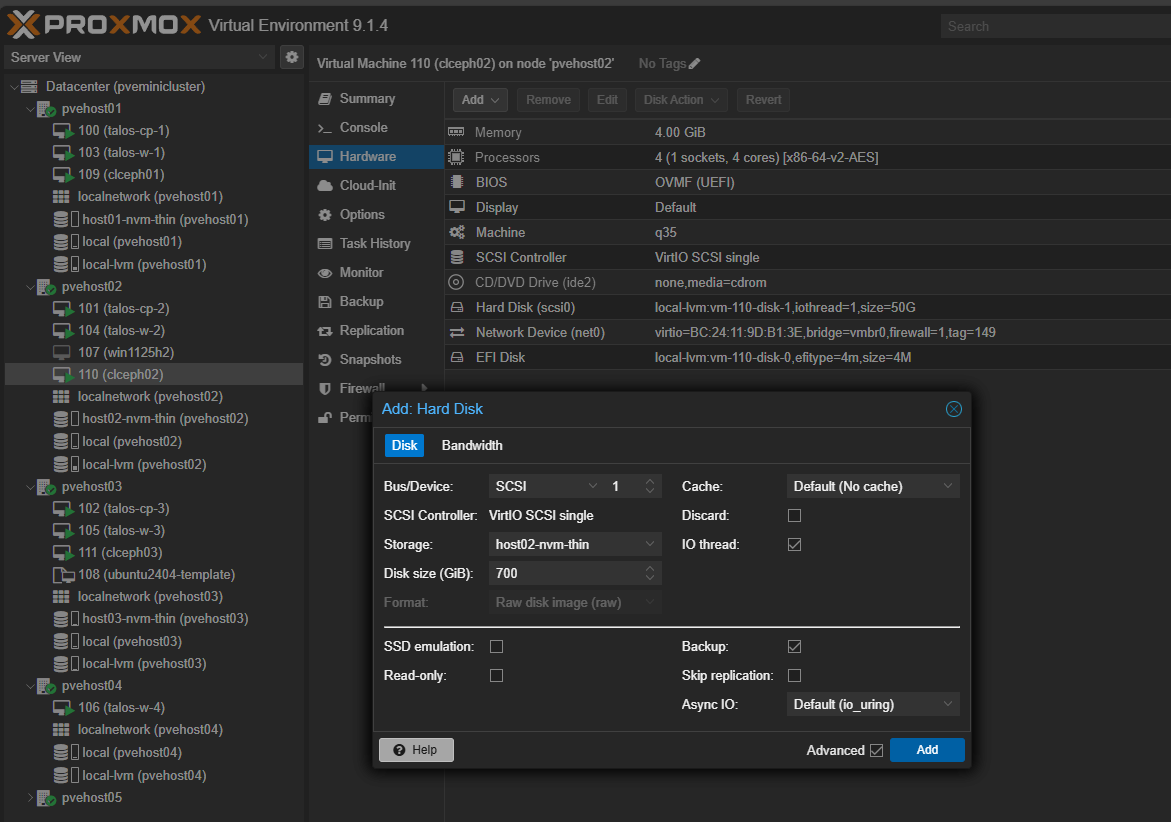
Below, I am adding an additional hard disk to the Ceph virtual machines
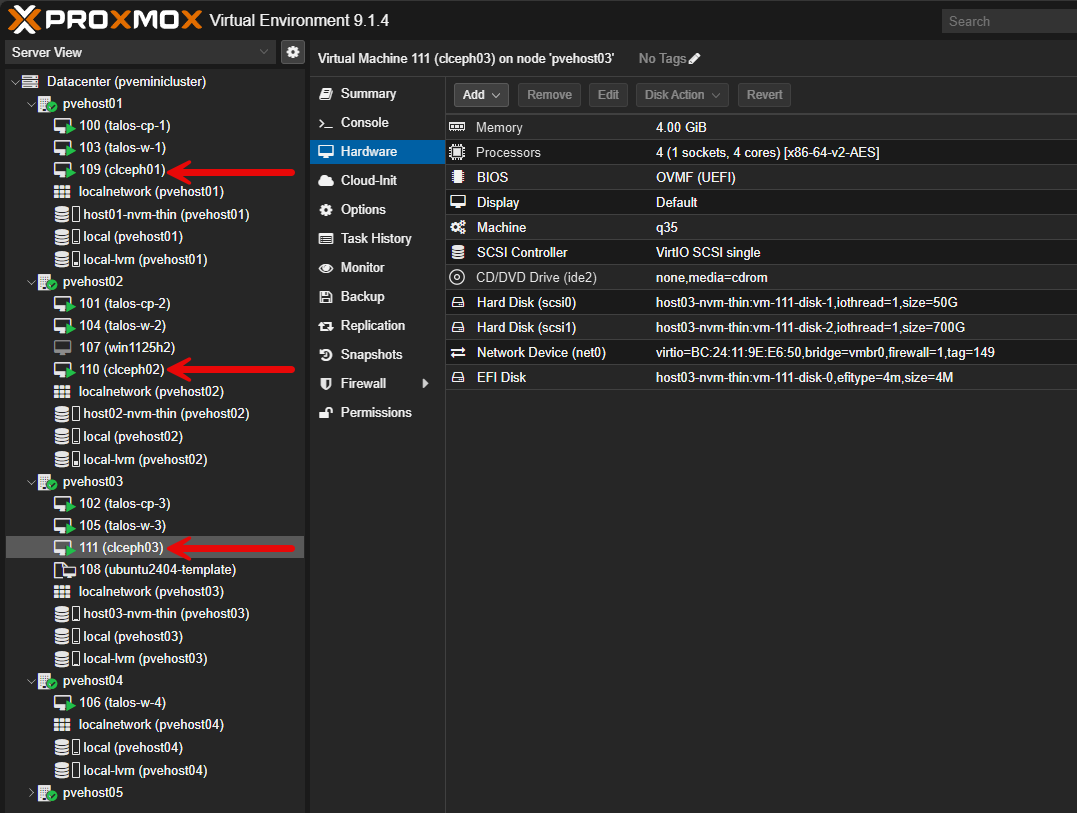
Here you can see how I have the three Ceph virtual machines spread between three different PVE hosts that are mini PCs in the minilab cluster.
I like this design as it intentionally keeps responsibilities of things separated. The Talos nodes focus on Kubernetes control plane and workloads. The Ceph nodes focus entirely on storage.
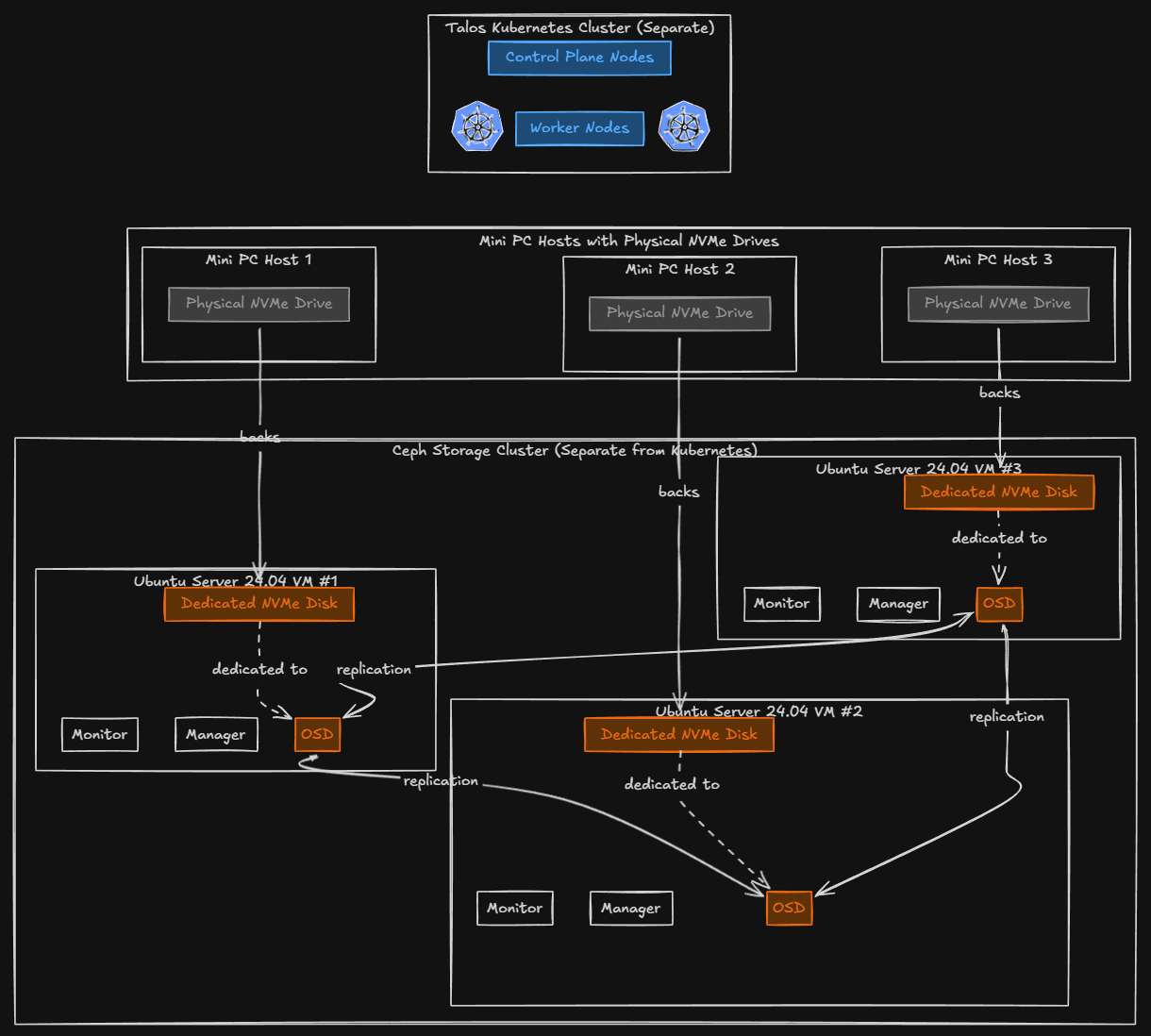
Each Ceph virtual machine runs the standard Ceph services, including: monitors, managers, and OSDs. The NVMe disks are dedicated to Ceph and these are not shared with the operating system. Ceph handles replication across the disks automatically. Also, with three nodes, I can tolerate a single node failure without data loss keeping the N+1 design alive and well. This I think is an ideal number for a home lab environment where you want to have resilience for your shared data.
Networking for Ceph and Kubernetes
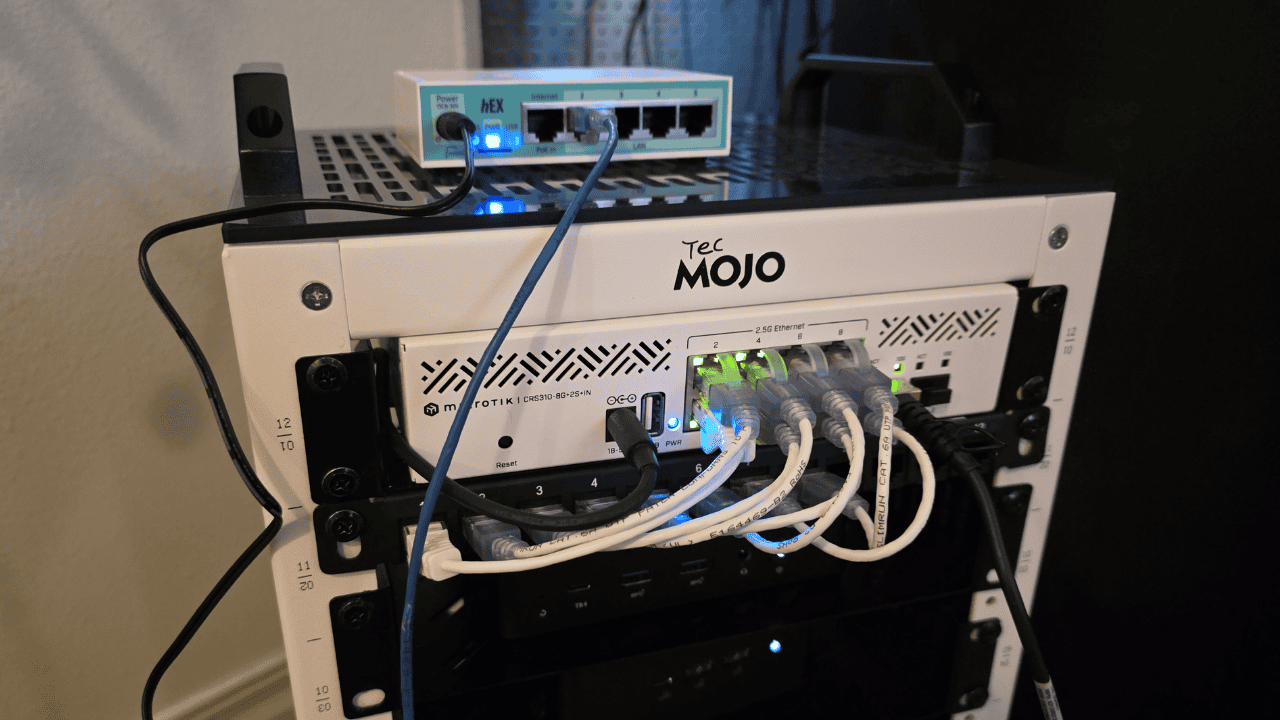
For my minirack I am using a Mikrotik CRS-310-8S-2IN+ switch that has (8) 2.5 GbE ports and (2) 10 GbE SFP ports. This keeps everything multi-gig in speed. Like all software defined storage, Ceph is sensitive to network latency. All of my Ceph and Kubernetes nodes are on the same high-speed switch uplinks. This keeps it from having to cross routing or even other switch boundaries which keeps the performance predictable.
Ceph traffic is isolated internally through VLANs and I have firewall rules where appropriate. Kubernetes accesses Ceph only through the CSI drivers. This traffic from the Talos cluster authenticates with the Ceph cluster using a generated Ceph token key.
The /etc/ceph directory challenge on Talos
One of the more interesting challenges I ran into involved the /etc/ceph directory. Talos runs as an immutable operating system. So, that being the case, it means system paths like /etc are read-only and cannot be written to by containers. The Ceph CSI driver assumes a traditional Linux host and tries to write a temporary Ceph keyring file to /etc/ceph/ keyring at runtime.
On Talos, that write fails and causes the CSI pods to crash-loop. The crash loop logs look something like this:
cephcsi.go:220] failed to write ceph configuration file (open /etc/ceph/keyring: read-only file system)To fix this, you have to explicitly mount a writable in-memory volume at /etc/ceph inside the Ceph CSI pods. This lets the driver create its keyring without touching the Talos host filesystem. This keeps Talos immutable and still allows the Ceph CSI to function normally inside Kubernetes.
Is this a safe approach? I think so. Note the following:
Why this is safe:
- The keyring is already stored securely in Kubernetes as a Secret
- The CSI driver recreates
/etc/ceph/keyringevery time it starts - Ceph data is stored on OSD disks, not Kubernetes nodes
- Losing the keyring file does not affect existing volumes or data
- This pattern is explicitly required for immutable OSes like Talos, Flatcar, Bottlerocket
What would not be good:
- Writing Ceph configuration to the Talos host filesystem
- Storing Ceph keys permanently on nodes
- Running Ceph OSDs inside Talos
- Sharing
/etc/cephbetween pods or nodes
Creating a Ceph cluster using Microceph
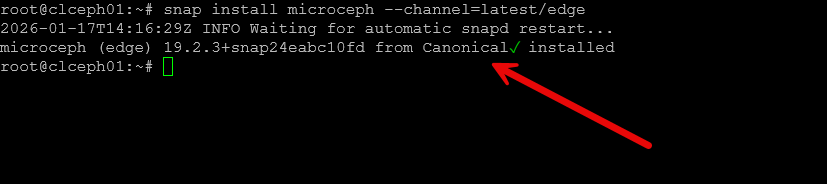
I used the Microceph installation process that I have written about before. Check out my blog post here on setting up Microceph and getting your distributed storage configured:
Below is a screenshot after installing microceph.
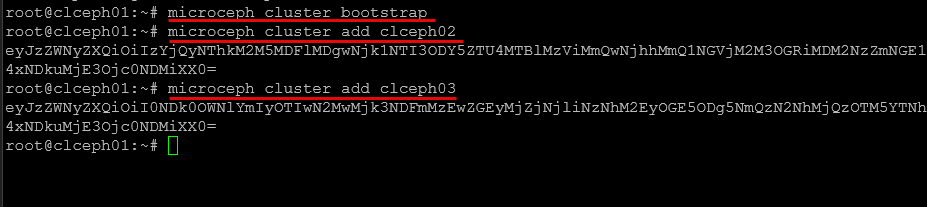
Bootstrapping the cluster and adding nodes to the microceph cluster.
Integrating Ceph with Talos Linux Kubernetes
Let’s look at the steps to do the actual integration of Ceph with Talos Linux Kubernetes. First create the privileged namespace in Talos.
Create the privileged namespace in Talos
Create a file called ceph-csi-namespace.yaml with the following:
apiVersion: v1
kind: Namespace
metadata:
  name: ceph-csi
  labels:
    kubernetes.io/metadata.name: ceph-csi
    pod-security.kubernetes.io/enforce: privileged
    pod-security.kubernetes.io/audit: privileged
    pod-security.kubernetes.io/warn: privileged
Then apply it:
kubectl apply -f ceph-csi-namespace.yamlCreate an auth token key in Ceph cluster and secret in Talos
On your Ceph cluster, run the following command to create a client.k8s key to allow your Talos cluster to authenticate to your Ceph cluster:
ceph auth get-or-create client.k8s \
  mon 'allow r' \
  osd 'allow rwx pool=rbd' \
  mgr 'allow rw'

ceph auth get-key client.k8s
Once you get that key above, paste that into the following which you will run on your Talos Kubernetes cluster:
kubectl -n ceph-csi create secret generic ceph-secret \
  --type="kubernetes.io/rbd" \
  --from-literal=userID=k8s \
  --from-literal=userKey='PASTE_BASE64_KEY_HERE'
Apply RBAC in the cluster for Ceph CSI
Next, we apply RBAC in the cluster for Ceph CSI:
kubectl apply -f https://raw.githubusercontent.com/ceph/ceph-csi/release-v3.11/deploy/rbd/kubernetes/csi-provisioner-rbac.yaml
kubectl apply -f https://raw.githubusercontent.com/ceph/ceph-csi/release-v3.11/deploy/rbd/kubernetes/csi-nodeplugin-rbac.yaml
Install the Ceph CSI node plugin
Now, here is part of the workaround I had to do for the node plugin Daemonset to avoid the /etc/ceph/keyring crash. Create this file: csi-rbdplugin-daemonset-talos.yaml.
apiVersion: apps/v1
kind: DaemonSet
metadata:
  name: csi-rbdplugin
  namespace: ceph-csi
spec:
  selector:
    matchLabels:
      app: csi-rbdplugin
  template:
    metadata:
      labels:
        app: csi-rbdplugin
    spec:
      hostNetwork: true
      hostPID: true
      priorityClassName: system-node-critical
      serviceAccountName: rbd-csi-nodeplugin
      containers:
        - name: csi-rbdplugin
          image: quay.io/cephcsi/cephcsi:v3.11.0
          imagePullPolicy: IfNotPresent
          securityContext:
            privileged: true
            allowPrivilegeEscalation: true
            capabilities:
              add: ["SYS_ADMIN"]
          args:
            - "--nodeid=$(NODE_ID)"
            - "--pluginpath=/var/lib/kubelet/plugins"
            - "--stagingpath=/var/lib/kubelet/plugins/kubernetes.io/csi/"
            - "--type=rbd"
            - "--nodeserver=true"
            - "--endpoint=$(CSI_ENDPOINT)"
            - "--v=5"
            - "--drivername=rbd.csi.ceph.com"
            - "--enableprofiling=false"
          env:
            - name: POD_IP
              valueFrom:
                fieldRef:
                  fieldPath: status.podIP
            - name: NODE_ID
              valueFrom:
                fieldRef:
                  fieldPath: spec.nodeName
            - name: POD_NAMESPACE
              valueFrom:
                fieldRef:
                  fieldPath: metadata.namespace
            - name: CSI_ENDPOINT
              value: "unix:///csi/csi.sock"
          volumeMounts:
            - name: socket-dir
              mountPath: /csi
            - name: host-dev
              mountPath: /dev
            - name: host-sys
              mountPath: /sys
            - name: host-mount
              mountPath: /run/mount
            - name: etc-selinux
              mountPath: /etc/selinux
              readOnly: true
            - name: lib-modules
              mountPath: /lib/modules
              readOnly: true
            - name: ceph-csi-config
              mountPath: /etc/ceph-csi-config/
            - name: ceph-csi-encryption-kms-config
              mountPath: /etc/ceph-csi-encryption-kms-config/
            - name: plugin-dir
              mountPath: /var/lib/kubelet/plugins
              mountPropagation: Bidirectional
            - name: mountpoint-dir
              mountPath: /var/lib/kubelet/pods
              mountPropagation: Bidirectional
            - name: keys-tmp-dir
              mountPath: /tmp/csi/keys
            - name: ceph-logdir
              mountPath: /var/log/ceph
            - name: oidc-token
              mountPath: /run/secrets/tokens
              readOnly: true
            - name: etc-ceph-writable
              mountPath: /etc/ceph

        - name: driver-registrar
          image: registry.k8s.io/sig-storage/csi-node-driver-registrar:v2.10.1
          imagePullPolicy: IfNotPresent
          securityContext:
            privileged: true
            allowPrivilegeEscalation: true
          args:
            - "--v=1"
            - "--csi-address=/csi/csi.sock"
            - "--kubelet-registration-path=/var/lib/kubelet/plugins/rbd.csi.ceph.com/csi.sock"
          env:
            - name: KUBE_NODE_NAME
              valueFrom:
                fieldRef:
                  fieldPath: spec.nodeName
          volumeMounts:
            - name: socket-dir
              mountPath: /csi
            - name: registration-dir
              mountPath: /registration

        - name: liveness-prometheus
          image: quay.io/cephcsi/cephcsi:v3.11.0
          imagePullPolicy: IfNotPresent
          securityContext:
            privileged: true
            allowPrivilegeEscalation: true
          args:
            - "--type=liveness"
            - "--endpoint=$(CSI_ENDPOINT)"
            - "--metricsport=8680"
            - "--metricspath=/metrics"
            - "--polltime=60s"
            - "--timeout=3s"
          env:
            - name: CSI_ENDPOINT
              value: "unix:///csi/csi.sock"
            - name: POD_IP
              valueFrom:
                fieldRef:
                  fieldPath: status.podIP
          volumeMounts:
            - name: socket-dir
              mountPath: /csi

      volumes:
        - name: socket-dir
          hostPath:
            path: /var/lib/kubelet/plugins/rbd.csi.ceph.com
            type: DirectoryOrCreate
        - name: plugin-dir
          hostPath:
            path: /var/lib/kubelet/plugins
            type: Directory
        - name: mountpoint-dir
          hostPath:
            path: /var/lib/kubelet/pods
            type: DirectoryOrCreate
        - name: ceph-logdir
          hostPath:
            path: /var/log/ceph
            type: DirectoryOrCreate
        - name: registration-dir
          hostPath:
            path: /var/lib/kubelet/plugins_registry/
            type: Directory
        - name: host-dev
          hostPath:
            path: /dev
        - name: host-sys
          hostPath:
            path: /sys
        - name: etc-selinux
          hostPath:
            path: /etc/selinux
        - name: host-mount
          hostPath:
            path: /run/mount
        - name: lib-modules
          hostPath:
            path: /lib/modules
        - name: ceph-csi-config
          configMap:
            name: ceph-csi-config
        - name: ceph-csi-encryption-kms-config
          configMap:
            name: ceph-csi-encryption-kms-config
        - name: keys-tmp-dir
          emptyDir:
            medium: Memory
        - name: oidc-token
          projected:
            sources:
              - serviceAccountToken:
                  audience: ceph-csi-kms
                  expirationSeconds: 3600
                  path: oidc-token
        - name: etc-ceph-writable
          emptyDir: {}
Then apply it to the cluster:
kubectl apply -f csi-rbdplugin-daemonset-talos.yamlApply the controller/provisioner deployment
The last one is the controller/provisioner deployment. It needs the same writable /etc/ceph workaround. Create a file called: csi-rbdplugin-provisioner-talos.yaml with the following contents:
apiVersion: apps/v1
kind: Deployment
metadata:
  name: csi-rbdplugin-provisioner
  namespace: ceph-csi
spec:
  replicas: 3
  selector:
    matchLabels:
      app: csi-rbdplugin-provisioner
  template:
    metadata:
      labels:
        app: csi-rbdplugin-provisioner
    spec:
      serviceAccountName: rbd-csi-provisioner
      priorityClassName: system-cluster-critical
      affinity:
        podAntiAffinity:
          requiredDuringSchedulingIgnoredDuringExecution:
            - labelSelector:
                matchExpressions:
                  - key: app
                    operator: In
                    values:
                      - csi-rbdplugin-provisioner
              topologyKey: kubernetes.io/hostname

      containers:
        - name: csi-rbdplugin
          image: quay.io/cephcsi/cephcsi:v3.11.0
          imagePullPolicy: IfNotPresent
          args:
            - "--nodeid=$(NODE_ID)"
            - "--type=rbd"
            - "--controllerserver=true"
            - "--endpoint=$(CSI_ENDPOINT)"
            - "--v=5"
            - "--drivername=rbd.csi.ceph.com"
            - "--pidlimit=-1"
            - "--rbdhardmaxclonedepth=8"
            - "--rbdsoftmaxclonedepth=4"
            - "--enableprofiling=false"
            - "--setmetadata=true"
          env:
            - name: POD_IP
              valueFrom:
                fieldRef:
                  fieldPath: status.podIP
            - name: NODE_ID
              valueFrom:
                fieldRef:
                  fieldPath: spec.nodeName
            - name: POD_NAMESPACE
              valueFrom:
                fieldRef:
                  fieldPath: metadata.namespace
            - name: CSI_ENDPOINT
              value: "unix:///csi/csi-provisioner.sock"
          volumeMounts:
            - name: socket-dir
              mountPath: /csi
            - name: host-dev
              mountPath: /dev
            - name: host-sys
              mountPath: /sys
            - name: lib-modules
              mountPath: /lib/modules
              readOnly: true
            - name: ceph-csi-config
              mountPath: /etc/ceph-csi-config/
            - name: ceph-csi-encryption-kms-config
              mountPath: /etc/ceph-csi-encryption-kms-config/
            - name: keys-tmp-dir
              mountPath: /tmp/csi/keys
            - name: oidc-token
              mountPath: /run/secrets/tokens
              readOnly: true
            - name: etc-ceph-writable
              mountPath: /etc/ceph

        - name: csi-provisioner
          image: registry.k8s.io/sig-storage/csi-provisioner:v4.0.1
          args:
            - "--csi-address=$(ADDRESS)"
            - "--v=1"
            - "--timeout=150s"
            - "--retry-interval-start=500ms"
            - "--leader-election=true"
            - "--feature-gates=Topology=false"
            - "--feature-gates=HonorPVReclaimPolicy=true"
            - "--prevent-volume-mode-conversion=true"
            - "--default-fstype=ext4"
            - "--extra-create-metadata=true"
          env:
            - name: ADDRESS
              value: "unix:///csi/csi-provisioner.sock"
          volumeMounts:
            - name: socket-dir
              mountPath: /csi

        - name: csi-snapshotter
          image: registry.k8s.io/sig-storage/csi-snapshotter:v7.0.2
          args:
            - "--csi-address=$(ADDRESS)"
            - "--v=1"
            - "--timeout=150s"
            - "--leader-election=true"
            - "--extra-create-metadata=true"
            - "--enable-volume-group-snapshots=true"
          env:
            - name: ADDRESS
              value: "unix:///csi/csi-provisioner.sock"
          volumeMounts:
            - name: socket-dir
              mountPath: /csi

        - name: csi-attacher
          image: registry.k8s.io/sig-storage/csi-attacher:v4.5.1
          args:
            - "--v=1"
            - "--csi-address=$(ADDRESS)"
            - "--leader-election=true"
            - "--retry-interval-start=500ms"
            - "--default-fstype=ext4"
          env:
            - name: ADDRESS
              value: "/csi/csi-provisioner.sock"
          volumeMounts:
            - name: socket-dir
              mountPath: /csi

        - name: csi-resizer
          image: registry.k8s.io/sig-storage/csi-resizer:v1.10.1
          args:
            - "--csi-address=$(ADDRESS)"
            - "--v=1"
            - "--timeout=150s"
            - "--leader-election"
            - "--retry-interval-start=500ms"
            - "--handle-volume-inuse-error=false"
            - "--feature-gates=RecoverVolumeExpansionFailure=true"
          env:
            - name: ADDRESS
              value: "unix:///csi/csi-provisioner.sock"
          volumeMounts:
            - name: socket-dir
              mountPath: /csi

        - name: csi-rbdplugin-controller
          image: quay.io/cephcsi/cephcsi:v3.11.0
          imagePullPolicy: IfNotPresent
          args:
            - "--type=controller"
            - "--v=5"
            - "--drivername=rbd.csi.ceph.com"
            - "--drivernamespace=$(DRIVER_NAMESPACE)"
            - "--setmetadata=true"
          env:
            - name: DRIVER_NAMESPACE
              valueFrom:
                fieldRef:
                  fieldPath: metadata.namespace
          volumeMounts:
            - name: ceph-csi-config
              mountPath: /etc/ceph-csi-config/
            - name: keys-tmp-dir
              mountPath: /tmp/csi/keys
            - name: etc-ceph-writable
              mountPath: /etc/ceph

        - name: liveness-prometheus
          image: quay.io/cephcsi/cephcsi:v3.11.0
          args:
            - "--type=liveness"
            - "--endpoint=$(CSI_ENDPOINT)"
            - "--metricsport=8680"
            - "--metricspath=/metrics"
            - "--polltime=60s"
            - "--timeout=3s"
          env:
            - name: CSI_ENDPOINT
              value: "unix:///csi/csi-provisioner.sock"
            - name: POD_IP
              valueFrom:
                fieldRef:
                  fieldPath: status.podIP
          volumeMounts:
            - name: socket-dir
              mountPath: /csi

      volumes:
        - name: host-dev
          hostPath:
            path: /dev
        - name: host-sys
          hostPath:
            path: /sys
        - name: lib-modules
          hostPath:
            path: /lib/modules
        - name: socket-dir
          emptyDir:
            medium: Memory
        - name: ceph-csi-config
          configMap:
            name: ceph-csi-config
        - name: ceph-csi-encryption-kms-config
          configMap:
            name: ceph-csi-encryption-kms-config
        - name: keys-tmp-dir
          emptyDir:
            medium: Memory
        - name: oidc-token
          projected:
            sources:
              - serviceAccountToken:
                  audience: ceph-csi-kms
                  expirationSeconds: 3600
                  path: oidc-token
        - name: etc-ceph-writable
          emptyDir: {}
Then apply it with:
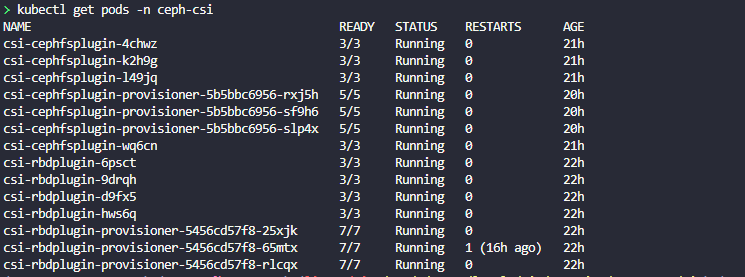
kubectl apply -f csi-rbdplugin-provisioner-talos.yamlCheck and make sure you have pods running and not crashing in the ceph-csi namespace:
kubectl get pods -n ceph-csiNote below that I have also provisioned CephFS in the Talos cluster as well.
Create the storage class for Ceph in Talos
Now, we can create our storage class. Create the file ceph-rbd-storageclass-immediate.yaml with the following:
apiVersion: storage.k8s.io/v1
kind: StorageClass
metadata:
  name: ceph-rbd
  annotations:
    storageclass.kubernetes.io/is-default-class: "true"
provisioner: rbd.csi.ceph.com
parameters:
  clusterID: CLUSTER_FSID
  pool: rbd
  imageFormat: "2"
  imageFeatures: layering
  csi.storage.k8s.io/provisioner-secret-name: ceph-secret
  csi.storage.k8s.io/provisioner-secret-namespace: ceph-csi
  csi.storage.k8s.io/node-stage-secret-name: ceph-secret
  csi.storage.k8s.io/node-stage-secret-namespace: ceph-csi
reclaimPolicy: Delete
allowVolumeExpansion: true
volumeBindingMode: Immediate
Apply it:
kubectl apply -f ceph-rbd-storageclass-immediate.yamlCreate a test PVC
Once you have the work done to configure your Ceph integration with Talos Kubernetes, you can create a test PVC to see if it will successfully bind. Create the following test-pvc.yaml.
apiVersion: v1
kind: PersistentVolumeClaim
metadata:
  name: ceph-test-pvc
spec:
  storageClassName: ceph-rbd
  accessModes:
    - ReadWriteOnce
  resources:
    requests:
      storage: 5Gi
Once you create the file, apply it with:
kubectl apply -f test-pvc.yamlVerify it with:
kubectl get pods -n ceph-csi
kubectl get sc
kubectl get pvc
kubectl get pv
Lessons learned
I stumbled onto the fact that immutable infrastructure forces you to make better decisions, even in the world of storage. Talos does not let you skim over design flaws. It requires planning and attention to detail. Ceph is also not very forgiving. It requires planning and the right disk layout and networking environment. Replication settings also matter.
I really like how this turned out though as the configuration for the storage integration is also in line with an immutable design and the storage configuration is kept at the pod level so the Talos hosts don’t need to worry about it. Once you have it configured correctly, it JUST WORKS as I have had no issues with this similar design in my Docker Swarm cluster.
Wrapping up
This has been an extremely fun project all in all that I am still not completely done with. My goal is to migrate my production workloads over to Talos and keep my Docker Swarm cluster in play as more of a staging environment that lets me play around with other cool things. However, I am never one to just say this “is it”. I like to continually learn and play around with things. But for this iteration of my minilab, this is the configuration I am going with at the start of 2026. I’m very excited to get the environment hydrated with my production data and move forward with designing for GitOps. Let me know in the comments if you are planning on doing something similar this year or have another project you want to share.

Google is updating how articles are shown. Don’t miss our leading home lab and tech content, written by humans, by setting Virtualization Howto as a preferred source.
About The Author

Would this setup also work with cephfs and rbd from the inbuilt Proxmox offering instead of running ceph on vms?
Brian,
Absolutely! The only reason I went with VMs is just a bit more flexibility in experimenting with different mini PCs that I have some ideas for. But you could absolutely do this with native Ceph in Proxmox and there are many great reasons you could do that too. Performance would be even better and you wouldn’t have to run dedicated VMs to host your storage. Let me know if this helps 👍
Hi!
I’m having a flawless experience (just deployed, but without the problems you found) installing ceph in talos, following their docs.
Did you follow them or tryed on your own?
This leaves me with some (three) nodes dedicated to ceph with additional virtual disks for OSDs, and no need of an external deployment to manage (but probably I’m nearer to a single point of failure?)
Anyway, good work and very good article!
Nicola Greetings!
So nice to see a fellow Talos’er and Ceph enthusiast! Yes I actually did this a bit on purpose as I wanted to have my storage outside of the Talos cluster, but I may have missed something in trying to translate between having the disks locally and having them external. I didn’t really find anything on that front. So lots of trial and error. I think I am going to try having Talos connect to a native Proxmox Ceph cluster next and experiment with this configuration as mentioned earlier above by @Brian Weller.
Brandon