


Many VMware administrators by now are most likely looking at moving to vSphere 6.5. In doing so, moving to VCSA 6.5 appliance is the first step towards that goal, besides proper planning of course. Part of any vCenter configuration is getting permissions assigned to appropriate users in the environment and granting access to vCenter objects. Most environments will be running Microsoft Active Directory as the identity source for assigning those permissions. I wanted to share an error I received with a test VCSA 6.5 appliance and joining the appliance to an Active Directory domain in a lab environment. There was a specific VMware VCSA 6.5 error code 42500 joining Active Directory domain.
VMware VCSA 6.5 error code 42500 joining Active Directory domain
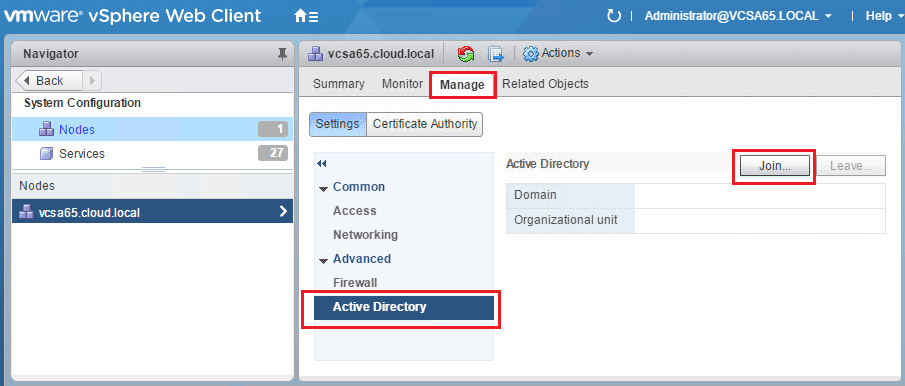
In order to join a vCenter appliance to Active Directory, login as your SSO administrator and go to System Configuration >> Manage >> Active Directory and click the Join… button.
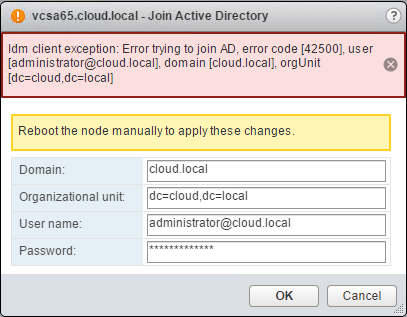
You will be presented with a simple dialog box to enter the Domain, Organizational unit, User name, and Password. As you can see below the VMware VCSA 6.5 error code 42500 joining Active Directory domain was presented when entering the correct information.
Resolution
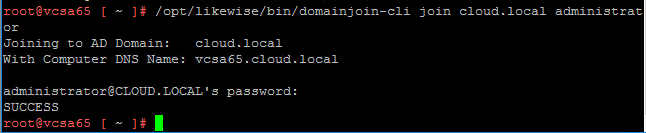
When in doubt, use the command line. Login to your remote VCSA CLI and enter the shell command. Once there, you can use the following command to join an Active Directory domain:
/opt/likewise/bin/domainjoin-cli join <your domain> <user name>
You will be prompted to enter the password for the user you entered to join the domain. You should receive a SUCCESS message as below.
You can make sure at this point you see the computer account successfully created in your Active Directory Domain Users and Computers snapin.
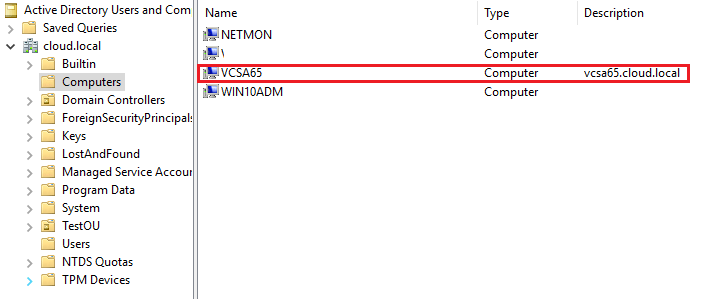
Also, at this point be sure to reboot your vCenter appliance after joining the domain.
Thoughts
The process to join a VCSA appliance to the domain is not too difficult, however, in this case the error with VMware VCSA 6.5 error code 42500 joining Active Directory domain presented in the GUI. This was easily overcome though by using the CLI to joing the domain from there. Hopefully this will help anyone else who may run into this error when joining their VCSA 6.5 appliance to an Active Directory domain.

Google is updating how articles are shown. Don’t miss our leading home lab and tech content, written by humans, by setting Virtualization Howto as a preferred source.
About The Author

Very insightful and interesting article. I would love to know more about this so
posting more would be appreciated.
Many thanks for this Brandon. I had exactly the same problem with the GUI and cli fixed it straight away.