




Jan 25, 2026 9:08 am
Hi all, just a quick note I wanted to toss out here. If you are looking for a script to add all of your Proxmox virtual machines to HA without having to click through the GUI to add each one individually. In the script below, you will see that I have my storage defined (we are adding all VMs on shared storage), and I am excluding VMs that match my Veeam worker nodes (vm-worker*).
First confirm your storage ID:
grep -Rho --include="*.conf" -E '^(scsi|virtio|sata|ide)[0-9]+:\s*[^:]+:' /etc/pve/nodes/*/qemu-server/*.conf \
| sed -E 's/^(scsi|virtio|sata|ide)[0-9]+:\s*([^:]+):.*/\2/' \
| sort -u
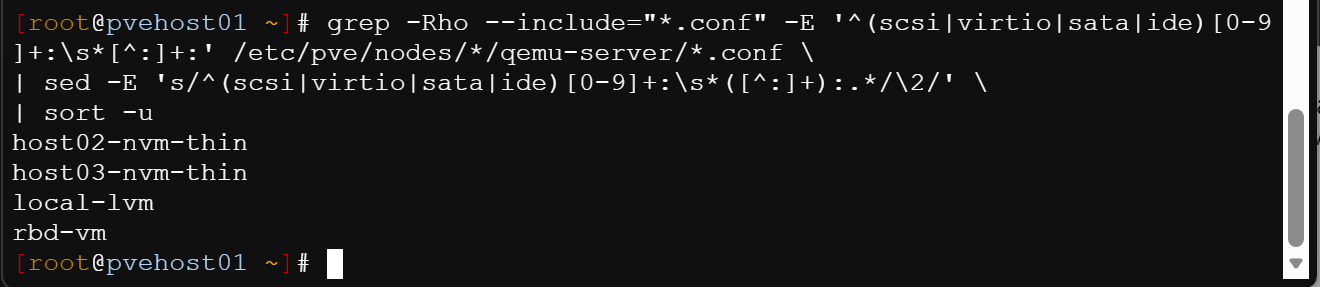
In this output, my storage id was "rbd-vm:
STORAGE_ID="rbd-vm"

# Get list of HA-managed VMIDs
HA_VMS=$(ha-manager config | awk '/^vm:/{print $1}' | sed 's/vm://')

for cfg in /etc/pve/nodes/*/qemu-server/*.conf; do
  id=$(basename "$cfg" .conf)

  # Skip if already HA-managed
  if echo "$HA_VMS" | grep -qx "$id"; then
    continue
  fi

  # Skip templates
  if grep -q '^template: 1' "$cfg"; then
    continue
  fi

  # Skip vbr-worker VMs
  name=$(awk '/^name:/{print $2}' "$cfg")
  if [[ "$name" == vbr-worker* ]]; then
    continue
  fi

  # Only include Ceph RBD-backed VMs
  if grep -q "${STORAGE_ID}:" "$cfg"; then
    ha-manager add "vm:$id" --state started
    echo "Added vm:$id ($name) to HA"
  fi
done