




Compared to many of the impressive builds shared here, my home lab is fairly modest, but it has grown into a solid and very educational setup over time.
Network gear
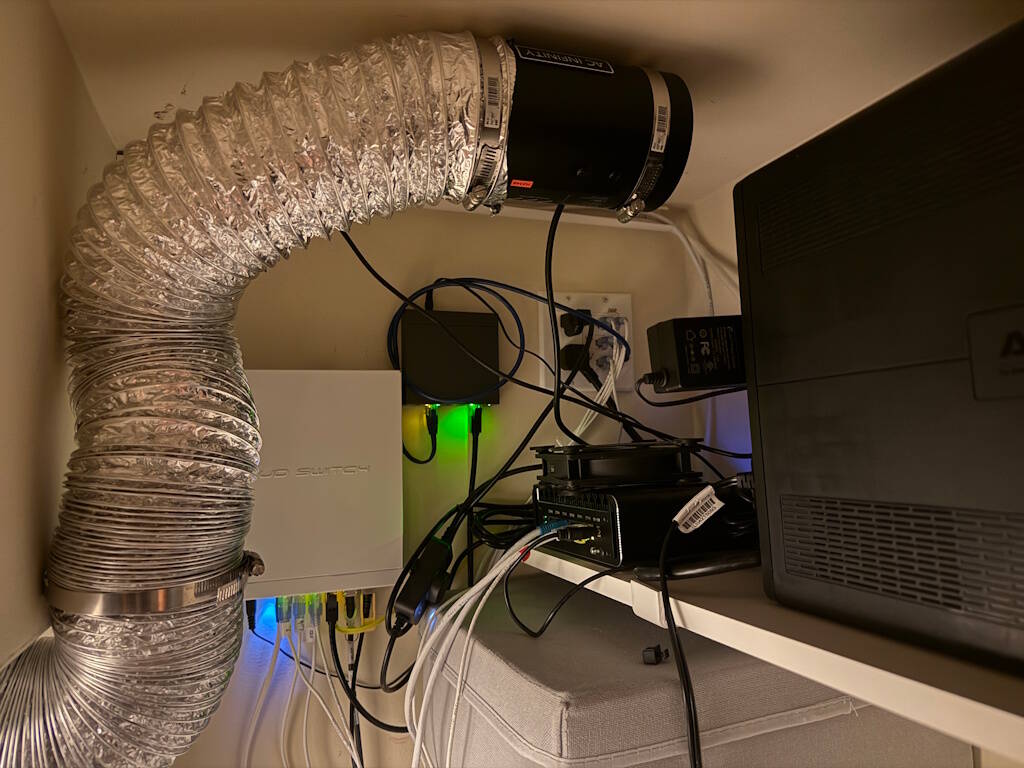
- Topton Fanless Mini-PC (J6314) with 6× Intel i226 2.5 Gbps NICs running OPNsense (with a 120mm fan on top - so not exactly fanless anymore 😄).
- MikroTik 10-port 2.5/10 Gbps switch (CRS310-8G+2S+IN).
- TP-Link 5-port PoE+ switch (TL-SG1005P), currently powering a single Reolink outdoor camera.
- MikroTik hAP ax3 and ax2 Wi-Fi 6 access points (not shown in the picture).
- APC UPS.
Most of it is in the closet, with an AC Infinity RAXIAL S4 exhaust fan and a duct pulling warm air out, which turned out to be really effective.
The "pearl" of the lab – custom NAS/server
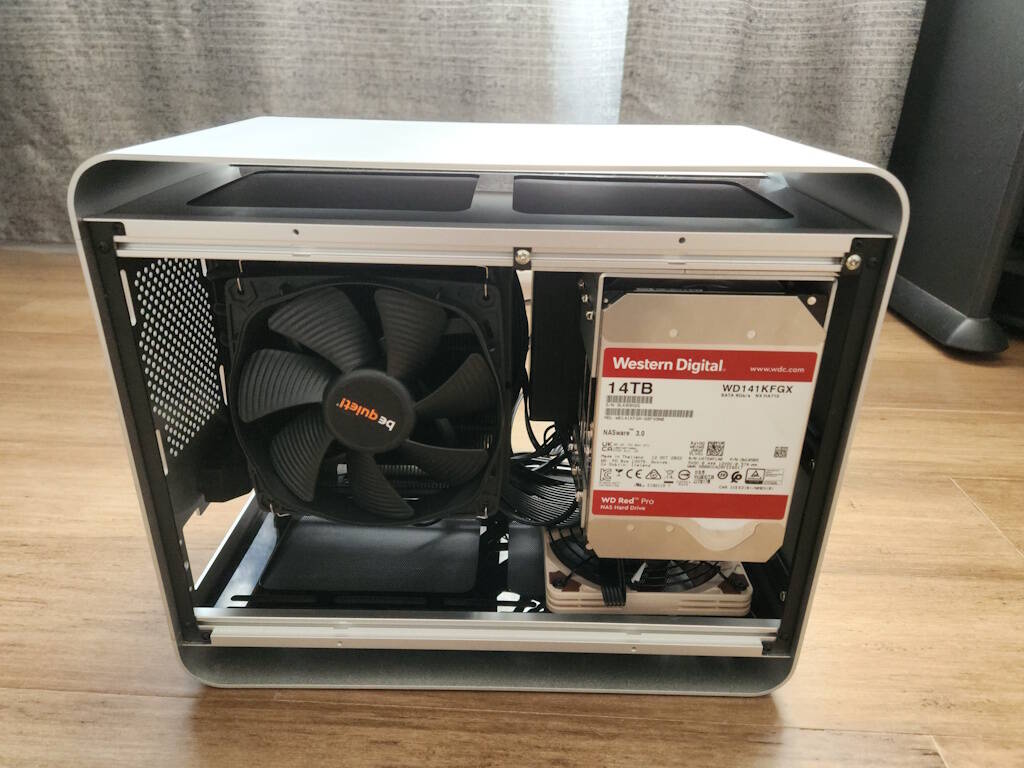
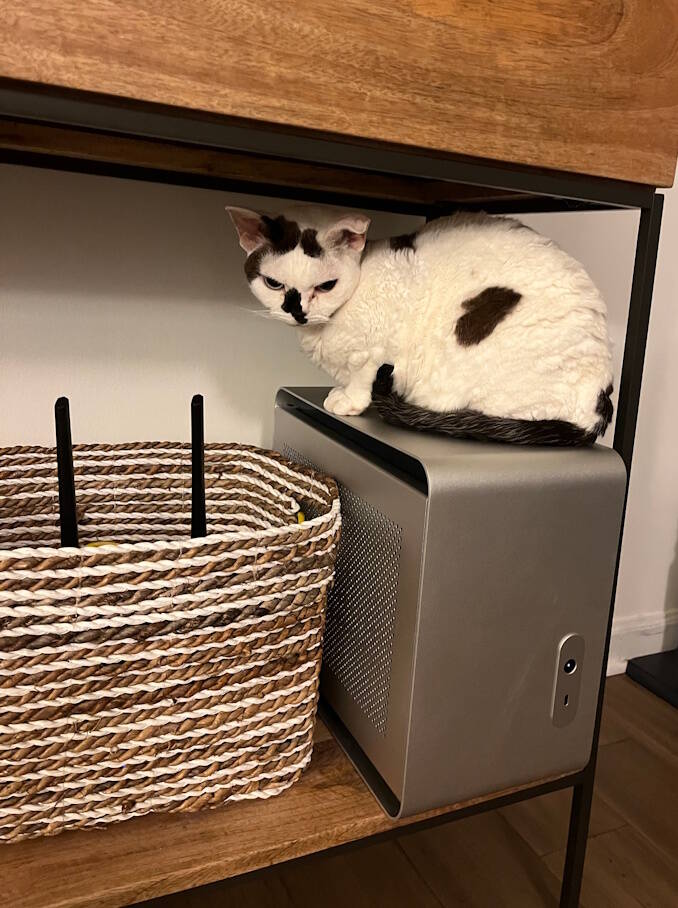
This build is what originally pulled me into the homelab hobby.
Case: Streacom DA2 V2 ITX aluminum case
Storage: 3× WD Red Pro 14 TB HDDs mounted using a custom bracket (ordered from SendCutSend)
CPU: AMD Ryzen 9 5900X (12 cores)
Memory: 64 GB ECC RAM
Hypervisor / OS: Proxmox + TrueNAS
While it started as a NAS, it quickly became a small all-purpose server. The original idea was to keep it visible in the living room without ruining the aesthetics, but three 7200 RPM drives turned out to be far noisier than expected - so it ultimately ended up in the closet as well.
Building the NAS is what got me started, and things escalated quickly from there. Adding more services and containers led to:
- Upgrading the entire house to 2.5 Gbps networking
- Improving Wi-Fi performance
- Implementing a more robust backup strategy
- Segmenting and cleaning up the network overall
New in 2025:
I added an 11-year-old Lenovo laptop to the lab. It replaced a Raspberry Pi 3B as my Home Assistant host and is also used to back up data from the NAS to an external USB HDD.
Plans for 2026:
- Replace the Mini-PC firewall with a Lenovo Tiny PC and run OPNsense virtualized in Proxmox. I already purchased ThinkStation P340 and Two Mellanox ConnectX-4 Lx dual-port NICs.
- Possibly replace the MikroTik hAP APs with TP-Link Omada or Ubiquiti, as MikroTik has proven somewhat unreliable for Wi-Fi duties in my environment
- Add another outdoor camera.



I started with a 2013 Synology, then upgraded to a 2017 model once I really got into Plex. As I began using Docker more heavily, I added a Mini PC and eventually migrated everything to Unraid, using the 2017 Synology as my primary storage.
The 2013 Synology is now used strictly for backups of the core data from the 2017 unit, as well as backups for family data from different homes and businesses. It also provides a nice upgrade path, since I can hand down hard drives as I expand storage in the newer Synology.
The Mini PC (M715q) is primarily dedicated to Plex, with several other Docker services running alongside it.
The HP T730 serves as my router, running pfSense with a 10Gb network card. My internet connection currently maxes out at 1Gb, but I figured I might as well future-proof the setup.


I have been in IT for 20 years. And I must say, it feels weird to put 20... I mostly specialize in networking - currently working as a sr network engineer for a hospital. My homelabs have always been really small; using an old desktop with no power for file storage. Then moving to a Synology back in 2011, which is actually still powered on. It's the DS411j and holding strong!
My current homelab, which is in the process of moving from my office closet into my bedroom closet. I ran out of room, and it was getting way too hot in the office for all my gear.
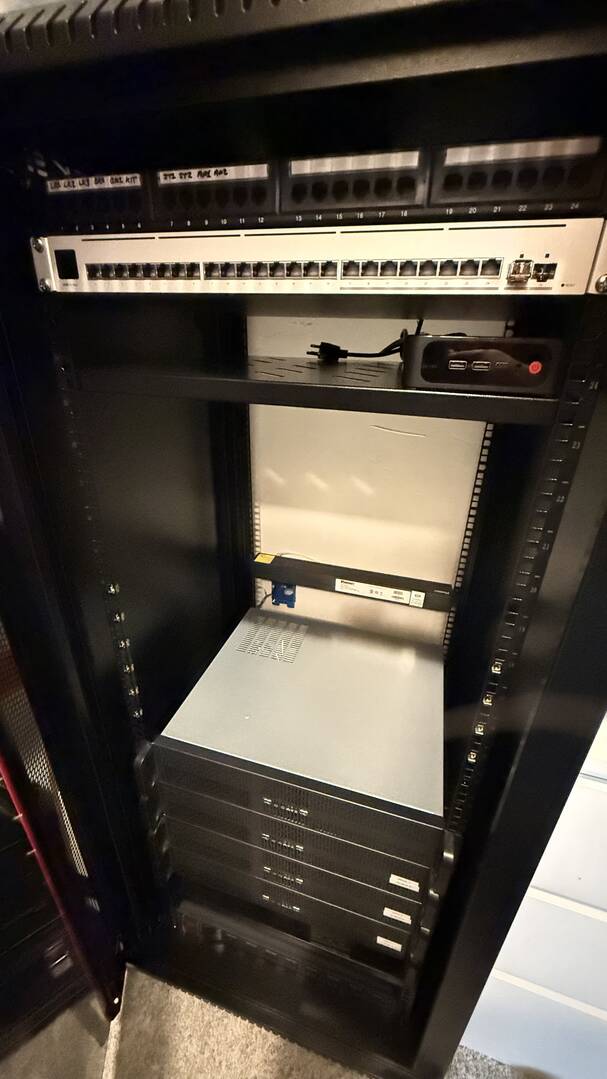
As of right now this is a big move and also a number of upgrades that i've been waiting to fill. I am in the US and basically live in the early 2000's when it comes to internet availability. I am still on Cox cable and as I am writing this, AT&T fiber is being ran in front of my house. So, with that being said, I have ran conduit from my wall in this closet to the outside of my house (with a pull-string, of course), so I can speed up the techs visit when they finally get it to my house.
The rack will be setup as follows:
1: Switch (USW-Pro-Max-24)
2: 24 port patch panel
3: Switch (USW-Pro-XG-24-PoE)
4: Unifi Cloud Gateway and Beelink Mini PC (on shelf)
5: UniFi NAS-Pro-4
6: Cox Modem, NVR (on shelf)
7:
8: Prox_1
9: Prox_1
10: Prox_2
11: Prox_2
12: Prox_3
13: Prox_3
14: Prox_4 PBS and Plex
15: Prox_4 PBS and Plex
16: Prox_5
17: Prox_5
18:
19:
20: Synology NAS (on shelf)
21: Synology NAS (on shelf)
22: Synology NAS (on shelf)
23: Synology NAS (on shelf)
24: Synology NAS (on shelf)
25: PDU
26: UPS
27: UPS
Node list:
Node-1:
* 2u server Chassis
* Minisforum
* 128GB DDR5
* 2x 1TB m.2
* 1x 4TB hard drive
* 1x 240gb SSD (boot drive)
Node-2:
* 2u server Chassis
* Minisforum
* 128GB DDR5
* 2x 1TB m.2
* 1x 4TB hard drive
* 1x 240gb SSD (boot drive)
Node-3
* 2u server Chassis
* Intel i7 8600 series
* 64GB DDR4
* 1x 4TB HDD
* 1x 8TB HDD
* 1x 1TB m.2 (boot drive).
Node-4
* 2u server Chassis
* AMD Ryzen 7
* 32GB DDR4
* 1x 240gb SSD (boot drive)
* 3x 4TB hard drive
Node-5 (Proxmox Backup Server)
* Coolermaster Case
* Intel i5
* 16Gb DDR4
* 4TB hard drive
* 256 SSD boot drive
The picture of the rack above is still work-in-progress and the eagle-eyed viewer will see that the 2u server chassis aren't even screwed into the rack.
Running services; ironically, these are not running currently. Not shown in the picture is there is no power in my closet. I hope to have this finished up tonight. I have pre-ran 12/2 wire to the closet and didn't have a receptacle to finish the job last night.
* Portainer
* Traefik
* Gotify
* Gluetun
* Sonarr
* Radarr
* Prowlarr
* FlareSolver
* qBittorrent
* linkwarden or karakeep emulerr
* immich
* Restic
* SFTPGo
VMs:
VMs:
* 2x Windows Server (AD+IIS)
* Immich
* Nextcloud
* CasaOS (for docker)
* Ollama
* Jellyfin
* Cloud panel
* Proxmox Backup Server
* NetlockRMM
* NGINX Proxy Manager
* Windows 11 VM for testing
Here's my wishlist to test services:
* Guacamole
* Zabbix (monitoring)
* PBS
* DokuWiki
* Paperless-NGX
* Pi-hole
* Heimdall
* Jellyfin (maybe)
* Seafile (document organization)
* powerdns
* tailscale
* wireguard
* Homepage
* RClone (vm)
* PairDrop
* Syncthing
* Snipe IT
* Open-WebUI
* ARRstack
* Remotely
* Beszel
* JellyStat
* Gopeed
* Qbittorrent
* PrivateBin
* Tianji
* Speedtest Tracker
* Whoogle
* StirlingPDF
* Change detection
* Open Speedtest
* Homebox <- home inventory management.
That's basically it in a nutshell. If anyone see's anything that jumps out that looks weird, or change anything, I am all ears. I love learning this and the community is amazing. And Brandon, basically everything on Node 1 and Node 2 are based off your videos! Which helped me a lot, by the way. So thank you!


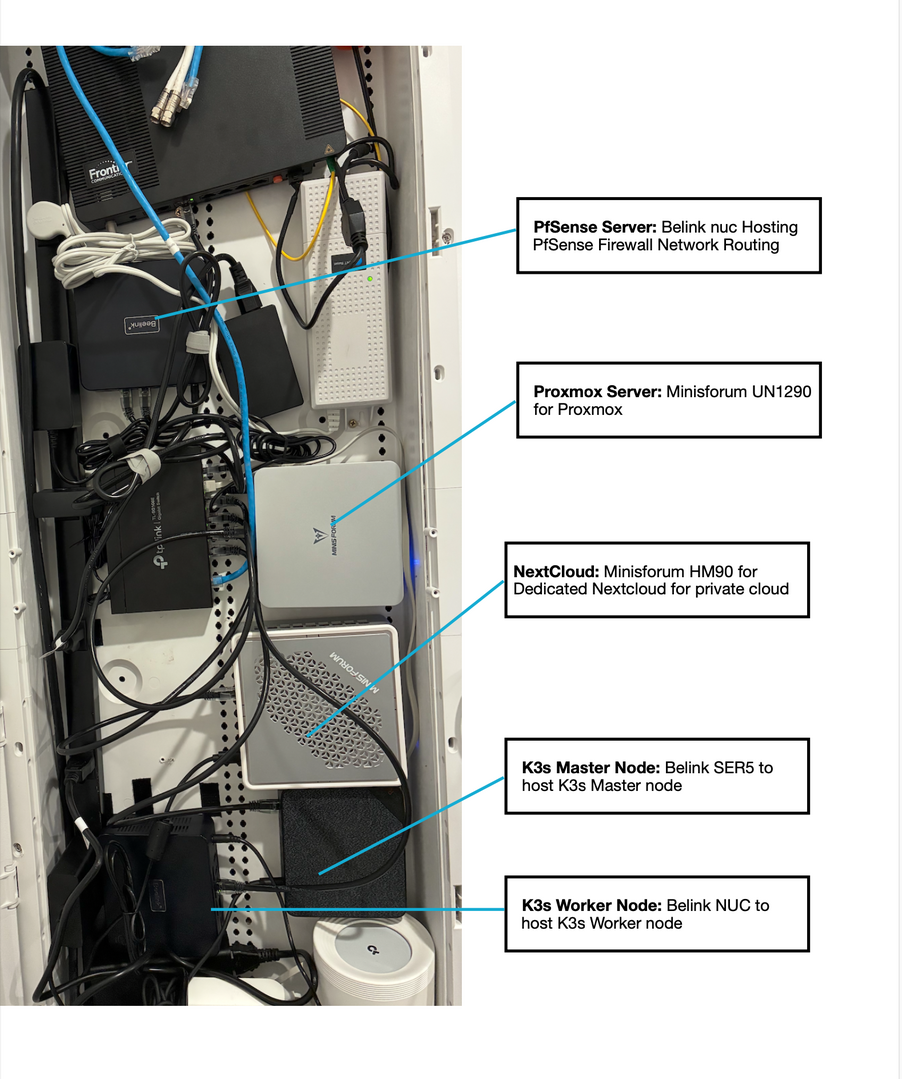
Current Home Lab Setup (High-Level)
-
pfSense Firewall
-
Hosted on a Beelink NUC
-
Handles routing, firewall rules, and network security
-
-
Proxmox Server
-
Minisforum UN1290
-
Used for virtualization and infrastructure experimentation
-
-
Nextcloud Server
-
Minisforum HM90
-
Dedicated private cloud for self-hosted storage and collaboration
-
-
K3s Cluster
-
Master Node: Beelink SER5
-
Worker Node: Beelink NUC
-
Used for Kubernetes workloads, DevOps tooling, and experiment
-
By profession, I am a DevOps Engineer,My home lab journey began with a simple goal: learn Kubernetes the real way.
Instead of relying on managed services alone, I decided to self-host a 3-node Kubernetes (K3s) cluster on mini PCs.
This setup forced me to understand:
-
Cluster bootstrapping
-
Control plane vs worker responsibilities
-
Networking, storage, and node failures
-
What actually breaks when things go wrong
It was very much a “break-it-as-you-can” environment—and that’s where the real learning happened.
In the recent times, I introduced pfSense, self-hosted on a dedicated Beelink device, to act as:
-
A firewall
-
A router
-
A network segmentation and security layer
With pfSense, I started practicing:
-
VLANs and subnet design
-
Firewall rules and NAT
-
Traffic isolation between services
-
Secure access patterns for internal services
This significantly improved my understanding of network security from an infrastructure-first perspective.
Private Cloud for Real Use – Nextcloud
The next step was making the lab useful, not just experimental.
I deployed Nextcloud on a dedicated Minisforum HM90 system to support small enterprise–style private cloud needs, including:
-
Secure file storage
-
User access management
-
Internal collaboration
-
Self-hosted alternative to public SaaS tools
2026 Goal, I want to evolve my home lab into a small-business–ready private cloud platform using Nextcloud, focused on:
-
Secure file storage & backups
-
Automated onboarding of businesses
-
Workflow automation (approvals, provisioning, access control)
-
Replacing common SaaS tools with self-hosted, privacy-first solutions
This will simulate how a managed private cloud service would operate for small businesses.

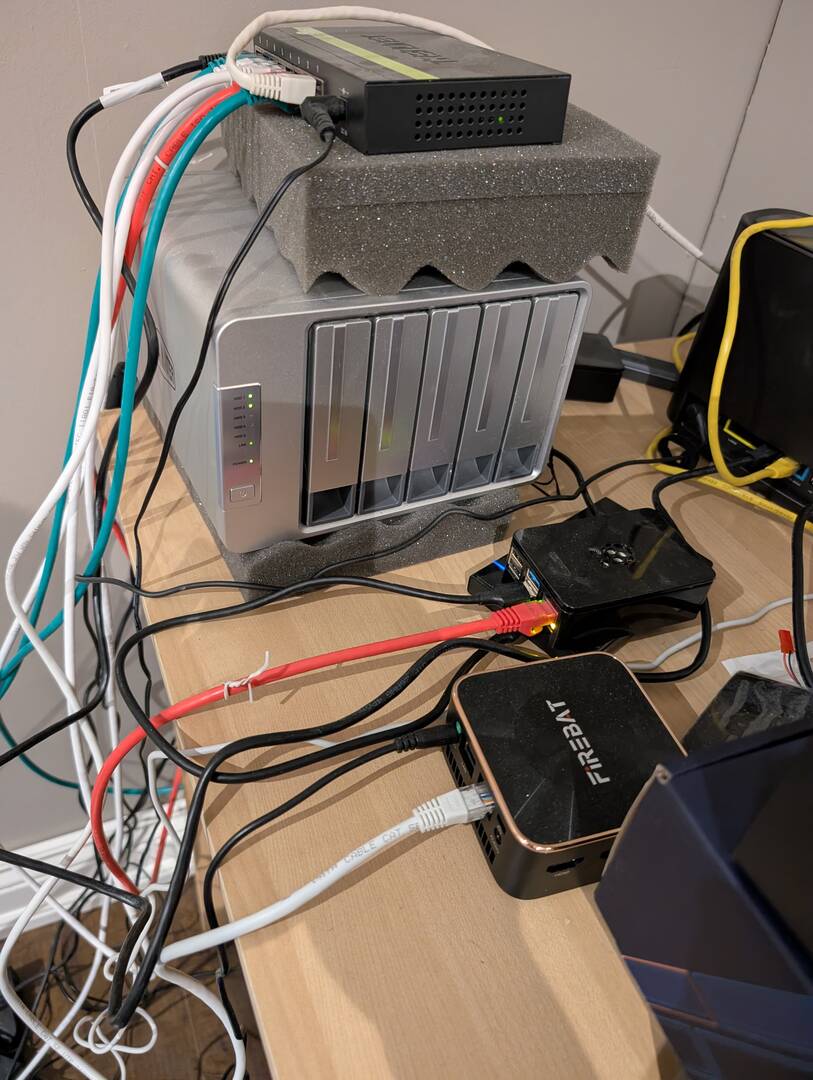
Terramaster f4-422 and 2 raspberry pi running pihole.
The mini PC was for playing around with proxmox but I need to reorganize power cables. I added it this year.
The nas is super outdated at this point so I am planning on moving to a newer ugreen unit in 2026, it's unfortunate RAM and storage is so expensive.
Future goals are to securely expose services using tailscale or cloudflared, and better set up docker.